This is topic Computer not playing DVD audio in forum Film-Yak at Film-Tech Forum ARCHIVE.
To visit this topic, use this URL:
https://ft-forum.com/ft/cgi-bin/ubb/ultimatebb.cgi?ubb=get_topic;f=8;t=004325
Posted by Mike Heenan (Member # 392) on 10-22-2005, 03:58 PM:
On the computer at work, when I play a DVD, I get the picture but no sound. I've been using a learn Dutch language Cd-rom in the same drive and get sounds off of that. All the sound codecs appear to be current etc. I just have no clue why I cannot get sound off any DVD I play... any suggestions? It's a PC, with a Pioneer DVR-A09XL drive.
Posted by Floyd Justin Newton (Member # 1316) on 10-22-2005, 05:22 PM:
Mike--
Is there a floppy inserted in the 3.5 drive?
Posted by Andy Summers (Member # 3207) on 10-22-2005, 05:39 PM:
Mike’
Mate I’m at a total loss as well, have you tried restarting the whole thing from scratch, and looking into the manual for the unit this may resolve the resolution.
Image of Pioneer DVR-A09XL
http://www.avdeals.com/dvdrdrive/images/dvr-a09xla.jpg
Tech spec for Pioneer DVR-A09XL
http://www.avdeals.com/dvdrdrive/DVRA09XL.htm
Posted by Mike Heenan (Member # 392) on 10-22-2005, 05:46 PM:
No, there is no floppy disc in the drive.
Posted by Bobby Henderson (Member # 840) on 10-22-2005, 07:08 PM:
What software are you using to play the DVD? You might try reinstalling it to see if that corrects the problem. Just to troubleshoot, try playing back the first .VOB file within Windows Media Player to see if you get any audio there.
Check to see if your drivers for your sound card are up to date. Also check your video card as well. Sometimes a bad printer driver or scanner driver can screw up the works.
When did this problem start to occur? Did you download any updates to Windows, install any new software or install any new hardware around the time this problem started happening?
Posted by Jason M Miller (Member # 2597) on 10-22-2005, 07:20 PM:
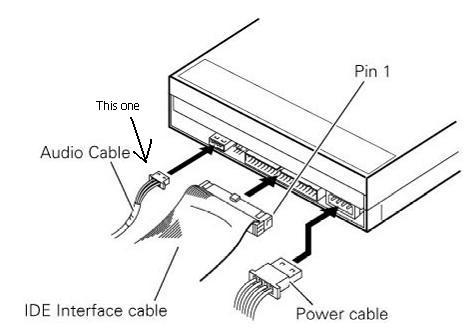
What kind of sound card is in there? See if you have up to date sound drivers, also if possible take a look inside, and see if the audio cable is plugged from the back of the drive to the sound card.
Example....
Posted by Mike Heenan (Member # 392) on 10-22-2005, 08:19 PM:
I am using either Real Medias dvd player or Windows Media 10 dvd player. It was working fine up till about 2 or 3 weeks ago, and I do believe I did update some stuff on the computer but I'm not positive. That audio cable is plugged into the sound card, whcih is a Creative soundblaster PCI, nothing fancy though. I just updated the drivers for the sound card and that didn't take care of the problem.
Posted by Daryl C. W. O'Shea (Member # 1303) on 10-22-2005, 09:28 PM:
The audio cable connected to the drive has no bearing on DVD playback sound. The ONLY sound that ever travels that cable is music CD audio.
Make sure the decoding software hasn't switched to digital only output.
Posted by Joe Redifer (Member # 3) on 10-22-2005, 09:51 PM:
I was about to say the same things as Daryl did. I never connect the audio cable to my drives. They work fine and produce sound from CDs anyway, except they do it digitally. In fact on Macs there are no audio cables to plug into the drives.
Mike, buy a new computer. Seriously.
Posted by Jim Ziegler (Member # 86) on 10-22-2005, 10:20 PM:
Update/reinstall you audio drivers. I have seen several cases where drivers "break" for no apparent reason.
Posted by Mike Heenan (Member # 392) on 10-22-2005, 10:20 PM:
WEll it's the one at work so I have no desire to buy one out of my own money. Darryl how would I check the decoding software?
Posted by Daryl C. W. O'Shea (Member # 1303) on 10-22-2005, 10:47 PM:
I've never used the software you've mentioned, so I can't say where exactly. Look for audio/video settings in the DVD software.
Also make sure you've got sound from other WAV sources (Windows Media Player videos / Winamp). If you don't, and WAV isn't muted or turned down in your sound control panel, it's a sound driver issue.
Posted by Wayne Keyser (Member # 2420) on 10-22-2005, 11:51 PM:
I'd look to the sound control panel OR the Windows XP "mixer" (in my case "sndvol32.exe" in the Windows XP program folder if you've lost the shortcut - may be different on your mnachine) and it's also possible that some recent program addition you've made has overlaid (sort of "chained") an additional mixer control. Either of those mixers could enable audio from some sources but not others, and they can sometimes fall out of the settings you've chosen earlier. See if any of the "mute" boxes are checked in any sound controls you may have.
Posted by Leo Enticknap (Member # 534) on 10-23-2005, 05:05 AM:
Can you get sound from a normal audio CD (as distinct from a CD-ROM with audio content, which you mentioned in your first post)? If so, then the sound card is receiving and playing back the signal from the audio cable which Daryl points is for analogue CD audio only, but for some reason it's not getting the DVD audio from your DVD playback software.
In that case I can't think of anything else it could be apart from an issue with your DVD playback software, because if it'll play audio content from a CD-ROM, then other software and the card are both obviously handling wave sound OK. It might be set to output coaxial digital only, or 5.1 sound which your 2.1 card can't deal with, or something like that. If you've never been able to get sound out of a DVD, the playback application might be a trial version which will only output the picture until you register it and/or pay a fee.
To cut a long story short, if you can play sound from a normal audio CD and other internal wave sources, but not the DVD playback application, then that rules out hardware and drivers and leaves the DVD playback application as the only possible culprit.
Posted by Stephen Furley (Member # 1277) on 10-23-2005, 05:35 AM:
What format of audio stream are you playing on the DVD? i.e. is it Dolby Digital, MPEG layer 2, PCM or DTS? Since Dolby Digital is the most common, I am guessing that this is what you are using. Do you have a DVD with PCM audio? It is most often used on music videos, often classical music. If not, can you make one? A lot of cheap, home type, DVD creating software produces only PCM tracks. If you can play a PCM track, but not a Dolby Digital one, then it sounds like the Dolby AC-3 decoding software has got screwed up. Sounds like it might be time for a re-install. Most computer DVD playing software will not handle DTS tracks, and I believe that MPEG audio is even more rare over there than it is here.
It's unlikely, but just a thought on why you may be able to play the CD-Rom; some CD-Roms with audio, mainly very early ones, were actually partly CD-Rom, and partly normal 'red book' CD-Audio discs. They played the audio exactly as a normal audio CD, which in those days was via the analogue audio cable from the drive. Could the CD-Rom you can play be one of these? If so, you may have the analogue cable connected, and it is playing through that, but cannot handle digital audio via the ATAPI, or SCSI interface from the drive.
Jim Taylor's book 'DVD Demystified' comes with useful test/demo disc, which has almost all of the features which a DVD can have, including some pretty obsuvre ones; the main ones missing are PAL video, it's all NTSC, and MPEG layer 2 audio. I have the second edition, but I believe a third edition is going to be published. I have a few, three I think, DVDs with MPEG audio, but they were all 2 channel only. I managed to find a copy of the original release of 'Jerry Maguire', which has a full multi-channel MPEG track on it; I bought it just for that reason, so I had an example of this type of track.
Posted by Martin Brooks (Member # 1269) on 10-23-2005, 09:16 PM:
If you haven't done this already, bring up the audio control panel. It looks like a small mixer. Different sources can have their own level and you might have the DVD level turned down.
Posted by Monte L Fullmer (Member # 2797) on 10-23-2005, 09:44 PM:
..wonder if the two programs are "battling in horrible conflicts" with one another to be the default player. I'd delete both and install just one and make that the default player.
I had that happen with "PowerDVD" that came with my gForce video card and those DVD's that need the "Interactual" player to play certain kind of DVD's. Had both installed on my machine and "PowerDVD" would not do audio, just video.
Thus, I crapped out Interactual of my machine and let "PowerDVD" be the default player.
-Monte
Powered by Infopop Corporation
UBB.classicTM
6.3.1.2