This is topic Windows XP Task Manager Aggravation in forum Film-Yak at Film-Tech Forum ARCHIVE.
To visit this topic, use this URL:
https://ft-forum.com/ft/cgi-bin/ubb/ultimatebb.cgi?ubb=get_topic;f=8;t=004396
Posted by Bobby Henderson (Member # 840) on 12-14-2005, 04:15 PM:
Someone please correct me if I'm wrong about it, but isn't the Task Manager under Windows XP Pro supposed to have some Windows style application window buttons on it so you can close the freaking window after it displays?
Currently my fairly new computer at work is displaying the following kind of window for Task Manager:
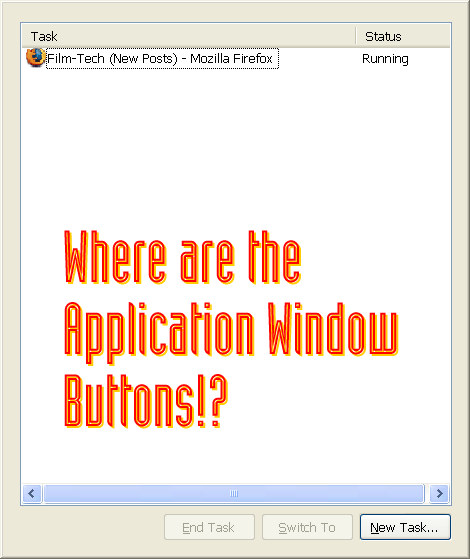
Of course, I Photoshopped in the typographic comment in that white space.
Anyway, is there something I can do to FORCE Windows to restore the damned window buttons on that thing so it can operate like any other program window? The way it works right now just seems like it was designed by a complete fuck-tard.
![[Mad]](mad.gif)
What makes matters worse is that if I need to bring up Task Manager to shut down some errant application (usually CorelDRAW 9) I can't even get the itty bitty task manager icon to display on the task bar at the bottom of the screen. The only way to get rid of task manager is to reboot. Absolutely rotten.
Posted by Jason M Miller (Member # 2597) on 12-14-2005, 07:21 PM:
![[Eek!]](eek.gif) dude thats crazy, I have never seen that before....uh ok just googled it and check this out and see if it helps http://www.windowsbbs.com/showthread.php?t=18004
dude thats crazy, I have never seen that before....uh ok just googled it and check this out and see if it helps http://www.windowsbbs.com/showthread.php?t=18004
Edit: Ok just tried it, to fix it double click on the top of the window.
Posted by Daryl C. W. O'Shea (Member # 1303) on 12-14-2005, 09:13 PM:
Yeah, some jackass decided it'd look cool without a menu bar, like a skinned Windows Media Player.
If I recall correctly double clicking, or using ALT+F should display the menu bar. I can't remember if both methods work for sure though... and despite repeated attempts the task manager isn't appearing in X for me. duh!
Posted by Dieter Depypere (Member # 3184) on 12-15-2005, 02:21 AM:
Double-click into that window should help. Had this too. Microsoft sucks.
Posted by Bobby Henderson (Member # 840) on 12-15-2005, 11:53 AM:
Yep. The double click thing fixed it. Thanks.
I'm wondering if this is an issue with nVidia video card chipsets. I've found several things on the Internet pointing toward that. Wierd.
Posted by Daryl C. W. O'Shea (Member # 1303) on 12-15-2005, 12:44 PM:
No, it is a feature. If you look around in the menu bar, there is an option to hide it.
Posted by Jason M Miller (Member # 2597) on 12-15-2005, 01:10 PM:
even though it's a feature, the Nvidia software that is installed with the drivers might enable the feature without letting the user know.
Posted by Dieter Depypere (Member # 3184) on 12-15-2005, 01:18 PM:
It has not really something to do with nVidia software (better: I canot believe that); my notebook uses ATI and I had the same issue.
Posted by Daryl C. W. O'Shea (Member # 1303) on 12-15-2005, 01:54 PM:
Usually this is seen on OEM versions of Windows XP (and a select few OEM versions of 2000 which also has tiny footprint mode). I know that it is set in a number of Dell system images as I've long ago set my GPOs to override the setting so that I don't have to listen to employees bitch about it whenever we're nice enough to give them a new machine to use.
http://support.microsoft.com/default.aspx?scid=kb;en-us;314227
Posted by Bobby Henderson (Member # 840) on 12-15-2005, 07:25 PM:
My office PC is a Dell Dimension 9100 system. However, task manager was not set in that configuration (sans menu bar, buttons, etc.). The silly thing just started doing that nonsense all by itself just a couple days ago.
Frankly it is a dumb-assed feature. It does very little to conserve desktop real estate, it is counter productive, counter intuitive and only seems to serve the purpose of pissing off computer users.
Posted by Dieter Depypere (Member # 3184) on 12-16-2005, 12:57 AM:
Seems like this just happened by accident. Happened to me too. But you are right; this is just plain stupid.
Posted by James Falloon (Member # 1933) on 12-17-2005, 06:44 AM:
Hay that's quite cool, I use the task manager quite a lot and I didn't know it could do that.
P.S. If you want to bring up the task manager quickly press CTRL+SHIFT+ESC
Posted by Robert Burtcher (Member # 3227) on 01-24-2006, 04:20 AM:
CTRL-ALT-DEL also quickly brings up the task manager.
When using the Task Manager, you can press the ESC key to exit Task Manager.
Powered by Infopop Corporation
UBB.classicTM
6.3.1.2