This is topic Using your computer for CD storage ? in forum Film-Yak at Film-Tech Forum ARCHIVE.
To visit this topic, use this URL:
https://ft-forum.com/ft/cgi-bin/ubb/ultimatebb.cgi?ubb=get_topic;f=8;t=004599
Posted by Greg Mueller (Member # 17) on 04-16-2006, 09:31 AM:
This might be slightly off topic, but....
I was going to buy one of those CD players that holds 300-400 CDs, but of the 3 I've found (Sony Pioneer JVC) none of them has an interface with a computer.
I've heard brief mention of a way to put all your CDs on a computer and then play them from the hard drive. This seems like a great idea as I would think there is a way you could build a data base and have them display in multiple ways etc etc .
Can someone recommend some software that will do this type of thing?
Posted by Adam Martin (Member # 641) on 04-16-2006, 10:29 AM:
iTunes
Posted by Sam Graham (Member # 2889) on 04-16-2006, 10:34 AM:
iTunes
It's free, it's easy to use, and it's flexible about what format and what compression level (if any at all...I use 192kbps) you want to import with. You can then use your PC just like an iPod. Play certain CD's, build playlists, play in shuffle mode...Plus, if you have high-speed internet, you can take advantage of podcasts and some streaming. I'd use it even if I didn't have an iPod.
Actually, any of the major media players (Windows Media, Real Player), will do this now. But I prefer iTunes.
Posted by Bobby Henderson (Member # 840) on 04-16-2006, 10:57 AM:
You don't even have to do the iTunes thing.
First, a standard 16-bit 44.1kHz LPCM audio track running at 1.4Mb/s will have better audio quality than a bit-crushed iTunes AAC file running at a mere 128kb/s data rate (which is what you typically get when buying a 99 cent song from iTunes).
In terms of cost per megabyte, it is cheaper to buy a portable large capacity hard disc drive and simply rip the LPCM .WAV files to it rather than buying stacks of blank CD-R discs.
Maxtor, Seagate and Lacie all make excellent drives in large capacities. Their 300GB, 500GB, 600GB and 1TB models often have 16MB memory caches and 7200rpm spindle speeds. Some even boast Firewire 800 connections (in addition to USB 2.0 and Firewire 400). These drives are not only fast enough to store lots of CD-quality audio; they can also directly capture and store many hours of digital video as well.
I have around 300 or so store bought compact discs in my music collection. I could rip all of them to just one high quality 300GB portable hard drive and have quite a bit of room to spare.
Posted by Brian Michael Weidemann (Member # 2243) on 04-16-2006, 06:54 PM:
I agree that with the high capacity drives out there, compressed audio formats aren't worth using. I was thinking about a 60GB iPod as soon as I did the math and realized just how much music I could put on there at straight, uncompressed .wav ... It wouldn't hold my whole CD collection, but I wouldn't want it to. If I hand picked my favorite artists and albums, the ones I would WANT to listen to anywhere, anytime, it would be perfect.
As for playlists on a computer, I wouldn't want my whole collection available for shuffle play. Or, at least, I wouldn't use it. But, what I AM doing is putting important, special, and other favorite CD's on my hard drive, uncompressed .wav, just as back-up, and for making copies I can keep in my car without ever wearing out the "master". My good ol', trusty Winamp 2.8 is still the best player, and I refuse to upgrade beyond it. It doesn't invasively search my whole system for anything and everything it can play and make libraries.
I'm almost scared to put iTunes anywhere near my system.
Posted by Joe Redifer (Member # 3) on 04-16-2006, 07:20 PM:
iTunes works much better than just about anything else, though WinAMP is pretty good. If you like WinAMP then you might feel that iTunes is too big because it can be nearly the size of a web browser whereas WinAMP only takes up about 32x8 pixels of screen space.
Posted by Greg Mueller (Member # 17) on 04-16-2006, 09:09 PM:
Bobby
What soft ware do you use?
Now I'm thinking a dedicated computer with one or more h-drives. Copy the CDs uncompressed to the h-drives. Drives are so cheap now....
Correct me if I'm wrong but it wouldn't take a real fast computer or a lot of memory to do this would it?
Here's another question....
I have a 5 disc Sony CD player now. Could I put the output of that into the input of the computer? That way I could load up the CD player and not have to be around while the CDs were copied into the computer.
Posted by Joe Redifer (Member # 3) on 04-16-2006, 09:24 PM:
You cannot do that. But it should only take a couple of minutes to copy an entire CD to the hard drive. I don't know how it works on Windows, but on the Mac you just insert the CD into the drive and drag the tracks to a folder on the hard drive. The end. Track names and everything are copied. I'm sure it's nowhere near that simple on Windows.
Posted by Sam Graham (Member # 2889) on 04-16-2006, 09:35 PM:
iTunes for Windows works the same way. Click and drag. (You also have to be online for iTunes to import the track names.)
And just to clear up any misconceptions, iTunes WILL import CD's in raw WAV format if you want it to. You don't have to import in a compressed format. iTunes allows importing in: AAC (16-320kbps), MP3 (128-192kbps), AIFF, Apple Lossless, or WAV formats.
Posted by Monte L Fullmer (Member # 2797) on 04-16-2006, 09:53 PM:
You can try this program to copy CDs to HDD. Not too bad at all...
-Monte
Posted by Greg Mueller (Member # 17) on 04-16-2006, 10:07 PM:
Ok that's different than I thought. I thought you actually had to play the CD to put it in the hard drive
Posted by Joe Redifer (Member # 3) on 04-16-2006, 11:16 PM:
The Apple Lossless (Quicktime 7 required, I believe) is a 2:1 compression with zero loss of anything, so you could put twice as much music in the same amount of space. But it will take a bit longer to import that way since it has to encode.
Sam, I was talking about just popping the CD in and dragging tracks without iTunes. If you try to do that on Windows, it creates "shortcuts". I think if iTunes is installed, the CDDB only needs to be checked the first time you put in the disc, after that your computer will automatically remember the track names, etc forever and ever.
Posted by Bobby Henderson (Member # 840) on 04-17-2006, 12:22 AM:
quote: Greg Mueller
What soft ware do you use?
It depends on the computer. Usually it's just whatever the computer had bundled into it, be it Adaptive EZ-CD creator or some Sonic stuff. I just use whatever I can to rip the CD files to the hard disc drive.
I have a copy of Sound Forge and that's really good for making finely tuned CDs where you have to actually get in and edit the audio on a single track or a series of tracks. I have quite a few discs where one song transitions into the next. If you want just one tune you have to pick an edit point and fade it. I don't trust the actual track mark and get better results zooming into the waveform and making the edit at the right spot.
I don't have iTunes installed because I haven't caved and bought an iPod or portable MP3 player like so many other folks. Basically I don't give enough of a shit about most current music these days to bother with it.
I also don't want applications constantly scanning my hard disc searching for music to update or auto-deleting something off the hard disc or MP3 player if it doesn't match up with another device. That crap is like some asshole grabbing the handlebars when you're trying to ride a bike. So I don't have drag and drop. Whoopie freaking doo. At least I have absolute control on where my music files reside, where I can burn them, store them and all that good shit without the application deciding it knows best and not me.
Posted by Phil Hill (Member # 371) on 04-17-2006, 01:56 AM:
Bottom line important: Transfer it in the digital *.wav domain...not the analog conversion or MP3 crap.
I personally like to only record the tunes/cuts I like from any CDs, LPs, and 45s...the rest I don't transfer...they can rot in hell!
Posted by Joe Redifer (Member # 3) on 04-17-2006, 02:28 AM:
Are there any vinyl players out there with a digital coax or optical output or perhaps a firewire connection so that I may transfer them to my computer in perfect digital clarity instead of getting clicks and pops?
Posted by Phil Hill (Member # 371) on 04-17-2006, 02:35 AM:
Joe, I should clarify... I meant only the CDs for direct digital transfer. The vinyl stuff I do transfer via analog to *.wav via turntable.
There are many great pop & click remover filters available with analog recording software.
Posted by Brian Michael Weidemann (Member # 2243) on 04-17-2006, 02:46 AM:
quote: Joe Redifer
WinAMP only takes up about 32x8 pixels of screen space.
Yep, that's one of the reasons I love it! Just a small handful of skins (courtesy of the Winamp website) and it's all it ever needs to be. Definitely not a resource hog, either, which I suspect iTunes might be.
It won't rip CD's, though. I use MusicMatch for that. It's straightforward in specifying format and track directory ... although it annoys me when it attempts CD lookup and labels all the tracks/artist/album by itself. Too often there's a typo in a song, or something's not capitalized, and even if I fix it manually, it still encodes the file with the looked-up information tagged on.
When iTunes labels everything by itself, from whatever database it uses, is it usually accurate?
Posted by Monte L Fullmer (Member # 2797) on 04-17-2006, 04:10 AM:
quote: Brian Michael Weidemann
It won't rip CD's, though
Pay 20 bucks to download Winamp PRO to do the ripping..works like a charm..
Winamp PRO does the CDDB check for titles and automatically put all of this info in the directory that you assigned to capture the Mp3 files, plus create a subdirectory of the CD title.
-Monte
Posted by Sam Graham (Member # 2889) on 04-17-2006, 07:50 AM:
quote: Joe Redifer
Sam, I was talking about just popping the CD in and dragging tracks without iTunes. If you try to do that on Windows, it creates "shortcuts".
Sorry...Yes, I agree. Absolutely.
[ 04-17-2006, 06:56 PM: Message edited by: Sam Graham ]
Posted by Joe Redifer (Member # 3) on 04-17-2006, 11:09 AM:
Brian, iTunes can be made really teeny tiny as well:

or even:
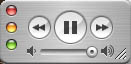
Still about 9 times bigger than Winamp. ![[Smile]](smile.gif) Also I don't know about it being a resource hog. I've had iTunes playing tracks from the drive or streaming continuous music using a new technology called "the internet" while I've been laboriously animating stills in Photoshop, working in After Effects and lots of stuff like that. No noticeable difference. I do have iTunes on my Windows machine and it works fine, but my Windows machine is not permitted to do anything cool so I can't say if it's a different story on Windows. Try it and if it sucks, uninstall! iTunes uses the CDDB, just like the majority of other programs out there to get the track names, etc.
Also I don't know about it being a resource hog. I've had iTunes playing tracks from the drive or streaming continuous music using a new technology called "the internet" while I've been laboriously animating stills in Photoshop, working in After Effects and lots of stuff like that. No noticeable difference. I do have iTunes on my Windows machine and it works fine, but my Windows machine is not permitted to do anything cool so I can't say if it's a different story on Windows. Try it and if it sucks, uninstall! iTunes uses the CDDB, just like the majority of other programs out there to get the track names, etc.
Posted by Alexander Smith (Member # 1769) on 04-17-2006, 05:26 PM:
If, for whatever personal preference reasons, you don't want
to use iTunes _but_ you want a lossless compression system
then you should consider using FLAC after you've ripped your
CDs.
Get FLAC here: http://flac.sourceforge.net/
quote:
When we say that FLAC is "Free" it means more than just that it is available at no cost. It means that the specification of the format is fully open to the public to be used for any purpose (the FLAC project reserves the right to set the FLAC specification and certify compliance), and that neither the FLAC format nor any of the implemented encoding/decoding methods are covered by any known patent. It also means that all the source code is available under open-source licenses.
FLAC has codecs for Linux, Windows, MacOS, WinCE as well as
a whole bunch of operating systems you've probably never heard
of.
Due to it being completely free to use, you can use it on your
site's non-sync jukebox, without any risk of making your employer
liable to pay any kind of fee for the use of FLAC.
For what's worth, a P3/600MHz box will do the trick nicely, with
a vanilla Ubuntu installation and XMMS as a simple player.
This is not, in any way, disparaging of Apple's own lossless
codec, but FLAC compresses to a similar in:out ratio. It's so
similar it's not worth being concerned over.
Alex.
Posted by Michael Schaffer (Member # 1204) on 04-18-2006, 02:02 AM:
I use FLAC, too. It's very practical, and FLAC Frontend is a very simple interface to en/decode FLAV files. I installed Ogg Directshow Filters, and for some reasons, WMP now plays some FLAC files, but not others, while WinAmp plays all of them without asking dumb questions.
Posted by Scott Jentsch (Member # 1681) on 04-20-2006, 05:29 PM:
I use MusicMatch for ripping and playing, but the program has had warts that have never been fixed after many years and many messages to Customer Support. When they were bought by Yahoo, all bets are off, as it looks like MusicMatch is fighting a losing battle with Yahoo Music Engine and they're just going to take the MusicMatch subscriber list and dump the rest in due time.
I also have iTunes installed, but it's more of a curiousity than anything else. I installed it to check out podcasts, but the novelty wore off quickly.
Both iTunes and MusicMatch have the annoying characteristic of installing monitoring programs that are running on your machine whether you want or need them to or not. iTunes has iTunesHelper.exe and iPodService.exe. MusicMatch has a couple that all start with mm*.exe
If I don't have an iPod, why the heck do I need to have a helper application running at all times? I also don't need my music player to be automatically monitoring my hard drive for playable media. I will tell it what I want it to catalog, and if I want it to automatically monitor something, I should have to tell it to do so, or at least tell it not to.
MusicMatch has become such a bloated piece of software that I can no longer recommend it to people as I once did. It does do a very good job of tagging, and I really like the MusicMatch Radio (at least the first hour, which is free at the higher quality), but the shoddy software and lack of customer support makes me not want to sign up for the Radio service because it's just not worth the hassle.
Exact Audio Copy is highly regarded by those who do ripping as a passion, not just as a hobby. Error correction is important when you're talking about audio CD's, even though you would think that digital should be digital, it can be different based on the tolerances of your drive. I've found it to be pretty fast in the times I've used it, but haven't done much ripping lately, so my memory fades on its feature set.
I've not tried to do this yet, but my holy grail would be a setup where I could have my CD's ripped to a large hard drive in a lossless format, whether that be WAV, FLAC, WMA Lossless, or Apple Lossless. Whatever I use to do the ripping would need to assign the tags at this time, as I would want to make sure that the tagging was done correctly (too many errors in CDDB and other db's to be trusted completely).
From that large stash of lossless files, I'd like to then be able to convert the lossless files into a compressed format for use by whatever application I have. If I want to cram a bunch of 192kbps MP3's onto my portable player, so be it. If I need to create a version of my collection that my years-old Audiotron can play, that could be done with this ideal approach.
This approach would allow me to invest the ripping and tagging time once, and then convert the files for whatever format I need.
The problem is, I don't know if this ideal is possible without jumping through dozens of hoops. Has anyone tried this?
I think something like this would also be exactly what would work great for Greg's original quest.
At 2:1 lossless compression, 300MB per CD would probably be an accurate estimate of disc space requirements.
Posted by Jason M Miller (Member # 2597) on 04-20-2006, 07:00 PM:
quote: Joe Redifer
Are there any vinyl players out there with a digital coax or optical output or perhaps a firewire connection so that I may transfer them to my computer in perfect digital clarity instead of getting clicks and pops?
You know I looked and looked and could not find one, but that does not mean there not out there, my guess would be look at the professional DJ models.
Posted by Chad Souder (Member # 343) on 04-20-2006, 08:32 PM:
quote: Greg Mueller
I was going to buy one of those CD players that holds 300-400 CDs
Just to comment on the original statement, I would avoid those high-capacity cd players. Lots of moving plastic parts. I would stick with a good carousel changer.
Posted by Mike Blakesley (Member # 26) on 04-20-2006, 08:39 PM:
Jason, you got suckered in by Joe's usual sarcastic crap. A turntable couldn't put out a digital signal unless it was equipped with a D/A converter, and that would render the sound useless to all the platter-heads who think digital sound is too sterile and lifeless. Therefore nobody would ever manufacture such a thing, because nobody who wants to spend mega-bucks on a turntable would ever buy it.
Posted by Monte L Fullmer (Member # 2797) on 04-21-2006, 03:51 AM:
quote: Mike Blakesley
A turntable couldn't put out a digital signal...
..never can, since the grooves are an analog source from the getgo.
Joe needs to spend 10 grand for a laser turntable, then he can have his vinyl reproduction without clicks and pops.. - or just get a hold of those master tapes, then he'd really have something to copy to his HDD.
-Monte
-Monte
Posted by Jason M Miller (Member # 2597) on 04-21-2006, 08:06 AM:
quote: Mike Blakesley
Jason, you got suckered in by Joe's usual sarcastic crap.
Posted by Greg Mueller (Member # 17) on 04-21-2006, 09:00 AM:
Thanks Scott, you've pretty much summed it up
Posted by Jeremy Jorgenson (Member # 2989) on 04-21-2006, 01:38 PM:
quote: Brian Michael Weidemann
it annoys me when it attempts CD lookup and labels all the tracks/artist/album by itself. Too often there's a typo
quote: Scott Jentsch
too many errors in CDDB and other db's to be trusted completely
agreed 100%
==
Also, if I'm doing an entire album, I like the album title (or at very least, year of release) and track number at the beginning of the song title, so if I alphabetize my playlist, the album song order is maintained.
Posted by Alexander Smith (Member # 1769) on 04-21-2006, 02:55 PM:
That's also a good idea, to have track names in the form:
01NameOfTrack1.ext
02NameOfTrack2.ext
etc
In the EAC options (F9), use %N%T as a filename format to
set that up.
Alex.
Powered by Infopop Corporation
UBB.classicTM
6.3.1.2