This is topic My printer refuses to print the color blue. in forum Film-Yak at Film-Tech Forum ARCHIVE.
To visit this topic, use this URL:
https://ft-forum.com/ft/cgi-bin/ubb/ultimatebb.cgi?ubb=get_topic;f=8;t=004662
Posted by Joe Redifer (Member # 3) on 06-03-2006, 06:26 PM:
I have a Hewlett Packard Deskjest 970CSE printer which normally kicks all sorts of ass (it prints in higher resolution than real life, even when using Kleenex for paper). But for some reason it won't print Cyan. The utility says all of the colors are 80% full. In fact the cyan is a bit more full than the yellow and Magenta... probably because it hasn't been printing. It is not an Hewlett Packard color cartridge but that shouldn't make any difference. These things aren't cheap and I don't want to run around buying a bunch of new carts if I don't have to. I've calibrated it and cleaned it and done all of that good stuff, and when I open the lid the cartridges slide to the happy face area and not the sad face.
Is this something typical with Hewlett Packards? A family member's Hewlett Packard printer (a bit lower end) stopped printing magenta all together, even with new carts installed (it would print for a bit and then stop). I want answers!
Posted by Leo Enticknap (Member # 534) on 06-04-2006, 06:12 AM:
Clogged up print head? The first HP printer I had (an inkjet model I bought in 1996) kept having this problem: if you didn't print anything for a few days the ink clogged up and it start printing streaky crap. The solution was to gently clean the head with a cotton bud dipped in isopropanol. My current printer (a Photosmart 7150) doesn't have this problem at all, even if it's been left for weeks without printing, so this seems to have been a problem which only affected an earlier generation of models.
Posted by Cory Isemann (Member # 2517) on 06-04-2006, 02:05 PM:
You still have a 970CSE? They made those what, 6 years ago? It's too old. Buy a new one.
Posted by Phil Hill (Member # 371) on 06-04-2006, 05:26 PM:
I left my HP 7140xi printer all alone for a few months while in Texas, and when I returned home the colors wouldn't print. I tried cleaning the printheads several times using the HP maintenance software to no avail. I kept getting that f*cking "IDS Failure Call HP" message as well as NO COLOR! I called HP as it said to do and they told me to buy new printheads. Yeah right! They wanted my arm, leg, and my 1st born son's foreskin! At $40 a printhead, that was $160... HA!
I finally found out that "IDS" means "Ink Delivery System". Basically, the printheads were clogged up with dried ink. Since the ink is about 90% water, alcohol didn't/wouldn't work. So, Googling, I stumbled across the below procedure that restored my printer to full color printing WITHOUT any cost.
1) Foldover a paper towel twice into its quarter-size and soak with WINDEX. (MUST be Windex...NOT plain or distilled water!)
2) Place the saturated towel on a non-paper plate that is no longer of your best dinnerware. (It may be stained)
3) Set the printhead(s) right-side-up (ink orifice down) on the saturated towel and weigh down to insure they remain in contact with the wet towel.
4) Let the whole thing set for 24 hours. The Windex will seep into the heads and dissolve the dried ink. The ink will leech out onto the towel.
5) Repeat if necessary steps 1 thru 4.
6) Wipe printheads and electrical contacts as necessary.
7) Reinstall the printheads and calibrate/align per HP instructions.
This works GREAT!
Posted by Joe Redifer (Member # 3) on 06-04-2006, 06:02 PM:
What is the difference between the ink cartridge and the printhead? I assume the head is on the cart? Anyway I did clean the tip of the cart. I can press it lightly against a piece of paper and only yellow and red leaks out.
I will try Phil's method. I wonder why only blue decided to dry up?
quote: Cory Isemann
You still have a 970CSE? They made those what, 6 years ago? It's too old. Buy a new one.
Just because it is 6 years old? Sounds like the problem is crusty ink. Otherwise it prints better than most current printers that I have seen. I think I'll keep it.
Posted by Phil Hill (Member # 371) on 06-04-2006, 06:17 PM:
I'm not familiar with your particular printer, Joe. Sorry.
Mine has separate ink supply cartridges and printheads...one ink cartridge for black and one multicolor ink cartridge for colors.
There are 4 separate printheads, one for each color that sit below the 2 ink cartridges. Cyan, Yellow, Magenta, and Black.
I know there are some printers that have the printhead integral to the ink cartridge. Mine are separate.
I hope this helps...
Posted by Joe Redifer (Member # 3) on 06-04-2006, 08:15 PM:
What might help is if somebody posted a picture of what a printhead might look like.
Posted by David Buckley (Member # 2600) on 06-04-2006, 09:29 PM:
Have a look at the expiry date of the cart. I had a couple of new, unused carts for the 970cxi (also antique) go out of date and they didn't work at all well when I tried to use them. See, thats what happens when you plan ahead.....
Posted by Mike Blakesley (Member # 26) on 06-04-2006, 09:35 PM:
HP printers have the print head right in the cart. I've had a couple of occasions where one color will dry up in a brand new cart. No amount of teasing or sweet talk will get it to work. And, I've seen tests in various computer magazines and "Consumer Reports" where they always say that the cheap refilled or whatever brands of carts are more unreliable. So, the real solution is probably to return the cart to the seller (if you can find him) and buy an HP cart, you cheapshit.
Posted by Joe Redifer (Member # 3) on 06-04-2006, 10:45 PM:
*Ahem* I wasn't the one who bought it. It was a gift. ![[Smile]](smile.gif)
Posted by Bobby Henderson (Member # 840) on 06-04-2006, 11:28 PM:
I use a HP DeskJet 1220C printer that is around 6 years or so old. It still works fine. However, my experience has been that it only prints well using HP branded cartridges.
Our company's sales manager took it upon himself to buy some cheap-ass Office Depot color cartridges for it when my printer was in need of new ink. He figured those things would be good enough, while saving the company some money. Those cartridges sucked ass. Not only was the color way out of whack, but the ink bled on the paper. It was shit.
Cheap, refilled ink cartridges may be fine for some plain ink on cheap paper correspondence. But it doesn't work well when you need decent color quality.
We have a variety of different ink jet printers and a big color laser unit. However the 1220C stays in service because it is the only printer we have that can print on "tabloid" size 11" X 17" paper.
Posted by Phil Hill (Member # 371) on 06-05-2006, 12:29 AM:
HP printhead:
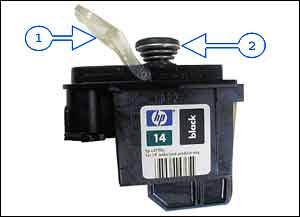
The separate ink supply cartridges set on top of these. As I mentioned in my above post, some printers have the printhead integral to the ink supply cartridge. The advantage to this is whenever you replace an empty ink cartridge you also replace the printhead...for big bux.
More info & pics here
Posted by Robert Burtcher (Member # 3227) on 06-08-2006, 04:34 AM:
Joe, your printer uses an HP #78 tri-color cartridge with an integral print head, like this:
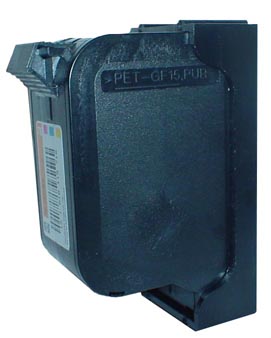
Your best bet is to either return the cartridge to the place of purchase or contact the (re)manufacturer, if listed on the packaging. You may be able to unclog the Cyan head with some isopropyl alcohol - try placing the print head of the cartridge on a paper towel soaked with isopropyl alcohol and place pressure on it for around 15 minutes or more - or by running a cleaning cycle on your printer. If all else fails, return it or call the (re)manufacturer.
Posted by Joe Redifer (Member # 3) on 06-08-2006, 10:39 AM:
It was definitely the color cartridge. I popped down to China's favorite superstore, Wal*Mart, and bought a new HP branded #78 for $30. They usually go for around $39 at places like Circuit City. I was a bit surprised to find that the black ink cart goes for only a dollar less.
Posted by Mike Blakesley (Member # 26) on 06-08-2006, 12:11 PM:
I would love to know how much it actually costs HP to make those cartridges. I'd bet $5 or less. Talk about giving away the razors and making money on the blades.
Posted by Lyle Romer (Member # 1266) on 06-08-2006, 12:30 PM:
A good tip somebody once gave me about buying printers. Once you've got it narrowed down to a few that meet your quality needs, analyze the ink cartriges. Find out the capacity and cost of the replacements. Many times a "cheaper" printer will have much lower capacity and/or more expensive cartriges. You can easily get to the point where a printer that costs a couple of hundred more will actually be cheaper in the long run due to the replacement ink.
Powered by Infopop Corporation
UBB.classicTM
6.3.1.2