This is topic Excel (spreadsheet) question in forum Film-Yak at Film-Tech Forum ARCHIVE.
To visit this topic, use this URL:
https://ft-forum.com/ft/cgi-bin/ubb/ultimatebb.cgi?ubb=get_topic;f=8;t=004826
Posted by Mike Blakesley (Member # 26) on 09-26-2006, 09:31 PM:
Are there any Excel users on here? There must be.
I'm building a simple receipt for my day job. What I want to do is make the receipt form on sheet 1, and be able to click a button to print that receipt, then clear the figures from it and apply the totals to a running total on sheet 2.
I know how to do all of it except the part in italics.
I'm sure there is a simple way to do this but I've scoured the "help" file and can't find it. Ideas would be appreciated. Go ahead make me feel stupid for not thinking of it myself. (In Excel I'm an "advanced beginner" at best.)
Thanks in advance for any help.
EDIT: Never mind, I just figured it out. I was searching for "running total" and "running calculation" etc. and was going down the wrong road....I needed to allow circular references and "iterations" to get the proper results in my "totals" area, so there it is.
I guess you mods can delete this if you want....I think it helped for me to post it here, just got my thought process rolling a different way.
[ 09-26-2006, 10:54 PM: Message edited by: Mike Blakesley ]
Posted by Dave Williams (Member # 299) on 09-27-2006, 01:06 AM:
That's the trick to Microsoft programs. They are way overcomplicated and overwritten, and as a result, cause us to overthink what we are looking for.
When it comes to microsoft, first overthink, then act dumb, and the answer will almost always just make itself appear.
Ciao
Posted by Phil Hill (Member # 371) on 09-27-2006, 07:21 PM:
Not your post Mike, but Dave's reply...
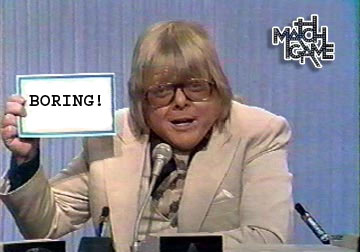
Posted by Joe Redifer (Member # 3) on 09-27-2006, 07:30 PM:
Phil's reply =
Posted by Phil Hill (Member # 371) on 09-27-2006, 07:34 PM:
Joe = ![[thumbsup]](graemlins/thumbsup.gif)
Funny! I LUV'd IT! ![[Smile]](smile.gif)
(I bet your a MAC guy...and NOT in tune with the biz world. ) ![[Razz]](tongue.gif)
Posted by Dave Williams (Member # 299) on 09-28-2006, 02:29 AM:
So just because I didn't call Mike a dumb ass whore and deminish his existence, therefore I am boring? ![[Eek!]](eek.gif)
Or is it that I am just boring in general, because that I can accept.
Ciao
Posted by Phil Hill (Member # 371) on 09-28-2006, 02:52 AM:
Hmmmm... I was referring to your comments about Microsoft.
Mike was only asking for some specific help, not a lecture. Duh...
Posted by Brad Miller (Member # 2) on 09-28-2006, 02:59 AM:
Ya know Phil, I've got to agree with Joe here...
Mike made his post at 9:31pm, then edited it at 10:54pm saying he figured it out. Dave made his post at 1:06am later that night, so at that point does it really matter?
Of course I now get to tease Mike for not posting HOW he did this for the archives.
Posted by Phil Hill (Member # 371) on 09-28-2006, 03:10 AM:
oh... Ummm...ahhh...I humbly apologize to Joe, Dave, and to all including JFC since I was too stupid to read the time stamps to know what Joe was referring to..
GD time stamps! I guess I'll now have to pay attention to THOSE now too, rather than "just reading" a post.
(But it's STILL a lecture!)
Posted by Joe Redifer (Member # 3) on 09-28-2006, 09:25 AM:
Phil = 
Posted by Mike Blakesley (Member # 26) on 09-28-2006, 01:39 PM:
Wow, this must be the most times songwriter Paul Williams' picture has been posted on the internet in one day!
And quite a coincidence too, because I watched some old "Match Game" clips on YouTube just the other night. Funny stuff!
quote: Brad Miller
HOW he did this for the archives.
The thread was more fun talking about how boring Phil and Joe are, but as for how I did it, basically you just go into the Options and select "allow circular references." This allows you to put a formula such as "=A1 + B1" into cell A1, with the result that every time you type a new number into B1 it is added onto A1, giving you a running total of whatever happens in B1.
Posted by Tim Reed (Member # 137) on 09-28-2006, 01:41 PM:
Funny guys, all o' yous.
Powered by Infopop Corporation
UBB.classicTM
6.3.1.2