This is topic Internet Explorer 7 - Makes Web Pages Look Bad in forum Film-Yak at Film-Tech Forum ARCHIVE.
To visit this topic, use this URL:
https://ft-forum.com/ft/cgi-bin/ubb/ultimatebb.cgi?ubb=get_topic;f=8;t=004874
Posted by Bobby Henderson (Member # 840) on 11-13-2006, 08:11 PM:
Just to satisfy my curiosity about Microsoft's long awaited update to Internet Explorer, I allowed the "push" update of IE7 to load on my notebook computer.
So far I'm not very impressed. The main gripe I have is the browser seems to have no way at all of showing JPEG and GIF bitmap images mapped to the native resolution of my notebook's LCD screen. The default "100%" zoom setting has the images scaled larger than normal, making the images look like crap. Anyone who has ever switched a flat panel LCD computer screen to a setting other than its native resolution may understand what I'm talking about.
Another obvious problem: many pages aren't displaying correctly. Because the browser is resizing images in the window the formatting of many popular websites is skewed all over the place. Apple's website has a centered table layout. IE7 has it too far to the left and at 100% zoom, the tabbed buttons don't fit right and the formatting of the page is all blown to garbage.
I've never seen this problem with Firefox. It maps out the graphics correctly. It displays pages formatted all in CSS correctly. It shows those centered table layouts correctly.
If there is something I am overlooking, will someone please let me know? I'd like to be able to pass the tip along to others. Although I'll continue to use Firefox as my default web browser I'm sure lots of others will only have IE7 installed -and possibly looking as cruddy as it does on my notebook screen.
Posted by Randy Stankey (Member # 64) on 11-13-2006, 09:44 PM:
Of course, that means web designers will have to design their web pages to match the whims of IE-7, thus being forced by Microsoft to do substandard work just to satisfy the unwashed masses who use that browser.
Posted by Mark J. Marshall (Member # 1409) on 11-13-2006, 09:45 PM:
With all the web based programs I create for our company, I suppose I'll have to download it soon too. I'm not surprised IE7 looks like crap right out of the gate with a standard install. On the flip side, I just installed Firefox 2.0, and it looks and functions great. All of my web based apps still look cool, and appear to function perfectly. I'm not looking forward to retrofitting all of my standards based HTML again for IE7 after already doing it once for IE6.
Sigh.
Posted by Scott Norwood (Member # 30) on 11-13-2006, 10:11 PM:
Bobby -- check the following registry setting (make sure it is "0" (zero)):
HKEY_CURRENT_USER\Software\Microsoft\Internet Explorer\Main\UseHR
Dell (and maybe some other manufacturers) turn on font scaling by default and it screws up the page layout in MSIE.
This is yet another reason to use Firefox, Opera, or pretty much any other browser.
Posted by Bobby Henderson (Member # 840) on 11-13-2006, 10:29 PM:
That did the trick. Thanks, Scott! I would not have found out about that registry key just farting around with the system by myself.
Too bad IE7 doesn't have a more obvious setting to correct that issue under its new zoom settings drop down menu. Really, "100%" should mean pixel for pixel representation on the monitor. At least that's how Photoshop and other image editors handle it.
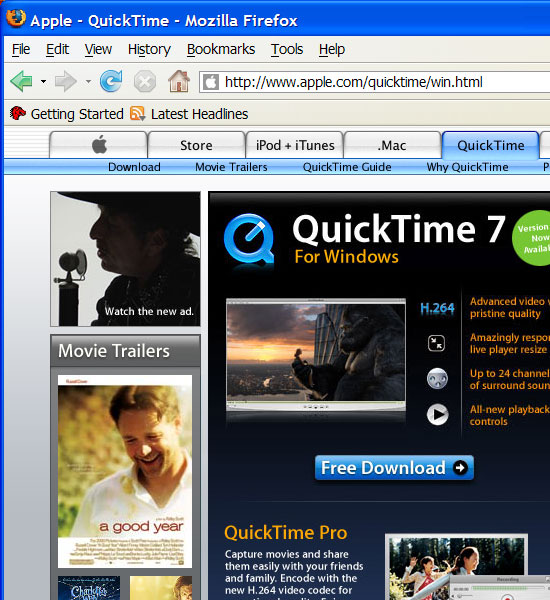
Just to show an example of what was happening, here is a portion of a web page from Apple's website shown in Firefox 2:
Now here is a copy of the same web page loaded up in Internet Explorer 7:
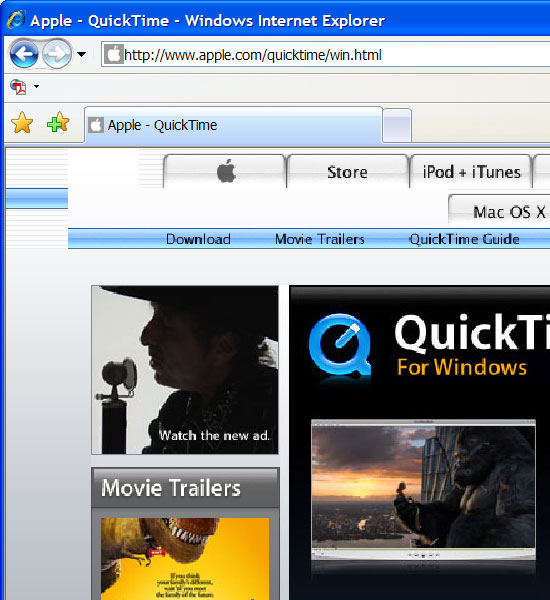
Notice how the photographic images have a ragged look to their edges. The blue QuickTime "Q" logo looks terrible. The tabs on the web site's interface have their formatting hosed.
I can understand to some extent why companies like Microsoft and even Dell do this with some computers. My notebook has a 15.4" screen with a 1680 X 1050 native resolution. Regardless of the high resolution, type is still easy to read on that screen so long as you use the large fonts setting. The same holds true for those Dell 17" notebooks with 1920 X 1200 resolution.
Posted by David Stambaugh (Member # 1102) on 11-13-2006, 10:39 PM:
Is the issue you're describing related to IE7's use of ClearType?
Microsoft's IE 7 Ignores Windows Setting
Microsoft is defending its decision to turn on its ClearType font rendering technology in Internet Explorer 7 even if users have switched it off system-wide.
ClearType, which debuted with Windows XP, is designed to make text more readable on LCD screens. By default, it's disabled in Windows, but Microsoft's IE 7 team has decided to enable it for the browser, even if the user has not turned on the feature Windows-wide.
"The decision to turn ClearType on by default in IE is unusual," acknowledged Bill Hill, a Microsoft researcher, in a posting to the IE team's blog. "But [it] was made because solid research over the past few years has shown conclusively that it improves reading, the task at which IE users spend most of their time."
Hill cited studies that claimed ClearType improved word recognition, reading speed, and reading comprehension, and defended the decision to enable ClearType by saying that users didn't know how to turn it on themselves.
"It certainly is unusual that IE is not respecting the system ClearType setting, but the problem is that most users do not know about features that are not turned on by default," Hill said. "We've found that a large percentage of Windows XP users don't know about ClearType, or how to turn it on.
"We believe the benefit of a 5 percent reading speed improvement offsets the minor annoyance for the few users that don't like ClearType."
Users commenting on Hill's blog generally took Microsoft to task for the decision.
"Can you imagine what would happen if every program started maintaining their own set of ClearType and other effects settings instead of using the system supplied values?" wrote a user identified as "matt."
"Frankly, IE 7 should follow the system wide setting and leave it at that," added "Xepol." "You want people to know about ClearType, find another venue to push it."
ClearType can be disabled in IE 7 Beta 2 Preview via the Tools/Internet Options/Advanced dialog. To turn ClearType off, uncheck the box "Use ClearType" under the Multimedia section. Unlike Windows XP, the upcoming Windows Vista will enable ClearType by default.
Posted by Bobby Henderson (Member # 840) on 11-13-2006, 11:33 PM:
I don't think ClearType caused that issue, unless Scott's registry trick also disables ClearType too. Normally when fonts are enlarged or modified in some way they'll at least stay constrained within the width of a cell in a table or a DIV layer while pushing downward with more lines of copy. When the graphics items were artificially enlarged by that odd setting I think that's what blew page formatting to shreds.
Posted by Adam Wilbert (Member # 1184) on 11-14-2006, 02:02 AM:
but ie7 does render PNG transparencies correctly, finally. That's at least one step in the right direction. ![[Roll Eyes]](rolleyes.gif)
Posted by Edwin Sheldon (Member # 4001) on 11-14-2006, 08:12 PM:
Their CSS support is still a bit broken, though. But hey, I have been screaming about PNG alpha channel support for years, so I can keep my complaining to a minimum. In a few years when developers can almost safely assume people have dumped IE6, we can actually start using translucent PNGs once in a while.
Posted by Bobby Henderson (Member # 840) on 11-15-2006, 12:37 AM:
You can get a lot of those translucent effects with Flash today.
![[evil]](graemlins/evil.gif)
Incidentally, Adobe donated a bunch of source code for the Flash ActionScript library to the Mozilla foundation recently. The code is now a centerpiece in Mozilla's new "Tamarin" project. Perhaps another version or two down the road and Firefox is going to be a lot more Flashy.
Posted by Mark Gulbrandsen (Member # 72) on 11-15-2006, 10:36 PM:
I downloaded it last night and its been fine on my Dell laptop.
Mark
Posted by Dieter Depypere (Member # 3184) on 11-17-2006, 01:12 PM:
That's why I use Firefox. Never some IE crap. ![[Wink]](wink.gif)
Powered by Infopop Corporation
UBB.classicTM
6.3.1.2