This is topic Notebook harddrive upgrade in forum Film-Yak at Film-Tech Forum ARCHIVE.
To visit this topic, use this URL:
https://ft-forum.com/ft/cgi-bin/ubb/ultimatebb.cgi?ubb=get_topic;f=8;t=004948
Posted by Andrew McCrea (Member # 674) on 01-29-2007, 06:04 PM:
Hey everyone,
I bought a cheap Acer notebook on Boxing Day (that's the day after Christmas that everything goes on sale "really cheap" in Canada) and it has 40GB, and is partitioned.
I don't know why its partitioned, but it has nothing on the partition.
I'm planning on upgrading to a 120-200GB HD, most likely a 160GB like my PC.
The stores want to charge $140 to install it, but I know enough about computers to install a harddrive. How do I switch it over to the new HD with all my files, operating system, etc.?
Posted by Mark Gulbrandsen (Member # 72) on 01-29-2007, 06:21 PM:
What on earth do you need that much space for... I hate really large drives... they just slow things down. 40 to 60 gb is the largest I'll go. Loose a 200gb drive and loose a lifetime of junk!
Mark
Posted by Brad Miller (Member # 2) on 01-29-2007, 06:27 PM:
It's all about porn storage Mark.
Andrew, there will be a cover on the bottom side of your laptop. Remove it and the drive simply pulls out (maybe with a screw or latch). Incredibly simple.
Posted by Phil Hill (Member # 371) on 01-29-2007, 06:42 PM:
But Grand-Poopie-BAH, I think he was asking how he could save all of his EXISTING files, INCLUDING the porn, and transfer them to his new, improved, and bigger drive. (Norton "Ghost"?)
OBTW: Make sure the new drive is at least a 7200 RPM one for fast access! ![[Wink]](wink.gif)
Posted by Monte L Fullmer (Member # 2797) on 01-29-2007, 07:33 PM:
quote: Andrew McCrea
but I know enough about computers to install a harddrive. How do I switch it over to the new HD with all my files, operating system, etc.?
Does the laptop have a burner drive? If not, buy a large sized thumbdrive (1 or 2GB size) to copy what desired files over. Then get the OS in the new HDD first by proper installation from install disc. Then, you can start all over by getting the programs in afterwards. Programs can be replaced, files are not so easy.
There are applications, inc which I'm not too familiar with that you can just use the USB cable to interconnect two computers to transfer files, but you had to do a search on that one.
Posted by Andrew McCrea (Member # 674) on 01-29-2007, 08:09 PM:
The problem is that the laptop came with the OS on it and I don't have a disk. This machine runs Windows XP MCE. I can back-up my system though (it takes 7 CDs or 2 DVDs, but it only has a CD-RW).
I didn't think you could just copy everything over, including the OS and have it work... I did that with my PC and had to re-install Windows XP from disc... but on the other hand, all the files were still there.
Of course, its all about the porn storage! Not really though... I keep music on my computers, and I'd like to have Adobe Audition, Dreamweaver, etc. on my laptop.
Posted by Darryl Spicer (Member # 711) on 01-29-2007, 09:43 PM:
was this a factory installed operating system. Some factory installs systems have problems with trying to run on larger drives than they originaly were installed on.
Actually I think the bigger issue is that even if the factory installed OS worked on a bigger drive it makes the back up disks that the factory provided useless since the drive no longer matches the factory set-up. I could be confused in all this but that doesn't matter if you don't have the original factory install disks.
Posted by Andrew McCrea (Member # 674) on 01-29-2007, 09:52 PM:
Well, I'll obviously talk to one of the guys before I purchase the new harddrive.
My theatre is across the street from a Best Buy (I've actually been able to pick up a wireless signal from them) so maybe I'll go in early tomorrow to ask them a few questions.
Posted by Bobby Henderson (Member # 840) on 01-29-2007, 10:01 PM:
One possible solution is the EZ-GIG PC Card data transfer kit. It's a $50 device that plugs into a notebook computer's PC Card slot. It mirrors your main boot partition over to the new hard disc drive.
I don't know how well this device works, but I saw it listed recently when looking around for possible replacement hard discs for my notebook computer. It was acting funky, so I had to reformat and reinstall everything and now it seems to be working fine. I may still buy a spare drive or two just in case.
The device is in stock at www.drivesolutions.com. Look under the "Other Products" section. You may be able to find it at other places with a web search.
The EZ-GIG device may not be of much use to someone whose hard drive is already glitching out or nearly toasted. Having data already backed up elsewhere is the only cure for that.
Posted by Leo Enticknap (Member # 534) on 01-30-2007, 04:10 AM:
Unless you really can't be dealing with more than one box (i.e. you need the portability), my suggestion would be to think about an external HDD for extra storage.
This basically kills two birds with one stone. Firstly, you've got an easy and hassle-free way of moving stuff to and from the laptop's internal HD - just drag and drop using Windows Exploder. Secondly, you can back up the system partition easily, using a utility such as Norton Ghost or Drive Image. So if you get a virus problem or a corrupted Windows installation or any other scenario in which restoring a clean system image is the best solution, you can easily do that.
There are also two other advantages. Firstly, if there's a physical failure of either HDD, you haven't lost anything. And seconly, your laptop is unlikely to have more than one HDD bay, meaning that if you do buy another internal drive, you'll be unable to use the existing one, which you've already paid for as part of the computer.
The one downside is the limited internal space. With my laptop I simply keep a slimmed down version of 'My Documents' on it (without the audio and video, basically) for use away from home. Unless you know you're going to want to do heavy-duty multimedia stuff away from home and are unwilling to carry an external HDD around with the laptop, I can't see this being a problem.
Posted by Michael Schaffer (Member # 1204) on 01-30-2007, 04:53 AM:
quote: Andrew McCrea
I don't know why its partitioned, but it has nothing on the partition.
That's because computers with pre-installed OS typically have a hidden partition which contains the backup files. I bet it has some kind of system restore function which feeds off that partition.
If it is a new notebook which doesn't have the OS disc with it, but you purchased an OEM version of Windows in the package, then they usually have a function somewhere which allows you to burn recovery discs (I think you mentioned that already). In which case the files to be burnt and backed up are on the hidden partition. You can tell when you look at properties of that partition under "My Computer". Often, you can see that a certain disc size is associated with that partition, but much less of it than you would think it is available. That's the hidden partition.
In any case, I would burn those back up discs (how much do you have to spend on 7 CDs these days?) and do what Dr. Enticknap said, namely, get an external USB2 hard drive. Keep all the files you need (in Brad's words, your favorite porn) on the internal hard drive, back everything up (including the 7 backup discs), store everything you don't need with you all the time on the external drive.
Posted by Cameron Glendinning (Member # 3516) on 01-30-2007, 05:14 AM:
I'm up to my 2nd external 250 gig drive now, its amazing how much porn you can collect over a short period of time!
This is one very easy way to go, I edit video with my laptop, and thats the only time I carry an external with me, its also nice to know that back up of music/ family photos / info is safe at home, not left in the back of a taxi or stolen ![[Cool]](cool.gif)
Full sized external firewire/usb2 tend to be cheap compared to the laptop internal hard drives.
Posted by Mark Lensenmayer (Member # 134) on 01-30-2007, 07:48 AM:
I would buy a 2/5" USB-powered drive case and put a big drive in there. It would be small enough to fit into the laptop case and wouldn't need an external power brick. Put applications only on the main drive and all of the data on the external. It is possible to clone a drive from a smaller to a larger one, but I've had nothing but problems when trying thi
Some people have ruined the screens on their laptops, and they give the machine to me to get their data. I just buy one of those drive enclosures, put in the drive from the laptop, then copy off their data to dvd or cd then I have a nice external drive that I can use for emergency backups.
Posted by Mark Gulbrandsen (Member # 72) on 01-30-2007, 08:52 AM:
Brad... of course its all about porn but I still hate large HD's. The USB drive is the only way to go and he can hide it from hiz mum.. Super convenient! Thats how I store all of my porn... not even my dog knows where I hide that HD!!
Mark
Posted by Andrew McCrea (Member # 674) on 01-30-2007, 09:49 AM:
OK, but...
I want to run large programs on the laptop. I can't put Dreamweaver and Audition on these computers because it fills the one partition right up. With a portable HD stick thing, I can put files on there, but I couldn't install programs to it.
The other partition, I haven't done the "Show hidden files" but its drive D, listed right in "My Computer" and has nothing the naked eye can see, so I assumed it would be empty.
Posted by Mark Gulbrandsen (Member # 72) on 01-30-2007, 10:35 AM:
Consider formatting the drive and installing a new copy of XP Pro, you'll probably get more on the drive this way. Its not unusual for a manufacturers drive to be partitioned the way yours is with the system recovery stuff installed. When I got my new Dell XPS I checked it and luckily its not partitioned so I left that laptop as-is but dumped all the usual junk they load in.
Mark
Posted by Mark Lensenmayer (Member # 134) on 01-30-2007, 10:41 AM:
That C: partition must be really small. I run GOLIVE which is much like DREAMWEAVER, and it doesn't take up much space at all. (Actually, I've come to prefer GOLIVE to Dreamweaver, but that is another matter.)
You might want to pick up a partition program that can repartition the machine without destroying the C: partition. That should give you the entire 40-gig's back. I haven't used any, so I'm hesitant to make a recommendation, but you can trial copies on most of the legal download sites.
Posted by Bobby Henderson (Member # 840) on 01-30-2007, 01:12 PM:
If Andrew is running Adobe Audition via a legal copy of Adobe Production Studio he will indeed be losing A LOT of disc real estate. The full install of Adobe Production Studio takes up more than 20GB of disc space (via 4 DVD-R install discs). That suite is just not practical at all to run on a notebook computer unless the notebook has at least a 100GB 7200rpm hard disc or larger.
The latest version of Audition alone takes up quite a lot of space.
Posted by Andrew McCrea (Member # 674) on 01-30-2007, 02:09 PM:
Here's what the partition looks like showing hidden files. Its 16.4 GB and the C:/ is 15.9GB, with 7.1GB free:
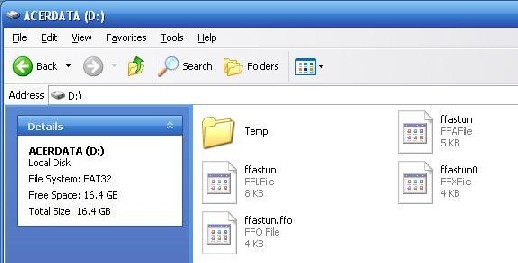
I'd also like the extra storage so that I can eventually upgrade to Vista and still have enough room.
Posted by Scott Norwood (Member # 30) on 01-30-2007, 02:16 PM:
Who is the manufacturer of the laptop? The extra partition likely contains the "system restore" information (because many manufacturers have become too cheap to send out CDs with their hardware). You should either make the restore CDs or order them from the manufacturer. Once you have done this, you can blow away the restore partition or even use a tool like Partition Magic to delete the restore partition and increase the size of your root partition to fill the entire disk.
The external USB/firewire disk would be the simplest (and maybe cheapest) way to increase your storage space, however.
Posted by Leo Enticknap (Member # 534) on 01-30-2007, 02:54 PM:
I tend to split my laptop HDD into two partitions; one for the OS and applications, and the other for data. The volumes don't fragment as quickly, and don't take as long to defragment; plus if one partition gets corrupted or virus infected, there's a fair to good chance that the other one will still be intact. You can also restore the system from an image without affecting any document files. But it's quite likely that the partitioning on Andrew's machine has configured a much bigger system partition than he actually needs. On my desktop PC, the system partition is the first 20gb of a 200gb disc, and with XP Pro, Office plus several other major applications, it's still less than half full. For a laptop, I can't see how you'd need 15gb unless, as Bobby points out, you're trying to run the sort of stuff that most laptops simply weren't designed to run. If the total HDD size is 40gb, I'd be inclined to create a 15gb C: partition and a 25gb D: one.
Adobe Audition 1.5 (a legal, standalone copy) only occupies 41.5mb on my hard drive. It's not a massive resource hog, in my experience. But there again, I probably don't use its more system hungry functions.
Posted by Bobby Henderson (Member # 840) on 01-30-2007, 02:57 PM:
Dell does that sort of thing with both their desktop and notebook PCs. However, they usually do include discs for the OS and various drivers. Depending on the system you buy, you may have to pay an extra $10-$20 for those discs. Get them anyway.
In Dell's case, their system restore partition is supposed to function as a more easy way to get the system back to a "factory reset" with all drivers (and misc. junk software) installed in one fell swoop. Using the OS disc, it's not difficult to format the hard drive completely and get a "vanilla" version of XP Pro installed instead. You'll just have to manually reinstall all of the system's drivers afterward (even things like Bluetooth and WiFi chipset drivers).
Posted by Mark Gulbrandsen (Member # 72) on 01-30-2007, 04:31 PM:
Thats odd then that my XPS notebook doesn't have that partition nor did it have any option for the disks you mentioned. It's 80 gb hard drive comes in at 79.4 gig and that small part left is way too small to be partitioned for XP-Pro or anything important.
Mark
Posted by Monte L Fullmer (Member # 2797) on 01-30-2007, 04:50 PM:
..with that 2nd partition, makes one wonder if that laptop was set up for dual boot option...running another version of Windows, or even stick Linux in that partition.
Posted by Bobby Henderson (Member # 840) on 01-30-2007, 04:58 PM:
I'm not sure what's going on with the "hidden" partitions on Dell hard discs. I know with mine, about 5GB of my 60GB hard drive was taken up with "hidden" stuff. That would seem to be more than enough room for a basic install of Windows XP Pro and the hardware drivers for my Inspiron 6000 notebook.
I can't remember for certain if it was an option I had to check in order to get physical CDs for all the software in my notebook when I ordered it online nearly 2 years ago. It is great having the discs though.
Posted by Cameron Glendinning (Member # 3516) on 01-31-2007, 01:30 AM:
If you are going to use your computer for editing ect, dont use fat 32 NTFS is better, no 2 gigabite limit. I have a cheap acer, it has a 60 gig drive, 30 gigs in both c and d, which for me is really just enough. I like the idea that your 40Gig drive would move in to a small external case, perfect for hiding from your parents
Posted by Darryl Spicer (Member # 711) on 01-31-2007, 10:00 AM:
normally the second partition is set up for the purpose that everyone has stated. They use it for system restore information to eliminate all the extra CD's and supposedly help keep the price down since a lot of the programs are trial based software that feeds off that partition for install.
The second partition can be used for a second OS but that would be something that was set up by the user.
It can also be used for setting up a fat 32 partition and an NTFS partition. The downfall to that is supposedly once set up for NTFS you can't go back to fat 32. This was done a lot early on for older based programs that did not like to run on NTFS drives
I read somewhere to that by setting up a second partition and putting the OS on the d/ partition instead of setting it up on C/ as we normally would helps reduce the chances of your OS being corrupted by a virus. How true that is I don't know.
Posted by Leo Enticknap (Member # 534) on 01-31-2007, 02:54 PM:
I guess some badly programmed malware might look for the OS files specifically on C:, and could therefore be fooled by putting Windows on a partition with another drive letter. But some badly programmed legitimate applications might do the same thing, meaning that they wouldn't work.
Posted by Andrew McCrea (Member # 674) on 01-31-2007, 04:33 PM:
Update:
I talked to Best Buy's Geek Squad.
They told me to create recovery disks, then put the new hard drive (120GB) in and boot up the computer. They told me to put the first disk in, and press ALT+F10 (as per Acer's specs).
It recovered onto the new hard drive and everything turned out perfectly. It also does not have a partition now.
I then put Vista on (took about 90 minutes) and everything's running fine.
I have 512mb ram, so I'm going to upgrade it. This computer can go up to 2GB.
Posted by Mike Blakesley (Member # 26) on 01-31-2007, 06:32 PM:
How do you like Vista?
Posted by Monte L Fullmer (Member # 2797) on 01-31-2007, 07:11 PM:
I've got the evaluation copy of Vista that I received a few months ago in an invitation from Microsoft to try out.
Vista is more user friendly that XP, but not much different otherwise. But definitely needs at least 1g of ram to operate smoothly though.
Actually, stick with XP until you need to go with VISTA ... VISTA's pretty with more buttons and whistles, but it's just not much of a needed OS upgrade for everyone.
But, if you want to try an excellent Linux OS, download the *.iso from this site, then burn this *.iso to disc, put your computer, or laptop to boot from CD and try this OS . Just head to one of the mirrors to download the large .iso file to burn to a 700m CD.
-Monte
Posted by Andrew McCrea (Member # 674) on 01-31-2007, 10:07 PM:
I agree with Monte.
I like some of the frills, like the new sidebar with its gadgets (little programs like an analog clock, a calendar, news headlines and weather, etc.).
I also think the taskbar is prettier (nothing to do performance wise, but I don't like how you can only show one quick launch option), and the start menu is kind of cool. You can click that button and immediately start typing in a search item to find a program.
I do need to upgrade my 512mb of ram though.
Posted by Bobby Henderson (Member # 840) on 02-01-2007, 12:31 AM:
Vista must be slower than the seven year itch with a mere 512MB of RAM.
My notebook computer is about 2 years old. I purchased it originally with 1GB of RAM, but upgraded it to 2GB soon after getting the Adobe Creative Suite 2 Premium upgrade. Even with that, and a good video card installed, I have absolutely no intention whatsoever of putting Vista on that notebook ever.
With all my years of using computers there is one BIG truth I know about "upgrades." They make your computer run slooooowwwwerrrrrr.
The only way I am going to wind up using Vista is when it comes pre-loaded on a new desktop or notebook PC I buy sometime in the future. And that isn't going to be anytime real soon (knock on wood).
Posted by Monte L Fullmer (Member # 2797) on 02-01-2007, 03:17 AM:
Probably that would do justice for VISTA, is to have a 512Mb 3D accelerated video card to run the button and whistles on the screen, 2Gb of Ram (even though 1G does it quite nicely since that's what I did with myh laptop in trying out that evaluation Vista - for 512 just was too sluggish..but 1gB does wonders for XP ..) and the larger drive..esp a SATA drive for towers, and of course, either the dual or quad core processors.
Made for serious gamers for sure.
-Monte
Posted by Scott Jentsch (Member # 1681) on 02-01-2007, 03:12 PM:
I attended the Office 2007 Launch Event on Tuesday, and they gave a brief demo of Vista, which was being used as the OS on the laptop they were demonstrating Office 2007 on.
The 3D Flip feature is visually interesting, and so is the live Task Window, but do they really add to productivity? Maybe a little.
The sidebar tools (widgets) that I saw can be duplicated right now with the Yahoo Widget Engine. The transparent title bars don't do much for me, as I used to have Stardock's DesktopX installed, but didn't see much sense in devoting the resources for it.
Out of curiousity, I installed the Vista Upgrade Advisor on my P4-3.06GHz box with 2GB of RAM installed, and it approved me, save for needing more drive space to perform the install. The main page of the Advisor lists as the primary benefits of Windows Vista Home Basic (the most basic version):
- Windows Defender and Windows Firewall
- Instant Search and Internet Explorer
There just doesn't seem to be a compelling reason for anyone to upgrade to this new operating system. I'd love to hear about what real improvements have been made that will affect reliability, performance, or my productivity, and after seeing that (albeit brief) demo and reading some reviews, I haven't seen it yet. Add to it that my Epson scanner and inkjet printer and my Minolta Color Laser are currently unsupported, and I don't think I'll be taking the Vista plunge anytime soon. Device support was a problem at XP's launch, too, so that will probably improve in the next 6-12 months.
I can't see why anyone would want to upgrade except out of curiousity, and I would think that the most popular adoption method will be from new PC sales.
Posted by Andrew McCrea (Member # 674) on 02-02-2007, 02:12 AM:
I'd definitely say wait for the next Windows... Vista just seems to be the same shit in a different pile. It conjures up memories of Windows RG.
And now they're really modelling themselves after Mac, but I don't like how serial keys are no longer supported. How many people have a monitor that meets that requirement?
It will be interesting to see how long it takes for the next Windows OS, and if they completely turn the system upside down like 3.1 to 95... That would be more interesting.
Posted by Monte L Fullmer (Member # 2797) on 02-02-2007, 02:20 AM:
Also...thing about OS's from Redmond is that when a new one comes out, they're somewhat buggy until the new Service Paks comes around (like with Win2k - up to SP 4) to clear the bugs out.
Now, we've seen XP with SP-2 and now with VISTA...how many SP's is this OS gonna need to clear the bugs (if any) out to make this a stable OS?
...funny, never saw bugs with old Win3.xx .. since it just sat on top of DOS and behaved itself as a GUI program should.
-Monte
Posted by Mark Gulbrandsen (Member # 72) on 02-03-2007, 09:36 PM:
There was an interesting article about how a news writer switched from MAC to PC because of Vista. I think it was on MSNBC but I went back anbd couldn't find it....
Edit: Here it is...
Mark
Posted by Mike Heenan (Member # 392) on 02-04-2007, 12:02 AM:
I just bought a hp laptop at costco today, a dv9233 (1.66ghz duo, 2gb memory, 240gb for porn, etc). It has the premium version of Vista, and what I'm seeing so far I like it. While I like it, it's not something I would rush out and buy, I would probably wait until you all are ready to just upgrade to a new computer that has it on there already installed.
Posted by Bobby Henderson (Member # 840) on 02-04-2007, 02:22 AM:
quote: Mark Gulbrandsen
There was an interesting article about how a news writer switched from MAC to PC because of Vista.
MSNBC actually had a somewhat interesting interview with Bill Gates where he groused and fumed over the lying, blatant, bullshit that often is the Mac-oriented Apple commercials. I'm not normally one to take sides with Satan-incarnate, but Bill is absolutely right.
I'm a professional graphic artist by living. I know this as well as anyone.
Apple does not have any kind of monopoly on creative computing. Those commercials that literally say you must own a Mac to do anything creative are full of shit.
To get specific, how 'bout any Mac fanatic show me one single Adobe or Macromedia application that runs exclusively on the Mac platform. Anyone? Anywhere? Bueller? Bueller? Bueller?
The truth is the only creative applications that run exclusively on the Mac platform anymore are those applications that Apple makes on their own. And that pretty much begins and ends with Final Cut Studio. Adobe, Avid, Autodesk and any number of other companies whose names also begin with the letter "A" are looking to trounce Apple.
Apple Shake was trying to make a good run as a very high end add-on for Final Cut Studio. But that was until a Windows-only application from Eyeon Software called "Fusion" came along. Windows-machines already dominate in a lot professional 3D animation and rendering areas. Apps like Fusion are allowing them to dominate in compositing. Lots of mainstream graphics applications from Photoshop to After Effects can be run on PCs. So that threatens to squeeze whatever lead Apple has in the long term.
The sad thing is the idiots in our mainstream media just think, by knee jerk laziness, that Apple automatically equates to truth and hipness. Our media does not bother to check any fact. So therefore they can ignore the irritating truth that companies like Adobe own the creative market, not Apple. And all of Adobe's stuff has been available on BOTH Mac and PC platforms for a long long time. Macromedia? Macromedia's stuff has been geared more for Windows than Mac since the 1990s. Macromedia Studio MX, Studio MX 2004 and their newest Studio 8 all had more stuff offered on the Windows side than the Mac.
Normally, I wouldn't give a damn about posting this stuff. But Apple's marketing style has invited this response. Apple does not own the creative computing world. They are selling the illusion that they do. Windows is very dominant in 3D animation. Can you run 3D Studio Max on a Mac? No. At least not unless you boot up Windows via Parallels on a Intel-based Mac. There are far more 3rd party graphics cards, peripherals and other devices to serve 3D artists using Windows than Mac.
The last bastion for Mac in terms of graphics is print-based publishing. And that's largely because a lot of newspaper and magazine publishers are slow to change or even upgrade anything at all.
Apple's computers are still high quality. Apple's OSX still has a lot of advantages over Windows. But Apple has got to get rid of this lying bullshit they're doing in their marketing.
Steve is just lapsing on that tired, bullshit tactic of mudslinging. Give it up already! Stop bitching about what is so bad about your competitor's product and start selling people on what is so good about your product! Duh!
![[Roll Eyes]](rolleyes.gif)
[ 02-04-2007, 01:00 PM: Message edited by: Bobby Henderson ]
Posted by Leo Enticknap (Member # 534) on 02-04-2007, 05:49 AM:
Without wanting to stray too much into political territory, I think that along with marketing the brand as a fashion icon, Apple advertising is also aimed at people who like to think of themselves as 'ethical consumers' (you know - the kind of hypocrite who lectures you about the evils of global warming before driving the half a mile home in her 7.5 litre Islington tractor), opposed to big business and globalisation. The fact that Apple is also pretty big and pretty global tends not to show up on their radar.
Commuting to work on the train, it never ceases to amaze me just how many other passengers are clutching Ipods; this being despite the fact that other personal music/video players with a much higher specification go for around 30-40% less than the Apple ones. Whatever you think of the hardware and software itself, the marketing of it has been phenomenally successful. And I bet the same thing will happen with the Apple mobile phone is launched here, too.
Posted by Mark Gulbrandsen (Member # 72) on 02-04-2007, 10:03 AM:
quote: Bobby Henderson
MSNBC actually had a somewhat interesting interview with Bill Gates where he groused and fumed over the lying, blatant, bullshit that often is the Mac-oriented Apple commercials. I'm not normally one to take sides with Satan-incarnate, but Bill is absolutely fucking right.
Right Here
Posted by Mike Heenan (Member # 392) on 02-04-2007, 10:12 AM:
Jeeez Bobby settle down, they're just commercials. ![[uhoh]](graemlins/uhoh.gif) Have you even used any Macs extensively?
Have you even used any Macs extensively?
Posted by Bobby Henderson (Member # 840) on 02-04-2007, 12:45 PM:
Well, I'm calm now. New day, new attitude.
![[Razz]](tongue.gif)
I have used Macs. They're great machines. Mac OSX is a great operating system. The next time I buy a desktop computer I may even buy a Mac Pro tower (and run both Windows and OSX on it). The price on a Dual Xeon Mac Pro tower isn't very different from what Dell is asking for a Dual Xeon Precision Workstation. The 24" iMac is also an excellent deal.
I just think Apple needs to concentrate on selling people on the positive points of their products rather than tell broad-stroked lies in their TV ads.
I'm surprised no other computer makers have taken advantage of the inaccuracies in Apple's ads and called them on it. Maybe Dell should run a similar ad for their XPS line, but with a different guy playing the "I'm a PC" part, maybe someone like UFC champion Chuck Liddell. "I'm a PC. I can run FarCry very very well. Hey, Mac, can you even play FarCry?"
Posted by Mike Heenan (Member # 392) on 02-04-2007, 01:38 PM:
Since I want portability, I went with a laptop, and for the video editing I do, this HP should be plenty enough to take care of all tasks, as it's likely more powerful than my G4 tower which still does great. I bought the HP at costco, as they do not have that 15% restocking fee that Best Buy and others have, so I have 30 or so days to test it out. I really wanted a Macbook pro 17" model just because that's what I've been editing on the last few years with FCP , but this HP is almost $1000 cheaper than if I were to buy a refurbished Macbook pro (which is $2299 vs $2800 new). Adobe premiere is pretty similar to FCP so I should be able to pick that up pretty quickly assuming I keep this current laptop.
Posted by Bobby Henderson (Member # 840) on 02-04-2007, 11:07 PM:
If you're going to use Adobe Premiere, consider buying the full Adobe Production Studio Premium suite if you don't already have a copy of Premiere.
The Production Studio Suite will give you some very useful, time saving capability via "Dynamic Link." The Dynamic Link function only comes with the full suite. You won't get it from buying the applications separately.
Dynamic Link allows you to place items like After Effects compositions into time lines within Premiere Pro or DVD layouts within Encore. You can make changes to anything within any of those applications without having to do any final renders. If you change some text or an effects layer or something else in After Effects that item is automatically updated in the other applications where it is referenced. The final render only has to take place when the composition is complete.
Add to that the ability to use Smart Objects from Photoshop and Illustrator (not to mention very tight integration with Flash 8 Professional) and you have one hell of a powerful combination.
Those features have been enough of a hit that the next version of Adobe Production Studio will once again be available for the Mac platform. I guess Adobe believes they finally have something good enough to compete directly with Final Cut Studio.
I've been using the Photoshop CS3 public beta. It's very good. The auto-stitching tool for panorama camera compositions is the best I've ever seen. Just crazy.
Posted by Mark Gulbrandsen (Member # 72) on 02-05-2007, 08:27 PM:
quote: Bobby Henderson
The auto-stitching tool for panorama camera compositions is the best I've ever seen. Just crazy.
If you think the panorama part of CS3 is good then check out Panorama Factory... most Pros are using this. Of course all it does is stitch panoramas together but by far the best I've ever seen. Check Out one I did that located on their web site.... Was this done with the Canon 30D or my Nikon 2200 Coolpix?
Posted by Cameron Glendinning (Member # 3516) on 02-06-2007, 05:56 AM:
Mark, WOW what a shot ![[thumbsup]](graemlins/thumbsup.gif) mind if I make a copy and put it up? , OK which camera?
mind if I make a copy and put it up? , OK which camera?
Posted by Andrew McCrea (Member # 674) on 06-25-2007, 07:55 PM:
So, I went back to Windows XP MCE due to Vista being very sluggish and crashing a lot...
I want to create a small partition on this aftermarket drive so that I can install Linux. I want to be able to use Ardour, which requires Linux or Mac.
Last night, I switched my hard drive to an NTFS from a FAT32. I can't seem to create a partition using Disk Management under Computer Management in Administrative Options.
I don't want to buy some expensive software that I'm going to use once, especially since I'm a big fan of open source programs (like OpenOffice and Ardour).
Posted by Bobby Henderson (Member # 840) on 06-25-2007, 10:58 PM:
I'm not 100% positive on this, but a lot of WinXP stuff really needs NTFS on its own partition to work properly. FAT32 sucks much ass. It's very inefficient on disc usage.
I would have XP on a NTFS partition and then perhaps create separate partitions for Linux in whatever FAT the particular build needed.
Posted by Damien Taylor (Member # 4255) on 06-26-2007, 12:13 AM:
I spent a lot of time and money accumulating a little over 1T in IDE only for it to be superseded with SATA. Stupid progress... Anyway ghosting is the way to go, and don't go too big, you'll just end up hoarding everything. I have directories that go on forever sometimes like 20 - 30 levels deep. I don't know whats in there, but it might be important so I can't delete it.
Posted by Jeremy Weigel (Member # 4208) on 06-26-2007, 12:51 AM:
Try using this program:
http://www.sysresccd.org/Main_Page
I was able to repartition my hard drive with it.
Posted by Dave Macaulay (Member # 813) on 06-29-2007, 10:17 AM:
I don't know which distribution you like, but I used the Ubuntu bootable CD and installed it on a system running XP. It repartitioned the drive and everything works fine. The only problem is the GRUB bootloader; it defaults to Linux and gives you about 5 seconds to choose XP, and I can't find any way to rearrange the boot preference order. GRUB also found Windows 98 on an old drive I kept installed to be able to use the old files, and I can boot into that as well.
Powered by Infopop Corporation
UBB.classicTM
6.3.1.2