This is topic Mozilla vs. Opera and Open Office vs. MS Office in forum Film-Yak at Film-Tech Forum ARCHIVE.
To visit this topic, use this URL:
https://ft-forum.com/ft/cgi-bin/ubb/ultimatebb.cgi?ubb=get_topic;f=8;t=005021
Posted by Michael Schaffer (Member # 1204) on 04-04-2007, 12:42 AM:
What are your thoughts about and experiences with the Mozilla Firefox/Thunderbird combination? So far, I have mostly used Opera, IE sometimes for pages Opera doesn't display well, and Outlook for email.
Also, have you tried Open Office? How compatible is it with MS Office?
Posted by Bobby Henderson (Member # 840) on 04-04-2007, 10:36 AM:
I use Firefox and Thunderbird pretty much exclusively. Firefox is great. Thunderbird is pretty useful. Its spam filter is handy. I just wish it had better address book import/export tools and better support for combining multi-part messages saved in RAR or yENC format. That's one area where Outlook Express has the vanilla install of Thunderbird beat. There may be extensions for Thunderbird that support the features I mentioned. I just haven't seen them yet.
I don't use Outlook or Outlook Express, because I don't mess around with MS Office applications much at all and Outlook Express is a major security liability to use.
Posted by Gordon McLeod (Member # 33) on 04-04-2007, 12:05 PM:
I use open office and find it is 99% as good as MS office but is very slow to load and a memory hog
Posted by Ian Price (Member # 14) on 04-04-2007, 12:18 PM:
I use Firefox, Thunderbird and Open Office.
I really like Firefox and Thunderbird. I like Open Office but I do find it hard to find some features sometimes. They are all there, but they are slightly different than MS Office. Everybody else can open my "Word .doc" in MS Office except my Father, but that may be an indictment of my Father more than the program.
I also use AVG, I'm all about free programs. What I would love to find is a free version of Quicken. There doesn't seem to be any. I did read about one, but they said is was so limited.
With open office I have only used Write and Calc. I haven't used the rest of the programs. Does anybody else use Base, Draw, Impress or Math?
As for loading slowly, Open Office does load slowly the first time of the day. But it leaves something in the cache and loads quickly after that.
Posted by Michael Schaffer (Member # 1204) on 04-04-2007, 06:25 PM:
I read that Firefox and Thunderbird take up a ton of system resources. Is that true? Does it slow down the system noticeably?
BTW, for binary messages, I use GrabIt! which is free and extremely parctical and easy to use. It also supports .nzb files. So typically, when I am looking for binary messages, I search for them on newzbin.com, mark the messages I want and export the .nzb file, then open it with GrabIt!. By naming the .nzb file like the directory I want the files to go to, it simply downloads, assembles, and decodes all the messages into that directory.
Posted by Mark Gulbrandsen (Member # 72) on 04-04-2007, 06:48 PM:
I prefer MS stuff overall. It has been a more comprehensive word program for me in what it does, how other programs and downloads translate over to it and I also use Excell alot for keeping track of different theaters maintainance. It is expensive and open office is free. If your budget affords it get the best.
Mark
Posted by Monte L Fullmer (Member # 2797) on 04-04-2007, 07:10 PM:
for Mozilla based browers, I use good ol' Netscape 7.0 - loads quick, doesn't bug up like IE-6, et.al.
Yes, I've noticed that Firefox/Thunderbird versions of the Mozilla kernal are quite the resource hogs...
...like Norton and McAfee (I also use Grisoft Antivirus 7.5 - which is dandy free AV program www.free.grisoft.com It just sits in the background, uses very little resources and still gets the nasties out of the way)
I use MS OFFICE 2003, but only have WORD and EXCEL loaded- just to save some resources on this program,
Posted by Edwin Sheldon (Member # 4001) on 04-04-2007, 08:21 PM:
I've been using Firefox since it was Firebird 0.6. I'm a bit of a fan. ![[Razz]](tongue.gif)
Posted by Michael Schaffer (Member # 1204) on 04-04-2007, 09:45 PM:
What about the alleged speed/resource issues?
Posted by Steve Guttag (Member # 268) on 04-04-2007, 10:29 PM:
I have a love/hate relationship with Opera...when it is on a good version that mates up well with the particulars of your computer...it is very fast and does the job without popups or picking up hitchikers.
Its been awhile since trying Firefox but when I was looking for an IE alternative...Opera, at that time, did the best for me. IE still remains the defacto browser that most web sites test for...there are some sites that Opera won't display correctly that IE will.
However, after every IE usage...one must run Ad Aware as there WILL be some sort of tracking cookie loaded in your computer.
I'm on Opera 9.10. It is running VERY well on my iMac (Intel duo version) but it was down right nasty on my old iMac DV SE. Film-tech pages would load super slow.
Steve
Posted by Edwin Sheldon (Member # 4001) on 04-05-2007, 01:12 PM:
Firefox has suffered more than its share of memory leaks, but I've never encountered 'speed' issues. In fact, with one simple tweak, it becomes far faster than any other browser I've used.
Type 'about:config' in the address bar.
In the Filter field, type 'pipe'.
Change network.http.pipelining to true
If you want, slightly increase the value of network.http.pipelining.maxrequests. Mine's at 8.
This will tell Firefox to use HTTP pipelining.
quote:
HTTP pipelining is a technique in which multiple HTTP requests are written out to a single socket without waiting for the corresponding responses. Pipelining is only supported in HTTP/1.1, not in 1.0.
The pipelining of requests results in a dramatic improvement in page loading times, especially over high latency connections (such as satellite Internet connections).
Opera supports pipelining out of the box. IE doesn't support it at all.
I've always been happy with Mozilla products. They provide the features I want. Security issues are fixed as soon as possible, unlike Microsoft products wherein issues are only fixed once a month, and only if Microsoft feels like it.
I use OpenOffice and NeoOffice exclusively. Despite being slow as molasses and a huge memory hog (thank you, Java), I am happy with 99% MS Office compatibility and the free price tag. Also, as a Linux user, running Office is out of the question.
Posted by Mark Hajducki (Member # 1732) on 04-05-2007, 06:15 PM:
quote: Ian Price
Does anybody else use Base, Draw, Impress or Math?
I use Math (it gives the same end results as MS Equation Editor) it is not as user friendly as Equation Editor, but is a lot faster once you get used to it.
Posted by Michael Schaffer (Member # 1204) on 04-05-2007, 08:41 PM:
Edwin - thanks for the tip. If Opera supports pipelining anyway, it may explain why I have the impression that it loads pages just a little bit faster than Firefox.
I have browsed around with Firefox, and I like it, but part from he fact that it always takes a little time to get used to a new browser, I actually still like Opera a little. Will see how that "relationship" develops.
But I really like Thunderbird. It seems to have all the necessary functions, but not too much of the unnecessary crap. One thing I like is that each account can have its own subfolders, so my private and my work emails, both received and sent, go directly into the right subfolders. I think you can do that with Outlook, too, but you have to create a set of rules for that. With Thunderbird, it's just a feature of the basic setup of a new account.
I couldn't get my gmail account to cooperate with Thunderbird though even though I followed the setup procedure step by step, enabled pop and all that, but it never seemed to connect. One strange feature of Thunderbird is that you don't enter your password in the profile, it asks you for the password the first time you connect. It never asked me for my gmail password, just showed there was some error (but it didn't say which), so I guess it never got that far.
For now, I have installed the gmail noifier which runs in the background and tells me when there are new mails in that account. Pretty handy, too, except I would prefer to have all my emails in the same client. I just wonder why it takes up 9 MB in memory.
Thunderbird does use quite a bit more memory on my computer than Opera (about 20 MB more), but since I now have 2 GB of memory, that doesn't really matter that much.
So it seems to be a good setup to have Opera and maybe Firefox for some pages which Opera doesn't display properly, and IE only for "emergencies", along with Thunderbird for email.
Next, I will try Open Ofice.
Posted by Rick Raskin (Member # 1561) on 04-06-2007, 03:15 PM:
Thanks for the heads-up on Open Office. I'm not sure if the loading issue will impact us but we are considering using it to replace MS. As the world moves to later MS versions we don't want to have to keep forking up the bucks to stay compatible.
I found a FREE web design package "Nvu" that so far looks like a good replacement for Front Page. Anyone have any experience with that one they'd like to share?
Posted by Adam Martin (Member # 641) on 04-06-2007, 08:09 PM:
quote: Rick Raskin
I found a FREE web design package "Nvu" that so far looks like a good replacement for Front Page. Anyone have any experience with that one they'd like to share?
I use Wordpad. Scott Norwood likes Vi. ![[evil]](graemlins/evil.gif)
Posted by Scott Norwood (Member # 30) on 04-06-2007, 08:35 PM:
Hey, now!
As for Firefox, I recommend it highly. Yes, it has some memory leak issues, but I trust that they will get sorted out with time.
Openoffice is fine. It works. My objection to it is that it tries too hard to be a clone of MS Office, rather than actually trying to improve upon the sorry state of most of the MS Office applications. Personally, I think that Word is a total piece of crap, and Openoffice has not improved upon it. Excel is actually a decent product and Openoffice seems to do a decent implementation of most of its features.
Posted by Michael Schaffer (Member # 1204) on 04-06-2007, 10:27 PM:
Here is an interesting tip for that memory issue:
http://www.freerepublic.com/focus/f-bloggers/1327586/posts
I haven't tried it yet though because I don't know how to undo that if this impacts the performance negatively.
Posted by Edwin Sheldon (Member # 4001) on 04-07-2007, 12:27 AM:
Depending on which vi clone you use, it makes a much better HTML editor than WordPad. Vim, my favorite (and the default of most Linux distributions) has wonderful syntax highlighting.
Posted by Rick Raskin (Member # 1561) on 04-07-2007, 07:57 AM:
The guy who co-hosts the site with me built everything in HTML and I learned from him. I started by using Text Pad to build pages but began using Front Page when I discovered it was on the computer. Sometimes though, I have to revert to HTML to edit some of the arbitrary spacing Front Page puts in, and the included HTML editor works fine. Nvu however, is FREE, offers nearly the same GUI interfaces and HTML capabilities. For knocking out pages in short order I tend to prefer the GUI interface over HTML. I have worked with VI and ED in the UNIX environment but prefer to use something that requires less syntactical knowledge.
Posted by Daryl C. W. O'Shea (Member # 1303) on 04-10-2007, 12:38 PM:
quote: Adam Martin
I use Wordpad. Scott Norwood likes Vi.
I've been meaning to ship him a keyboard with arrows on it and a copy of Vim for years now.
In any case, Scott knows that the only way to edit a live kernel is with cat, echo and awk. ![[Big Grin]](biggrin.gif) If you can manage that you can probably write your web pages with anything.
If you can manage that you can probably write your web pages with anything.
Posted by Michael Schaffer (Member # 1204) on 04-14-2007, 03:36 PM:
I have tried Thunderbird for a while now, and it is a really nice program. Not too bloated with unnecessary functions, but it still has everything needed to work with several pop accounts.
But one thing puzzles me: it is sloooooooooooow. When I have downloaded new messages and click on one to read or delete it, it sometimes takes 3 seconds or so for that action. No, I have not set it to "fetch only headers", so it isn't getting those messages from the server. They are already here.
There are also some other, minor, but still sometimes annoying bugs. For instance, when I open the program or click on "receive all messages" (or whatever it is called there), it only checks the mian server, not my other accounts. But I have checked all the relevant settings for the other servers as well. Those little bugs and problems make it less than optimal for me to work with.
Posted by Adam Martin (Member # 641) on 04-14-2007, 04:53 PM:
quote: Michael Schaffer
When I have downloaded new messages and click on one to read or delete it, it sometimes takes 3 seconds or so for that action.
I have not experienced this except on the rare email with a gigantic attachment.
quote:
it only checks the main server, not my other accounts
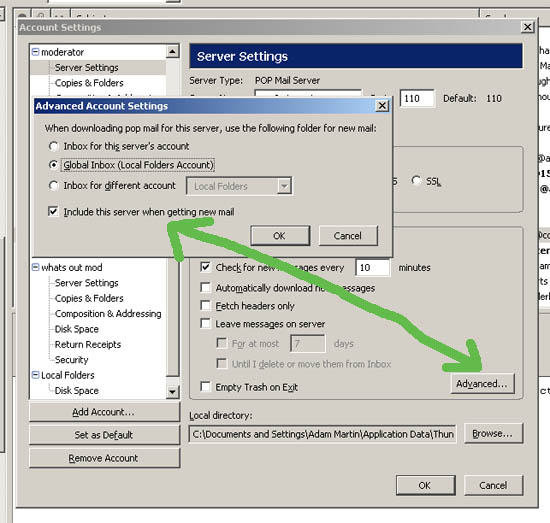
For each account:
Tools > Account Settings > Server Settings (Choose account) > "Advanced" Button > "Include this server when getting new mail"
Posted by Daryl C. W. O'Shea (Member # 1303) on 04-14-2007, 05:41 PM:
quote: Michael Schaffer
When I have downloaded new messages and click on one to read or delete it, it sometimes takes 3 seconds or so for that action.
Clicking the mouse on a message or hitting the delete key on the keyboard should be immediate (at least with 1.5.0.10 and before). Using the up and down arrows there will be a delay... which IIRC is configurable somewhere.
Posted by Michael Schaffer (Member # 1204) on 04-14-2007, 06:57 PM:
Thanks for the tips. There is something strange going on here. I have two accounts "GMX" and "UCS", private and work. I also have a GMAIL account, but I couldn't make that work with Thunderbird (I followed and triplechecked the instructions on the gmail webpage, enabling pop and all that, and it worked with Outlook, ).
So for now, I installed the gmail notifier which runs in the background and pops up when there is new mail, then I can go to the website and look at it there.
When I go to advanced account settings and check "global inbox", my work account simply disappears. When I check "inbox for this server's account", it reappears, but the "include" option is greyed out and not available anymore, and it doesn't check messages for that account. When I check "inbox for a different account", then I can check the "include" option, but obviously, I don't want to set it to put the mail in the other inbox. That's the whole point of having several separate accounts. So I check that and then go back to inbox for this servers account, the "include" option is greyed out again, but now it's still checked, and that seems to work now. I also checked "check for new meassages at startup", and that now seems to work for both accounts, too. The only thing that doesn't work still is that when I click on "get mail" on the top left, it only gets one account, I have to open the little dropdown menu there and select "get all". But that's not a big problem.
The speed issue is like this: when I click through already read messages, it goes very quickly. But when I mark and read or delete new messages, it takes a looooong time (really 3 seconds or so which tends to get on your nerves when you quickly want to go through some new mails and discard the ones you don't want).
It is version 1.5.0.10.
Posted by Daryl C. W. O'Shea (Member # 1303) on 04-14-2007, 07:24 PM:
I only know of the slow down that occurs when you use the keyboard to go through messages. Clicking with the mouse has always been fast for me. I don't, nor do any of my users, use POP3 though... so if it's an issue with the way their local folder storage mechanism works with POP3 accounts I would never have seen it.
Posted by Adam Martin (Member # 641) on 04-14-2007, 08:38 PM:
I am using POP3 accounts and do not experience the delay. Perhaps your antivirus software is intercepting the email when it is opened (or is scanning the email disk file when it is accessed) and the scan is causing the delay.
Posted by Michael Schaffer (Member # 1204) on 04-15-2007, 08:37 PM:
That must be it. I use avast! antivirus, and when I stop the email and a few other scanners running in the background, going through the mails suddenly goes very fast. Oddly, with the scanners running, it also takes a while to delete messages. But why would they want to scan messages which are already in the inbox and have been scanned, especially when they are moved into the trash. Maybe avast! ad Thunderbird simply don't harmonize well. I also always had it running in the background with Outlook, but it didn't affect the speed noticeably.
Still, with the server settings now figured out, I like Thunderbird, and I think I will continue using it. Thanks for the tips!
Powered by Infopop Corporation
UBB.classicTM
6.3.1.2