This is topic Weird PC display problem in forum Film-Yak at Film-Tech Forum ARCHIVE.
To visit this topic, use this URL:
https://ft-forum.com/ft/cgi-bin/ubb/ultimatebb.cgi?ubb=get_topic;f=8;t=005211
Posted by Leo Enticknap (Member # 534) on 09-05-2007, 08:03 AM:
I've got a strange problem, either with my PC monitor or graphics card I guess. When I open an image file (JPEG, TIF, PSD - doesn't matter), the colour balance is OK in some applications, but has a purple/pink hue, like faded Eastmancolor, in others, as so:
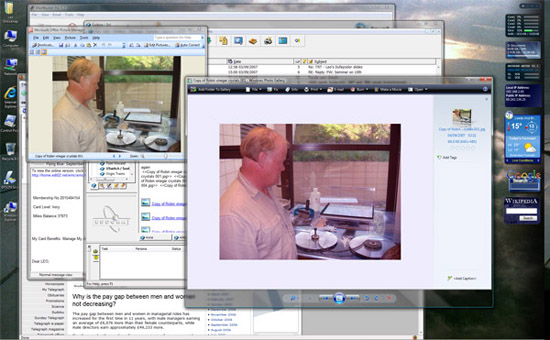
In the above example it's fine in Microsoft Office Imaging, but pink in Windows Photo Gallery. Another problem is that when I scan images directly into Photoshop, they appear fine on the scanner interface but pink once they're in Photoshop. If I scan direct to a file, close the scanner software and then open the file in Photoshop, the pictures are OK. Furthermore the pictures print correctly, even if they display in pink.
Logic says that it can't be a problem with the monitor, because if the monitor was playing up it would affect the entire display, not just one window in it. However, this is a new monitor (Acer AL2416W, arrived on Saturday), and I didn't have this problem with the other one. The correct monitor driver is installed.
I've tried tweaking the Adobe Gamma settings, but without any luck. Any suggestions appreciated.
Posted by Bobby Henderson (Member # 840) on 09-05-2007, 11:10 AM:
The problem isn't with the monitor. You have a color management conflict within the operating system itself.
Are you running Windows Vista? Lots of graphics people who have to use Windows-based systems are avoiding any upgrades to Vista (either on existing machines or pre-loaded into new systems). Numerous problems have been reported with various Adobe applications, although the recent CS3 upgrade suites solved many issues.
Worse problems exist with scanner drivers. Business hasn't been great in that sector in recent years so various scanner manufacturers haven't been as quick as others to solve issues with Vista.
The best thing I can suggest is making sure the drivers for your scanner, printer and video card are all up to date. Make sure you have the latest maintenance patches for whatever versions of Adobe software you're running.
The Adobe Gamma loader program can also pose problems too. If you have a printer or scanner trying to run its own separate color management routines as well you can get wacky conflicts. Adobe Bridge is supposed to help make color management more simple, reliable and agnostic from what the operating system does -but that's only going to be good if you're running the version of Bridge that comes with the more print oriented Adobe suites containing InDesign, etc. Adobe's Production Studio suite is only geared for RGB (even though Photoshop & Illustrator still have all their CMYK functions within that suite).
Posted by Leo Enticknap (Member # 534) on 09-05-2007, 12:56 PM:
Many thanks Bobby. Yes, it's Vista. I'll make sure the graphics card and scanner drivers are up to date and all applications have the latest updates and patches on them, and see what gives.
Watch this space...
Posted by Chad Souder (Member # 343) on 09-05-2007, 06:23 PM:
It sure seems to me like it is the driver for your video card. Vista has very few drivers actually finished and in good working order for video cards, so it is likely you may be up a creek for some time. My friend was having a similar problem with video clips. He fixed the problem by going back to XP.
Posted by Andy Muirhead (Member # 712) on 09-05-2007, 07:28 PM:
I've no idea at all why anyone would upgrade to Vista at the moment. Why "upgrade" to an OS which uses more system resources, which in turn makes your PC slower, and also has major compatibilty issues. I'd understand if you had a DirectX 10 card, but apart from that..
I'll be sticking with XP for, well, a long time yet!
Posted by Phil Hill (Member # 371) on 09-05-2007, 07:36 PM:
I totally agree, Andy. I just bought another Dell notebook and had a choice of OS...I went for the XP Pro...have it on 3 computers.
Vista sux!
Posted by Leo Enticknap (Member # 534) on 09-06-2007, 03:47 AM:
I put Vista on because I effectively had no choice. This was a homebuild PC I built a couple of months ago. The OS was bought from the University I work for, which is a member of the Microsoft corporate 'work at home' scheme whereby staff can buy Windows and Office for use on their home machines at a massive discount (£15 each). The only drawback is that, strictly speaking, you're supposed to uninstall the software when you leave that workplace.
XP is no longer available under that scheme. So it would either have been a case of buying a fully portable Vista Ultimate licence at £15, or buying an XP Pro OEM licence for around £100 I guess. Given that I need the x64 edition, it might even have been more than that.
To be fair, this is the first major bug I've come across with Vista. None of the applications I use most frequently (Firefox, Eudora, Word, Acrobat, Premiere, and Encore, basically) have crashed or played up, and the Windows Explorer interface on Vista is a lot easier to use than its predecessor, I think. My only real grouse so far is the security paranoia - 'click OK to confirm that you really want to do this' incessantly while you're installing software.
I didn't have a chance to investigate the colour problem last night, but am increasingly convinced that it has something to do with Adobe. None of my Adobe applications are packaged into a bundle - they were all bought separately. These are Photoshop CS2, Acrobat 8 Standard, Premiere, Audition and Encore (all 1.5). I think I'm going to start by disabling Adobe Gamma Loader from running at startup and see if that solves it.
Posted by Leo Enticknap (Member # 534) on 09-07-2007, 06:10 PM:
Killed Adobe Gamma Loader - killed the problem with it.
Thanks again to Bobby for the pointer.
Posted by Bobby Henderson (Member # 840) on 09-08-2007, 01:06 AM:
Glad I could help.
Normally Adobe Gamma Loader shouldn't cause color conflicts. But with Windows Vista screwing up so many different things, especially with peripheral devices like scanners and printers, the color conflicts seem like a guaranteed problem to have to endure.
Also you mentioned running Adobe video-centric applications like Encore and Premiere. Are you running Adobe Production Studio? That suite doesn't have the same color control system as the print oriented "Design" suite with InDesign. I run Production Studio on my work computer and have CS3 Design Premium on my notebook at home. This is an issue I think Adobe seriously needs to address. Their video applications (like Premiere Pro and After Effects) tend to ignore ICC and ColorSync profiles embedded in image files from PC and Mac systems. The threat is that Adobe Photoshop's Gamma Loader can run amok and screw up color worse than it needs to be controlled. The "Design" print-oriented suite reigns in a lot of that nonsense.
Keep checking back with the updates. Hopefully something will work out where you can have the Adobe Gamma Loader program running and not have it conflict with anything else in the system.
Posted by Leo Enticknap (Member # 534) on 09-09-2007, 05:41 AM:
quote: Bobby Henderson
Are you running Adobe Production Studio?
No - all my Adobe applications were bought individually (again, through the University's 'work at home' scheme) - before the Production Studio and Creative Suite bundles came out, in the case of the video stuff. The two bundles cost around £100 each to buy that way, and I don't have any need for the extra functionality at the moment.
There's no doubt that Gamma Loader was the culprit here, because when I stopped it from running at startup, the problem went away. As you say, the underlying cause is probably Vista, and given the huge amount of hardware and applications software combinations out there, I guess it's to be expected. That having been said, my experience of the Vista rollout has been a lot smoother and easier than with XP, which was an insecure and unstable nightmare until SP2 came out. It took them almost two years after the consumer release to get XP solidly reliable: apart from this colour problem, Vista has worked with no significant glitches straight out of the box.
Posted by Damien Taylor (Member # 4255) on 09-09-2007, 09:40 AM:
It's pretty poo that Microsoft stopped pressing xp instantly and didn't really give people a choice. I used 98SE for years into xp's reign and didn't miss out on much, except games... oh new versions of office, actually i don't think i could use anything i downloaded off the net either.
Ninja edit: YES I'M AWARE I DON'T USE CAPITAL i'S
Posted by Joe Redifer (Member # 3) on 09-09-2007, 05:16 PM:
Someday, when you grow up, you will be important enough in society to use capital i's.
Posted by Kevin Raisler (Member # 1761) on 09-09-2007, 07:51 PM:
I agree vista probably doesn't know how to manage your video card (driver) very well indeed. yet another reason to wait..
Powered by Infopop Corporation
UBB.classicTM
6.3.1.2