This is topic Anyone ever use a 35mm negative/slide scanner? in forum Film-Yak at Film-Tech Forum ARCHIVE.
To visit this topic, use this URL:
https://ft-forum.com/ft/cgi-bin/ubb/ultimatebb.cgi?ubb=get_topic;f=8;t=005293
Posted by Allison Parsons (Member # 2728) on 12-05-2007, 07:11 PM:
Santa knows for Christmas that I want one like the one shown HERE . Has anyone ever used one and if so, how did they work? I don't need the scans to look perfect, 5.0 megapixels is fine by me. Just want something that I can archive my negatives to the ol 'pooter.
Posted by Kenneth Wuepper (Member # 1174) on 12-05-2007, 07:27 PM:
Allison,
That looks like a very handy little scanner. My old scanner had the ability to scan slides and negatives as well as paper and flat objects. The negative scanning left a lot to be desired. Since this is being offered by NGS, I would think it is pretty good.
Once scanned, the images can be manipulated within many programs. My problem was the color masking, that orange colored background, was not consistent and caused the colors to be watered down somewhat. I could correct for it in the darkroom but not as well in the computer.
I hope Santa is monitoring the FORUM and will find your chimney. Let us know if you get it and how it works.
KEN ![[Smile]](smile.gif)
Posted by Bobby Henderson (Member # 840) on 12-05-2007, 08:55 PM:
The $99 slide scanner may be just fine for casual hobbyist purposes.
For anything professional-minded, I would recommend the Nikon Super Coolscan 5000 ED. The downside is that scanner costs over $1000. Some older Coolscan models can be had in the $500 price range.
The big difference with the professional level slide scanners is they have higher resolution sensors and can get greater levels of dynamic range captured from the slide. Basically that means more brilliant color, more detail revealed in shadow areas and more control over highlights.
For really anal retentive demands on image quality, nothing beats putting a slide, negative or chrome transparency image through a high quality drum scanner. If the image is really important, you can mail them off to a number of photo-oriented service bureaus and job out that scan. Very few people need to use a drum scanner enough to justify paying thousands of dollars (or tens of thousands) to buy one outright.
Posted by Allison Parsons (Member # 2728) on 12-05-2007, 09:05 PM:
Ken,
My dad and I both want one, so Mrs Mom Santa will probably be buying one for us to share.
I read in one description it uses 3 LED lights. I really wish I could afford a $500 anal retentive one (ha), but thats not going to happen any time soon. Now I just have to learn to use Photoshop...
Posted by Mark Gulbrandsen (Member # 72) on 12-05-2007, 10:35 PM:
quote: Allison Parsons
I really wish I could afford a $500 anal retentive one
I bought one of the anal retentive ones one day when it was on special for $299.99.... an HP to be exact... I thought it'd be great to get all my transparencies onto a hard drive... alas it didn't last long enough for me to complete the job!! Never bought another one.... home computer stuff seems to have a short life span these days so you may actually be better off with the 99.00 one.
Mark
Posted by Bobby Henderson (Member # 840) on 12-06-2007, 12:36 AM:
I don't like HP products. Had a couple different HP desktop color inkjet printers bite the dust, including a somewhat expensive 1220C.
I'll stand by my recommendation of the Nikon Coolscan as the most reliable thing to get in terms of slide scanners. That series of slide scanners has been around for a long time and is one of the few types of film scanners for consumers still in development.
$99 isn't too bad for a not so well known brand scanner. It's not going to be too painful a deal if it breaks or doesn't work all that well. The Nikons are expensive, but they work well and are dependable.
Posted by Leo Enticknap (Member # 534) on 12-06-2007, 05:19 AM:
Agreed with Bobby. The more you pay the better the picture you get.
I have a Pacific Image PF3650 Pro3 for reversal and negatives, and also an Epson Perfection V200 flatbed, which has a flourescent tube in the lid and an attachment for scanning slides and filmstrips with it. Again, the driver software can support both negatives and reversal.
I think the PF3650 gives spectacular results for its price, though it prefers negatives to reversal, and is really no good with Kodachrome (due to its very dense emulsion and unique non-substantive grain structure, only the very highest spec scanners can do Kodachrome 64 justice, and if you're taking pictures with the sole intention of digitising them, then sadly, I would suggest avoiding it). The resolution, colour range and contrast are all great, and at up to 3,600dpi native you can scan for printing up to 10 x 8 with no problem at all. The main drawback is that it's very slow. With digital ICE selected, it can take 4-5 minutes to do each frame.
The other problem is that is that it won't work with the new PC I built over the summer, which is triple-boot Vista Ultimate x86, XP Professional x64 and Ubuntu Linux 7.10. When I attempt to install the Vista driver the PC freezes when I try to reboot it, and I can only get back into Windows through system restore. It clearly isn't the driver per se, because I can get it to work on my laptop (also running Vista x86), but there's some problem with the driver/hardware combination which I'm now out of ideas for trying to fix. There is no XP x64 or Linux driver available for the scanner, annoyingly.
The film scan facility on the flatbed does a better job than I thought it would, given the price of the thing (only £65): comparing the results from both, the contrast is slightly flatter, and a detailed comparison of the same negative scanned on both at 1,800dpi to an uncompressed TIF shows a little less detail in things like signs, leaves on trees, lines on people's faces, etc. But given the price, I was very pleasantly surprised. The main problem is that converting it from document to film use and back again is a bit of a faff, and the warm-up time is long. But if you want one scanner for everything, are on a bit of a budget and don't need the film scans to be publication/gallery quality (i.e. just snapshot printing or web use), I'd say it was a pretty good package.
Posted by Stephen Furley (Member # 1277) on 12-06-2007, 06:28 AM:
I've got a now rather old Minolta Scan Speed which does 35mm mounted or strips of film, and APS cassettes with an extra attachment. It works well, the film holders are probably the weakest part of the design, and this seems to apply to many other models as well. I've also got an Epson 1640 SU Photo, which is a flatbed with film attachment, which will take film up to 5x4, and can also take strips of any length, which is useful if I want to scan a frame from the middle of a long roll of film.
Any scanners of these types are pretty slow, and apart from the APS attachment on the film scanner you need to manually move to the next frame between scans. They're ok for small amounts of work, but if you've got a lot of film to scan it will take forever.
Posted by Bobby Henderson (Member # 840) on 12-06-2007, 11:29 AM:
quote: Leo Enticknap
The other problem is that is that it won't work with the new PC I built over the summer, which is triple-boot Vista Ultimate x86, XP Professional x64 and Ubuntu Linux 7.10.
This is a major reason why I warn fellow graphic artists to avoid using 64-bit operating systems unless they have a specific, isolated need for 64-bit operation and don't have it connected to a bunch of other devices.
It shouldn't take very long for companies to create 64-bit friendly printer drivers for newer models that have been selling well.
When it comes to flatbed scanners, and especially slide scanners, a person may be waiting for a long time to get any updated drivers that will work properly in a 64-bit operating system. The digital still camera business has killed off much of the slide/film scanning market. The result is the companies still making slide scanners rank those items as a much lower priority when it comes to updating software and device drivers.
quote: Stephen Furley
They're ok for small amounts of work, but if you've got a lot of film to scan it will take forever.
This is another advantage for sending off your negatives or slides to a service bureau for drum scanning. Those high priced scanners are much faster. They're also more accurate in how they focus on the film frames.
Flatbed scanners with transparency adapters work only so well when scanning film in plastic holders. The focus is always going to be a little soft. Dedicated slide scanners do a better job in this area. However, if the slide film is not mounted perfectly flat into the slide holder then the focus will vary as well.
The spinning drum in a drum scanner solves that focus problem. The photomultiplier tubes (PMTs) typically capture wider dynamic range from the film original than what CCD and CMOS devices in more traditional scanners can achieve.
Posted by Richard P. May (Member # 3598) on 12-06-2007, 12:09 PM:
Working in a film lab, we needed a scanner that could accept rolls of film without cutting. Those that could only carry about six frames wouldn't work.
We found Cyberview X, which came from Pacific Image Electronics, 387 Van Ness Way, Torrance CA 90501.
It was in the $200. range, and has worked out very well for our purposes.
RPM
Posted by Sean Weitzel (Member # 244) on 12-07-2007, 07:04 PM:
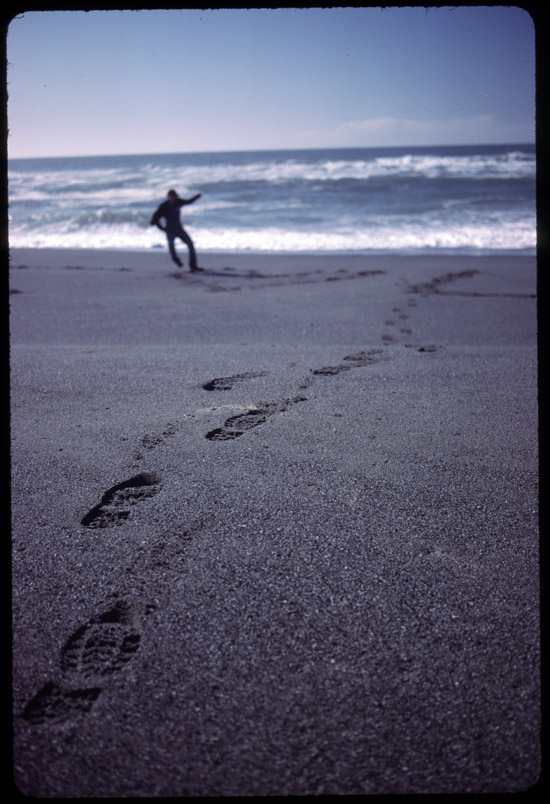
Allison, I started out with an Artiscan 2400fs parallel port scanner. It was slow, and had a maximum resolution of 2400dpi. It would also produce some streaks in darker images which I wasn't fond of, however photoshop ususally was able to clean up the images. I upgraded a few years ago to a Minolta Scan Dual IV which is 3200 dpi and does a fantastic job. They can be had on ebay for about $200. I still have the artiscan. I don't think it's worth anything. I'll give it to you free if you want it to tinker with. PM me if so. I remember it working ok with Windows XP, though the software was optimized for Windows 98. I am attaching some sample scans below. I hope these comply with the forum rules and are not too big. I tried to keep the width at 550 pixels and under 200kb like the rules stated.
Sample from the Artiscan - Kodachrome 64

Sample from the Minolta - Kodachrome 25
Posted by Kenneth Wuepper (Member # 1174) on 12-08-2007, 06:40 AM:
Sean,
Thanks for the samples from your scanners. Both of these units are producing excellent results for most people.
Your images do suffer from the usual digital comparison fault in that the one with most contrast seems to be much better. The second image, the footprints, suffers from a severe lack of depth of focus in the original image. Many would think this scanner was producing an inferior scan to the one above it. You can easily see the dust or fibers from the mounting around the entire image, an indication of the resolution in that area but not of the image focus.
Check out the Scheimpflug principle. In order to have all of that second image in focus you would need to have a view camera with a tilting lens board or a lens with a bellows and the ability to tilt the lens with respect to the film plane.
Just for fun, do you have scans of the same image from both scanners?
KEN
![[thumbsup]](graemlins/thumbsup.gif)
[ 12-08-2007, 09:45 PM: Message edited by: Kenneth Wuepper ]
Posted by Sean Weitzel (Member # 244) on 12-09-2007, 11:42 PM:
Good eye, Ken. The lack of depth was intentional on my part in the 2nd slide. I was shooting F2.8 at about 1/125 on Kodachrome 25 if
I recall correctly. I wanted the footsteps to give way into a blurry background. I'll have to pull the artiscan out and see how the same slide looks.
Posted by Adam Martin (Member # 641) on 11-27-2008, 11:23 PM:
Any recommendations on a good print scanner with an auto-feed? I have a bazillion prints to scan for Cinematour, with another bazillion on the way. I would prefer non-HP and under a million dollars. ![[Big Grin]](biggrin.gif) I'm not sure I want to trust an outside source such as scanmyphotos.com.
I'm not sure I want to trust an outside source such as scanmyphotos.com.
Posted by John Hawkinson (Member # 1135) on 11-28-2008, 12:11 AM:
print scanner? As in 3x5 prints? Or do you mean positive film, like E6 chemistry slides?
If you have thousands, I'd suggest you have it done outside, it'll save lots of hassle, time, and pain.
--jhawk
Posted by Adam Martin (Member # 641) on 11-28-2008, 12:31 AM:
3x5 and 4x6 prints, and yes, thousands.
Powered by Infopop Corporation
UBB.classicTM
6.3.1.2