This is topic Wierd Web Browser Problem with Backgrounds in forum Film-Yak at Film-Tech Forum ARCHIVE.
To visit this topic, use this URL:
https://ft-forum.com/ft/cgi-bin/ubb/ultimatebb.cgi?ubb=get_topic;f=8;t=005294
Posted by Mark Gulbrandsen (Member # 72) on 12-06-2007, 07:11 PM:
I'm having a strange web browser problem in that on several web sites the background does not diaplay. I also see this problem with the setup program on the Christie ZX projector where the background, pull down boxes and so on are not there... just a white background... although the setup program works just fine if you know where the pull downs are at. I normally run Internet Explorer 7 on the this laptop but I also downloaded the latest Netscape and it has exactly the same problem.... missing backgrounds. So this leads me to believe that its an XP issue and not the browser. Anyone else ever have this problem?
Thanks,
Mark
Posted by Scott Jentsch (Member # 1681) on 12-10-2007, 02:55 PM:
Mark,
Could you provide an example web site where this problem occurs?
I can take a look with the set of browsers that I have at my disposal, plus take a look at the code and see if they're doing some non-standard stuff which is most likely the cause of the problem.
Posted by Monte L Fullmer (Member # 2797) on 12-10-2007, 07:45 PM:
Should have stayed with IE-6, even IE-5.5 is a better browser. IE-7 isn't all quite there yet being related to VISTA. Big thing about these newer browsers, if your memory allocation isn't at least 1gB in size, performance can suffer.
If going Crapscape, find the older versions (like v.7.00, v.7.10 .. anything below v.8.00) Or, dive into Firefox which is the best - even though Crapscape and Firefox are both Mozilla related.
If you're gonna uninstall, go into the Registry and git rid of the keys related to what program you've uninstalled since, sometimes, these keys remain after an uninstall.
Or, as mentioned before a few wks ago: do a system restore BEFORE these problems occurred in the browser, if it's system related. That might get you back to square one.
Posted by Mark Gulbrandsen (Member # 72) on 12-10-2007, 10:12 PM:
HEre are a couple of examples.... Its not the background color setting... I also don't believe its the web browser because both IE7 and Netscape both do the same thing.
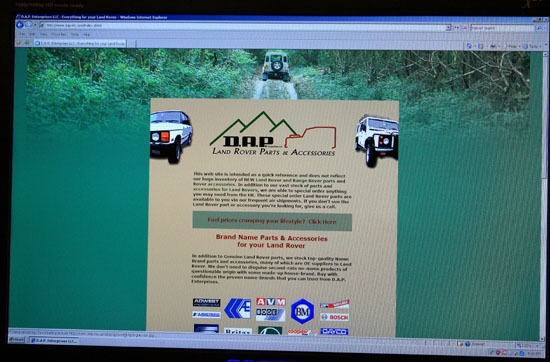
Here's how this web site is supposed to look....
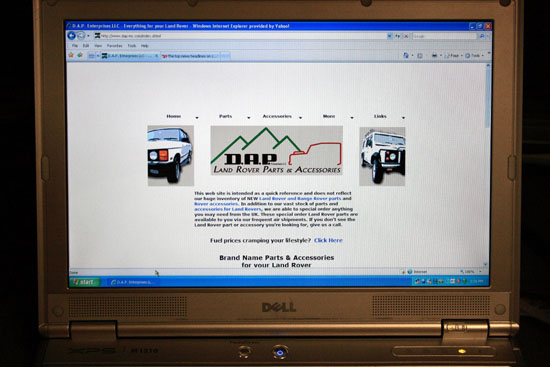
Here is how it looks on the laptop...
The Christie setup software which is actually web browser based is missing all it's backgrounds, tabs and pull down boxes.... it all works though if you know where the tabs and pull downs are....
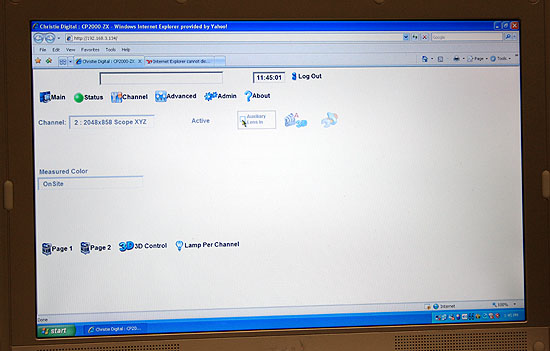
Strange ha?
Posted by David Stambaugh (Member # 1102) on 12-10-2007, 10:44 PM:
Mark, see this MS knowledgebase article. I suspect that's your problem. If I check the box "Ignore colors specified on web pages", that DAP page looks exactly like your screen grab.
Control Panel, Internet Options, General. Click the "Accessibility" button, make sure no options are checked.
Hmm, only seems to affect IE though.
Posted by Mark Gulbrandsen (Member # 72) on 12-10-2007, 10:48 PM:
Just checked and none of the boxes on that page are checked... Thanks for posting that though. I am beginning to wonder if its an actual Windows problem and not something with the browser.
Mark
Posted by James Westbrook (Member # 3690) on 12-11-2007, 01:19 PM:
Mark,
Are you running an anti-virus program with ad blocking? I would have several fields unaccessible when I had Norton's ad block on.
Posted by Mark Gulbrandsen (Member # 72) on 12-11-2007, 02:16 PM:
Nothing like that running. Have Adaware on here but Adwatch is not running at the moment.
Posted by Scott Jentsch (Member # 1681) on 12-12-2007, 04:07 PM:
The home page on the http://www.dap-inc.com/ web site has a lot of issues, so I'm not surprised that a browser would have difficulty displaying that page.
What's odd is that it appears that IE 7 is acting differently on the different machines.
Usually, the problems that are evidenced in your screenshots are a result of poor web design. In the DAP Inc. example, they have multiple HTML closing tags, lots of JavaScript that was copied from various repositories, and the page was generated by FrontPage. In this case, copy and paste was not their friend.
Posted by James Westbrook (Member # 3690) on 12-12-2007, 05:30 PM:
Not to mention the repetetive animation on the bottom of the page...that is quite a busy front page.
Mark, are the animated rovers showing up on your lap-top?
Posted by Mark Gulbrandsen (Member # 72) on 12-12-2007, 10:01 PM:
I don't see any animation on the bottom of the DAP web page even on the puter at home. What about the bottom picture of the Christie ZX setup software which is supposedly made up of simple graphics with pull down boxes.....? Nothing odd about that one. I tried two other laptops tonight that belonged to friends and they worked just fine.
Posted by Monte L Fullmer (Member # 2797) on 12-13-2007, 04:10 AM:
I clicked on, in my DELL Inspiron 6000 (and I notice that Mark, is that an XPS-1210 laptop there?) that D.A.P. site (in IE-6 and XP) and loaded up just fine
..and it loaded up fine in Firefox 2.0 as well.
Check to see if you've got the latest FLASH player software from Adobe for the animation. It could be a FLASH issue due to the vehicle animation. You need v.9.0.xxx.xx for the most FLASH updated software. The entire front page could have been encoded for FLASH playback.
Also, in the Adobe site, you should also download the lastest SHOCKWAVE FLASH player being v.10.x.x. Some of these sites require the most updated players so their pages can be properly displayed.
Also, what is totally interesting is that when you right-click on the screen, they've got it protected from any copying for a small window pops up for contact info.
-Monte
Posted by James Westbrook (Member # 3690) on 12-13-2007, 08:08 PM:
Flash...that would probably be it.
I was thinking Java.
I had to update my Java. Works great in Firefox. IE has problems with it.
Posted by Mark Gulbrandsen (Member # 72) on 12-14-2007, 07:40 AM:
I have the latest Java but I'll check the flash thingy..... good idea! Its definately NOT the web browser!! Its an XPS M1210.... pile of crap, the case on it is literally falling apart after 13 months of ownership. Never another Dell!
UPDATE: That was part of the problem. I now have the little cars at the bottom and the tan background but still not the green background nor the image at the top. I'm thnking a file is missing somewhere in windows that controls this. Thanks for getting it this far though!
Mark
Posted by Daryl C. W. O'Shea (Member # 1303) on 12-14-2007, 09:17 PM:
quote: Mark Gulbrandsen
Its an XPS M1210.... pile of crap
Are you using it as a portable? The XPS line won't last if you actually move them out of your house. The best, durability wise (and actually best if you're not a gaming freak), Dell has is their Latitude series. I've had my current Latitude for 5 years now... I often keep it wedged between a couple tool boxes in my car. If not there, I bash it around in a backpack. I've never seen an Inspiron or XPS last and I'm waiting to see what happens to the few Vostros we now have.
Posted by Mark Gulbrandsen (Member # 72) on 12-14-2007, 11:48 PM:
Oddly... yesterday I picked up a Lattitude CPX 650 mhz on the cheap in really good shape... The Lattitudes are also one of my favorites too as far as Dells go.
Other than the case on the XPS its been just fine and its a relatively fast laptop. I had an old Lattitude CPX P-3 500mhz and it was trusty until it fell over and the plastic hinge points broke. The flex cable was severed going to the display as a result when it was turned on. The display didn't crack or break.... just the hinge point and flex cable. I replaced all the broken parts and just ended up with nothing but a white screen when powered up so I figured it either wiped out the display electronics or the video card. Works ok with an external monitor though. I just tossed it into the dead laptop drawer in my shop at that point but I'll use the one I just picked up to sort out whats wrong with it as well... if I ever get time.
Mark
Powered by Infopop Corporation
UBB.classicTM
6.3.1.2