This is topic Wonky video/monitor problem in Vista Home Premium in forum Film-Yak at Film-Tech Forum ARCHIVE.
To visit this topic, use this URL:
https://ft-forum.com/ft/cgi-bin/ubb/ultimatebb.cgi?ubb=get_topic;f=8;t=005295
Posted by Andrew McCrea (Member # 674) on 12-09-2007, 07:29 PM:
Hey everyone,
I got a Dell computer from Wal-Mart on October 13. I had a weird problem where I'd hear the processor stop making that sound and then a few seconds later, this would happen:
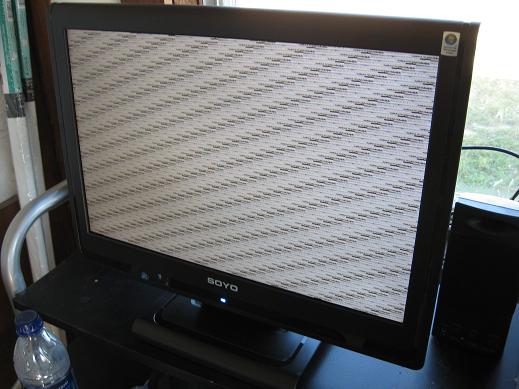
Well, I talked to Dell and they wanted me to update the driver. We booted up in Safe Mode with Networking and the problem happened again, so the woman at the call centre suggested that the video card was defective.
I took the computer back to Wal-Mart 2 days after my purchase and they gladly exchanged it.
Now, in the last few days, the problem has started happening again. I have a hard time believing that its a defective video card again.
I have to reboot the computer from holding the power button down and then I'm usually fine again for a little time.
I haven't noticed if it happens when I do something in particular... It just seems to happen randomly.
The computer came with Vista Home Premium, and I really love Vista, I just don't want to lose data or have to put up with this.
Here are my details:
Dell Dimension E521
Integrated NVIDIA GeForce 6150 LE graphic GPU
320GB Sata HD
1GB Ram
It doesn't have the extra video card, I have a dual core processor (so I guess the AMD AthlonTM 64 X2 dual-core).
I have put in a D-Link DWA-552 and a 4-port USB card from Zellers that I had in my old computer.
I greatly appreciate all of the help!!!
Posted by David Stambaugh (Member # 1102) on 12-09-2007, 08:01 PM:
quote: Andrew McCrea
I'd hear the processor stop making that sound
What sound are you referring to? The CPU fan?
Check the Event Viewer for any logged errors: Right-click on Computer, Manage, Event Viewer, Windows Logs, System (also Application).
Is the monitor using a DVI connection, or VGA? Have you messed with the screen refresh rate setting (it should be 60Hz and no higher for a flat-panel; most of the time Windows won't even let you select a higher rate on a flat-panel, but anything could happen). Is the video cable tight at both ends? Do you have another monitor you can swap with for testing?
Posted by Andy Muirhead (Member # 712) on 12-09-2007, 08:05 PM:
I'd guess it's trouble shooting time. You've replaced the main PC, and the problem still persists, so next try your cables from the video card to the PC, try another one. If the problem is still there, try a different monitor. Keep trying different things until you identify the weak link.
EDIT: Yeah, David posted the same time as me with some other ideas you would be best checking first, ie check that your outputted video card resolution/settings are compatible with your monitor.
Posted by Andrew McCrea (Member # 674) on 12-09-2007, 08:33 PM:
OK, so I have it filtered down to Errors... What exactly am I looking for?
Its on VGA (the blue typical monitor connection). I don't know how to modify the refresh rate or anything on Vista...
Also the noise I'm referring to is the noise the processor makes when its... processing.
By old computer, I meant my IBM NetVista year-2000 computer with Windows XP. I've heard sometimes Windows has problems with USB or more than one network card.
Posted by David Stambaugh (Member # 1102) on 12-09-2007, 08:40 PM:
Try to correlate the timestamp of any logged errors with the time that the problem occurred, and the subsequent reboot (although it's unlikely you'll find anything helpful in the log after rebooting).
The only noise a CPU might make that I'm aware of is from the cooler fan. If that fan is stopping for some reason, all kinds of crazy things could happen. Once or twice I have come across systems where the switching power supply could sometimes be heard making a high-frequency whining sound under different CPU loading, but that's pretty rare.
Posted by Andrew McCrea (Member # 674) on 12-09-2007, 08:49 PM:
Sorry, just that typical computing sound is what I'm talking about... I didn't mean to make it sound like it was a bigger deal...
So far, a correlation I've seen is that most errors before a "The previous shutdown was unexpected" is this error: "The following boot-start or system-start driver(s) failed to load: cdrom" and here's a website referring to the error.
Posted by David Stambaugh (Member # 1102) on 12-09-2007, 08:58 PM:
Hmm. Right-click on Computer, Manager, Device Manager. Are any devices showing a yellow or red "?" or "!"? Be sure to check under "Other Devices".
The change in CPU sound that you're hearing might be important if it is the fan stopping or something like that.
Posted by Andrew McCrea (Member # 674) on 12-09-2007, 09:03 PM:
No, its not the fan. Its just that sound you hear with every computer. Sometimes you can really hear it when a computer is working pretty hard (I hear it from every computer). Its hard to explain.
Nothing's showing a ! or ?.
Posted by David Stambaugh (Member # 1102) on 12-09-2007, 09:11 PM:
Well, that CD-ROM error message is kind of suspicious but if everything looks good in Device Manager, that may be a false lead. Does the CD drive work ok after Vista finishes booting?
I'd focus on swapping out the monitor (and cable) at this point. Maybe remove the USB card, then the D-Link card if the problem is still occurring.
Posted by Joe Redifer (Member # 3) on 12-09-2007, 09:32 PM:
You're hearing the hard drive read and write.
I have found a few things that could be causing the problems:
quote:
-I got a Dell computer from Wal-Mart
-I really love Vista
-My monitor is made by world renowned electronics giant SOYO!
You should always assemble your own computer instead of having a place like Dell or Hewlett Packard do it for you. The only reason you should ever buy a pre-assembled computer is if you get a laptop or a Mac. The laptop will be portable, but it will still have that shitty Dell or HP crappiness to it. You can only buy Macs preassembled, unfortunately.
You really should not love Vista. Wait about 5 years and then it will be OK. It took Windows XP quite a while to become acceptable for doing anything other than searching the internet for a new service pack.
I've never heard of Soyo, but I bet they suck ass. I bet that is what is failing on you. They are probably based in North Korea or Ireland or some other place that sucks.
Posted by Tristan Lane (Member # 1169) on 12-09-2007, 09:58 PM:
Soyo has made some decent PC motherboards in the past. I'm actually using the same Monitor the Andrew is using, coupled to a Dell Computer (optiplex GX280), Nvidia card, and Vista Home premium. No problems so far.
Andrew: Is the on screen menu of the monitor affected by the same problem the PC output is? If so, suspect the monitor.
Try the DVI input if you find that the VGA input is the problem (that is if you have a DVI output on your video card.)
Posted by Andrew McCrea (Member # 674) on 12-10-2007, 06:59 AM:
Hey Tristan,
My menu is not affected (I didn't think to say this earlier) and I do not have DVI.
I also have a lot of these errors and Google suggests "Repeated Vista Crashings" but I haven't had a chance to read it yet as I'm out the door to an exam!
Error:
"The server {C7E39D60-7A9F-42BF-ABB1-03DC0FA4F493} did not register with DCOM within the required timeout."
Posted by Rick Raskin (Member # 1561) on 12-10-2007, 07:01 AM:
quote: David Stambaugh
Maybe remove the USB card, then the D-Link card if the problem is still occurring.
I've seen similar problems with RF interference in the past.
How close is the monitor to the D-Link router? I'd remove the wireless card as above and make sure the router is not nearby. Also try switching channels on your router if possible.
Posted by Leo Enticknap (Member # 534) on 12-10-2007, 07:19 AM:
Given that this problem has now happened with two totally separate PCs (identical models) but with the same monitor, that would lead me to believe that the problem lies with the monitor.
Has that monitor ever worked properly with any other computer? If so, that leaves two possible conclusions.
1 - The monitor is knackered. To check this, follow Tristan's suggestion of trying to get the monitor's own settings menu up after the display goes ga-ga.
2 - There is some sort of conflict between that model of monitor and the hardware/software combination in the PC. If the graphics card and monitor support DVI as well as VGA, then agreed with David - trying DVI might side-step the problem.
Posted by Andrew McCrea (Member # 674) on 12-10-2007, 11:38 AM:
The problem happened with my old monitor from my IBM machine on the other Dell. I bought this monitor afterwards because I thought that other monitor wasn't compatible.
When the problem happened on this new monitor on the other Dell, I and the Dell support lady were lead to believe that it was the computer hardware.
Then it started happening on this second Dell computer in the last few days (I've had it since October 15 or so).
The wireless router is a few hundred feet away (because I live in my own building at the ranch), the actual computer (with the wireless card installed in the machine) is sitting right beside the computer. I got rid of my computer speakers just in case the magnet in them was the problem but its still happening.
It appears another correlation is this error:
"The server {C7E39D60-7A9F-42BF-ABB1-03DC0FA4F493} did not register with DCOM within the required timeout."
to this error:
"The following boot-start or system-start driver(s) failed to load: cdrom"
to this error:
"The previous system shutdown at 11:20:50 AM on 10/12/2007 was unexpected."
EDIT: I also just put my "drivers and utilities" CD in the drive and the drive isn't reading it.
Posted by Chris Slycord (Member # 4239) on 12-10-2007, 01:18 PM:
Well if the cdrom-related drivers failed to load... it's kind of expected that your cd drive won't work since the driver is what your OS uses to talk control the cdrom.
Posted by Tristan Lane (Member # 1169) on 12-11-2007, 02:10 AM:
quote: Andrew McCrea was the last to post
C7E39D60-7A9F-42BF-ABB1-03DC0FA4F493
Run Regedit and do a search for the string of numbers in the error message. It may shed more light on which driver/hardware component is failing.
Posted by Rick Raskin (Member # 1561) on 12-11-2007, 04:35 PM:
quote: Andrew McCrea
I have put in a D-Link DWA-552 and a 4-port USB card from Zellers that I had in my old computer.
So we have established that the problem also occurred with your old monitor. I recommend you remove (uninstall) the two items above that you added from your old computer and see if the problem still occurs. If it clears then install the reused hardware one item at a time to try and identify the bad guy. You may be fighting a compatibility issue with the new motherboard and the old stuff. Try the above and let us know the results.
Powered by Infopop Corporation
UBB.classicTM
6.3.1.2