This is topic Lets see more cinema pictures!! -> OT Computer data backup jabber in forum Film-Yak at Film-Tech Forum ARCHIVE.
To visit this topic, use this URL:
https://ft-forum.com/ft/cgi-bin/ubb/ultimatebb.cgi?ubb=get_topic;f=8;t=005323
Posted by Paul Gordon (Member # 3320) on 01-01-2008, 08:54 AM:
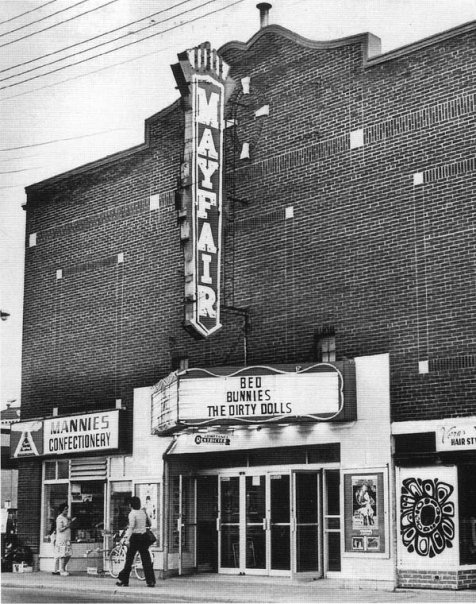
It doesn't seem like there has been much change in the archive of cinema pictures on this site. I'd love to see more, specially the older single screen movie houses. I uploaded our cinema pics for the Mayfair Theater in Ottawa a year ago...but no one posted them.
[ 01-03-2008, 08:10 PM: Message edited by: Adam Martin ]
Posted by Brad Miller (Member # 2) on 01-01-2008, 12:59 PM:
Well I had the most magnificent computer crash and everything sent to the "pictures" account not posted yet is gone. Please resend them to my email address listed on the "contact us" page. (If you originally sent it to my direct email address, then I still have it.)
Posted by Mark Gulbrandsen (Member # 72) on 01-01-2008, 03:14 PM:
I guess I can assume thats where the "Digital Cimema Forum" also disappeared too as well.... ![[Confused]](confused.gif) . I mean really... in this day and age if you're not running at least a raid 1 on that sort of thing it can get to be pretty hopeless with hard drive crashes occuring on important stuff....
. I mean really... in this day and age if you're not running at least a raid 1 on that sort of thing it can get to be pretty hopeless with hard drive crashes occuring on important stuff....
Mark
Posted by Brad Miller (Member # 2) on 01-01-2008, 05:45 PM:
Yeah well today I upgraded to a 5 disc raid 1 setup, so that should be a thing of the past. In the meantime, the data may or may not be lost. I am working on recovering it. Still, it doesn't hurt to resubmit, although I won't have any time to update anything until Feb or March.
Posted by Mark Gulbrandsen (Member # 72) on 01-01-2008, 07:39 PM:
I detest storage on CD ROMs so I just set up a Dell 1550 server (single rack space small server) with a raid 5 on it to store my digital photo files. If I loose a drive I just re-build the array and it keeps on chugging along like the Eveready Bunny without any data loss. I think it will fill up pretty fast though as it only has 320mb SCSI's on board. It was more of an experiment but the server works nice just running Windows XP... and the 1550's are pretty reliable... and literally dirt cheap, I paid 50 bucks for mine with 3-18 gig drives anbd bought the 320's off of E-Bay! If I fill it up I'll end up getting a larger used Dell and just move these drives over to it and add some more. The single rack unit servers only hold 3 drives.... I could also add a power vault storage frame to the 1550 with up to 12 drive dual channel RAID capability for a few hundred bucks.
Mark
Posted by Scott Norwood (Member # 30) on 01-01-2008, 08:01 PM:
I hope that Brad and Mark are still doing regular backups to removable media. RAID does not equal backup. RAID can offer redundancy in case of hardware failure, but will not protect against a power surge, fire, or accidental deletion.
Posted by Chad M Calpito (Member # 3736) on 01-01-2008, 08:18 PM:
I sent some pictures of my theatre sometime last year via snail mail. Maybe they got lost in transit. It's primarily booth pictures.
Posted by Brad Miller (Member # 2) on 01-01-2008, 09:35 PM:
There is a stack of "snail mail" sitting here that I haven't had time to scan, so it's probably in that stack.
Posted by Chad M Calpito (Member # 3736) on 01-01-2008, 11:25 PM:
I understand, Brad. ![[Big Grin]](biggrin.gif)
Posted by Bobby Henderson (Member # 840) on 01-01-2008, 11:43 PM:
I'm hoping to be able to get some good pictures of Warren Theatres' Moore 20 complex a little over an hour's drive away from me. I'd love to get a booth tour, but I haven't been able to get much feedback at all from their staff at this point. I'm hopeful they'll let me or another F-T participant tour the place and take photos (and promote the place via a very formidable movie theater enthusiast web site). Even better yet, the Moore 20 might be a good place to hold some sort of F-T get-together of members in the central part of the country.
Posted by Brad Miller (Member # 2) on 01-02-2008, 01:05 AM:
We already have pictures of the Warren theaters, but we are waiting on approval to post them. They are absolutely beautiful theaters.
Posted by Mark Gulbrandsen (Member # 72) on 01-02-2008, 08:20 AM:
quote: Scott Norwood
I hope that Brad and Mark are still doing regular backups to removable media.
I'm not at that point yet with this system... I don't even know what they use for backing up lots of large files these days. I do store stuff elsewhere at least what I would consider really important stuff... Its actually stored on another system off site and I do pay for that storage but the space is more limited.
Mark
Posted by Christopher Howland (Member # 4386) on 01-02-2008, 03:54 PM:
Many of the large companies that need to store large amounts of data are still using "tape" drives. Each tape can store up to 90 gig of data, and they are not that expensive. They are not like cds though. They are purely for backup purposes in the case of an extreme failure. Since its a tape, you cant pick out files to restore, you gotta restore the entire thing. Its almost like a ghost image of whatever you backed up. However, they can be deleted and reused again, and they hold up for a much longer time period than VCR tapes.
Posted by Steve Guttag (Member # 268) on 01-02-2008, 04:32 PM:
True and NOT true. We still use a streaming tape back up for our stuff...there is a whole, back up set up for the workstations as well as the server (all done from the server though).
Anyway...once, I deleated a file accidentally while writing a proposal. I was able to run the back up program and it found the file on the tape and put it in a recovered file folder...just the file I was looking for.
I want to say I was running a dos app. and was in a dos mode so the usual delete safe guards (recycle bin, empty recycle bin...etc) were not there so a mere delete was enough to kill the file.
Steve
Posted by Mark Gulbrandsen (Member # 72) on 01-02-2008, 09:24 PM:
From what an IT friend of mine said today is that tape backup is still by far and away the more popular method for backing up but that it is not the most stable method. The tapes are exposed to too many outside influences and age also kills them pretty quickly. As long as you do backups regularly though its certainly an ok way.
Mark
Posted by Scott Norwood (Member # 30) on 01-02-2008, 09:55 PM:
The best bargain right now in backup technology is DLT7000 drives. They go for about $120 each on Ebay and the tapes hold 35 gigs native (tapes are $25-35 each). The format is stable and widely used, although it hasn't been in current production for several years.
For higher capacity, look at LTO-3, which can write 400 gigs (native) to the tapes.
DLT and LTO are not like the crappy QIC, 4mm, and 8mm tape drives of the past. They are well designed formats that rarely have issues. Restoring a single file is not a problem, unless you are using some really horrible backup software. The time to restore a file can vary widely depending upon how the backup was made.
Some systems (e.g. AIX) actually let you make a bootable tape that will automatically restore the system in the event of a complete disk failure.
Posted by Steve Guttag (Member # 268) on 01-02-2008, 10:00 PM:
And that is just it...we back up daily. For us, it is merely to avoid catestrophic crashes from destroying the data...it isn't to look back 5-years and see a snap shot of the hard drives. The streaming tapes have done us pretty well thus far.
Steve
Posted by David Stambaugh (Member # 1102) on 01-02-2008, 10:07 PM:
I'll put in a vote for Sony AIT. Been using AIT-1, -3, and now -4 drives and media for almost 5 years. I'm getting 300GB-400GB per AIT-4 media and averaging ~1.3GB/min. throughput which is still serving us well. I think AIT-5 is out now.
Posted by Mike Blakesley (Member # 26) on 01-02-2008, 10:44 PM:
I've been doing a weekly "system" backup at our store using the same tapes for about 10 years. The system does a "verification" pass on the tape after writing it so it makes sure the data is all there. Never a problem. I'm kind of amazed the tapes all still work...I know it's risky but we've never had to restore a backup yet (knock wood) and in March we're replacing the whole system with one that does its backing up online, so I'm hangin' tough with the tapes.
Posted by Frank Angel (Member # 248) on 01-03-2008, 05:58 AM:
We backup alternating between two Maxtor 250G external hard drives three times a week, and like Steve says, it isn't so much that you want to be able to go back years to find stuff, it's just in case your server blows up (in a place that had a major fire which gutted our complex AND the servers -- you tend to think more catastrophic than just a hard drive or two failure). But now we have a mutha of a server with 6 hot-swapable raid array and pretty much the physical box would have to blow up in order for you to really be in trouble.
Aside from protection from really serious failures, our backup system really is there so that it lets us go back about two weeks, so we are protected from situations like Steve's where a User comes to me and says they accidently deleted or accidently changed a file but they want the earlier one back. I need to be able to go get that particular file and easily restore it.
Does anyone do the off-site thing? I.e, you take at least some backup copies away from the building where the server resides? That's supposed to be important. And let me tell you, once you've had a major catastrophy, not to just the computer hardware but to the environment where the hardware sits, you are a little more impressed with the need for off-site backups.
We are looking to using one of those internet companies for storage. Mike, how will you be handling this? What company are you going to go with, if you don't mind my asking. Do you find this backup method is cost-effective?
Posted by Rick Raskin (Member # 1561) on 01-03-2008, 07:21 AM:
We once used an off site independent backup facility. The only time we needed to retrieve a disk they were unable to locate it. We cancelled the contract but they continued to try and bill us. Now backups are done in house and reside on numerous servers both on and off site as well as archived tape.
Posted by Scott Norwood (Member # 30) on 01-03-2008, 08:04 AM:
Commercial off-site storage is generally a waste of money for smaller operations unless a) you are storing sensitive data or b) you have a huge quantity of media. It's generally easier and more cost-effective to get a safe-deposit box or send the tapes home with a trusted employee.
Remember that in order to restore from the tapes in case of fire/flood or other situation in which your hardware is destroyed, you will need new hardware and also a copy of whatever backup software you used to do the backups (hopefully the same version).
Another option (more for quick recovery from accidental deletions than for long-term storage) would be to have an off-site or colocated server somewhere and use "rsync" (or similar) to copy daily (,hourly, weekly...) changes to important files. This is mostly useful for business-critical stuff (accounting system, source code, etc.) than for someone's MP3 archive.
Posted by Tim Reed (Member # 137) on 01-03-2008, 09:14 AM:
All of my Screen Attractions work is archived on OnStream 30GB DLT tapes. The (now defunct) OnStream drive and software are clunky at best to work with and I've never been happy with them. It can take forever to locate a file and get it off a tape, which always worries me.
Further, I'm becoming increasingly concerned as the equipment and media age... I suppose DVD-ROM would be a good alternative?
Posted by Steve Guttag (Member # 268) on 01-03-2008, 09:28 AM:
Our tapes do indeed leave the building (I guess with Elvis). As I'm not involved with that at all, I don't know the quantity of tapes or the frequency that things move about. I do know that there are tapes labeled with the days of the week that I've had to make sure were in the drive prior to leaving when the people that normally do that are on vacation and I was going to be in the office.
Steve
Posted by Mike Blakesley (Member # 26) on 01-03-2008, 10:33 AM:
quote: Frank Angel
Mike, how will you be handling this? What company are you going to go with, if you don't mind my asking. Do you find this backup method is cost-effective?
Frank - we are a Carquest store and we're switching to their new computer system which includes online backups as part of the package. For our own local stuff (checkbook and such) we just use a regular PC which I back up onto a CD-R every week or so.
Posted by Phil Hill (Member # 371) on 01-03-2008, 04:31 PM:
I use Maxtor external hard drives for backups. I keep one hidden here at home (in case of a break-in or theft of my computer) and a duplicate one at my parent's place in Texas. That way, if one or the other place gets destroyed, I still have a backup to restore from.
I use a separate folder or a disk partition for all data on all my computers so it's easy to backup. Ya always can re-install the application/program...but it's the data and files that are important to safeguard.
I would never use an online backup service...ya just don't know what they do with all your personal files and porno pics. ![[Roll Eyes]](rolleyes.gif)
I stopped using tape for backup YEARS ago...
Posted by Mark Gulbrandsen (Member # 72) on 01-03-2008, 05:28 PM:
I have had my OS on a completely seperate drive for many years now and split up storage between two other drives, all are SCSI type drives and they've been very reliable over the past several years.... When I ran IDE type drives that "C" or OS drive always seems to be the one that dies for what ever reason. Phil's idea is good and with the hot pluggable drives on the 1550 I could keep an entire set of RAID 5 drives elsewhere and rotate them every once in a while.
Mark
Posted by Monte L Fullmer (Member # 2797) on 01-03-2008, 08:32 PM:
What's the reasoning in not using any form of optical disc devices for HDD archiving? Using RAID systems, or mirrored HDDS for daily backups, that I can see..
I've never had a problem with the CD thing, but just curious.
Posted by Mark Gulbrandsen (Member # 72) on 01-03-2008, 11:05 PM:
Using CD's is just not a "clean green" way to do it... How many of the silvery disks do you want all over the place or sent to the garbage dump? Even data tapes can be used over and over for many years before they go bad... Some might say re-writable CD ROMS's but I've had a few problems with those and they seem unpredictable. Ok for stuff thats not important though.
Mark
Posted by Daryl C. W. O'Shea (Member # 1303) on 01-05-2008, 12:30 AM:
quote: Monte L Fullmer
What's the reasoning in not using any form of optical disc devices for HDD archiving?
Optical media is none of reliable, media cost efficient, time/labour efficient or even practical in terms of storage capacity.
Posted by Monte L Fullmer (Member # 2797) on 01-05-2008, 02:52 AM:
would "laser rot" be the main culprit then?
Posted by Brad Miller (Member # 2) on 01-05-2008, 12:08 PM:
Update - ok so there is a program Get Data Back that I got and I am reporting for everyone's future benefit that although it took 3 DAYS to do it's thing, I got about 3/4 of the data off of that drive back. I would have gotten it all, but the drive started making horrible noises and flat out physically died about halfway through the recovery. (I got everything of importance anyway , including the picture submissions.) This program is highly recommended for anyone stuck in this situation.
I also invested in a couple of Netgear RND4000 ReadyNAS NV+ units. These are a hardware based raid system, of which I loaded up 4 Seagate 750GB drives each and set them to a Raid 1 array. (Note the manual for this is crap, but just ignore the "setup wizard" and click on the "advanced setup" option and it is pretty straightforward.) It is a network drive and you can set up different volumes (don't forget to do this or you won't be able to write any data to it) that are "public" within your network or "private" with password protection. The unit will email you when the drives are getting full, overheating, or one is developing read/write errors. When using a Raid 1 array, so long as I install a new drive before all 4 die, it will automatically re-write the data to the new drive and put it into the raid. The drives are hot-swappable too. The best part of it all is the USB jack on the front coupled to a backup button. I can simply plug in a 750GB external USB drive, press the backup button and it will sync the files to the external drive. Then that drive is taken to the safety deposit box off-site however often I like.
I HIGHLY RECOMMEND this unit to anyone with a need to get some solid data backup protection.
Posted by Mark Gulbrandsen (Member # 72) on 01-05-2008, 12:56 PM:
Yea... I know another photographer using a similar storage system and he loves it. I think there are some of those available for down around even 500 bucks... but at any rate thats a very good route to go.
Mark
Posted by Adam Martin (Member # 641) on 01-05-2008, 03:04 PM:
What symptoms of failure did that drive exhibit, Brad? I recently had a 500 GB Seagate fail (physically) after only 6 months of use.
Posted by Phil Hill (Member # 371) on 01-05-2008, 06:04 PM:
In the last 20 years, I've had more Seagate drives fail than any other brand. IMHO they are CRAP! I have avoided them like STDs.
Posted by Chris Slycord (Member # 4239) on 01-05-2008, 06:19 PM:
quote: Brad Miller
Update - ok so there is a program Get Data Back that I got and I am reporting for everyone's future benefit that although it took 3 DAYS to do it's thing, I got about 3/4 of the data off of that drive back. I would have gotten it all, but the drive started making horrible noises and flat out physically died about halfway through the recovery. (I got everything of importance anyway , including the picture submissions.) This program is highly recommended for anyone stuck in this situation.
A similar sounding product is called "Spinrite" available at linky
It'll also recover data "in place" on a drive meaning that it'll detect your bad sectors, recover the data from them, then tell the drive to no longer use those. Highly recommended.
Posted by Scott Jentsch (Member # 1681) on 01-05-2008, 06:44 PM:
Another interesting device that I've read about is the Drobo system.
http://www.drobo.com/
It takes up to four regular drives and makes them into redundant storage, connected to a USB port. In that respect, it's more like an external hard drive with redundancy than a pure NAS product.
I just finished spec'ing a machine that is going to use two 500GB SATA drives in a RAID 1 configuration inside the box. Everything that happens to drive 1 is mirrored to drive 2. While that doesn't protect against fire or file system corruption, it protects against hard drive failure on a second-by-second basis. This aspect was important for the tax preparation client.
Offsite backups are still important. External hard drives are the fastest and most convenient. Optical is less expensive (depending on the backup set size), but more cumbersome and there are some worries about longevity, but I am not all that concerned about that (just don't use the cheapest off-brand media to be found).
Posted by Mark Gulbrandsen (Member # 72) on 01-06-2008, 09:50 AM:
quote: Phil Hill
In the last 20 years, I've had more Seagate drives fail than any other brand. IMHO they are CRAP! I have avoided them like STDs.
Back when I went to Dolby D-Cinema Training they talked about how manufacturers grade the hard drives they manufacture. With Server manufacturers being offered the best drives and the rest being sold to DIY places like Fry's and the remainder to places like Target and Wal-Mart. Now I have bought drives at Wal-MArt to replace bad drives in DTS XD_10's and haven't had one fail.... so makes me wonder if thats true or not. I can certainly see manufacturers doing something like though.
I have had alot of ALL manufacturers IDE drives fail over the last 15 years more Western Digital then others, an almost equal amount of Seagates and a few Maxtors and IBM's... a large box full of em in the garage to show for it. After the last IDE drive started making more and more noise I went to SCSI drives.... this was alomst 4 years ago now. Haven't had even a hiccup out of them.... and they were NOS Seagates when I bought em... ST150176LC to be exact... these are the two inch thick variety... not the sleeker 1" SCSI type drives. These were never used pulls from servers that were bought but never installed... later scrapped out and the parts sold off. I think you're going to find that the best reliability still lies in SCSI drives, most IT guys would agree and my experience certainly leans that way. Its obvious alot of folks are still using them and much research is still going into them in terms of size and speed. I don't think SATA is really going to offer any more reliability over IDE... things went SATA because they are cheaper to make... they also do offer better performance as hopefully any new product would... but I haven't noticed any higher reliability out of them over IDE.
Mark
Posted by Paul Gordon (Member # 3320) on 02-06-2008, 08:24 AM:
Pictures for the Mayfair Theatre re-uploaded/emailed.
Posted by David Stambaugh (Member # 1102) on 02-06-2008, 11:05 AM:
I currently buy mostly Seagate 7200.11 SATA2 and Western Digital Raptors for the office. The Raptors are basically SCSI drives with a SATA interface. Very reliable. The Seagates seem no better and no worse than their competitors among regular SATA(2) drives. I've had the worst luck with WD Caviars.
Our oldest server is 5 1/2 years old now. The Quantum SCSI drives have been spinning that entire time. Have had 1 drive failure in 5 years, RAID-5 with hot-swap so no downtime.
Posted by Daryl C. W. O'Shea (Member # 1303) on 02-06-2008, 10:16 PM:
FWIW, the guys who maintain Amazon's EC2 and S3 clusters (thousands of nodes and even more drives) report that around 30% of all new drives they install from all manufacturers fail within 3 months.
That said, drive manufactures seem to rotate on who gets to make good drives and who gets to make pieces of junk. I wouldn't go out and buy a WD Caviar to put in production these days (then again most of the 50+ low-end Dell's I put into service this year came with them). Before two years ago (and for a few years preceeding then) they were pretty good. Before that Maxtor was making decent drives for a short period (just after Fujitsu, who were previously make decent drives, screwed up royally), around the same time that IBM was producing the Deathstar series of drives (bad firmware).
Currently (for about the last two years), Seagate 7200.9,10,11 drives have been good performers in their price range.
Bottom line, it doesn't really matter. Some of the drives you buy will fail, some won't. Depends on if you're lucky enough to fall in the far end of the bathtub curve or not.
Posted by David Stambaugh (Member # 1102) on 02-07-2008, 11:05 AM:
I mostly agree with you Daryl. For run-of-the-mill desktop drives, the drive manufacturer probably makes little difference. Drives fail, a simple fact of computer life.
I do think the WD Raptors are in a class of their own, have never had one fail. They're very expensive on a per gigabyte basis compared to "regular" drives but sometimes you get what you pay for. I think the 150GB Raptor has a street price of about $175 now. Compare that to a Seagate 7200.11 500GB for around $120. Lately I've been using a Raptor for the boot drive and a Seagate 7200.11 as the 2nd drive in new XP deployments. Occasionally I'll stripe a couple of the Seagates in RAID-0, gives a modest boost in performance.
We have a few Samsung 500GB drives deployed, haven't had one fail yet.
Scary thought: About 3 years ago, when the company I work for was a lot poorer, I deployed 3 Hitachi Deskstar 400GB drives in a RAID-5 array in a low-end server. Haven't had a single problem with it. ![[uhoh]](graemlins/uhoh.gif) I do have a spare drive sitting on the shelf though.
I do have a spare drive sitting on the shelf though. ![[Wink]](wink.gif)
Posted by Daryl C. W. O'Shea (Member # 1303) on 02-08-2008, 03:21 AM:
3 year old Deskstars are fine (they probably don't even "click" every couple of hours to re-adjust themselves). I can't think of any major issues Hitachi has had since taking over IBM's storage business.
Raptors are fine drives... like you said a SCSI or SAS drive attached to a SATA controller. Something that should have really always been available in parallel formats, too, at the higher price point. I've just not had much use for Raptors (especially at nearly 5 times the price/GB, although that's offset by most business user's machines not needing more than 20GB anyway)... I'm usually either deploying normally idle office workstations where any drive will do or, oppositely, clusters to process 10's of millions of tiny files an hour in which case I use pre-fetch algorithms to maintain streaming like random read throughput.
Posted by Peter David Bruce (Member # 4447) on 02-10-2008, 06:03 AM:
i emailed my cinema pictures and info to Brad back in jan. Looking forward to seeing them up. quite keen for you all to see where i work. ![[Smile]](smile.gif)
Powered by Infopop Corporation
UBB.classicTM
6.3.1.2