This is topic A good GPS navigation system in forum Film-Yak at Film-Tech Forum ARCHIVE.
To visit this topic, use this URL:
https://ft-forum.com/ft/cgi-bin/ubb/ultimatebb.cgi?ubb=get_topic;f=8;t=005348
Posted by Michael Schaffer (Member # 1204) on 01-18-2008, 07:28 PM:
As a nice accessory for the long trip from San Diego to Boston that I have ahead of me, and to make getting around in a completely new area easier, I have decided to finally get myself a nice GPS navigation system. I don't need any of the gadgets, bluetooth, mp3, all that nonsense, I need a good, reliable system that is not too bulky to take with me when I am flying somewhere.
It appears to me that the option where the systems announces the street names as well as turns (text-to-speech or whatever that is called) is more important than a widescreen display. You aren't supposed to stare at the screen anyway while driving. So right now, I am leaning towards the Garmin nüvi 260 which is the cheapest one with text-to-speech and a regular display and not much (if any) multimedia features. It also seems to be quite handy, flat rather than the CRT shape some of them have and which make them a little bulky.
I guess the actual navigation features and content such as points of interest, shops, hotels, etc, are pretty much the same and the price differences are just additional features such as widescreen display or multimedia. So far, I have only used Garmin systems, so I wonder how other systems, like Magellan, compare to these?
Posted by Louis Bornwasser (Member # 3063) on 01-18-2008, 10:03 PM:
I have a Garmin Nuvi360 equipped with North American and European data bases. It is simple, small and cheap. Very satisfied....about 50 languages. I travel with it even if I am not driving. Louis
Posted by Mark Gulbrandsen (Member # 72) on 01-18-2008, 10:14 PM:
quote: Louis Bornwasser
about 50 languages
So... which one do you normally use?
Mark
Posted by Tim Reed (Member # 137) on 01-19-2008, 02:57 AM:
I just bought my wife a Garmin for Christmas. Very nice. Portable. Easy-to-see screen.
Posted by Michael Schaffer (Member # 1204) on 01-19-2008, 03:04 AM:
After reading a number of reviews, I am leaning more and more towards the Magellan Maestro 4040 which is only slightly more expensive than the Garmin nüvi 260, but it also has text-to-speech, widescreen display and bluetooth for hands-free calling. Dunno if I really need that, but it might be practical. The navigation features appear to get generally very positive reviews although some say the semi-transparent icons on the screen are a little hard to read. Still, that looks quite attractive. But I have absolutely no experience with Magellan systems. Has anyone ever used one of them?
Posted by Stephen Furley (Member # 1277) on 01-19-2008, 04:38 AM:
You must really like driving Michael, that's a heck of a long journey; it's actually further than the total distince that I drove in the several years that I had a car.
Just make sure that you don't do what several drivers have done with GPS systems recently, I've heard of two cases here and one in the US in the last couple of months where a driver has been instructed by the GPS to turn left or right and they have done so, onto a railway line at a level crossing. In the US case the driver was unable to reverse their vehicle off the crossing, and it was hit by a train. This was on Metro North in New York (state, not city). The story, and a picture of the crossing are here:
web page
There was a thread about it on uk.railway a couple of weeks ago.
Even in the dark I really fail to see how the driver could mistake this crossing for a road; it's not exactly an unmarked one, is it?
Posted by Leo Enticknap (Member # 534) on 01-19-2008, 09:09 AM:
I use a MyGuide 3100, and, despite being about the cheapest satnav on the market, I'm very pleased with it. The machine is really a fully featured PDA running Windows CE 5.0, and is easy to hack to install other software. The GPS software it comes with is a rebadged version of iGO, and the package I bought had UK maps only. You can download the Main Roads of Europe (motorways and 'A' roads only, bascially) map and install it for free, but the licence file won't let you install other maps. I guess the US version is similarly locked to US maps only.
However, I had no problem hacking it and installing an Ebay-purchased full version of iGO, plus TomTom (instructions are on the EBuyer forum thread linked above). I personally prefer the former: the directions are clear, the route logging feature is useful (you can note the total journey time so that if you do the same trip again, you can give people a reasonably accurate ETA), and you can configure it to change from a small scale 2D map while cruising on the motorway (5 miles on the screen) to a large scale, detailed 3D map as you approach junctions and decision points.
The machine comes with 500mb of flash memory built in (enough for iGO, plus UK, Ireland and either Main Roads of Europe or one other country - probably enough for detailed maps of 3 or 4 US states, I'd guess), and will also take SD cards up to 4gb. Excellent value, IMHO. If you want to install a media player and also use it as an ersatz ShiPod connected to your stereo (standard stereo headphone jack), you can do that too.
Posted by Joshua Waaland (Member # 287) on 01-19-2008, 01:27 PM:
When I was on the road doing sales the last two years, I used a Magellan c330 that my employer bought me. My biggest two complaints is that the maps were already out of date when I got it, and it takes really screwy routes sometimes. Even though I have it set to take the most direct route it will sometimes take me way out of the way when I know there is a faster, more direct way.
As for the maps, the first time I noticed they were messed up was when I was driving across a major highway that runs east to west across mid-Ohio that had been there for twenty years. It showed me driving through a field parallel to the highway about 1/2 a mile away. Once I was trying to get to a place that is on the other side of a dead end street but it took me to the dead end street so I have to find a way back out and around to get to the building.
There are quite a few map mistakes that I have found while using it since I got it including taking me past the place I was going to and showing places on the maps that have been gone for many years. For instance if I pick out a Burger King nearby and drive there only to find that there is now a bank there.
The fee to update the maps online costs almost $50 if I remember right. Not really worth it to me since I have a feeling that the mistakes I noticed probably won't be fixed anyways. GPS systems will probably soon be like home copiers. It is cheaper to buy a new copier than buy a new cartridge. It will probably be cheaper to buy a new GPS than to update the maps when the prices eventually come down.
It is nice to have but I think the technology and information on them needs to catch up a little before they can be heavily relied on and practical. Definitely not a substitute for common sense and a good road map. Don't zone out like I did many times and just relied on it and ended up lost. ![[Wink]](wink.gif) With the experience I have had with them I wouldn't waste my money on one at this point in time.
With the experience I have had with them I wouldn't waste my money on one at this point in time.
One of my co-workers has a TomTom and he hacked it and downloaded some celebrity voices from the internet. One of them is Clint Eastwood giving you directions. Another one is a woman who talks dirty to you. It's hilarious. Unfortunately I couldn't find any hacks for my Garmin online.
Posted by Michael Schaffer (Member # 1204) on 01-19-2008, 02:38 PM:
quote: Joshua Waaland
I used a Magellan c330 that my employer bought me.
Googling c330 actually brings up this Garmin model, but no Magellan:
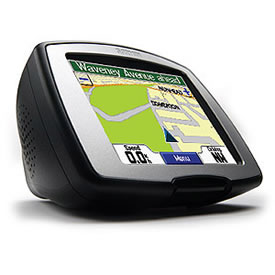
Posted by Dennis Udovich (Member # 1066) on 01-19-2008, 02:42 PM:
Purchased a Garmin Streetpilot c330 three years ago for $800. It was on sale from $1,000. It works great and maps/info can be updated on the Garmin website. This same unit now sells for $200 on sale at Best Buy.
Posted by Andy Muirhead (Member # 712) on 01-19-2008, 07:47 PM:
I'm tempted by the Tom Tom Go 520, mainly because of all the extra features. It has an FM transmitter to play MP3s through the car radio, hands-free bluetooth calling, will read received txt messages aloud while driving, has a large 4.3" touch screen, has voice recognition and loads more.
While I'm not in desperate need of a GPS system, I am in need of some kind of in car MP3 player/mobile bluetooth/toy thingy! This seems to fit the bill all in one box! It's not that pricey either.
Posted by Louis Bornwasser (Member # 3063) on 01-20-2008, 10:38 AM:
My experience is Garmin, the undisputed leader. Most aircraft are Garmin as well. Nuvi 360 uses basically the same program as the aircraft. (No I haven't taken the Nuvi aloft....yet.)
I have seen an error or two, but the other 99.999% it is excellent. Downloads are free from their website.
I use the Aussie woman.....then I deliberately disobey!!!! This feels good (after being married 35 years.) Louis
Posted by David Stambaugh (Member # 1102) on 01-20-2008, 10:45 AM:
Last summer I bought a Garmin Nuvi 350. Used it for 2 driving trips to Reno where I had a lot of downtown Reno addresses to locate. It never failed to get me where I was going and back "home" again. Audio navigation prompts are an absolute must in these things.
Posted by Mitchell Dvoskin (Member # 751) on 01-20-2008, 12:01 PM:
I own the TomTom GO720, which I am very happy with. It features Text to Speech, 4.3" screen, the FM transmitter, and Bluetooth for hands free calling. I didn't think I would use the Bluetooth, but it has turned out to be a usefull feature. My TomTom's map was up to date from the store, but they offer one free current map download with each unit purchased to insure you have the most current map.
The feature I like best is that if I ignore it's instructions and get off of it's route, it immediatly recalculates the route based on where I turned rather than telling me to turn around. Very usefull to go around traffic jams or if you know a faster route.
The TomTom also has the ability to display and route around traffic jams, either with an optional additional receiver that sticks on the window, or wirelessly thru your phones bluetooth, although that option requires a fee and cell phone data fees.
Overall, I have been very happy with it. The only thing I would recommend regardless of what brand you buy, is don't get the 3.5" screen. Go for the bigger screen, it makes a difference.
Posted by Michael Schaffer (Member # 1204) on 01-20-2008, 02:53 PM:
quote: Louis Bornwasser
My experience is Garmin, the undisputed leader. Most aircraft are Garmin as well. Nuvi 360 uses basically the same program as the aircraft.
Interesting to know.
Right now, I am undecided between these two:
Garmin nüvi 260
for $268 from amazon - 3.5" screen, text-to-speech (direction in real street names), the cheapest Garmin with that function. There is a handy comparison chart on the same page. Beyond that, currency converter, calculator, world time, picture viewer, all pretty much irrelevant extras.
Or this:
Magellan Maestro 4040
for $291 - 4.3"widescreen, text-to-speech, bluetooth phone, muliti destination routing - this does look more attractive with a number of features more for just a little more money. But I don't have any expereince with Magellan systems at all...hm...
Posted by Jason Black (Member # 684) on 01-20-2008, 05:18 PM:
I've owned both a Magellan, Roadmate & maestro models, and also a Garmin Nuvi.
Used a TomTom and my Magellan side by side on several trips to/from NJ...
My preference is the Nuvi hands down. Sat pickup is much faster, rerouting is quick, if needed.
Check your local Costco for a great deal on either the Maestro or Nuvi... i just picked up another Nuvi 650 for $300!
Posted by David Stambaugh (Member # 1102) on 01-20-2008, 08:33 PM:
I actually bought a TomTom widescreen before I got the Garmin. Don't remember the TomTom model. I didn't like it at all, returned it and got the Garmin which I've been very pleased with. Circuit City wasn't happy about taking that return either but they did.
Someone explain to me how a widescreen GPS is better. What good is seeing more side streets off to the left and right of your route, if you're mostly driving straight ahead and can see your upcoming turns just fine without a widescreen. The short time I had the TomTom widescreen, I could see no advantage to it at all. Maybe it's just me.
Posted by Paul Mayer (Member # 355) on 01-21-2008, 03:16 AM:
On the scooter I use a Garmin eTrex (about $90 online). It's very small and packaged for outdoor use - the case color matches the bike. I use it to give me accurate speed display since the bike's kph/mph indicator is beyond useless.
Ditto Louis' observations about Garmin in planes. It's what we taught and used for GPS navigation at the college (395 MAPs in class and 460s in the simulator), and it's what we use on some of our MD-80s at Allegiant Air.
Have a good trip Michael. I hope to be returning to SoCal shortly.
Posted by Andy Muirhead (Member # 712) on 01-21-2008, 07:45 PM:
Well I bought the TomTom GO 520 today, and I'm very impressed. Actually came in handy on the trip home, came across what seemed to be a very serious accident, so headed up a back road I've never been on before. The widescreen actually helped, as the sat nav was sending me a different route, but I could see that I could get back on my original road. The FM transmitter seems a little weak, you really have to turn the volume up. Loads of options etc. Has all the Sat's from startup, in fact sitting indoors, it still has a good lock.
Posted by Joshua Waaland (Member # 287) on 01-21-2008, 09:02 PM:
quote:
Googling c330 actually brings up this Garmin model, but no Magellan:
Your right Michael. It is a Garmin. Sorry, I don't know what I was thinking.
So I used my GPS last night and remembered another thing about it that is annoying. When you are on a freeway it will tell you to take an exit. If there is another split right after the exit you can sometimes miss your turn because it doesn't tell you in time to get over. For example...
I was driving southbound on I-77 through Akron, Ohio. The GPS told me to take the next exit which was I-76 which runs east and west. It said stay to the right for I-76 Youngstown/Barberton. Youngstown is east and Barberton is west. I stayed to the right but right after I exited there was an immediate split. I needed to go to the left (east Youngstown) but since I only had seconds from the time the display changed from stay to the right to stay to the left I had to cut across lanes of traffic to go left. If the display would have initially said exit right and then go left to take I-76 east to Youngstown, that would have saved me the headache. But instead it said stay to the right and take I-76 to Youngstown/Barberton not telling me which way I was going to go immediately after the exit. I can't tell you how many times I have missed a split because of this and had to waste fifteen minutes driving to the next allowable exit to turn around.
My point is, all-in-all they are useful but don't expect any of them to be completely dependable or not have their share of glitches.
Posted by Chris Slycord (Member # 4239) on 01-21-2008, 09:11 PM:
quote: David Stambaugh
Someone explain to me how a widescreen GPS is better. What good is seeing more side streets off to the left and right of your route, if you're mostly driving straight ahead and can see your upcoming turns just fine without a widescreen. The short time I had the TomTom widescreen, I could see no advantage to it at all. Maybe it's just me.
If the road you are on is backed up you can see side streets to use if you know where you're going decently well. Granted, most GPS systems have a "detour" calculation.
Posted by Jack Ondracek (Member # 1466) on 01-21-2008, 10:36 PM:
Garmin's GNS-530W is probably the best way to go... especially if you might be travelling on instruments.
![[Big Grin]](biggrin.gif)
Posted by Mike Heenan (Member # 392) on 01-21-2008, 11:06 PM:
If you're a cheapskate, buy whatever's available at costco, and take it back when you get to Boston if you don't intend on using it anymore.
Posted by Michael Schaffer (Member # 1204) on 01-22-2008, 12:24 PM:
I do intend to use it there because that whole area is completely new for me. I have only ever been there for 4 days last month. Boston itself is a very complicated city to drive around in. That will be a very good field test for the unit.
I had leaned more and more towards the Magellan Maestro 4040 but since the overwhelming majority here recommended Garmin and some reviews I read suggested that the Magellan's extra features look better on paper than in real life, I ordered the Garmin nüvi 260. What's the point in asking for tips if you don't listen to them?
Posted by Sam Graham (Member # 2889) on 01-22-2008, 02:39 PM:
I ended up using the Hertz "Never Lost" (Magellan) unit in a rental in Las Vegas (not because I wanted it, but because you had to get it if you wanted a car with a sunroof). It actually got lost trying to find the Hertz return facility at the airport, which I found amusing (as did Hertz, actually).
Anyway, I've been using a Garmin GPS-72 handheld non-mapping GPS for about five years now, mostly for statistical information like direction, altitiude and speed. In looking at some of these new navigation units, it seems none of them display this information.
Anybody familiar with a color navigation unit that will display these things, as well as maybe a date/time stamp (to the second)? Ideally, I'd have the highway map in the middle with information bars at the top and bottom that let you customize the fields.
Posted by David Stambaugh (Member # 1102) on 01-22-2008, 07:39 PM:
My Garmin Nuvi 350 has a trip computer screen that displays, among other things, elapsed time, remaining time to reach destination, estimated arrival time, current exact speed, average speed, average moving speed, time spent not moving, and maybe more that I'm forgetting. No altitude though. No date/timestamp feature that I can recall.
Posted by Phil Hill (Member # 371) on 01-23-2008, 03:12 AM:
I have an Initial GM-510 I'm totally happy with.
I also have some model (# escapes me) of a TomTom that is crap that I'll be soon putting on eBay.
Powered by Infopop Corporation
UBB.classicTM
6.3.1.2