This is topic My recovery D: drive is almost full, what?! in forum Film-Yak at Film-Tech Forum ARCHIVE.
To visit this topic, use this URL:
https://ft-forum.com/ft/cgi-bin/ubb/ultimatebb.cgi?ubb=get_topic;f=8;t=005459
Posted by Allison Parsons (Member # 2728) on 05-06-2008, 09:31 PM:
A bit ago, I scheduled weekly back ups of my computer. Well poking around today I noticed that the D: drive is almost full to capacity. Is there a way I can delete everything thats on it and start a new backup point? I'm running Vista on a Dell notebook 1505 if that helps any.
Posted by David Stambaugh (Member # 1102) on 05-06-2008, 10:22 PM:
Mmm, well if you literally want to quickly erase everything* on Drive D:, right-click on that drive in My Computer (or whatever the heck Vista calls it now ![[Wink]](wink.gif) ) and select "Format..." and do a Quick Format. Although being Vista, it might want you to have some elevated admin privileges to do that. Sorry, my Vista experience is still fairly limited.
) and select "Format..." and do a Quick Format. Although being Vista, it might want you to have some elevated admin privileges to do that. Sorry, my Vista experience is still fairly limited.
* Yes I know a Windows format doesn't erase the files, just initializes the file system.
Posted by Monte L Fullmer (Member # 2797) on 05-06-2008, 10:29 PM:
( ![[evil]](graemlins/evil.gif) delete VISTA and put in a REAL operating system called XP ..j/k..)
delete VISTA and put in a REAL operating system called XP ..j/k..)
Get some space cleared up on that drive...
Posted by Mark Gulbrandsen (Member # 72) on 05-06-2008, 11:56 PM:
Thats one of the really nice feature about Windows Home Server Software... aside from the remote access to it's server and all your home computers... from anywhere literally. When it does an automatic backup it only ads in the changes you made that day to the existing data on your local drives... it a sense it backs up cumulatively and it aso lets you restore a complete bungled up hard drive on any remote or laptop in just a few minutes with data taken from the last backup... including he OS! This way it doesn't keep accumulating many complete backups and the resultant huge amounts of data hat fill hard drives. You may want to check it out...
Posted by Charles Greenlee (Member # 3856) on 05-07-2008, 04:34 AM:
Vista ![[puke]](graemlins/puke.gif) . I run windows 2003. Its basically XP, for servers. 99.9% of the drivers are the same, 99% of XP sofware works on it. Like I said it is an updated XP for servers. Had to have it on my old Mobo, since it was a Dual Xeon serverboard. Wouldn't run non-server OSes. Ran Linux really well too.
. I run windows 2003. Its basically XP, for servers. 99.9% of the drivers are the same, 99% of XP sofware works on it. Like I said it is an updated XP for servers. Had to have it on my old Mobo, since it was a Dual Xeon serverboard. Wouldn't run non-server OSes. Ran Linux really well too. ![[thumbsup]](graemlins/thumbsup.gif) Go SMP.
Go SMP.
Posted by Leo Enticknap (Member # 534) on 05-07-2008, 06:32 AM:
quote:
Although being Vista, it might want you to have some elevated admin privileges to do that [format a hard drive volume].
As with XP, you need to have administrator rights. There are two ways this can be done:
1. Log in as an administrator, if the username you use routinely is not an administrator ID.
2. Right-click on Windows Explorer and select 'run as administrator' from the menu. It'll then ask you for the password. Once it opens, Windows Explorer will then behave as if you're logged on as an administrator, while all other programs will continue to run under your normal ID. You will be able to format a hard drive volume this way.
Posted by Michael Moore (Member # 3867) on 05-10-2008, 08:23 PM:
is this Drive D a partition of Drive C? If so you may have a problem getting it to format in Vista. If dell is not giving you a Restore Disc and putting it in a partition you will need to make a restore disc first then go in and do a fresh install of vista and remove that D partition. That is if this is what you are looking to do.
Mike
Posted by Mark Gulbrandsen (Member # 72) on 05-10-2008, 10:12 PM:
quote: Charles Greenlee
I run windows 2003. Its basically XP, for servers
2003 Server platform actually a lot more stable and even more bullett proof than good ole XP is. "Windows Home Server" is a program running on top of W-2003 Server which makes it also pretty darn stable but more user friendly for the wife. Straight ole 2003 Server is much more difficult for folks to grasp if they even ever can. The Windows "Home Server" software still has a few known bugs in it... it IS brand new however there is an nupgraaded version on the way to fix the two known problems.... they are saying that the new version will only be 64 bit and will then obviously only run on 64 bit capable servers. I recently upgraded to a used Dell 2650 for a mere pittance on E-Bay. My older Dell 2450 which is still a decent server is available for free if anyone wants to pay the shipping on it... about 65 lbs boxed!
Mark
Posted by Allison Parsons (Member # 2728) on 05-11-2008, 01:14 AM:
I just want to delete everything on the damn D: drive and start a new. What good does formating it do? As you can tell, I'm one of the few people under the age of 30 that really doesn't know the in's and out's of computers very well (or at least Vista)
Posted by Chris Slycord (Member # 4239) on 05-11-2008, 04:20 AM:
quote: Michael Moore
is this Drive D a partition of Drive C?
I'm gonna answer for her. The answer is "no."
How can I know this? Because a windows "drive" is a partition and as such you can't have a partition of a partition.
quote: Allison Parsons
I just want to delete everything on the damn D: drive and start a new. What good does formating it do?
Formatting it does exactly what you want.
If you do a "quick format" like mentioned earlier it resets the file system so that it'll be empty to the operating system. It's called "quick" because this type of format takes almost no time since it doesn't actually physically erase the data on the disk (it just instead tells the OS that every part of the drive is empty).
And a traditional (not-quick) format will erase the partition and reset the file system but this'll take much longer and really isn't needed.
edit: Furthermore, even if all you did was delete the partition with fdisk or some similar utility, windows would still have to format the partition for you before you could use the partition. And this would result in the same thing as the quick format.
Posted by Leo Enticknap (Member # 534) on 05-11-2008, 06:45 AM:
Just to add something to Chris' explanation. It's possible to divide a single hard drive into two or more separate spaces, which the operating system treats as separate drives, each with their own drive letter. Each space is called a partition. Once a partition is formatted and in use by the computer, the formatted space is called a volume. I'm guessing that Allison has one physical hard drive in her computer, which has been divided up into two spaces (partitions), which have then been formatted as volumes called C: and D:.
Just to be confusing, it's also possible to have two or more physical hard drives in your computer, each of which only has one partition/volume. To see what's what (in either XP or Vista) run start - programs - administrative tools - computer management. You'll need to run it as an administrator (see my post above) if you want to change anything. Once this program is open, click on 'Disk Management'. That will then show you a graphical diagram of all the hard drives in (or connected to) your computer, and how they are partitioned and formatted. By right-clicking on a volume or area of empty space, you can then reformat it, change its drive letter and various other things.
But the short answer to your question is like Chris said. Formatting D: will nuke everything that's on it. There's an area at the start of the volume which contains information about where all the files are physically located on it. Quick formatting deletes the data in this area - it's like tearing the contents page or the index out of a book. Full formatting actually deletes the data itself, replacing it all with zeros. Software does exist which can manually go through the contents of a disc and recover files which are still there but no longer referred to in the 'index' section of a disc.
You only need to do a full format if:
1. There's a security issue - for example if you're about to sell your old computer on Ebay and want to make damn sure that your personal data is all gone from it.
2. If you suspect that there may be an error on the drive, full formatting will also establish whether there is or not (because if there's a physical problem, Windows will give you an error message). For this reason I tend to full format brand new HDDs before using them for the first time, to make sure that if there is a defect on them, I can return them while still under warranty.
3. If you want to change the type of file system for the volume, e.g. change a FAT drive to NTSC.
Otherwise, quick formatting is all you need to do.
Posted by Chris Slycord (Member # 4239) on 05-11-2008, 10:40 AM:
The confusion is that windows (even vista) refers to every partition that it can see and mount as a "Hard Disk Drive" even if the partitions aren't physical drives.
And Leo means you'd choose NTFS. It would be kind of hard to format a partition as NTSC (the digital television transmission standard used here in the States). ![[Smile]](smile.gif)
Posted by Mark Gulbrandsen (Member # 72) on 05-11-2008, 10:47 AM:
Ahhhhhh... Caught you there Chris. You indeed do know your computer stuff though... much better than I! NTSC is actully the current old color television standard. Means "Never The Same Color" to us old broadcasters. The new standard is ATSC... or probably "Always The Same Color" to todays young punk broadcasters that came up with this system.
Posted by Chris Slycord (Member # 4239) on 05-11-2008, 12:36 PM:
Touche
Obviously NTSC is analog. And I knew that too. I fail.
Posted by Leo Enticknap (Member # 534) on 05-11-2008, 12:37 PM:
I think NTSC would work great for computer displays, if you want a clear, bright picture, but you can live with it being a bit fuzzy as the downside. But if you're willing to put up with a slightly dimmer picture that can flicker a bit, but need pin-sharp resolution, click on PAL...
Posted by Sean McKinnon (Member # 612) on 05-12-2008, 10:15 AM:
Mark,
Im trying to remember what NTSC really stood for? Im thinking is was something like "National Television Systems Commitee" for some reason but don't think thats correct? Is it?
Posted by Chris Slycord (Member # 4239) on 05-12-2008, 11:43 AM:
Change "systems" to "system" and you are correct, according to wikipedia. That's the group who chose that standard and the standard was simply named after them.
Posted by David Stambaugh (Member # 1102) on 05-12-2008, 12:44 PM:
The "S" is also commonly referred to as "Standards" as in National Television Standards Committee. But officially it's "System".
Posted by Mark Gulbrandsen (Member # 72) on 05-12-2008, 12:58 PM:
Bah... I still say "Never The Same Color" and those guys knew it when they adoped the standard! But I guess if it weren't for a tiny somewhat unstable 3.58mhz oscillator we'd all be exposed to spinning CBS Colorwheel disks....
Posted by Charles Greenlee (Member # 3856) on 05-12-2008, 03:18 PM:
Those old coloerwheel, and mechanical TV's look cool as hell. Crappy picture though. I still wouldn't mind having one simply as a collectors/conversation piece. Though I would have to rig up a converter to convert standard TV signals to work on it. Gotta go all out. Maybe watch family guy on the thing and see if you can make out the characters on screen.
but back on task. Formatting D: drive, won't totally start you over. You'd have to format C as well, but by doing that you'll lose windows and everything, and really will start over. "can't have a partition of a partition"? Can, in a way. Called a logical partition, which is a sub-partition of your extended partition, at least as far as the FAT(16 or 32) system goes. Maybe buying a windows guide book (like Windows for dummies. No I'm not trying to imply anything), may be a good idea. Good reference material to have around.
Posted by Chris Slycord (Member # 4239) on 05-12-2008, 04:10 PM:
I'm well aware that you can make an extended partition then have any number of logical partitions inside it. But you'll want to look back and notice I was responding to Michael saying that D drive was a partition of the C drive. And THAT is impossible. Guess I should've been more clear that I was talking about normal partitions; I assumed the context of my original response made that clear (since he was talking about the C drive which obviously isn't an extended partition)
And she didn't say she wanted to start over with windows; just with the D: drive. She said she wants to erase the D: drive then use it for backups.
Posted by Mark Gulbrandsen (Member # 72) on 05-12-2008, 04:45 PM:
The way I read it also told me that she had a physically seperate D drive.
Charlie... There is a television museum in Ohio that has a working color wheel television set. They built a digital convertor so it can play any NTSC source in color wheel mode.
Mark
Posted by Charles Greenlee (Member # 3856) on 05-12-2008, 08:33 PM:
"Charlie" And suddenly, I became my grandfather somehow. LoL It's ok. I knew who you were talking to. I didn't mean necessarily that was her case, just recalling. I was tired. I'm still trying to figure out how I want to put linux on here. It's a pain to dual boot, especially if you host a server or 2. So you'd have to set up similar servers in linux to keep those accessible. I could use that dist. that will run from within windows, but that's alot of overhead. Oh well, I figure out what I want to do eventually.
Posted by Chris Slycord (Member # 4239) on 05-12-2008, 10:55 PM:
quote: Mark Gulbrandsen
The way I read it also told me that she had a physically seperate D drive.
Not necessarily. My vista box (generic gateway I got cheap thanks to compusa closing all their stores) came with a second partition by default which is used for backups and such. And this is with one disk.
quote: Charles Greenlee
It's a pain to dual boot, especially if you host a server or 2. So you'd have to set up similar servers in linux to keep those accessible. I could use that dist. that will run from within windows, but that's alot of overhead. Oh well, I figure out what I want to do eventually.
Personally I think a better solution would be to buy a low-power (lower-energy consumer) computer exclusively for your servers you're hosting. Since your computer you're using for hosting would have to be up 24-7 you'd save money in the long-run from lower power consumption. Plus, generally servers don't actually have to be running on the newest, fastest processors anyway. via makes some motherboard-cpu combos that peak at 20 watts consumption.
Posted by Ron Yost (Member # 1850) on 05-13-2008, 12:13 AM:
"Never Twice Same Color" here on the west coast. Well, according to an engineer (friend of my dad's) at KTTV, L.A., back in the long ago.
Posted by Charles Greenlee (Member # 3856) on 05-13-2008, 03:37 AM:
This one scales back nicely at ide. CPU only uses 4-5 watts at idle with power saving enabled. And the software goes in to "nap" mode which uses even less, but still allows the background apps to continue running. In other words, the FTP and Apache, still work. Not sure what the system uses as a whole though. I've seen the CPU suck down 40W in turbo mode doing some encoding of video. My video also "throttles back" for power saving when it's not being pushed. Pretty much everything, except my sound card, and like that uses alot ![[Roll Eyes]](rolleyes.gif) . SB-live 5.1. Yes, my mobo has a newer soundcard on board, but it's also only 5.1, and doesn't have a digital in jack, externally, or internally for the CD-drive.
. SB-live 5.1. Yes, my mobo has a newer soundcard on board, but it's also only 5.1, and doesn't have a digital in jack, externally, or internally for the CD-drive.
Posted by Mark Gulbrandsen (Member # 72) on 05-13-2008, 07:33 AM:
quote: Chris Slycord
Personally I think a better solution would be to buy a low-power (lower-energy consumer) computer exclusively for your servers you're hosting. Since your computer you're using for hosting would have to be up 24-7 you'd save money in the long-run from lower power consumption. Plus, generally servers don't actually have to be running on the newest, fastest processors anyway. via makes some motherboard-cpu combos that peak at 20 watts consumption.
Good idea but I bet that VIA board doesn't support x64 bit software. Future versions of WHS will be x64 bit. My Dell 2650 is certainly 64 bit capable and it is somewhat power hungry with its redundant supplies. There is a snap in program for WHS that allows one to hibernate the server at selected times and I may eventually add that program.
Posted by Chris Slycord (Member # 4239) on 05-13-2008, 10:51 AM:
Yeah via only has 32-bit processors now. Though AMD has introduced some processors that are closer to their level of power-consumption which are 64-bit. And I'm sure that they'll come out with 64-bit cpus eventually.
Though windows home server seems like overkill if all you're doing is what charles mentioned (just running ftp and http servers). And I'm not sure what exactly in a generic server would really need 64-bit either.
Posted by Sean McKinnon (Member # 612) on 05-13-2008, 11:16 AM:
off topic, I used to volunteer at a cable access station in the mid 90's before I found bigger cooler machines to play with (35 projectors) we were all NTSC S-VHS format with the exception of one 1/2 inch deck in "Cablecasting" to playback programs from other access studios. I was one of few people who had the ability to properly white balance and phase the studio cameras using the wave form and vectorscope monitors. You could very very clearly tell which shows were taped on days when I wasn't there as the same people would look green on camera one, purple on camera two, and blue on camera three. It was pretty funny to watch! We would play a game trying to guess which color was going to come up every time they switched cameras! ![[Big Grin]](biggrin.gif)
Posted by James Westbrook (Member # 3690) on 05-13-2008, 02:58 PM:
How did Allison's recovery drive get so full? My recovery drive is at 18 percent capacity, and I've had this computer since 2003.
Posted by Chris Slycord (Member # 4239) on 05-13-2008, 03:04 PM:
Could be it was being used as the default location for restore points. And then she has several different old restore points.
Posted by Allison Parsons (Member # 2728) on 05-14-2008, 02:44 AM:
Hi guys,
Yes, I agree with Chris when he said that it was saving multiple restore points (probably when I would schedual weekly backups). I'm going to try to tinker with a few things tomorrow, since I will final have time to sit down and do some of your suggestions.
I just want to delete all the restore points and start over from scratch. Start over, meaning save a new restore point without my Recovery D: drive being almost full to capacity. I DO NOT want to my computer to be restored from a previous restore point.
(and my D: drive is NOT external)
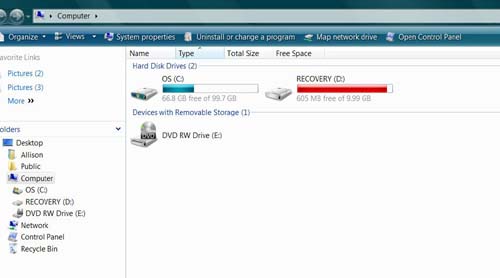
Posted by Charles Greenlee (Member # 3856) on 05-14-2008, 06:18 AM:
Ack! Vista! Flee! Run away! Fast! I may grab a copy of vista after I give it another month or so to settle. Vista is like Disneyland.
"When they opened Disneyland nothing worked.", "Yes John. But when the Pirates of the Caribbean breaks down, the pirates don't eat the tourists." - Jurassic Park
Posted by Sean McKinnon (Member # 612) on 05-14-2008, 10:25 AM:
"I'm pleased to report that I've been error free for almost a week, I've been error free for almost a week, I've been error free for almost a week"
"Can somebody please restart him? It's painful to watch!"
Posted by Chris Slycord (Member # 4239) on 05-14-2008, 11:51 AM:
To delete your restore points that are located on that drive:
1) Double-click on the "computer" icon
2) Right click on the D: drive and choose "properties"
3) Click on "cleanup"
4) Choose to clean up files from all users (probably will work with the other selection but this is just to be safe)
5) Select "More options" tab then click on "cleanup" icon in the "System Restore and Shadow Copies" section
Posted by Allison Parsons (Member # 2728) on 05-14-2008, 02:19 PM:
Thanks Chris. That worked somewhat. I now have 1.44G of free space instead of 604MB left.
Posted by Chris Slycord (Member # 4239) on 05-14-2008, 02:25 PM:
The rest of the used space is probably because the partition originally (before you had it used for restore points) contained a copy of your original C: drive.
Similar to that a lot of computers will come with a restore CD that installs everything that your PC came with exactly as it was when you started. Only now, they include too much stuff for it to easily fit on one CD so they use a partition for that.
Powered by Infopop Corporation
UBB.classicTM
6.3.1.2