This is topic Help with getting a parallel printer cable fit through a small hole in forum Film-Yak at Film-Tech Forum ARCHIVE.
To visit this topic, use this URL:
https://ft-forum.com/ft/cgi-bin/ubb/ultimatebb.cgi?ubb=get_topic;f=8;t=005511
Posted by Lyle Romer (Member # 1266) on 06-24-2008, 09:05 AM:
Ok, here's the situation. I need to get an old school parallel printer cable (DB25 to Centronics 36 pin) through a hole that is about 1/2" too small in diameter to fit either end through. I'm looking for a solution that doesn't involve drilling out the hole to a bigger diameter.
Does anybody know of any cables where the connector (either one) is oriented parallel to the cable direction? Either that or a ribbon cable that can be pushed through the hole? Any other ideas that don't involve cutting the cable and trying to splice the wires back together or making the hole bigger?
Posted by Steve Guttag (Member # 268) on 06-24-2008, 09:28 AM:
Centronics connectors definately were offered in Rt angle versions. The trick may be finding a DB25 to Centronics Rt angle cable, pre-made.
Steve
Posted by Dave Macaulay (Member # 813) on 06-24-2008, 11:00 AM:
Unless this is a special long cable, the things are pretty much free (I have about 10 of them in a box unless I tossed them out). The molded ends are just rubber goo molded around the stripped sleeve of the wire aand the otherwise loose small wires to the connector pins. You can cut off a bunch of the molded rubber with an exacto knife so the cable can bend down beside the connector and go through the hole. It'll look like crap but work fine as long as you don't flex it a lot and cause wires to break. I have done this, ruined two cables by slicing through wires - they are pretty ratsnestish in the rubber and you can't see them until you've cut into them - but the third was still working when the printer died and a new USB one went in.
Posted by Scott Jentsch (Member # 1681) on 06-24-2008, 11:34 AM:
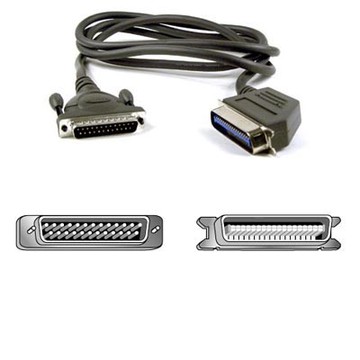
Maybe this will work:
Belkin Non-IEEE Parallel Compliant Printer Cable with Right Angle Centronics Connector, 10' IM115161
I found it at Staples.com, but the forum system wouldn't take the URL and make it a link.
Posted by Monte L Fullmer (Member # 2797) on 06-24-2008, 11:56 AM:
if the cable pin house can be taken apart, you can then bend the pin house to the side and slide it through that hole with no problem.
Posted by John Walsh (Member # 168) on 06-24-2008, 12:39 PM:
Yeah, unless you can take or cut the housing off, even a right angle connector is not going to fit through a 1/2" hole. I think Dave has the best idea about cutting away the molded housing.
Alternately, could you use a punch to made the existing hole bigger? I know you didn't want to drill, but I thought that maybe that was just because you can't get a drill bit in there, or didn't want the metal chips all over.
Posted by Stephen Furley (Member # 1277) on 06-24-2008, 01:30 PM:
Is this for a conventional pc and printr, or something special? Can whatever it is drive a USB printer? If so you could use a USB-parallel converter, so you'd only need to pass a USB plug through the hole.
Posted by Rick Raskin (Member # 1561) on 06-24-2008, 03:01 PM:
I have one that the hoods can be removed. You can have it for postage.
Posted by Anslem Rayburn (Member # 1267) on 06-24-2008, 03:25 PM:
quote: Scott Jentsch
Maybe this will work:
Belkin Non-IEEE Parallel Compliant Printer Cable with Right Angle Centronics Connector, 10' IM115161
I found it at Staples.com, but the forum system wouldn't take the URL and make it a link.
Link to item on Staples.com
Posted by Steve Guttag (Member # 268) on 06-24-2008, 05:06 PM:
I think he said the hole was 1/2" too small for a conventional DB25 or Centronics to fit through...not 1/2" total hole. If the hole is 1/2" then I suggest just making the cable.
Steve
Posted by Phil Hill (Member # 371) on 06-24-2008, 05:09 PM:
I've used a D-Link DP-301P+ for the last many years to drive my HP LaserJet 5...it's a Bi-directional Parallel Printer Port server for an EtherNetwork 10/100 network. Plugs directly into the "Centronics" parallel port of the printer and uses a small cat5 cable to the computer or router. Never had a problem.
This may be a good option/solution.
"Street Price" is less than at the mfgr's site.
Posted by Tristan Lane (Member # 1169) on 06-24-2008, 11:35 PM:
quote: Scott Jentsch
Belkin Non-IEEE Parallel Compliant Printer Cable with Right Angle Centronics Connector, 10' IM115161
The key word here is "Non-IEEE" Compliant. This could result in flaky operation of whatever is on the other end of the cable. Then again, maybe it's because there's a small insignificant detail of the cable that doesn't meet IEEE standards.
Powered by Infopop Corporation
UBB.classicTM
6.3.1.2