This is topic Anyone here use Satellite Internet Service? in forum Film-Yak at Film-Tech Forum ARCHIVE.
To visit this topic, use this URL:
https://ft-forum.com/ft/cgi-bin/ubb/ultimatebb.cgi?ubb=get_topic;f=8;t=005574
Posted by Mark Gulbrandsen (Member # 72) on 09-10-2008, 06:20 PM:
My DSL service is so dismal here no better than most people's dial up service is, it starts out at over a hundred kb and then quickly throttles down to about 26kb on downloads! Qwest tells me that it's because I'm at the end of their line... literally. Some of my back yard is actually in the next town! I say thats BS that they throttle it like many others do. The thing is that I have a 1.5 meg line and it does check out at 1.5 meg.
I've switched ISP recently but unfortunately am still stuck with using Qwests throttled line for whom ever provides my service. They of course say they don't throttle it... yea right! I can get a fractional T-1 for $289 a month... hey I'm not a gamer and I don't really need that type of bandwidth. I do have servers that I remotely access so that rules out Comcast's cable Internet.. they don't allow anyone to go through SSL port 443. So much for them...
Then that leaves Satellite Internet... There are at least a dozen companies... anyone here use any of them and what was your quality of service and so on? What about port usage? Ports 80, and 443 mainly.
Ironically the next town over has Utopia Fibre and a 50mb bandwidth for 60 bucks a month ![[Cool]](cool.gif) .
.
Thanks,
Mark
Posted by Joe Redifer (Member # 3) on 09-10-2008, 06:25 PM:
It's not BS, that's how DSL works.
Get cable internet or move to somewhere less shitty. Stay away from satellite. Too much lag.
Posted by David Stambaugh (Member # 1102) on 09-10-2008, 06:31 PM:
quote: Mark Gulbrandsen
I do have servers that I remotely access so that rules out Comcast's cable Internet.. they don't allow anyone to go through SSL port 443. So much for them
Where did you hear that? You're talking about accessing those remote servers from home, correct? I have Comcast and I do that practically every day, have never had any problem. If they were blocking port 443, you wouldn't be able to connect to any secure server for things like banking, etc. VPN, SSH, etc. have all worked fine for me with Comcast. A while back I had a webcam set up at home that I could access remotely via HTTPS (SSL) and it worked fine too (with appropriate firewall settings etc).
Maybe I'm not understanding. ![[Confused]](confused.gif)
Has Qwest sent someone out to your house to actually check the DSL line quality? If they refuse to "because we already know it sucks" then they shouldn't have sold you the service in the first place.
Hell, I have 60+ users sharing a 7mbps Qwest ADSL line at work that only costs us about $70/mo including a block of static IPs, and nobody's complaining! Of course it helps that we're only a few hundred yards from the Qwest central office. ![[Big Grin]](biggrin.gif)
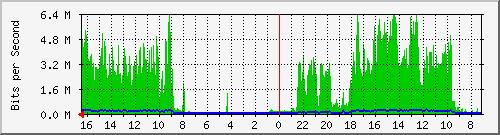 (Green = Download, Blue = Upload)
Does anyone like ClearWire offer wireless service there?
Posted by Sean Weitzel (Member # 244) on 09-10-2008, 07:38 PM:
My in laws live in a cabin in the middle of the woods in northern california and have had Hughesnet (formerly direcway) for just under 2 years. Up until 4 months ago, they had the DW-6000 modem and the lag and overall speed was absolutely abysmal. Now they have the DW-7000 modem (same .74 meter dish) and the performance seems to be on par with lower speed DSL. The lag is much better and I can even use a vpn client over it now. Things to watch out for, you are only allocated a certain amount of data you can download per day based on your plan (includes all traffic, even web surfing). If you go over that amount, you will be throttled back to 2kb/sec for 24 hours. Hope that helps.
Posted by Chris Slycord (Member # 4239) on 09-10-2008, 07:47 PM:
quote: Mark Gulbrandsen
I do have servers that I remotely access so that rules out Comcast's cable Internet.. they don't allow anyone to go through SSL port 443. So much for them...
Have your server use some other port than 443.
Then you just append ":440" to the end of your https link, assuming it is using port 440.
quote: David Stambaugh
Maybe I'm not understanding.
He wasn't saying that the outgoing stuff on 443 was blocked; just the incoming. It's just like a lot of ISPs block incoming stuff on port 25 since they grow suspicious of someone running a mail server that's accessible from the outside world (since that's a common vector for spamming).
BUt you did mention being able to access your stuff on your lan from https so his info probably was wrong about the blocking even happening. Though they could've changed things since the time you switched.
Posted by Mark Gulbrandsen (Member # 72) on 09-10-2008, 10:41 PM:
Thanks for the suggestions and insight guys...
I have two servers but it's not like I'm hostin some web sites from my home and getting thousands of hits a day.... just a couple of servers, one WHS box, and another W2003 box that I occasionally remotely connect to.
I actually called and talked to the local Comcastic Technician. He told me that "Comcast does not allow remote connection to a Home based server".
Now Qwest told me the exact opposite and more or less what you'd expect to hear... They allow and encourage the use of those ports and so on. Sure I could use a different set of ports and so on but some reports of people getting caught by Comcast range from being disconnected to a stern warning to discontinue doing it. A large number of providers block port 80 and 443 all together so there is no remote access capability.
That doesn't leave me much... geez, on average it takes 8 min to download a 10 meg photo file!! That sucks! I agree... I will call Qwest and insist they come out and check the line all the way to the house to see whats up. Another thing... Qwest said "We Do Not Throttle The Data Stream". If you have a 256kbps line thats what you get... if you have a 1.5mbps line thats what it is. The local Xmission tech also told me the same thing... in fact he verified my line from their office and said he was getting about 1.5mbps. What he did say is that MSN(Qwests ISP) throttles the data but Xmission does not. MSN was the first thing I dumped... The speed from Xmission is barely any better. I wish I could get a biz class DSL line brought in here but they say they can't get one here. The only other line I can get put in here is the fractional T-1... way too expensive even at $289!
I thought it may have been the Win 2003 box since my internet comes into that box, but even a direct connection to any of the puters here gives the same miserable results. All of my lines, computers, switches, and servers are all gigabyte ethernet so thats not a limiting factor either.
I think you can see whay I'm frustrated...
Dave... I can get Blue Sky, Hughes Net, and several others. They all have different service plans for different speeds and so on. No Clear Wire here yet... You may find this interesting, I'm pretty sure its the first of it's kind anywhere... This is the fibre system going in all along the Wasatch Front and going into all homes in all the participating cities.
Posted by Chris Slycord (Member # 4239) on 09-10-2008, 10:58 PM:
I bet the only people being caught or kicked are the ones running something high-bandwidth.
Posted by Mark Gulbrandsen (Member # 72) on 09-10-2008, 11:04 PM:
I tend to agree... I generally only access it when I travel... The rest of the time it's just a local home network. I have to wonder of they block the ports or not though...
Mark
Posted by Joe Redifer (Member # 3) on 09-10-2008, 11:44 PM:
I have a friend who has Comcast and he serves stuff with a blogdns account which keeps up with his changing IP. Works fine and they haven't yelled at him or anything.
Posted by Chris Slycord (Member # 4239) on 09-10-2008, 11:50 PM:
Assuming you're not running firewall software, you could try to portscan your computer assuming you:
1) Have control of a computer outside your network
2) Know your real, external IP address.
Oh wait. A simpler way is to go to http://www.grc.com/default.htm then click on the link that says "ShieldsUP!" and it'll test which ports are open. But if the test it does shows most ports as "stealth" then it means you or your ISP are running some sort of firewall that's stealthing the port.
Posted by Rick Raskin (Member # 1561) on 09-11-2008, 08:33 AM:
Mark. Have someone at Qwest test your DSL service from their gateway router. You may have unfettered 1.5 Mbps from the CO to your modem, but could be getting throttled back somewhere in the path from the router to the CO equipment. Testing your line from your house to the CO is only a small part of the equation.
I'm not familiar with the specifics of Qwest's architecture, but what I've seen are basically variations of a common theme.
Posted by Mark Gulbrandsen (Member # 72) on 09-24-2008, 06:02 PM:
Rick,
ally had time to be home and deal with Quest on this problem and indeed the problem WAS at their end. My speed is now the full 1.5 meg down and about half that up. The tech said the problem was an attenuator that was set wrong.
Mark
Posted by Tristan Lane (Member # 1169) on 09-24-2008, 10:50 PM:
quote: Mark Gulbrandsen
I do have servers that I remotely access so that rules out Comcast's cable Internet.. they don't allow anyone to go through SSL port 443. So much for them
Mark,
Comcast is screwed up. You need to talk to their business services department. They seem to have less restrictions than the home department. We use Comcast as our primary ISP at the theater with no problems, with plenty of secured inbound connections happening all of the time.
It's unfortunate that Qwest sucks out there. I just upgraded to their "fiber" service, but have confirmed 7mbps service. I'm "in the loop" as the commercials would say. The strange thing is that I am still using the same DSL modem I had.
IMPO: DSL has always provided a more consistent and reliable connection than cable. Also, in my area Cable service is so grossly overpriced if all you want is to access the internets, you must pay 50% more per month for the service than an similar service from Qwest.
It's good to hear that you now have better speed. 1.5 isn't bad.
Powered by Infopop Corporation
UBB.classicTM
6.3.1.2