This is topic Question for any photographers: I'm going to the Grand Canyon... in forum Film-Yak at Film-Tech Forum ARCHIVE.
To visit this topic, use this URL:
https://ft-forum.com/ft/cgi-bin/ubb/ultimatebb.cgi?ubb=get_topic;f=8;t=005914
Posted by Justin Hamaker (Member # 2165) on 09-05-2009, 09:22 PM:
I'm going to the Grand Canyon in a couple weeks and I don't know what camera equipment to take.
Here's what I have:
70-300mm f/4.5-5.6
18-70mm f/3.5-5.6
28mm f/2.8
50mm f/1.7
35-70mm f/4 w/macro
70-210mm f/4 macro
I have a hip bag that will hold the camera with a lens mounted plus another lens or two - plus I can fit my video camera. I also have a light weight tripod I purchased just for this trip which will strap to the bottom of my pack.
Posted by Steve Guttag (Member # 268) on 09-05-2009, 09:38 PM:
I generally don't go anywhere that I'm going to do some serious photography without my 50mm, 28mm and 135mm. Mind you, I'm talking about 35mm SLR stuff so your needs may be different, depending on the camera.
I do have a 75-205 that is handy but rarely takes the best pictures. A simple 2X converter can double your focal range and not detract as much.
I have shot pictures at the GC. It is huge and very bright...so the slower speeds of the lenses you mentioned should not be an issue. I would tend to have longer focal length lenses shooting something like that. But, if you want to have people in the picture too (family) and such...then having something in the 50mm range will almost be a must. The GC will always be HUGE in your background, no matter what...so you really need to lens for the foreground. Use the longer lenses for what you find more interesting in the GC itself (sans people). You'll need a long lens indeed if you want to give the Colorado River justice if you are shooting it from high up in the observation areas.
Steve
Posted by Adam Martin (Member # 641) on 09-05-2009, 10:54 PM:
Don't forget the circular polarizer.
Posted by Bobby Henderson (Member # 840) on 09-05-2009, 11:23 PM:
Don't forget a spare memory card or two as well at least one spare camera battery.
The Grand Canyon is a great subject for stitched panorama photos. Issues with parallax shouldn't be too much of a problem with shooting distant subjects. I'm interested in getting a panning clamp and nodal slide setup to eliminate parallax when shooting multi-frame panorama type photos. Really Right Stuff makes some of the more popular gear for that sort of thing. But it sure isn't cheap. Their basic package costs $360 and an L-plate for shooting in portrait orientation costs another $140.
Obviously, you would want to avoid using a circular polarizer filter for any multi-frame panorama photos.
You might also want to try shooting some HDR pictures.
Posted by Joe Redifer (Member # 3) on 09-05-2009, 11:49 PM:
Even on distant objects, stitching rarely is perfect. Check out this stitched picture made from about 6 or 7 individual pics (I was probably close to 100 feet behind the row of cars at the bottom):

As you can see in this Film-Tech sized image, nothing looks askew. But when you zoom in looking for defects (as I do), then things show up:
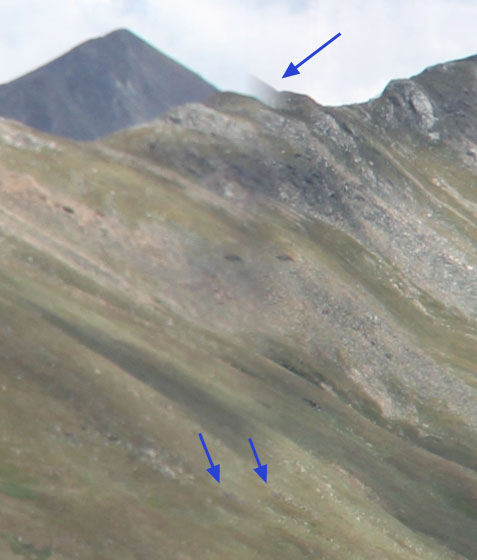
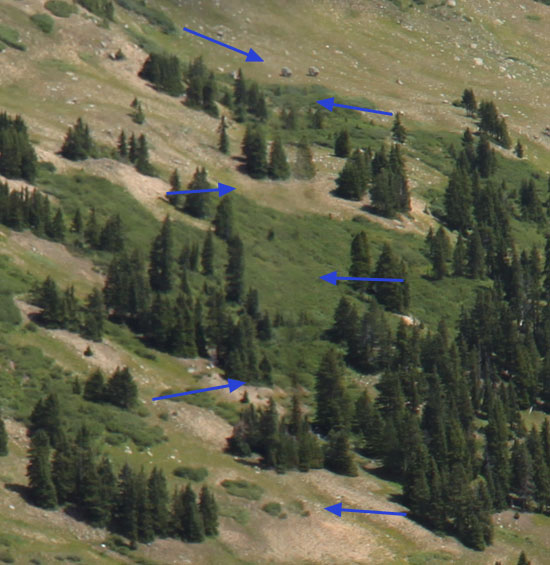
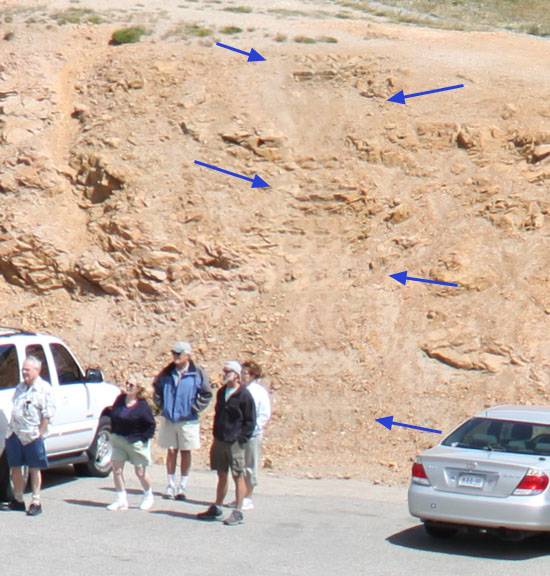
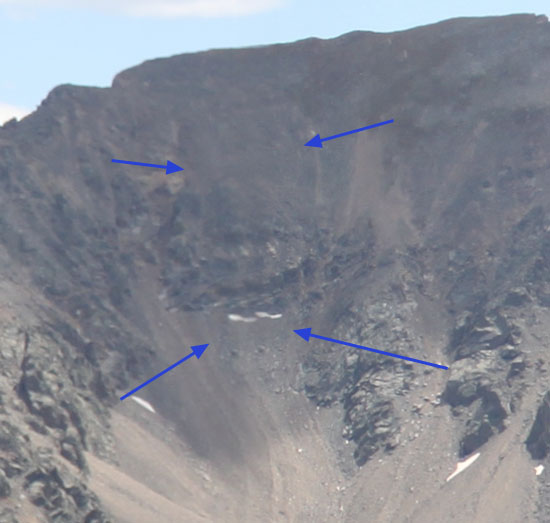
That's about as good as it gets. It is usually much worse. This was done with Canon's shitty software. Apple Quicktime can do it a bit better, but they haven't made a QT VR authoring program since OS 9. Photoshop can't do it... well maybe there is a $900 plug-in that can, but otherwise you are left with kind of crappy stitch quality.
Posted by Bobby Henderson (Member # 840) on 09-06-2009, 12:47 AM:
That's parallax alright. The effects of it are going to be there in any series of stitched photos, but the problems are much more obvious when stitching together photos of subjects shot at a more medium to close distance.
There's only two ways to defeat parallax. Spend a bunch of time editing out the problems in Photoshop or buy dedicated panorama panning gear. Automatic functions via software are not going to work.
A panning clamp and nodal slide allows the camera to be adjusted back to where the tripod's center of rotation lines up with the camera's optical center. This varies on the focal length of lens being used. When the camera is properly aligned the multiple image panels will stitch together far more seamlessly.
Posted by Robert Minichino (Member # 3495) on 09-06-2009, 12:56 AM:
Just get a fisheye and rectification software. Voila! Single-shot panoramic photos. ![[Razz]](tongue.gif)
Posted by Bobby Henderson (Member # 840) on 09-06-2009, 01:33 AM:
Some of us want the high, native pixel counts.
I want to be able to cover the side of a 18 wheel truck trailer with truly high resolution graphics, not something blown up to fuzz ridden crap through Photoshop re-sampling. In general, a vehicle wrap needs to have a native, full scale resolution of at least 60ppp to 72ppi to hide the pixel grid at "grabbing the door handle" viewing distances. A truck trailer might get by with 36ppi resolution at full scale. However, multiple image panels would still be needed even with a 21 megapixel D-SLR.
Posted by Joe Redifer (Member # 3) on 09-06-2009, 04:00 AM:
quote: Bobby Henderson
That's parallax alright.
Parallax is the effect of objects closer to you seeming to "move" at faster speeds than objects further away as you are moving, so to speak. The rotation of the camera from one end to the other is a matter of inches. Parallax on objects a mile or more away would be negligible at best. Even with the most extreme telephoto lens, moving a foot left and right would not produce any noticeable different on those mountains so far away. That is not what caused my stitching wackiness. Instead, it was shitty software. I did an entire Quicktime VR tour of my house once, every room. Apple QTVR stitched it all together really well, with very few artifacts here and there.
Posted by Bobby Henderson (Member # 840) on 09-07-2009, 12:07 AM:
This page on the Really Right Stuff photography equipment web site describes image parallax perhaps a bit better than I was managing.
Powered by Infopop Corporation
UBB.classicTM
6.3.1.2