This is topic flat screen tv recommendations? in forum Film-Yak at Film-Tech Forum ARCHIVE.
To visit this topic, use this URL:
https://ft-forum.com/ft/cgi-bin/ubb/ultimatebb.cgi?ubb=get_topic;f=8;t=006296
Posted by Richard Hamilton (Member # 321) on 11-09-2010, 11:57 PM:
I'm going out to get one tomorrow. Any advice? I want to spend under a grand. I was hoping for about 50", it has to have HDMI inputs. This is for personal use, I currently have a 19" Samsung mounted on my wall, but it's time to upgrade. Nothing wrong with the Samsung, just want something bigger.
Rick
Posted by Mike Blakesley (Member # 26) on 11-10-2010, 01:16 AM:
We have a 52" Toshiba; it has a gorgeous picture, is user-friendly, has a nice remote and has not given any trouble in 2 years. We actually used to sell Toshiba products at our store and they always had good stuff.
I realize this isn't exactly the definitive word but it's the best I've got on this subject.
Posted by Tom Petrov (Member # 1534) on 11-10-2010, 01:43 AM:
I bought a Hannspree 42in for my bedroom. I couldn't be happerier. 1080p with 120hz. I got the sale of a life time at the time with $279 instant rebate off a price of $679 up here in Canada.
I simply could not pass up a deal like this. I used to have a Samsung 23inch but it was just too small for my room. I looked at all others but when I saw the price discount, I could not resist.
I really wanted Samsung but 720p 40inch tvs were priced at $599 at Walmart....what I have, I am happy with.
Posted by Pravin Ratnam (Member # 1417) on 11-10-2010, 05:46 AM:
Panaosnic Plasmas give you good value for the quality and money. Make sure your room is not superbright though.
Posted by Richard Hamilton (Member # 321) on 11-12-2010, 11:03 AM:
My system is almost complete. I ended up getting an Insigna 55", 1080p 120hz, Denon AV receiver, Pioneer speakers, and Insigna Blu-Ray player. Now I have to wait until Monday for the cable company to exchange my cable box so I have HDMI for the cable. They won't let me just come exchange boxes, they have to "install" it. I also need to build about a 10" stand for the TV to get it above the center speaker and figure out how to mount the surrounds. I'm not sure if I want to drill into them for mounts or put small shelves in the corners. Pictures later ![[Smile]](smile.gif)
Posted by Richard Hamilton (Member # 321) on 11-20-2010, 12:55 PM:
Pictures so far, please no comments about the messy wiring, I just hooked everything up and want to make sure it is all I need and working correctly before I tie and hide the cables.
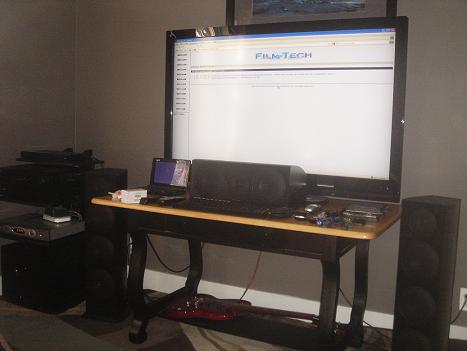
I'm still unsure about the sub placement. The manual just says to try different locations in the room and to switch phasing to see what sounds better. All the speakers are ported in the back except the sub. The sub is "down firing" and is ported in the front. It is a powered sub and I can adjust volume, frequency, and phase(by 180 degrees) on the controls on the back of the sub.

I'm also wondering if I need to build small stands for the L/R speakers? The room is only about 12'X 12'. The picture and sound are great, but I just want to make sure it's the best I can get out of it ![[thumbsup]](graemlins/thumbsup.gif)
Rick
Posted by Manny Knowles (Member # 1171) on 11-20-2010, 01:59 PM:
LOL -- and I thought I was the only one who did Film-Tech on the big screen with surround -- the way the director intended! ![[Razz]](tongue.gif)
Posted by Richard Hamilton (Member # 321) on 11-20-2010, 05:17 PM:
Manny, It was either that or porn
Posted by Louis Bornwasser (Member # 3063) on 11-20-2010, 07:22 PM:
Ahhhhaaa! That's it!
TV is supposed to be small. Movies are supposed to be big. That is why D Cin seems wrong. Louis
Posted by Richard Hamilton (Member # 321) on 11-24-2010, 10:47 AM:
Had to replace the Denon yesterday. The night before, I went thru the EQ process step by step in the advanced section of the manual. The receiver came with a mic and I had to put it in 6 different locations in the room and it took measurements. When I was done, the levels seemed lower. I put in a disk, and as soon as there was a loud part, the Denon would shut off.
After 30 minutes on hold with a Denon tech, I was able to reset the unit back to "out of the box". He asked about my speakers and when I told him they were 6 Ohms, he said that was the problem. The problem happened after I did the EQ, which was only room measurements from a series of pops from each channel. The receiver is rated at 6-16 Ohms. After I hung up, it happened again, only this time it wouldn't power up.
After 30 minutes on hold with Best Buy, they said I could bring it in to their repair department, to which I replied "I can also box it and the $2000 of other stuff I just bought last week and get my money back and go buy everything somewhere else".
Anyway, they replaced the Denon and now I'm hesitant to mess with the settings. I guess "if it ain't broke, don't fix it"
Posted by Brad Miller (Member # 2) on 11-24-2010, 11:38 AM:
If it needed to be calibrated to whatever degree it permitted and you can't, take it back!
Posted by Tony Bandiera Jr (Member # 2365) on 11-24-2010, 01:42 PM:
Richard, save yourself the future aggravation and return that Denon now for a refund.
Denon used to be the best in terms of performance and reliability (I have one that is over 15 years old in my rack at home right now) but...
Guess where they are made now? ![[puke]](graemlins/puke.gif)
And guess where the one I have was made?
Try to find a Marantz, very similar in specs and features and a lot more reliable.
I had to return a new Denon that was dead out of the box, would power up but had NO outputs, video or audio, from any output!
I went thru the same hassle on the return at Worst Buy, only after I threw a very loud tantrum did the exchange it.
Never again will I buy Denon or anything of high cost from Worst Buy.
Posted by Richard Hamilton (Member # 321) on 11-24-2010, 05:42 PM:
Tony, Gonna give the Denon a second chance. I exchanged it for the same model and will push it to it's limits this weekend. I'll be looking at different brands in the meantime. I always associated Denon as one of the best (high end).
quote: Tony Bandiera Jr
Guess where they are made now?
Ummm.... near my home away from home, hehe.
Posted by Jesse Skeen (Member # 586) on 11-25-2010, 12:38 AM:
I'm typing this now on my laptop hooked to a 55-inch LCD with Pioneer sound system. I tried a Denon receiver before I got the Pioneer, but it was awful at handling analog video- if the sync went bad for the slightest amount of time, the signal would drop out, it even happened when my laserdisc player changed to side 2! I contacted Denon about this and they suggested I get a time-base corrector! It went back right after that.
Posted by Richard Hamilton (Member # 321) on 11-25-2010, 10:14 AM:
Jesse, How do you have your laptop set up? Mine is through the VGA input, but I can't make the TV the primary monitor, I have to extend it to the TV. When I try Primary, the TV goes blank and says "no signal". I have to drag all the icons from the laptop to the TV. They auto align on the TV, but the first time I open them, they open on the laptop, then I drag them to the TV and then they open on the TV every time after that. Anything in the Start Menu, I have to use the laptop, I can't move the Start Menu bar over to the TV.
How is the Pioneer?
Rick
Posted by Tony Bandiera Jr (Member # 2365) on 11-27-2010, 01:34 PM:
quote: Jesse Skeen
I tried a Denon receiver before I got the Pioneer, but it was awful at handling analog video- if the sync went bad for the slightest amount of time, the signal would drop out, it even happened when my laserdisc player changed to side 2! I contacted Denon about this and they suggested I get a time-base corrector! It went back right after that.
I found out the hard way on this one..I installed two Denons at UC Irvine, initially thinking that the extensive input switching and the upconversion would be ideal..untill damn near EVERY source suffered the blackout problem..a major deal as professors use the worst-possible media for lectures. I ended up having to run additional lines to the video projectors and get an outboard component video switcher to get things working right.
Like I said before, never again with Denon.
Richard, I hope your Denon holds out..I have no faith in their long-term reliability anymore either.
Posted by Mark Lensenmayer (Member # 134) on 11-27-2010, 02:43 PM:
I'm looking for a good 55" unit (non-3d). The Samsung models look good, but I'd consider other brands. Anyone have recent experience here?
Posted by Jesse Skeen (Member # 586) on 11-27-2010, 09:04 PM:
I have my computer hooked to the HDMI input on the receiver, which then goes to the TV's HDMI input (all my stuff is hooked to the receiver, but I also have component cables hooked to the TV and swap them between DVD players when I want to see closed-captions, since HDMI can't pass those.) Works with no issues except there's about an inch of black on all sides- my TV has 4 pre-settings though so I use one of those with the HSize and VWidth set just enough to zoom in on it.
I can't get my computer to play any downloaded multi-channel audio files through the receiver with either the HDMI or mini-optical output- I'm too computer-illiterate to know exactly how that works.
As long as I'm posting here, I'll link to a video of the problem my Vizio TV is having with its 'smart dimming'- this should be self-explanatory: (And yes, that is my voice.)
http://www.youtube.com/watch?v=BX45RuQnGuY
Posting that was actually enough to get the company's attention and they sent me a replacement TV but it had the same problem. Now they're going to send me the next model up, but I'm afraid it's still going to do this. It seems whoever designed this TV programmed it to do that on purpose, but of course they're wrong- the LEDs should never go COMPLETELY out when there's any video signal coming in. I currently have the smart-dimming turned off, but the black levels are pretty crappy that way. I held off getting a new TV for a long time just because I'm picky about black levels, and this was the first affordable LED set to come along.
Posted by Joshua Waaland (Member # 287) on 11-28-2010, 10:58 AM:
I just bought this model yesterday for our bedroom at an HHGREGG while in Charlotte, NC visiting family. My brother-in-law knows a manager at the store and got me $50 off of an already good price. Hooked it up last night and it looks great on the hi-def channels. Can't wait to get my hi-def cable box later this week so I can hook it up properly with an HDMI cable.
I hope to buy a much larger TV later next year for our living room to replace our large projection HDTV.
http://www.hhgregg.com/ProductDetail.asp?SID=n&ProductID=24571
Posted by Richard Hamilton (Member # 321) on 12-01-2010, 11:58 AM:
A little off topic, but does anyone know what BD-Live is? It shows up on the menu in certain movies, but when I click it, it says to check my internet connection or my USB connection. My blu-ray is connected to my router via ethernet, and I just hooked the Blu-Ray directly to my modem via USB. When I talked to a tech at Insigna, he couldn't answer my questions and kept putting me on hold. He finally came back and said BD-Live is just for updates. To which I replied, "then why is it an option on my menu screen when I insert a disc, and when I select it, it says I don't have an internet connection?" I know my internet connection is good. So anyway, what the hell is BD-Live?
Posted by Daniel Schulz (Member # 1881) on 12-01-2010, 12:15 PM:
BD-Live is a feature that lets you pull additional or new content tied specifically to your disc; it shows up on the menu and everything. For instance new trailers for related movies, or a commentary or making-of that was created after the discs were pressed.
Posted by Monte L Fullmer (Member # 2797) on 12-01-2010, 12:56 PM:
I have two Vizio's that I bought at Costco (bought them 6 months apart with one being the 120hz one)- both 37inchers.
One upstairs in the living room and the other with my computer with Blu-Ray with HDMI output in my ET room.
The autodim feature works good with the one downstairs. The light sensor is in the lower right of the unit.
Posted by Joshua Waaland (Member # 287) on 12-01-2010, 03:50 PM:
I also just bought this Sony Blu-Ray Player at Best Buy. Hooking it up tonight to check it out.
http://www.bestbuy.com/site/Sony+-+3D%26%2342/Internet+Connectable/Wi-Fi+Built-In+Blu-ray+Disc+Player/9739925.p?id=1218165051047&skuId=9739925
Incidentally, I am selling off all of my 35mm equipment very soon. Just no time to mess with it. I would rather pop in a Blu-Ray or use Netflix and watch a film on my new flat screen. Much less work and cost. I will miss working with film though.
Posted by Monte L Fullmer (Member # 2797) on 12-01-2010, 03:57 PM:
With Blu-Ray there is an Achilles Heel in all of this since some of the newer releases requiring firmware updates with the players to reproduce the information on the disc correctly.
..do a search on firmware updates with that and any player that is out there, for there has been some makes where any updates done via USB thumbdrive can totally screw up and lock up the unit due to update procedures or the software itself.
Thus, the unit has to be returned to the factory(ies) to clear out the system where they have to do the updates themselves.
Heard that Samsung had a few issues in this direction..
Posted by Darryl Spicer (Member # 711) on 12-01-2010, 04:04 PM:
BDlive is an interactive connection that can be included in certain bluray titles. You need an Internet connection and a usb flash drive for the content to download to.
Posted by Jesse Skeen (Member # 586) on 12-02-2010, 10:37 PM:
BD-Live is a candidate for "Sony's stupid piece of shit that doesn't fucking work"!
Posted by Joshua Waaland (Member # 287) on 12-03-2010, 08:16 AM:
The player that I bought has wi-fi built in so there is no problem connecting to the internet for updates.
I read about some of the Samsung problems too. I wanted to buy a unit that was the same brand as the TV that I have and CNET rated the Samsungs pretty high. The users however complained about a lot of player failures so I steered clear. I then went to Sony thinking that since they developed the technology, they should have the best hardware for it. We will see if that is the case. Worst case, I am only out $160. ![[Roll Eyes]](rolleyes.gif)
Posted by Tony Bandiera Jr (Member # 2365) on 12-03-2010, 01:08 PM:
My experience with Sony's has been nothing but bad...very slow loading, two units that outright died, three that kept outputting green screen or multicolored snow...all in client's screening rooms. Oddly, never had any trouble with their DVD only players, I have one in a screening room that is well over 10 years old with heavy use and still going strong.
I have Samsungs at UC Irvine, we'll see how they last. They do load faster than Sony and seem to load faster than the Panasonic I have in my own screening room.
Powered by Infopop Corporation
UBB.classicTM
6.3.1.2