This is topic Windows 8 revealed in forum Film-Yak at Film-Tech Forum ARCHIVE.
To visit this topic, use this URL:
https://ft-forum.com/ft/cgi-bin/ubb/ultimatebb.cgi?ubb=get_topic;f=8;t=006444
Posted by Joe Redifer (Member # 3) on 06-02-2011, 07:26 PM:
Authentic video from MicroSoft
http://www.youtube.com/watch?v=p92QfWOw88I
My thoughts (which shouldn't be read until after you have watched the video):
Why does everything need to be touch screen? Sure, W8 will work with a keyboard and mouse "if that's what you have", says MicroSoft. They say it as if everyone so desperately wants to touch the damn screen. I hate the touch screen interface on the iPhone and iPad. Keyboard and mouse is so much more efficient. Imagine trying to edit video or work in Photoshop or Illustrator with a touch screen interface. Although I imagine it could work, I can't imagine it working well. Also, that Start screen nonsense needs to go. I sure hope there is a "classic" mode which makes it look like Windows from 15 years ago (Windows 2000).
So are we stuck with this touch stuff from now on? For kiosks and shitty phones I guess it is fine, but for desktop computers? What's the next big thing? Controlling our computers with voice? That would suck for porn surfing. ![[Smile]](smile.gif)
Posted by Bruce Hansen (Member # 281) on 06-02-2011, 07:34 PM:
I like to eat jelly dounuts while working on the computer, so that touch screen thing is a bad idea. ![[beer]](graemlins/beer.gif)
Posted by Lionel Fouillen (Member # 1475) on 06-02-2011, 07:48 PM:
Joe, enjoy the thrills of mass marketing !
They annoy us with 3D at the movies, thinking that everybody loves it, and even that everybody should love it, and if you don't, you're old/retard/overconservative. Now Microsoft considers everybody must be waiting for touch screen computers.
Apple does the same. I'm a hardcore Mac user, having both a Mac and an iPhone. This virtual iPhone keyboard is the least convenient keyboard I ever used, making my iPhone the worst phone ever to text someone, mainly due to the absence of arrows to navigate in the text. And Steve Jobs announced that they're "bringing back to the Mac the good things of iOS" ? Wow, I pray for my MacBookPro to keep working another year or two without forcing me to adopt Lion.
What's the next thing? Stadium-seating keyboards? Because all keys following a slight slope, that's just too flat?
Posted by James Westbrook (Member # 3690) on 06-02-2011, 11:40 PM:
*pounds head on desk*
Do.......not.....want!
Posted by Frank Angel (Member # 248) on 06-03-2011, 12:19 AM:
Windows 8 -- Wow, WAY cool name! That's what the creative "team" came up with? Did someone put that up on that fabulous wall of creative ideas that's supposed to impress us?
So the nice new 27in monitor that I just bought needs to be junked so I can get dizzy with crap zooming across a monitor screen I have to point to over and over? I can't just buy a new computer, now we all have to replace our monitors as well. EVERY monitor with this new OS has to be a touch screen monitor, yes? They are asking us to junk perfectly good, working moniors just for this Windows? So right off the bat, its ecologically irresponsible and for what purpose? Consumerism gone amuck. More planet resourses turned into junk for the landfills with a half-life of a couple of millennia.
Hey, we all know why MS worked so hard on this astounding nonsense -- it's that they want to claim a "revolutionary new" look a few jumps ahead of Apple. For the longest time, Microsoft has had a huge corporate inferiority complex because Apple had what was perceived as a much "cooler" UI than the PC, and MS has always been constantly in a catch-up mode. With every new Windows incarnation they were always trying to look like an Apple but without violating patents. I guess Gates finally thinks this is MS's big leap-frog ahead of Apple, but in reality it certainly is stealing the touch screen look from the iPhone, so they STILL can't claim to be the first with some totally new kind of interface -- fact is, Apple had it first, only on a smaller scale. And touch screen monitor technology is certainly nothing new (or to write home about either).
But this is application of it and the fancy UI does NOTHING useful; it's all flash and no substance -- just sounding brass and tinkling cymbals. I mean, for years, the FIRST thing I do is shut off all the animated menu options in MS Apps. And the first time I worked with a Mac, I asked the guy, "How do I turn off this stupid animated nonsense on the bottom of the screen that looks like barrel distortion in motion?" "Oh," sez he, "but why would you do that?....it's so COOL." I scowl and say, "Because it's so brainless and I HATE cool almost as much as I hate cute."
What are we, infants in a crib with a shiny mobile hanging in front of us with which we're supposed to be fascinated because it moves if we touch it? Screw MS. I guess for the same reasons I didn't like Macs, now I can REALLY hate Windows 8. A curse on BOTH their fluff houses.
Make the world a damn operating system that doesn't get garbaged up and slowed down after a few months of operation; make us an OS that has such rock solid, impenetrable security that it doesn't have to spawn a entire anti-virus software industry; how about building that security as integral and native to the OS? HUH? How about a Registry that CLEANS ITS EFFIN SELF?! Build THAT in! How bout an OS that cannot display the word "BUFFERING"?
Oh yah, and when shit happens that is so severe that the operating system decides it needs to send the problem details back to its creator -- instead of it giving me a message thanking me for helping Microsoft, how about that freaky Microsoft "team" that worked so hard making it so my fingers can type on the monitor screen instead of a perfectly functional KEYBOARD, how about have them send a FIX back to my computer instead of a useless thank you message? THAT would actually be worth something, instead of them spending all that energy trying to mimic the iPhone.
I want a meat and potatoes OS from MS that WORKS and never has to say BOO to me about a problem. If an OP knows enough to send me an error message, make it so that it can diagnose and FIX the error -- isn't that the very metaphysical nature of what a computer IS....a diagnostic tool? Physician heal thyself!
Bottom line, I am not interested in some foo-foo eye candy designed to entertain a two year old and make computer illiterates think they are cool computer whizzes.
Windows 8 = ![[puke]](graemlins/puke.gif) (How's THAT for an animated icon....and you didn't even have to touch the screen!!)
(How's THAT for an animated icon....and you didn't even have to touch the screen!!)
Posted by Brad Miller (Member # 2) on 06-03-2011, 01:49 AM:
Watching that video simply makes me angry.
Microsoft is #1 for a reason. Looks like they don't care about keeping that throne since they are willing to destroy a good SOLID operating system interface with this fluffy animated iShit.
I skipped Vista for a reason. I also have refused to use Windows 7 for a reason. If there is no way to disable this crap, I will be skipping Windows 8 as well.
XP in classic mode is a real computer. When I click on something it pops up instantly. I don't have to wait and watch it funnel up in position via a tornado swirl in some lame attempt to impress me. I also appreciate having TEXT in the taskbar at the bottom of the screen. Having only icons to identify what I am working on is a joke.
Posted by Mike Blakesley (Member # 26) on 06-03-2011, 02:25 AM:
I don't know what you guys are going so batshit about. It says in the video that it'll work with a keyboard/mouse. The only reason they're going all touchy with it is so it'll run on iPad-type devices which you gotta admit, are awful popular.
Plus, this thing is probably at least 3 years away from the marketplace so who knows what it'll look like when it finally comes out. And, the guy clearly says that Windows 8 is a "code name" so they'll probably come out with a really cool name when they finally release it, like "Windows '14" or something.
I agree with Frank about the need for a nice robust OS that is secure. But that could crash the Silicon Valley economy, so it'll never happen.
FWIW I switched my computer here from XP to Win7 about a year ago and pretty much every problem I had with this machine vanished and has not returned, so I'm a Win7 fan.
Posted by Andy Frodsham (Member # 4061) on 06-03-2011, 02:47 AM:
Microsoft, as ever, get away with murder!
I still remember the great scam perpetrated on us all in the days of the Windows 3.0 to 3.1 'upgrade', and the Vista 'joke' is still very fresh in most of our memories!
I hate paying good money for 'faulty' goods or, worse still, to be used by Bill Gates as an unpaid 'beta tester'!
Posted by Monte L Fullmer (Member # 2797) on 06-03-2011, 02:59 AM:
I thinks this Win8 is all heading towards the touchpad, for when you look at some facts, touchpads are gaining on the sales while laptop sales are slipping for portable computers.
There could be a new generation of touchscreen flat panels (like the ELO touchscreen monitors that a lot of POS terminals currently uses) that can really benefit with Win8.
It could head towards a marketing thing where you buy a touchpad with this new Win8 installed, or have the option to install this Win8.
It's all heading towards ease of use. But, watch out: maybe APPLE will go a step farther and come out with an OS that uses the webcam to monitor eye movement to activate the cursor on the screen where no hands are needed.
It's not going to end......
-Monte
Posted by Mike Blakesley (Member # 26) on 06-03-2011, 11:14 AM:
How about this: They could come out with Windows Business, which would be designed for desktops and laptops, and then Windows Pleasure (insert your own porn joke here) which would be for the touchscreen crowd, which if you look at that video, are apparenly mostly concerned with looking at and arranging photos, and playing games.
Posted by Bobby Henderson (Member # 840) on 06-03-2011, 11:49 AM:
Remember the old saying? K.I.S.S. Keep It Simple Stupid.
IMHO, Microsoft is clearly getting caught up in the mania of pouring more enhancements into the user interface and losing total sight of why people use personal computers. From what I saw in that video about Windows 8, it looks like a slick interface for a sales kiosk. But it doesn't look like something I want to use as a computing work space. Too much of it looks like it would get in the way of how I want to use the machine.
I have two fundamental needs with a personal computer.
1. I use it to run applications to create and finish work.
2. I use it to store & organize the work, which consists of files.
Any real improvement to an operating system should make it easier, faster and more reliable to do one of the two fundamental purposes I just mentioned. Anything else is just window dressing or completely irrelevant.
I think Microsoft is taking this obvious departure from personal computer UI design as a panicked reaction to all the hysteria surrounding the iPhone and iPad. They're trying to make Windows into something that competes with those products. The problem is a personal computer has a very different purpose from a smart phone or tablet device.
Devices like Android phones, iPads, etc. are designed only for viewing media and interacting with it in limited ways. Traditional personal computers (desktops and notebooks) are made to create media as well as store very large amounts of it. The user interface of a personal computing operating system needs to be tailored to that purpose. The PC is not a freaking phone or TV set. It's smarter and far more powerful than that.
When I work, I want to see as little of the operating system UI as possible. I want it to get the hell out of my way. I even use applications like Photoshop and Illustrator in such a manner that their UI trash isn't getting in the way of my work either. When I can see more of my work, less of menus and still get lots of things done fast then I am happy.
The same thing goes for organizing files. Microsoft deserves a lot of heat over this. They bury Windows Explorer farther and farter into hidden menus and what not. Instead they want people hopping through 23 different window screens just to find a file in some sub-folder on a hard disc or thumb drive. I think it's much faster and far more simple to use the file tree in Explorer. Same goes for the Finder on a Mac. The menu system in Microsoft Office applications make me angry. There's a lot of needless complication and visual embellishment when all I want to see in the upper left corner is a "File" menu and have it offer the standard choices. They started pulling this crap with Windows Media Player a few years ago and the infection of stupidity spread across Microsoft's product line.
quote: Joe Redifer
Imagine trying to edit video or work in Photoshop or Illustrator with a touch screen interface.
Obviously it would suck. Nevertheless even companies like Adobe are getting ate up with it. They have that new color mixing app for the iPad. You export the results into Photoshop. Um, I can kind of do the same thing in Photoshop already. Corel Painter provides far more capability in that direction (if you need it).
I might be more excited if a stylus was involved instead of my finger. I draw using a pencil or pen, not my finger. I can click a stylus point on various menu items more accurately than I can using my rounded fingertip. Wacom makes a couple "Cintiq" LCD monitors where you use a stylus to draw directly on the screen with 2048 levels of pressure sensitivity. They have 12" and 21" models. They're really expensive.
Posted by Brad Miller (Member # 2) on 06-03-2011, 11:30 PM:
What Bobby said. Also this...
quote: Bobby Henderson
The menu system in Microsoft Office applications make me angry. There's a lot of needless complication and visual embellishment when all I want to see in the upper left corner is a "File" menu and have it offer the standard choices.
That stupid ribbon in Office 2010 is really annoying. At least I found this.
Posted by Tony Gallimore (Member # 5358) on 06-04-2011, 12:54 AM:
You're 100% right on this and your previous post... I'm still holding onto XP pro even though I was offered a free Windows 7 OS. Why do they want to keep tinkering with a good version and end up messing it up with all those useless bells and whistles so many end up turning off. Same thing with the Office Suite, too much unused stuff to wade through to do a job... and that ribbon clutter just makes it that much more useless. And now fingerprints all over the monitor? They can keep it! I was told by the tech at the school where I retired... they are hanging onto XP Pro and re-imaging all their new drives that come in with 7 back to XP.
Posted by Mark Gulbrandsen (Member # 72) on 06-04-2011, 07:19 AM:
I've owned an HP tablet computer for years... it's still one of my favorite computers. It has Windows XP Tablet version OS which is touch based... so touch based stuff is not necessarily new and has been around a while.
Posted by Martin McCaffery (Member # 37) on 06-04-2011, 08:29 AM:
quote: Frank Angel
What are we, infants in a crib with a shiny mobile hanging in front of us with which we're supposed to be fascinated because it moves if we touch it?
Do you really have to ask?
Posted by Ian Parfrey (Member # 5122) on 06-04-2011, 03:19 PM:
Found this under the video in Joe's link.
quote:
Adding comments has been disabled for this video.
![[Roll Eyes]](rolleyes.gif)
Posted by Mike Blakesley (Member # 26) on 06-04-2011, 06:12 PM:
That's just because there are too many people who love to bash Microsoft just for the sake of doing it. Diehard Mac users, for example. Why bash Microsoft when you don't use their stuff?
It reminds me of how every time there is a story in a newspaper website about some church thing, the comments get filled up with "non-believers" bashing religion. My question is, why are they even reading the church-related news?
I think if Microsoft figured out a way for your computer to automatically give you $10,000 a year, there would be people bitching because it wasn't $15,000.
Posted by Joe Redifer (Member # 3) on 06-04-2011, 06:34 PM:
The reverse is also true, Mike. People love bashing Apple. You can't say one deserves it while the other doesn't. BOTH deserve the bashing. While obviously you can't please everybody, perhaps the extreme negative outrage over this latest Windows will make MS change their plans before release.
Posted by Chris Slycord (Member # 4239) on 06-04-2011, 07:15 PM:
Likely, Windows 8 will have an option to switch between this interface and a simpler one similar to Windows 7, although I'm with Brad on the idea that the bottom taskbar should have names instead of icons. That's definitely something that should be changed on 7.
Posted by Joe Redifer (Member # 3) on 06-04-2011, 08:01 PM:
You guys haven't enabled the Classic Mode in Windows 7?
Also, I'm not sure about text over icons in the task bar. Text takes up way too much room if you have a lot of stuff open and quickly becomes truncated. I like icons and display the full text if I hover over them like the Mac OS dock. I am familiar with my icons so I don't really find it confusing.
Posted by Martin McCaffery (Member # 37) on 06-04-2011, 08:05 PM:
The scary thing about the linked video is how badly it is recorded. Are they trying to keep YouTube from being the future of filmed entertainment, or were they incapable of making a decent sounding and looking recording?
Posted by Brad Miller (Member # 2) on 06-04-2011, 08:55 PM:
Can someone please post a screenshot of Windows 7 with classic mode enabled and a few different programs running (at least 2 instances of the same program)? I'm betting it isn't really classic mode.
Posted by Chris Slycord (Member # 4239) on 06-04-2011, 09:35 PM:
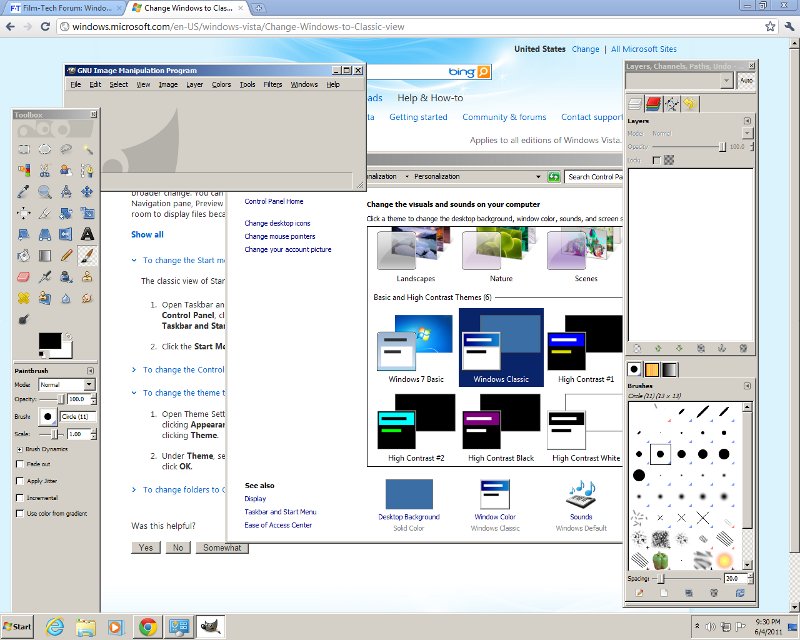
And with multiple instances of the same program, there only is one "instance" showing in the bottom of the screen.
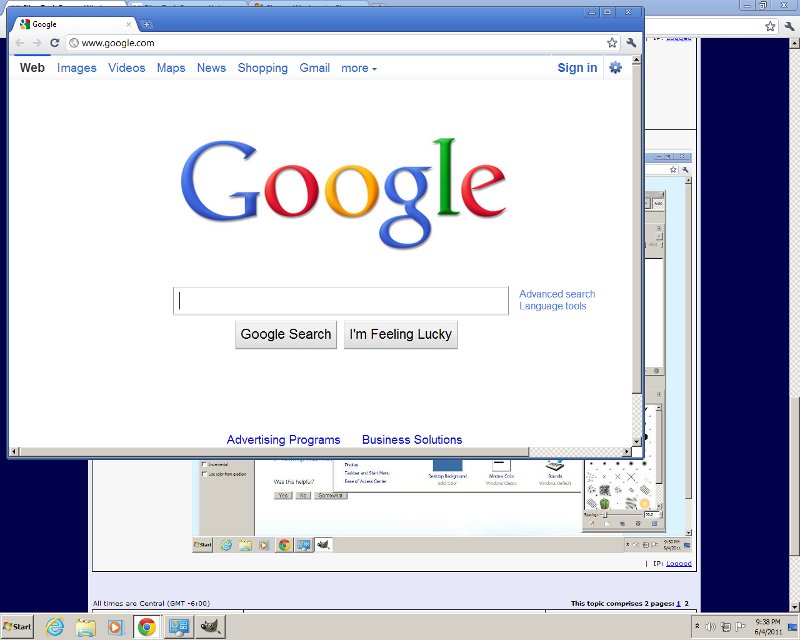
Posted by Brad Miller (Member # 2) on 06-04-2011, 09:44 PM:
Wow, what a mess. I have some questions just based off of this image.
I see Internet Explorer there by the start button. Is that there because you actually use IE (remind me to slap you) or because Windows won't let you delete it?
I also see Windows Explorer (which is good), some play button, what I think is Windows Media Player, an icon of a game controller and a bird (or maybe a dog's head). THAT is exactly my point. What is that??? WHY can they not have actual TEXT there??? And if you have two IE windows open, I'll bet you only get one little "e" icon forcing you to either double click or hover, wait and THEN click, right?
EDIT - I saw you just posted a second screenshow. Where are the normal FILE - EDIT menus?
Posted by Chris Slycord (Member # 4239) on 06-04-2011, 09:49 PM:
The IE icon is there by default. I've just never bothered removing it from the taskbar. And to your other question, check that I edited the post with another screenshot. Your guess is correct. You get one icon at the bottom of the page no matter how many instances you've got of a program running.
And you don't see the file menu because chrome browser defaults to not using them and puts it all in the little options icon on the far right...
Posted by Brad Miller (Member # 2) on 06-04-2011, 10:06 PM:
Icons are stupid. Windows 7 still sucks. I know I am not the only person who feels that way and continues to stick with XP because of it. Microsoft screwed up by not providing some sort of XP view.
Posted by Randy Stankey (Member # 64) on 06-04-2011, 10:25 PM:
That funny looking icon is the GIMP.
http://www.gimp.org/
Posted by Joe Redifer (Member # 3) on 06-04-2011, 10:55 PM:
LOL, you guys don't know Windows 7's Classic mode very well. I'll have to find my hard drive with W7 on it in a bit and plug it in to my Mac and boot it up.
quote: Brad Miller
I also see Windows Explorer (which is good), some play button, what I think is Windows Media Player, an icon of a game controller and a bird (or maybe a dog's head). THAT is exactly my point. What is that???
If it was an application that you personally used, you'd know. The only time it would ever be confusing is the first time you used it, but even then since you didn't recognize it, you'd probably figure it was for the new application you just installed. If you are still confused, I'm pretty sure that W7 lets you hover your mouse over it and the full text is revealed.
Posted by Chris Slycord (Member # 4239) on 06-04-2011, 11:23 PM:
I was figuring when you said "classic mode" you meant enabling the classic theme, which I did. But now I see what it is that you were referring to (I think).
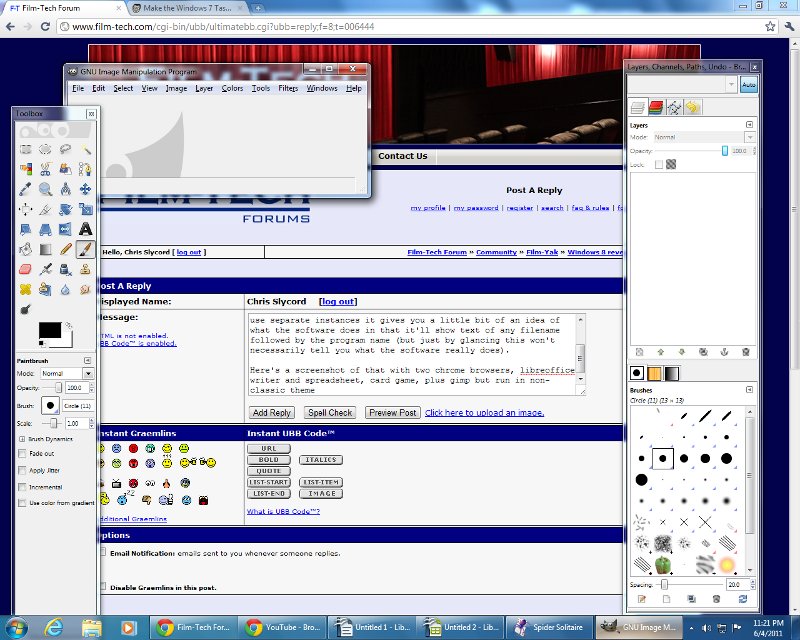
In any case, Brad, you can make the taskbar have separate icons for each running instance of a program. And when you do have it use separate instances it gives you a little bit of an idea of what the software does in that it'll show text of any filename followed by the program name (but just by glancing this won't necessarily tell you what the software really does).
Here's a screenshot of that with two chrome browsers, libreoffice writer and spreadsheet, card game, plus gimp but run in non-classic theme
Posted by Joe Redifer (Member # 3) on 06-04-2011, 11:42 PM:
Yeah, here is how it looks in CLASSIC mode:

Ooops I guess I can't show you because PNG doesn't work on Film-Tech. What the fuck, Adam? It's 2011, not 1996.
Anyway, it looks exactly like Windows 98.
Posted by Brad Miller (Member # 2) on 06-05-2011, 02:48 AM:
quote: Joe Redifer
I'm pretty sure that W7 lets you hover your mouse over it and the full text is revealed.
Screw that. Hovering wastes time. Just give me visible TEXT all the time. (And yes I realize it only takes one second, but regardless it is just as much of an annoyance as an extra mouse click.)
quote: Chris Slycord
Here's a screenshot of that with two chrome browsers, libreoffice writer and spreadsheet, card game, plus gimp but run in non-classic theme
MUCH better. You're getting closer, but where is my START button and why are the quick launch icons wasting so much of the taskbar space? Can the taskbar be raised to 2 or 3 rows? And what is this gimp and why do I care? I mean Pulp Fiction was an awesome movie, but I don't need to be reminded of it every 5 minutes of the day. (And don't tell me you don't think about that scene every time you hear "gimp".)
quote: Joe Redifer
Ooops I guess I can't show you because PNG doesn't work on Film-Tech.
Use your fancy schmantsy Photoshop to convert it to a jpg.
Posted by Joe Redifer (Member # 3) on 06-05-2011, 03:05 AM:
quote: Brad Miller
Use your fancy schmantsy Photoshop to convert it to a jpg.
Screw that. And yes I realize it only takes a few seconds, but regardless it is just as much of an annoyance and when posting pics of computer graphics, PNG works best. In fact, I'm pretty sure I used to be able to post PNG to Film-Tech. Film-Tech is ahead of the curve in cinema hardware. The website should be modern, too.
Anyway, here is the pic:
http://www.joeredifer.com/crap/W73.png
quote: Brad Miller
Can the taskbar be raised to 2 or 3 rows?
Yep. Just drag it up.
quote: Brad Miller
And what is this gimp and why do I care?
Gimp is a free image editor, kind of like Photoshop with high-functioning autism. You care because you asked.
quote: Brad Miller
Pulp Fiction was an awesome movie, but I don't need to be reminded of it every 5 minutes of the day.
Every ten minutes, then? I agree every 5 is too much.
Posted by Brad Miller (Member # 2) on 06-05-2011, 11:58 AM:
Here is your pic in wonderful jpg Joe
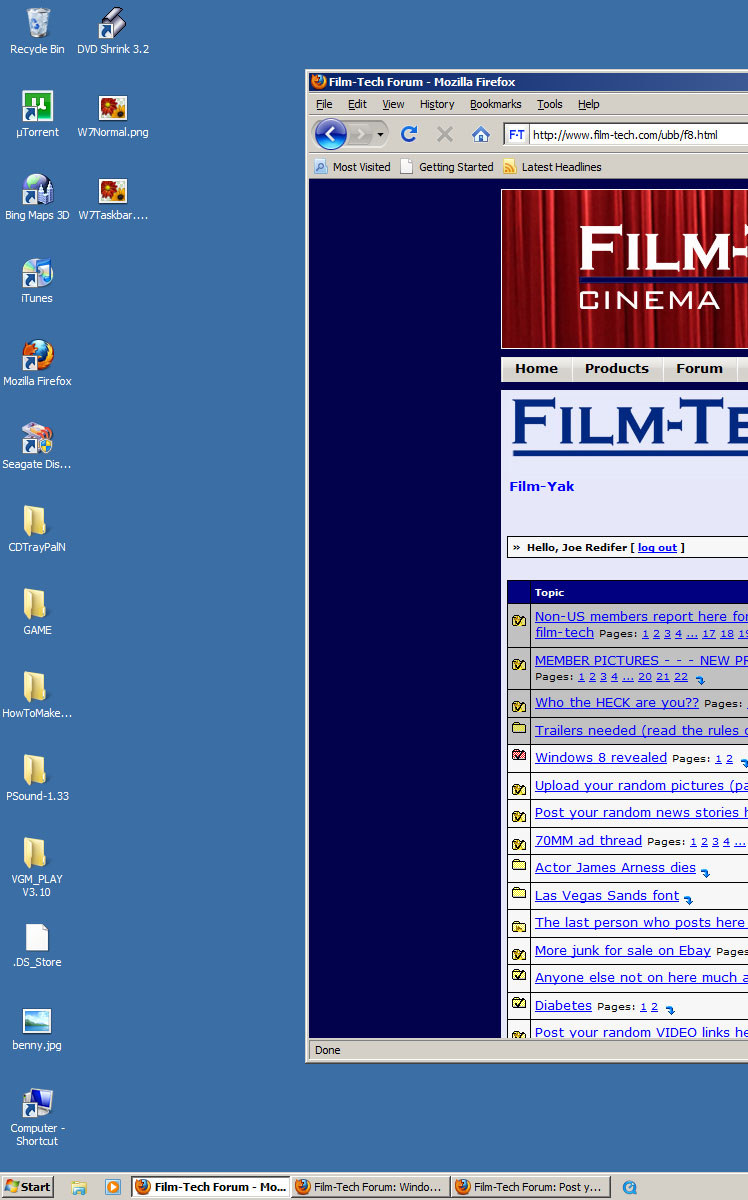
And THAT is pretty close to awesome. I'll have to give Windows 7 a shot and see if I can turn off the "i" to achieve that.
Posted by Sean Weitzel (Member # 244) on 06-05-2011, 01:51 PM:
I had win7 initially configured like Joe, but eventually spiced it up a little bit.
For example, While I don't have a problem with the more modern start button, I am a huge fan of the Quick Launch area, so I re-added the quicklaunch to the task bar. I also never understood "pinning" an application to the task bar. This is how my task bar normally looks
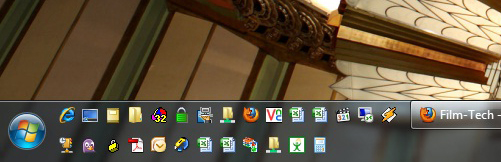
But if you want to be crazy, you can enable full text names for the quicklaunch icons:
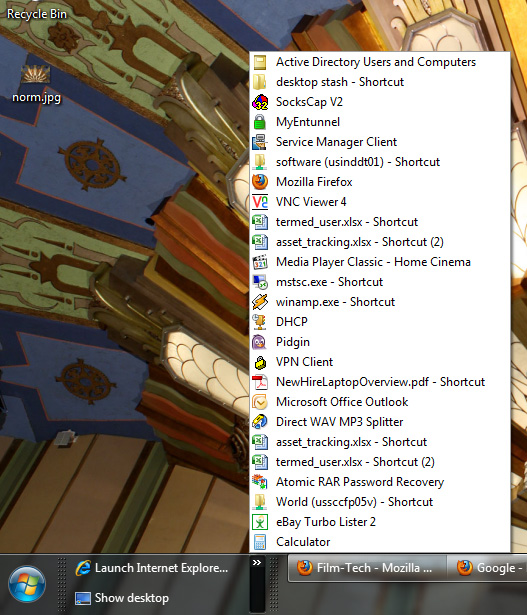
One thing to be cautious of with Win 7 is that some legacy apps flatly will not even run with the whiz-bang aero desktop theme enabled, they REQUIRE the classic non-enhanced desktop. Also be VERY careful if you decide to install 64 bit. Lots of legacy 32 bit applications will run fine, but some won't. Also flash enabled websites will give you freezing issues since Adobe has their head up their ass and haven't come out with a stable 64 bit native flash that I am aware of at least.
Posted by Mike Blakesley (Member # 26) on 06-05-2011, 02:02 PM:
I've used Adobe Pagemaker 7 for about a hundred years to make my newspaper ads. It's easy, quick and I know all the shortcuts. Then I would convert the file to PDF to send to the paper. But that's the ONE thing I can't get to work on Win7 -- PM's convert utility just hangs the program. I'm sure there's some other way to convert a Pagemaker file to a PDF, but haven't had time to research it yet. For now I do my ads on my computer at work, which still has XP.
Probably will begrudgingly abandon PM at some point, I guess... it makes me a little sad, since it was one of the first "high end" programs I owned. (Maybe this is a sign I should cut-out the newspaper advertising?!)
Posted by Sean Weitzel (Member # 244) on 06-05-2011, 02:13 PM:
That's strange, Mike. I have Pagemaker 7 installed right here on this Win7 32 bit and don't have a problem exporting to PDF from within the app. Try uninstalling your printers, maybe a driver is in the way. If that doesn't help maybe try re-installing Acrobat or even uncheck the box that tries to auto display the exported PDF when the conversion is done.
The workaround should all this fail would be to purchase the full version of acrobat that allows PDF creation. It creates a virtual PDF printer. You just tell pagemaker to print to the PDF distiller.
Posted by Frank Cox (Member # 6258) on 06-05-2011, 02:34 PM:
I use Scribus for my desktop publishing needs. It has a bit of a learning curve but it works very well and there is a Windows version (though I've never used that.)
Scribus is free software.
There is a section on the Scribus website that showcases some examples of what it can do. I have personally used it to create layouts for flyers, advertising cut sheets for both print and online, fridge magnets, labels for candy bags, custom printed plastic bags for my cotton candy, envelopes, business cards, notepads, signs, and probably a lot more stuff that I can't think of offhand. Friends of mine layout two weekly newspapers with it.
Posted by Frank Angel (Member # 248) on 06-05-2011, 02:38 PM:
quote: Brad Miller
I know I am not the only person who feels that way and continues to stick with XP because of it. Microsoft screwed up by not providing some sort of XP view.
No, Brad, you certainly are NOT. All of CUNY (City University of New York), consisting of some 27 senior and junior colleges, after lots of evaluation have opted not to move past Win XP SP3. Vista came and (thankfully) went, and Win 7 but each ITS department in each college has turned down both vista and Win 7.
I speak to the chief IT guy at BC all the time and he said that have a hundred reasons why XP satisfied their needs better than later incarnations. They all know over there that they will eventually have to move past XP because MS will stop supporting it, but they will wait until MS comes up with an OS that performs with as much stability and as cleanly as XP.
I am sure none of them over at ITS will be too thrilled with this maschugina piece of fluff.
Posted by Chris Slycord (Member # 4239) on 06-05-2011, 02:45 PM:
quote: Brad Miller
You're getting closer, but where is my START button and why are the quick launch icons wasting so much of the taskbar space?
If you switch to the "classic theme" that I showed earlier, it'll give you a button that says start. All you'd have to do is enable the classic theme then choose to have the taskbar never combine buttons.
And the icons are big because that's how they are in the default theme.
quote: Brad Miller
Can the taskbar be raised to 2 or 3 rows?
By default, the taskbar is locked into place but when you deselect locking it, you can resize the taskbar to take up to half the screen if you wanted
quote: Brad Miller
And what is this gimp and why do I care? I mean Pulp Fiction was an awesome movie, but I don't need to be reminded of it every 5 minutes of the day. (And don't tell me you don't think about that scene every time you hear "gimp".)
gimp is a free/open source image manipulation program. And I wasn't reminding you of the program. I was pointing out what programs were in the screenshot as a comparison to earlier and for some strange reason when I was resizing images to throw them up on your fancy "i can only take 800 pixels-wide" website, I decided to leave the thing open. ![[Razz]](tongue.gif)
Posted by Joe Redifer (Member # 3) on 06-05-2011, 03:35 PM:
What does everyone use the START button for? The only time I really ever use it is to go to the Control Panels menu or find the command prompt if I need to run some underdeveloped application. I never launch apps from it and as a file directory it sucks ass.
Posted by Brad Miller (Member # 2) on 06-05-2011, 04:23 PM:
I played with a Windows 7 install for a bit today and indeed I can make it look like Joe's picture. Unfortunately they have jumbled most other things around trying to make it more "user friendly" so I now have to go FIND where they are. ![[Mad]](mad.gif) Other than that, I might give it some consideration, but geez Firefox 4 sucks. Any program that removes my standard file/edit/view/etc links at the top of the window pisses me off.
Other than that, I might give it some consideration, but geez Firefox 4 sucks. Any program that removes my standard file/edit/view/etc links at the top of the window pisses me off.
Posted by Anslem Rayburn (Member # 1267) on 06-05-2011, 04:43 PM:
Brad, just click the Firefox button, go to options, and select Menu Bar. It will add the old File/Edit/View bar and get rid of the Firefox button.
Posted by Joe Redifer (Member # 3) on 06-05-2011, 08:03 PM:
My Firefox 4 has all of the FILE EDIT VIEW etc, but I am on the Mac version now. In fact I did install it on my Windows XP computer as well and they are still there I believe and I don't recall needing to turn them back on.
But anyway, as I've learned in the past, computers and their UI can't/won't stay the same forever. You will eventually need to learn the new locations of things or stop using new programs altogether since they won't be supported on older OS's. What if Dolby creates some bullshit that everyone needs that only works with Windows 8? And if you try to put it in a classic mode, the Dolby program breaks? Still, you can ever win because I'm sure there are a lot of essential programs that REQUIRE Windows ME or some such nonsense. You need old and new. I've found that the "compatibility modes" in Windows generally don't do shit.
That said, I don't care for the control panel in Windows 7. It groups things into ambiguous clusters instead of each having its own icon. That's an unnecessary extra click and sometimes you need to guess which one to click on.
Posted by Scott Norwood (Member # 30) on 06-05-2011, 09:02 PM:
Has anyone else found the 32-bit version of Win7 to be signficantly less stable than the 64-bit version of same? That has been my observation with a few dozen users running it (mostly the 64-bit version).
I will also say that, if you want a 64-bit Windows OS, Win7 is the best option at the moment. WinXP-64 is fairly stable, but it was never very popular and hardware support (i.e. drivers) is pretty bad for most devices. Vista-64 is a bad joke.
The UI issues don't bother me much, as I have never particularly liked the Windows GUI. I just turn off all the eye candy (control panel->system->advanced->performance->adjust for best performance). Once this is done, performance improves noticeably.
Posted by Joe Redifer (Member # 3) on 06-05-2011, 10:59 PM:
I am running the 64-bit version of Windows 7 and have updated it every week and had no problems, though I still use the Mac OS more (which has a psuedo-64-bit OS). I think the OS updates come out each Wednesday. The service packs are just collections of those updates.
Posted by Sean Weitzel (Member # 244) on 06-05-2011, 11:06 PM:
My windows 7 32 bit Professional on a Dell D620 laptop that I am currently typing this is hands down more reliable that Windows 7 64 bit Enterprise on an HP Elitebook 8530w that I use at the office. Both have the same apps installed.
Posted by Monte L Fullmer (Member # 2797) on 06-06-2011, 12:06 AM:
quote: Anslem Rayburn
just click the Firefox button, go to options, and select Menu Bar
Thx for the tip, for I was wondering on that as well when I upgraded to FF-4 and my menu bar disappeared after the upgrade. ...thx-
Did the tip and got my menu bar visible now...
quote: Sean Weitzel
My windows 7 32 bit Professional...
What I'm using also with my Lenovo G550 laptop here...boots up pretty quick and very reliable .. but do miss my old DELL 6000 Inspiron that I had XpPRO,SP 3 on it...that was a very stable system for sure.
thx-monte
Posted by Joe Redifer (Member # 3) on 06-06-2011, 01:28 AM:
Sean, did you install those systems yourself or did the OS come pre-installed with the computer? Manufacturers often install a ton of their own useless nonsense that can interfere with the stability of the computer.
Posted by Sean Weitzel (Member # 244) on 06-06-2011, 02:31 AM:
Joe - Both were vanilla installs to blanked drives from the Microsoft discs.
Posted by Bobby Henderson (Member # 840) on 06-06-2011, 10:22 AM:
The hardware in any given computer will have a big effect on how well the machine runs. For instance, my office desktop computer takes what seems like forever to boot. I think Norton Anti-Virus has something to do with this, but I think system's hardware and unique combination of drivers is probably a bigger culprit. By comparison, my old notebook computer boots up relatively fast.
quote: Scott Norwood
Has anyone else found the 32-bit version of Win7 to be signficantly less stable than the 64-bit version of same?
I'm wondering why Microsoft even sells a 32-bit version of Windows 7. I have zero desire to choose a 32-bit version of Win7 when I buy a new computer because of the limits 32-bit operating systems have in dealing with graphics. Under a 32-bit OS Adobe Photoshop will only use 2GB of RAM. Certain registry tweaks can allow it to use 3GB of RAM, but possibly at the cost of making the whole system unstable. For some stupid reason a PC with 4GB of RAM will only show 3.25GB installed under 32-bit Windows XP.
quote: Joe Redifer
What does everyone use the START button for?
I right-click on it to access a pop-up menu that allows me to launch Windows Explorer or Search.
quote: Joe Redifer
If it was an application that you personally used, you'd know. The only time it would ever be confusing is the first time you used it, but even then since you didn't recognize it, you'd probably figure it was for the new application you just installed. If you are still confused, I'm pretty sure that W7 lets you hover your mouse over it and the full text is revealed.
I agree. I'm familiar with any application I use, even on an occaisional basis. Icons work. However, the icons need to be designed logically. I also have no problem with hovering over items in the taskbar to see what's what.
One thing I would like to see fully spelled out in Windows is all the freaking processes that are running when you hit Ctrl+Alt+Delete. So many of the items running have cryptic names that give no clue on what they do.
quote: Joe Redifer
Ooops I guess I can't show you because PNG doesn't work on Film-Tech. What the fuck, Adam? It's 2011, not 1996.
Every modern web browser has supported PNG for years. The PNG format has many of the capabilities of both GIF and JPEG. PNG even supports 8-bit alpha channels, which allows anti-aliased masking and transparency. By comparison GIF transparancy is just 1 bit. It sucks.
I'll also throw in a vote for SVG (Scalable Vector Graphics) support. Modern web browsers support SVG files. SVG works better in displaying logos and other graphical items. GIF is stuck using some sort of limited color palette. JPEG tends to screw up edge detail with its image compression. SVG files are far more efficient. The file size is small and stays the same no matter how big you scale the image on a web page. And it displays the graphic perfectly, unlike GIF or JPEG. SVG files are written in XML and are supported directly by the HTML5 spec.
Inkscape is a free, open source application that creates and edits SVG graphics.
quote: Mike Blakesley
I've used Adobe Pagemaker 7 for about a hundred years to make my newspaper ads. It's easy, quick and I know all the shortcuts. Then I would convert the file to PDF to send to the paper. But that's the ONE thing I can't get to work on Win7 -- PM's convert utility just hangs the program.
PageMaker 7 only has limited compatibility with Windows Vista and Windows 7. Its version of Acrobat Distiller gets broken by 64-bit operating systems. Adobe Type Manager is another casualty. Adobe isn't developing PageMaker any further. They put all their page layout developement resources into InDesign, which is really a far better application.
I'm stuck in a similar situation. I'm running Adobe Creative Suite 3 Design Premium on my old notebook computer I've kept alive for over 6 years, thanks in part to Sean Weitzel who helped me with a replacement LCD panel a couple years ago. The notebook's obsolete PATA-based hard disc is starting to have issues. When it fails I'm going to have to buy a new notebook. When that happens I'll also need to finally upgrade my Adobe Creative Suite license. Adobe CS3 doesn't work with Win7 64-bit. Gotta move up to CS5.5, or CS6 if my notebook survives long enough.
Posted by Chris Slycord (Member # 4239) on 06-06-2011, 06:27 PM:
Since browsers were brought up...
The only reason I hate Firefox 4 is that, for whatever reason, if I open it in the guest/user account I created, it takes over 5 minutes to open. It doesn't happen in the account that's got administrator access. For what it's worth, the same thing happens in IE when there's a random site that won't work for me in chrome. Reinstalling makes no difference; installing an updated firefox 4 makes no difference either.
And chrome opens in less than a second on both accounts.
Posted by Joe Redifer (Member # 3) on 06-07-2011, 01:46 PM:
That's just damned bizarre!
Posted by Scott Jentsch (Member # 1681) on 06-07-2011, 05:31 PM:
I skipped over Vista and went from XP to Win 7 64-bit, and haven't looked back. It does take a while to become accustomed to where things are in the new OS, but that's natural with any software that spans 10+ years.
The only real gripe I have with the OS is that folder positions and states are no longer remembered on a folder-by-folder basis, but rather just by the position of the last window opened. It screwed with my workflow something fierce!
Programs and hardware not working with the 64-bit version are the fault of those programs and hardware manufacturers, or the user for trying to put a contemporary OS on old hardware and trying to run old software on it.
There were a few cases of software that was supposedly designed for Win 7 that didn't work well in 64-bit environments (I'm looking at you, Quickbooks), but they finally got that worked out. PDF printer drivers were a hurdle that I ran into early on. Future versions of Quickbooks and Adobe Acrobat fixed that situation.
Windows 7 is such a better working environment than XP was that while it can be difficult to get used to something new, the effort is rewarded in the extra performance that you can get from the OS. Give the OS a multi-core CPU and it knows what to do with it. Give it more RAM, and it will make use of it.
It's also much more stable than XP was for me, but that's probably due to the fact that I had an XP install that was years old and cluttered with lots of droppings from years of program installations and upgrades.
The Task Manager and Resource Monitor that you can get to from doing a CTRL-ALT-DEL is a wonder to behold with all the viewing options that you have. Want to see which program is hogging memory? Take a look and find out just how much it's using. Thinking that you're maxing out the transfer speed of your hard drive? Yep, it's in there. Like to watch your four cores being used to their fullest? Run Handbrake on a video conversion and watch a multi-threaded program flex your PC's muscles.
I would never go back to Windows XP. It's a giant leap backwards for how I work and the programs I use, and the hardware that I have. Your mileage may vary. If I had something that only ran on XP, I'd have to see if Win7 Pro's XP would handle it. Fortunately, I don't have to use any legacy software like that.
Posted by Anslem Rayburn (Member # 1267) on 06-07-2011, 06:35 PM:
quote: Scott Jentsch
The Task Manager and Resource Monitor that you can get to from doing a CTRL-ALT-DEL is a wonder to behold with all the viewing options that you have.
Just a side note. You can access the Task Manager with a right-click on an empty area of the task bar. Quicker to open this way than Ctrl-Alt-Del and then selecting it.
Posted by Frank Angel (Member # 248) on 06-09-2011, 02:19 PM:
I agree it would be nice if Task Mngr would give more specifics about any executable that it's displaying so you can more easily determine if it's something you want or need running or not. Some files can give you a clue by the file name (for example, HP apps usually have files that all start with HP), but you can always kick the ones you don't recognize and see it the system balks or if they delete without incident. Stuff that an application needs to run will usually be put right back by the app. Same with most of the OS files. Win won't let you delete files it needs, or if you do delete something necessary, Win will say screw you and shut itself down. BUT, it's a way to learn what you need to leave and what can be done without. And yes, it sure would be nice if a simple click would tell you want program any given file that is running is associated with.
Posted by Anslem Rayburn (Member # 1267) on 06-09-2011, 09:43 PM:
Under the "View" menu on Task Manager you can have it list the "Image Path Name" which will show you the directory and actual file that is used to run the process.
Posted by Frank Angel (Member # 248) on 06-15-2011, 01:01 AM:
Anslem, that sounds like it would be a big help, but I can't find it. I opened View and the tab there had Refresh Now, Update Speed and Select Columns. In Select Columns tab there are a bunch of parameter that it will let you click to add them to the display columns in PROCESSES, BUT the one that I think is what you are talking about -- it says Image Name, which ironically is at the TOP of the list, but of course it is grayed out, so I can't select it. Microsoft screwing with me yet again. Is that the function you are referring to, and if so, what part of my computer do I hit with a sledge hammer to get it to be clickable?
Posted by Anslem Rayburn (Member # 1267) on 06-15-2011, 10:40 PM:
On my laptop, it's called "Image Path Name" and appears after all of the I/O entries almost at the end of the list. None of mine are grayed out, not sure why it wouldn't be selectable. If you can't choose it, look for "Command Line" and see if you can select it. It will display the entire path, as well as any switches used to run the process.
Powered by Infopop Corporation
UBB.classicTM
6.3.1.2