This is topic How to get rid of an audio hum in forum Film-Yak at Film-Tech Forum ARCHIVE.
To visit this topic, use this URL:
https://ft-forum.com/ft/cgi-bin/ubb/ultimatebb.cgi?ubb=get_topic;f=8;t=006508
Posted by Frank Cox (Member # 6258) on 08-26-2011, 11:47 PM:
Among other things, I am the webmaster for CHXL, a unique little radio station that's owned and operated by the Okanese First Nation on their reserve in Saskatchewan. "Fifty Thousand Watts of Pow Wow Power!"
I have a streaming audio server in my theatre that streams their signal on the Internet. You can find it through their webpage if you're interested. Unfortunately, there is a slight hum in the Internet stream that I have never been able to get rid of.
This is the setup: I have an external antenna on a tower that hooks to a tuner with standard coax, the tuner is plugged into a small Behringer mixer board, and the mixer is plugged into the "mic in" on a computer. The power for everything listed here is hooked up to a single UPS so everything is plugged into the same electrical circuit, and the antenna ground is hooked to the same circuit as well, so everything has a common ground.
The stations sounds perfect if I put some speakers directly onto the tuner. But through the computer, the stream has a slight hum. I connected a wire from a screw on the tuner case to a screw on the computer case and that cuts the hum by a significant amount, but it's still there. I tried hooking a wire from the mixer case to the computer case as well, but that increased the hum by a lot.
So, my question is: Does anyone have any ideas that I haven't yet tried to get rid of this hum?
Posted by Frank Angel (Member # 248) on 08-27-2011, 01:29 AM:
First, why are you putting line level output from the tuner into a mic input on the computer? Line level out should always go into line level in. Secondly, you could double check everything to see if there is a hidden ground loop in your setup, but they can be peksy and if you want to try a down and dirty fix, you can get an isolation transformer that will break any ground loop. You can get them at many electronic outlets like this: here: ART hum blocker
There are cheaper ones on the market, but be careful -- they are all just transformers in boxes....some are expensive xformes, some cheap. Cheap transformers can muddy and even distort the bass. You want a unit that has a wide frequency response and no phase shifting in the bottom end. I have used these ART products and have been very happy with them.
Again, why are you using the MIC input? Is there a level problem from the tuner...too low for the line IN on the sound card?
Posted by Frank Cox (Member # 6258) on 08-27-2011, 01:59 AM:
The server doesn't see the line level input, even though it is physically present on the server. Therefore, when I set thing thing up the path of least resistance (no pun intended) was to simply use the mic in, which it does see.
That's actually the purpose of the mixer board -- to cut the input signal from the tuner down for the mic in. And it works fine for that purpose.
If I plug a CD player into the mixer board and stream that instead of the radio station, there is no hum. Which appears to eliminate the mixer board as the source of the hum.
I really don't see where the hum can be getting introduced, even though it obviously is sneaking in somewhere. Everything has a common ground and is being fed from a single power supply and I thought that would be sufficient.
Perhaps relevant: The tuner has a two-prong (ungrounded) power cord. The mixer board is powered by a wall-wart adapter, so it also has no separate ground of its own. The computer has a standard three-prong (grounded) power cord.
I find it interesting that the hum is greatly reduced by connecting a wire from a screw in the tuner case to a screw in the computer case. Without that wire, the hum is pretty bad.
I've been living with this hum for a couple of years, but it sure would be nice to get rid of it if I can.
Posted by Monte L Fullmer (Member # 2797) on 08-27-2011, 03:09 AM:
quote: Frank Cox
The tuner has a two-prong (ungrounded) power cord.
Is the plug polarized - one hot and one neutral tang, or a common type of non polarized plug. If you look on the wire (if it's the standard 18g flat zip cord type), there will be two different leads to the plug: one smooth and one ribbed. The smooth one is hot and the ribbed is neutral. Mark your plug so the one blade representing hot goes in the smaller receptacle of the socket.
One way to reduce ground looping with that wire trick.
Grounds don't like each other too well and they can argue real bad.
Gonna have to attenuate that input from the AUX to MIC then. Maybe a 50k trimpot can attenuate that high line current down to match that mic input current.
Posted by Frank Cox (Member # 6258) on 08-27-2011, 03:13 AM:
Again, that's what the mixer board is doing. It attenuates the output from the tuner so it will match the mic input. And it works: There is no hum when I plug a CD player "line out" into the same input on the mixer board. The hum shows up only when the tuner "line out" is plugged into the mixer board.
Posted by Monte L Fullmer (Member # 2797) on 08-27-2011, 03:19 AM:
Yep, got some real bad "ground looping" going on. There are 'ground loop isolators' out there that one can purchase to eliminate this problem then.
Do a google search on "ground loop isolators"
I have a bunch of them that I can shoot off to you. PM me if interested.
-thx Monte
Posted by Frank Cox (Member # 6258) on 08-27-2011, 03:27 AM:
The tuner is an old one that was laying around at the station when we decided to undertake this project, and it has an old-style non-polarized plug on it. I just checked how I have it plugged in and I see that it was, purely by chance, plugged in with the smooth side of the cord into the smaller slot in the receptacle.
So I guess that lets that out as the source of the hum.
Posted by Leo Enticknap (Member # 534) on 08-27-2011, 10:20 AM:
quote: Frank Cox
The server doesn't see the line level input, even though it is physically present on the server. Therefore, when I set thing thing up the path of least resistance (no pun intended) was to simply use the mic in, which it does see.
Sounds to me like a problem with the driver software for the sound card. Is it an old-ish card running a much newer version of Windows, and the driver running forced compatibility mode? Might replacing the sound card for one for which a driver is available that is fully compatible with your operating system be worth trying?
Posted by Louis Bornwasser (Member # 3063) on 08-27-2011, 11:26 AM:
Remove all existing grounds like the third wire on the AC plug. Then wire all chassis together with a wire of some substance like a #12 with lugs. Sometimes a smaller wire adds hum and a larger wire stops it.
I have used battery jumper cables to search for a good ground. THAT'S a big conductor. Louis
Posted by Frank Cox (Member # 6258) on 08-27-2011, 12:54 PM:
Leo: It's a relatively new computer running Centos 5, not Windows. (I'm like the maid: I don't do Windows.)
I don't think that's the source of the problem, anyway -- the hum is not present when I plug a CD player into the same input on the mixer board.
Louis: The whole works is plugged into the same circuit (and therefore the same ground) right now. Doesn't that amount to the same thing?
As it sits right now, wiring the tuner and the computer together reduce the hum, but extending that wire to the case of the mixer board causes the hum to increase.
Monte: I sent you a PM that includes my email address (though you can find it pretty easily with Google, too.)
Posted by Monte L Fullmer (Member # 2797) on 08-27-2011, 03:30 PM:
quote: Louis Bornwasser
I have used battery jumper cables to search for a good ground. THAT'S a big conductor.
(Course, this is DC current, but similar..:)Why some auto hobbyists, esp when doing major mods with the engine, will add many grounding connections with the same gauge wire (and with higher count strand wire) used from the battery to various parts under the hood - like shock towers, transmissions, intake manifolds, power steering brackets, et.al. - to really distribute the current from the negative post for a lot better circuit path than just the two from the battery-which is the firewall and the one engine ground point.
These owners really want the current to flow freely for better operational power.
Posted by Frank Angel (Member # 248) on 08-27-2011, 03:36 PM:
Frank, Leo is right -- wire size is a key issue for the potential (no pun intended) where hum can originate. The old RCA method of ground hum elimination still works -- you solder a ground wire to a piece of equipment, if the hum lessens, you leave it on; it the hum increases, you snip it off. Trial and error. The jumper cables are great for this. Try them on each piece of equipment to a GOOD ground point. It is not as unlikely as it my seem that even ground pins in an outlet can have higher potential to earth than zero. I once read a voltage potential at the ground pins between two outlets in the same room at 7 volts differential! 7 volts of 60Hz is a LOT of hum. Short of driving a copper stake 5 feet into the ground, you can't really trust grounding points in a building, especially an older one. Try various places and various jumps between equipment with those battery cable clamps to see if you can kill the hum.
Let me ask you this -- can you get a clean signal out of the tuner if you send its output directly to the computer -- well, not directly to the mic input, you will need a Direct Box (commonly found in any sound engineer's toolbox) to get it down to mic level? See if it is clean going directly and bypassing the mixer. If it is, they it has to be the interconnection and the mixer that is the culprit.
If none of these steps solves the hum, then I wouldn't hesitate grabbing an audio isolation transformer and put it between the tuner and the mixer (you say you can play other source thru the mixer and the audio out of the computer is fine. yes?). That leaves you with a tuner that interacts badly with the mixer and an isobox between them should resolve that.
On the other hand, I would strongly suggest that you replace the sound card and get one that accepts a line level 1v/p-to-p input. Needing to have the mixer drop the line level signal down to mic level only to then require the sound card to amplify it back up to line level is an unnecessary, potentially noise inducing step; at the very least it has the potential to degrade the signal. The flimsy cable and the consumer 1/8 mini plug between the mixer and the computer itself can be a source of noise, which is why on pro equipment they use XLRs and hefty, well shielded cable. Why boost a signal 100 times (and whatever noise is present) when you already start off with a 1v line-level signal? I'm just sayin....
Posted by Monte L Fullmer (Member # 2797) on 08-27-2011, 04:16 PM:
Here's one that I done recently: At a drive in that I take care of on occasion, they use an Mic amp to play their CD player into along with their PA announcement through the FM transmitter.
The Cd player went kaput and they got another CD player to put in line, but the output of that new CD player was a lot stronger than the old one which caused major distortion on playback.
I took a 100k stereo pot and put it inline in the RCA cables so the output can be attenuated down to match the mic amp, but did I get the hum like a bad open.
Took some 12g strand, soldered one end of the wire to the common side of the pot where the ground leads from the RCA cable met, and the other end attached it to a near by "J-box" case which was heading to the earth. Hum suddenly disappeared. CD playback now works excellent with no distortion.
Posted by Frank Cox (Member # 6258) on 08-27-2011, 04:17 PM:
I can't plug the tuner directly into the computer because I don't have anything other than the mixer board that will attenuate the signal. (If I did, I probably wouldn't have the mixer board.) And I don't live in a place where I can just walk down the street and pick up that sort of thing.
The next time I go to "the city" I will go to the music shop where I purchased the mixer board and see if they have a ground loop isolator -- I'm pretty sure I can get one there since they have all sorts of doodads. I did pop in at the hardware store here this morning on the off-chance that they might have one of those things since they carry some telephone and television hookup stuff, but they didn't have it and it wasn't on their list of things that they can order, either.
Meanwhile, I've lived with this hum for quite a while so I guess I can live with it for a bit longer. I guess it bugs me more than it bugs anyone else; I've never heard anything mentioned about it by any of the listeners or the folks who work at the radio station -- everyone is just happy that the station is available online (and they have a surprising number of listeners).
The audio server runs on Centos 5. I suspect that Centos 6 (released a couple of months ago) would recognize the line level input, but setting that up would involve reformatting the server and setting the whole thing up from scratch again, which is a lot of work that I would be just as happy to not do. I think I had to do a custom compile of Icecast to get it going on Centos which, while not hard to do, is once again something that it's nice to not have to do, as well.
When the point comes that the server quits, I'll set the next one up with the latest and greatest, but until that point arrives, well...
If all I need to get rid of the hum is a ground loop isolator, that's not hard to do so I'll just put one of those on my shopping list.
Posted by Bruce Hansen (Member # 281) on 08-27-2011, 04:30 PM:
First thing I would try is to un-ground the antenna. Then try turning off the tuner, then try unpluging it. Does the hum go away? Try turning the AC plug around in the socket.
If at all possible find a way to use the line in to the computer. Taking line level and dropping it to mike level, then having the computer bring it back up to line level is a very bad practice. There should be a program for the sound board somewhere. You may have to find it, in order to turn the line input on (and the mike in off).
Caution: most audio transformers are LINE level. Do not try to use them with a mike level signal. You will have lots of problems.
Posted by Frank Cox (Member # 6258) on 08-27-2011, 05:11 PM:
Monte has very kindly offered to mail me a ground loop isolator.
I'll hook that up between the tuner and the mixer board and see what develops.
I would like to take this opportunity to publicly thank Monte and everyone else who has participated in this thread. The amount of knowledge to be found here is absolutely amazing.
Posted by Louis Bornwasser (Member # 3063) on 08-27-2011, 05:43 PM:
Order a direct box on line. You can get one with an isolating transformer inside, in stereo. Louis
Posted by Monte L Fullmer (Member # 2797) on 08-27-2011, 06:42 PM:
N/P .. gotta help a fellow FT member out.. if possible. - thx, Monte
Posted by Richard Hamilton (Member # 321) on 08-28-2011, 07:40 AM:
Try 1 of these products. I've used RDL products on quite a few installs, no complaints. RDL You need a power supply (24Vdc) for it.
Rick
Posted by Louis Bornwasser (Member # 3063) on 08-28-2011, 11:06 AM:
"Teach it the words!" Louis
Posted by Frank Cox (Member # 6258) on 08-28-2011, 12:35 PM:
Richard: I must be missing something -- I don't see what that gadget would gain me in this situation...
Posted by Richard Hamilton (Member # 321) on 08-28-2011, 12:56 PM:
RDL FORMAT‑A features superior audio performance that rivals or exceeds shielded wiring. Design simplicity, ease of installation, unsurpassed flexibility, automatic fused power, exceptional hum rejection, low noise, and low distortion provide designers and installers the optimum choice in economical twisted pair products.
exceptional hum rejection, Sorry, thought thats what you were asking about.
Rick
Posted by Kenneth Wuepper (Member # 1174) on 08-28-2011, 01:31 PM:
Let's do a little reduction of possibilities:
The hum is only present when the tuner is connected. (YES - NO)
It appears that the antenna for the FM tuner has a ground at the tower or perhaps even a lightning protection device. (YES - NO)
Conduct this test and note results:
Leaving the tuner connected but DIS-connecting the antenna (leaves the hum unchanged or eliminates said hum)?
KEN
Posted by Frank Cox (Member # 6258) on 08-28-2011, 05:39 PM:
Richard: I guess I'm not sufficiently knowledgeable about audio to understand what that gadget actually does. It's a replacement for my mixer board? Or something else? I really don't see how it fits into the circuit that I have set up. (Sorry to sound stupid but I've read that web page 3 times now and I still don't get it.
Kenneth: The hum is only present when the tuner is connected. And there is no hum if I swap the cables that connect the tuner to the mixer board over to a different audio source (CD player) and stream that instead of the radio station.
Interestingly enough, today the hum seems to be almost gone, and I have no idea why or what changed. It's still present but it seems very slight and I don't know if anyone would actually notice it if you weren't specifically looking for it.
The antenna feeds into the building with a standard coax cable and that coax cable has a grounding block on it. Like this one. After experimentation, I found that the hum is least when the ground wire is attached to the metal box that houses the power receptacle that the electronics are plugged into, so that's where it is grounded to right now. The ground wire is 14AWG stranded automotive wire.
It just now occurs to me to ask this question: The tuner, computer, etc. are all plugged into a UPS. The UPS plugs into the power receptacle on the wall, and the antenna is grounded to the box that houses that same receptacle. I wonder if it would be beneficial to hook the antenna ground wire to the ground terminal on a 3-prong plug and plug that into the UPS instead of grounding it to the receptacle box? Then everything would be grounded to the exact same point. I thought that grounding it to the receptacle box would amount to the same thing, but perhaps not?
The nature of the streaming is that the online stream runs about 30 seconds behind the live source. In other words, what is fed into the computer live right now is heard 30 seconds later on the Internet.
So.. the experiment:
Immediately after unhooking the antenna the hum increased greatly on the stream. When the 30 seconds were up and the setup ran out of "signal" there was such a huge blast of static and interference that there is no way to tell if there was still a hum or not; it was completely drowned out by the other noise.
That seems very odd to me; why would the hum increase immediately when the what you're listening to was actually encoded 30 seconds before I unhooked the antenna?
Again, the hum seems a lot less today and I don't know why because other than fiddling around with the wiring I haven't actually changed anything from what it was yesterday. But if it never gets any worse than it is right now this minute, I think I can live with it.
If any of you folks want to try it out and see what you think, you can access the stream through the CreekFM web page or you can connect directly to the streaming server here. Note that there is no hum in the intro, which is a pre-recorded file that's stored on the server.
Perhaps it will be easier to visualize how this is set up if you see what it actually looks like. Note that the tuner lives in a cupboard a few feet above the rest of the gadgetry (there was only so much room on the little table) so it doesn't actually show in this photo. The green wire that's attached to the top case screw on the computer goes to a case screw on the tuner; that's the ground wire that I said I put between them and it cut the hum by a significant amount.
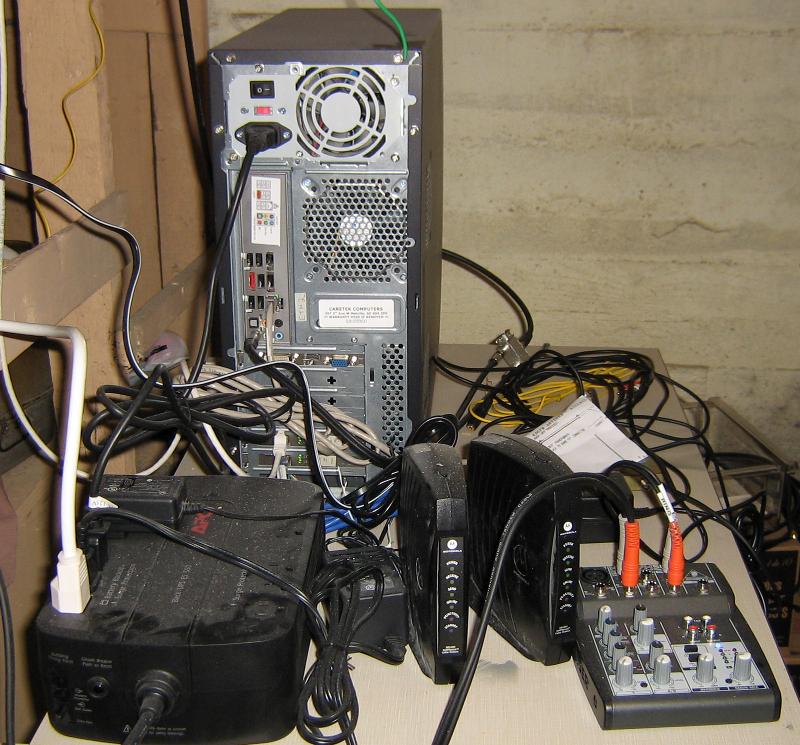
Once again I would like to thank everyone for their input and ideas. I am learning a lot about audio and ground loops!
Posted by Jeff Kane (Member # 6372) on 08-28-2011, 05:59 PM:
First thought: segregate everything as best you can, get that UPS away from the audio equipment, make sure all the audio equipment and wiring is as far away from everything else as is possible, and if audio wiring must cross anything else, make sure it's at a right angle. You may have improved the ground or it may simply be that you moved the mixer or a cable that was picking up hum further away from the source.
But the ground loop isolator you're getting sent should eliminate the problem entirely.
Posted by John Wilson (Member # 269) on 08-28-2011, 06:29 PM:
LOL @ Louis
Posted by Kenneth Wuepper (Member # 1174) on 08-28-2011, 06:48 PM:
Hello Frank Cox,
I see that you have quite a "lash up" there.
Initially, Have you tried moving the components around on the table? Magnetic fields are very nasty and can induce many problems like hum and noise.
I see that you are using a small mixer to interface the tuner and the computer. Does that mixer have a microphone level output? If not, then what is its purpose? Hopefully, not just to reduce the level of the incoming signal from the tuner.
You can easily determine if the hum is in the signal from the mixer by using the headphone monitoring facility in the mixer to listen to what you are feeding the computer sound card.
Does the computer sound card have a headphone or speaker output? Listen at that point for the hum.
What is your internet connection? Is it a cable TV company or high speed telephone co service? There is another source of grounding as the incoming cable will be grounded outside your building.
So we now have:
The power outlet grounding on the GREEN wire to the power panel
The cable company coaxial cable or TelCo ground
The FM antenna to tower ground
The antenna coaxial cable grounded to (the GREEN wire)
The computer system and audio components grounded through the UPS system grounding pin
The computer case grounded to the tuner case
How close is this 50 Kilowatt transmitter to all of your equipment? Your longer than necessary cables could be acting as antennas and collecting EMI directly from the transmitter.
KEN
Posted by Carsten Kurz (Member # 5396) on 08-28-2011, 08:08 PM:
Either or both a transformer/DI-Box in the audiopath and a
http://en.wikipedia.org/wiki/Sheath_current_filter in the antenna line.
Plus get rid of that mic level input. Check into settings or change audio card.
- Carsten
Posted by Frank Angel (Member # 248) on 08-29-2011, 06:12 AM:
I don't understand....the computer seems to have the standard configuration of audio jacks with a sound card on the mother board. The standard three jacks are visible -- a line output, the mic input that you are using, and a line input. Why doesn't the line input work? That can be as simple a fix as unmuting it in the Control Panel (assuming Windows). Or something more complicated, but it should be seriously looked into, going so far as to install a decent sound card and disabling the onboard circuit, because it could solve your problem so easily.
Kenneth is being very kind calling that a "lash up." No offense, but it is mess that invites induced hum and noise, with AC cables COILED running inches away from signal cables and equipment. Follow Ken's advice and straighten every out, uncoil the AC wires and try to isolate them from components and other signal cables; at the very least, keeping AC on one side of the table and everything else on the other.
The fact that the hum has changed and you "haven't done anything" points to one thing -- what you have done has affected it, and that would be that you have been moving around among the components and wiring. Just moving that stuff can very well be just enough to change the hum level, the way your wire is layed out there.
I would almost bet that if you turn up your audio and listen for the hum and just started to move all the that hodgepodge around, you will hear the hum level change.
BTW, I have found that the damn 1/8in mini plug and jack on the computer have always been a really nasty source of static and poor contact on a mic input. You should at the very least clean the plug and the jack itself with a good contact cleaner. The contact surfaces for something as high gain as a mic preamp input should have a much more substantial connector. The contact surfaces are so miniscule that they easily oxidize in the best of circumstances and not for nuthin and with all due respect, that setup doesn't scream "clean." Twist the mic connector plug and listen to all the noise. That almost always means there's poor contact there due to dirt and oxidation. And given the preamplification that follows, ANY induced AC right there can be the cuplrit.
Posted by Bruce Hansen (Member # 281) on 08-29-2011, 05:18 PM:
Looks to me like everything on that mixer is turned way down, and it looks like both inputs and outputs are 1/4" connectors. Are the outputs line level, and you are just cranking the level down to output a mike level? If so, that is where your problem is. You cannot use a line level out cranked down to mike level, you will have all kinds of hum, noise, and hiss.
As others have said, find a way to make the line level ins work.
Posted by Monte L Fullmer (Member # 2797) on 08-29-2011, 10:38 PM:
i just see a lot of grounds going around in a lot of circles ... "ground looping" -
I'm getting to blame the mixer ...
I bet those RCA inputs on that mixer have a common ground going across the entire jack strip instead of being separated per each input/output switch.
Usually "A/B" switching devices (like this mixer for example) with RCA (unbalanced input) jacks, painfully call for ground loop isolators on the input side since the grounds are all tied together as a common and the switches are only on the plus side and no switchable ground-leaving ground all connected together
Home A/V units with multiple RCA audio/video inputs usually have a built-in ground isolation inside to eliminate this "hum syndrome"
Posted by Frank Cox (Member # 6258) on 08-29-2011, 11:24 PM:
If we're going to blame the mixer, then why is it that unplugging the tuner and connecting a CD player to the mixer instead (using the same cable) has no hum?
Unless I'm missing something (which wouldn't surprise me) doesn't that eliminate the mixer and everything past it (connection to the computer, etc.) as the source of the problem?
Posted by Louis Bornwasser (Member # 3063) on 08-30-2011, 11:07 AM:
Frank: your tuner adds the antenna ground. Perhaps a direct box (with isolation) after the tuner then onward would work. Louis
Posted by Bruce Hansen (Member # 281) on 08-30-2011, 05:19 PM:
Is the CD player a portable (battery opperated)? Even if it is an AC opperated unit, the internal wireing could be different. In some equipment there is a resistor or cap. from one side of the AC input to ground. This could be the difference. (As I said before) unplug the AC to the tuner, then dissconnect the antenna (or try it the other way around), see of the hum goes away. Try turning the AC plug around. Are the 1/4" connectors on te mixer "balanced"? If you are using 2 crt. 1/4" connectors, you are shorting the output of an IC to ground - not good. Ground loops are funky things. Sometimes the strangest things will sol ground loops.
FIND A WAY TO USE THE LINE IN ON THE COMPUTER.
Posted by Sean McKinnon (Member # 612) on 08-31-2011, 10:16 PM:
I have a question...
Why can't you move the server to the studio and take a program signal right out of the board or Distribution Amp? I don't see how grabbing the signal off the air is going to do anything to help you here.
Posted by Frank Cox (Member # 6258) on 08-31-2011, 11:35 PM:
Because the studio is located on an Indian Reserve where the only available Internet service is a terrestrial wireless service that's (a) very expensive, and (b) very poor.
We run the server here (about 40-some miles away) because it's the nearest point that has a reliable wired Internet service available. Plus I'm here to look after it.
I did look into transmitting the signal from the reserve to here by modem over a leased line, but the cost of that was prohibitive and the station would lose one of their incoming phone lines unless we paid a fortune for a new line to be run. We also considered microwave transmission, since the studio already sends the programming up the hill to the tower by microwave link and the idea was to swap the microwave receiver for a repeater, drive the FM transmitter from the repeater and move the microwave receiver here to drive the streaming server.
Ultimately, we decided that since we can get an adequate signal most of the time using a high-gain directional FM antenna on a tower here, that's what we use and we'll live with the odd time that we lose the signal due to weather or whatever. Microwave was going to cost significantly more, the FM transmitter is obviously already running and a high-gain "professional" antenna wasn't terribly expensive.
We also gave some consideration to the idea of doing a "sneaker-net" system and simply streaming a week's worth of Moccasin Road (the major "original" daily CHXL program) by bringing each week's programming here on a portable hard drive or something so we could just play it locally. But we discovered that re-shaping the transmitter's footprint a bit and using this antenna here give us adequate reception for live streaming and of course that's what we really wanted.
Posted by Frank Angel (Member # 248) on 09-01-2011, 05:39 PM:
Your setup seems to be doing what you need and doing it well. Stick with it; finding and eliminating the hum is easier than reinventing your system's wheel.
Posted by Frank Cox (Member # 6258) on 09-14-2011, 01:11 AM:
I updated the CreekFM streaming audio server's operating system to the just-released Centos 5.7 (from version 5.6) earlier tonight and lost my input signal. The tuner was playing but the stream encoder didn't see any input.
I discovered that the (software) level settings had changed, so playing around with alsamixer got it going again. And now the hum is gone.
The current level settings aren't much (if any) different than the settings I was using before the software update. I don't see anything in the system log that looks directly related to the sound driver included in the Centos update, either.
Needless to say, I'm pretty happy about this though I haven't a clue what the Centos update fixed in that regard.
You are all invited to tune into the now hum-free CreekFM audio stream if you wish. It's a truly unique radio station, broadcasting from the heart of the Okanese First Nation Reserve in Saskatchewan, Canada.
CHXL
www.creekfm.com
Fifty Thousand Watts of Pow Wow Power!
Serving the File Hills First Nations. And the World.
Powered by Infopop Corporation
UBB.classicTM
6.3.1.2