This is topic Microsoft XL help in forum Film-Yak at Film-Tech Forum ARCHIVE.
To visit this topic, use this URL:
https://ft-forum.com/ft/cgi-bin/ubb/ultimatebb.cgi?ubb=get_topic;f=8;t=006637
Posted by Joe Redifer (Member # 3) on 03-12-2012, 10:43 PM:
See what I did there? Y'know, like Simplex XL? Hahaha?? No? OK.
Anyway I am new to Microsoft Excel. I am using Office 2011. I have a column full of times and I would like Excel to add these times. Times are listed in minutes and seconds, no hours though I would like Excel to be able to add hours as necessary. Times are listed like this: 7:21 or 22:08 (again, minutes and seconds). So how do I get the total time of the entire column down at the bottom. You Windows guys say Microsoft is crazy awesome and Apple sux so I assume Excel can do this without me having to alter the way I enter times.
Walk me through this step by step. Thanks.
Posted by Chris Slycord (Member # 4239) on 03-13-2012, 01:56 AM:
By "total time" do you mean a running total of time (like 21:00 plus 4:00 becomes 25:00) or do you mean that you are keeping a total for what time of day it is (21:00 then add 4:00 I get 1:00)?
Posted by Joe Redifer (Member # 3) on 03-13-2012, 02:58 AM:
Running total, so 7:21 + 6:38 becomes 13:59 and so on.
Posted by Dominic Espinosa (Member # 2122) on 03-13-2012, 05:10 AM:
Assume the following:
G5 is time on, I5 is time off the difference is calculated or the cell is left blank.
=IF(24*(IF(G5>I5,I5+1-G5,I5-G5))>0,24*(IF(G5>I5,I5+1-G5,I5-G5)),"")
If simply adding time formatted numbers together, say 03:00:00 and 01:00:00 then:
=sum(A1:A31)*24
Assuming A1 thru A31 contain these times. Make sure the cell with this formula is formatted "General" and not "Time" as it will want to roll over like a 24hr clock.
Posted by Joe Redifer (Member # 3) on 03-13-2012, 02:32 PM:
What?
Posted by David Zylstra (Member # 4230) on 03-13-2012, 03:14 PM:
I just tested with Excel 2010 . . . .
If you have the fields set as Category "Time" and type "37:30:5" (i.e. HH:MM:SS) you can use the simple sum or addition formula.
The thing to remember is the time should be entered into the fields with data for all 3 types - i.e. for 30 minutes 2 seconds you would enter 0:30:02 (or 0:30:2 works too). If you enter a whole number it will multiply times 24 (i.e. 3 becomes 72:00:00), entering more than 60 seconds will result in the hours and minutes being calculated (i.e. 0:0:120 will turn into 00:02:00)
Posted by Chris Slycord (Member # 4239) on 03-13-2012, 03:29 PM:
I'll assume you want row #2 to contain the time entries, each of them placed in a separate column in that row just so we can make this easy, and they start from B2 and end at Z2. And I assume you want the total hours to be stored in position B4
1) Have a blank document.
2) Click on the "2" on the left side so you can select the whole row.
3) Click on "format" then "cells"
4) Select "time" on the left
5) Change the format code to be "HH:MM"
6) Click on cell B4
7) Type in "=24*SUM(B2:Z2)" and hit enter
8) Right-click on B4 and select "format cells" then on the far-left side choose "number" then select "general" and click OK
I'd put some text in A2 and A4 to tell you that they are for the times entries and total hours entries, respectively but that's not necessary.
Posted by Joe Redifer (Member # 3) on 03-13-2012, 04:32 PM:
I don't have a blank document. It already exists. There is no HH:MM, only random numbers in the Time options on the format settings. See:
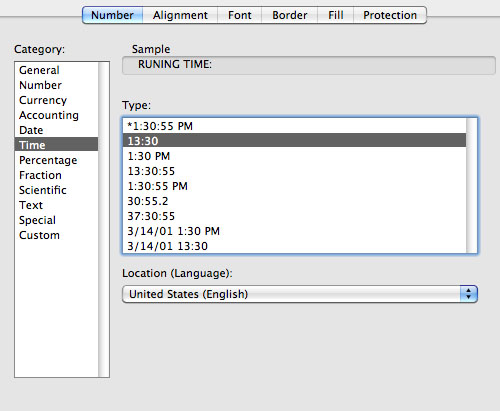
I REALLY have no clue what you guys are saying. This is why I hate Excel with a passion. I am not an office kind of guy.
Here is the document I am working on. I am trying to get all of the times in column (not row) E to automatically add up. It needs to automatically re-tally when I enter a new episode in at the bottom as well.
Posted by Frank Cox (Member # 6258) on 03-13-2012, 05:13 PM:
Here you go
I wasn't sure where you wanted the total so I put it in cell E2. You can put it anywhere you like.
Note that it will currently add everything in column E from cell 3 to cell 1024. If you have more entries than that, increase the number.
Posted by David Zylstra (Member # 4230) on 03-13-2012, 05:23 PM:
Your current data is in HH:MM as time of day and not MM:SS
Do this:
Hold down <Ctrl> and click on column E then F to highlight the both columns
Right click -> format cells -> number tab -> choose "Time" from left side -> choose "37:30:55" as the type -> click OK
Now, in field F3 type the formula =e3/60
Copy that formula down the entire column
Verify that the times in column F look correct (basically your current data is formatted as HH:MM and not MM:SS and /60 converts them)
Highlight f3 through f48, right click -> copy
Right click in field e3 -> Paste special -> Values (choose the first icon with the 123) - this pastes the corrected times into colum E
Delete column F
In E49 type =sum(e3:e48) and you should get the total of 11:06:06
If you want I can email you back a copy of the spreadsheet I performed the above steps on.
edit: actually try this link: link
Posted by Joe Redifer (Member # 3) on 03-13-2012, 06:47 PM:
That works perfectly, thanks!
Frank, thanks for the effort but the summed times were incorrect. It should be close to 11 hours by my manual calculations.
Posted by Frank Cox (Member # 6258) on 03-13-2012, 06:52 PM:
I should probably have done a sanity check on it; I didn't notice that the format you had your times in differs from the "official" time format that you can do calculations on.
Oh well. Shows you what I know...
Posted by Joe Redifer (Member # 3) on 03-13-2012, 08:19 PM:
One more question (and this one should be pretty simple): How do I do a line break in a cell? If I press ENTER/RETURN it just moves to another cell, but I'd like to stay within the cell and have line breaks. I imagine it's just a matter of holding the correct button when I press ENTER/RETURN, right?
Posted by Dominic Espinosa (Member # 2122) on 03-13-2012, 08:36 PM:
ALT+ENTER
Posted by Joe Redifer (Member # 3) on 03-13-2012, 09:49 PM:
That does not work. Just goes to the next cell. However Command+ Alt+Return seems to work.
Posted by Dominic Espinosa (Member # 2122) on 03-14-2012, 06:39 PM:
MAC user! Evil Mac user!
<-- (PC Guy) ![[Wink]](wink.gif)
Posted by Joe Redifer (Member # 3) on 03-14-2012, 06:58 PM:
It takes us twice as many buttons to do the same thing!
Posted by Bobby Henderson (Member # 840) on 03-14-2012, 10:11 PM:
Ugh, I cannot stand Microsoft applications. I mess around with Excel only when I have to do so. Microsoft strives at making their office applications more complicated and user un-friendly than they need to be. And they seem to have little if any idea (or desire) to make their software friendly with other software, like graphics programs.
I'll get customer provided "art" files all time in Word or Powerpoint. Sometimes I'll get one of the Publisher .pub files. Fun. That crap rarely, if ever, transports over into applications like Adobe Illustrator or CorelDRAW successfully at all. Even PDF doesn't solve all the problems. Oh well. I try to tell wannabe graphic designers to try Inkscape. It's free. And the SVG files it generates usually come into Illustrator just fine.
Posted by Dominic Espinosa (Member # 2122) on 03-14-2012, 11:59 PM:
quote:
It takes us twice as many buttons to do the same thing!
Sure but you have fewer virii and increased stability.
I'd use Linux for everything but I've got some apps that are only available on windows that I use far too religiously.
Posted by Joe Redifer (Member # 3) on 03-19-2012, 06:08 PM:
OK Word question. In Word 2011, I can no longer press the DOWN arrow to get to the end of the text like I could in previous, more primitive editions of Word. How do I enable this in the fancy 2011 edition?
Posted by Sean Weitzel (Member # 244) on 03-19-2012, 07:51 PM:
Command - Home for the top of the document. Command - End for the bottom.
But if you have a macbook pro or other mac that lacks home and end keys, the keys are emulated by Fn-Left arrow or Fn-Right arrow. Therefore, Command - Fn - Right will take you to the end of the document.
references:
http://mac2.microsoft.com/help/office/12/en-us/word/item/f7701a9f-35bc-49c5-a5b5-8c24b085a166
http://pcmcourseware.com/blog/2009/02/23/home-and-end-keys-on-the-macbook-pro/
Bonus LMGTFY:
http://bit.ly/GzKhkP
Posted by Joe Redifer (Member # 3) on 03-19-2012, 08:54 PM:
Bah! Why can't MS just make the arrow keys go down line by line and then to the end of the last sentence like they do for every other application that uses text? Like this post I'm typing. I can totally do it. MS is a shitty company that makes shitty things because they have shitty designers. How did they "win"?
Posted by Randy Stankey (Member # 64) on 03-20-2012, 08:26 AM:
I think the problem is because of the way different operating systems were designed from the beginning.
When Apple acquired the Xerox Star system, they spent a lot of time and money researching the way people interact with computers and how they actually use them.
For instance, the trash can is at the bottom, left of the computer screen and the menus are arranged from left to right across the top of the screen. Think about it for a second and compare the arrangement of the computer desktop to a real desk in your office.
Most right handed people put their real trash can on the right side of their desks. The motion of tossing a piece of paper into a real trash can is similar to the motion of dragging a file on your screen to the virtual trash can on your computer. Many right handed people would put their Rolodex file or their notebook at the top, left corner of their desk. Thus, the reason why the "File" menu is located at the top, left of the screen.
When Microsoft came along and copied Apple, they simply rearranged things without consideration of how people actually worked on computers. They took all of the discrete features of the existing system and created a mash up. The name "Windows" is indicative of that behavior.
The underlying annoyance that many people have with computers is directly caused by Microsoft's lack of attention to basic details of design. Because Microsoft was able to place more of their systems in offices and businesses, they actually "trained" people to believe that the "wrong" way is the "right way. However, the underlying inconsistencies and the annoyances that they cause still remain as undercurrents to virtually all operating systems that came after the original Windows operating systems.
I'm not saying that one operating system is "better" or that one is "worse." I'm just saying that Joe's problems and the annoyances he feels because of them are directly caused by the inconsistencies between the way he naturally interacts with the objects in his work environment and the computers he uses.
The best example of a bad user interface is the average DVD player that most people have in their houses. Most people want to just put in a disk and press "play" but 99% of all DVD players don't work that way. The keys on the remote control are not located in rational places. The order of the buttons you have to press is virtually random, jumping around in different situations and from model to model of different players.
Sony is another good example of good and bad interface design. The interface on the older Trinitron televisions used to be one of the best. You could operate the controls on the remote without even looking. You picked up the remote and clicked the channel buttons or changed the volume without even looking. The remotes were designed so you could operate every button, virtually by feel. Now, on the almost all Sony remotes, the buttons seem to be in the most convenient locations for the engineers to place them, not in the most convenient locations for the users.
This is probably the most pervasive problem in modern technological society: The lack of attention to detail and the way that people actually interact and use technology.
It's not getting any better. In the last ten years, I think it's gotten much worse.
Posted by Manny Knowles (Member # 1171) on 03-20-2012, 10:50 AM:
quote: Randy Stankey
the trash can is at the bottom, left of the computer screen
On every Mac I've owned -- and I've owned a lot of them -- the trash can was/is on the bottom-right.
Posted by Randy Stankey (Member # 64) on 03-20-2012, 11:04 AM:
That's what they call dyxlesia... Or is it dyslexia? I don't know for sure. I keep getting things bass ackwards.
Posted by Mike Blakesley (Member # 26) on 03-20-2012, 02:40 PM:
I'm surprised MS is still using that tired old Windows name. Windows can break; they can get dirty; they can be covered by curtains.
Next upgrade, they should change the name to Doorways. Just think of the marketing possibilities. Pathways to opportunity. "The doorway is now open." I'm amazed their marketing geeks haven't done something like this yet.
Posted by Frank Cox (Member # 6258) on 03-20-2012, 02:44 PM:
In a world without walls and fences, who needs Windows and Gates?
Posted by Joe Redifer (Member # 3) on 03-20-2012, 03:57 PM:
Mike, you just know how they'd handle it: "Introducing Windows Doorway!"
Posted by Joe Redifer (Member # 3) on 09-29-2012, 07:01 PM:
David I'm hoping you can help again. The times are now broken. As I add episodes to the list, I need to move the total down. I did a copy and paste but that didn't seem to copy the actual formula, just the numbers representing the result. Before I did that I tried to double-click into the cell and I couldn't get out. Every other cell I clicked on turned green, red blue, etc for no reason whatsoever. I could not escape and had to quit the program. Not sure how to copy and paste in order to move it down and get it to still work. I don't want it too far below the episode total so it will need to move constantly. Help!
Here's the file again.
Posted by Frank Cox (Member # 6258) on 09-29-2012, 07:45 PM:
Have you considered that you may be using the wrong tool for the job? (When all you have is a hammer, every problem looks like a nail.)
A simple database would be something to consider. It would probably scale a lot better and give you more flexibility in terms of what reports you can get out of it. Microsoft's JET database is widely used, though I don't personally know anything about it other than how to extract data from it with mdbtools.
Posted by Joe Redifer (Member # 3) on 09-29-2012, 09:12 PM:
I have no idea WTF you're talking about. Really. I am not a database guy or a MicroSoft Office kind of guy. Excel seems fine for what I want to do which is to keep track of crap like this and offer this information to our fans.
Posted by Frank Cox (Member # 6258) on 09-29-2012, 09:25 PM:
ok. Excuse me for trying to help you out with a suggestion.
Posted by Joe Redifer (Member # 3) on 09-29-2012, 09:53 PM:
I honestly don't understand what you're suggesting.
Posted by Randy Stankey (Member # 64) on 09-29-2012, 10:30 PM:
He's suggesting that you try a database program instead of a spreadsheet.
You've got multiple data stacked up in single cells of your spreadsheet. That causes things to become cluttered and difficult to sort or order your data. A database will allow you to have separate fields for your data and you will be able to create relationships between things that can help you keep stuff organized.
FileMaker Pro or Bento are good database programs. FileMaker does have "Time" data types that you can add and subtract, automatically. Bento is basically "FileMaker Light." Bento should be able to do the same thing.
I had this very same discussion with people at Mercyhurst. They were trying to keep information in a spreadsheet and they had things so badly twisted up that they spent more time farting around trying to get Excel to do what they wanted than doing actual work. After much gnashing of teeth, I was able to convince them to try FileMaker. It took them some time to learn how to operate it but, after a while, most of their problems went away and they were able to operate smoothly again.
Take some time to look into Bento. Sit down and think about your data and what you want to do with it. I think Bento might be helpful in getting the job done.
You can get Bento from the App Store for $49.
Posted by David Zylstra (Member # 4230) on 09-29-2012, 11:03 PM:
Pretty simple fix - in cell E73 make the formula:
=SUM(E3:E72)
(as needed change the 72 to be 1 row less than where the total time is - as long as it starts at E3 it should be good)
I'm not familiar with Excel on the Mac, but there should be a function to insert rows (on the PC you simply right click on the row where you wan to add one and choose "Insert"), using this function should automatically adjust the time sum formula.
To get the time format onto new rows simply copy any one of the cells that have the time in the proper format to the new row's time column (this applies the time formatting to that cell)
I can upload a fixed copy tomorrow afternoon if needed.
Posted by Joe Redifer (Member # 3) on 09-30-2012, 04:34 PM:
The insert row function worked, thanks David! That makes EVERYTHING much easier. I just applied it to an old copy of the speeadsheet I had before I added the most recent episode.
quote: Randy
You've got multiple data stacked up in single cells of your spreadsheet. That causes things to become cluttered and difficult to sort or order your data. A database will allow you to have separate fields for your data and you will be able to create relationships between things that can help you keep stuff organized.
I think Excel works fine. The only thing I need for it to do is to add time in a single column. It's not cluttered at all. You guys are inventing a problem where there is none.
Posted by Randy Stankey (Member # 64) on 09-30-2012, 07:49 PM:
I've just had a lot of experience with people who try to do things with spreadsheets and can't make them work the way they want.
Honestly, do it the way you want. It will work if you get the formulas right.
Right now, there would be a certain amount of overhead getting the data in your spreadsheet into a database. Depending on how much time you have, you might be better off keeping it in a spreadsheet.
However, I still suggest that you look into a database so that you can see how it works. Maybe not this time but some time in the future, I think you'll benefit from using a database instead.
Posted by Joe Redifer (Member # 3) on 10-01-2012, 08:49 PM:
I really don't see how I'd benefit.
Posted by Randy Stankey (Member # 64) on 10-01-2012, 10:44 PM:
It's about the way data is organized.
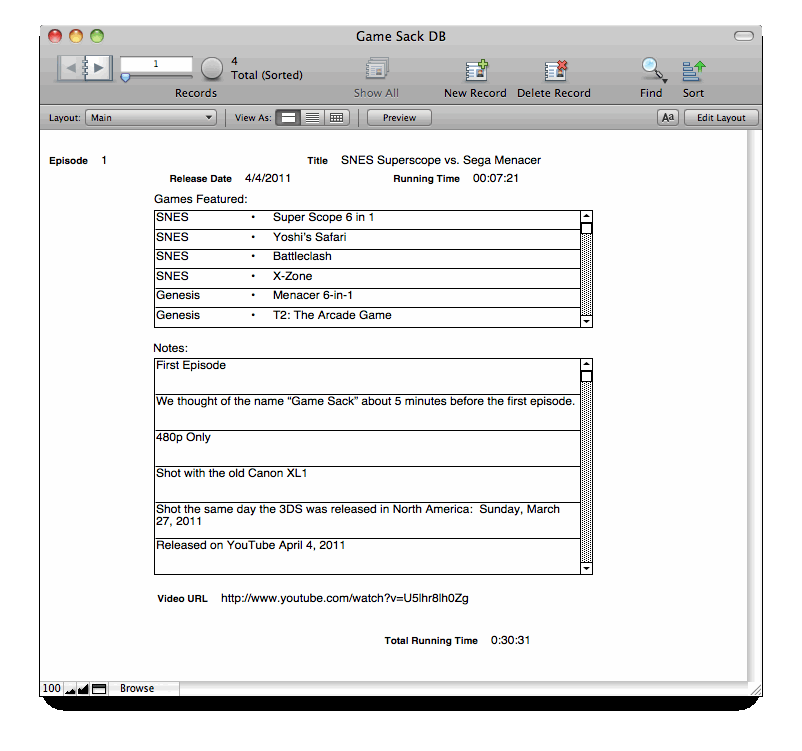
If you want to see each episode by itself:
If you only want to see the header data of each episode presented as a list:
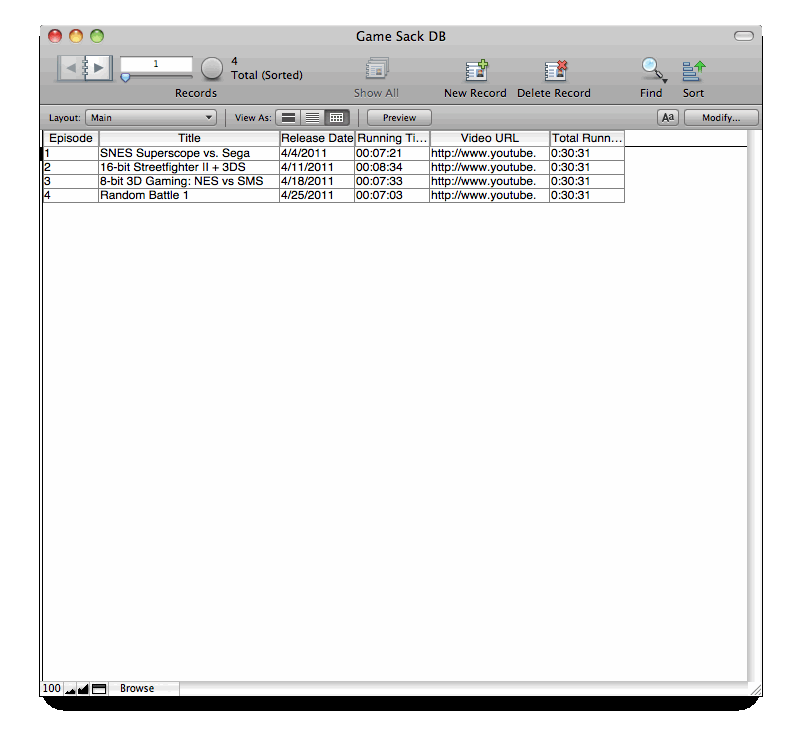
If you only want to see episodes that feature a certain game platform, you can search and select for it. Your "Total Time" field will update to show the total of only the selected records.
If you want to sort, search or select for any criteria or groups of criteria, you can do that.
I only made one table layout and one page layout but, if you want to create a layout that shows data in different order, you can do that. If you want a layout to print out and store in a notebook, you can do that, too.
A database organizes data much more efficiently than a spreadsheet. Spreadsheets are only designed to list things out and total up the rows and columns.
P.S. - I only entered data for four episodes. I'm too lazy to enter 64 episodes just to show you how a database works. If you want the file, you can enter your own data.
Posted by Frank Cox (Member # 6258) on 10-01-2012, 11:25 PM:
You can export the XLS file to a CSV file and import that into your database. Very little effort required that way.
You also don't need to pay $50 to try out a database program on a Mac if you don't want to. sqlite is usually used as an embedded database but you can easily use it from a commandline or via a general-purpose front-end as well. Since modern Macs run on some version of Unix I suspect that there is a version of bash that's already installed on it, and further since Apple is well known as a big user of sqlite in their software, the chance that sqlite is already installed on any given Mac also approaches 100%.
Here is an example of how to use a simple bash script to drive a sqlite database that maintains a kind of a notepad. You could easily adapt that script to handle a simple database like the one under discussion here.
Alternatively, there are a number of front-ends available, some of which are actually Firefox add-ons. Here is an example of a sqlite frontend. I've never used it myself.
Again, sqlite is absolutely free and it's very fast and powerful.
Posted by Randy Stankey (Member # 64) on 10-02-2012, 12:04 AM:
My database example has three tables, "Main," "Games Featured" and "Notes," which are related to each other by the "Episode Number" field.
In order to export the spreadsheet to CSV and import into the database, it would take some massaging of the data. It can be done and I wouldn't have to retype all the data/fields but, as I said, I'm too lazy to do it just for an example that nobody is likely to use.
OpenOffice has a database module but I have never used it. I got FileMaker from Mercyhurst because I occasionally did work at home. They bought a 5-seat license but only used four of the seats. I got the fifth seat to use at home so I didn't have to be stuck at work to fix little problems in the database that I could just as easily do elsewhere.
FileMaker or Bento are good, flexible, easy to use programs but there are other good options such as the ones you mention, as well.
Posted by Joe Redifer (Member # 3) on 10-02-2012, 04:20 AM:
I will certainly concede that Microsoft Excel is neither fast nor powerful. However it is probably used by more common people who like this kind of thing, thus easier to share with fans. The only thing that could be better is something web-based. I don't have SQL access on this server and I forgot all I knew about it anyway in 2001 or so.
Randy, that app is pretty cool, but it looks like Mac OS 5 or 6!
Posted by David Buckley (Member # 2600) on 10-02-2012, 04:27 AM:
Am I right in thinking that you simply wish to add up all the times in a column? Does Excel for Mac not have a sigma button on the toolbar? Normally, one simply clicks on the empty cell below the rows one wishes to sum, and click the sigma button. Excel will then draw a box around the cells it proposes to add up, and if that is acceptable just hit enter and the job is done.
The fun with adding up times (and dates) is understanding how these items are held in Excel. A value of 1 in date / time speak is one day, so 12 hours is 0.5 and the cell formatting understands all this. So if you change the formatting of the column to general, you get to see the underlying number, as a fraction of a day. Change the formatting to HH:MM then Excel just interprets the underlying number and displays it.
So switching the cell formatting temporarily to general is a very good way of sanity checking and finding bogus data.
Posted by Joe Redifer (Member # 3) on 10-02-2012, 05:02 AM:
Holy crap that's awesome! Thanks for the trick with the sigma button. That's not exactly a button I would look at and think does anything I'd want it do.
Posted by Randy Stankey (Member # 64) on 10-02-2012, 08:09 AM:
With FileMaker, et. al., you design your own interface. You can make it almost any way you want. Add your own graphics, even.
I was just too lazy to do anything more than the plane Jane layout.
System 6 looks better than my layout.
Posted by Randy Stankey (Member # 64) on 10-02-2012, 11:23 AM:
BTW: Why doesn't Excel (or even Numbers) store times and dates as a timestamp? It would be much easier. Wouldn't it?
No matter how dates are stored, the application has to do calculations. Wouldn't a timestamp need the same kind of internal calculations? Doing math or calculating differences between times would be a lot simpler from the user perspective.
FileMaker uses timestamps for its internal date storage. Why not Excel?
Powered by Infopop Corporation
UBB.classicTM
6.3.1.2