This is topic Which Wi-Fi access point has the best range? in forum Film-Yak at Film-Tech Forum ARCHIVE.
To visit this topic, use this URL:
https://ft-forum.com/ft/cgi-bin/ubb/ultimatebb.cgi?ubb=get_topic;f=8;t=006718
Posted by Brad Miller (Member # 2) on 07-29-2012, 01:10 AM:
I've been pretty impressed with the Apple Airport Extreme in terms of range (their setup software is iHorrible), and I am testing a Cisco EA4500 because I've been told it outperforms the Airport Extreme in terms of range (their wizard setup software is bad too, but they have a nice browser GUI unlike the Apple).
I don't need a "router", of which both of these have. All I am really looking for is an access point with really good range. It seems the only way to get a really strong signal though is on the router models though.
Anyone have first hand experience?
Posted by Frank Cox (Member # 6258) on 07-29-2012, 01:22 AM:
It's very easy to use a router as a WAP. You just turn off everything in the router's setup except for the wireless connection stuff and give it an address on your network.
You'll also pay less for a router to use as a WAP than you'll pay for a stand-alone WAP, simply based on the volume of those things that they sell. And they're easier to replace when they quit, too. Just zip down to your local Staples (or whatever), where a stand-alone WAP is usually a special order item.
Posted by Scott Norwood (Member # 30) on 07-29-2012, 03:04 AM:
Have you considered multiple "meshable" access points?
Posted by Stephen Furley (Member # 1277) on 07-29-2012, 04:22 AM:
Not all home type wireless routers can be used as access points, though most of them can.
Brad, what type of building do you want to use this in? Are you trying to get a long distance, or just to get a moderate distance in a 'difficult' building? If the latter then Scott's suggestion is probably the way to go. The system we have at work is from Extreme Networks, but is actually made by Motorola. When we rented some office space in a building across the road while our main building was being refurbished one access point could cover the whole of one floor of that building, with just one small dead spot, and part of the floor below, while in the main building it's difficult to get the same access points to cover more than a couple of rooms. The main building seems to have been built to survive a nuclear attack.
Also, what type of devices do you want to use this with? Things like 'phones tend to need a stronger signal than laptops, and some 'phones will drop the connection completely on a signal which will work with others. My HTC Wildfire S is just about unusable with the access point built into my home router unless it's in the same room, but I normally keep that access point turned off. Installed an Apple Airport Extreme last weekend to replace an old Netgear 802.11b only model which had died. The Airport extreme seems to work well, though I agree with you about the setup software, Airport Utility, would prefer a simple web interface. It says I cannot use the version of Airport Utility which I have, when I download a newer one it says I cannot use that with the version of the system software which I am running. The older Airport Utility does actually seem to work with it however.
The Airport Extreme has much better coverage; I have it on 50% at the moment and that's better than the old AP was on full power. To be honest, I doubt if you'll do better without moving to something much more expensive, multiple access points and/or external antennae.
The Extreme system at work is very expensive, but they do make a small access point which is the same size and shape, and fits in place of a standard American wallplate, it can also mount on top of a British one, but is not so neat. The idea is that you just pop the keystone jack out of the standard wallplate, connect it by a short cable provided to a socket on the back of the AP, and then fit the AP in place of the wallplate; should tale about a minute to fit and also provides an Ethernet port on the front, so you don't lose the one which was there previously. You can also get a module which fits into it to provide three additional wired ports if needed. We don't have any of these yet, but I borrowed one to test, and they're not bad, we will probably buy a few to fill in dead spots from the main APs. Unlike the main Extreme access points these can be used without the rack-mount controller.
One problem which I have found with any systems with multiple access points is that Android 'phones are very poor at moving from one AP to another. Mine will drop out for several seconds, sometimes longer, and occasionally needs Wi-Fi turned off and on again to make it pick up the new AP. Other people's Androids, of various models, seem to have the same problem. This is with Gingerbread, I haven't been able to try it with Ice Cream Sandwich yet (Who thinks up these silly names?)
Posted by Brad Miller (Member # 2) on 07-29-2012, 01:06 PM:
I've been using one Airport Extreme for most smaller multiplexes (up to about 8 screens) and larger ones I can typically do it with 2 of them. I run in bridge mode and the transition is seamless.
I noticed the price came down on them to about $155 from $200, so this is suddenly a bit better value. I do prefer the fact the Cisco can export its settings to a file. This way I can import them to another box. I'm not aware of the Airport Extreme having that capability.
Posted by Scott Norwood (Member # 30) on 07-29-2012, 01:36 PM:
Is this for a business-critical function or a nice-to-have?
For business-critical use, you really should be looking at hardware that is designed for that purpose. I have used the Proxim AP-4000M and the Cisco Aironet 1140, both of which are "meshable" and work well. The Cisco unit has significantly better range. Either one is far better than the $39 Linksys or Netgear models that are typically sold for home use, as the price would reflect.
Posted by Barry Floyd (Member # 385) on 07-29-2012, 01:53 PM:
We use the Engenius EOC2611P Access Point at our place. It can either be set to use as an access point, or used as a wireless bridge. We use ours as a wireless bridge, which for us links the concession stand building to the ticket booth 350+ feet away. It essentially functions for us as a 350 foot network cable. I can pick up the signal (5 bars in strength) down at our marquee which is about 1/4 of a mile down the street from the theatre.
Posted by Joe Redifer (Member # 3) on 07-29-2012, 04:43 PM:
Saw this on Reddit yesterday:
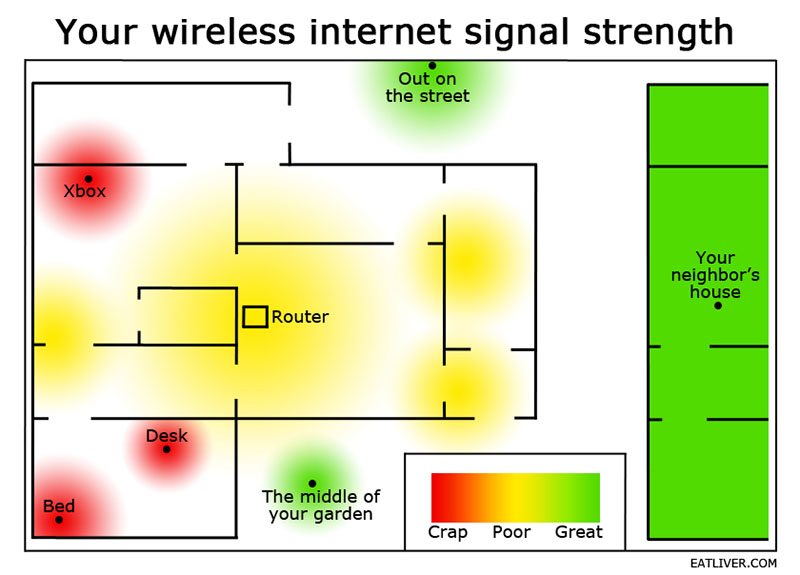
I also learned on Reddit that cordless phones cause interference. Change the frequency of the Wi-Fi or the phone and never have a cordless phone base near the Wi-Fi point.
Posted by Tony Bandiera Jr (Member # 2365) on 07-29-2012, 05:06 PM:
I just bought a Netgear WNCE2001 from Best Buy for $49.00, I saw another tech using it for remote setup on a Christie CP2220. He claims it has plenty of range...I'll test it when I can and let y'all know. Newegg link
Posted by Steve Guttag (Member # 268) on 07-29-2012, 07:51 PM:
Brad,
What are you using it for? That is...is this for setting up theatres and YOU (or your techs) need a wireless accesspoint to align a system) or is for a permanent installation and you are trying to move movies or just control stuff about a complex without the need of Ethernet cables or fiber?
I've had relatively miserable long-term luck with low-end Linksys stuff though since I only use it for set up...it gets "rebooted" each time so it has worked for years for me and never a signal strength problem...even in very long cinemas.
Now I HAVE had good luck with a Linksys E3200...very fast and it has yet to glitch at home.
Posted by Brad Miller (Member # 2) on 07-30-2012, 02:01 AM:
This is only for convenience. Nothing mission critical like moving content or device management. It is for things like being able to go into the auditorium to tweek focus from up close, etc.
Posted by Steve Guttag (Member # 268) on 07-30-2012, 05:59 AM:
So the Range just needs to be the length of the auditorium? Damn, most anything should work.
Posted by Tony Bandiera Jr (Member # 2365) on 07-30-2012, 11:59 AM:
Brad, the unit I posted will work great. And it is small and has no external antenna to break. ![[Smile]](smile.gif)
Posted by Paul Mayer (Member # 355) on 07-30-2012, 12:26 PM:
I used a TrendNet 456 for my installs. Very tiny, runs on either AC or USB power, and had enough range to handle things like what Brad mentioned.
Posted by Brad Miller (Member # 2) on 07-30-2012, 02:06 PM:
No Steve, the building, not an auditorium.
Posted by Steve Guttag (Member # 268) on 07-30-2012, 05:48 PM:
So you just want to plunk it down and not care where you are in the building. That is something I don't normally do...it moves with me as I don't normally network things until the end.
Good luck.
Posted by Brad Miller (Member # 2) on 07-31-2012, 12:36 AM:
It stays permanently at the theater. When needed, it simply is turned on. Sometimes 2 are needed to get full coverage, but no matter where you are in the building, you're on the network.
Why would you wait until the last minute to network? That's the first thing we do.
Posted by Steve Guttag (Member # 268) on 07-31-2012, 05:57 AM:
Simply because networking is the last thing we normally need. It also forces the theatre to have run the system "manually" so they know how to, at least, run the stuff.
Putting it on the network also takes relatively little time once all of the theatres are up.
I have noticed that for a DCS system...the network must come first.
I don't leave a wireless system on there and just bring my own if I'm going to be on-site...it takes how long to put it on the network? Seconds? Heck, every Barco projector has a switch built into it. The wireless I carry has a switch (as most routers do) built in so "splicing" it in is also a couple of seconds.
Powered by Infopop Corporation
UBB.classicTM
6.3.1.2