This is topic Are Apple products really worth it? in forum Film-Yak at Film-Tech Forum ARCHIVE.
To visit this topic, use this URL:
https://ft-forum.com/ft/cgi-bin/ubb/ultimatebb.cgi?ubb=get_topic;f=8;t=006872
Posted by Terry Lynn-Stevens (Member # 7349) on 07-27-2013, 01:10 PM:
We are looking at getting a new laptop and we cannot believe the price of the Mac Books. Are they really worth it?
How about the iPad, iPod, iPhone etc?
It just seems that everything Apple is very overpriced. We were shocked to noticed that the newest laptops do not have a cd/dvd/BR drive. And good luck connecting to the internet unless you have Wi-Fi
Posted by Daniel Schulz (Member # 1881) on 07-27-2013, 01:27 PM:
A bit of a tough one. Let's divide this into two separate discussions:
1) Q: Is a MacBook worth the price premium? A: I think so. A similarly-specced Widows laptop usually winds up not too far off the Mac in price, and the Apple laptops are beautiful little machines. I know quite a few people who are using them as Windows laptops. In other words, they haven't bought into the cult of Mac in terms of the OS and the rest of the Apple content ecosystem, but they just make damn fine laptop computers, even if you are running Windows.
2) Q: is the whole Apple content system worth buying into (Mac OS, the iTunes store, iPods, AppleTV). This one's tougher, as the alternatives are getting very very good, and many people (myself included) object to Apple's "walled garden" approach, in which you have to use iTunes to manage your content, it all works better with premium-priced Apple hardware and they make it hard to get and play content through other sources. If you hate DRM, want to Stick It To The Man, would rather maintain your own file libraries, etc. then you may not want to jump into the Apple camp. OTOH, if you just want an efficient way to consume media, whether by buying downloaded files, streaming your music library, renting TV or movies - it's tough to beat the ease-of-use and general slickness of the Apple setup. Anything you can do with Apple can be done cheaper with some combination of Linux boxes, Android devices & Windows machines, but the Apple setups really are just plug 'n play.
Don't sweat the missing optical drives or ethernet - the Apple branded external DVD drive is $79, and others are cheaper, If you need ethernet you can get a Thunderbolt/Ethernet adapter.
Regarding the iPad - I still think it's hard to make the case that anyone *needs* one, but if you have the $$$, they are the world's greatest internet consumption device (email, Facebook/Twitter/Pinterest/what-have-you, watching video from your lap, etc.)
Posted by Mike Heenan (Member # 392) on 07-27-2013, 03:18 PM:
They're great products. Yes they're usually higher priced; however if you spec out a Dell or Sony for instance, you'll see that the price isn't as high as some would have you believe for a comparable machine. It depends on what you need it for... if you're just doing general web browsing, emails, etc, then there's really no need to get more than a cheapo $500 windows laptop. If you get into the tablet scene, don't waste your money on android, definitely go with the iPad, you won't regret it. I'm still not sold on a tablet replacing a desktop or laptop though. As for phones, the iphone is awesome, but I wish the screen was larger (I have the 5). I've only used a Samsung S3 which I hated compared to my 4S last year.
Posted by Aaron Garman (Member # 1653) on 07-27-2013, 03:25 PM:
Yes, worth it. As already said, similarly spec'd PCs are going to run you the same amount of cash, but I've preferred OS X to anything for some time now. My first Mac, a 2006 MacBook is still running as a server and does that pretty well. My 2010 MacBook Air was running like a champ, but I'm planning an upgrade. I paid about $999 for it 3 years ago and I'm getting just over $300 back from a recycling program for it. They really hold their value.
I've been thoroughly happy with the ecosystem too. It all works seamlessly for me.
And then of course, there is the OS. OS X is great for getting stuff done. Windows, especially 8, has become so bloated that it's just not enjoyable to use anymore. I do still keep a virtual machine of XP on my Mac for certain projects.
The current line of Mac laptops are the best they've ever produced hardware wise, even if you choose to run Windows on them via bootcamp. Great machines.
AJG
Posted by Leo Enticknap (Member # 534) on 07-27-2013, 03:39 PM:
From what I gather, one of the drawbacks with Apple stuff (especially their laptops) is that it is not easily upgradeable and repairable, and that the few upgrade options that do exist are very expensive.
For example, I have an HP dv6910ea laptop, originally purchased in January 2009. Since then I have expanded the memory from the OEM 2gb to 4, replaced the CD/DVD optical drive with one that can also read BDs, added a Bluetooth module, replaced the OEM 250gb hard drive with a 1TB one, replaced the processor fan when it started to get noisy, replaced the keyboard when the legend on one or two keys started to wear out and upgraded the battery to a four-hour one. The total cost of all these DIY aftermarket repairs and upgrades was probably around $300 over 2-3 years. In contrast to that, a Macbook-owning colleague paid GBP220 (around $300) simply to have a failed optical drive replaced. On a typical PC laptop that would cost about $50 if you did it yourself or $100 if you took it to a repair shop.
Posted by Stephen Furley (Member # 1277) on 07-27-2013, 03:48 PM:
I think it depends on whether you need to run Apple software. I do because of my work, so I don't have much choice. I have two 13 inch Apple laptops, a late 2006 white Macbook purchased in January 2007 which runs system 10.5.8 and Windows XP under Bootcamp, which is what I'm typing this on, and a Macbook Pro (not Retina Display) purchased last October which runs System 10.8.4, and also Windows 7, a Windows 8 evaluation licence, recently expired, Windows XP and Fedora 18 under VM-Ware Fusion Pro.
Reliability of the older machine has not been good; I've had to pay out quite a lot in repairs and parts, including a new top case and keyboard which I had to get from an Ebay seller in the States, because Apple could no longer supply it. I've had no problems with the Pro so far.
The quality of the Apple displays is good, but the glossy screen can be a problem if you've got windows or lamps behind you.
Connectivity is an issue for me, neither machine has a serial port, which I use a lot, but many Windows laptops also lack one now, and USB-serial adapters work. Using Thunderbolt dongles for Ethernet, Firewire etc. is more problematical as most machines have only one Thunderbolt port and Thunderbolt hubs do not seem to be available (yet), so while you could connect a dongle to a monitor connected to the Thunderbolt port you could not connect two dongles, Firewire and Ethernet for example, at the same time. This was one reason why I bought the non-Retina Pro, because it still has these ports.
Both of my machines support 802.11n, the older one needed an enabler download, which I think cost $1.50, though I don't use wireless a great deal. Both also have optical digital audio out, which can go direct into a Dolby DMA8 plus. Both can also provide DVI-D output which many cheaper laptops cannot, and which is useful for feeding digital cinema systems.
Leo, you are correct; on the latest Apple laptops almost nothing is user-replaceable or upgradeable. The RAM is soldered to the motherboard, and the battery is glued to the case, so both have to be replaced, together with the keyboard and trackpad, I think. My six and a half year old Macbook still has its original battery by the way, and it is user-replaceable, though new ones are over a hundred pounds.
Posted by Randy Stankey (Member # 64) on 07-27-2013, 04:05 PM:
I have a Bondi Blue iMac which I bought in 1999 which still works perfectly. I replace the hard drive just for maintenance purposes and also because I wanted more space. I maxed out the memory and, except for keyboard and mouse replacements when they wore out, I did nothing to it. That computer runs as well, today, as it did when it was new. It was a good, fast computer when it was new but, compared to computers today, it's old and slow. If I tried to run an application like FinalCut, the computer would come to a grinding halt. That is my only complaint about that computer but that really isn't the computer's fault.
I also have a snow white iBook which I bought in 2000. I also replaced the hard drive and maxed the memory. I have replaced the keyboard on that one, too. Hey, things like that just wear out. Right? However, I still use that computer, occasionally. I often use it to remotely control video equipment because my iPad doesn't do Flash. It also comes in handy because it's got a large(r) hard drive. I can transfer stuff like pictures and video to it and use it to display stuff for people where that might be space prohibitive on the iPad.
With two computers that are going on ten years old and my main desktop, a Mac Pro 3,1, which is five years old and still going strong I think I've gotten quite a bit of bang for my buck. I'm not talking just about how long the hardware lasts but how long the computer remains viable for doing work given the pace at which applications and system software grows more complex and needs more processing power just to stay "normal."
I never really experienced that kind of longevity out of a windows platform. In order to keep hardware alive, I have often had to reformat and install Linux.
Posted by Joe Redifer (Member # 3) on 07-27-2013, 06:12 PM:
I like Mac, I don't like the "Apple tax" (high prices) nor the stigma that comes from being associated with other Mac users. I like building my own computers piece by piece and you really save a bunch o' cash that way. I'm not one who will just go out and buy a Dell. But with Apple, I have to buy it whole. You can kind of configure it on their website. Buying it at the store you're limited to what they have. No newly-designed Mac has any optical (CD/DVD, etc) drive any more. iMacs have had those drives for a while. The new Mac Pro won't have one. All PCs still have one, I think. And don't even bring up Hackintoshes as they don't work tremendously well since the OS is designed to work with very specific hardware.
I've had my Mac Pro since 2006. It's survived that long because I've been able to change things about it as time progresses. More RAM has been added. MANY internal hard drives have been added. Capture cards have been added to the PCIe slot. A completely new video card is in there (ATI 5770... didn't even have to install a driver, just plug it in and it works fully since all of various the graphic card drivers are built into the OS). I can even change out the CPUs if I wanted to. With the new Mac Pro that is coming out soon (the one that looks like a trash can), this functionality has been removed. I can no longer upgrade it. I might be able to add RAM, but that's it. It's no longer a Mac Pro, but instead a glorified Mac Mini. I can't put hard drives in it (ANY hard drives). Anything I add has to be attached with a stupidly expensive Thunderbolt cable. Want to add a PCI card? Fuck you, because you can't. You have to get an external PCI rack for that and hook it up with glorious Thunderbolt. And guess what, that will probably require its own power supply. So an additional power supply for PCI cards, another one for the drives, more for anything else you attach, geez. So it's a very poorly thought-out product. Do I want one? Yes.
Posted by Mark Ogden (Member # 43) on 07-27-2013, 06:49 PM:
I'm starting to wonder about Jon Ive's influence over Apple as a whole. The industrial design mantra has alway's been "form follows function", but it seems to be reversed there, and I am beginning to wonder how much his design wishes influence product specifications. The whole simple and thin thing is all very well and good, but I find their propensity for fixing design cues that aren't broken and losing operational features along the way pretty annoying (the little iPods without the display being a prime example). I would still rather have an optical drive built in to my iMac, and as JR has pointed out, the new Mac Pro may look cool to some (not to me, it reminds me too much of the old G4 Cube), but I would rather maintain the degree of user modification that we have now, even if it means sticking in a fan and keeping a more traditional tower style chassis. I like design just fine, it's what attracted me to Apple in the first place, but c'mon.
Having said that, I would still answer the OP's question as "yes". Still the most solid and reliable computing platforms out there, and the support remains superb.
Posted by Randy Stankey (Member # 64) on 07-27-2013, 07:15 PM:
quote: Joe Redifer
I like Mac, I don't like the "Apple tax" (high prices) nor the stigma that comes from being associated with other Mac users.
The high price is somewhat balanced out by better longevity. In my opinion, cost per year of ownership is lower with Macs.
As to Apple fanboys... I don't want to even think about them, let alone be associated.
When buying Apple, my advice is to get the minimum of parts or accessories from the manufacturer. Buy the base model Mac that fits your needs but don't buy cards, RAM or hard drives. Get that stuff from third party suppliers like Newegg or OtherWorld. You'll save a boatload of money that way.
Posted by John Lasher (Member # 968) on 07-27-2013, 07:39 PM:
Full disclosure: My brother works at the most profitable Apple store on the east coast, that said I'm a PC man myself.
But a tip from him if you do decide on a mac: look for a refurbished one. You'll save a few bucks, all the parts on a computer that wear out will be brand-new, and the refurbished units are subject to stricter quality control than the new ones.
Posted by Bobby Henderson (Member # 840) on 07-28-2013, 11:16 AM:
In another forum this topic would be considered flame bait.
Apple makes good products and a customer should be happy with one as long as he doesn't mind the choices Apple has made for him.
I don't agree with some of the company's philosophy. It's pretty damned ridiculous you can't buy a Mac tower or notebook with a built in Blu-ray burner or play BD movies in OSX. It's paranoia to protect the iTunes business model, despite the fact legions of PC users use iTunes.
If I plug an iPhone into a PC I should be allowed to see more than the damned digital camera folder. And you can only copy photos from the phone; you're not allowed to move photos onto the phone. They make you use iTunes to move content on and off the device. I don't like that. You should be able to use the Finder in OSX or Windows File Explorer to see everything. I have a file manager on my Android phone that lets me see all the folders in the phone's internal memory and removable MicroSD card. My PCs, HDTV and Playstation 3 can see the folders in my smart phone and play media from it easily.
The whole "thin is sexy" thing has gone too far. The iPhone has influenced every smart phone maker to use non-removable batteries. I would never buy a notebook computer that had a non-removable battery. The top end Mac Book Pro models have everything glued into the unit. If you have any serious problem with the system you cannot fix it yourself. You have to pay someone else to do it, and possibly even mail off the system and be without it for weeks. That sucks. I'd much rather have a slightly thicker notebook that allows me to do a bunch of the repair work myself.
The design of the new Mac Pro tower is fucking idiotic. It's a complete misunderstanding of the needs of power users. I guess the guys in California want a computer that will fit in a lipstick case and perhaps match the sexy shoes and dress you're going to wear that day.
The so-called "Mac Tax" is real. There's two reasons for it. 1. Lack of crapware subsidizing a low price. Department store PCs are well known for being bloated with system slowing crapware. 2. Apple brand worship. This is no different than other popular brands soaking consumers for the prestige of using, carrying or wearing a product with a certain brand name. Apple is perhaps the only technology company that successfully made its products fashionable.
quote: Randy Stankey
I never really experienced that kind of longevity out of a windows platform. In order to keep hardware alive, I have often had to reformat and install Linux.
We have a couple old Dell PCs in my work place that are over 10 years old and still running ok. My last work computer sat under my desk for 7 years. It was recently moved over to drive our vinyl cutting machine. The video card in the machine it replaced shit the bed, and that computer (a cheap kit built model) was at least 7 years old.
Longevity is actually the primary reason why the press keeps shouting doom and gloom headlines about the PC industry. Sales are indeed down quite a bit. The press doesn't look at the obvious reasons for the situation. They just keep saying consumers have changed their preference to tablets and smart phones. Yeah, sure, smart phones are incredibly popular. Most people I know have one. But all of those people have a notebook or desktop computer at work and at home. I have never seen anyone be able to do all of their computing using a smart phone or tablet. At some point you need a more powerful PC with a real keyboard, far more storage, a bigger screen and full fledged desktop applications. Smart phones and tablets are not a replacement for a real computer. And, no, we do not live in a "post-PC world" despite claims from the technology press.
The PC market is saturated. People now only typically buy a new computer to replace a really old one that finally broke and can no longer be repaired. The PC industry will have to make some bold innovations and much bigger leaps forward in terms of power & capability to get consumers back into the "I want a new PC phase" and away from the "oh shit I have to buy a new PC" phase.
Customers can buy PCs that don't last worth a damn. If you buy the cheapest, low end models you'll get minimal power, minimal upgrade-ability and lots of crapware. Such models won't last more than 3 or 4 years before getting really slow. But that's still more than the 2 year (or less) life span of many smart phones. I'm guessing the press wants us replacing our computers every 2 years before they declare the PC industry as being healthy.
![[Roll Eyes]](rolleyes.gif)
Posted by Randy Stankey (Member # 64) on 07-28-2013, 12:38 PM:
Bobby,
While I absolutely agree with you, I am not referring to just hardware longevity. I am also talking about the way that the operating system and applications software remains usable for a longer time. Yes, PCs have caught up quite a bit in this area but, in my experience, my Macs have remained useable longer and have still been able to do the work I need them to do in the way I need to get it done.
With every Mac I have owned, I have gotten seven to ten years of useful service plus a few more of "useable" service and, if I want to milk it, I could get a couple-few more.
Posted by Elise Brandt (Member # 5552) on 07-28-2013, 01:09 PM:
I'm on the "worth it" side myself. I got my MacBook Air a couple years ago now, I think, and have linked it with my iPhone and could not be happier with it. I needed Air because it's really a portable computer, not a draggable one. It's so light a tiny and fits into any of my shoulder bags, and since I need to haul it around most of the time that's the key issue I had.
Sure it cost an arm and a leg, but fortunately it was the company who had to cough it up. And right now, I'd drop that cash myself if I needed a new one.
The hotel we stayed at in Barcelona for CineEurope had a plaque on the room wall that said: "An apple a day keeps Windows away" ![[Razz]](tongue.gif)
Posted by Scott Norwood (Member # 30) on 07-28-2013, 02:01 PM:
As mentioned above, if you need to run or write software that only runs (or only runs well) on the Mac (or Ipad, etc.), then you need to buy an Apple product.
Otherwise, I think that Bobby pretty much nailed it here:
quote: Bobby Henderson
Apple makes good products and a customer should be happy with one as long as he doesn't mind the choices Apple has made for him.
Apple makes some nice hardware, absolutely none of which I would buy. I dislike the company in general, as well as its condescending attitude towards its users. The idea that anyone would sell a product with a rechargeable battery that cannot be easily replaced by the user is laughable. This is the one part of the product that is guaranteed to fail, and it should be a user-replaceable item (see Ipad, Ipod, Iphone, and the recent Mac laptops). Same for their other parts. Yet, Apple goes out of its way (pentalobe screws, anyone?) to make life difficult for those who wish to replace parts on their hardware.
Similarly, it becomes difficult to manage Mac hardware in a corporate environment when newer hardware will not run older versions of the operating system (a problem with some older software), the old hardware is no longer available for purchase, and Apple gives no clue as to what new products will be introduced when. Aunt Millie may not care about this, but it is a big issue in installations of more than a handful of machines.
Also, I dislike some of Apple's hardware design choices: I hate their chiclet keyboards, their glossy LCDs (matte is available on their laptops at extra cost, but not on imac desktops), and the fact that the hardware is generally proprietary for no good reason. (I have no issues with proprietary hardware when it represents an improvement over commodity hardware, but not when it is just proprietary for the sake of being so.)
That said, their desktop and laptop hardware actually isn't particularly overpriced when compared with quality x64 hardware from other manufacturers. Apple doesn't do "cheap and crappy," but, once you get above that level, the Apple tax is fairly small, especially compared to what it used to be. If you want a pre-built and pre-packaged computer and are happy with what Apple sells (they don't give many choices), then it is not a bad deal.
My own computing preference at the moment is Linux on the desktop and server and Windows on the laptop. Many of us need to run various pieces of Windows software at times, and laptops often have weird hardware which is better supported by Windows. I prefer to build my own desktops and servers and can choose hardware that specifically avoids any compatibility issues with Linux.
The tablet discussion is a separate issue, and I don't really have anything to add, except that the Apple devices have far better touch-sensitive LCDs than anything else that I have seen. I hate touch panels generally, but the Apple ones are usable, unlike pretty much all others. I don't really have any use for a tablet, however, and the non-replaceable battery would be a deal-breaker for me in any case.
Posted by Bobby Henderson (Member # 840) on 07-28-2013, 02:09 PM:
quote: Randy Stankey
While I absolutely agree with you, I am not referring to just hardware longevity. I am also talking about the way that the operating system and applications software remains usable for a longer time.
It isn't difficult to keep a Windows-based PC's operating system usable for a really long time. But much of that comes down to how well the user takes care of the machine, how well he keeps his software organized and how well he backs up his data.
Given the behavior patterns of many "average" computer users, I'm not surprised to see computer systems brought to their knees in only a couple years. The person loses track of software discs, documentation, etc. to repair or "factory restore" the operating system. They have all kinds of stuff loaded onto the computer that aren't backed up to external drives. Many have copies of software given to them by a friend or whoever built the system they can't afford to lose in a hard drive format. There's no helping those users.
Many problems, including malware infections, are caused by user behavior. They visit risky web sites looking for pirated movies, music, software and porn. They don't consider the malicious payloads bundled in with a risky website or torrent download. They open e-mails they should simply delete. Basically they just do whatever they want and don't want to do any "homework" learning Internet street smarts or do any work at being careful.
With Windows-based machines, it's easy to get 7-10 years of productive use out of a PC -provided it is not a cheap, entry level model. With proper use, a simple factory restore procedure can have an old system running very fast again. It just starts getting dicey when the various Windows updates one must apply end up being the thing that slows the system to a crawl.
I think Microsoft probably could continue supporting Windows XP for a few more years. But their decision to end support next April is, IMHO, a business move to force many users to upgrade old computer hardware that is still working properly.
Posted by Monte L Fullmer (Member # 2797) on 07-28-2013, 03:47 PM:
I still play with Win98 in an old laptop that I have and do XP on two of my computers here at home. I do have Win7 on my new laptop, but will end there for I have no interest in Win8 yet.
Like buying a Chevy Impala or a Toyota Camry - personal choice.
Apple is that - pure Apple where they make their own "innards" to run the things making it more expensive since most items are not 'on the self' as with PC products to purchase and also in higher demand.
But, as with the 8 bit days of early computing: ATARI and COMMODORE - ATARI comes from a gaming platform and specializes in games, where COMMODORE (and soaking up AMIGA later on) pointed the compass needle in the business end of the equation with Jobs sneaking in with the APPLE IIe units to mess things up.
Thus, anything graphics, multimedia or strong business applications, APPLE wins this war hands down.
Just that the 'on the shelf items' and also in high demand, PC easily wins this war.
Posted by Bruce Hansen (Member # 281) on 07-28-2013, 05:26 PM:
Apple crap is way too dumbed down for me. I cannot do what I want to do the way I want to do it. I must do everything the way some jerk at apple decided it should be done. NO THANK YOU! itunes is communist crap. It is VERY restructive. I made the mistake of buying an ipod some years ago. I had the way I was going to set it up all planed out, then I found out that was not going to happen. As I said above, I cannot do what I want to do, the way I want to do it. Then I tryed dealing with itunes CRAP. I throw the ipod in a drawer, and there it sat untill someone told me to get floola . I have used it on a few trips, but the ipod is still very poorly designed, andhard to use. I will never buy another piece of apple crap.
Posted by Leo Enticknap (Member # 534) on 07-28-2013, 05:33 PM:
quote: Bobby Henderson
With Windows-based machines, it's easy to get 7-10 years of productive use out of a PC -provided it is not a cheap, entry level model. With proper use, a simple factory restore procedure can have an old system running very fast again. It just starts getting dicey when the various Windows updates one must apply end up being the thing that slows the system to a crawl.
Agreed completely. For a long time now I've been refurb-ing older computers for friends, relatives and the occasional colleague. I am frequently met with disbelief when I claim to be able to restore someone's 2006 vintage computer to a state at which it'll be perfectly OK for MS Office, email, browsing and light photo editing duties, followed by the owner eating humble pie when it's done. My usual procedure is along the following lines:
Hardware refurb:
1. If the existing RAM is <2GB (XP), <3GB (Vista/7 32-bit) or <4GB (Vista/7 64-bit), recommend that the owner upgrades memory accordingly - big performance boost for very little outlay (older computers will have DDR2 at the very latest, ergo memory pretty cheap).
2. Ask the user to consider replacing the hard drive on spec if it's over five years old, pointing out that it could fail at any moment and that a new one will deliver a big capacity increase (compared to the old one) for very little money.
3. Open up the case, clean out crud with a combination of compressed air sprays and pastry brushes (removing cards, drives etc. as necessary), replace all fans and processor thermal paste, then reassemble.
Software Refurb:
1. Make system image of hard drive, exactly as I find it, onto an external portable.
2. If the factory restore discs are still extant, execute a factory restore using them. If not, reinstall Windows from scratch using Windows CD, and downloading drivers on another PC and installing them from a thumb drive as and when necessary.
3. If the factory restore discs were used, uninstall the crapware that will have been put back in the restore process.
4. Update Windows until it'll update no more.
5. Install necessary applications software that the owner wants (I would also recommend installing a good freeware antivirus/firewall, e.g. Comodo, at this stage), then configure to owner's taste.
6. Stop the Windows Update service, delete C:/Windows/SoftwareDistribution, then restart it (to get rid of unnecessary crap deposited on the hard drive during the update process).
7. Boot an Ubuntu CD, then using GPartEd, shrink the Windows partition and create two new ones: a D:/Data partition and an Ubuntu partition.
8. Install Ubuntu on the third partition, then set up a dual boot menu. We now have a way of retrieving the user's documents if the Windows partition ever gets corrupted and/or malware-ridden, that does not require transplanting the hard drive into another computer. Tell owner that (s)he doesn't have to worry about Ubuntu - just select Windows from the menu at every bootup - but that (s)he's welcome to have a play with it, and that it doesn't bite. Who knows - we might just win a Linux convert!
9. Reboot into Windows, then map the user's shell folders to D:.
10. Restore the user's documents and other data from the system image on the external HDD to D:. Keeping the user's data files on a separate partition from the operating system reduces fragmentation-related system degrading long term.
11. Defragment the system drive, then take a Clonezilla system image of the now finished re-installation, and give it to the user on a large thumb drive (32gb is normally enough, but sometimes a 64gb one is needed). Instruct user to put it in a safe place and not to lose it. Job done.
Posted by Mike Heenan (Member # 392) on 07-28-2013, 06:23 PM:
I can't figure
Scott, I like the "chicklet" keyboard, mainly because it's not noisy like regular keyboards. The sound of regular keyboards being typed on makes me want to murder the typer. ![[Smile]](smile.gif)
quote: Bruce
Apple crap is way too dumbed down for me. I cannot do what I want to do the way I want to do it. I must do everything the way some jerk at apple decided it should be done. NO THANK YOU! itunes is communist crap. It is VERY restructive. I made the mistake of buying an ipod some years ago. I had the way I was going to set it up all planed out, then I found out that was not going to happen. As I said above, I cannot do what I want to do, the way I want to do it. Then I tryed dealing with itunes CRAP. I throw the ipod in a drawer, and there it sat untill someone told me to get floola . I have used it on a few trips, but the ipod is still very poorly designed, andhard to use. I will never buy another piece of apple crap.
Wow... what on earth do you want iTunes to do? Granted it's extremely bloated, but for organzing music and making playlists, I like it..
Posted by Bobby Henderson (Member # 840) on 07-28-2013, 08:22 PM:
The "Chiclet keyboard" thing reminds me of another issue I find irritating: lots of electronics companies will copy just about any design idea from Apple even if it is a bad idea.
Non removable batteries. When the iPhone was new it was one of the few mobile phone models that had a non removable battery. Now just about every smart phone has a non removable battery.
The same thing goes for removable storage. Years ago just about every Android-based device had a MicroSD card slot. Now an increasing number of Android phone models have ditched the MicroSD card slot. I happen to believe removable storage is a huge advantage. My first HTC Evo 4G LTE phone bricked on me during some glitched update Sprint pushed to users July of last year. Anything that was in the phone's internal memory was not recoverable thanks to the touch screen being non-operable. I had most of my data on the MicroSD card slot. I transferred that just fine. I guess the phone makers figure we're all going to use "the cloud" for storage & back-up, despite the fact many carriers limit users on bandwidth.
On the keyboard topic, my new Dell system has some super thin keyboard that was obviously inspired by Apple's designs. It's okay I suppose. But I'm more used to regular keyboards.
I wouldn't put it past Dell and other PC vendors to copy Apple's lead and start making notebooks with all the parts glued-in and made user non-serviceable. I wouldn't put it past them to start making desktop cases that copy Apple's latest moves. They would be copying Apple's design trends and cutting into the custom kit PC building scene.
quote: Mike Heenan
Granted it's extremely bloated, but for organzing music and making playlists, I like it..
I don't think there is any "perfect" media playing software available at all. They all have some kind of short-coming. I don't like iTunes. But I don't like Windows media player much at all either. I have a laundry list of things I would like a good media player to support, but none of them do it all.
I have my entire CD collection backed up as CD quality .WAV files. I have a few albums in lossless FLAC format. I'll use Adobe Audition to create 320kb/s .MP3 files for use in my phone or SanDisk Clip+ music player. I use TagScanner to edit the metadata and album cover art since the various media players come up short in terms of accuracy very often. It takes a little more time, but a few albums per week is very do-able.
Posted by Leo Enticknap (Member # 534) on 07-28-2013, 08:49 PM:
On the non-removable battery score, I agree with Bobby even to the extent of wondering if there ought to be a law against selling laptops/tablets/phones with batteries that are designed deliberately not to be replaceable by the customer. The problem, I guess, is defining in a law what that actually means. You have to unscrew something to get at the battery? You have to undo a soldered connection and remake it?
However, the bottom line is that li-on and li-poly batteries lose their capacity over repeated charge and discharge cycles, and therefore anybody who uses their phone, laptop or tablet regularly is going to need to replace its battery sooner or later. Doing this is routine maintenance, not an abnormal repair. Therefore, designing an appliance such that you have to return it to the vendor to have its battery replaced should in my view be against anti-monopoly laws. It's analogous to having to return your car to Ford or Honda to have the oil changed. The problem would be wording the law so that it conveys that idea (designing an appliance to make battery replacement unnecessarily difficult) accurately.
Posted by Joe Redifer (Member # 3) on 07-28-2013, 09:31 PM:
What is the "chiclet" keyboard? Is it the thing I am typing on now? I love this keyboard, best one I've ever used bar none. I do not miss the keyboards with giant buttons that need to be pressed way down to register. I can type a lot faster with this thing. It's also pretty damn quiet compared to any other keyboard I've used. Second best keyboard was for the Sega Dreamcast. It has the big keys. All other keyboards suck.
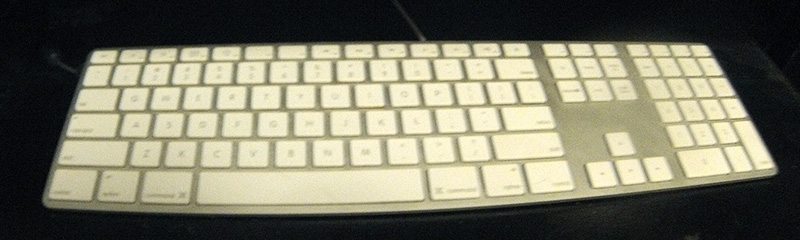
Had to use the Go Pro hence the spherical distortion as it was the only camera in reach.
Posted by Mike Blakesley (Member # 26) on 07-28-2013, 09:33 PM:
quote: Leo Enticknap
It's analogous to having to return your car to Ford or Honda to have the oil changed.
There are a lot of parts that you have to have fixed at the dealer (or at the very least, you can only buy them at the dealer).
As for the non-replaceable battery thing...I agree it's kind of dumb, BUT the vast majority of people are going to reach the end of their cellphone contract before their battery is worn out, and thus be eligible for an upgrade. iPods and iPads are different though.... there's no reason to get a new one every couple of years so one would hope the battery would last, say five or six years at least. I've got an iPad that's at least 5 years old, battery is still going strong (although I don't use it on battery that often).
Posted by Randy Stankey (Member # 64) on 07-28-2013, 09:36 PM:
I don't take any computer (which I have administrative control over) as it comes. Apple or otherwise. I buy the basic hardware, stock, then add what I want. Memory, displays, hard drives, interface cards, etc. The OS gets installed from scratch and configured the way I want it to be or, if the computer is new, junk I don't want is unceremoniously dumped and replaced with what I want.
I'm sure that most of you guys do similar.
I don't see Apples as being any less configurable than many other computers, even my Bondi iMac or my Snow White iBook. The iMac was easy to take apart and reassemble. The iBook was a pain but no more difficult than any other small form factor laptop computer. My Power Mac is very easy to work on. You can change a hard drive, add memory or change an interface card, literally, in two minutes. I really don't understand why people say they aren't upgradeable. The only things you can't change (easily) are the soldered-in components. How many other computers, besides Apple, have a lot of soldered-in components? Quite a few.
In terms of operating system and software maintenance or longevity, I don't mean wiping the drive and installing Linux. I have ten-plus year old Dell Craptiplex computers running Linux and still going strong. I'm talking about Mac OS. Yes, computers get old and software gets more demanding. Any computer will eventually come to the end of its useful life as new and better software evolves but I find that my Macs have stayed useful, longer.
I thought the silver and white chicklet keyboard was stupid at first but soon discovered that it isn't all bad. It has a light touch and a short key travel. It's actually quite a bit sturdier and useful than it looks. Even if you don't like it, I think it would be worth a second look. On the other hand, depending on where and how it will be used, there's nothing wrong with getting another keyboard. I often do but, after giving my chicklet keyboard a second chance, I stuck with it. Five years and still going strong.
My biggest complaint in the human interface department is the mouse. I love the four-button "Mighty Mouse." I like using it. I use all four functions. I like the response of the scroll ball but I HATE how easily it gunks up. You really have to be conscientious to keep your hands clean or else it will stick and stop working. I keep a bottle of alcohol and a box of Kimwipes nearby at all times. If that one issue could be fixed, I'd give it an "A." I really don't care for the "Magic Mouse" at all. I prefer the Apple TrackPad for when I want to use gestures to control the computer. I have a Wacom pen tablet for drawing and precision work.
The "New" Power Mac? Yes, it does look like a trash can. Why does Apple seem to have a fetish with designing computers that look so weird? The first iMacs look like something out of a Russ Meyer film. (Set two of them side by side.) The first iBooks look like a toilet seat. Apple mice look like a giant suppository. Now, a trash can? I shudder to think what will be next!
If I could have my wish and make all computers be one way, I'd choose some flavor of Linux but, since Mac OS is Unix based, I can deal. I really do think Macs are the mainstream OS that works most efficiently and works closest to the way I like to work. However, as a fair disclaimer, I use Windows machines and Linux based machines for work and I like to resurrect old Windows boxes as Linux machines, as far as computers that I have bought for myself, I have never owned anything except an Apple. My first computer was an Apple ][e.
BTW: I have my iBook set up so I can boot it up in Yellow Dog Linux if I want to. If you set it up right, it makes a really great machine to hack a Windows network. ![[evil]](graemlins/evil.gif)
Posted by Terry Lynn-Stevens (Member # 7349) on 07-28-2013, 10:02 PM:
quote: Bobby Henderson
Non removable batteries.
I never even knew that the batteries could not removed. That makes me think it sucks even more. No optical drive, shit out of luck with no wi-fi (rarely happens), no numerical keypad on the right side. I guess it is no Apple Mac for me.
Can anyone comment on the speakers? Are they any good or am I better off with something else?
Posted by Bobby Henderson (Member # 840) on 07-28-2013, 10:50 PM:
These are the Mac notebook models that have non-removable batteries (according to the Apple Support page:
All MacBook Air computers
All MacBook Pro with Retina display computers
MacBook (13-inch, Late 2009) and later
MacBook Pro (Early 2009) and later
Such notebook models should only have the built-in battery replaced by Apple personnel.
Apple says you can get a good 5 years or more of life out of their built-in notebook batteries. But here's my problem with that: I've seen a lot of notebook computers have issues, such as crashes or problems with certain applications, that could only be solved by removing the notebook battery and making stuff reset. How is one going to manage that if the notebook's battery is glued into the case and sealed shut out of reach?
My Dell XPS 15 notebook is has some pretty serious specs for a notebook. It's thicker than a Mac Book Air, and maybe even thicker than any Mac Book Pro. But it's not heavy or clunky. It might weight half as much as the Dell Inspiron 6000 notebook it replaced. One thing I don't like about it (and I blame this whole drive for thinness on it): you have to take out the keyboard to get to the hard drive in case it fails. WTF.
I like having an optical drive in my computer. I have some CD-R, DVD-R and even a few BD-R discs with data on them. I like playing Blu-ray disc movies in my notebook if I happen to be on a trip somewhere. I can patch the video to a TV set via the notebook's HDMI output.
Some people might not need an optical drive. It's true many software vendors are moving to downloadable installers. Microsoft is pushing it, especially with Office 365. At my work we have two "seats" of Adobe Creative Cloud. You get no discs with that. On the bright side I can install my license on my work PC and a 2nd computer at home, even a Mac if I choose to do so (although you can't have both computers using the apps at the same time). FYI, I'm still using my own personal license of Adobe Master Collection CS5.5 on my notebook. It seems to work just fine aside from the few new features the new CC apps have.
I still think the Internet has some serious improvements to make in terms of speed before all this cloud stuff and streaming will be totally practical. However, I still like having my data and photos backed up on physical discs that I possess and control. If the cloud breaks you can't get access to your data. Thankfully Adobe only makes their apps "phone home" once a month for validation. OTOH, the Typekit font service they're still working on will require an always online situation.
Posted by Randy Stankey (Member # 64) on 07-28-2013, 10:57 PM:
My Snow White iBook as a small, hidden reset switch that you press with a pencil point or a paperclip. Hitting that button and holding it for five seconds resets the firmware and allows a stuck computer to boot from scratch.
My iPad has similar. You press and hold the sleep/wake button for five seconds then tap/slide the button that appears on the screen. It does a factory reset. You can reload your iPad's contents from backup via iTunes or iCloud.
Posted by Joe Redifer (Member # 3) on 07-28-2013, 11:17 PM:
As far as I know all Macs (including laptops) allow you to hold the power button for 5 seconds for a hard reboot/power off. I've had to reboot my Mac with this method a few times but I've never had to disconnect it from its power source. I have had to unplug my Windows PC once, if I'm remembering correctly (which I am). Of course it didn't like it and complained the next time I booted it up.
Posted by Edward Havens (Member # 4715) on 07-29-2013, 06:08 AM:
I'm a proud MacBook Pro user for several years, and a proud Apple stockholder. I don't give a flying flip about the Apple culture, or who designed my computer, or why an aluminum frame is better than a plastic one, why I can't watch a Blu-Ray on my Mac (and why the flip would I want to watch a movie on a 12.7" screen anyway?) or any of that crap. I am not a programmer. I am not a graphic artist. I don't sit in Starbucks all day, pretending I am writing a screenplay or somehow otherwise important. All I care about is overall functionality, ease of use, durability and value. Macs and OSX has all that over PC and Windows.
But the best part? I can dual boot OSX and Windows on my Mac, so I really have two computers, and Windows is stable on my MacBook. And never once have I seen the BSOD when using Windows on my MacBook. I guess there's a reason PC Magazine stated the the Mac was the best and most stabile Windows PC.
Posted by Scott Norwood (Member # 30) on 07-29-2013, 07:36 AM:
Randy: some upgradability issues with current Apple hardware include, for example, replacing the hard disk in the current Imac. This requires removing the front glass panel and the LCD and is not exactly the sort of thing that Aunt Millie would be able to do. Same for the Mac Mini--this is not a user-replaceable item, even though hard disks have one of the highest failure rates of all computer parts. Similarly, the latest laptops have the RAM soldered in, which prevents upgrades and also prevents users from replacing bad RAM.
Contrast this with your standard desktop tower or a well-designed laptop like a Lenovo T-series or Dell Latitude, where pretty much everything can be replaced easily by removing a few (normal, Phillips head) screws.
As for the chiclet keyboard, I have a few issues with it: the key throw is very short, the keys are not scuplted to keep the typist's fingers in the center of the key, and the frame of the keyboard itself is very small and that makes it awkward to pick up the keyboard and move it to another part of one's desk without pressing a key. My preference in keyboards is the Unicomp "customizer 101" (same thing as an IBM model M "clicky" keyboard), which is pretty much the polar opposite of the chiclet keyboard. I like noisy keyboards and find that having both tactile and audible feedback from a keyboard reduces errors and increases typing speed. I realize that noisy keyboards are not always appropriate (in libraries, for example), however.
Actually, my favorite keyboard layout was (and is) the Sun type-5 Unix-style layout, but the IBM/Unicomp buckling-spring keyboard feels better to type on.
Posted by Leo Enticknap (Member # 534) on 07-29-2013, 08:59 AM:
quote: Bobby Henderson
Apple says you can get a good 5 years or more of life out of their built-in notebook batteries. But here's my problem with that: I've seen a lot of notebook computers have issues, such as crashes or problems with certain applications, that could only be solved by removing the notebook battery and making stuff reset. How is one going to manage that if the notebook's battery is glued into the case and sealed shut out of reach?
The only way I can think of is by letting the battery discharge totally. In the case of a li-on battery this will significantly reduce its capacity and shorten its life, and in the case of a li-poly one will increase the risk of a thermal runaway during the subsequent charge cycle.
Posted by Randy Stankey (Member # 64) on 07-29-2013, 09:03 AM:
Flat panel iMacs use laptop hard drives? Don't they? I have used flat panel iMacs at work but I wouldn't buy one for myself. Thus, I don't know how to replace a drive in an iMac. Being an Apple user, not an Apple fanboy, I buy computers based on how they work, not how they look.
Soldered-in RAM. My Snow White iBook has soldered-in RAM but it also has an RAM expansion slot. Russ Meyer iMacs had that. Deflated Basketball iMacs had that. Toilet Seat iBooks had that.
As long as the computer has the ability to add expansion RAM, I'm mostly okay with it.
Model M is the king of all keyboards! Like you said, Unicomp still makes them. ![[Cool]](cool.gif)
The keyboard is usually one of the first things I replace on a computer. Just put the original keyboard back in the box and plug in the third party keyboard. Next time I buy a keyboard, I just might buy a Unicomp/Model M.
I like the light touch and the short keystroke of this Apple keyboard. However, I agree with you that sculpted keycaps would be better.
After five years of heavy use, my Apple keyboard is starting to show some wear. Maybe it's time to replace. Maybe I ought to look into one of those Unicomps.
BTW: I think Unicomp will customize your key layout. If you want the Sun/Unix they might have it: http://pckeyboard.com/
Posted by Scott Jentsch (Member # 1681) on 07-29-2013, 12:42 PM:
When I was younger, I used to get into the this vs. that competitions. I would engage in drawn-out discussions about why product A was better/worse than product B. Over time, I realized that I was often arguing points over what amounted to a very small difference between products, and very often, the products were similar enough to satisfy a vast majority of their intended audience. That said, I'm not too old to throw my opinions into the ring...
The Mac vs. PC thing is age-old. Few things in the technology field have been hashed over as many times. I think it largely comes down to 1) what you have a need for, and 2) what your preference is.
Do you need to run particular software applications? If so, which platform will run them? That will often make your choice for you. Concentrate on the use first, and the tool second.
Some people are Mac people, some are Windows people. I think it largely comes down to familiarity. I've not used the Mac OS much at all, but my limited experiences with it have been frustrating because I'm not accustomed to the Mac way of doing things. I was a WordPerfect person back in the day, and using Word continues to be a challenge for me. Things that were so incredibly easy in the very early versions of WordPerfect are still incredibly obscure, inanely designed, or just outright missing in Word.
It's the desktop/laptop vs. tablet choice that I think is the real choice to be made, however.
Few people have a need for more than a tablet can provide. I think that explains the surging popularity of tablets. The form factor is great for tasks like E-Mail, web browsing, and reading news, as well as the plethora of apps out there. Once you use a tablet, you will likely not want to pick up a laptop or use a desktop unless you absolutely have to. There are, of course, needs that are best suited to the keyboard/mouse/monitor combo, but that's an ever-diminishing percentage of overall use. I could never imagine not having a desktop/laptop available, though.
I've spent several years using Apple's portable devices. It started with the iPod Classic, Shuffle, Nano, and Mini. Then with the iPod Touch, iPad 2, iphone 3GS, and most recently, the iPad "4" and iPhone 5. I also have experience with non-Apple products in each of those segments.
I'm not an Apple fanboy by any means. Each of Apple's products could be better in my opinion, but overall, they are all better than any of the rest of the products in their segments, in my judgement.
I don't mind the choices that Apple has made for the most part. Would I like a removable battery? Sure, but not if it makes my phone thicker and/or heavier. At first, the non-removable battery idea bothered me, but every single device I have still has its original battery and it works fine. Sure, after three years of use, my 3GS battery was starting to drain a little faster than I would have liked, but was attributable to the age of the battery, or the fact that the apps and OS got more power-hungry over time?
You can't beat the ecosystem built around Apple products. If you can think of an accessory, it's probably available. That's the thing that pushed me over the edge from the beginning with the iPod Classic and is still true today.
My best advice is to ignore the this vs. that battle that is oh-so-easy to get sucked into. Define your needs. Give multiple products a try to see what you like and to verify that they meet your needs. Compare on value, not price. Good luck!
Posted by Mark Ogden (Member # 43) on 07-29-2013, 01:22 PM:
You guys want a great Apple keyboard, check out the line from Matias, who offer models designed specifically for Mac integration. The Tactile Pro has full travel range keys and is very "clicky", it basically has the same layout as the old Apple Extended. Beautiful curved keys with special characters inscribed on them, so no looking at menus. Built like a tank and even heavier than the old IBM Style M so don't drop it on your foot. The Quiet Pro is also very solid, but is dead silent and comes in Apple silver/black. They're a little pricey, but judging from the build quality they are probably that last ones you will ever need to buy.
Posted by Dennis Benjamin (Member # 1137) on 07-29-2013, 01:41 PM:
My son recently asked me for an Apple brand computer.My children all use Apple products, Ipads and Ipods.
I too was floored when seeing the prices of these machines. There was no way I was going to buy him one brand new. So for his birthday, he got a used one. I told him that he needs to take a year to get to know the OS, and how it works, before I'd ever consider getting him a new one.
Since I had purchased it for him, I took the time to actually use the machine myself. It reminded so much of a Linux machine, it wasn't funny. I would have to agree with the sentiment that if it is indeed the machine and programs you need - than you should get one. However, a 14 year old kid really doesn't need one.
I build my own desktops and laptops at this point. Personally, I only use Linux. At work, I have to deal with Microsoft - and that is fine. But when it comes to a computer that I a personally going to use - it will be a machine that I built and configured - that way I only have myself to blame when it doesn't work. I am not going to pay some ridiculous amount of money for a machine that eventually will be obsolete.
And yes, I do indeed build my own laptops...
Posted by Chris Slycord (Member # 4239) on 07-29-2013, 01:58 PM:
quote: Dennis Benjamin
It reminded so much of a Linux machine, it wasn't funny.
That's because OS X is a unix operating system.
Posted by Randy Stankey (Member # 64) on 07-29-2013, 02:15 PM:
One of my favorite tricks at work used to be to Telnet into another machine and fix problems for propel from across the room. Mac OS also has a good remote access client if you set it up in advance.
Somebody would say, "Hey, I can't get my computer to do 'X'." No sooner would they finish explaining the problem and it would be fixed.
"How did you do that?"
"Do what?"
Posted by Aaron Garman (Member # 1653) on 07-29-2013, 02:24 PM:

Posted by Joe Redifer (Member # 3) on 07-29-2013, 02:50 PM:
quote: Randy Stankey
One of my favorite tricks at work used to be to Telnet into another machine and fix problems for propel from across the room. Mac OS also has a good remote access client if you set it up in advance.
I had issues with my iPod and Apple remote accessed my computer from California after I gave them permission (I was on the phone with them). I don't remember the problem I was having at the time, but they saw that I didn't use iTunes to automatically put music on the thing and they wanted to switch it so that it did (which would have erased the existing music library on my iPod). I didn't let them. I then moved the cursor that they were controlling to the little app which was known as Phone to Mac, now known as iExplorer. That little app lets you treat any iPhone/Pod/Pad like an attached storage device.
Posted by Randy Stankey (Member # 64) on 07-29-2013, 03:27 PM:
I manage my iPad with iTunes basically because it is the easiest way to back up my data. I mostly use Hightail (YouSendIt) to move content in and out of the iPad but that little app you mention sounds interesting.
I'll have to check into it. Do you have to jailbreaak the device to use it?
Posted by Manny Knowles (Member # 1171) on 07-29-2013, 03:42 PM:
Ugh - that moment in Jurassic Park was so weak.
Posted by Chris Slycord (Member # 4239) on 07-29-2013, 03:48 PM:
quote: Randy Stankey
I'll have to check into it. Do you have to jailbreaak the device to use it?
The website for the product makes no reference to jailbreaking even for the mounted disk mode he's mentioned.
Posted by Randy Stankey (Member # 64) on 07-29-2013, 04:14 PM:
Just checked App Store. Looks neat. Might be worth the $5.00.
I'll have to put that on my wish list.
Posted by Joe Redifer (Member # 3) on 07-29-2013, 04:59 PM:
No jailbreaking required. It's not on the App Store.
Posted by Sean McKinnon (Member # 612) on 07-30-2013, 01:05 PM:
There's a great (free) product called "logmein" that I use to monitor and troubleshoot the computers at my office from my iPad or iPhone. I can log in and run programs, print, restart, shutdown, basically do anything remotely. It is very cool!
Posted by Monte L Fullmer (Member # 2797) on 07-31-2013, 03:35 AM:
My friend just came back from a visit to mainland China and took a lot of digital videos on this trip.
He transferred this videos to his 13" MacBook Air so all can see the videos.
He recorded the videos in Hi Def with his camera, which uses quite a bit of storage and needs good speed for playback.
Thus with the the playback, especially with moderate moving panning shots, the images had aliasing lines pretty bad where one can tell the extracting of data from the SSD inside just wasn't fast enough where a standard 7200 spin HD would win this playback hands down.
But, overall, quite an impressive little machine.
Posted by Bobby Henderson (Member # 840) on 07-31-2013, 08:38 AM:
A solid state hard disc, such as the ones installed in certain Mac Book Air/Pro notebooks, shouldn't have a problem with HD playback.
If HD video playback in the Mac Book Air was looking choppy I would suspect other culprits -like a very under-powered CPU and graphics chipset configured for saving battery life rather than performance. Was the notebook attached to a wall outlet at the time or running off the battery? Some notebooks with true graphics cards will switch over to a motherboard embedded, lower power chipset when the system is running off the battery. IIRC, a Mac Book Air notebook has nothing near 1080p HD resolution in its display, maybe 720p. I wonder if the notebook was doing any extra work downsampling HD video footage to fit the pixel dimensions of its display.
quote: Sean McKinnon
There's a great (free) product called "logmein" that I use to monitor and troubleshoot the computers at my office from my iPad or iPhone.
Log Me In is available for Windows PCs. We have used it to troubleshoot the computers of customers using electronic variable message centers and their respective software control programs. I think Log Me In works better than Cisco's WebEx. Teamviewer is popular.
Posted by Randy Stankey (Member # 64) on 07-31-2013, 09:21 AM:
quote: Bobby Henderson
Was the notebook attached to a wall outlet at the time or running off the battery? Some notebooks with true graphics cards will switch over to a motherboard embedded, lower power chipset when the system is running off the battery.
Yes, I bet this is what is contributing to the problem if not the outright cause.
As I remember all the Mac laptops do this. The solution is to either plug the computer in to the power supply or to change the settings in the "System Settings."
I vote for simply plugging it in.
Posted by Joe Redifer (Member # 3) on 07-31-2013, 04:03 PM:
For what it's worth Jen has both a Mac Book Pro and a Mac Book Air, both were new and fairly recent. I haven't really taken an interest in either, but she likes the Air much better and says the Pro is much too slow.
Posted by Monte L Fullmer (Member # 2797) on 08-02-2013, 03:09 AM:
It was the latter - using battery power for the presentations, but heard that transfer speed from SSD's are slower than from a standard mechanical HD, why I came up with this result...and not at all familiar with APPLE products outside where the old AMIGA looked like they picked up some pointers from APPLE for their unit's operations-including using the same Motorola 68000 series processor.
Posted by Mike Heenan (Member # 392) on 08-02-2013, 02:10 PM:
Transfer speeds are slower from an SSD than a HDD? That's not true at all. SSD smokes HDD transfer rates.
Posted by Terry Lynn-Stevens (Member # 7349) on 01-09-2014, 05:35 PM:
My better half got an iPad Mini with retina display for Christmas. It is a nice product but $399 is a lot of a money. So far, the display looks great and the battery lasts a really, really long time. It is also very fast.
So far I am on the fence if it really is worth the high price.
Posted by Joe Redifer (Member # 3) on 01-09-2014, 06:14 PM:
quote: Mike Heenan
SSD smokes HDD transfer rates.
Unless that SSD is a Compact Flash drive hooked to the computer via USB.
Posted by Terry Lynn-Stevens (Member # 7349) on 01-09-2014, 06:31 PM:
quote: Joe Redifer
Unless that SSD is a Compact Flash drive hooked to the computer via USB
Can the average person tell the difference?
Posted by Bobby Henderson (Member # 840) on 01-09-2014, 09:24 PM:
USB 2.0 has a maximum speed of 480 megabits per second, which is pretty slow compared to what SATA connections can do. USB 3.0 can push data as fast (or maybe even faster) than eSATA. Thunderbolt is even faster, but not widely supported yet.
Posted by Jeff Kane (Member # 6372) on 01-12-2014, 09:32 PM:
The average person can easily tell the difference. Last few notebooks I've gotten; instead of paying through the nose for an SSD, I've bought the SSD separately and replaced the HDD myself. Notebook disassembly isn't for the faint of heart but in this case it's very much worth it. SSDs are much much faster.
As for the video tearing and such, that's not the HDD transfer at all. If it were a transfer rate issue you'd see pausing or stuttering. What's happening is the GPU being throttled to save power. Easing up the power saving settings would fix that.
Oh, and Joe? My bet is the Macbook Pro doesn't have an SSD in it? Stuff some more RAM in it and get a 256 or 512gb SSD. Easy to replace on that machine and they're quite inexpensive now. The machine will fly.
Posted by Joe Redifer (Member # 3) on 01-13-2014, 02:26 PM:
I don't know I don't pay attention to laptops. The few times I had to use my fiance's laptop I was not having a good time. There's no way a touchpad can be as fast or as precise as a mouse. Also I do not like that laptops are less powerful. By the way I'm typing this on a computer from 2006. Go figure.
Posted by Claude S. Ayakawa (Member # 1401) on 01-13-2014, 04:54 PM:
The first computer I bought was a PC in the early eighties and hated it and promptly started to work with Mac computers. After four Apple desktop and now on my 2nd pro MacBook laptop machine, I just love it! All of my professional images some of you had seen on my Facebook page were prepared with Apple computers and Photoshop software and what a joy it was creating the final images with such fantastic hardware.
I also have a iPad 3 and a iPhone5 and love them both as well.
-Claude
Posted by Bobby Henderson (Member # 840) on 01-13-2014, 08:47 PM:
I remember 10 or so years ago I still had the attitude that I would never buy a notebook/laptop computer. They were too expensive, not powerful enough, very limited in RAM and hard disc capacity and the screens were pitifully low in resolution.
The situation got better in the mid 2000's. The aspects I didn't like about notebook computers improved enough that they become attractive.
I also got very tired of feeling like my leg was chained to a computer desk for too much of the day. I haven't minded it at my day job. But I felt this growing aggravation of having to sit at yet another computer desk at home to do any work or play on a PC. And I have a really nice AnthroCart desk that cost nearly $700. I wanted to be able to sit in the living room and be able to watch TV while using the computer. Or be able to take the computer somewhere outside of home.
Notebook computers aren't quite as powerful or durable as a desktop computer. But portability is a big advantage.
I'm still not sold on tablets. They have more shortcomings than the notebook computers I used to hate (paltry RAM, lack of storage capacity, connectivity issues, etc.). And I can't run my graphics programs on them.
quote: Joe Redifer
The few times I had to use my fiance's laptop I was not having a good time. There's no way a touchpad can be as fast or as precise as a mouse.
I can't stand touchpads. I almost always have a laser mouse or my Wacom tablet hooked up to my notebook computer.
quote: Claude S. Ayakawa
All of my professional images some of you had seen on my Facebook page were prepared with Apple computers and Photoshop software and what a joy it was creating the final images with such fantastic hardware.
It's often more difficult to configure a Windows-based PC just the way you want it unless you build your own system. For a long time we've bought Dell systems at my workplace, but lately Dell has really gotten flat out terrible in terms of pricing and available options for notebooks and desktops.
My boss at my day job wanted a new notebook to replace his 7+ year old desktop PC that was suddenly acting up. I tried finding a suitable notebook at Dell's website, but the options just sucked. Some of the pricing was even higher than that of Apple. Their new XPS notebook has a 3200 X 1800 pixel display, but once you get it configured how you want it the device could cost more than a Retina Display Mac Book Pro. I looked around further and found a much better deal at Toshiba's web site. For under $1500 I ordered a very well equipped 17" notebook with Win 8.1 Pro and MS Office pre-loaded as well as decent warranty coverage. The same thing would have cost well over $2000 at Dell.
Provided you're working with a properly configured computer it doesn't matter if you're using Adobe software on a Mac or PC. The feature set is all the same.
I have mixed feelings about Adobe's Creative Cloud software subscription model. But one advantage it has is you can load it on 2 machines and they don't have to be on the same platform. If you use a PC at work and a Mac at home it will load fine. Adobe would not let anyone do this with their traditional boxed software. They would charge an upgrade fee if you wanted to switch platforms.
Posted by Joe Redifer (Member # 3) on 01-14-2014, 03:11 AM:
I can understand the appeal of a portable computer for you and most others. But me it's kind of hard. I work with video and I need fast drives and those fast drives can't be the same drive that the OS is on. I also need lots and lots of storage. With a single project taking anywhere from 100 to 600 GB a laptop just won't cut it. Maybe when external hard drives get really small, really fast and don't require any other power than what they get via Thunderbolt, etc this problem will be solved. That way I can just move the HD from computer to computer and all of the projects follow the drive (Final Cut Pro does not use save files). Still got a ways to go before that stuff isn't crazy expensive.
Posted by Bobby Henderson (Member # 840) on 01-14-2014, 09:30 AM:
I don't know how useful USB 3.0 connected external hard discs are for editing a substantial HD video project. Single USB 3.0 external hard discs work fine as scratch discs for Photoshop and After Effects.
The USB 3.0 spec claims up to 5 gigabits per second, but the best performance is going to come from an externally powered disc rather than something running off bus power (plus you don't want to risk burning up the port). The best I/O performance is going to come from an external unit with multiple discs in RAID configuration. Thunderbolt is another leap above USB 3.0. IIRC, Thunderbolt can support up to 10 gigabits per second.
Notebook computer screens still have their issues, particularly the cheap ones. My Dell XPS notebook has a great looking RGB LED backlit screen, but a 15" screen is a little small. The notebook does have HDMI and Display Port for connecting to larger external monitors or HDTV sets. Connecting to too many external devices (big monitor, one or more external hard discs, a Wacom tablet, etc.) will push one right back into a computer desk.
Posted by Terry Lynn-Stevens (Member # 7349) on 09-18-2014, 02:26 PM:
I saw the new IOS 8 update today, what is the big deal? Looks like the same inferior operating system as IOS 7. I understand with the new OS 8 Apple has forced new apps onto the device. I also understand that the the update to IOS 8 adds the U2 album to your phone, its this true?
And why would anyone want to buy the new iPhone 6 or plus? They are behind in specs and are missing some important features. I read somewhere that basically the iPhone 6 has the same specs at the Nexus 4. Is that true?
How can people be so stupid to buy this shit?
Posted by Joe Redifer (Member # 3) on 09-18-2014, 04:17 PM:
quote: Terry Lynn-Stevens
I saw the new IOS 8 update today, what is the big deal?
It's not a big deal. Only marketing would have you believe otherwise.
quote: Terry Lynn-Stevens
I understand with the new OS 8 Apple has forced new apps onto the device.
All versions of iOS has apps that you can't delete. You can shove them into a folder so they're out of view, however.
quote: Terry Lynn-Stevens
I also understand that the the update to IOS 8 adds the U2 album to your phone, its this true?
Yes, this is true. I have already heard a song by U2. Since all of their songs are nigh identical, there's no need to hear these. The internet is rife with tutorials on how to remove U2 from your iPhone and your life.
quote: Terry Lynn-Stevens
And why would anyone want to buy the new iPhone 6 or plus?
Because it has stuff that appeals to them. I personally don't care about smart phones but I imagine that a lot of people prefer the iOS over the Android OS. I remember Jen complaining that Android is always downloading updates all the time, even when you turn that feature off. Always downloading, always updating. It's almost as bad as a Playstation 3 which itself is almost as bad as an Adobe product. Plus some people prefer the walled garden. They prefer having only several hundred thousand choices of apps that do the same thing rather than several billion to sift through. They find the OS easier to deal with, etc. I can see that. From what I've used of Android I wasn't impressed. I have an iPod Touch that uses iOS and it's OK. I'm in no hurry to "upgrade" to 8.0 however My 7.x works fine and dandy for now. 8 doesn't have any features that I know of which are desirable for me.
quote: Terry Lynn-Stevens
How can people be so stupid to buy this shit?
Because they're not you. You've got it all figured out.
Posted by Mark Gulbrandsen (Member # 72) on 09-18-2014, 04:22 PM:
Joe, I know exactly what you mean about the apps. I have 2.3 million apps installed on my eye pad where as I could only have 780,000 installed on my droid tablet. That's a huge difference in usability for sure.
Mark
Posted by Bobby Henderson (Member # 840) on 09-18-2014, 04:43 PM:
Terry is obviously trolling (and making himself look like a complete idiot at the same time).
Sales are slowing down in the smart phones segment and especially in tablets. Each new product is less impressive an upgrade as the previous one because no one can think of any killer new features that aren't already there.
More customers are skipping product cycles, waiting at least one or two product generations before before buying something new, that way when they finally do buy they'll get a more substantial upgrade. There's also growth in the lower cost segment. Some people are getting tired of paying $100-$150 per month on a typical smart phone plan. They're going with older model phones to get on lower cost plans like Walmart's "Straight Talk" thing.
If someone is walking around with an iPhone 3 or 4 model, moving up to the iPhone 6 or 6 Plus might be a worthwhile upgrade. I hear the camera is quite a bit better. It boasts optical image stabilization and some other improvements & new features (like capturing video at high frame rates for slow motion stuff). I'm surprised the standard iPhone 6 doesn't have a full 1080p resolution display, but the 6 Plus model does. Some of the Android phones have moved up to 2560 X 1440 resolution displays.
If I had to buy a new phone right now I'd probably get a Galaxy S5. Aside from the glut of features two things I like about the phone is it has a MicroSD card slot for removable memory and a removable/replaceable battery. Since the battery can be replaced the phone could potentially last several years, unlike all the other phones with glued in batteries that will hold a charge for only so long.
quote: Terry Lynn-Stevens
I read somewhere that basically the iPhone 6 has the same specs at the Nexus 4. Is that true?
No. It's going to have the same specifications as the Nexus 6. That means it will be able to scoop and toss eggs out of boiling water and kill someone by gouging their eyes and crushing their head.
Posted by Joe Redifer (Member # 3) on 09-18-2014, 10:09 PM:
I think the Galaxy 5S is what Jen had. It was giant. She took some 4K video with her phone that she wanted to transfer to me but it was a huge pain in the ass. You can't just put the card in there and have the phone copy to the card. I don't think USB worked, either. In the end she had to upload it to some site for me to download it even though she was only inches away from me.
Posted by Randy Stankey (Member # 64) on 09-18-2014, 10:48 PM:
^^^ That! ^^^
Stuff just works the way I expect it to.
My iPad is set up to sync via Wi-Fi and I don't need iCloud to do it if I don't want to. I just drop a picture, a movie or a song into a folder on my computer and open up iTunes. Bam! It's there.
I don't need or want 4G/cellular for my iPad. I don't want it. I don't want to pay for it. 90% of the time, I am at home, work, at Micky D's or Starbucks where I can get Wi-Fi. If I'm not near one of those places, I can wait until I am.
While there is nothing wrong with following standards or using certain methods to get things done, I don't want my computer telling me what I can do, when I can do it or how I have to do it.
Apple products aren't perfect and I'll be the first one to bitch when I think they don't behave the way I want but I find that they are much better for getting things done, the way I want, without a lot of extra fussing around.
Posted by Bobby Henderson (Member # 840) on 09-18-2014, 11:12 PM:
quote: Joe Redifer
I think the Galaxy 5S is what Jen had. It was giant. She took some 4K video with her phone that she wanted to transfer to me but it was a huge pain in the ass. You can't just put the card in there and have the phone copy to the card. I don't think USB worked, either. In the end she had to upload it to some site for me to download it even though she was only inches away from me.
Some Android phones don't make it very easy to connect via USB and Samsung has been guilty of this with some of their phones. You probably have to drag down the top notification bar and click on a few things for its USB port to let the phone act like an attached disc drive. It could be some device driver thing too.
Was Jen connecting the phone to a Mac or PC? I wonder how well or not some Android phones show up in OSX' Finder when connected via the USB cable.
I've been using an HTC phone (the EVO 4G LTE) for a couple years. It connects automatically without me having to fart with anything. I can open Windows' file explorer and the Evo shows up as a connected device, showing a root folder for the MicroSD card and another root folder for the phone's internal memory. That's pretty handy because some apps will want to try to save shit to the internal memory when they should have been saving to the MicroSD card. My phone even connects to the USB ports on my new TV set and my Playstation 3.
Another app I strongly recommend for any Android phone users: ES File Explorer. If an app in the phone wants to try to play any games about where a music, image or video file is going to be stored you can use ES File Explorer within the phone to move whatever file you want where you want it.
There are things I don't like about my phone, the battery being glued in for one thing (my first Evo had a removable battery, but the battery life was not good). But overall I have no intention of getting rid of it until it breaks.
quote: Randy Stankey
My iPad is set up to sync via Wi-Fi and I don't need iCloud to do it if I don't want to. I just drop a picture, a movie or a song into a folder on my computer and open up iTunes. Bam! It's there.
I just wish the iPhone and iPad didn't require someone to use iTunes to move anything on/off the device. I'd like some choice in the matter. Some people love iTunes and other third party utilities that move files off phones, digital cameras, music players, etc. I don't. I prefer to launch a simple file manager to do all that stuff.
When I attach an iPhone to my computer via USB cable and look it under Windows' file explorer the only thing the iPhone will let me see is the "DCIM" folder where the digital camera files are stored. It only lets me move photos off the phone and nothing onto the phone. I found that out messing with my Aunt's iPhone. I pulled a ton of photos off her phone and organized them into a few different folders. She wanted a bunch of the photos put back on the phone. I couldn't simply move them back in File Explorer. Gotta launch iTunes to do that.
Posted by Monte L Fullmer (Member # 2797) on 09-18-2014, 11:19 PM:
A more fancier eye-phone is going to be that much more of a current hog from the battery.
Posted by Randy Stankey (Member # 64) on 09-19-2014, 12:29 AM:
iTunes does suffer from terminal bloat.
One thing that I hate is that, when iTunes syncs your folders and puts files onto the iPad but, unless you remove the files from iTunes, you can't remove it from the pad.
Yeah, a regular file browser or at least an intuitive gatekeeper app would be better than iTunes.
Posted by Marcel Birgelen (Member # 6801) on 09-19-2014, 05:19 AM:
Regarding iTunes, I couldn't agree more. This thing is actually one of the reasons why I never went the iPhone route in the first place. Nowadays, most things can be done "over-the-air", so you don't need this dreaded thing so much anymore. But this iTunes thing really should be replaced by some more generic sync framework. I think Apple is keeping that thing the way it is, primarily as a means to generate traffic to the iTunes store...
quote: Joe Redifer
Yes, this is true. I have already heard a song by U2. Since all of their songs are nigh identical, there's no need to hear these. The internet is rife with tutorials on how to remove U2 from your iPhone and your life.
As far as I've read almost everywhere on-line, this has nothing to do with the iOS 8 upgrade, but this was pushed to all iTunes users that had the option to automatically download all purchases enabled. So, even those who did not upgrade their iDevice but regularly use iTunes and most probably had this feature enabled got the U2 album pushed down their throats. This caused quite a bit of controversy and might actually even be illegal.
Posted by Steve Guttag (Member # 268) on 09-19-2014, 06:50 AM:
I have an Galaxy S4 and an iPad...I get along with both. I haven't had the issues Joe speaks of with getting stuff on/off the device. I store all photos and stuff on the SD card so it is transportable...it connects via Bluetooth to either a PC or Mac for moving things on/off as well. Via the USB port is another means so there are three ways...physically move the card, connect via cable, go wireless via Bluetooth (or use WiFi and bounce via dropbox, if desired but that seems a round about way). The S4 is the "right" size for me whereas the iPhone was too small. Naturally, the S4 can be too small if you are doing more "computing work rather than just phone stuff so I do have the iPad...which does have G4 on mine which is handy when I need to remote into a theatre while I'm at a ballpark.
I've owned a Macintosh since '87 (still have that one too) and work with PCs for most everything in cinema...likewise on the personal electronics front...I have an iPad and an Android...I go between them rather seamlessly. I buy what I find works best for me in each situation and in the case of phone/pad, which apps did what I want and how I thought they should work. I've been happy with my decisions in that respect.
Posted by Bobby Henderson (Member # 840) on 09-19-2014, 09:42 AM:
quote: Randy Stankey
Yeah, a regular file browser or at least an intuitive gatekeeper app would be better than iTunes.
Apple just needs to open up at least some of the iPhone and iPad so the more computer literate of us can manage files on the device in the OSX Finder or Windows File Explorer. They have things walled off, primarily as a sales ploy to force people to use iTunes even if they don't like iTunes.
I suppose most Android phones would have gone the iTunes style route already if not for so many Android users demanding straight forward connections between the portable device and a personal computer or other devices like TVs, car stereo systems, etc. When the device maker tries lock down things the customer just says "screw you" to that manufacturer and roots the phone, installing vanilla Android. Not to mention the phone model gets hit with a lot of negative feedback. A lot of people root Android phones anyway to get rid of phone company bloatware.
quote: Steve Guttag
I have an Galaxy S4 and an iPad...I get along with both. I haven't had the issues Joe speaks of with getting stuff on/off the device.
Some Galaxy S4 and S5 users are having connection issues when connecting via USB cable. I did some web searching through some phone user forums and YouTube about it. One problem is the MTP Driver fails to load on some systems. I saw one blog post about an upgrade to Windows 8.1 on one PC taking away the guy's ability to connect his Galaxy S4 phone to that PC or any other PC that successfully connected previously. When it's connecting correctly it should show up in Windows File Explorer as a connected portable device and show two root folders for the MicroSD card and phone's internal memory (just like it does with my HTC phone).
Bluetooth is an alternative, but it's not as fast and simple as connecting using a USB cable. AirDroid is another wireless alternative, but it has its own drawbacks as compared to connecting via USB.
If all else failed for me, I'd just use ES File Explorer within the phone to move whatever files I needed to transfer to the MicroSD card and then take the card out of the phone and put it in the computer.
Posted by Leo Enticknap (Member # 534) on 09-19-2014, 02:24 PM:
quote: Bobby Henderson
Bluetooth is an alternative, but it's not as fast and simple as connecting using a USB cable.
It's also a battery killer. The battery on my Samsung S3 only lasts around two hours in the car when Bluetooth-connected to the radio and without being connected to USB power. With the Bluetooth off, the battery runs for 8-10 hours between charges.
Posted by Martin McCaffery (Member # 37) on 09-21-2014, 12:05 PM:
The Onion Settles It All:
iPhone6 v Galaxy S5
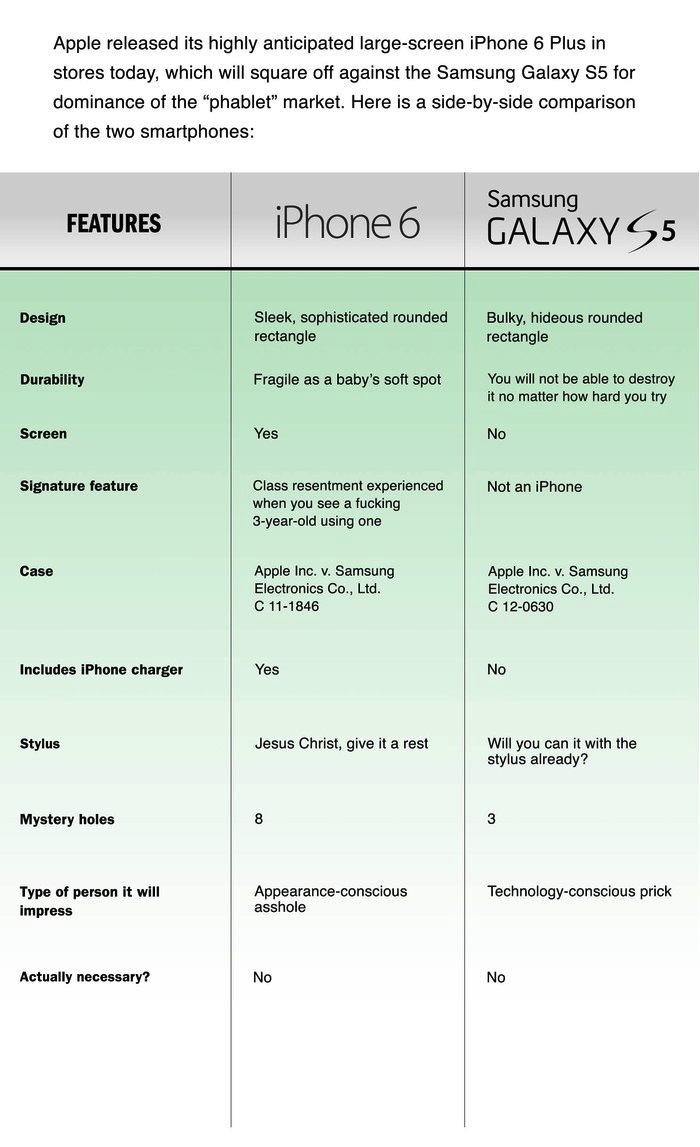
Posted by Terry Lynn-Stevens (Member # 7349) on 09-24-2014, 11:45 AM:
I hear these new super duper eye phones are bending. I just bent my eye phone 6
Powered by Infopop Corporation
UBB.classicTM
6.3.1.2