This is topic Future of CD-Rw and DVD-RW ? in forum Film-Yak at Film-Tech Forum ARCHIVE.
To visit this topic, use this URL:
https://ft-forum.com/ft/cgi-bin/ubb/ultimatebb.cgi?ubb=get_topic;f=8;t=007018
Posted by Claude S. Ayakawa (Member # 1401) on 06-10-2014, 03:36 PM:
I just replaced my almost five year old Mac laptop with a new 13 inch MacBook Pro that still came with a disc drive and was told it is the only current new model that has one. I asked why and the Mac person told me the computing world is moving away from discs just like they did with floppy discs and Flash drives are the 'in' thing now. Almost all new Macs will now need a external disc drive to read and burn discs. On top of that, my local Costco where I have always bought blank CD RWs and DVD RWs have not had any for sale now for a while and the sales person does know if they will ever carry them again. I have seen them at Sam's Club and other retailers but for how long? Are CD RW and DVD RW going to be eventually phased out soon?
-Claude
Posted by Frank Cox (Member # 6258) on 06-10-2014, 03:44 PM:
CD and DVD discs for computer applications are pretty much dead. The last few computers that I've had built don't have CD or DVD drives.
I haven't actually handled a CD or DVD with anything on it other than an installation image for quite a few years.
Posted by Sam Graham (Member # 2889) on 06-10-2014, 04:17 PM:
It's true. They're on their way out in the name of downloads and Cloud storage.
For laptops, a lack of disc drive and use of SSD hard drives means a far thinner design is possible. And there's fewer mechanical things to break down.
The outboard units are fine, though, and cheap. Even Apple's "superdrive" is only $79.
Posted by Marcel Birgelen (Member # 6801) on 06-10-2014, 05:16 PM:
CDs and DVDs are still one of the easier options to use if you want to install an operating system from scratch on a machine. So, whenever I need to load Windows, Linux, FreeBSD, VMWare ESXi, or what not, to a blank machine, I still prefer CD/DVDs above some kind of bootable USB stick. You just burn the image you got/downloaded from the supplier to a blank disc and if the device doesn't have an internal CD/DVD you just hook it up via USB.
Posted by Jesse Skeen (Member # 586) on 06-11-2014, 05:59 AM:
I always bring my laptop to friends' places so I can rip their DVDs, then burn them to blanks later ![[Smile]](smile.gif)
Posted by Scott Norwood (Member # 30) on 06-11-2014, 07:13 AM:
The -RW (rewriteable) disks were never a good idea. They did not have a high degree of compatibility with older drives and the -R blanks were cheap enough that the more expensive rewriteable disks were rather pointless.
I still find optical disks useful as a way to distribute data (flash drives need to be formatted as NTFS/ext3/HFS+/etc. and not every platform will read every type of format). CD-Rs and DVD-Rs (I have never found a use for DVD+R) are cheap enough to be disposable and can be read by any system. Flash drives also have a limited life expectancy (more limited that CD-R or DVD-R, both of which are already rather limited).
As mentioned above, optical disks are generally the easiest way to install an operating system.
Also, I like to burn compilation music CDs for use in my car.
I don't necessarily feel the need to have a CD/DVD drive in every computer I use, but I would not want to be without at least one.
Posted by Sam Graham (Member # 2889) on 06-11-2014, 08:11 AM:
quote: Scott Norwood
Also, I like to burn compilation music CDs for use in my car.
I'm still a music CD buyer (another increasingly rare breed) and burned copies for my car...up until just recently when I got a new (to me) car that doesn't have a six CD changer.
The alternative solution (to piles of CD's and changing each on on the fly) was to upload CD's to iTunes as raw WAV files, which I then load onto an old iPhone 4S that I've semi-retired into being a hard drive for the car. I just leave it plugged into the USB interface.
The 16GB model holds about 25 albums worth of WAV files and plays back at CD quality.
Posted by Sean Weitzel (Member # 244) on 06-11-2014, 12:38 PM:
I had to flash the system bios on a fairly recent motherboard yesterday. The flash utility was a pure dos binary. I had to create a bootable CD with dos and the utility on it to accomplish this. www.bootdisk.com is your friend.
Posted by Justin Hamaker (Member # 2165) on 06-11-2014, 02:30 PM:
The problem with optical discs is they don't have enough storage capacity for modern needs. Solid state drives and memory sticks offer a more flexible solution with greater capacity. As mentioned above, the main value for optical discs is installing an operating system or for music discs.
Over the last couple years, the only reason I have had to burn files to a CD/DVD was to give security camera footage to the local sheriff's department.
Posted by Bobby Henderson (Member # 840) on 06-11-2014, 08:53 PM:
The worsening plight of the optical disc has everything to do with large capacity external hard discs.
I don't think it has nearly as much to do with "the cloud," as a bunch of computer industry types like to think. Most people have hundreds or even thousands of Gigabytes worth of digital stuff. "The cloud" can't store all that stuff easily or for cheap either. I do use cloud-based services like Dropbox, but I only use it for files I alter quite a bit or for temporarily sharing some fairly big files.
Large capacity external hard discs have allowed a lot of people to clear out a bunch of clutter. I have my entire music CD collection ripped in .WAV format and copies to a couple different external hard drives. The CDs themselves can be stored in a box out of sight instead of taking up a bunch of space on a shelf. I used to backup a lot of art files and other computer data to CD-R discs. Now that hard drive capacity is so cheap it's just a lot easier to have 20 years worth of art files handy on one disc. I can open and alter any of those files. After a certain amount of time or if the hard disc starts acting a little funky the data can be copied over to a new one (I do maintain multiple back-ups of work files).
I still need optical disc drives to a certain extent for work. Some customers will bring in art files burned onto a CD-R or DVD-R disc. Or they'll ask for files burned to one. Once in awhile I'll need to burn something that will play in a DVD player or Blu-ray player. Blank CD and DVD discs are cheaper than USB flash memory sticks.
Movies are still better on Blu-ray than any streaming service. Perhaps that might change whenever Internet connections of 20Mb/s-30Mb/s are common around the country. Right now America's Internet speeds are still laughably, pathetically slow compared to a bunch of other areas around the world. So I'm going to keep using Blu-ray. It's not easy to buy a computer with a built in Blu-ray drive -particularly a Blu-ray burner (my personal notebook and work desktop both have Blu-ray burners).
quote: Scott Norwood
The -RW (rewriteable) disks were never a good idea. They did not have a high degree of compatibility with older drives and the -R blanks were cheap enough that the more expensive rewriteable disks were rather pointless.
The big problem I had with the +/-RW types of discs: they often required some specific breed of disc burning software in order to work. I hated that. After a couple bad experiences with RW discs more than 10 years ago I never used RW again. If I burn data to an optical disc I always make it a burn once/closed session disc.
quote: Sam Graham
I'm still a music CD buyer (another increasingly rare breed) and burned copies for my car...up until just recently when I got a new (to me) car that doesn't have a six CD changer.
I still prefer buying music on CD -provided if the music act in question recorded enough material to make the entire album worth buying.
There's not a lot of options out there for buying lossless compressed music singles. I'm not a big fan of the lossy compressed music files sold by iTunes and Amazon. They've upped the bit rates from a puny 128kb/s to 256kb/s VBR, but you can still hear some noticeable differences. Google Music sells 320kb/s constant bit rate MP3 files. That's not too bad. Nevertheless, lossless is still better. This is despite the fact so many music producers compress the hell out of a song's dynamics just to make it louder.
I usually take my store bought CDs and rip them to .WAV files. I had a few with some strange copy protection tricks, but got around them with the "extract from CD" function in Adobe Audition.
quote: Justin Hamaker
The problem with optical discs is they don't have enough storage capacity for modern needs.
That depends on what the need may be. Sometimes I need more storage capacity than a 4.7GB DVD-R disc will provide. Then there are other times where I don't even have enough data to fill up a 700MB CD-R disc. For the smaller stuff, I'm using Dropbox more.
I wish the BD-R format had grown more popular. 25GB-50GB on an optical disc is pretty damned good. But very few people have Blu-ray burners and the blank discs have always been fairly expensive.
Posted by Leo Enticknap (Member # 534) on 06-11-2014, 10:06 PM:
Ironically, I'm burning more optical discs now than at any time in my life, just as they're on the verge of obsolescence. I'm back in the theater biz, and we are frequently sent files of trailers (usually H.264 or ProRes) for arthouse and re-release titles that I'm putting through DCP-o-matic, burning to a DVD-R and then circulating to our two sites for ingestion into the DSS200s there. DVD-Rs are the perfect size, single layer ones are now so cheap that they're almost being given away, I'm not at risk of losing any USB flash drives that way and we can store the discs in envelopes afterwards, taking up very little space, for use if we ever get the movies back again.
As long as the Internet connections to our sites are slow enough that feeding the servers through the wire is not a viable option, even for 1-2GB trailer DCPs, this is turning out to be the most effective solution.
Agreed with Bobby on the price of BD writable media. In particular, double layer discs are still ridiculously pricey. I'm almost wondering if this is deliberate, as an anti-piracy measure.
Posted by Bobby Henderson (Member # 840) on 06-12-2014, 01:08 AM:
I kind of wonder if the outrageous price of blank BD-R/RW media is part of licking the all mighty asshole of the technological God known as "Apple." Those douche bags on Infinity Drive had something to do with the problem, trying to leverage bullshit iTunes as a movie streaming service. Yeah, I heard of Netflix. I'm actually an Amazon Prime subscriber. But Apple can eat it since they wanted to force low bit rate, low quality bullshit down everyone's throats
![[Mad]](mad.gif) God-for-fucking-bid any company besides Apple (such as Sony for instance) make a buck off an advance in technology.
God-for-fucking-bid any company besides Apple (such as Sony for instance) make a buck off an advance in technology.
Posted by Sam Graham (Member # 2889) on 06-12-2014, 04:27 PM:
quote: Bobby Henderson
I still prefer buying music on CD -provided if the music act in question recorded enough material to make the entire album worth buying.
Exactly. Which is why I buy fewer than ten albums a year anymore. In fact, the only 2014 release I've purchased this year is Rosanne Cash - "The River and the Thread" so far. And I don't buy singles. If the artist doesn't release an album worth of decent material and/or doesn't release CD's, they're out of luck with me.
quote: Bobby Henderson
There's not a lot of options out there for buying lossless compressed music singles. I'm not a big fan of the lossy compressed music files sold by iTunes and Amazon. They've upped the bit rates from a puny 128kb/s to 256kb/s VBR, but you can still hear some noticeable differences. Google Music sells 320kb/s constant bit rate MP3 files. That's not too bad. Nevertheless, lossless is still better. This is despite the fact so many music producers compress the hell out of a song's dynamics just to make it louder.
I've found it's not just lossless, but WAV files specifically.
I don't think it's just compression. There's some re-EQ'ing going on. And I've found that's also true with Apple Lossless. The converted files are far more bass heavy. I upload songs at 320kbps for my current phone and have played around with Apple Lossless. I can't tell the difference between the two. But WAV files are night and day different.
So I consider WAV to be the only way to go to get CD quality.
Posted by Joe Redifer (Member # 3) on 06-13-2014, 02:10 PM:
quote: Sam Graham
Even Apple's "superdrive" is only $79.
Which is way too much. It doesn't even do Blu-ray and I think it's only USB 2. Only losers still use USB 2. Might as well not even have running water.
quote: Sam Graham
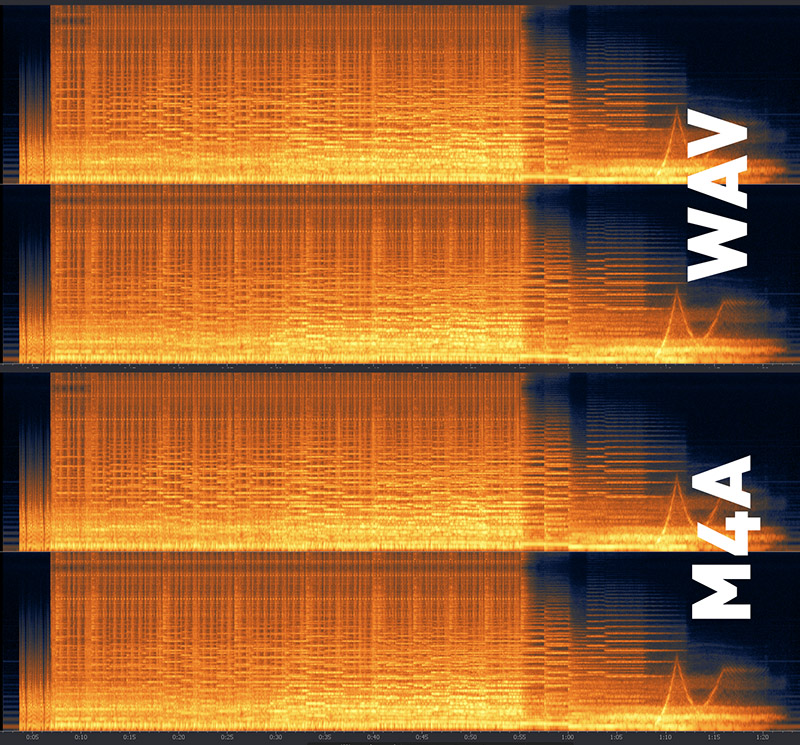
There's some re-EQ'ing going on. And I've found that's also true with Apple Lossless. The converted files are far more bass heavy.
Below is the spectrum of a raw WAV file (left and right channels) and the Apple Lossless M4A version I made from it. No difference at all whatsoever. They are the same.
Posted by Bobby Henderson (Member # 840) on 06-13-2014, 03:07 PM:
How do we know that image wasn't Photoshopped?
![[evil]](graemlins/evil.gif)
![[Razz]](tongue.gif)
Posted by Marcel Birgelen (Member # 6801) on 06-13-2014, 04:33 PM:
quote: Sam Graham
I've found it's not just lossless, but WAV files specifically.
The format itself is lossless. The bits that come out after decompression are the same that went in per specification.
Maybe your encoding software does some "re-EQ-ing" or your player handles WAV files differently, but the whole concept of lossless is that the decompressed stream is binary identical to that what went in...
Posted by Sam Graham (Member # 2889) on 06-13-2014, 05:19 PM:
Strange. I've done this test in two different vehicles, in one case doing all of the uploads on the same machine/iTunes install, and playing back on the same iPhone.
They sound blatantly different.
Posted by Scott Norwood (Member # 30) on 06-13-2014, 05:37 PM:
It was:
quote:
$ exiftool ~/spectrum.jpg | grep -i photo
Software : Adobe Photoshop CS6 (Macintosh)
Photoshop Thumbnail : (Binary data 10280 bytes, use -b option to extract)
Photoshop Quality : 9
Photoshop Format : Optimised
Creator Tool : Adobe Photoshop CS6 (Macintosh)
History Software Agent : Adobe Photoshop CS6 (Macintosh), Adobe Photoshop CS6 (Macintosh)
Posted by Joe Redifer (Member # 3) on 06-15-2014, 06:43 PM:
Well yeah I had to use Photoshop to combine the two images. They won't crop, add text and combine themselves. Bobby and Scott are you trying to say there's deception going on? Speak up if ya are.
The fact remains that the original WAV and lossless M4A are 100% identical.
Sam do you change anything in iTunes like bass boost or anything like that which uses the iTunes software to alter the tonal quality of the sound?
Posted by Sam Graham (Member # 2889) on 06-16-2014, 02:47 PM:
EQ is set to "Classical" with Volume Limit and Sound Check set to "Off".
In any case, this is really much ado about nothing. I have a solution that works for me is all the original point was.
Posted by Joe Redifer (Member # 3) on 06-17-2014, 09:36 PM:
Its not much ado about nothing, it's a bunch of hoopla over minor issues. Anyway your EQ settings could be encoded into the new file and then the EQ setting gets applied again. Just a hypothesis.
Posted by Mike Blakesley (Member # 26) on 06-17-2014, 10:09 PM:
Maybe the tone controls are set different in one vehicle? Some hidden EQ setting perhaps?
I found my iPod was sounding really bass-heavy in my vehicle and I kept having to turn the bass down....then I realized I had set the bass higher on the iPod itself when I took it on a plane trip, because my headphones don't have enough bass. So I was getting "double bass" in the vehicle. Set the iPod back to "flat," problem solved.
Posted by Bobby Henderson (Member # 840) on 06-18-2014, 09:20 AM:
All sorts of playback devices are notorious for adding in their own flavors of digital sweetening.
This is why it's not very easy to play DTS encoded Music CDs. Some devices, like my Playstation 3, will recognize the data format and keep it intact. A Blu-ray player or DVD player must also do the same thing. It's hit or miss finding a CD player equipped with an optical output that doesn't color the bit stream before it is passed to an outboard decoder or surround sound receiver equipped with DTS decoding. Personal computers often suck at playing DTS Music CDs because of variables starting with the software being used to play the disc. Even if the computer's sound card can understand every DTS format the playback software and even the computer's operating system may insist on adding their own "me too" bits of bullshit that end up corrupting the bit stream.
I have wanted to rip the handful of DTS music CDs I have in my collection, but haven't figured out a reliable enough way to do it.
Posted by Joe Redifer (Member # 3) on 06-18-2014, 02:42 PM:
They can be ripped just as you'd normally rip a CD, by dragging the audio file to a folder on the desktop. Actually on Windows I think that just creates shortcuts for some stupid reason. But anyway I've done this on the Mac and I'd get what it thought were normal 44.1Khz 16-bit stereo AIFF files. I'd click them and Quicktime 7 would open and it'd play back in DTS 6 channel. But if I lowered the volume slider on the Quicktime Player even a smidge, the audio would break and become SHHHHHHHHH white noise-ish type sound. That computer had an optical output.
I can illegally send you a DTS audio file if you want as WAV or AIFF... probably AIFF. Burn it to CD-R as an audio CD and see if it plays. I want to make sure it is a CD you don't have because I want to keep the criminal element intact.
Posted by Bobby Henderson (Member # 840) on 06-18-2014, 03:39 PM:
Yeah, on Windows if you try dragging and dropping from a music CD to a hard disc folder it will only drag a useless .CDA shortcut file. You have to use some kind of application to rip the music content, be it WinAmp, VLC media player or Windows Media Player, and have it show up as a .WAV file.
I haven't tried ripping a DTS music CD with Adobe Audition. I wonder if its "extract audio from CD" function will work more reliably.
Posted by Joe Redifer (Member # 3) on 06-18-2014, 03:50 PM:
Can you copy and paste into a new folder perhaps? Or does that also create a shortcut? Even if it writes a big CDA file you should just be able to change the extension to WAV. It's all LPCM. I can change AIF to WAV and it still works as a WAV.
Posted by Terry Lynn-Stevens (Member # 7349) on 06-18-2014, 04:19 PM:
quote: Claude S. Ayakawa
I just replaced my almost five year old Mac laptop with a new 13 inch MacBook Pro that still came with a disc drive and was told it is the only current new model that has one. I asked why and the Mac person told me the computing world is moving away from discs just like they did with floppy discs and Flash drives are the 'in' thing now. Almost all new Macs will now need a external disc drive to read and burn discs. On top of that, my local Costco where I have always bought blank CD RWs and DVD RWs have not had any for sale now for a while and the sales person does know if they will ever carry them again. I have seen them at Sam's Club and other retailers but for how long? Are CD RW and DVD RW going to be eventually phased out soon?
I would fully expect an optical drive on any Mac, especially at the ridiculous price Apple is charging, having to pay extra for a separate external unit is simply a rip off.
Now that is out of the way, CDs are pretty much done, DVD and bluray are slowly dying and I am afraid that we will see a big collapse in physical media purchases in the next few years. I myself like the idea of ownership, but I have noticed I am watching more and more Netflix and renting on iTunes more than I am purchasing movies. Redbox is pretty good, but it is only good because it is cheap and I can walk to pick up a rental. Now when I visit a video store I usually check to see if the movie I want is available on streaming on my Can I Stream It App, then the library, and then only then I might purchase it.
We do burn DVDs from Redbox on occasion.
As for music, I rarely purchase a CD unless I go and watch an Indie band at a local pub and they have a CD to buy. But that is rare occasion.
I get that CD is still superior to iTunes or whatever the download is, but I just got a brand new 2014 car on Saturday and I must say blue tooth music streaming, USB and iPod connectivity as well as an aux input is so much more convenient. The car came with a single slot CD player as well, I doubt I will ever use it ![[Big Grin]](biggrin.gif) And CD player does not work with my voice recognition.
And CD player does not work with my voice recognition.
With files and such, I never print at home EVER. I just use Google Drive to transport any info that I need. If I need to print, a FedEx Kinkos is a handy place to visit.
I think there will always be a place for optical storage/purchases, but going cloud based, or the streaming option is so much more convenient and I think I probably have more access to films and music than I ever did before.
Posted by Mike Blakesley (Member # 26) on 06-18-2014, 06:25 PM:
Amazon Prime just added I don't know how many thousand albums to their streaming service. So now you can stream all of that stuff through a phone and, via Bluetooth, to any other device you have handy. I've already listened to about a half dozen albums that I'd been curious about but never bought. (In some cases I'm glad I didn't buy them!) It's surprising some of the great stuff they have available.
It's kind of a sad thing that ownership is going away but I can understand why it is. Not counting a 10-disk box set, I think I only bought one or two CDs last year. I used to buy a couple or three every month, at least.
Posted by Frank Angel (Member # 248) on 06-19-2014, 09:17 AM:
What about BluTooth transmission from device to device -- what is THAT quality? Can one expect the sound quality of what is basically an over-the-air broadcast to be as robust as a wire? I never hear the techs in the digital audio lab talk about the bluetooth specs...they just seem to assume that whatever audio gets sent from one bluetooth device will be identical coming out of the receiver device. I find that hard to believe.
As for this wise habit: quote: Bobby Henderson
I do maintain multiple back-ups of work files.
There is a sign on our studio wall:
DIGITAL: If you don't have 3 copies of it, you don't have it.
Posted by Bobby Henderson (Member # 840) on 06-19-2014, 02:40 PM:
quote: Joe Redifer
Can you copy and paste into a new folder perhaps? Or does that also create a shortcut?
The problem with viewing LPCM files on a music CD in Windows' File Explorer or any File/Open dialog box is the .CDA file is essentially seen as a dummy file of sorts; there's little if any actual data in the file. The actual LPCM music data is hidden. Lots of PC-based multi-media software can still play standard music CDs and rip them somewhat properly, but you can't merely drag and drop the song files from the CD into hard disc folders like you can in the Finder on a Mac.
I still need to try opening one of the DTS CD tracks in Audition. I have the CS5.5 version on my personal notebook. I have the CC and just downloaded CC 2014 versions on my work PC. Both computers have sound cards that will do internal DTS decoding. I can hook my notebook up to my home theater system via an optical cable.
quote: Terry Lynn-Stevens
I would fully expect an optical drive on any Mac, especially at the ridiculous price Apple is charging, having to pay extra for a separate external unit is simply a rip off.
Given the lack of native Blu-ray movie playback in Mac OSX, the lack of an optical drive isn't such a big deal. However, in exchange I would want a generous number of USB 3.0 ports as well as connections for HDMI, Firewire, Display Port & Thunderbolt. Instead of using all the space formerly taken by the optical drive to make the computer smaller/thinner, why not allow for more memory expansion or a more beefy graphics card? The biggest problem I have with Mac notebooks is them gluing in all the parts, even the damned battery.
Computer companies are doing away with optical discs for installation and OS back-up. I have my OS recovery copied onto a 16GB USB flash memory stick. That's actually an easier & faster method since you don't have to fart with switching out 2 or 3 DVD-R discs during a system restore procedure. I also have a hidden system restore partition on the hard disc drive, but hard drives do fail, hence the USB memory stick back-up.
Software companies are trying to shift everyone to download-able installers and getting rid of boxed software entirely. We have two licenses of Adobe Creative Cloud at my workplace; that stuff is download-only. The last couple licenses of MS Office we bought were downloaded. Even sign industry specific software is going that route. We bought our last update of FlexiSign Pro online. Our Roland VersaWorks RIP software installs via an old CD, but all of the updates (more than 2GB worth) are based online.
I still like optical disc drives since Music CD and Blu-ray offer superior quality music and movies over what one can stream online. I'm burning fewer and fewer discs though.
quote: Terry Lynn-Stevens
I get that CD is still superior to iTunes or whatever the download is, but I just got a brand new 2014 car on Saturday and I must say blue tooth music streaming, USB and iPod connectivity as well as an aux input is so much more convenient.
I'm not a big fan of music playback over Bluetooth. I've tried it out in several different vehicles, from fairly affordable to stupid expensive. Music via Bluetooth sounds muddy in every one of them. I get much better results copying a bunch of music to a USB memory stick, be it in .WAV format or 320kb/s MP3. Either way sounds a lot better than Bluetooth. Obviously, the vehicle needs to have a USB port for this to work.
quote: Mike Blakesley
Amazon Prime just added I don't know how many thousand albums to their streaming service. So now you can stream all of that stuff through a phone and, via Bluetooth, to any other device you have handy.
Yeah, I saw this as well. It makes me feel a little better about that $20 price hike. I haven't tried out the music streaming service yet. I guess Amazon intends to compete with rival music subscription sevices from Google Play, Sony and others. The obvious question I have is: what's the bit rate of the streamed music? The tunes sold by Amazon are 256kb/s variable bit rate encoded .MP3 files. If the music streaming bit rate is similar that would make it quite a bit better than the free versions of Pandora, Rhapsody, etc.
quote: Frank Angel
DIGITAL: If you don't have 3 copies of it, you don't have it.
Here's another thing to add: don't keep all your back-ups in the same place. What if your office is burned down in a fire or flattened by a tornado?
Posted by Leo Enticknap (Member # 534) on 06-19-2014, 05:18 PM:
quote: Claude S. Ayakawa
I asked why and the Mac person told me the computing world is moving away from discs just like they did with floppy discs and Flash drives are the 'in' thing now. Almost all new Macs will now need a external disc drive to read and burn discs.
For a laptop, I can see the logic of not including an optical drive, because in a portable device you want to minimize (i) moving/fragile parts, and (ii) weight. An optical drive has both. For the same reason, I have an SSD in my laptop but not my home desktop/tower PC, in which it isn't (to me, at any rate) worth paying a big premium and capacity penalty for solid state and lightness. But even before flash sticks became widespread I was probably only using the optical drive in my laptop once or twice a year, and if my next laptop doesn't have one, that won't be a major problem for me. It'll be several years at least before I'd be willing to leave one out of my desktop machine, though.
Posted by Mike Blakesley (Member # 26) on 06-19-2014, 08:35 PM:
quote: Bobby Henderson
I haven't tried out the music streaming service yet. I guess Amazon intends to compete with rival music subscription sevices from Google Play, Sony and others. The obvious question I have is: what's the bit rate of the streamed music? The tunes sold by Amazon are 256kb/s variable bit rate encoded .MP3 files. If the music streaming bit rate is similar that would make it quite a bit better than the free versions of Pandora, Rhapsody, etc.
I found an article on Billboard.com that answers your question -- here's the answer:
quote:
For streaming, sound quality will be adjusted for available connectivity, which will range from a high bit rate of 256k to a low of 48k.
I have a pretty decent stereo in my pickup and I listened to quite a few tunes. They all sounded very good to me (not muddy). I don't know how or if you can monitor what the bitrate is, but to me it was better than satellite radio, but not quite as good as CD.
The experience was smooth except one time the music went to "pause" for no reason. I assumed it was because it lost connectivity. I exited and restarted the app and it worked fine from then on.
I was kind of wondering about phone battery drain, but it was no worse than web surfing on the phone.
One thing I noticed is that the biggest of the 3 major labels, Universal, home of a TON of excellent artists, is not included on the deal, which sucks. I suppose if it really does well, they'll come around.
Here's a link to the article which gives a ton o'details.
Billboard: Amazon launches Prime Music Streaming Service
Posted by Bobby Henderson (Member # 840) on 06-20-2014, 01:40 PM:
I gave Amazon's Prime Music a try. Overall it seems pretty good, although I find it kind of confusing how to simply play a song or album without necessarily adding it to my music collection. Amazon has a lot of interesting custom play lists of music, but it seems like they all add themselves to the collection. That could make it a pain to keep things organized.
I'm not too surprised about Amazon Prime Music not getting every major music label on board. The lack of Universal Music does hurt, especially if you're a country music fan. OTOH, when you look at the movie streaming services like Netflix and Amazon Prime Video they don't have everything included there either. I would expect some content to come and go from Amazon's music service over time.
Back on the DTS CD topic, I can rip DTS CDs using Windows Media Player or Adobe Audition. Either will rip the data correctly. Unfortunately very few applications will actually play the data properly; they only see it as LPCM data and not DTS encoded data masquerading as LPCM. Foobar2000 with the DTS decoder 0.3.3 add on component is the only one I've found that will work reliably regardless of how the ripped .WAV file is named or piggy-backed with other metadata. PowerDVD is hit and miss with playing individual ripped DTS encoded .WAV files. I tried a plug-in with Windows Media Player that only worked briefly but reverted to the white noise. I'll have to keep experimenting.
I was hoping the new version of Audition would have a little more import capability with regard to DTS encoded audio files as in seeing the DTS data and offering the options to keep the data as is or import it as six demux'ed tracks to save as a multi-channel LPCM file or even encode in Dolby Digital or Dolby Digital Plus.
If anything I can use Foobar2000 for playback on my computer system or passing the bitstream to the home theater system. At least I have some recourse for backing up those discs.
Posted by Mike Blakesley (Member # 26) on 06-20-2014, 03:54 PM:
quote: Bobby Henderson
Overall it seems pretty good, although I find it kind of confusing how to simply play a song or album without necessarily adding it to my music collection.
Well it doesn't really add it to your collection, it adds it to your library which (on Amazon) is just a list of songs you can play. The songs are never actually stored on your own piece of equipment, unless you buy and download them.
Posted by Joe Redifer (Member # 3) on 06-20-2014, 07:03 PM:
quote: Terry Lynn-Stevens
We do burn DVDs from Redbox on occasion.
I suppose that the MPAA are already calculating how much prison time to give you to put a stop to your pirating ways.
Posted by Brad Miller (Member # 2) on 06-20-2014, 07:14 PM:
I have a 2013 Jeep and let me tell you...their stock radios SUCK! When playing a CD, there is high frequency sampling "splatter". Other people don't notice this, but it's aggravating to me. I can usually ignore it to a reasonable extent.
Then there's FM. It's got about the same amount of splatter. Nothing great, but listenable.
But the Sirius satellite radio...dear lord it is horrible. Even just the voice of a dj sounds garbled there is so much splattering it's as if Joe Redifer intentionally made an overly compressed bit of audio as a joke.
And they couldn't understand why I wouldn't sign up for the satellite radio when the free demo expired.
Posted by Monte L Fullmer (Member # 2797) on 06-20-2014, 11:44 PM:
Agree with Sirius radio - not worth the subscription due to poor satellite service.
Posted by Bobby Henderson (Member # 840) on 06-21-2014, 07:22 PM:
It's all about the bit rate. I can't remember which audio codec Sirius/XM uses, but I do know it varies between a paltry 64 and 96 kilobits per second. HD Digital Radio operates at the same horribly low bit rates.
At least Amazon Prime Music will stream a 256kb/s audio stream if you have a reasonably decent Internet connection. It sounds better than Sirius and it sounds better than online radio services like Pandora and Slacker.
Posted by Claude S. Ayakawa (Member # 1401) on 06-21-2014, 08:24 PM:
Having a laptop with a optical disc drive is very important to me, Leo because my photography business requires it. The trend today is clients seem to prefer digital files instead of prints when I am hired to photograph fitness shows and other functions. I can also send print orders to my local lab using the internet but I still prefer doing it the old fashioned way by burning my order on a cd and hand carrying it to my local lab. When the order has been printed, the cd I is stored with a another disc that has all of the original files from each photo session I do. The same files are also saved on a external hard drive but the disc is a backup should anything happen to my HD.
I had my new Mac laptop computer with a disc drive for over a month now and I love it
-Claude
Posted by Brad Miller (Member # 2) on 06-21-2014, 09:14 PM:
Bobby, the company car has XM radio in it and it doesn't have that blatant splattering. Keep in mind my comments on the Jeep radio were NOT from "critical listening". It's obvious to anyone that listens. It's the Jeep head unit.
Still satellite radio has never been all that great.
Posted by Leo Enticknap (Member # 534) on 06-23-2014, 11:39 AM:
Claude: I'm guessing that your laptop is your main work computer and that's why you still need the optical drive. As I wrote earlier, I still want one in my home desktop tower PC, and at a guess it'll be 3-5 years at least before I'll no longer be using one at all. Incidentally, that PC still has a 3.5" floppy drive in it, though I literally can't remember the last time I used it. It certainly wasn't since the PC was shipped from Britain to California, so it might not even work now!
That having been said, my impression is that USB flash sticks are effectively the new floppy discs. The smaller ones (as in, up to 4GB) are now literally given away with trailer DCPs on them - there's an enormous box of them in the office downstairs. At work we're now in the bizarre situation whereby if a trailer or short arrives as a file of some sort (which from indie filmmakers, students etc. is frequently), our publicity person walks to the booth with the thing on a USB stick and then hands it over to me, at which point I put it through DCP-o-Matic and onto our servers. Sooner or later the Internet will be fast enough that for anything smaller than a few gigabytes this will be unnecessary. But the mentality among a lot of people now seems to me to treat small volume USB sticks as a replacement for floppies and optical discs.
The next major milestone, IMHO, will be the removal of the 20 megabyte limit for email attachments. That is the essential reason why people are walking up and down stairs with flash sticks in my workplace. Yes, I know that a simple shared sever drive or NAS device would solve that problem, but again, the mentality of most people seems to be that removable, physical media or email attachments are the only two ways of moving files from A to B.
Posted by Terry Lynn-Stevens (Member # 7349) on 06-23-2014, 12:26 PM:
quote: Leo Enticknap
The next major milestone, IMHO, will be the removal of the 20 megabyte limit for email attachments.
There are work arounds for that already. FTP sites and sites such drop box already help achieve that. I believe Google Drive addresses that issue as well.
Posted by Mike Blakesley (Member # 26) on 06-23-2014, 12:53 PM:
Dropbox needs to step up its game -- its free storage space is laughably small next to Google's.
Physical media is still needed considering how slow download speeds are (or can be) in a lot of areas.
Posted by Bobby Henderson (Member # 840) on 06-23-2014, 02:23 PM:
Download bandwidth is the main thing making physical media still necessary. The video quality for movies on Blu-ray routinely trounces that of any streaming service. The only way the two formats can be equal is when the viewer is streaming the same video encode at the same high bit rate Blu-ray typically yields. Very few people get such a benefit through movie streaming.
I'll only stream a movie via Amazon's Prime service when 2 requirements are met: 1., it doesn't cost me anything extra to watch the movie and 2., it's a movie I've either already seen or don't care so much about seeing in the best manner available.
quote: Leo Enticknap
That having been said, my impression is that USB flash sticks are effectively the new floppy discs. The smaller ones (as in, up to 4GB) are now literally given away with trailer DCPs on them - there's an enormous box of them in the office downstairs.
I'll agree USB memory sticks of smaller capacities (1GB, 2GB & 4GB) are given away free in a lot of manners. I've picked up a few of those things at trade shows. Unfortunately some of those freebie USB memory sticks are not very reliable. I've seen some of them fail. Thankfully I had copies of the same data backed up elsewhere. I've had bad luck with Lexar brand memory sticks (which are often cheaper). I usually buy SanDisk brand flash memory devices, whether they're compact flash cards for my DSLR, MicroSD cards for a phone or USB memory sticks.
Optical discs still beat flash memory in terms of cost per gigabyte by a wide margin. The main problem with optical discs is they quickly accumulate and waste space in the office or on the bookshelf.
Posted by Leo Enticknap (Member # 534) on 06-23-2014, 02:24 PM:
Terry - agreed that there are lots of ways to move large files online, assuming that the Internet connection speed at both ends is up to it (an unsafe assumption in many cases, as Mike points out).
What I've seemed to notice, however, is that your average, non-technology geek (or at least, someone who has not had to move >20MB files regularly and thus has not been motivated to explore the other options) tends to assume that there are only two ways to move files: by attaching them to an email, or putting them on a physical object that can be removed from the computer and put in their pocket or purse. Therefore, when either the email 20MB limit goes away, or another method of moving files online gains widespread, non-geek acceptance, the days of all portable physical media (i.e. anything smaller than a hard drive) will probably be numbered.
Posted by Mike Blakesley (Member # 26) on 06-23-2014, 03:03 PM:
quote: Bobby Henderson
I'll only stream a movie via Amazon's Prime service when 2 requirements are met: 1., it doesn't cost me anything extra to watch the movie and 2., it's a movie I've either already seen or don't care so much about seeing in the best manner available.
Agreed. That's one problem I've seen with the movie service; most of the movies I really would really like to see, I already own. This could be why streaming isn't taking off as fast as the pundits thought it would, especially with older viewers....that and the fact that loading a disk is still faster and more convenient way, in some ways, to view a movie. (For example, Amazon Prime's fast forward/rewind totally sucks.)
Posted by Leo Enticknap (Member # 534) on 06-23-2014, 08:58 PM:
Sorry - just posted in the wrong thread.
Powered by Infopop Corporation
UBB.classicTM
6.3.1.2