This is topic Windows 7 ?? in forum Film-Yak at Film-Tech Forum ARCHIVE.
To visit this topic, use this URL:
https://ft-forum.com/ft/cgi-bin/ubb/ultimatebb.cgi?ubb=get_topic;f=8;t=007067
Posted by Steve Matz (Member # 1890) on 09-24-2014, 04:30 PM:
I have Windows 7 Home-Version...What is the deal with the constant updates they keep adding almost every couple days. Just about a week ago they added 12 updates and it took like 15 minutes for it to load before shutting down and rebooting.
What is Windows updating constantly that they need to do this; pretty annoying for sure ![[thumbsdown]](graemlins/thumbsdown.gif)
Posted by Monte L Fullmer (Member # 2797) on 09-24-2014, 05:19 PM:
WinBlows 8 and 8.1 are doing the same with constant updates.
It's all about security issues.
My Winblows 7, 64bit at home gets bombed with these updates also, but I have them set to where I'll do the updates when I'm effing good and ready ... and can leave the computer alone to let them do their thing and not be there.
-Monte
Posted by Rick Raskin (Member # 1561) on 09-24-2014, 05:22 PM:
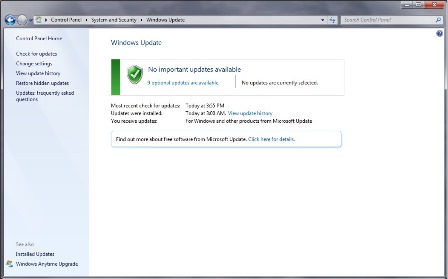
Click on the view update history link to see what is installed.
Agreed, it is a PITA, especially when you want to shutdown and there a slew of updates that want to install. I never thought I'd say it but I do like W7 better than XP. Several people have contacted me about downgrading the W8 pig to W7.
Posted by Steve Matz (Member # 1890) on 09-24-2014, 09:39 PM:
Thanks Rick, I want to buy a new Laptop with the fastest Processor that's available but they all have Windows 8. I like Windows 7, can I take the 8 out and put the 7 in.... ![[Confused]](confused.gif)
Posted by Steve Guttag (Member # 268) on 09-25-2014, 05:39 AM:
You can always use a Win 7 install disc (available from places like Amazon...you need the MS license). I do recommend, for laptops that you use the setting where either it can download the updates and you install them when you want or you have to go check to see if there are updates available. It sucks when the computer decides to interrupt your installation to do its thing. Who owns the computer anyway?
I've taken to allowing updates about once a 1/4 and just let it do its thing overnight rather than bother me while I'm trying to work.
Posted by Marcel Birgelen (Member # 6801) on 09-25-2014, 06:01 AM:
If you go for the business gear instead of the consumer/home stuff, you most often still have the option to downgrade to Windows 7. That saves you tons of hassle if Windows 8(.1) isn't what you want.
And, although it's not yet a common problem, with a new PC you need to make sure that the necessary drivers for your PC are available for Windows 7. Maybe you could also wait for Windows 9, which will become available in a couple of months. Windows 9 brings back the start button and start menu, without the need to install some third party plugin and should feel a whole lot more like Windows 7.
And like Steve already mentioned, you need a proper Windows 7 license, including working license key.
Usually, I disable not only the automatic updates, but also the automatic downloads (as they can pile up, slow down your computer while downloading in the background), so I only get the notifications. If you use your computer on the Internet (which is almost a rhetoric question), it's still quite important to keep up with them, as most updates are indeed security updates. There's tons of nasty stuff out there, just waiting to exploit some unpatched thingy on your computer...
Microsoft programs like Office work together with Windows Update, but many independent software products, like Firefox, iTunes, Chrome, Adobe products, etc. operate on their own update "frameworks" and you need to configure the settings for them individually. Usually it's more important to get the latest updates for your browser than for your OS though, at least if you're behind a halfway decent firewall and don't automatically click on any attachment that flies into your inbox.
Posted by Mark Gulbrandsen (Member # 72) on 09-25-2014, 11:41 AM:
Steve, Beware that with some manufacturers you will void the warranty by installing an OS other than what it is supplied with. I recommend you get a second drive (an SSD) and put W7 on it. Keep the old drive and put it back in if service is ever required under warranty.
Also... If you order a custom computer from Dell they may be able to supply a W7 convertible to W8 OS for you. Thing to do is to call and waste the sales persons time then when you get to the end demand W7 instead of 8. It's worked for me many times! What they give you is w7 on the drive and a second upgrade disk if you want tomfoolery to W8. Also... Demand a copy of the OS be included with your laptop. Some manufacturers including Dell use the excuse that the OS is on the rescue partition. That's not going to get you going again if the drive fails. Demand the disk be included for them to wrap up the deal.
Mark
Posted by Steve Matz (Member # 1890) on 09-25-2014, 01:01 PM:
Thanks Guys for the Info; The 2 Laptops I was looking at with the Fastest Processors were Dell and Toshiba.I didn't know that Windows has a 9 Version coming out that might work like the 7 does. Maybe I'll wait if it's going to be out before the end of the Year...
BTW: I have another Laptop I use on the Internet that has WINDOWS 7 STARTER VERSION. It seems to do all what I need it to do, but should I upgrade it to the Home Version. It's always sending me an upgrade Link. How many Megs/Gigs does the HV takeup over the Starter version!
Posted by Marcel Birgelen (Member # 6801) on 09-25-2014, 01:44 PM:
What do you need the fastest processors for anyway? Spend more on extra RAM and a bunch of SSDs, that will give you much more bang for the buck, unless you're really needing all that processing power, but most people don't.
Posted by Bobby Henderson (Member # 840) on 09-25-2014, 02:17 PM:
Things are really getting out of hand with regards to computer security. I saw a news report showing how people can hack into a car's computer system and do all kinds of harmful things to it, things that can only be fixed by a very expensive, instrusive overhaul of the vehicle. Various retailers have been stung by major security breaches, compromising personal info of millions of people. Obviously the computing industry and Dept. of Justice is simply not taking this issue seriously enough. It's probably going to take something more serious than the credit card data of several million people getting hacked for them to step up their game.
quote: Marcel Birgelen
Microsoft programs like Office work together with Windows Update, but many independent software products, like Firefox, iTunes, Chrome, Adobe products, etc. operate on their own update "frameworks" and you need to configure the settings for them individually. Usually it's more important to get the latest updates for your browser than for your OS though, at least if you're behind a halfway decent firewall and don't automatically click on any attachment that flies into your inbox.
The frequent updates to Windows ("patch Tuesday" and what not) are annoying. It's particularly annoying when a new patch breaks a feature in the OS or makes a particular application inoperable. I had to walk a customer through an undo of a Windows update that broke is LED message center sign software a couple weeks ago. I had to roll back one patch broke Postscript Type 1 font compatibility. It took months for Microsoft to correct that one.
Firefox and Chrome seem to be updating constantly. Chrome is up to version 37 and Firefox is on version 32. It's annoying, but probably good for security (and they're improving their HTML5 test scores). Meanwhile Internet Explorer remains so far behind that I wonder why Microsoft doesn't just kill IE already.
I don't know the numbers, but I'm willing to bet far more desktop computing software is sold via download than in a retail box. Now it's all trying to transition into a subscription based model -such as Adobe Creative Cloud and Microsoft Office 365.
Adobe's Creative Cloud applications do seem to have somewhat frequent updates, but that's only if you have a bunch of those applications installed. If you run only what you need the update notices will be less frequent. Acrobat Pro is the only one I have that tries to automatically update itself. The others just let me know updates are available in the apps tab of the Creative Cloud control panel.
I guess the more annoying thing to me is how Microsoft has changed Windows enough in its past 2-3 versions that lots of older 32-bit compiled software no longer works. When you buy a new computer you have to not only think about the price of that hardware, you must also budget a LOT of software upgrades. Some industry-specific software can be very expensive.
quote: Mark Gulbrandsen
Also... Demand a copy of the OS be included with your laptop. Some manufacturers including Dell use the excuse that the OS is on the rescue partition. That's not going to get you going again if the drive fails.
I'll second the recommendation, if the option is even there with Dell anymore. I got an OS disc with my Win 7 notebook. I couldn't get OS discs for the newest two Dell desktops at my work. I created OS back-ups on DVD-R and USB memory sticks using the recovery software Dell bundles with systems now. It has flaws, but I suppose it's better than nothing. Even if you have an OS disc, I still recommend creating an additional back-up. DVD discs can suffer laser rot, get lost or broken.
Lately Dell has been goofing up in the pricing and configuration options of their systems. The last PC we bought, a 17" notebook for my boss, was a Toshiba loaded with Win 7 Pro.
Posted by Rick Raskin (Member # 1561) on 09-25-2014, 04:09 PM:
quote: Mark Gulbrandsen
I recommend you get a second drive (an SSD) and put W7 on it. Keep the old drive and put it back in if service is ever required under warranty.
I couldn't agree more. That way you are doing a clean install of W7.
Posted by Steve Matz (Member # 1890) on 09-25-2014, 08:41 PM:
Changing the Subject but regarding Security and Computers. The new 2015 CORVETTE has a PDR(performance data recorder)option what is called VALET MODE. When engaged it records both front and rear video along with Audio inside the Driver compartment. It was supposed to be able to monitor your Car when someone besides your self is Driving your Car;like a Parking Attendant or Valet. That way when you got your car back you could playback what he did while parking your Car. Like maybe taking it for an extended Ride,smoking the Tires,etc.; Seems now though that the option maybe illegal in Certain States and GM is telling 2015 Vette owners to not use the option for now. Interesting Read...
I want to know if some A-HOLE Parking Valet is abusing my Car instead of Parking it. Shouldn't be no legality issue here...
http://www.corvetteblogger.com/2014/09/25/chevy-tells-2015-corvette-owners-not-to-use-the-pdrs-valet-mode-over-legal-concerns/?utm_source=feedburner&utm_medium=email&utm_campaign=Feed%3A+CorvetteBlogger+%28Corvette%3A+Sales%2C+News+%26+Lifestyle%29
Posted by Marcel Birgelen (Member # 6801) on 09-26-2014, 02:17 AM:
Even without having read the article, I do know that just recording someone without having their explicit consent can lead into trouble.
Besides this, all those electronic gadgets in the car can also be used against you. Nowadays, it's not just your computer and mobile phone, but also your car, your "connected fridge", your TV and whatnot are becoming interesting targets for digital abuse.
While the damage that can be done while hacking your fridge will probably be rather minimal, I don't need to tell you what damage can be done when someone hacks into your car.
Posted by Terry Lynn-Stevens (Member # 7349) on 09-26-2014, 02:57 AM:
quote:
What is Windows updating constantly that they need to do this; pretty annoying for sure [thumbsdown]
Can't you just turn it off for Windows 7? I have Windows 8 (I think for about 2 years now) and I never update it.
Posted by Marcel Birgelen (Member # 6801) on 09-26-2014, 03:48 AM:
Yes, you can turn it off for any Windows version up until now, but you're a total douche if you never install updates.
There, I said it. It's about the worst advice you could give anyone and blissfully ignorant if you keep such a policy yourself.
While I totally agree that the current update cycles for all those different software packages are getting out of hand, security updates are there for a reason and using a computer that's two years behind on updates on the Internet is just the epitome of ignorance.
quote: Bobby Henderson
The frequent updates to Windows ("patch Tuesday" and what not) are annoying. It's particularly annoying when a new patch breaks a feature in the OS or makes a particular application inoperable.
That's the reason why I don't automatically put any update on any computer. Stuff occasionally breaks and remains unfixed for months or never gets fixed... Or you have to call Microsoft to get a specific patch and sometimes they even demand money for it.
The problem with Microsoft is that their update descriptions are so vague, it's often hard to discriminate from those alone if the patch is a fix to an imminent security hole or something that can wait until later.
quote: Bobby Henderson
Firefox and Chrome seem to be updating constantly. Chrome is up to version 37 and Firefox is on version 32. It's annoying, but probably good for security (and they're improving their HTML5 test scores). Meanwhile Internet Explorer remains so far behind that I wonder why Microsoft doesn't just kill IE already.
Yes, Firefox adapted roughly the same update scheme as Chrome. Personally, I find those version numbers somewhat ridiculous, but the old "waterfall" model of development is out those days, it's all about "frequent delivery" and "short release cycles". While this might fly with web-applications, it doesn't work for stuff that actually needs an install base on any device.
Everything is now constantly begging for updates. The motto should still be: Make it good and only update if you've got some important security issues to address or a whole new set of features.
Adobe is somewhere stuck in the middle. After most users didn't really bother anymore to upgrade from CSn to CSn+1, since none of the new features really mattered to them, Adobe also joined the subscription-only bandwagon. Now they're forced to release new features every now and then, to keep their subscribers somewhat happy. The same goes for Office 365. Personally, I'm still stuck on CS6 and Office 2010. Both seem to do the job quite fine at the moment and I'm not forced to pay for them on a monthly basis...
Furthermore, Microsoft should work out a decent central update delivery mechanism that other could hook up to. Others should, maybe, let go their pride and also start using it. It's far easier to manage your updates for all your applications from a single environment (a lot like a mobile phone/tablet) than via a dozen of those update managers and popups that keep nagging for attention...
Also, both Adobe and Oracle deserve to be punished for their evil tactics of trying to push some stupid toolbar or "free antivirus" down your throat with updates for Flash and Java...
Posted by Bobby Henderson (Member # 840) on 09-26-2014, 10:48 AM:
quote: Marcel Birgelen
Even without having read the article, I do know that just recording someone without having their explicit consent can lead into trouble.
In the United States it depends on where the person is being recorded and how the video is used. People are entitled to privacy in their homes and work places. But they can't really do much about being recorded in public. If you're taking pictures/video of someone for commercial purposes you really need to get a signed release. If you're recording evidence of some jackass valet joyriding in your car the valet doesn't have any room to gripe.
quote: Marcel Birgelen
Nowadays, it's not just your computer and mobile phone, but also your car, your "connected fridge", your TV and whatnot are becoming interesting targets for digital abuse.
There is a funny device that will let you hack a Google Chromecast device and Rickroll the HDTV set on which it is attached. :-P I don't know if Google has patched that security hole yet.
quote: Marcel Birgelen
Yes, you can turn it off for any Windows version up until now, but you're a total douche if you never install updates.
I'll second that, but I'm actually pretty suspicious of Terry's comment, thinking it's probably bullshit. Windows 8 will pester you if you don't have automatic updates enabled and if there's any updates you haven't installed. I waited a few months after Win 8.1 was released before finally installing it. The computer would remind me at least once a day the free update was available. I waited for a slow work day before installing the update, which involved a download over 3 Gigabytes in size and an installation process almost as long as a factory reset. Win 8.1 has been an improvement over 8.0, but I have a feeling Win 9.0 will sell quite a bit better.
quote: Marcel Birgelen
Yes, Firefox adapted roughly the same update scheme as Chrome. Personally, I find those version numbers somewhat ridiculous, but the old "waterfall" model of development is out those days, it's all about "frequent delivery" and "short release cycles". While this might fly with web-applications, it doesn't work for stuff that actually needs an install base on any device.
Another downside to the frequent updates to Chrome and Firefox: the updates can break compatibility with various browser add-ons. Some of those add-ons are coded by only one or two people and they're making little if any money with the effort. Sometimes a handy browser plug-in will just end up breaking and never getting updated. I've lost a couple Adobe Illustrator plug-ins over this same kind of situation.
quote: Marcel Birgelen
Also, both Adobe and Oracle deserve to be punished for their evil tactics of trying to push some stupid toolbar or "free antivirus" down your throat with updates for Flash and Java...
It's all about making money with advertising.
Posted by Marcel Birgelen (Member # 6801) on 09-26-2014, 12:48 PM:
quote: Bobby Henderson
In the United States it depends on where the person is being recorded and how the video is used. People are entitled to privacy in their homes and work places. But they can't really do much about being recorded in public. If you're taking pictures/video of someone for commercial purposes you really need to get a signed release. If you're recording evidence of some jackass valet joyriding in your car the valet doesn't have any room to gripe.
The situation isn't very different here, although stuff obviously differs a bit from country to country... I'm not sure what the situation on the valet is though, since this guy/girl is doing his job at that moment. There might be a whole bunch of other rules applying for those situations. While it's not entirely prohibited to film workers during their job, there are still some privacy regulations at work, like limited access to the recorded material, etc.
quote: Bobby Henderson
There is a funny device that will let you hack a Google Chromecast device and Rickroll the HDTV set on which it is attached. :-P I don't know if Google has patched that security hole yet.
Yeah, I've heard about it. It was done with a RaspberryPi that tricked the Chromecast to connect to a temporary WiFi network. A great example of how easily exploitable a lot of those connected devices are. I guess it takes a few really serious incidents before people realize the potential implications of all those interconnected, badly protected devices.
quote: Bobby Henderson
Win 8.1 has been an improvement over 8.0, but I have a feeling Win 9.0 will sell quite a bit better.
For me, Windows 8.0 was totally unworkable. My girlfriend almost catapulted her computer out of the window after I updated her notebook. I've seen hordes of people just staring at their screen, not knowing what to do. Yeah, it was really a great strategy, forcing a touch-screen interface with a zombie desktop mode onto desktops ![[Wink]](wink.gif) .
.
Windows 8.1, although being a bulky, awkward update (which often failed to appear in this dreaded Windows Store), restores some of the lost functionality, so it's almost not worthless.
Windows 9.0 looks promising... after one failed attempt at a fundamental UI change, we're more or less back where it came from.
quote: Bobby Henderson
Another downside to the frequent updates to Chrome and Firefox: the updates can break compatibility with various browser add-ons. Some of those add-ons are coded by only one or two people and they're making little if any money with the effort. Sometimes a handy browser plug-in will just end up breaking and never getting updated. I've lost a couple Adobe Illustrator plug-ins over this same kind of situation.
Well, that's another consequence of this "If it breaks, we'll fix it in the next update... maybe" mentality: unstable APIs, leading to compatibility issues with stuff that needs to interface with other stuff. And indeed, if you're depending on some plugins or other software by some one-man developer team, you're often out of luck.
quote: Bobby Henderson
It's all about making money with advertising.
Yeah, but do Oracle and Adobe really need those few bucks they're making on this? For me it's more a sign of acknowledgement that those technologies are dying... Because it's totally counterproductive to the purpose. Many people I know have entirely removed Java, just because those frequent updates, always trying to peddle some new spyware. The same goes for Flash those days. Although the web is still somewhat "defective" without a working Flash plugin, they're doing their utmost best to destroy the value that's left in the technology. It's like those companies have already written off those technologies and have decided to squeeze the last few dollars out of it via those nasty tactics.
Posted by Bobby Henderson (Member # 840) on 09-26-2014, 02:21 PM:
quote: Marcel Birgelen
Yeah, I've heard about it. It was done with a RaspberryPi that tricked the Chromecast to connect to a temporary WiFi network. A great example of how easily exploitable a lot of those connected devices are. I guess it takes a few really serious incidents before people realize the potential implications of all those interconnected, badly protected devices.
I think it's going to take a really horrible incident of computer based crime to make all involved take security as seriously as they should. It may take a bunch of people getting killed or a successful company being financially imploded for the right steps to be taken.
One of the chief problems is unaudited code from many different sources. Every major computing company is mixing their own in-house developed code with stuff from the open source community. Yet they're providing hardly any funding at all to the open source community. Even Apple and Microsoft are inserting open source code into their stuff. Open source coders are driven by passion instead of dollars, but they often don't have the passion of going back to painstakingly audit code and fix any holes they find. Software engineers come and go, hopping from one job to the next. Some leave on bad terms, holding grudges and perhaps even plotting revenge. Companies are out-sourcing a lot of programming work, trying to make it cheaper and drive up the company's stock price.
It shouldn't be a surprise to anyone when a serious flaw is discovered. We're used to "Patch Tuesday" when it comes to Windows since it is by far the biggest target of black hats.
Heartbleed was a huge problem last year, targeting OpenSSL. Businesses are still recovering from that one. This week a new threat, dubbed "Shellshock" was discovered. And it could be a potentially bigger problem than Heartbleed. The actual security hole is over 30 years old. It's in a command line shell for UNIX called Bash or Bourne Again Shell. The hole is in Mac OS and various flavors of Linux. Patches are already available for Cent OS, Debian and Ubuntu. Apple hasn't said when a patch will be availble for OSX. The Apache server is vulnerable to the Bash bug, which is a huge problem since over 50% of active websites run on it. I wonder if my Android phone is vulnerable.
quote:
For me, Windows 8.0 was totally unworkable. My girlfriend almost catapulted her computer out of the window after I updated her notebook. I've seen hordes of people just staring at their screen, not knowing what to do. Yeah, it was really a great strategy, forcing a touch-screen interface with a zombie desktop mode onto desktops [Wink] .
Windows 8.1, although being a bulky, awkward update (which often failed to appear in this dreaded Windows Store), restores some of the lost functionality, so it's almost not worthless.
My experience with Win 8 hasn't been as bad as yours. For me it's pretty similar to Windows 7 once you hop past that stupid tiled front end into the desktop. When I log into my work PC I just click the Windows key to toggle past "metro." I stay in the desktop side of Win 8 the rest of the day. Lots of people don't like memorizing keyboard short cuts, which Win 8 forced on users. I didn't mind that so much since it's already necessary (or at least far more productive) in graphics work. Win 8.1 has made that a little easier.
My biggest gripe with Win 8 is all the legacy software it broke, which made it necessary to buy a lot of new software with new computing hardware.
quote: Marcel Birgelen
Yeah, but do Oracle and Adobe really need those few bucks they're making on this? For me it's more a sign of acknowledgement that those technologies are dying... Because it's totally counterproductive to the purpose.
It's extra bucks for them to pad their bottom line and make the quarterly report look better. The practice is widespread.
Most Windows-based PCs are pre-loaded with tons of crap-ware to subsidize the low price of that computer. This is one of the main reasons why a Mac or a Dell from their business side costs so much more money. Lots of smart phones are pre-loaded with crap-ware for the same reasons, either to lower the cost of the phone or improve the phone carrier's profit margin. It doesn't have anything to do with an application's popularity rising or falling.
Posted by Monte L Fullmer (Member # 2797) on 09-27-2014, 01:55 PM:
Time for users to switch to Linux - Ubuntu 10.4, or Mint Cinnamon.
-Monte
Posted by Frank Cox (Member # 6258) on 09-27-2014, 04:06 PM:
quote: Bobby Henderson
The Apache server is vulnerable to the Bash bug, which is a huge problem since over 50% of active websites run on it.
Sort of. For this to be exploited, bash needs to be spawned by an internet facing service and pass environmental variables into a bash shell. Shell scripts under Apache's cgi-bin that call bash are vulnerable, but that's not all webservers or internet-enabled services by any means.
This doesn't just affect webservers, though. dhclient on my computer (Centos 7) runs shell scripts in /etc/dchp/dhclient.d, which could create an "interesting" interaction if it encountered a rogue dhcp server, for example.
quote: Bobby Henderson
I wonder if my Android phone is vulnerable.
Non-rooted Android devices don't come with bash, as far as I know. Cyanogen and Cydia do come with an apparently vulnerable version of bash.
I have on my non-rooted Android phone an app called Terminal IDE that contains a great number of cool things including, unsurprisingly, a terminal. The terminal included is bash version 2.2.0(2) -- yes that is a vulnerable version of bash.
Perhaps some other Android apps come with bash, as well. It depends on what you have installed on your phone.
Here is an excellent write-up that explains how this bug works:
Shellshock: How does it actually work?
Posted by Dave Macaulay (Member # 813) on 09-27-2014, 04:22 PM:
The Microsoft update cycle of once a month "Patch Tuesday" isn't too bad. I haven't been hurt by these updates in maybe 3 years. They do, rarely, push some critical updates out-of-cycle when a bug is being exploited by malware.
It's mad to disable updates. If you ever connect to the internet, you're at risk. "Honeypot" unpatched systems deliberately connected to the internet tend to be "pwned" within minutes.
If you look at active malware exploits like "cryptolocker", they use known bugs that have were in updates months ago: they prey on systems that haven't been updated.
For a computer working alone or on an isolated network with no ability for outsiders to connect to it, updates can be ignored. Such systems are rather rare these days. Business critical systems should be secured behind a proper firewall and have necessary updates fully tested before installation to avoid severe issues, there have been stories of major businesses having long service outages because of updates that break core utilities.
You should run something like Qualsys Browser Check periodically to confirm all plugins are current.
I agree that updates (hello, Adobe!) should NOT have opt-out crap like Chrome or "helper" toolbars included in the update process. This stuff is generally only with free software though, so I cut them some slack.
So far, the only problem I've run across is with Java, current versions won't run unsigned applets. The old Jnior web interface was suddenly unavailable: a Jnior firmware upgrade can fix that (but... should you upgrade a working Jnior and maybe break it?) and the interface will still run from the support tool... but the problem was unexpected and frustrating. I don't know what other equipment with Java powered interfaces will be broken: I have found no way to make an unsigned applet run.
Posted by Bobby Henderson (Member # 840) on 09-27-2014, 06:17 PM:
quote: Monte L Fullmer
Time for users to switch to Linux - Ubuntu 10.4, or Mint Cinnamon.
If only switching computing platforms was easy.
With the applications I run the only choices I have are Windows and Mac OSX. This is mostly due to Adobe's Creative Suite/Creative Cloud applications. I don't want to attempt emulating them in a non-native OS environment. The applications are making direct use of the graphics card GPU to accelerate renders and previews. At best, the applications would run slowly emulated in Linux. At worst, they wouldn't run at all. I doubt the Creative Cloud front end could work at all under emulation. I sure don't see "live" CC services like Typekit working. Simply put, you have to be using a Mac or PC to run Adobe Creative Cloud.
There is a vocal crowd of Linux supporters campaigning for Adobe to release a Linux-native version of Creative Cloud, but they're not getting anywhere with it. The user base just isn't large enough to support the development costs.
Even going from Windows to OSX would be a painful switch for me. Some of my applications are available only on Windows. CorelDRAW is an important one I've used for over 20 years. There's no version of it for OSX, despite many requests. I have quite a few Windows-based Postscript Type 1 fonts. I would need to make Mac-based conversions if I wanted to use any of them in OSX. That could be tedious.
And then there's all the archived files, many of which are best opened in their native applications rather than imported into another. This is a key reason why I use both CorelDRAW and Adobe Illustrator. They have their own specific strengths and shortcomings. Neither is perfect at importing artwork from the other, which can be a problem when dealing with customer provided files.
quote: Frank Cox
Perhaps some other Android apps come with bash, as well. It depends on what you have installed on your phone.
My phone isn't rooted and it may not be affected by Shellshock. I think most Android phones are infected with malware via mistakes made by their users. They ignorantly load software from other places outside Google's Play store, sometimes with the aim of getting pirated content, be it applications, music or whatever. It's kind of similar to what happens on a lot of Windows PCs.
Posted by Steve Guttag (Member # 268) on 09-27-2014, 07:23 PM:
Don't believe all of the Linux people...I've been dealing with it for a couple of years now...the amount of things that just don't work are numerous. One problem with an "open" system is the lack of standards/rules...things are not well tested to ensure they work with other things. It is almost like back in DOS days where everyone just about assumes that the entire computer is theirs and not pay attention to what interrupts and memory space is already in use. There is also a striking lack of backwards compatibility in some of OS. I just tried updating one of our systems to Ubuntu 14.04 LTS...It didn't work...not only was it horribly slow...it started throwing up errors left and right.
That said, I just tried loading it on to a newer computer (same brand, about 2-years newer motherboard and graphics)...no problem with that one. So it is like going from Win98 and expecting the same computer to take Win7...some may but most will not make it worth your while. I will say that 14.04 on this newer computer (still a stripper) was a very smooth installation and the programs I run on it (just a couple) worked as expected and installed faster than all previous versions.
But for my personal use...I'd stick with my Mac running OSX or Windows 7 (which is what we currently use for computers we supply for our support system).
Posted by Steve Matz (Member # 1890) on 09-28-2014, 09:07 PM:
Got a question here! My old Laptop had Windows 98 2nd Edition.I still haven't been able to find a Driver that will work properly to backup all the Photos,Files,etc. on a USB Flashdrive. I was thinking if I uploaded all this stuff(almost 2gigs) to one of those Free Storage Places on the Net and then DL it backdown to my present Laptop(windows 7) I would be home free...
Then I got to thinking Windows 98 uses the FATS File system and Windows 7 uses NTFS. So if I tried to DL photos form the Storage to my Laptop will Windows 7 not recognize them and I won't see an image.If not then I guess I'm going to end up taking this down to a Computer Shop(which I have been putting off) and having the HD Transferred to a DVD. This is an ancient laptop that only has a CD Drive and the old 1.44mz Diskette drive. Even though I still have a ton of those diskettes; it would take me forever to do 2 gigs of Files. Hell I was satisfied with Windows 98 except when U-Tube came around....
Posted by Bobby Henderson (Member # 840) on 09-28-2014, 10:52 PM:
The File Allocation Table format for the hard disc drive shouldn't matter unless you're connecting the drive directly to something that can't understand that FAT format, such as connecting a NTFS formatted drive to a Playstation 3 that can't see such drives and can only see FAT 32 volumes on attached hard discs. Any new PC can read hard discs formatted in standard FAT, FAT32 or NTFS.
That's one of the things I like about my new TV set. It can read NTFS volumes connected to its USB ports. It will even understand other kinds of USB connected devices like flash card readers.
Anyway, there's a few different ways you can (and should) get the data off that old notebook computer.
1.: backup the data to CD-ROM discs if the notebook has a CD burner.
2.: hard wire it and the computer to which you want to transfer files to a cheap router. Use the network you create to move the files from one computer to another.
3.: install the hard disc from that old computer into to a USB connectable mounting kit, allowing it to be read as an attached "slave" drive. Definitely try methods 1 and 2 first and only doing this if the first 2 fail for some odd reason.
Posted by Steve Matz (Member # 1890) on 09-28-2014, 11:28 PM:
quote: Bobby Henderson
2.: hard wire it and the computer to which you want to transfer files to a cheap router. Use the network you create to move the files from one computer to another.
No CD Burner So your #2 idea seems a good way to go...Thanks Bobby ![[thumbsup]](graemlins/thumbsup.gif)
Posted by Monte L Fullmer (Member # 2797) on 09-29-2014, 01:10 AM:
Bet you can find a driver, and that might have to be the old 1.0 driver to work with Win98SE on a Google search where the driver can fit on a 3.5inch floppy.
In doing so, you'll need the Win98SE install disk to finish the install.
You can backwards format a thumbdrive to a FAT32. In your newer computer, find the thumbdrive properties/format and select FAT 32.
-Monte
Posted by Rick Raskin (Member # 1561) on 09-29-2014, 06:16 AM:
If you don't have a router get an Ethernet crossover cable and do it computer to computer.
Posted by Steve Guttag (Member # 268) on 09-29-2014, 08:01 AM:
I recently did option 3! Just plugged the HDD in and transferred the entire drive over...worked like a charm and didn't take very long because of how small the drives were back in the Win98SE days. Very painless.
Posted by Frank Cox (Member # 6258) on 09-29-2014, 11:22 AM:
I have a 221 mb archive file containing the entire contents of my hard drive (programs, data, source code, notes, everything) from when I last ran MS-DOS on a '486.
About once every second blue moon I actually need one of those files for something, too. I use dosemu to run old dos-based programs on Linux when needed. It works amazingly well.
Posted by Sean Weitzel (Member # 244) on 09-29-2014, 11:23 AM:
Steve Matz's old laptop probably also only has USB 1.1 ports which are DOG SLOW. Option 3 of slaving the drive and attaching it to a newer PC to copy the contents is a good way to go. Don't forget that Windows 98 was prior to the user profile structure of c:\documents and settings\username or just c:\users\username. The documents, pictures, downloads, etc folders are located in c:\windows.
Oh if you go option two and try to network it, keep in mind most modern PC's with gigabit ethernet can auto negotiate negating the need for a proper crossover cable. Any old patch cable will do but one will probably have to manually configure an IP scheme for the machines to see one another.
Posted by Lyle Romer (Member # 1266) on 09-29-2014, 02:09 PM:
quote: Bobby Henderson
It's probably going to take something more serious than the credit card data of several million people getting hacked for them to step up their game.
Unfortunately, you are right. What it is going to take is when health care records get hacked and TMZ leaks the names of people that are HIV+. Then all of a sudden it will be a national priority.
Posted by Bobby Henderson (Member # 840) on 09-29-2014, 07:34 PM:
Considering the prejudices of those in power, I think a health care records hack to publicly expose anyone positive for HIV would result in some public moral hand wringing, saying "you shouldn't have been doing those immoral things to get HIV" and no actual efforts being made to catch the criminals responsible for the hack in the first place.
Posted by Chris Slycord (Member # 4239) on 09-30-2014, 11:30 PM:
quote: Steve Matz
Got a question here! My old Laptop had Windows 98 2nd Edition.I still haven't been able to find a Driver that will work properly to backup all the Photos,Files,etc. on a USB Flashdrive. I was thinking if I uploaded all this stuff(almost 2gigs) to one of those Free Storage Places on the Net and then DL it backdown to my present Laptop(windows 7) I would be home free...
1) On the old computer, go to http://www.freesshd.com/ and download freeFTPd.exe
2) Install it and make sure it says that the sftp server is running. Also, make sure that the directory/folder that your important files are in are included in the sftp server's path.
3) On the new computer, install winscp's sftp client (http://winscp.net/)
4) Run the client and have it access the old computer and the download the files wherever you want them.
Dropbox is a simpler option but it'll require the files all going to their server where a local sftp server just sends stuff between your PCs.
Posted by Bobby Henderson (Member # 840) on 10-01-2014, 11:12 AM:
Most people have probably already heard the next version of Windows won't be Windows 9, but Windows 10 instead. The developer preview will soon be available, but the actual finished version that will be distributed to customers won't be available until the Summer or Fall of 2015. I'm kind of wondering what sort of changes we could see in personal computer hardware by then.
Microsoft distributed some new patches for Windows yesterday, making "Patch Tuesday" live up to its name. Sometimes the patches will show up on different days.
Shellshock was a big computer security item last week. This week news is spreading about how the portable devices being carried by protesters in Hong Kong are being specifically targeted. A new virus for iOS, called Xsser, was discovered by researchers investigating similar malware targeting Android based devices.
Posted by Steve Matz (Member # 1890) on 10-01-2014, 12:02 PM:
Thanks Chris;I will try that option. I forgot how old this Laptop really is(Compaq Presario 1260) It still has the common phone jack and the Internet Service I'm using has a Dish w/Ethernet Cable;so I've got to go buy an Ethernet adaptor to go in between the Cable & LT. I thought this was going to be a simple transfer to a 16ghz Flashdrive I was trying to use on the Compaq but no dice.One of the techs I talked with at a Computer shop said that Flashdrives were developed when the NTFS File system came about and they more than not don't seem to work on the FAT System. I Downloaded a bunch of different drivers from HP that were supposed to be able to transfer Windows 98 to a FD
but none of them work right...
I don't suppose something as simple as using a USB Cable between the 2 Laptops would work either.If all these old Vintage Photos weren't valuable and many one of a kind; I would have Chucked this LT in the Garbage a long time ago. What s hassle....
Posted by Rick Raskin (Member # 1561) on 10-01-2014, 04:23 PM:
Steve: Take out the hard drive and have your computer shop buddy sell you a caddy that will mount it to your new machine's USB. Then transfer at will.
Since your machine (according to the specs) does not have an Ethernet port but only has a 56K modem you will find an FTP client to be excruciatingly slow if you could even get it to work at all.
IMHO: Mounting the HDD to the new machine is the best option.
quote: Bobby Henderson
install the hard disc from that old computer into to a USB connectable mounting kit, allowing it to be read as an attached "slave" drive.
Posted by Steve Matz (Member # 1890) on 10-02-2014, 09:25 PM:
Rick. I purchased an Ethernet Cross over cable and a adaptor for the standard type telephone jack on the Compaq. Looks like it will transfer the Files but not at any lightning rate. Beggars can'r be choosers;just glad I will be able to get them over to the other LT, than I can back them up on a Flash Drive....Thanks ![[beer]](graemlins/beer.gif)
Posted by Frank Angel (Member # 248) on 10-03-2014, 11:36 AM:
quote: Marcel Birgelen
While I totally agree that the current update cycles for all those different software packages are getting out of hand, security updates are there for a reason and using a computer that's two years behind on updates on the Internet is just the epitome of ignorance.
What no one has been able to explain to me is, how is it that there is a path DIRECTLY into my OS from the outside by which any software author like MS or HP or Adobe can do a pop up and tell you it wants to install an update? Sure you can opt out and NOT click OK, BUT given the very nature of hacking, how do I know that "update" actually is from Microsoft or HP or whoever has software that you installed? Seems to me if there is that easy path directly into my computer, ANYONE with half a hacking skill could use that to mimic an update. A user would be much less likely to question one of those "upgrade" requests precisely because, as you said, general assumption is, you are a fool if you don't acquess to a request to update your OS or any other software ugrade that is being requested. Why do we never question where that request is coming from? Everyone is highly suspect of links in other places, but not from the little toolbar in the righthand corner of the screen asking us for DIRECT access to dump code to the OS. How come? We also sit watching passively that those numbers ticking up on the logoff screen telling us not to turn off the computer ARE until it's finished trusting that the code being installed is actually coming from Microsoft and not some skilled hacker. Seems a questionable assumption at best.
As for recording someone without their permission, simple...just do what every business does on every phone call, tell the valet driver, "This is being recorded for safey purposes." If he'd rather not be recorded, say fine and let the next eager valet park it and get the tip.
Posted by Steve Matz (Member # 1890) on 10-03-2014, 12:05 PM:
Frank;I get those Popups all the time to upgrade ADOBE ACROBAT and one for upgrading PDF Files(PDFlite) when I check on how much it uses for the update;it's like 30+ megs.Granted that's pretty trivial when you have a 300 ghz Harddrive. But I have no problem opening up PDF Files at present so what does deducting 30 megs from your HD do that's going to be an improvement.I look at it as hey 30 megs can DL a lot of Photos that I want to keep
and PDF Files open up as fast as I click the Mouse. If this was back in the old days of my Compaq Laptop which had a jokingly 4ghz HD than 30 megs would have been a substancial deduction....
Posted by Frank Cox (Member # 6258) on 10-03-2014, 04:45 PM:
quote: Frank Angel
What no one has been able to explain to me is, how is it that there is a path DIRECTLY into my OS from the outside by which any software author like MS or HP or Adobe can do a pop up and tell you it wants to install an update?
It's actually works the other way around. The software on your computer "phones home" periodically and asks the server at MS, HP or Adobe if there is an update available, then pops up the window if so.
quote: Frank Angel
how do I know that "update" actually is from Microsoft or HP or whoever has software that you installed?
If this is implemented properly (that's the IF), any downloaded updates will be signed by a private key owned by MS, HP or Adobe, and your computer will refuse to install any update that purports to be from one of those outfits without that key being present. The private key thing here works the same way as the KDM's that we all know and love with digital cinema.
Having said that, there have been a few instances where rogue private keys have made it into the wild from at least some of those companies, so it's obviously not a 100% solution either.
But that is how it works.
Posted by Frank Angel (Member # 248) on 10-04-2014, 02:23 AM:
Thanks, Frank -- that's is interesteing, but I still think, no matter which what the conversation goes -- either the PC calling MS or MS initiating a connection to the PC, it still seems fraught with hacking possibilities, especially given that people are very wary of links in emails and on what could be bogus websites, but seem not only trusting but eager to accept and all offers of an update. My feeling is, if MS can offer a "key," so can a hacker. But hey, it's the world we live in, I guess. I suppose you have to trust SOMEbody....sort of.
Powered by Infopop Corporation
UBB.classicTM
6.3.1.2