This is topic Windows 10 ? in forum Film-Yak at Film-Tech Forum ARCHIVE.
To visit this topic, use this URL:
https://ft-forum.com/ft/cgi-bin/ubb/ultimatebb.cgi?ubb=get_topic;f=8;t=007311
Posted by Steve Matz (Member # 1890) on 06-03-2015, 01:39 PM:
I'm sure this has happen to probably every one's PC,at least if your using Windows 7. Looked at my Taskbar the other day and an Icon that I hadn't seen before was there. Put my pointer on it and it reads Get Windows 10 Free Update...Go to Windows Update...Get to know Windows 10. I'm pretty satisfied with W7 as it does all the things I need it to do, but I heard its a tremendous improvement over W8 which seems to be disliked by a lot of Users. Would like some Feedback from the Computer whizzes as to what a Guy should do... ![[Confused]](confused.gif)
Posted by Frank Cox (Member # 6258) on 06-03-2015, 01:54 PM:

Posted by Mitchell Dvoskin (Member # 751) on 06-03-2015, 01:58 PM:
At some point you installed MS Update KB3035583. Microsoft activated this nagware on Monday.
From Computerworld:
Users can kill the task bar icon by selecting "Customize" from the task bar's notification area -- the option is under the small up-arrow at the left of the section -- then choosing "GWX" and setting it to "Hide icon and notifications."
Alternately, users can remove the Get Windows 10 app and its marketing push by uninstalling KB3035583 from the Windows Update pane. (On Computerworld's Windows 7 PCs, Get Windows 10 did not appear in the Control Panel section devoted to uninstalling programs.)
Posted by Sam Graham (Member # 2889) on 06-03-2015, 03:51 PM:
1. Wait for Windows 10 to be released.
2. Wait for all the bitching about what a clusterfuck it is, and which existing programs don't work with it.
3. If it's not a clusterfuck and none of said programs are yours, go for it.
You don't have to get it in advance to get it for free. It'll be free for at least a year after release, according to Microsoft.
As for me, I'll be getting it immediately because I'm a fucking idiot.
Posted by Bobby Henderson (Member # 840) on 06-03-2015, 04:15 PM:
LOL, Sam!
Hopefully Microsoft will at least have some kind of "compatibility assistant" for Windows 10 like it did for Windows 8 users upgrading to Win 8.1. At least someone looking to upgrade might get some kind of advance warning of any compatibility problems.
BTW, I only upgraded my office PC from Win 8 to 8.1 a few months after 8.1 was released. For Win 10 to skip "9" altogether Microsoft must believe this is a really huge upgrade. I take it as meaning the new OS is likely to break a lot of existing software and device drivers.
I don't have any plans to upgrade my personal notebook from Win 7 Ultimate 64-bit to Windows 10. New software and new operating systems almost always require more computing horsepower. My notebook is 3 years old, going on 4. I might be asking for trouble installing a new OS on a computer that old.
Posted by Leo Enticknap (Member # 534) on 06-03-2015, 06:34 PM:
Microsoft are clearly anxious to retire earlier versions of Windows ASAP and rid themselves of the ongoing cost of supporting them. If they weren't, they wouldn't be offering 10 as a free upgrade and undertaking to support it for the lifetime of any device it's (legally) installed on.
If they really wanted to earn some kudos, they'd extend the offer back to Vista and XP as well. Very few people would be likely to want to take that offer up, because there aren't many PCs out there that are of a good enough hardware spec to run 10, have owners who know how to install an OS update and are motivated to do so, but currently have XP or Vista on them. So that gesture wouldn't cost them much, it would be very good PR and it would enable them to retire (as in, cease supporting) every pre-10 version of Windows within a year or two of release, assuming that 10 is another XP or 7, and not another Vista or 8.0.
Posted by Bobby Henderson (Member # 840) on 06-03-2015, 09:42 PM:
Microsoft would get more computer users to upgrade out of older operating systems if the new OS actually ran better and faster on the existing hardware. IMHO, Microsoft hasn't released an OS like that since Windows 95.
Unfortunately Microsoft has to make computer manufacturers happy and that typically means making the OS so it honestly requires a brand new PC or almost new computer to run well. If I could I'd ask Microsoft's engineers "what am I going to get out of upgrading a Win 7 notebook to Win 10 besides a slower PC likely needing a number of software upgrades and device driver updates?"
I sympathize with Microsoft's problem, but if they want to solve that problem they need to make it easier & better for users to upgrade to the latest OS. They have to consider their own interests and not care quite so much about keeping hardware vendors happy.
Both Microsoft and computer hardware vendors need to realize if they can make personal computing fun again and make it to where people actually want to buy the latest hardware then their business might improve.
Posted by Justin Hamaker (Member # 2165) on 06-03-2015, 10:28 PM:
I was reading up on Windows 10 today, and one thing I will give Microsoft credit for is doing a true Beta test with some 4 million users before launching the OS.
Having completely skipped Windows 8 and 8.1, some parts of the review didn't mean anything to me. But it does sound like they are reverting back to more of a Windows 7 look rather than the Windows 8 look.
One thing that sounds intriguing to me is being able to split the desktop into 4 apps/programs, and then save that particular desktop so you don't have to redo it every time you go back to that task.
The main negative from the review is that Windows 10 Home users will not be able to disable automatic updates. But this will still be an option with Pro and Enterprise(?).
I'll still wait a while to upgrade, but I am intrigued. I am very happy with Windows 7, and I am in no hurry to lose it for something unknown.
Posted by Mike Blakesley (Member # 26) on 06-03-2015, 10:39 PM:
quote: Bobby Henderson
Both Microsoft and computer hardware vendors need to realize if they can make personal computing fun again and make it to where people actually want to buy the latest hardware then their business might improve.
I think the problem is more that computers and software are so capable now that it's impossible for them to put in new features that mean anything because the software already does everything imaginable. So they do things like automate tasks (which takes away the ability to tweak things) or load it down with features nobody needs.
I'm a Quickbooks user and I would probably still be happy with about four or five versions ago, if it would work on my machine and be supported -- but it won't, so I have to upgrade. So now the current version crashes every few days on both machines I have it installed on.
I remember when Pagemaker went from 5.0 to 7.0 sometime in the 90s. They added things like the ability to rotate text, floating palettes and other real new features. I'm still using that program today if I want to create a simple sign or something.
Posted by Frank Cox (Member # 6258) on 06-03-2015, 11:30 PM:
You might want to look at Scribus, which is also available for Windows. I've been using it for years to create ads and whatnot, and friends of mine lay out a weekly newspaper with it.
Posted by Ken Lackner (Member # 1002) on 06-04-2015, 08:44 AM:
Why all the negativity towards Windows 8? A close frien recently bought a Windows 8 tablet. I used it extensively for a little while to check it out, and I absolutely love it. Granted, touch-screen devices are pretty much the intended use for the tile screen. There is no need to install this OS on a desktop or a laptop without a touch-screen, and I wouldn't.
Posted by Bobby Henderson (Member # 840) on 06-04-2015, 09:38 AM:
quote: Mike Blakesley
I think the problem is more that computers and software are so capable now that it's impossible for them to put in new features that mean anything because the software already does everything imaginable.
When you dig into particular applications there are always new improvements that can be made. I have a list of things I'd like to see incorporated into Adobe Illustrator, CorelDRAW and Adobe Photoshop. Sometimes the development team will listen to feature requests.
If there isn't anything that can be improved or added in terms of features the development team can always go back and make the application run better and faster. Unfortunately few companies bother with that even though "better & faster" is a pretty easy thing to sell.
quote: Mike Blakesley
I remember when Pagemaker went from 5.0 to 7.0 sometime in the 90s. They added things like the ability to rotate text, floating palettes and other real new features. I'm still using that program today if I want to create a simple sign or something.
At one point Adobe was selling full versions of PageMaker 7.0 for only $99 to registered Illustrator & Photoshop users as a competitive side-grade. It did little to chip away at the market share of Quark Xpress at that time. Adobe may have already been at work on InDesign anyway.
BTW, are you running PageMaker 7.0 on a Win XP PC? I'd be surprised if you were able to get it to run on a newer version of Windows. Even older versions of InDesign have problems running under Vista, Win 7 or 8.
quote:
You might want to look at Scribus, which is also available for Windows. I've been using it for years to create ads and whatnot, and friends of mine lay out a weekly newspaper with it.
Scribus, like most open source graphics programs, is good for casual use, but lacks a number of features to make it productive in a professional graphics production environment.
From what I can tell Scribus still isn't a fully OpenType-aware application. Neither is Inkscape for that matter. Most new OpenType fonts, especially ones that are commercially sold, offer at least some OTF-specific features, like ligatures, context sensitive alternate characters, swashes, etc. I have a few fonts that are staggering in their OTF prowess, such as Bookmania, Mark Simonson's revamping of the classic Bookman type family. Each weight in this type family has over 3000 glyphs.
Posted by Leo Enticknap (Member # 534) on 06-04-2015, 11:02 AM:
quote: Bobby Henderson
Unfortunately Microsoft has to make computer manufacturers happy...
Therein lies the issue. Windows is designed to be an operating system that will run on a huge array of hardware setups. If you add up all the possible motherboard/card/peripheral combinations, it probably goes into millions of individual configurations. Windows has got to work reasonably reliably with all of them for it to be a credible platform.
Apple took the easy route, by only allowing their OS to be used with their own hardware, and most Linux distributions don't have the reputation issue that Microsoft does, because they are given away to end users (hence you can't really complain if it's glitchy on your specific hardware setup). Microsoft, however, is sold and proprietary, and so the end customer (even if they bought Windows involuntarily, bundled with hardware and pre-installed) has a contractual right to expect it to work. Furthermore, it's got to be viable for a "non-geek" user to work with.
So, given the software engineering challenge Microsoft set themselves, I sometimes think they get a bit of a bad press. There are negative side effects of their business model, the ever increasing hardware spec of new versions (as Bobby points out, probably to appease the hardware giants) and the crapware that typically comes on bundled Windows images being probably the two biggest. But Microsoft is trying to avoid going down the "You want my software? You have to buy my hardware as well, pal!" route, which I appreciate.
In response to Ken, Windows 8.0 was a total disaster, but 8.1 was a vast improvement that went out with a reputational millstone around its neck. I've got 8.1 on my 2007-build home PC, and although I have a slight preference for the 7 desktop, there are good things about 8.1, e.g. its software RAID function, which on my machine (running a RAID of five 4TB drives) is just as fast and reliable as the 3Com hardware RAID card I was using previously. And furthermore, there's no risk of data loss if your RAID card goes south and you can't find a replacement of the same model.
Posted by Peter Castle (Member # 1997) on 06-04-2015, 06:56 PM:
I detest the tile look and full-screen apps in 8 and 8.1.
So I just add StartIsBack and ModernMix, and for under $10 you've got 7 back - with the improvements made in 8.
Posted by Mike Blakesley (Member # 26) on 06-04-2015, 10:27 PM:
quote: Bobby Henderson
BTW, are you running PageMaker 7.0 on a Win XP PC? I'd be surprised if you were able to get it to run on a newer version of Windows. Even older versions of InDesign have problems running under Vista, Win 7 or 8.
I have it running on two different Win 7 computers. The only issues I have are, the shortcut function keys (like F6 to 'bold' a selection) don't work - you have to click the onscreen buttons. And, printing is kind of flaky, but I get around that by printing to a PDF and then printing the PDF.
Posted by Rusty Gordon (Member # 2210) on 06-04-2015, 11:02 PM:
I've been using various builds of the "Windows 10 Technical Preview" and more recently the renamed "Insider Preview" (build 10130) for about a year and steady improvements every step of the way have made it very serviceable as an operating system. I have been running it in a VMWare Fusion virtual machine on a Mac with 5K retina display using 2 processor cores, 4 GB RAM and 30 GB SDD and it looks amazing and is quite fast. I have been testing Sensible Cinema Software with it daily for about 6 months. I have a great deal of confidence in it already.
If anyone has any questions about the O/S itself, don't hesitate to ask. I do not have any details about price, availability or anything of that nature.
Here are some observations:
1) Start button and menu are back though in a somewhat different form factor than Windows 7.
2) Full screen Windows 8 Metro apps can now be run in a Window along side of regular Windows programs and other Metro apps.
3) You can boot to the traditional desktop.
4) Older programs that installed and ran on XP but were difficult or impossible to install on Windows 7, 8 and 8.1 did install without difficulty or even compatibility mode. For example, Visual Basic 6, Microsoft Office 97, et al. Things I had long written off do easily install---on the 32-bit version of Windows 10 anyway. I didn't try 64-bit but I believe it will install and run as a Win32 app.
5) Refinements to Windows Explorer, a pared down browser for when you don't need a full blown browser called "Project Spartan" launches when you click a link in an email for instance, more error logging, better security, reliable networking and shared folders (finally!), better search capabilities, and a clean look for ultra high resolution monitors.
It's evidence that Microsoft is listening to its customers. It is more of a collection of refinements than a major jump from Windows 8, but it addresses all of the criticisms of 8 not answered in 8.1 plus it adds stability and compatibility not found in 7, 8 and 8.1 without making users jump through hoops to get their programs to just work.
Rusty Gordon
Posted by Leo Enticknap (Member # 534) on 06-04-2015, 11:43 PM:
quote: Rusty Gordon
I do not have any details about price, availability or anything of that nature.
They've said that they're going to give it away as a free upgrade to current (and legal) users of 7, 8 and 8.1 for a year after the launch date. I'd speculate that the price of a standalone license will be in the region of $100 for the consumer version and $150 for the business/"professional" version, as that's been the case pretty much since XP.
Posted by Marcel Birgelen (Member # 6801) on 06-05-2015, 01:37 AM:
quote: Mike Blakesley
I think the problem is more that computers and software are so capable now that it's impossible for them to put in new features that mean anything because the software already does everything imaginable. So they do things like automate tasks (which takes away the ability to tweak things) or load it down with features nobody needs.
Software companies around the globe started to recognize this problem and the potential hurt it does to their cashflow...
In my opinion, people have become to fear updates more than that they're anticipating them. I'm still keeping Adobe Master Collection CS6 around and quite frankly, I'd be perfectly happy with CS5 or maybe even CS4. The same goes or Office... I'm still using Office 2010 on one PC, while the other is on 2013. There is not a single feature I'm missing in the 2010 release.
Since people stopped buying into constant updates for features they never even asked for, the software companies started switching to subscription models. Right now it's the only way to get any of the recent Adobe products, even large volume customers are being pushed into subscription models.
In the end, it will just cost you more money and time... Just look at the average browser experience those days, you never know what new or rearranged buttons you'll find once you restart your browser, but every time the thing needs a minute or two to load, you know it's update time...
Firefox, for example, put two new buttons alongside the address bar I never asked for within a month or two. Also, this "new age" version numbering is just ridiculous, I've totally lost track what the current versions of both Firefox and Chrome should be.
Posted by Aaron Garman (Member # 1653) on 06-05-2015, 03:56 AM:
Meanwhile, in Cupertino...

Posted by Sam Graham (Member # 2889) on 06-05-2015, 02:06 PM:
quote: Bobby Henderson
For Win 10 to skip "9" altogether Microsoft must believe this is a really huge upgrade.
I suspect it's more like "Apple is on OS X 10, and we can't sound like we're a generation behind", though I enjoy the joke that "Windows 9 was so bad, even Microsoft skipped it".
Posted by Frank Cox (Member # 6258) on 06-05-2015, 05:26 PM:
It's my understanding that some Windows software checks the version number of the platform it's running on and if the version number starts with 9 then it's assumed to be Windows 95 or 98 or whatever other Windows 9x versions there may be. So the Small-and-Flabbies decided the best solution was to go directly to 10.
Posted by Mark Ogden (Member # 43) on 06-05-2015, 05:47 PM:

Posted by Steve Matz (Member # 1890) on 06-06-2015, 12:11 AM:
quote: Mitchell Dvoskin
At some point you installed MS Update KB3035583. Microsoft activated this nagware on Monday.
From Computerworld:
Users can kill the task bar icon by selecting "Customize" from the task bar's notification area -- the option is under the small up-arrow at the left of the section -- then choosing "GWX" and setting it to "Hide icon and notifications."
Well I did the above and it disappears until you restart your PC again and there it be. I guess it wants me to DL 10 so bad that it nags you to death. I'm gonna let a few People try this and give some Feedback before I decide. Like I said in my initial post Windows 7 works great for me ![[beer]](graemlins/beer.gif)
Posted by Bobby Henderson (Member # 840) on 06-06-2015, 12:28 AM:
quote: Marcel Birgelen
In my opinion, people have become to fear updates more than that they're anticipating them. I'm still keeping Adobe Master Collection CS6 around and quite frankly, I'd be perfectly happy with CS5 or maybe even CS4.
I have my CS5.5 Master Collection set of discs handy just in case. But in terms of file sharing with other advertising related businesses the CC-based applications are taking over pretty quickly.
Adobe's rivals have to find some way to step it up a few notches. Right now they're not doing it. I was really disappointed to see how buggy Corel's latest version of Draw, X7 was. I'm sure they shed yet more users to the Illustrator camp. Adobe even deleted Freehand import capability out of its CC versions of Illustrator (which is another good reason to keep those CS versions around). People with loads of art files in .FH format were screwed.
Posted by Steve Matz (Member # 1890) on 06-23-2015, 11:57 AM:
Finally got rid of that pesky little Windows 10 icon on my task bar that kept coming back after every reboot. I guess I should have known from the beginning since Mitchell gave me the Update number(MS Update KB3035583) that all I had to do was click Programs from my Start Menu
then click on windows updates. After that click "View update history" then when all that loads click "installed updates" find that update number, put your pointer on it and right click. it will say uninstall. you have to restart your PC and it will do a reconform for a minute but Now that sucker is gone....Thanks for that update number Mitchell...
Posted by Steve Guttag (Member # 268) on 06-23-2015, 12:34 PM:
You can also turn it off via regedit. Then again, you can also really mess up your computer via regedit too!
If you copy the text below into a text document and change the extension to .reg. Double click on it, it will disable the "Get Windows 10" icon and also keep it from using any resources.
[HKEY_LOCAL_MACHINE\SOFTWARE\Policies\Microsoft\Windows\GWX]
"DisableGWX"=dword:00000001
Posted by Bill Brandenstein (Member # 7758) on 07-10-2015, 09:09 AM:
Thanks for all this info, Mitchell and others. Professional users shouldn't have to put up with nagware such as this, but I've successfully uninstalled and disabled KB3035583 from my Windows 7 machines. When all necessary drivers are available, and perhaps it hits SP1, then I'll upgrade.
Posted by Bobby Henderson (Member # 840) on 07-10-2015, 10:26 AM:
Obviously I'm going to wait for bug reports and what not before jumping onto the Windows 10 thing. My primary concern is any extra performance requirements above Win 7 or Win 8.
My 3 year old notebook, which was pretty high end when I bought it, could be upgraded to Windows 10. But I'm not going to do that if Win 10 slows down the machine any versus how it runs under Win 7.
Adobe Illustrator CC 2015 has some new GPU acceleration improvements. They work pretty well, even for routine things like zooming in/out and panning across artwork. I can't toggle on the GPU acceleration features reliably on my Win 7 notebook. It requires Win 8.1 or later.
Posted by Leo Enticknap (Member # 534) on 08-03-2015, 06:06 PM:
I installed it on my laptop this morning.
I was not impressed at not being allowed to do a "clean install". This was a laptop that came with 8.1 pre-installed by the OEM, with the product key in UEFI. When I booted the 10 ISO from a flash stick, it wouldn't pick up the existing product ID, and asked me for a key. So I retrieved my key, but the Windows 10 installer wouldn't accept it. I therefore had to run it as an upgrade from 8.1 (which I did after saving a Clonezilla image of the unmolested 8.1 partition, in case I wanted or needed to roll back).
The upgrade process went smoothly (took about an hour), without any reported errors. Afterwards, I established that it is possible to delete the Windows 8 files that the upgrading process archives, by doing a disc cleanup on C: and selecting the "Delete previous versions of Windows" option. I haven't done this yet, and won't until I'm 100% convinced that all my software and settings have been preserved reliably. So far so good.
As far as W10 itself goes, I cannot see any difference from 8 apart from the reconfigured start menu, which is basically a scaled down version of the W8 icon screen that appears where the old 7/Vista/XP start menu used to. I haven't tried the new browser yet, but don't intend to anyway because I use Firefox for everything except a small number of sites that will only work with IE.
Presumably there are some "under the hood" differences that will become apparent in the fullness of time. If not, I can't understand why they needed to come out with a whole new version of Windows, rather than just give you the new start menu as an option for 8 (in the same way that you can install the "Gnome classic" menu as an option on Ubuntu). Maybe they figured that Windows 8 is a tainted brand name and they had to start afresh.
Posted by Mitchell Dvoskin (Member # 751) on 08-03-2015, 06:25 PM:
I have not installed Win10, and have no near term plans to do so. For me, a computer is a tool to do something, not a toy where I want the to have the newest and coolest
From what I have been reading online, Win10 more or less works ok, but the following issues have been reported.
- Automatic updates have been screwing up some 3rd party device drivers.
- Conflicting information on how long the "life of the device" is regarding free updates.
- Solitaire and other MS supplied games now have advertisements in them.
Posted by Leo Enticknap (Member # 534) on 08-03-2015, 06:27 PM:
My reasoning is that they're going to kill support and updates for pre-10 versions as soon as they feel they can, so I might as well get it over with. Doing my laptop first, and not my main home PC (needed for mission critical stuff), so that any serious issues encountered will not affect important work.
Posted by Sean Weitzel (Member # 244) on 08-03-2015, 07:06 PM:
Well, "mainstream support" for Windows 7 ended this pass January. (free non security patches and telephone support). "Extended Support" goes until January 14 2020. That's when they will stop issuing security updates like they did with Windows XP in April, 2014. Windows 8 mainstream support ends Jan 9 2018 and Extended Support ends Jan 10 2023.
As for Windows 10, I have been trying to build a clean Windows 7 pro on a spare laptop in order to upgrade it to Windows 10, but I seem to be having issues with the device randomly powering off. I just blew out the heat sink fins and cooling fan with an air hose thinking it might be overheating. I can't pave over my primary laptop yet because it has Windows 8.1 Enterprise on it which the free upgrade to 10 does not support.
Posted by Steve Guttag (Member # 268) on 08-04-2015, 07:15 AM:
See...by the time Win 7 support fully goes...I'm sure I'll be on a new machine and a much more stable version of Win10 or whatever makes sense at that time. The last time I updated the OS on a WinTel machine was an old 486 machine that came with Windows 3.11 and I updated it to Win 95. The rest have all run the OS that came with them. I found that by the time it was ready to update the OS, I was ready for a new computer that had a faster microprocessor and more RAM capability than the computer hardware supported. The same will be with Win 7 for me. I have an i7 based Thinkpad for field use and an i7 based desktop in the office. Both are running Win 7 Pro and likely will remain that way. Since the office computer is less than a year old, it has a greater chance of an OS update at some point but that will be an office decision based on compatibility needs more than anything and it would be for every machine. Kind of like we are on Server 2008...that will only update when need so dictates and then the discussion will also be if the hardware should be changed at that time too.
Posted by Sam Graham (Member # 2889) on 08-06-2015, 12:37 PM:
Well, it finally downloaded last night. Installation took like 20 minutes and was as painless an upgrade as I've ever had.
Nearly everything was right where I left it. I had to made three modifications to get certain things back to normal, and they were minor.
It looks much nicer than 7, operates noticeably faster, and navigates mostly the same way. Works for me.
Posted by Mark Gulbrandsen (Member # 72) on 08-06-2015, 12:59 PM:
Windows 10 is awesome! My computer runs ten times faster than it ever has. Be sure to dosable all the reccomended stuff because 10 is pretty flexible with all YOUR data!
Mark
Posted by Rick Raskin (Member # 1561) on 08-06-2015, 03:09 PM:
Loaded it today on my desktop and laptop and also a machine at the VFW. All went without a hitch and they seem to run somewhat faster.
The VFW has a machine that was originally Vista and was upgraded to 7. That one will need a video card because the onboard video isn't supported in W10.
Go figure! I could understand maybe an original XP machine but an HP that came with Vista? Nvidia apparently did not supply MS and updated driver.
Posted by Sean Weitzel (Member # 244) on 08-06-2015, 05:11 PM:
Most OEM driver packs for Windows 7 will install in Win10 without issues. Just make sure you download the correct driver to match if you have a 32 bit or 64 bit build of Win10.
The heat sink was indeed clogged on my HP Elitebook. Cleaning it out stopped the random power off. I ran into issues trying to use the Media Creation Tool to download the ISO and eventually had to find the workaround to be able to access the ISO download page on the Microsoft site. So far I'm quite pleased with this OS.
Posted by Mark Gulbrandsen (Member # 72) on 08-06-2015, 05:23 PM:
Rick,
When I loaded 10 on my desktop it wiped out the driver for my video card. Reloading it was all it took to fix the issue and I used the Win 7 driver. Works just fine now so you may want to try that before you replace.
Mark
Posted by Rick Raskin (Member # 1561) on 08-06-2015, 06:17 PM:
Mark,
In my case W10 says the computer is unable to be upgraded because the video hardware is not supported. Interestingly the video is chip onboard. I'll try a driver update in W7 and see if that helps.
Rick
Posted by Carol May (Member # 4068) on 08-07-2015, 10:56 PM:
I installed Win10 a week ago, no problems with that, but I'm only today watching Netflix, and the sound has changed. I can't turn it up loud enough. With Win8.1, I had the sound around 80%, give or take, but now even at 100%, it's too soft. I plugged in headphones and it was fine at about 60%.
I couldn't find anything special under Settings or in the Vaio (it's a Sony laptop) control center. Ideas?
Posted by Steve Guttag (Member # 268) on 08-08-2015, 06:43 AM:
So, if you are on Win 7, what is the rush to Win 10? Why be on the first wave of it? Early adopters are ALWAYS effectively "Beta Testers." I can understand if you are fed up with Win 8 or 8.1 to want to move onto something that "fixes" it but from Win 7? I'll wait and likely never upgrade but would purchase a new computer with it already on it. I don't buy computers that often and don't have any immediate plans to do so. I suspect that when I do, Win 10 will have matured much the way Win 7 had when I bought my current laptop.
Posted by Leo Enticknap (Member # 534) on 08-08-2015, 03:39 PM:
In answer to Carol's question, the answer probably lies in the audio card settings. Start by checking the volume level both in the Netflix app (can you get louder volume playing something other than Netflix? If so, the problem is in the Netflix app) and the computer's master volume (speaker icon in the taskbar notification area). If that doesn't solve the problem, check that the upgrade process intalled a proper device driver for your audio card (device manager and check for warning triangles).
The audio card driver may have its own control panel that you open through an icon in the notification area. If so, check for nothing silly there, e.g. it's configured for 5.1, not 2.0, and is therefore only playing the L and R channels of a 5.1 mix through your laptop's speakers.
The bottom line is that if you were achieving a louder level under a previous operating system, the problem is a software one, soluble somehow and very likely a rogue setting. It's just a question of finding it. And as yours isn't an unusual model of laptop, I'd be surprised if it's something monumentally silly, like the upgrade process didn't install a driver for your audio card ... but you never know.
Posted by Rick Raskin (Member # 1561) on 08-08-2015, 05:50 PM:
I found that others have encountered the same problem with the same video hardware (described above)and the fix is to use the media creation tool from MS. We'll see???
Posted by Carol May (Member # 4068) on 08-08-2015, 08:24 PM:
Leo and Rick,
Yes, this is a Win10 problem and lots of people are having it. One message board had a temporary fix, to change to the HD something or other driver. Can't remember the full name, but changing it was easy, someone posted good instructions. At 100%, I don't need earphones now, but still not great. A couple others posting said that after waiting on hold for hours with MS, then working with tech support person for another hour or two, the answer was that there'll be an update coming in the next week or so.
When I rebooted my computer after changing drivers, there were already various updates. I'll be turning it on a little later tonight, and there'll probably be yet more updates. The glory and the joy of early adoption.
Posted by Rick Raskin (Member # 1561) on 08-11-2015, 11:29 AM:
After reading that others were having the same problem and about the fix, I downloaded the .iso file from Microsoft and created an install DVD. W10 loaded just fine that way.
Also, if you have an HP 1600 series laserjet you'll need to download the updated driver from HP.
Posted by Justin Hamaker (Member # 2165) on 08-11-2015, 06:03 PM:
I upgraded my home computer to Windows 10 last night. I mainly use that computer for playing games and internet browsing. As well as web programming, so I figured there was little risk of not being able to do what I need to do.
The only immediate issue I had was needing to update my Nvidia drivers for my display to have the proper resolution and use both monitors. I've had a few minor issues with web sites needing to have plugins updated, but no major issues.
When I first tried to play Netflix, it gave me an error. But included a link to a help file which had the fix. I just needed to delete a file and restart my browser.
My initial impression of Windows 10 is that it's a more refined version of Windows 7. One of the features I'm looking forward to playing with is the desktop groups.
Posted by Bobby Henderson (Member # 840) on 08-21-2015, 11:25 AM:
I upgraded my work tower from Win 8.1 Pro to Win 10 Pro, mainly to get past some really annoying behavior going on lately with Win 8.1. Mouse action was erratic at times, jumpy and even freezing briefly in some instances. That kind of thing can get really infuriating if you're working in any kind of graphics program or working in applications with very complicated user interfaces (like Adobe After Effects).
So far the update seems to be working pretty well. Mouse action is better, but not 100% perfect. Microsoft's application compatibility checker isn't perfect. It said all my apps were compatible with Win 10, but I found Daktronics' Venus 1500 software wouldn't launch (it's used to control LED signs and create message for them).
The one hangup, which Microsoft has been screwing up for years, is network access. I've gone through some hell getting Windows 8 and 8.1 to play nicely with the other Win 7 PCs and older Win XP PCs on the network. Win 10 is no different.
There is no rhyme or reason why Win 10 allows me to access several other PCs on the network (and allow them to access mine) while blocking access to two others. When I try to access them I get hit with this useless dialog box:
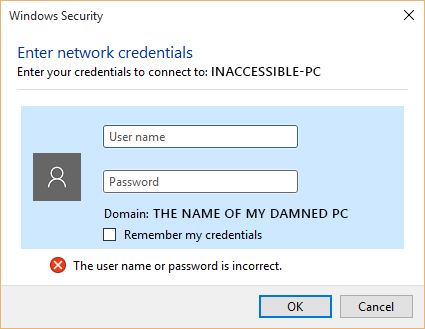
One of the blocked PCs is running Win XP Pro and the other is running Win 7 Pro. There are other PCs on the network running Win 8, Win 7 and Win XP that talk back & forth between my computer just fine. It really doesn't make any sense.
It would seem logical for Microsoft and other computer software companies to make things easier and more user friendly. But they're not doing that. My theory is they're going in the direction of automotive companies: make your product stupidly complicated so the user can't do any troubleshooting himself; force him to pay a tech to solve any problems. It would be shocking if those companies were actually trying to implement such a strategy considering just how shitty desktop computer sales have been in recent years.
Posted by Sean Weitzel (Member # 244) on 08-21-2015, 02:55 PM:
Are you trying to browse straight to the C$ hidden share or a properly shared folder? Starting with Windows 8 MS deliberately disabled access to \\win8-pcname\c$ by default. I believe you can turn it back on with a registry edit.
Posted by Bobby Henderson (Member # 840) on 08-21-2015, 03:10 PM:
I think the issue has something to do with differences in how Windows encrypts network data, along with whether passwords are used for machines to access each other.
I was able to get the two blocked PCs to see my shared folders after I enabled file sharing for machines that use 40-bit or 56-bit encryption. The default is 128-bit. I still get hit with a password wall when I try to access either machine.
Microsoft's engineers have done very little to clean up the disorganized mess that is Windows' network settings. Windows 10 adds another level of mess to it. You basically have to bypass that crap and get to the older looking Control Panel and dig in there to do any good.
Posted by Leo Enticknap (Member # 534) on 08-21-2015, 04:32 PM:
quote: Bobby Henderson
There is no rhyme or reason why Win 10 allows me to access several other PCs on the network (and allow them to access mine) while blocking access to two others. When I try to access them I get hit with this useless dialog box:
Different versions of Windows have always had a problem getting at each other's shared folders within a LAN workgroup. I have never been able to get a Vista and a 7 machine to talk to each other. 10 on my laptop talks to my desktop (both of two partitions: 7 and 8.1) without any problem, though.
I have encountered a glitch whereby if I lose the Internet connection and then it reconnects (which happens every few hours here, probably because of poor quality wire under the street - we've tried a new router and DSL filter, with no luck), Outlook gives me that box and even if I then enter the correct username and password, the box just pops up again. The only way to get the connection to my workplace's Exchange server back is to quit and restart Outlook.
Posted by Rick Raskin (Member # 1561) on 08-21-2015, 06:44 PM:
Leo: You may want to have your service provider verify there are no load coils or half-taps on your DSL facility. The added reactance will play havoc with the DSL signal if they are there.
Powered by Infopop Corporation
UBB.classicTM
6.3.1.2