Film-Tech Cinema Systems
Film-Tech Forum ARCHIVE


my profile | my password | search | faq & rules | forum home
  next oldest topic   next newest topic
» Film-Tech Forum ARCHIVE   » Operations   » Digital Cinema Forum   » NEC Series 2 Projectors (NC1600C, NC2000C, NC3200S) Issues, Tips, and Tricks (Page 2)

 
This topic comprises 6 pages: 1  2  3  4  5  6 
 
Author Topic: NEC Series 2 Projectors (NC1600C, NC2000C, NC3200S) Issues, Tips, and Tricks
Frank Angel
Film God

Posts: 5305
From: Brooklyn NY USA
Registered: Dec 1999


 - posted 09-25-2011 07:28 PM      Profile for Frank Angel   Author's Homepage   Email Frank Angel   Send New Private Message       Edit/Delete Post 
I think it is really cool that well into the digital era, you guys still call the 2.39:1 ratio, CinemaScope. It's a nice nod to that historical, very significant presentation-changing process. But don't forget the capital S.

 |  IP: Logged

Steve Guttag
We forgot the crackers Gromit!!!

Posts: 12814
From: Annapolis, MD
Registered: Dec 1999


 - posted 09-25-2011 07:51 PM      Profile for Steve Guttag   Email Steve Guttag   Send New Private Message       Edit/Delete Post 
The Anamorphic lens is strictly for common height screens...while modern lenses often can be zoomed, one looses about 23% of their light that way...it isn't a resolution thing, it is a light thing.

Also, an anamorphic or WCL lens will not require any zooming/focus of the prime lens resulting in more stable settings as all projectors with motorized lenses drift...some worse than others.

Now earlier in the Series 1 days, lenses did not have such a wide zoom range and they didn't have overlapping zoom ranges...those projectors REQUIRED an anamorphic or WCL lens to achieve both Flat and Scope on a common height screen.

If you have common width and you don't zoom your lens a little, then some format is being compromised. The Scope image is wider than the Flat (2048 versus 1998)...If You don't zoom, you are either cropping or scaling your Flat image to get it to work.

-Steve

 |  IP: Logged

Brad Miller
Administrator

Posts: 17775
From: Plano, TX (36.2 miles NW of Rockwall)
Registered: May 99


 - posted 09-25-2011 08:15 PM      Profile for Brad Miller   Author's Homepage   Email Brad Miller       Edit/Delete Post 
quote: Steven J Hart
Our NEC 2000 simply switches to a different Screen File When switching from flat to scope so there is no zooming and really is no delay at all.
quote: Steve Guttag
If you have common width and you don't zoom your lens a little, then some format is being compromised. The Scope image is wider than the Flat (2048 versus 1998)...If You don't zoom, you are either cropping or scaling your Flat image to get it to work.
Exactly! I just love how so many people (including some dealers) tell people with common width screens that they don't need the zoom motor kit and intentionally chop off part of the picture or scale it because it makes them a fast sale.

Digital done wrong.

 |  IP: Logged

Steven J Hart
Master Film Handler

Posts: 282
From: WALES, ND, USA
Registered: Mar 2004


 - posted 09-25-2011 09:40 PM      Profile for Steven J Hart   Author's Homepage   Email Steven J Hart   Send New Private Message       Edit/Delete Post 
quote: Steve Guttag
If you have common width and you don't zoom your lens a little, then some format is being compromised. The Scope image is wider than the Flat (2048 versus 1998)...If You don't zoom, you are either cropping or scaling your Flat image to get it to work.
Our Flat picture is slightly narrower than Scope, so I move the side masking in to compensate when we play a flat feature. I don't think we are doing any scaling or cropping. I guess I could go in and set up a lens file for Flat that Zooms the lens out to fill the full width. Then I wouldn't have to move the side masking. This is all very new to me as we are just playing our second digital feature this weekend.

One thing I really enjoy about the digital projector is being able to sit in a comfy seat in my auditorium and tweak the zoom, focus and lens shift from my laptop. My installer set the projector up for Flat and Scope features, but did very little for the Blu-Ray player, so I've set up screen files and lens files for the common aspect ratios found on Blu-Ray's and DVD's and assigned them to macros. One thing I'm a little confused about is the tic box on the screen setup page in the dcc for "letterbox" I guess I need to read the manual...

 |  IP: Logged

Brad Miller
Administrator

Posts: 17775
From: Plano, TX (36.2 miles NW of Rockwall)
Registered: May 99


 - posted 09-25-2011 11:04 PM      Profile for Brad Miller   Author's Homepage   Email Brad Miller       Edit/Delete Post 
Either way Steven, and it is doing it right. (Moving the masking in a little bit or zooming.)

 |  IP: Logged

Justin Hamaker
Film God

Posts: 2253
From: Lakeport, CA USA
Registered: Jan 2004


 - posted 09-26-2011 06:37 PM      Profile for Justin Hamaker   Author's Homepage   Email Justin Hamaker   Send New Private Message       Edit/Delete Post 
Does anyone know how I would go about getting a custom screen layout file into the DCC/NEC projector. The pre-installed files are not really very good, and the XYZ file which comes on the GDC server is only good enough to get you close. And none of these if very good for getting the best focus across the screen.

When I was configuring my screens, I mainly relied on flat and scope trailers to set the picture for each format.

 |  IP: Logged

Brad Miller
Administrator

Posts: 17775
From: Plano, TX (36.2 miles NW of Rockwall)
Registered: May 99


 - posted 09-29-2011 12:42 AM      Profile for Brad Miller   Author's Homepage   Email Brad Miller       Edit/Delete Post 
Are you saying all 4 corners cannot be sharply focused at once? If so, your installation technician *@&$^!#$|% up.

Or do you just want something for general focus?

 |  IP: Logged

Justin Hamaker
Film God

Posts: 2253
From: Lakeport, CA USA
Registered: Jan 2004


 - posted 09-29-2011 01:45 AM      Profile for Justin Hamaker   Author's Homepage   Email Justin Hamaker   Send New Private Message       Edit/Delete Post 
What I'm saying is the files that come installed on the projector and the GDC do not have anything on them which allows you to see the focus on all parts of the screen. I'm not talking about the competence of anyone, just the lack of a tool to accomplish what needs to be accomplished.

There is a file on the GDC called DCI XYZ Framing, which has some arrows and lines, but it is hardly adequate for getting your picture right on the screen. And it doesn't really have text in the middle which allows you to set the focus.

 |  IP: Logged

Dave Macaulay
Film God

Posts: 2321
From: Toronto, Canada
Registered: Apr 2001


 - posted 09-29-2011 08:07 AM      Profile for Dave Macaulay   Email Dave Macaulay   Send New Private Message       Edit/Delete Post 
Focus uniformity is an installation adjustment done with tools, at the lens mount. Christie calls it "boresight", Barco calls it Scheinpflug" or something like that, I dunno what NEC calls it. The lens has to be angled correctly to get the best possible focus uniformity on your screen, there isn't a "perfect" adjustment from the factory that will always work. If you have a flat screen and the projector square to the screen, the factory setup should be OK. If you have tilted the projector or your screen is tilted (for example) it will usually need to be adjusted. This should be done as part of any installation (I do lamp alignment, rough aim and level, boresight, convergence, final aim and level, lens files, screen files, colour and light level - in that order).
I suggest you check convergence as well: a single pixel white line grid pattern is good if NEC doesn't include a convergence pattern. If the installer skipped the boresight setup I suspect he/she skipped the convergence as well. A white line should be a white line: misonvergence will give the lines a coloured fringe. I don't expect a perfect convergence over the whole screen but it should be damned close.

 |  IP: Logged

Mark Gulbrandsen
Resident Trollmaster

Posts: 16657
From: Music City
Registered: Jun 99


 - posted 09-29-2011 09:39 AM      Profile for Mark Gulbrandsen   Email Mark Gulbrandsen   Send New Private Message       Edit/Delete Post 
I agree that NEC puts so little in terms of usable focus alignment files as to be useless. They do include the standard convergence file, thankfully. I have actually been using some of the BARCO alignment files and installing them onto the NEC T.I. on a few occasions. Barco has by far the best screen alignment files that exist, but you have to know how to access the T.I. and then "Put" the files in there using the T.I. file manager. Strong can supply you with their screen alignment file that will drop into the NEC the same way and it is certainly more useful for alignment then anything that comes on the projector, but because the NEC displays it's alignment files full chip only it is still best played back from the server! You can use Free DCP to build any of these files for play back on a server. GDC also now includes another alignment file other than the XYZ file that is a bit more useful for sizing images, I suggest you contact support and request it from them on a thumb drive. When it comes to creating screen files playing back the alignment image from your server instead of the projector is highly reccomended. Don't forget the NEC will make these images the full chip, ok for focus but not really so good for screen alignment! I've always liked the set up files Dolby provided to do screen files. If you can get a large thumb drive or a full CRU insert then begin collecting and saving these files for future use. For instance... "The Help" had a very good framing-focus snip on it that ran about 5 min. I was told that in the near future upcomming GDC OS upgrade it will include being able to off load content onto the CRU... That will make saving these easier.

Mark

 |  IP: Logged

Scott Norwood
Film God

Posts: 8146
From: Boston, MA. USA (1774.21 miles northeast of Dallas)
Registered: Jun 99


 - posted 09-29-2011 10:45 AM      Profile for Scott Norwood   Author's Homepage   Email Scott Norwood   Send New Private Message       Edit/Delete Post 
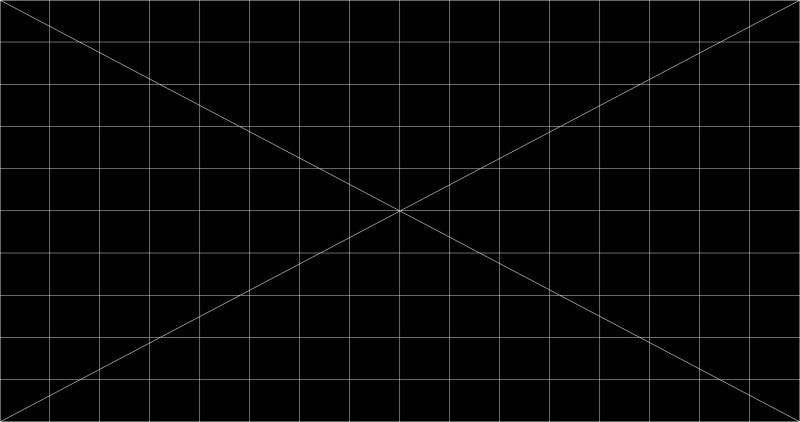
What does everyone want for a focus/convergence test pattern? Would something like this work? (single-pixel grid)

 -

Or should there be separate patterns for 1.85 and 2.39? What about the grid density?

 |  IP: Logged

Mark Gulbrandsen
Resident Trollmaster

Posts: 16657
From: Music City
Registered: Jun 99


 - posted 09-29-2011 02:37 PM      Profile for Mark Gulbrandsen   Email Mark Gulbrandsen   Send New Private Message       Edit/Delete Post 
Thats a little too basic... Focus bulls eyes in the center area and near the four corners and definition of scope height and flat width are also necessary.

 |  IP: Logged

Steve Guttag
We forgot the crackers Gromit!!!

Posts: 12814
From: Annapolis, MD
Registered: Dec 1999


 - posted 09-29-2011 08:48 PM      Profile for Steve Guttag   Email Steve Guttag   Send New Private Message       Edit/Delete Post 
My favorite remains the Barco "Focus" target. It has 5 targets (one in each corner and one in the center. It is VERY easy to use. They even have it in the green-only version so you don't mistake bad convergence for bad focus. The green only version has many more targets too.

However, if you can create .PNG files, you have a way to create your own targets.

As Mark has noted...via the TI ICP program, one can "collect" ones favorite targets and use them on any DLP projector. They all have patterns that the others don't have but can be useful.

-Steve

-Steve

 |  IP: Logged

Justin Hamaker
Film God

Posts: 2253
From: Lakeport, CA USA
Registered: Jan 2004


 - posted 10-01-2011 03:30 AM      Profile for Justin Hamaker   Author's Homepage   Email Justin Hamaker   Send New Private Message       Edit/Delete Post 
Another question is what parts should you keep on the shelf for the NEC projectors? Any of the fans or boards prone to failure and inexpensive enough to justify keeping on the shelf.

 |  IP: Logged

Bob Bregazzi
Film Handler

Posts: 17
From: Hampshie, England
Registered: Jan 2010


 - posted 10-01-2011 04:08 AM      Profile for Bob Bregazzi   Email Bob Bregazzi   Send New Private Message       Edit/Delete Post 
Thats a little too basic... Focus bulls eyes in the center area and near the four corners and definition of scope height and flat width are also necessary.
-------------------------------------------------------------------

why not a dgital version of the rp40 target film you can't go wrong on that

 |  IP: Logged


All times are Central (GMT -6:00)
This topic comprises 6 pages: 1  2  3  4  5  6 
 
   Close Topic    Move Topic    Delete Topic    next oldest topic   next newest topic
 - Printer-friendly view of this topic
Hop To:


Powered by Infopop Corporation
UBB.classicTM 6.3.1.2

The Film-Tech Forums are designed for various members related to the cinema industry to express their opinions, viewpoints and testimonials on various products, services and events based upon speculation, personal knowledge and factual information through use, therefore all views represented here allow no liability upon the publishers of this web site and the owners of said views assume no liability for any ill will resulting from these postings. The posts made here are for educational as well as entertainment purposes and as such anyone viewing this portion of the website must accept these views as statements of the author of that opinion and agrees to release the authors from any and all liability.

© 1999-2020 Film-Tech Cinema Systems, LLC. All rights reserved.