Film-Tech Cinema Systems
Film-Tech Forum ARCHIVE


my profile | my password | search | faq & rules | forum home
  next oldest topic   next newest topic
» Film-Tech Forum ARCHIVE   » Operations   » Digital Cinema Forum   » Create/convert to DCP (Page 2)

 
This topic comprises 8 pages: 1  2  3  4  5  6  7  8 
 
Author Topic: Create/convert to DCP
Carsten Kurz
Film God

Posts: 4340
From: Cologne, NRW, Germany
Registered: Aug 2009


 - posted 12-01-2012 07:06 PM      Profile for Carsten Kurz   Email Carsten Kurz   Send New Private Message       Edit/Delete Post 
quote: David Favel
Is there a method to "unpack" a dcinema file to play on a computer. This is an ad to play before the main feature.
There is player software like EasyDCP or the digitall player for unencrypted DCPs.

You can also unwrap or play the individual MXF files in the DCP, e.g. with stereoscopic player or VLC. Again only if they are unencrypted.

- Carsten

 |  IP: Logged

Bajsic Bojan
Expert Film Handler

Posts: 190
From: Ljubljana, Si, Eu
Registered: Aug 2008


 - posted 12-02-2012 02:06 AM      Profile for Bajsic Bojan   Email Bajsic Bojan   Send New Private Message       Edit/Delete Post 
Wont start a new topic so here goes.

----
How to encode jpeg2000 the fastest?

I'm using OpenDCP and the converter uses CPU power, allows multi-threading, but don't know if it would use up all cores / threads in letssay i7 6-core. Anyone have any info, how it handles that, and how fast it goes? I'm currently getting roughly 1-1.5 frames per second from my dualcore, which is not bad.

I have been looking at the jpeg2000 plugin for Adobe Premiere, but cannot find if the encoding to jpeg would use up the nVidia CUDA cores, as that would probably speed up things alot. I know Premiere uses CUDA for regular encoding, but no info if it works and how it works on jpeg2000.

Any other programs that do jpeg2000 and utilize GPU power?

I really would like to make things a bit faster and am thinking of upgrading my older computer, but don't want to waste 600$ on an i7 and motherboard if i can get the same encoding speed boost from i.e. a gtx560 with 400 CUDA cores for 200$.

Any info appreciated.

 |  IP: Logged

Antti Nayha
Master Film Handler

Posts: 268
From: Helsinki, Finland
Registered: Oct 2008


 - posted 12-02-2012 05:30 AM      Profile for Antti Nayha   Email Antti Nayha   Send New Private Message       Edit/Delete Post 
I seem to remember that the Windows version of OpenDCP won't utilize more than a single core. The Mac version will.

Commercial software such as easyDCP are significantly faster than OpenDCP, which uses the OpenJPEG library for encoding j2k files. OpenJPEG is open source but less optimized performance-wise compared to the commercial stuff.

 |  IP: Logged

Jussi Siponen
Film Handler

Posts: 75
From: Mikkeli, Itä-Suomi, FINLAND
Registered: Jan 2010


 - posted 12-02-2012 05:51 AM      Profile for Jussi Siponen   Email Jussi Siponen   Send New Private Message       Edit/Delete Post 
See the Making your own DCP's thread for some discussion on hardware.

To summarize: your system has to find the right balance between different components or you are going to be limited by the weakest link in your setup. The fastest processor in the world is not going to help you any if your discs can't keep up the required data rate.

My current 3 GHz Intel Core i7 950 based PC can achieve 0.4x encode speed (i.e. encoding takes 2.5 times the playback time) with Fraunhofer EasyDCP and is CPU bound (i.e. the CPU is the limiting factor). Now, if I were to upgrade the CPU, the disc I/O would become the limiting factor (i.e. the system would be I/O bound).

 |  IP: Logged

Bajsic Bojan
Expert Film Handler

Posts: 190
From: Ljubljana, Si, Eu
Registered: Aug 2008


 - posted 12-02-2012 06:18 AM      Profile for Bajsic Bojan   Email Bajsic Bojan   Send New Private Message       Edit/Delete Post 
using an older intel core2duo, in task manager it says it utilises both cores to near 95%. windows vista 64bit.

some people on the openDcp forum mentioned running 4 cores at roughly 50%, but the posts are somewhat old.

@jussi:
yes, that i am aware of, but at the moment, with 1.5 frames per second max, i am not touching the threshold of the discs in an way. I am looking to improve from 1:20 ratio to something like 1:5 (would be really really great), that is cca 5 frames per second. That would be 25Mbit/s and would still be well below what average disc read/write operations are.

/edit. ah yes, the tiff/bmp files are larger, so esentially the read would have to be at cca 250-300Mbit for 1:5... ok, back to the drawing board [Razz]

 |  IP: Logged

Carl Hetherington
Film Handler

Posts: 93
From: York, North Yorkshire, England
Registered: Jul 2012


 - posted 12-02-2012 11:59 AM      Profile for Carl Hetherington   Author's Homepage   Email Carl Hetherington   Send New Private Message       Edit/Delete Post 
If you are hitting disc IO limits with your encodes with OpenDCP then DVD-o-matic might help a bit, as it goes directly from the source video to JPEG2000 without needing a disc write/read to/from TIFF.

There has been some open-source work on J2K encoding using CUDA, which I keep meaning to look into when I get time.

As regards a Mac OS X version of DVD-o-matic, there isn't one at the moment, but I'm happy to take donations to buy a Mac Mini to do a port on [Wink]

I'm still happy to hear about any problems anyone is having; either to the mailing list dvdomatic@carlh.net or my email cth@carlh.net.

Regards

Carl

 |  IP: Logged

Jussi Siponen
Film Handler

Posts: 75
From: Mikkeli, Itä-Suomi, FINLAND
Registered: Jan 2010


 - posted 12-04-2012 10:33 AM      Profile for Jussi Siponen   Email Jussi Siponen   Send New Private Message       Edit/Delete Post 
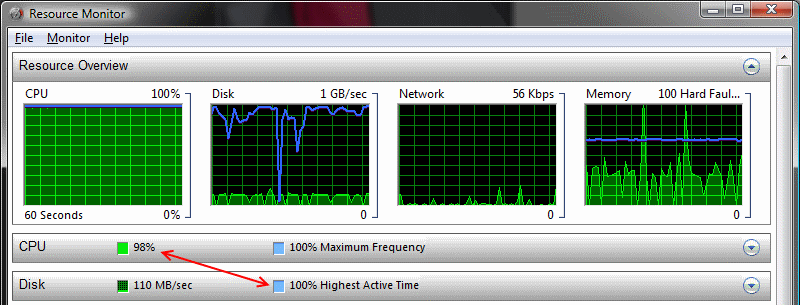
A quick demonstration of the principle of having a balanced system I mentioned earlier:

 -

- Discs don't need to be any faster, because the CPU is fully loaded
- CPU couldn't be any faster without the discs becoming a bottleneck

 |  IP: Logged

Terrence Meiczinger
Film Handler

Posts: 45
From: Orono, Me, USA
Registered: Dec 2008


 - posted 12-06-2012 12:03 AM      Profile for Terrence Meiczinger   Author's Homepage   Email Terrence Meiczinger   Send New Private Message       Edit/Delete Post 
Recent versions of OpenDCP should use all cores on Windows. Early versions didn't because the application would exceed the 2GB per process memory limit on 32-bit Windows and crash.

There are other processing limits, such as I/O, so more threads doesn't always mean better performance. You may need to adjust the number for your system. For example, on my 8-core Mac Pro, 6 threads is usually optimal when using OpenJPEG. When using the Kakadu encoder, just 1 thread is needed because the encoder is highly optimized and simultaneous encodes starve each other.

GPU encoding for JPEG2000 isn't going to be all that beneficial over well written CPU code. The costs of GPU setup and memory transfers will outweigh the computational gains. GPUs are great for certain tasks, but it's not simple as just throwing GPUs at everything. Decoding on the other hand could benefit from GPU processing.

 |  IP: Logged

Frank Cox
Film God

Posts: 2234
From: Melville Saskatchewan Canada
Registered: Apr 2011


 - posted 12-06-2012 12:16 AM      Profile for Frank Cox   Author's Homepage   Email Frank Cox   Send New Private Message       Edit/Delete Post 
Where is the opendcp source code? I've looked on both http://code.google.com/p/opendcp/ and http://www.opendcp.org/ and all I can find is compiled binaries for various systems.

 |  IP: Logged

Tom Herendeen
Film Handler

Posts: 2
From: Lyons, NY USA
Registered: Nov 2012


 - posted 12-12-2012 11:58 AM      Profile for Tom Herendeen   Email Tom Herendeen   Send New Private Message       Edit/Delete Post 
Anyone have any comments about using Windows Movie Make to create input for DVD-o-matic? In a 90 second clip, the sound go terribly messed up in the last 15 seconds. The sound was a .wav file; the video was a series of stills. WMM's output is a .wmv file as opposed to a .mp4 which seems to work fine.

 |  IP: Logged

Carl Hetherington
Film Handler

Posts: 93
From: York, North Yorkshire, England
Registered: Jul 2012


 - posted 12-13-2012 10:33 AM      Profile for Carl Hetherington   Author's Homepage   Email Carl Hetherington   Send New Private Message       Edit/Delete Post 
quote: Tom Herendeen
Anyone have any comments about using Windows Movie Make to create input for DVD-o-matic? In a 90 second clip, the sound go terribly messed up in the last 15 seconds
Hi Tom, if you want to send me the WMV file (either email to cth@carlh.net or use yousendit.com, perhaps) then I will take a look at it and see if I can work out what's wrong.

Best regards

Carl Hetherington (dvd-o-matic author)

 |  IP: Logged

Frank Angel
Film God

Posts: 5305
From: Brooklyn NY USA
Registered: Dec 1999


 - posted 12-21-2012 03:05 PM      Profile for Frank Angel   Author's Homepage   Email Frank Angel   Send New Private Message       Edit/Delete Post 
Ok, you've got your new home-made DCP authored and now you ingested it. Question is, will all that high security let the system play it, no questions asked even tho it has no KEY? Or do you create your own key to unlock your own DCP? How does that work?

 |  IP: Logged

Frank Cox
Film God

Posts: 2234
From: Melville Saskatchewan Canada
Registered: Apr 2011


 - posted 12-21-2012 03:36 PM      Profile for Frank Cox   Author's Homepage   Email Frank Cox   Send New Private Message       Edit/Delete Post 
A dcp can be encrypted or unencrypted. An unencrypted dcp doesn't require any key to play.

 |  IP: Logged

Mike Blakesley
Film God

Posts: 12767
From: Forsyth, Montana
Registered: Jun 99


 - posted 12-21-2012 03:51 PM      Profile for Mike Blakesley   Author's Homepage   Email Mike Blakesley   Send New Private Message       Edit/Delete Post 
OK, so I made a very nice "Merry Christmas" tag. It features a snowy picture of our downtown, thus it gets ooohs and aahs from the audience every time it plays. But now, we're playing a 3-D movie and when the tag comes up, the screen goes to all-green, so I've had to take it out.

I assume this is due to the movie being 3-D and the tag being 2-D, but 2-D trailers work fine.

Anybody got an idea or a workaround for this? Or am I just missing some setting?

 |  IP: Logged

Carl Hetherington
Film Handler

Posts: 93
From: York, North Yorkshire, England
Registered: Jul 2012


 - posted 12-21-2012 04:33 PM      Profile for Carl Hetherington   Author's Homepage   Email Carl Hetherington   Send New Private Message       Edit/Delete Post 
quote: Frank Angel
Ok, you've got your new home-made DCP authored and now you ingested it. Question is, will all that high security let the system play it, no questions asked even tho it has no KEY? Or do you create your own key to unlock your own DCP? How does that work?
Many of the free programs (DVD-o-matic included) generate unencrypted DCPs, so they will just play (much like most trailers).

quote: Mike Blakesley
OK, so I made a very nice "Merry Christmas" tag. It features a snowy picture of our downtown, thus it gets ooohs and aahs from the audience every time it plays. But now, we're playing a 3-D movie and when the tag comes up, the screen goes to all-green, so I've had to take it out.

Strange! Is this with DVD-o-matic? I'm pretty sure I checked some of its outputs in 3D mode and they worked ok. What projector/server combination are you using?

I suppose you could drop into 2D mode for the trailer and then go back to 3D for the rest of the script, but it's a bit of a faff...

Carl

 |  IP: Logged


All times are Central (GMT -6:00)
This topic comprises 8 pages: 1  2  3  4  5  6  7  8 
 
   Close Topic    Move Topic    Delete Topic    next oldest topic   next newest topic
 - Printer-friendly view of this topic
Hop To:


Powered by Infopop Corporation
UBB.classicTM 6.3.1.2

The Film-Tech Forums are designed for various members related to the cinema industry to express their opinions, viewpoints and testimonials on various products, services and events based upon speculation, personal knowledge and factual information through use, therefore all views represented here allow no liability upon the publishers of this web site and the owners of said views assume no liability for any ill will resulting from these postings. The posts made here are for educational as well as entertainment purposes and as such anyone viewing this portion of the website must accept these views as statements of the author of that opinion and agrees to release the authors from any and all liability.

© 1999-2020 Film-Tech Cinema Systems, LLC. All rights reserved.