Film-Tech Cinema Systems
Film-Tech Forum ARCHIVE


my profile | my password | search | faq & rules | forum home
  next oldest topic   next newest topic
» Film-Tech Forum ARCHIVE   » Operations   » Digital Cinema Forum   » Create/convert to DCP (Page 5)

 
This topic comprises 8 pages: 1  2  3  4  5  6  7  8 
 
Author Topic: Create/convert to DCP
Manuel Acevedo Civantos
Film Handler

Posts: 26
From: Québec, QC, Canada
Registered: Mar 2013


 - posted 04-19-2013 02:19 PM      Profile for Manuel Acevedo Civantos   Author's Homepage   Email Manuel Acevedo Civantos   Send New Private Message       Edit/Delete Post 
Just wanted to remark the indiegogo campaign for DVD-o-Matic. Please support it!

With its ease of use, it can be a real game changer for many small exhibitors and producers.

 |  IP: Logged

James Skinner
Film Handler

Posts: 22
From: Wolfville, Nova Scotia, Canada
Registered: Dec 2012


 - posted 04-21-2013 01:24 PM      Profile for James Skinner   Email James Skinner   Send New Private Message       Edit/Delete Post 
While it can be tricky to setup initially, I have been very happy with DCP Builder. Its seem much more feature rich than the other free options. http://dcpbuilder.com

 |  IP: Logged

Ronda Fitzsimmons
Film Handler

Posts: 75
From: Pottstown, PA, USA
Registered: Sep 2002


 - posted 05-17-2013 11:25 AM      Profile for Ronda Fitzsimmons   Author's Homepage   Email Ronda Fitzsimmons   Send New Private Message       Edit/Delete Post 
Only 11 days left for Carl's indiegogo campaign. Easy to contribute using paypal for any who would like to help him out.

 |  IP: Logged

Carsten Kurz
Film God

Posts: 4340
From: Cologne, NRW, Germany
Registered: Aug 2009


 - posted 05-17-2013 02:41 PM      Profile for Carsten Kurz   Email Carsten Kurz   Send New Private Message       Edit/Delete Post 
Yep. We're nearly there. It's great software and easy to use. Please contribute!

http://www.indiegogo.com/projects/dvd-o-matic-on-mac-os-x/

http://carlh.net/software/dvdomatic/

- Carsten

 |  IP: Logged

Cameron Glendinning
Jedi Master Film Handler

Posts: 845
From: West Ryde, Sydney, NSW Australia
Registered: Dec 2005


 - posted 06-08-2013 09:26 PM      Profile for Cameron Glendinning   Email Cameron Glendinning   Send New Private Message       Edit/Delete Post 
I recently tried to ingest a DVD o matic made DCP that I have made and run before in several conventional cinemas on the IMAX digital system and it is not being recognized, therefore not ingested. The system does allow ingesting of conventional DCP 2D content, any ideas why or what software would work with IMAX gear?

 |  IP: Logged

Kirk Futrell
Film Handler

Posts: 95
From: Nashville, TN / U.S.A.
Registered: Nov 2008


 - posted 06-10-2013 03:44 PM      Profile for Kirk Futrell   Author's Homepage   Email Kirk Futrell   Send New Private Message       Edit/Delete Post 
Cameron,
Does the IMAX server possibly only recognize EXT3 formatted drives and the drive you have your file on is not formatted that way?

Carl,
DVD-O-Matic has been a huge help at our theatre. Being an arthouse we often have to make our own DCP trailers for upcoming series or from downloaded or pro-res trailers. We have even found a work around for the default L,R only you typically get when downloading pro-logic LT,RT trailers from the internet. We put those trailers together in our playlist so that we can switch our Datasat AP20 to 2:4 matrix mode for those trailers and switch it back to default when they are over. I haven't yet found a free program that will demux the LT,RT to convert it to 5.1 wav files to drop in to DVD-O-Matic yet so until then this is how we do it. We also use your encode servers on our a couple of other PCs on our network to dramatically cut down encode times. Keep up the good work!

 |  IP: Logged

Carsten Kurz
Film God

Posts: 4340
From: Cologne, NRW, Germany
Registered: Aug 2009


 - posted 06-10-2013 04:59 PM      Profile for Carsten Kurz   Email Carsten Kurz   Send New Private Message       Edit/Delete Post 
I have suggested to Carl to enable an option for stereo->2.1 decoding, maybe even ProLogic etc. ENCODING and ProLogic->discrete decoding.

As far as I know, FFMPEG has that functionality, and indeed, the AP20 does an excellent job - IF the material is actually ProLogic encoded and not just plain stereo.

There is an even better surround option in the AP20, that is, dts NEO6. Unfortunately, it is only available for NonSync Sources, not DCI content. It does an excellent job to place dialog on the center speaker. We use it all the time when we play alternative content with stereo tracks from media-players, notebooks, etc.

- Carsten

 |  IP: Logged

Mike Blakesley
Film God

Posts: 12767
From: Forsyth, Montana
Registered: Jun 99


 - posted 07-17-2013 02:47 PM      Profile for Mike Blakesley   Author's Homepage   Email Mike Blakesley   Send New Private Message       Edit/Delete Post 
I am trying to convert a piece of video for a special show this weekend and have an "issue."

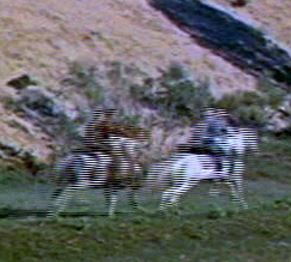
The picture looks good unless something is moving quickly L-R on the screen....then, the moving parts of picture seems to split horizontally into small segments briefly, like part of the picture has to 'catch up' with the rest of the picture.

I'll paste in a section of a picture that illustrates the problem:

I tried looking at the video from the VOB files in the DVD-o-Matic player, and also tried converting the video to an avi using Handbrake...the results are the same either way.

I'm using DVDFab's HD Decrypter to copy the video from the DVD. There don't seem to be any settings in that, and besides it's worked for other video I've converted before. This is an old old video from the '50s I'm working on so could that be part of it? It looks fine when just looking at it in Windows Media player.

Can anyone shed some light on this? I hope I've described the problem understandably enough.

 |  IP: Logged

Joe Redifer
You need a beating today

Posts: 12859
From: Denver, Colorado
Registered: May 99


 - posted 07-17-2013 04:10 PM      Profile for Joe Redifer   Author's Homepage   Email Joe Redifer   Send New Private Message       Edit/Delete Post 
What is the frame rate of the source video and what is the frame rate of the DCP? It may not like 23.98fps. Or 29.97fps. It has to be a hard 24 or 30 for best results, I think. Remember... "hard".

 |  IP: Logged

Mike Blakesley
Film God

Posts: 12767
From: Forsyth, Montana
Registered: Jun 99


 - posted 07-17-2013 05:23 PM      Profile for Mike Blakesley   Author's Homepage   Email Mike Blakesley   Send New Private Message       Edit/Delete Post 
The DCP is coming out at 30, and the source is 29.97. Here is a portion of a screen shot.

 -

I'm not sure if the DCP frame rate is the problem though because this "bad" look is coming from the preview, before the DCP is even created (and the DCP results look the same as this). And, if the DVD is created at 29.97 how can I get around that...if that's the problem?

 |  IP: Logged

Carsten Kurz
Film God

Posts: 4340
From: Cologne, NRW, Germany
Registered: Aug 2009


 - posted 07-17-2013 06:09 PM      Profile for Carsten Kurz   Email Carsten Kurz   Send New Private Message       Edit/Delete Post 
That's interlacing, your source footage is 'i'. DVD-o-matic has some processors, including a range of different de-interlacers, to get rid of that. You will lose some vertical resolution, but it's your only choice. Don't ask me which deinterlacer module to use. Just try them on a short snip.

http://en.wikipedia.org/wiki/Interlaced_video

http://en.wikipedia.org/wiki/Deinterlacing

That's normal for DVD content. Only very few DVDs are mastered with progressive footage.

Pushing the framerate from 29,97 to 30fps is the best option. DVD-o-matic will automatically resample the audio to adjust for that. If your server/projector can play 30fps, your fine.

- Carsten

 |  IP: Logged

Mike Blakesley
Film God

Posts: 12767
From: Forsyth, Montana
Registered: Jun 99


 - posted 07-17-2013 06:14 PM      Profile for Mike Blakesley   Author's Homepage   Email Mike Blakesley   Send New Private Message       Edit/Delete Post 
Handbrake has de-interlacing too, I'll try it with that on. I don't think it was on before, at least. I'm doing this while attempting to do my actual job so I keep having to stop/start. Thanks, will let you know what happens.

 |  IP: Logged

Randy Stankey
Film God

Posts: 6539
From: Erie, Pennsylvania
Registered: Jun 99


 - posted 07-17-2013 08:04 PM      Profile for Randy Stankey   Email Randy Stankey   Send New Private Message       Edit/Delete Post 
Definitely interlacing artifacts.

I use MPEG Streamclip to de interlace and to convert to another CODEC before encoding to the final format.

http://www.squared5.com/

It's an extra step and it takes a little longer but it ensures that the video will look as good as it can before you encode to DCP.

 |  IP: Logged

Joe Redifer
You need a beating today

Posts: 12859
From: Denver, Colorado
Registered: May 99


 - posted 07-17-2013 09:50 PM      Profile for Joe Redifer   Author's Homepage   Email Joe Redifer   Send New Private Message       Edit/Delete Post 
Yes, because the more steps of recompression, the better! That's why I always re-encode my MP3s into M4A before I convert them to WAV. I just wish I had time to convert it into more formats before the final one.

Disregard this post if your "Another Codec" is uncompressed or near-lossless.

 |  IP: Logged

Frank B. McLaughlin
Film Handler

Posts: 76
From: Denver, CO
Registered: Dec 2011


 - posted 07-18-2013 06:42 AM      Profile for Frank B. McLaughlin   Author's Homepage   Email Frank B. McLaughlin   Send New Private Message       Edit/Delete Post 
I find 1080/60p in, 29.97 out works rather well.

 |  IP: Logged


All times are Central (GMT -6:00)
This topic comprises 8 pages: 1  2  3  4  5  6  7  8 
 
   Close Topic    Move Topic    Delete Topic    next oldest topic   next newest topic
 - Printer-friendly view of this topic
Hop To:


Powered by Infopop Corporation
UBB.classicTM 6.3.1.2

The Film-Tech Forums are designed for various members related to the cinema industry to express their opinions, viewpoints and testimonials on various products, services and events based upon speculation, personal knowledge and factual information through use, therefore all views represented here allow no liability upon the publishers of this web site and the owners of said views assume no liability for any ill will resulting from these postings. The posts made here are for educational as well as entertainment purposes and as such anyone viewing this portion of the website must accept these views as statements of the author of that opinion and agrees to release the authors from any and all liability.

© 1999-2020 Film-Tech Cinema Systems, LLC. All rights reserved.