Film-Tech Cinema Systems
Film-Tech Forum ARCHIVE


my profile | my password | search | faq & rules | forum home
  next oldest topic   next newest topic
» Film-Tech Forum ARCHIVE   » Operations   » Digital Cinema Forum   » Dolby DSS200 Version (Page 2)

 
This topic comprises 3 pages: 1  2  3 
 
Author Topic: Dolby DSS200 Version
Steve Guttag
We forgot the crackers Gromit!!!

Posts: 12814
From: Annapolis, MD
Registered: Dec 1999


 - posted 06-12-2015 11:14 PM      Profile for Steve Guttag   Email Steve Guttag   Send New Private Message       Edit/Delete Post 
I'm reasonably sure it is the same...definitely the same GPIO file. I've used the GPIO on something like 2 systems so I don't have the pinout memorized.

 |  IP: Logged

Marcial Feliciano Ramos
Expert Film Handler

Posts: 108
From: Puerto Rico
Registered: Oct 2003


 - posted 06-15-2015 02:14 PM      Profile for Marcial Feliciano Ramos   Email Marcial Feliciano Ramos   Send New Private Message       Edit/Delete Post 
Steve, what is the highest non-DCI version for a DSS100 and DSP100?

 |  IP: Logged

Marco Giustini
Film God

Posts: 2713
From: Reading, UK
Registered: Nov 2007


 - posted 06-15-2015 03:37 PM      Profile for Marco Giustini   Email Marco Giustini   Send New Private Message       Edit/Delete Post 
Same as DSS200: 4.3.5-13

 |  IP: Logged

Mike Renlund
Film Handler

Posts: 71
From: San Francisco
Registered: Feb 2008


 - posted 06-15-2015 04:25 PM      Profile for Mike Renlund   Email Mike Renlund   Send New Private Message       Edit/Delete Post 
The last version of the DSS100/DSP100 before DCI compliant software was released was 4.7.0.

GPIO was planned but not included in the DSS100. The DSS200 and DSS220 are the only DSS servers that support GPIO because they have the CAT914z board. The XML configuration file for the CAT914z is loaded during the config script.

Mike Renlund
Dolby Laboratories

 |  IP: Logged

Steve Guttag
We forgot the crackers Gromit!!!

Posts: 12814
From: Annapolis, MD
Registered: Dec 1999


 - posted 06-15-2015 07:23 PM      Profile for Steve Guttag   Email Steve Guttag   Send New Private Message       Edit/Delete Post 
So the GPIO connector on the back of the DSS100 was essentially dead? Perhaps the "failsafe" terminals did something but one couldn't fire the GPO or receive on the GPI?

 |  IP: Logged

Sam D. Chavez
Film God

Posts: 2153
From: Martinez, CA USA
Registered: Aug 2003


 - posted 06-16-2015 02:07 PM      Profile for Sam D. Chavez   Author's Homepage     Send New Private Message       Edit/Delete Post 
Steve incorrect? Say it aint so.

 |  IP: Logged

Mike Renlund
Film Handler

Posts: 71
From: San Francisco
Registered: Feb 2008


 - posted 06-18-2015 04:07 PM      Profile for Mike Renlund   Email Mike Renlund   Send New Private Message       Edit/Delete Post 
Failsafe did work. None of the other functions were used. When I was in exhibition and installing 100 series we were using the NA10 for our automation

Mike Renlund
Dolby Laboratories

 |  IP: Logged

Marco Giustini
Film God

Posts: 2713
From: Reading, UK
Registered: Nov 2007


 - posted 06-18-2015 05:11 PM      Profile for Marco Giustini   Email Marco Giustini   Send New Private Message       Edit/Delete Post 
Thanks Mike for correcting me, I forgot that the DSS100 went DCI a little later.

 |  IP: Logged

System Notices
Forum Watchdog / Soup Nazi

Posts: 215

Registered: Apr 2004


 - posted 03-11-2018 11:59 AM      Profile for System Notices         Edit/Delete Post 

It has been 996 days since the last post.


 |  IP: Logged

Steve Guttag
We forgot the crackers Gromit!!!

Posts: 12814
From: Annapolis, MD
Registered: Dec 1999


 - posted 03-11-2018 11:59 AM      Profile for Steve Guttag   Email Steve Guttag   Send New Private Message       Edit/Delete Post 
Dolby is now up to 4.9.1 (18). The big "feature" in 4.9.1 is the ability to jump over the first part of a clip (double-click on the clip while building a show) and specify the desire entry point (e.g. past an attached preview). It is not entirely clean in that one should precede the clip by a black clip.

For those that missed it, 4.9.0.96 added in telemitry to the UI so one can see what the actual resolution/frame rate/container are rather than merely depending on what someone typed in. 4.9.0 had all of the various Closed Caption fixes in it.

 |  IP: Logged

Leo Enticknap
Film God

Posts: 7474
From: Loma Linda, CA
Registered: Jul 2000


 - posted 03-11-2018 01:27 PM      Profile for Leo Enticknap   Author's Homepage   Email Leo Enticknap   Send New Private Message       Edit/Delete Post 
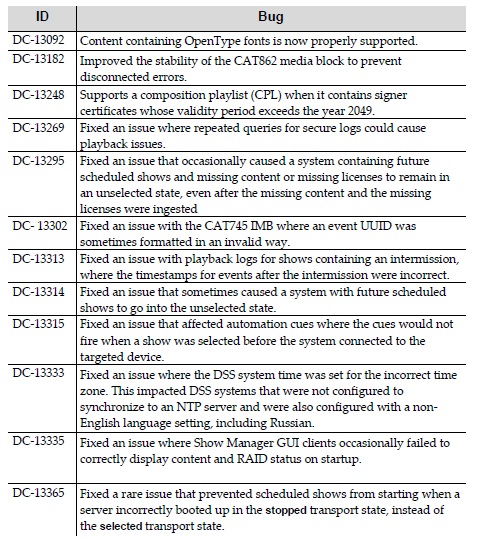
Here are the 4.9.1 (18) fixes:

 -

 |  IP: Logged

Alexandre Pereira
Expert Film Handler

Posts: 126
From: Toronto, Ontario, Canada
Registered: Jan 2016


 - posted 03-11-2018 11:13 PM      Profile for Alexandre Pereira   Author's Homepage   Email Alexandre Pereira   Send New Private Message       Edit/Delete Post 
Hi Leo - do you think this upgrade will actually fix my super annoying Cat682 No Transport issue on the DSS200?...I finally figured out it has nothing to do with the connection to the CP2000SB but like the DSS100 Showplayer to Showstore RJ45 cable connection.

 |  IP: Logged

Leo Enticknap
Film God

Posts: 7474
From: Loma Linda, CA
Registered: Jul 2000


 - posted 03-12-2018 09:50 AM      Profile for Leo Enticknap   Author's Homepage   Email Leo Enticknap   Send New Private Message       Edit/Delete Post 
DC-13182 looks like it might, but that's as much as I could say.

 |  IP: Logged

Carsten Kurz
Film God

Posts: 4340
From: Cologne, NRW, Germany
Registered: Aug 2009


 - posted 03-12-2018 10:10 AM      Profile for Carsten Kurz   Email Carsten Kurz   Send New Private Message       Edit/Delete Post 
The 'Disconnected/No Transport' issue turned up in almost every Dolby DSS release notes I have seen. Part of that issues seems to be an overly sensitive software, but there is also a physical reason for these errors to appear - the external and/or internal short link cable or passthrough connectors between ShowStore and Media Block. One should check and replace these cables if that problem comes up. As far as I know, one can also remove the slot cover holding the passthrough RJ45 sockets and connect a direct cable to reduce the risc of a connection loss.

- Carsten

 |  IP: Logged

Steve Guttag
We forgot the crackers Gromit!!!

Posts: 12814
From: Annapolis, MD
Registered: Dec 1999


 - posted 03-12-2018 11:53 AM      Profile for Steve Guttag   Email Steve Guttag   Send New Private Message       Edit/Delete Post 
"Disconnected" does not refer to a cable. In a less than intuitive manner, it refers to the OS being disconnected from the "Show Store." What is confusing is that the Show Store is on the same thing as the OS/UI (the DSS100/200/220). "Transport Not Available" refers to the Show Player (DSP100, CAT862, CAT745). If the "Mediablock" is given as the reason, then the link cable is the likely culprit. If "can not communicate with the projector" is the reason given, then the projector is off, or there is an IT problem communicating with the projector. Note, it takes time for it to recognize a projector that just came on line.

As for the link cable, if I EVER have to open a DSS200 to check that cable, BOTH of them (internal and external) are removed and I run a single 2-foot cable from the CAT862 out through an empty card slot and into the link port on the back. The problem NEVER returns. Thy zip tie that link cable internally way too tight, in my opinion.

 |  IP: Logged


All times are Central (GMT -6:00)
This topic comprises 3 pages: 1  2  3 
 
   Close Topic    Move Topic    Delete Topic    next oldest topic   next newest topic
 - Printer-friendly view of this topic
Hop To:


Powered by Infopop Corporation
UBB.classicTM 6.3.1.2

The Film-Tech Forums are designed for various members related to the cinema industry to express their opinions, viewpoints and testimonials on various products, services and events based upon speculation, personal knowledge and factual information through use, therefore all views represented here allow no liability upon the publishers of this web site and the owners of said views assume no liability for any ill will resulting from these postings. The posts made here are for educational as well as entertainment purposes and as such anyone viewing this portion of the website must accept these views as statements of the author of that opinion and agrees to release the authors from any and all liability.

© 1999-2020 Film-Tech Cinema Systems, LLC. All rights reserved.