Film-Tech Cinema Systems
Film-Tech Forum ARCHIVE


my profile | my password | search | faq & rules | forum home
  next oldest topic   next newest topic
» Film-Tech Forum ARCHIVE   » Operations   » Digital Cinema Forum   » Bringing Projector & Server out of storage (2 years w/o power) (Page 3)

 
This topic comprises 3 pages: 1  2  3 
 
Author Topic: Bringing Projector & Server out of storage (2 years w/o power)
Carsten Kurz
Film God

Posts: 4340
From: Cologne, NRW, Germany
Registered: Aug 2009


 - posted 11-29-2015 06:35 PM      Profile for Carsten Kurz   Email Carsten Kurz   Send New Private Message       Edit/Delete Post 
I have seen ICPs with a rechargeable LiButton Cell soldered next to the primary 2032. However, it is possible there have been different production runs with some being rechargeable Li cells and others using supercaps.

The question is, will there ever be a warning on some software level, like there is e.g. in Dolby and Doremi servers for their media block battery? There should be a sticker on every ICP faceplate with an exchange date scheduled ;-)

- Carsten

 |  IP: Logged

Michael Wilkinson
The Entertainment King of Colusa and Beyond

Posts: 89
From: Colusa, CA USA
Registered: Apr 2004


 - posted 12-03-2015 06:09 PM      Profile for Michael Wilkinson   Author's Homepage   Email Michael Wilkinson   Send New Private Message       Edit/Delete Post 
Thanks again for the key Scott!

..and hello again. The lamp is in the machine and....absolutely nothing changed. There are solid RYG indicators on the back panel, one green led just below the lvps, another led on what I presume is the power supply for the lvps, a solid orange light on the TPC ethernet jack, a green light on the TPC ethernet jack that flashes in series of 12 times, plus a solid standby, flashing run, and blinking PIB light on the PIB. Everything else is dead. I'd rather not do the emergency start for now.

One other thing to note is that there is reference to a switch on the TPC-I took the back cover off also to no avail.

Christie suggested a possible short in the the PIB or IMB. They didn't seem to know the solid red, yellow and green status led thing.

How's this for a challenge?
[beer]

 |  IP: Logged

Stephan Shelley
Jedi Master Film Handler

Posts: 854
From: castro valley, CA, usa
Registered: Nov 2014


 - posted 12-03-2015 06:59 PM      Profile for Stephan Shelley   Email Stephan Shelley   Send New Private Message       Edit/Delete Post 
Does the screen of the TPC do anything? There is a info sheet on the Christie website about pib troubshooting. The blinking yellow run light indicates communication issue between the pib and tpc. The blinking green pib light indicates it has booted up and running correctly. Make sure the tpc is plugged in correctly. Could be a bad tpc. Try the emergency start and see if it does anything. The dowser should open and lamp should come on. Contact me privately or by email and I could email you the info sheet.

 |  IP: Logged

Michael Wilkinson
The Entertainment King of Colusa and Beyond

Posts: 89
From: Colusa, CA USA
Registered: Apr 2004


 - posted 12-03-2015 08:34 PM      Profile for Michael Wilkinson   Author's Homepage   Email Michael Wilkinson   Send New Private Message       Edit/Delete Post 
Stephen:

The TPC is completely dead; Christie mentioned a power switch but I didn't find any inside or out.

The three solid indicators on the back make me suspicious. I was also thinking to hotwire the 24v power supply on the TPC (while disconnected from the projector) to see if I can get that booted up on its own.

Given that the projector is sitting on the floor I was trying to avoid the emergency start temptation. But I do have an emergency in line duct fan that I can throw on there for the occasion. (I was just wondering how to go about shutting it back off other than to pull the plug or breaker)

I'll message you in a bit once I have another chance to dig into this.

 |  IP: Logged

Stephan Shelley
Jedi Master Film Handler

Posts: 854
From: castro valley, CA, usa
Registered: Nov 2014


 - posted 12-03-2015 08:46 PM      Profile for Stephan Shelley   Email Stephan Shelley   Send New Private Message       Edit/Delete Post 
The three taillights lit at once is a normal part of the boot sequence. After they all light up they go out and then the yellow comes on indicating the projector is in standby. The red may come on if there is an error. All three staying on is an indication that the boot sequence has stalled. There is an info sheet on the power switch on the tpc as well.

 |  IP: Logged

Michael Wilkinson
The Entertainment King of Colusa and Beyond

Posts: 89
From: Colusa, CA USA
Registered: Apr 2004


 - posted 12-04-2015 01:06 AM      Profile for Michael Wilkinson   Author's Homepage   Email Michael Wilkinson   Send New Private Message       Edit/Delete Post 
Stephan,

Thanks for the docs.

The TPC is an Advanta (or something like that) model 650 so it doesn't look like there is a power switch on or within. The troubleshooting leds point to the PIB status as okay but unable to connect to the touch computer.

I don't have any ethernet couplers handy so it looks like I'll wait until tomorrow to try the PIB-FIT troubleshooter.

So Emergency Start anyone? If that succeeds in lighting the lamp, opening the dowser, etc. how would one go about a proper shut down without the TPC? (or do I literally just kill the breaker)

OKAY SO I JUST WENT AND PUSHED THE EMERGENCY START. LAMP LIT. ICP ALL LIGHTS CAME ON WITH THE "SOFTST" BLINKING, PIB NOW HAVE ADDED THE 'POWER" LED TO THE LIST OF WORKING INDICATORS BUT STILL GETTING THE TPC ERROR AND NO IMB ACTIVITY.

ALL THREE BACK PLANE LIGHTS ARE STILL LIT SOLID.

I'M WONDERING IF THE TOUCH PANEL CLOCK BATTERY COULD CAUSE A FAILURE?

 |  IP: Logged

Stephan Shelley
Jedi Master Film Handler

Posts: 854
From: castro valley, CA, usa
Registered: Nov 2014


 - posted 12-04-2015 08:37 AM      Profile for Stephan Shelley   Email Stephan Shelley   Send New Private Message       Edit/Delete Post 
Sounds like your TPC is dead.

On the IMB is the Showvault powered up and connected to the projector and IMB? The PCIexpress cable needs to be connected and an Ethernet cable from the PIB to the server. You will need trial and error or do some investigating to figure out eth0 or eth1. If you do trial and error it will have to sit a few minuets to do the handshacking. Were showvault and projector connected to each other in a past life? The projector and one of the Ethernet ports need to be on the same network. Also I think it is in device manager the projector needs to be defined there including the IP of the projector. Without the TPC on the projector you have no idea what that is. If they worked together before the should now.

 |  IP: Logged

Michael Wilkinson
The Entertainment King of Colusa and Beyond

Posts: 89
From: Colusa, CA USA
Registered: Apr 2004


 - posted 12-04-2015 05:34 PM      Profile for Michael Wilkinson   Author's Homepage   Email Michael Wilkinson   Send New Private Message       Edit/Delete Post 
 -

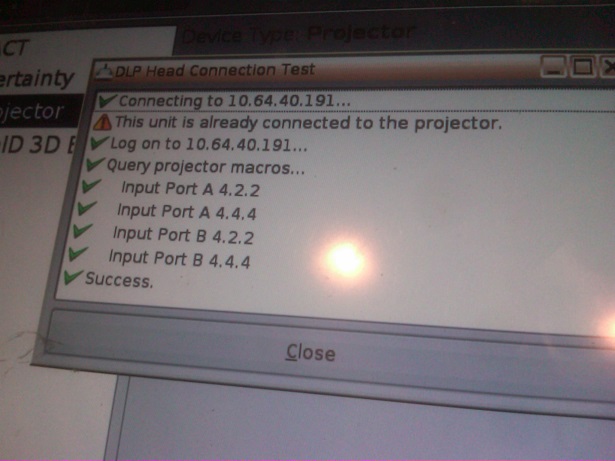
This is the message I'm getting. The PIB is still showing solid green standby & power. The run is flashing yellow, the PIB is blinking green. Which suggests that the TPC is an issue but the other concern I have is that the ICP and IMB lights are off and the back panel-all three lights are still solid. Is this a normal state until the TPC allows a proper start?

I also re-seated the PIB, ICP & IMB just to be sure.
The IMB itself doesn't have any indicators but there are now green PWR & CBL leds above the ShowVault's PCI Express connector.

The Emergency Start did not allow non encrypted content to play. There is still "Marriage is not active" warning coming up.

 |  IP: Logged

Stephan Shelley
Jedi Master Film Handler

Posts: 854
From: castro valley, CA, usa
Registered: Nov 2014


 - posted 12-10-2015 03:36 PM      Profile for Stephan Shelley   Email Stephan Shelley   Send New Private Message       Edit/Delete Post 
The three tail lights lit and the flashing yellow run are all indicators of the problems with the TPC. Green standby, power and flashing green on the PIB all indicated normal operation of powersupplies and PIB. Do the IMB and ICP on the PIB board lite solid green as well? LD not being lit would indicate that it is not installed and not needed with an IMB.

As you removed the security ring to reseat the boards you have broken marriage. At this point you need a working TCP to perform marriage.

 |  IP: Logged

Michael Wilkinson
The Entertainment King of Colusa and Beyond

Posts: 89
From: Colusa, CA USA
Registered: Apr 2004


 - posted 12-13-2015 04:56 PM      Profile for Michael Wilkinson   Author's Homepage   Email Michael Wilkinson   Send New Private Message       Edit/Delete Post 
The IMB and ICP lights are off in the scenario I described.

The good news is that the server does recognize the connection to both the PIB and IMB. Also there are no longer any clock battery warnings coming up.

It looks like the screen is dead on the TPC; it does ping when connected to a network. Is there some tiny reset switch somewhere that I need to find? Even the manual mentions one but no one here can find it. It's an Advantec TPC650H.

I ordered a TPC just in case.

 |  IP: Logged


All times are Central (GMT -6:00)
This topic comprises 3 pages: 1  2  3 
 
   Close Topic    Move Topic    Delete Topic    next oldest topic   next newest topic
 - Printer-friendly view of this topic
Hop To:


Powered by Infopop Corporation
UBB.classicTM 6.3.1.2

The Film-Tech Forums are designed for various members related to the cinema industry to express their opinions, viewpoints and testimonials on various products, services and events based upon speculation, personal knowledge and factual information through use, therefore all views represented here allow no liability upon the publishers of this web site and the owners of said views assume no liability for any ill will resulting from these postings. The posts made here are for educational as well as entertainment purposes and as such anyone viewing this portion of the website must accept these views as statements of the author of that opinion and agrees to release the authors from any and all liability.

© 1999-2020 Film-Tech Cinema Systems, LLC. All rights reserved.