Film-Tech Cinema Systems
Film-Tech Forum ARCHIVE


my profile | my password | search | faq & rules | forum home
  next oldest topic   next newest topic
» Film-Tech Forum ARCHIVE   » Operations   » Digital Cinema Forum   » GDC Error Msg Question (Page 3)

 
This topic comprises 4 pages: 1  2  3  4 
 
Author Topic: GDC Error Msg Question
Frank Cox
Film God

Posts: 2234
From: Melville Saskatchewan Canada
Registered: Apr 2011


 - posted 06-12-2016 01:33 AM      Profile for Frank Cox   Author's Homepage   Email Frank Cox   Send New Private Message       Edit/Delete Post 
I don't really know. When I replaced mine I just ordered a new set from the company that I use to handle my equipment maintenance. They sent me a new set of hard drives that was pre-formatted and ready to go. I removed the old ones and put the new ones in, then booted the server up and loaded all of my content back in. And there was literally nothing more involved than that. Didn't even need a screwdriver and didn't enter any passwords either. The actual changing of the hard drives took five minutes, including the time that it took to open the box that they came in.

I don't know if you can use off-the-shelf hard drives in that server but if you can then you'll have to format them yourself. Maybe the server can do that too; I have no idea since I've never had to do it.

 |  IP: Logged

Pur Wanto
Film Handler

Posts: 13
From: Jakarta Barat, Indonesia
Registered: Feb 2015


 - posted 06-12-2016 01:45 AM      Profile for Pur Wanto   Email Pur Wanto   Send New Private Message       Edit/Delete Post 
Dear Mr. Frank,

owh oke Mr. frank, thanks for your reply.

thanks,
pur

 |  IP: Logged

Jim Cassedy
Phenomenal Film Handler

Posts: 1661
From: San Francisco, CA
Registered: Dec 2006


 - posted 06-12-2016 12:57 PM      Profile for Jim Cassedy   Email Jim Cassedy   Send New Private Message       Edit/Delete Post 
Pur-
I got the same error message on a server about a month ago.

GDC had me do some disk diagnostics, and they determined
that for some reason, the drive had been 'kicked out' of the
system. They said there could have been several reasons for
this, ranging from just a momentary glitch to some sort of
actual disk problem.

In my case, they talked me into how to do all the disk
diagnostics on the 'failed' hard drive, and when the results
came back with no errors, they had me add the 'bad' drive
back into the RAID array system.
(You need to do this overnight, because it takes 4 or 5 hours)

I added the 'bad' disk back in, and over the next several days
I did diagnostics on it every morning when the system got
powered up until I was sure the drive was 'stable'

GDC said I should only worry about getting a new hard drive
if it starts acting up again. That was over a month ago, and
I've had no more error messages or problems since then.

To do all the disk & RAID diagnostics you need to get into
the ADMIN menu.

The rest of the procedure is too detailed to go into here.

Most GDC servers here in the US, come pre-loaded with a set
of GDC training videos. I would suggest that before you go out
and start buying new hard drives, you check your server to see
if you have them and then watch these three videos:
#13 "Admin Panel Overview"
#14 "Identifiying A Failing RAID Drive"
#15 "Removing & Adding RAID Drives"

They will tell you everything you need to know.
(They might be available on You Tube. Try searching for them)

If you don't have them, give GDC tech support a call. They were
very helpful to me.

 |  IP: Logged

Pur Wanto
Film Handler

Posts: 13
From: Jakarta Barat, Indonesia
Registered: Feb 2015


 - posted 06-18-2016 06:59 AM      Profile for Pur Wanto   Email Pur Wanto   Send New Private Message       Edit/Delete Post 
Dear Mr. Jim .C

Thanks very much for your help, now i already getting a new hard drive (3 pcs). how long time for cread new raid array? 4 - 5 hour or more?

thanks,

Pur

 |  IP: Logged

Mark Gulbrandsen
Resident Trollmaster

Posts: 16657
From: Music City
Registered: Jun 99


 - posted 06-18-2016 12:40 PM      Profile for Mark Gulbrandsen   Email Mark Gulbrandsen   Send New Private Message       Edit/Delete Post 
If they are 1TB drives it does take about to 5 hours. Longer for larger drives. But you can load content while raid is creating.

Mark

 |  IP: Logged

Pur Wanto
Film Handler

Posts: 13
From: Jakarta Barat, Indonesia
Registered: Feb 2015


 - posted 06-19-2016 05:08 AM      Profile for Pur Wanto   Email Pur Wanto   Send New Private Message       Edit/Delete Post 
Dear Mr. Mark,

My hdd drives is 2 TB. and my question:
1. SX2000 can upgrade using 6 TB(2TB+2TB+2TB) or no?
2. Do you have gdc training videos or manual book for guide create new raid array?

Thanks,
Pur

 |  IP: Logged

Mark Gulbrandsen
Resident Trollmaster

Posts: 16657
From: Music City
Registered: Jun 99


 - posted 06-19-2016 04:22 PM      Profile for Mark Gulbrandsen   Email Mark Gulbrandsen   Send New Private Message       Edit/Delete Post 
Yes, the GDC can accept 2 tb drives in all three positions. You will end up with about 4tb of storage space. I will post the procedure here tomorrow morning complete with pages form the manual, I would do it today but I am not at home. I will also talk to GDC and see if they would allow Brad to post some of those videos on line here, there are two of them on YouTube but not the one on creating a new raid.

Mark

 |  IP: Logged

Leslie Hartmier
Expert Film Handler

Posts: 100
From: Edmonton, Alberta, Canada
Registered: Jul 2012


 - posted 06-19-2016 05:13 PM      Profile for Leslie Hartmier   Email Leslie Hartmier   Send New Private Message       Edit/Delete Post 
All 25 videos can be found on GDC's FTP server, in english, portuguese and spanish, if you have the FTP credentials.

It would be a reasonable request to see if they can be hosted elsewhere as well. We have them sitting on our company FTP server for our managers, after getting approval from GDC.

If I end up chatting with them today or tomorrow, I'll ask as well.

Leslie

 |  IP: Logged

Pur Wanto
Film Handler

Posts: 13
From: Jakarta Barat, Indonesia
Registered: Feb 2015


 - posted 06-19-2016 09:59 PM      Profile for Pur Wanto   Email Pur Wanto   Send New Private Message       Edit/Delete Post 
Dear Mr. Mark & Leslie,

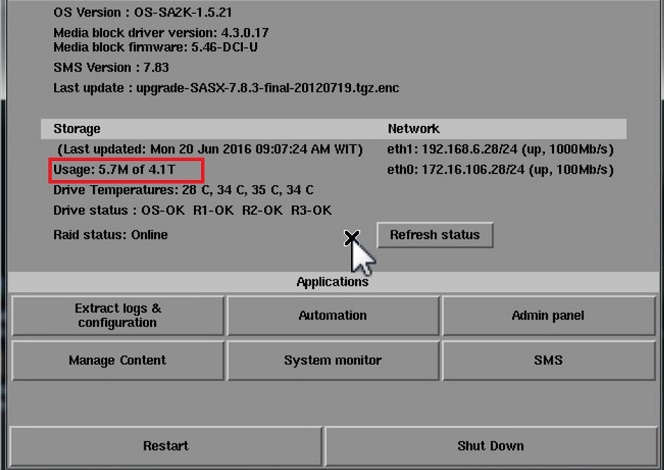
Thanks for your help and reply. My new HDD Drives now already created new raid array.
 -

after created new raid array, now hdd drives have detect 4.1 T and raid status already online too. to do that i need 10 hour [Frown] .

thanks,
Pur

 |  IP: Logged

Mark Gulbrandsen
Resident Trollmaster

Posts: 16657
From: Music City
Registered: Jun 99


 - posted 06-20-2016 12:30 PM      Profile for Mark Gulbrandsen   Email Mark Gulbrandsen   Send New Private Message       Edit/Delete Post 
Our,

You can still ingest content while raid is creating. Raid creation still goes on in background while content is ingesting.... You can also move sets of drives, inserting them n any order between the GDC servers and then reboot and have that raid and no building is necessary. Easy way to move content from one screen to next screen...

Mark

 |  IP: Logged

Steve Guttag
We forgot the crackers Gromit!!!

Posts: 12814
From: Annapolis, MD
Registered: Dec 1999


 - posted 06-20-2016 12:44 PM      Profile for Steve Guttag   Email Steve Guttag   Send New Private Message       Edit/Delete Post 
So can you play content while it is initializing? On Dolby's you can do most anything while it is initializing the RAID...play, ingest, transfer. I've never done it on a GDC and the ones I've updated to 4TB capacity, I let complete overnight.

 |  IP: Logged

Leslie Hartmier
Expert Film Handler

Posts: 100
From: Edmonton, Alberta, Canada
Registered: Jul 2012


 - posted 06-20-2016 02:39 PM      Profile for Leslie Hartmier   Email Leslie Hartmier   Send New Private Message       Edit/Delete Post 
You can ingest while the RAID is initializing, but simply speaking from a computer nerd point of view, it is a terrible idea. Ingests take an unholy amount of time to accomplish on a GDC server while rebuilding (like, a twenty minute ingest can and will take HOURS). Also, the RAID initialization will take much longer, as the blocks that are being copied to then require that they be gone over again, which means that the logic will not be focusing only on locking in the drive to drive parity.

Additionally, faffing around with ingesting increases the chance that the content gets corrupted (normally not an issue, as the logic gives higher priority to rebuilding the blocks that are being written to, but...)

So, simply put, why ingest when you may just have to ingest again? Why slow down the RAID rebuild when it's less efficient to do so? Dolbys are FAR better at it, as they use beautiful hardware RAID cards, but they are not immune to all the issues above.

As for running content? Since our priority is picture perfect presentations for increased profit, why would we not just cancel a show that we may have to refund tickets for anyway, and not gain a reputation for not always giving our best?

Again, and just for reference, I don't actually prefer Dolby - yeah, yeah, there might be something wrong with me - but they have far less problems with ingesting while running content. We still don't allow our locations to do so.

Additionally, even if the RAID is trucking along, due to Doremi and GDC using software RAID, the CPU does a lot more work, increasing the stutter of the playing content.

Me? I would rebuild the RAID after the location closes, or if the shows are cancelled, I'd rebuild the RAID then. We do not ingest or run shows while rebuilding. We're not interested in the cost in reputation.

Leslie

 |  IP: Logged

Mark Gulbrandsen
Resident Trollmaster

Posts: 16657
From: Music City
Registered: Jun 99


 - posted 06-20-2016 04:19 PM      Profile for Mark Gulbrandsen   Email Mark Gulbrandsen   Send New Private Message       Edit/Delete Post 
Yes, you can Steve.... The way it works is it throttles back any other RAID processes in service at the time. Playback has priority over all other functions on a GDC. They are just using on board INTEL software raid. There DID at one time exist a build issue that if you were playing back 4K and rebuilding a RAID the picture would skip, but was a pre-build 7.83 non DCI version and was when 4K was first introduced.

If you use drives that meet GDC specs then all should be well. I have yet to encounter a RAID that doesn't allow one to do work while the raid is building. They all do it in the background. Just don't shut down the server or the rebuild process may start all over again, but even later Dell raids can remember where they stopped building and when powered back up the building continues right along as though nothing ever happened. Perc 5 and 6 Raid Cards can do this as well as most LSI raid cards AS LONG as they have correct memory installed and battery back up. None of the commercially available cinema servers have ever included battery back up on raid. Don't need it just for playback and the data is considered non critical.

Mark

 |  IP: Logged

Steve Guttag
We forgot the crackers Gromit!!!

Posts: 12814
From: Annapolis, MD
Registered: Dec 1999


 - posted 06-20-2016 04:50 PM      Profile for Steve Guttag   Email Steve Guttag   Send New Private Message       Edit/Delete Post 
Leslie,

You'd be horrified to see a couple of our sites then! With Dolby DSS...while show was running, ingest AND transfer on the same server! Dolby's servers are far from perfect but on the RAID department, they got the goods.

 |  IP: Logged

Leslie Hartmier
Expert Film Handler

Posts: 100
From: Edmonton, Alberta, Canada
Registered: Jul 2012


 - posted 06-20-2016 05:23 PM      Profile for Leslie Hartmier   Email Leslie Hartmier   Send New Private Message       Edit/Delete Post 
Steve, you MONSTER. [Smile]

Leslie

 |  IP: Logged


All times are Central (GMT -6:00)
This topic comprises 4 pages: 1  2  3  4 
 
   Close Topic    Move Topic    Delete Topic    next oldest topic   next newest topic
 - Printer-friendly view of this topic
Hop To:


Powered by Infopop Corporation
UBB.classicTM 6.3.1.2

The Film-Tech Forums are designed for various members related to the cinema industry to express their opinions, viewpoints and testimonials on various products, services and events based upon speculation, personal knowledge and factual information through use, therefore all views represented here allow no liability upon the publishers of this web site and the owners of said views assume no liability for any ill will resulting from these postings. The posts made here are for educational as well as entertainment purposes and as such anyone viewing this portion of the website must accept these views as statements of the author of that opinion and agrees to release the authors from any and all liability.

© 1999-2020 Film-Tech Cinema Systems, LLC. All rights reserved.