|
|
This topic comprises 5 pages: 1 2 3 4 5
|
|
Author
|
Topic: My first Mac will be here Thursday!!!
|
|
|
Stephen Furley
Film God

Posts: 3059
From: Coulsdon, Croydon, England
Registered: May 2002
|
 posted 06-16-2005 12:48 PM


quote: Randy Stankey
Nope. You click the power button on the keyboard then, when the confirmation dialog comes up, press RETURN on the keyboard.
Not all keyboards have the power button. Those on early machines didn't, by the time the LC came out they did, but I seem to remember that it didn't work on that model. Most ADB keyboards had it, but the USB ones don't, blue and white iMacs and G3s, early G4s and the cube all ran system 9 with USB keyboards as standard.
My Mac Mini still supports the power button; if I plug in an ADB keyboard via a Belkin ASB-USB adapter I can shut it down this way. At least I can in System 10.3, I don't have 10.4 to try.
Is there some other combination of keys that can be used to do this on a USB keyboard?
quote: Randy Stankey
If your Mac crashes too much (or crashes AT ALL in OS X) something's wrong with it. I help manage an office with 6 Macs. Before I got there they had crash problems left and right. Now they hardly have a problem. The NUMBER ONE offender in crashing Pre-OS X Macs is extensions conflicts. And, in my experience, the number one offender in extensions conflicts is Microsoft. Adobe is a close second.
If you reign-in all the extensions installed by Microsoft/Adobe products I can guarantee that your computer problems will be dramatically reduced.
Microsoft has always installed loads of junk, one reason I prefer to use Linux, rather than Windows, for things like DNS and DHCP servers. Install only what's needed, don't use X, just run them in text mode. No GUI using up resources, much less code running, therefore likely to be far fewer bugs, the thing can stay up for years. Windows servers often need to be re-booted after a few weeks, and after installing most updates. If I want a graphical interface to manage something running on a Linux box I use Webmin.
| IP: Logged
|
|
Randy Stankey
Film God

Posts: 6539
From: Erie, Pennsylvania
Registered: Jun 99
|
posted 06-16-2005 01:40 PM
I enjoy using a GUI if it's well designed. Apple's latest incarnations are good but not the best they have done. I have NEVER found a Microsoft GUI that didn't give me the feeling like I was walking though a "Hall of Mirrors". X-11 is tolerable if you are willing to learn it.
However, command line interface is the most efficient. Not only does it waste less "computes" it's more efficient for the user to operate. A person who knows how to type never needs to move their hands off the keyboard. Using a mouse forces the user to move his hands then realign them to the home keys when he wants to type again. Chasing a mouse all over the desktop is less than efficient as well. That's why I use a track ball.]
During the days of Mac System 6 & 7 is the time when system extensions became popular. At that time there were a few people writing some quite useful ones. One was an ext. that would allow you to power down the computer at the stroke of the keyboard. Yo programmed the sequence to whatever you wanted. (CMD-CTL-Q for instance.)
After that is when I took my hiatus from computers. It wasn't until I got my iMac that I started working with them again. By that time the power button could be used to power the computer on and off. I know that some models can do it and some can't. Virtually all Macs made today can do it.
If you want a really good example of how Adobe can really bung up a computer, try installing their PostScript printer driver using the automatic installer!
Their installer installs the driver and the PPDs necessary to access the printer but it also ERASES the current "PrintingLib" (Printing Library Routines) extension and replaces it with an EARLIER version that's INCOMPATIBLE with Mac OS 9! If you run the installer and let it operate as it is programmed you will be unable to print ANYTHING with your regular print driver unless you reinstall the system! (Or if you're savvy, just part of it.)
The workaround is to go into your extensions folder and remove the PrintingLib extension to the desktop before running the installer. When it's finished you replace the extension that Adobe installed with the original. Your computer will work normally.
This is well-known and is documented at Apple.com
As you can see, this is NOT APPLE'S FAULT! It is the fault of Adobe, HP and others who use that crappy installer even after they have been told that it will bung up your system!
As a matter of fact, when I get a call from sombeody asking for help with their Mac, one of the first questions I ask is, "Have you installed ANYTHING from Adobe?" 9 times out of 10 the answer is yes. This kind of thing is so common that I now have a 120 GB external dual-interface (USB/FW) hard drive with all of the files needed to resurrect a hosed system. In most cases, all I have to do is plug in the drive and drop the proper files/extensions back into their proper places and the problem is solved.
I hear a lot of people complain that their Macs crash too much. The overwhelming cause is an extensions conflict caused by running some installer that blows the system all to hell... 3rd party crap that fouls up the computer. The next most popular cause is people who tinker with things they shouldn't.
I will tell you flat out: The people who are the most vocal about their Macs crashing are almost ALWAYS the people who abuse their computers the most.
| IP: Logged
|
|
|
|
Bobby Henderson
"Ask me about Trajan."

Posts: 10973
From: Lawton, OK, USA
Registered: Apr 2001
|
posted 06-16-2005 06:55 PM
In an earlier post, I said, "I also don't agree with the judgment that Photoshop is somehow laid out more efficiently in OSX than it is on Windows."
quote: Martin Brooks
Even on applications that are essentially the same on both platforms (like Photoshop), there are still enough differences that I'm much more productive on the Mac.
Martin Brooks said that, but I've heard the claim repeated many many times. Much of it is just bullshit. Differences between platform releases of just about any major graphics application is typically very minor.
quote: Joe Redifer
One thing I do like better about Mac Photoshop, though, is that it doesn't put a grey box behind my work making the app cover the entire screen. I hate that. I can't figure out how to get rid of it on Windows.
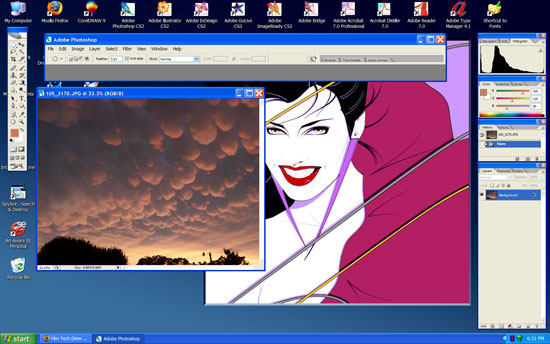
The PC version of Photoshop has been able to have open images and toolbars float over the desktop since as far back as I can remember. Here's a screenshot of my PC PSD CS2 installation not hogging the entire desktop with grey:
quote: Joe Redifer
Working around in Windows sucks because you have to go into My Computer to navigate the hard drives.
You don't have to do that, even though Windows' default tries to steer you in that direction. I prefer using Explorer (somewhat similar to Apple's Finder). Just right click on the Start button and select "Explore". I have a shortcut to explorer on my desktop, because I prefer launching it that way (it doesn't expand the Windows directory tree view down automatically like it does when you launch it through the Start button). You can drag shortcuts to your hard drives to the desktop. I did that for awhile but not anymore; having an explorer shortcut is good enough. There are various after-market customizable skins for XP. Alienware has some very cool skins they use to set their gaming PCs apart.
quote: Randy Stankey
I will tell you flat out: The people who are the most vocal about their Macs crashing are almost ALWAYS the people who abuse their computers the most.
I think the same thing can be said in general about PC users. Just about every gummed up beyond belief WindowsPC I have encountered involved lots of user misuse and installation of lots of shitball cheapie trash software.
| IP: Logged
|
|
|
|
|
|
Bobby Henderson
"Ask me about Trajan."
Posts: 10973
From: Lawton, OK, USA
Registered: Apr 2001
|
posted 06-16-2005 08:10 PM
Upper right hand corner of the window, where you have the three window sizing buttons, hit the middle one to "restore down" the size of the window. By default it may still look maximized to fill the screen. However you can mouse over the corners or edges of the screen to bring up arrow tools to size down the window to however small you like. I just size the Photoshop window down small enough that it doesn't hide the menu options.
Unfortunately, Adobe is one of the few companies that use this Mac-like behavior with their PC versions. Macromedia keeps all open images in their applications locked into the program window. You can't drag it out over the desktop like you can with Adobe's stuff. But since Adobe is buying Macromedia all of that may change. I just hope the entire change is for the better, not worse.
quote: Joe Redifer
Also how do I get Windows Photoshop to resize the canvas window as I zoom in and out like it does automatically on the Mac?
I don't think the PC version does that. At least I haven't tried to make it do that. Usually I have a window sized to how I need it and the use the keyboard shortcuts to zoom in/out and hand pan across the image. A good amount of the time I'll just have the image use the whole screen and hit the tab key to hide all the toolbars. Pretty handy when you're digitizing something.
quote: Joe Redifer
Also is that Duran Duran vector the only graphic image you have? It pops up in all your graphical screen grabs.
I posted this one in the wallpaper thread a few days ago. We have had some strange yet beautiful storm clouds in our area lately.

I have wallpapers of all sorts of other stuff, like Nine Inch Nails imagery or pics of the $250 million "Dallas High Five" superhighway interchange project in North Dallas. But I do like that Pat Nagel illustration, not to mention it took a long time to vectorize a scan of it and organize the objects into useful form. It also made for a cleaner background to use to demonstrate that Photoshop desktop thingie.
quote: Joe Redifer
By the way, clicking the START button is still an extra step. Also, how can a menu or a folder be similar to the entire desktop on a Mac?
Explorer isn't really a folder or menu. It's just an expandable tree like view of your computer's installation. Everything is there in one place, including a folder for your desktop and the desktop of other users on that machine. Explorer is not the most visually pleasing tool to use, but I prefer it to the alternative of cycling between one window after another and another and another to get around in that "My Computer" garbage.
| IP: Logged
|
|
Adam Wilbert
Jedi Master Film Handler

Posts: 590
From: Bellingham, WA, USA
Registered: Mar 2002
|
posted 06-16-2005 08:29 PM

explorer works even better if you create a shortcut, and change the target (right click, select prefrences) to "%SystemRoot%\explorer.exe /n, /e, /select, C:\". This will open your c:\ drive (or whatever path you type at the end) as the default instead of expanding "my documents" as the default.
On the PC, alt-f4 is the shortcut to bring up the shutdown menu, since everyone is on this "macs can shut down from the keyboard" kick.
Not that anyone cares, but my package won't arrive until tomorrow now... ![[Frown]](frown.gif)
| IP: Logged
|
|
Scott Jentsch
Phenomenal Film Handler

Posts: 1061
From: New Berlin, WI, USA
Registered: Apr 2003
|
posted 06-16-2005 10:03 PM
quote: Randy Stankey
As you can see, this is NOT APPLE'S FAULT! It is the fault of Adobe, HP and others who use that crappy installer even after they have been told that it will bung up your system!
As a matter of fact, when I get a call from sombeody asking for help with their Mac, one of the first questions I ask is, "Have you installed ANYTHING from Adobe?" 9 times out of 10 the answer is yes. This kind of thing is so common that I now have a 120 GB external dual-interface (USB/FW) hard drive with all of the files needed to resurrect a hosed system. In most cases, all I have to do is plug in the drive and drop the proper files/extensions back into their proper places and the problem is solved.
I hear a lot of people complain that their Macs crash too much. The overwhelming cause is an extensions conflict caused by running some installer that blows the system all to hell... 3rd party crap that fouls up the computer. The next most popular cause is people who tinker with things they shouldn't.
I think this pretty much sums up the case for Windows PC's as well. If you never install any third party apps, and never install any additional devices, I'm sure Windows XP would be pretty darn error-free.
That said, in the years that I've been using Windows XP, I've found it to be very stable and a huge improvement over its predecessors.
I'd love to give a Mac a try, but so far no one has taken me up on my request to get one for free. ![[Smile]](smile.gif) I think the Mini would make a great addition, but $500 plus monitor, keyboard, and mouse is still too steep for me. Someday, my curiousity will get the best of me... I think the Mini would make a great addition, but $500 plus monitor, keyboard, and mouse is still too steep for me. Someday, my curiousity will get the best of me...
| IP: Logged
|
|
|
|
|
|
|
|
|
|
|
|
|
|
All times are Central (GMT -6:00)
|
This topic comprises 5 pages: 1 2 3 4 5
|
Powered by Infopop Corporation
UBB.classicTM
6.3.1.2
The Film-Tech Forums are designed for various members related to the cinema industry to express their opinions, viewpoints and testimonials on various products, services and events based upon speculation, personal knowledge and factual information through use, therefore all views represented here allow no liability upon the publishers of this web site and the owners of said views assume no liability for any ill will resulting from these postings. The posts made here are for educational as well as entertainment purposes and as such anyone viewing this portion of the website must accept these views as statements of the author of that opinion
and agrees to release the authors from any and all liability.
|

 Home
Home







 Printer-friendly view of this topic