Film-Tech Cinema Systems
Film-Tech Forum ARCHIVE


my profile | my password | search | faq & rules | forum home
  next oldest topic   next newest topic
» Film-Tech Forum ARCHIVE   » Community   » Film-Yak   » Share your great software here... (Page 6)

 
This topic comprises 6 pages: 1  2  3  4  5  6 
 
Author Topic: Share your great software here...
Bobby Henderson
"Ask me about Trajan."

Posts: 10973
From: Lawton, OK, USA
Registered: Apr 2001


 - posted 03-15-2012 04:26 PM      Profile for Bobby Henderson   Email Bobby Henderson   Send New Private Message       Edit/Delete Post 
Tom, batch re-sizing won't work well unless all the images have the same size and orientation. Here's a quick work-around: in Adobe Bridge, select all the portrait oriented images in the folder. In the Edit menu select "rotate counter clockwise 90 degrees." If you have fewer landscape oriented images apply the rotation trick to them. In the end you should have everything in the folder oriented the same. Run the batch re-sizing operation. Afterward select all the images that are rotated out of proper orientation and rotate them 90 degrees back to where they should be.

Regarding JPEG compression on batch processing, the Bridge/Photoshop combo usually gives me a setting for JPEG or whatever that is applied to all the images.

 |  IP: Logged

Steve Guttag
We forgot the crackers Gromit!!!

Posts: 12814
From: Annapolis, MD
Registered: Dec 1999


 - posted 03-16-2012 03:03 AM      Profile for Steve Guttag   Email Steve Guttag   Send New Private Message       Edit/Delete Post 
Dropbox is definitely a GREAT resource.

On the remoting in department...I've used Teamviewer as well as Logmein. As far as free remote control, Logmein is the best I've seen. They have the best/fastest interface I've seen too. As for purchase, Teamviewer had the most attractive licensing costs and that is what we have gone with. Its feature set is also quite nice but I do miss Logmein's speed and graphical quality.

Filezilla has been a mixed bag for me...it was fine up until recently when it seemingly botched some binary transfers. Things looked good but when those files were executed they were corrupt. I've heard that this sort of thing cropped up on Filezilla in the past year or so. I have since switched to WinSCP and have had no issues.

Other indispensable programes..."Putty" It is a bit of a Swiss Army Knife of communication...does serial, SSH, Telnet...one can save settings...it is small nimble and just works.

VNC seems to be another feature that is handy with the various DCinema "toys"...UltraVNC has worked best for me, thus far.

Parallels has been a REAL nifty application for the Mac if you need to run other operating systems like Windows or even Linux...Better than "bootcamp" Parallels lets one really integrate the various operating systems into a single unified GUI...Windows apps run under Windows but only bring up their own window so it isn't like switching between the two operating systems. It is what they call "Coherence" mode. Note, you still have to buy whatever operating system you want to add, Parallels just makes it so one can have both running at the same time and integrated very well.

 |  IP: Logged

Chris Slycord
Film God

Posts: 2986
From: 청주시, 경북도, South Korea
Registered: Mar 2007


 - posted 03-16-2012 09:15 AM      Profile for Chris Slycord   Email Chris Slycord   Send New Private Message       Edit/Delete Post 
Virtualbox ( www.virtualbox.org ) will also allow you to run other OS's inside your Mac (and it runs on Windows and Linux hosts too). And unlike parallels, it's free.

Also, Codeweavers makes a product called Crossover that allows you to run individual windows programs in your Mac (or Linux) instead of running a whole OS/computer like parallels/virtualbox/vmware. Think it costs ~$50.

 |  IP: Logged

Tom Mundell
Expert Film Handler

Posts: 120
From: Silver Spring, MD, USA
Registered: Nov 2007


 - posted 03-16-2012 09:39 AM      Profile for Tom Mundell   Author's Homepage   Email Tom Mundell   Send New Private Message       Edit/Delete Post 
Thanks Bobby, what you describe is pretty much what I've been doing; I'm using an older version of Photoshop (cs1) so I'm wondering if the repetitive jpeg dialog box is something that's been improved in the newer versions.

I've been meaning to check out ImageMagick, maybe I'll finally get around to that...

 |  IP: Logged

Bobby Henderson
"Ask me about Trajan."

Posts: 10973
From: Lawton, OK, USA
Registered: Apr 2001


 - posted 03-16-2012 12:21 PM      Profile for Bobby Henderson   Email Bobby Henderson   Send New Private Message       Edit/Delete Post 
I couldn't tell you about the JPEG thing regarding CS1; I skipped that version. The "Image Processor" in Photoshop will allow you to apply a JPEG compression setting for all the images processed. That avoids hitting the user with a dialog box for each image being saved. Fireworks can do the same thing. Adobe Bridge can launch batch processing operations through either app. Some people prefer Fireworks for JPEG compression since it can make the file sizes significantly smaller than what Photoshop does at the same quality settings.

 |  IP: Logged

Paul Mayer
Oh get out of it Melvin, before it pulls you under!

Posts: 3836
From: Albuquerque, NM
Registered: Feb 2000


 - posted 03-16-2012 04:55 PM      Profile for Paul Mayer   Author's Homepage   Email Paul Mayer   Send New Private Message       Edit/Delete Post 
I'll second the use of Putty and VNC. Used them both when I was at Strong and they worked well.

 |  IP: Logged

Frank Cox
Film God

Posts: 2234
From: Melville Saskatchewan Canada
Registered: Apr 2011


 - posted 06-17-2012 03:01 PM      Profile for Frank Cox   Author's Homepage   Email Frank Cox   Send New Private Message       Edit/Delete Post 
I decided that I wanted a more secure way to store my online banking account names and passwords than just keeping a plain text file on my computer.

Since these things are long strings of letters and numbers, it's much easier to have them in a file which I can just copy-and-paste from than trying to type all of that stuff in all the time.

My initial method was simply encrypting the text file with gpg, but I just found a more convenient way:

Revelation Password Manager

 |  IP: Logged

Leo Enticknap
Film God

Posts: 7474
From: Loma Linda, CA
Registered: Jul 2000


 - posted 06-17-2012 03:19 PM      Profile for Leo Enticknap   Author's Homepage   Email Leo Enticknap   Send New Private Message       Edit/Delete Post 
quote: Mike Blakesley
Filezilla (www.filezilla.com) -- Everyone probably knows about this one, but it's a really good and fast FTP utility. I know there are a gazillion others out there but this one is quick and easy to use.
+1. And it also works flawlessly with secure (FTPS) servers, too. About a year ago my employer decided changed our online filestore access to FTPS, and so of course just typing the address into Windows Exploder (©, TM) or its Ubuntu equivalent didn't work any more. The Shitrix (ditto) client they suggested using not only didn't work, but succeeded in eliciting a BSOD from Windows 7 into the bargin. Filezilla worked first time, and has done ever since, and is available in both Windows and Linux versions.

 |  IP: Logged

Frank Cox
Film God

Posts: 2234
From: Melville Saskatchewan Canada
Registered: Apr 2011


 - posted 09-04-2012 12:08 AM      Profile for Frank Cox   Author's Homepage   Email Frank Cox   Send New Private Message       Edit/Delete Post 
I decided that I want to learn GTK+ programming. And boy, let me assure you that object-oriented, event-driven programming is a whole new world for a guy who's spent over three decades doing procedural programming.

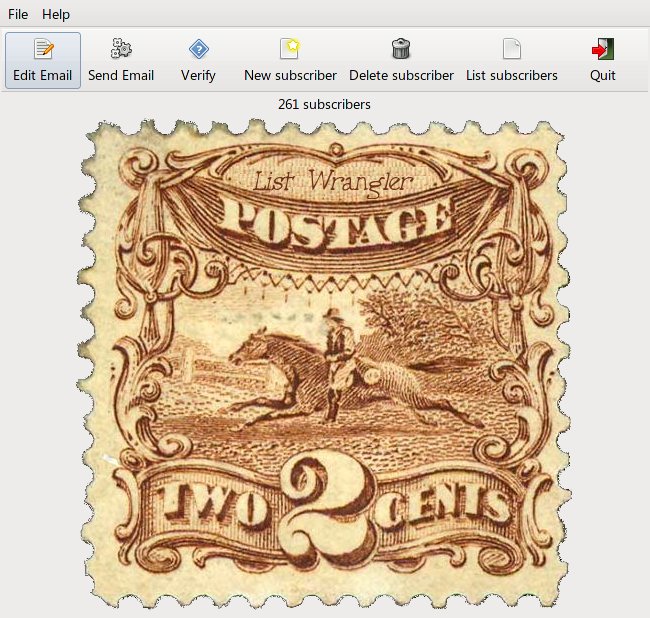
The best way to learn to program is, of course, to write a program. So I did a ground-up rewrite of the program that I use to manage my email mailing list, the periodic emails that I send to customers who sign up to receive notifications about new movies. And while I was at it, I extended the program and made it a lot more configurable, so now it's a general-purpose email mailing list manager. Not to mention a lot prettier. My first GUI program.

Having finally managed to wrap my mind at least partially around the concepts involved in event-driven programming, it's done and it works. For me, anyway.

If any of you fine folks have a need for an email mailing list manager program, I have posted it on my website here: http://www.melvilletheatre.com/articles/listwrangler/
 -
As you can see, it's designed so you can send everyone your two cents worth!

 |  IP: Logged


All times are Central (GMT -6:00)
This topic comprises 6 pages: 1  2  3  4  5  6 
 
   Close Topic    Move Topic    Delete Topic    next oldest topic   next newest topic
 - Printer-friendly view of this topic
Hop To:


Powered by Infopop Corporation
UBB.classicTM 6.3.1.2

The Film-Tech Forums are designed for various members related to the cinema industry to express their opinions, viewpoints and testimonials on various products, services and events based upon speculation, personal knowledge and factual information through use, therefore all views represented here allow no liability upon the publishers of this web site and the owners of said views assume no liability for any ill will resulting from these postings. The posts made here are for educational as well as entertainment purposes and as such anyone viewing this portion of the website must accept these views as statements of the author of that opinion and agrees to release the authors from any and all liability.

© 1999-2020 Film-Tech Cinema Systems, LLC. All rights reserved.