Film-Tech Cinema Systems
Film-Tech Forum ARCHIVE


my profile | my password | search | faq & rules | forum home
  next oldest topic   next newest topic
» Film-Tech Forum ARCHIVE   » Community   » Film-Yak   » Microsoft XL help (Page 3)

 
This topic comprises 4 pages: 1  2  3  4 
 
Author Topic: Microsoft XL help
Joe Redifer
You need a beating today

Posts: 12859
From: Denver, Colorado
Registered: May 99


 - posted 09-29-2012 09:12 PM      Profile for Joe Redifer   Author's Homepage   Email Joe Redifer   Send New Private Message       Edit/Delete Post 
I have no idea WTF you're talking about. Really. I am not a database guy or a MicroSoft Office kind of guy. Excel seems fine for what I want to do which is to keep track of crap like this and offer this information to our fans.

 |  IP: Logged

Frank Cox
Film God

Posts: 2234
From: Melville Saskatchewan Canada
Registered: Apr 2011


 - posted 09-29-2012 09:25 PM      Profile for Frank Cox   Author's Homepage   Email Frank Cox   Send New Private Message       Edit/Delete Post 
ok. Excuse me for trying to help you out with a suggestion.

 |  IP: Logged

Joe Redifer
You need a beating today

Posts: 12859
From: Denver, Colorado
Registered: May 99


 - posted 09-29-2012 09:53 PM      Profile for Joe Redifer   Author's Homepage   Email Joe Redifer   Send New Private Message       Edit/Delete Post 
I honestly don't understand what you're suggesting.

 |  IP: Logged

Randy Stankey
Film God

Posts: 6539
From: Erie, Pennsylvania
Registered: Jun 99


 - posted 09-29-2012 10:30 PM      Profile for Randy Stankey   Email Randy Stankey   Send New Private Message       Edit/Delete Post 
He's suggesting that you try a database program instead of a spreadsheet.

You've got multiple data stacked up in single cells of your spreadsheet. That causes things to become cluttered and difficult to sort or order your data. A database will allow you to have separate fields for your data and you will be able to create relationships between things that can help you keep stuff organized.

FileMaker Pro or Bento are good database programs. FileMaker does have "Time" data types that you can add and subtract, automatically. Bento is basically "FileMaker Light." Bento should be able to do the same thing.

I had this very same discussion with people at Mercyhurst. They were trying to keep information in a spreadsheet and they had things so badly twisted up that they spent more time farting around trying to get Excel to do what they wanted than doing actual work. After much gnashing of teeth, I was able to convince them to try FileMaker. It took them some time to learn how to operate it but, after a while, most of their problems went away and they were able to operate smoothly again.

Take some time to look into Bento. Sit down and think about your data and what you want to do with it. I think Bento might be helpful in getting the job done.

You can get Bento from the App Store for $49.

 |  IP: Logged

David Zylstra
Master Film Handler

Posts: 432
From: Novi, MI, USA
Registered: Mar 2007


 - posted 09-29-2012 11:03 PM      Profile for David Zylstra   Email David Zylstra   Send New Private Message       Edit/Delete Post 
Pretty simple fix - in cell E73 make the formula:
=SUM(E3:E72)
(as needed change the 72 to be 1 row less than where the total time is - as long as it starts at E3 it should be good)

I'm not familiar with Excel on the Mac, but there should be a function to insert rows (on the PC you simply right click on the row where you wan to add one and choose "Insert"), using this function should automatically adjust the time sum formula.

To get the time format onto new rows simply copy any one of the cells that have the time in the proper format to the new row's time column (this applies the time formatting to that cell)

I can upload a fixed copy tomorrow afternoon if needed.

 |  IP: Logged

Joe Redifer
You need a beating today

Posts: 12859
From: Denver, Colorado
Registered: May 99


 - posted 09-30-2012 04:34 PM      Profile for Joe Redifer   Author's Homepage   Email Joe Redifer   Send New Private Message       Edit/Delete Post 
The insert row function worked, thanks David! That makes EVERYTHING much easier. I just applied it to an old copy of the speeadsheet I had before I added the most recent episode.

quote: Randy
You've got multiple data stacked up in single cells of your spreadsheet. That causes things to become cluttered and difficult to sort or order your data. A database will allow you to have separate fields for your data and you will be able to create relationships between things that can help you keep stuff organized.
I think Excel works fine. The only thing I need for it to do is to add time in a single column. It's not cluttered at all. You guys are inventing a problem where there is none.

 |  IP: Logged

Randy Stankey
Film God

Posts: 6539
From: Erie, Pennsylvania
Registered: Jun 99


 - posted 09-30-2012 07:49 PM      Profile for Randy Stankey   Email Randy Stankey   Send New Private Message       Edit/Delete Post 
I've just had a lot of experience with people who try to do things with spreadsheets and can't make them work the way they want.

Honestly, do it the way you want. It will work if you get the formulas right.

Right now, there would be a certain amount of overhead getting the data in your spreadsheet into a database. Depending on how much time you have, you might be better off keeping it in a spreadsheet.

However, I still suggest that you look into a database so that you can see how it works. Maybe not this time but some time in the future, I think you'll benefit from using a database instead.

 |  IP: Logged

Joe Redifer
You need a beating today

Posts: 12859
From: Denver, Colorado
Registered: May 99


 - posted 10-01-2012 08:49 PM      Profile for Joe Redifer   Author's Homepage   Email Joe Redifer   Send New Private Message       Edit/Delete Post 
I really don't see how I'd benefit.

 |  IP: Logged

Randy Stankey
Film God

Posts: 6539
From: Erie, Pennsylvania
Registered: Jun 99


 - posted 10-01-2012 10:44 PM      Profile for Randy Stankey   Email Randy Stankey   Send New Private Message       Edit/Delete Post 
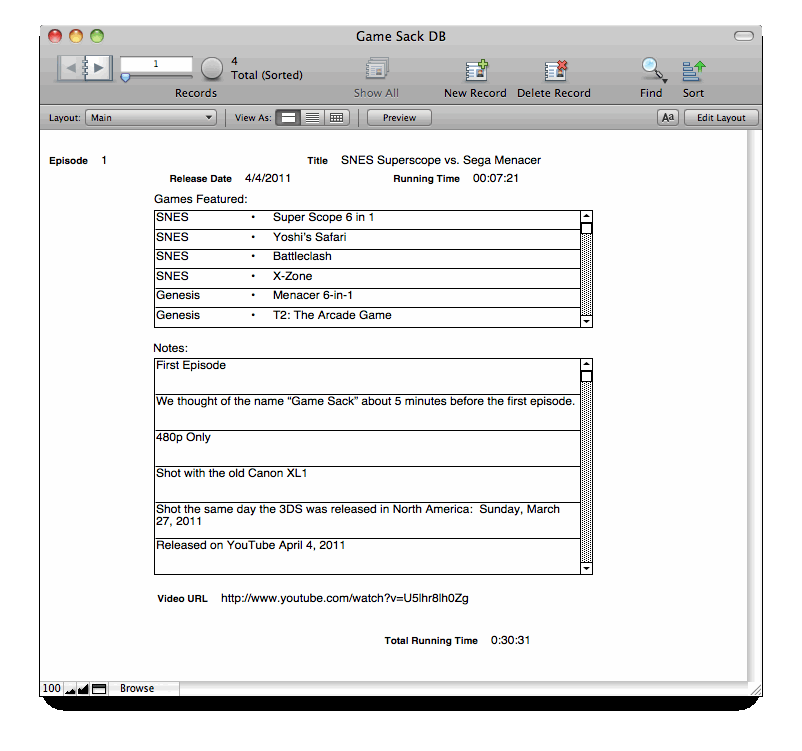
It's about the way data is organized.

If you want to see each episode by itself:
 -

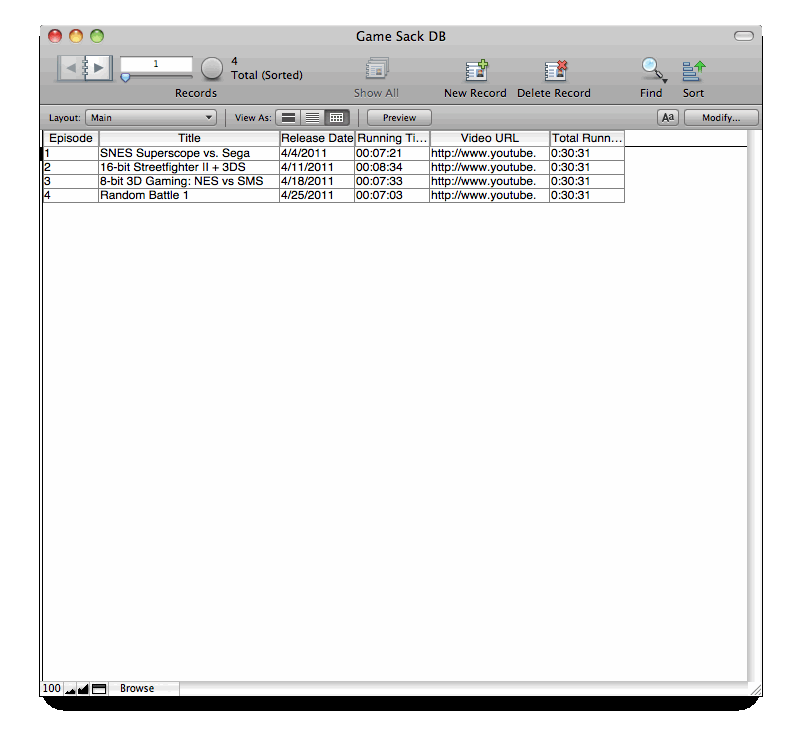
If you only want to see the header data of each episode presented as a list:
 -

If you only want to see episodes that feature a certain game platform, you can search and select for it. Your "Total Time" field will update to show the total of only the selected records.

If you want to sort, search or select for any criteria or groups of criteria, you can do that.

I only made one table layout and one page layout but, if you want to create a layout that shows data in different order, you can do that. If you want a layout to print out and store in a notebook, you can do that, too.

A database organizes data much more efficiently than a spreadsheet. Spreadsheets are only designed to list things out and total up the rows and columns.

P.S. - I only entered data for four episodes. I'm too lazy to enter 64 episodes just to show you how a database works. If you want the file, you can enter your own data.

 |  IP: Logged

Frank Cox
Film God

Posts: 2234
From: Melville Saskatchewan Canada
Registered: Apr 2011


 - posted 10-01-2012 11:25 PM      Profile for Frank Cox   Author's Homepage   Email Frank Cox   Send New Private Message       Edit/Delete Post 
You can export the XLS file to a CSV file and import that into your database. Very little effort required that way.

You also don't need to pay $50 to try out a database program on a Mac if you don't want to. sqlite is usually used as an embedded database but you can easily use it from a commandline or via a general-purpose front-end as well. Since modern Macs run on some version of Unix I suspect that there is a version of bash that's already installed on it, and further since Apple is well known as a big user of sqlite in their software, the chance that sqlite is already installed on any given Mac also approaches 100%.

Here is an example of how to use a simple bash script to drive a sqlite database that maintains a kind of a notepad. You could easily adapt that script to handle a simple database like the one under discussion here.

Alternatively, there are a number of front-ends available, some of which are actually Firefox add-ons. Here is an example of a sqlite frontend. I've never used it myself.

Again, sqlite is absolutely free and it's very fast and powerful.

 |  IP: Logged

Randy Stankey
Film God

Posts: 6539
From: Erie, Pennsylvania
Registered: Jun 99


 - posted 10-02-2012 12:04 AM      Profile for Randy Stankey   Email Randy Stankey   Send New Private Message       Edit/Delete Post 
My database example has three tables, "Main," "Games Featured" and "Notes," which are related to each other by the "Episode Number" field.

In order to export the spreadsheet to CSV and import into the database, it would take some massaging of the data. It can be done and I wouldn't have to retype all the data/fields but, as I said, I'm too lazy to do it just for an example that nobody is likely to use.

OpenOffice has a database module but I have never used it. I got FileMaker from Mercyhurst because I occasionally did work at home. They bought a 5-seat license but only used four of the seats. I got the fifth seat to use at home so I didn't have to be stuck at work to fix little problems in the database that I could just as easily do elsewhere.

FileMaker or Bento are good, flexible, easy to use programs but there are other good options such as the ones you mention, as well.

 |  IP: Logged

Joe Redifer
You need a beating today

Posts: 12859
From: Denver, Colorado
Registered: May 99


 - posted 10-02-2012 04:20 AM      Profile for Joe Redifer   Author's Homepage   Email Joe Redifer   Send New Private Message       Edit/Delete Post 
I will certainly concede that Microsoft Excel is neither fast nor powerful. However it is probably used by more common people who like this kind of thing, thus easier to share with fans. The only thing that could be better is something web-based. I don't have SQL access on this server and I forgot all I knew about it anyway in 2001 or so.

Randy, that app is pretty cool, but it looks like Mac OS 5 or 6!

 |  IP: Logged

David Buckley
Jedi Master Film Handler

Posts: 525
From: Oxford, N. Canterbury, New Zealand
Registered: Aug 2004


 - posted 10-02-2012 04:27 AM      Profile for David Buckley   Author's Homepage   Email David Buckley   Send New Private Message       Edit/Delete Post 
Am I right in thinking that you simply wish to add up all the times in a column? Does Excel for Mac not have a sigma button on the toolbar? Normally, one simply clicks on the empty cell below the rows one wishes to sum, and click the sigma button. Excel will then draw a box around the cells it proposes to add up, and if that is acceptable just hit enter and the job is done.

The fun with adding up times (and dates) is understanding how these items are held in Excel. A value of 1 in date / time speak is one day, so 12 hours is 0.5 and the cell formatting understands all this. So if you change the formatting of the column to general, you get to see the underlying number, as a fraction of a day. Change the formatting to HH:MM then Excel just interprets the underlying number and displays it.

So switching the cell formatting temporarily to general is a very good way of sanity checking and finding bogus data.

 |  IP: Logged

Joe Redifer
You need a beating today

Posts: 12859
From: Denver, Colorado
Registered: May 99


 - posted 10-02-2012 05:02 AM      Profile for Joe Redifer   Author's Homepage   Email Joe Redifer   Send New Private Message       Edit/Delete Post 
Holy crap that's awesome! Thanks for the trick with the sigma button. That's not exactly a button I would look at and think does anything I'd want it do.

 |  IP: Logged

Randy Stankey
Film God

Posts: 6539
From: Erie, Pennsylvania
Registered: Jun 99


 - posted 10-02-2012 08:09 AM      Profile for Randy Stankey   Email Randy Stankey   Send New Private Message       Edit/Delete Post 
With FileMaker, et. al., you design your own interface. You can make it almost any way you want. Add your own graphics, even.

I was just too lazy to do anything more than the plane Jane layout.

System 6 looks better than my layout. [Wink]

 |  IP: Logged


All times are Central (GMT -6:00)
This topic comprises 4 pages: 1  2  3  4 
 
   Close Topic    Move Topic    Delete Topic    next oldest topic   next newest topic
 - Printer-friendly view of this topic
Hop To:


Powered by Infopop Corporation
UBB.classicTM 6.3.1.2

The Film-Tech Forums are designed for various members related to the cinema industry to express their opinions, viewpoints and testimonials on various products, services and events based upon speculation, personal knowledge and factual information through use, therefore all views represented here allow no liability upon the publishers of this web site and the owners of said views assume no liability for any ill will resulting from these postings. The posts made here are for educational as well as entertainment purposes and as such anyone viewing this portion of the website must accept these views as statements of the author of that opinion and agrees to release the authors from any and all liability.

© 1999-2020 Film-Tech Cinema Systems, LLC. All rights reserved.