Film-Tech Cinema Systems
Film-Tech Forum ARCHIVE


my profile | my password | search | faq & rules | forum home
  next oldest topic   next newest topic
» Film-Tech Forum ARCHIVE   » Community   » Film-Yak   » Windows 10 ? (Page 4)

 
This topic comprises 4 pages: 1  2  3  4 
 
Author Topic: Windows 10 ?
Justin Hamaker
Film God

Posts: 2253
From: Lakeport, CA USA
Registered: Jan 2004


 - posted 08-11-2015 06:03 PM      Profile for Justin Hamaker   Author's Homepage   Email Justin Hamaker   Send New Private Message       Edit/Delete Post 
I upgraded my home computer to Windows 10 last night. I mainly use that computer for playing games and internet browsing. As well as web programming, so I figured there was little risk of not being able to do what I need to do.

The only immediate issue I had was needing to update my Nvidia drivers for my display to have the proper resolution and use both monitors. I've had a few minor issues with web sites needing to have plugins updated, but no major issues.

When I first tried to play Netflix, it gave me an error. But included a link to a help file which had the fix. I just needed to delete a file and restart my browser.

My initial impression of Windows 10 is that it's a more refined version of Windows 7. One of the features I'm looking forward to playing with is the desktop groups.

 |  IP: Logged

Bobby Henderson
"Ask me about Trajan."

Posts: 10973
From: Lawton, OK, USA
Registered: Apr 2001


 - posted 08-21-2015 11:25 AM      Profile for Bobby Henderson   Email Bobby Henderson   Send New Private Message       Edit/Delete Post 
I upgraded my work tower from Win 8.1 Pro to Win 10 Pro, mainly to get past some really annoying behavior going on lately with Win 8.1. Mouse action was erratic at times, jumpy and even freezing briefly in some instances. That kind of thing can get really infuriating if you're working in any kind of graphics program or working in applications with very complicated user interfaces (like Adobe After Effects).

So far the update seems to be working pretty well. Mouse action is better, but not 100% perfect. Microsoft's application compatibility checker isn't perfect. It said all my apps were compatible with Win 10, but I found Daktronics' Venus 1500 software wouldn't launch (it's used to control LED signs and create message for them).

The one hangup, which Microsoft has been screwing up for years, is network access. I've gone through some hell getting Windows 8 and 8.1 to play nicely with the other Win 7 PCs and older Win XP PCs on the network. Win 10 is no different.

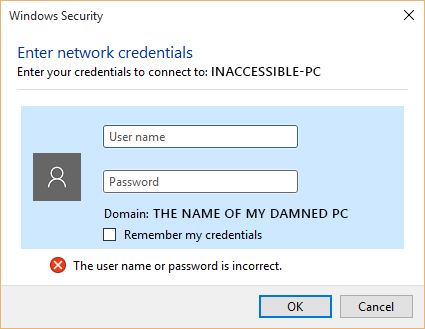
There is no rhyme or reason why Win 10 allows me to access several other PCs on the network (and allow them to access mine) while blocking access to two others. When I try to access them I get hit with this useless dialog box:

 -

One of the blocked PCs is running Win XP Pro and the other is running Win 7 Pro. There are other PCs on the network running Win 8, Win 7 and Win XP that talk back & forth between my computer just fine. It really doesn't make any sense.

It would seem logical for Microsoft and other computer software companies to make things easier and more user friendly. But they're not doing that. My theory is they're going in the direction of automotive companies: make your product stupidly complicated so the user can't do any troubleshooting himself; force him to pay a tech to solve any problems. It would be shocking if those companies were actually trying to implement such a strategy considering just how shitty desktop computer sales have been in recent years.

 |  IP: Logged

Sean Weitzel
Jedi Master Film Handler

Posts: 619
From: Vacaville, CA (1790 miles west of Rockwall)
Registered: Dec 1999


 - posted 08-21-2015 02:55 PM      Profile for Sean Weitzel   Email Sean Weitzel   Send New Private Message       Edit/Delete Post 
Are you trying to browse straight to the C$ hidden share or a properly shared folder? Starting with Windows 8 MS deliberately disabled access to \\win8-pcname\c$ by default. I believe you can turn it back on with a registry edit.

 |  IP: Logged

Bobby Henderson
"Ask me about Trajan."

Posts: 10973
From: Lawton, OK, USA
Registered: Apr 2001


 - posted 08-21-2015 03:10 PM      Profile for Bobby Henderson   Email Bobby Henderson   Send New Private Message       Edit/Delete Post 
I think the issue has something to do with differences in how Windows encrypts network data, along with whether passwords are used for machines to access each other.

I was able to get the two blocked PCs to see my shared folders after I enabled file sharing for machines that use 40-bit or 56-bit encryption. The default is 128-bit. I still get hit with a password wall when I try to access either machine.

Microsoft's engineers have done very little to clean up the disorganized mess that is Windows' network settings. Windows 10 adds another level of mess to it. You basically have to bypass that crap and get to the older looking Control Panel and dig in there to do any good.

 |  IP: Logged

Leo Enticknap
Film God

Posts: 7474
From: Loma Linda, CA
Registered: Jul 2000


 - posted 08-21-2015 04:32 PM      Profile for Leo Enticknap   Author's Homepage   Email Leo Enticknap   Send New Private Message       Edit/Delete Post 
quote: Bobby Henderson
There is no rhyme or reason why Win 10 allows me to access several other PCs on the network (and allow them to access mine) while blocking access to two others. When I try to access them I get hit with this useless dialog box:
Different versions of Windows have always had a problem getting at each other's shared folders within a LAN workgroup. I have never been able to get a Vista and a 7 machine to talk to each other. 10 on my laptop talks to my desktop (both of two partitions: 7 and 8.1) without any problem, though.

I have encountered a glitch whereby if I lose the Internet connection and then it reconnects (which happens every few hours here, probably because of poor quality wire under the street - we've tried a new router and DSL filter, with no luck), Outlook gives me that box and even if I then enter the correct username and password, the box just pops up again. The only way to get the connection to my workplace's Exchange server back is to quit and restart Outlook.

 |  IP: Logged

Rick Raskin
Phenomenal Film Handler

Posts: 1100
From: Manassas Virginia
Registered: Jan 2003


 - posted 08-21-2015 06:44 PM      Profile for Rick Raskin   Email Rick Raskin   Send New Private Message       Edit/Delete Post 
Leo: You may want to have your service provider verify there are no load coils or half-taps on your DSL facility. The added reactance will play havoc with the DSL signal if they are there.

 |  IP: Logged


All times are Central (GMT -6:00)
This topic comprises 4 pages: 1  2  3  4 
 
   Close Topic    Move Topic    Delete Topic    next oldest topic   next newest topic
 - Printer-friendly view of this topic
Hop To:


Powered by Infopop Corporation
UBB.classicTM 6.3.1.2

The Film-Tech Forums are designed for various members related to the cinema industry to express their opinions, viewpoints and testimonials on various products, services and events based upon speculation, personal knowledge and factual information through use, therefore all views represented here allow no liability upon the publishers of this web site and the owners of said views assume no liability for any ill will resulting from these postings. The posts made here are for educational as well as entertainment purposes and as such anyone viewing this portion of the website must accept these views as statements of the author of that opinion and agrees to release the authors from any and all liability.

© 1999-2020 Film-Tech Cinema Systems, LLC. All rights reserved.