Using a tablet to remotely control an IMS 3000

Collapse
X
 
  • Time
  • Show
Clear All
new posts
  • Graham Cooke
    Newbie
    • Aug 2023
    • 16
    • Malmesbury, Wiltshire, United Kingdom

    #1

    Using a tablet to remotely control an IMS 3000

    Does anyone use the facility, that Dolby claims in its manual, to be able to control an IMS3000 with a tablet and app remotely, and how does it all work?

    I volunteer at a community run cinema in Wiltshire (Movies@Malmesbury). We use a shared facility, so all of the equipment is up on a stage behind the screen (we back project).

    Depending upon the film, and the size of the audience, we sometimes have to make adjustments to the sound level of films. This involves walking to the front of the hall, up some steps and onto the stage and then using the laptop on stage up adjust sound levels.

    This is rather clumsy, especially in a darkened hall.

    We would like to start our shows off as usual, up on stage, and then be able to make fine adjustments to the sound levels from the comfort of our seats.

    How do we set up such a system, assuming that it’s possible in the first place, and what advice do people have to help us out.

    Many thanks

    Graham Cooke
    Movies@Malmesbury
    ​
  • Leo Enticknap
    Film God
    • Jan 2020
    • 3572
    • Loma Linda, CA

    #2
    Add a wifi access point (or combined router/access point) to the projection management LAN, connect the tablet to that, and load its web UI in a browser. I can't speak for Android, but several of my customers operate the web UIs of IMS3000s using Safari on iPads, and it works just fine. If the access point you set up does not have a built in DHCP server, you would need to give the tablet a static IP address. If it does, you would need to configure the DHCP server to allocate an address in the same subnet as the IMS3000 (but not the same addresses as are used by other static devices on the LAN).

    In terms of adjusting the sound level, if your audio processor has a web UI (e.g. it's a CP850 or 950), you can do it the same way. If it doesn't (e.g. a CP750, which has a dedicated app for network control, which is only available for Windows), you have a number of options. One would be to use a Windows laptop rather than a tablet as your remote control device. Another would be to set up automation cues in the IMS3000 that you could then execute individually as needed.

    Comment

    • Graham Cooke
      Newbie
      • Aug 2023
      • 16
      • Malmesbury, Wiltshire, United Kingdom

      #3
      Hi Leo, Thank you so much for getting back to me so quickly and for your advice. We have trawled the internet to try to find how the system might work but could find nothing. Your advice will enable us to move forward. All I need to do now is convince our Town Council to make the funds available for us to be able to buy the kit and implement our plans.

      Once again, many, many thanks,

      Graham

      Comment

      • Ryan Gallagher
        Film God
        • Nov 2022
        • 2855
        • Austin, Texas, USA

        #4
        2nd Leo's recommendations. It does depend a bit on which audio processor/method you are using.

        But generally, If you have a facility IT person who has some hands in the projection network you may have to ask them about Wifi access to that network. If they don't go for that you can always configure your own NAT enabled Wifi-AP and add it to the network (with permission hopefully).

        We aren't on an IMS but also use the tablet approach in a very manual booth. I was using my ancient iPad2 with no issues until my IT Manager forbade WPA2 auth. We have a slightly more modern iPad Mini now. (The interfaces are much more responsive after the update as well).

        We use the RealVNC client for remote to our sound processor (AP20), Christie, and Doremi (as well as 3 video dept machines as needed). At least on Apple, so far I've found RealVNC to offer the best touch-screen emulation for the christie/doremi. I have an old android too where we found an app that works sort of, but the VNC app that did touch well failed to do things like "long press" very well, so that one just stays next to the doremi console if you need to quickly access the AP20 without running across the booth.

        We can also launch the webui of Doremi on the tablet (which is akin to your IMS3000 needs, as there is no VNC interface to those IMS machines).

        Even if you operating a single screen in a booth, a tablet comes in very handy so you can position yourself next to a porthole that has legacy curtain/houselights control and still keep an eye on the DCP timecode etc. Not to mention wandering the house to get a better listen when tech-checking a level, or doing channel ID/pink checkouts where the booth monitor might be lying to ya. I set all our feature levels sitting in the prime balcony film-fan club seating area.

        It also means I can do all that from my phone too in a pinch without involving stairs to fetch the tablet. But the tablet size screen is much preferred.

        The only thing I can't do at this time is control main drape, house lights, and masking... but there is a renovation looming so not tackling any of that for the 5 months that remain.

        Comment

        • Caleb Williams
          Pro Film Handler
          • Jun 2022
          • 149
          • Casper, Wyoming, USA

          #5
          Welcome to the forum Graham!

          If there is already a network set up that the IMS3000 and audio processor are connected to, all you would need to do is buy a cheap consumer wifi router, like netgear or linksys, and connect it to the same network switch. (Do not connect a consumer router to the internet at the same time).

          You may need to change the DHCP settings as Leo mentioned. For example: set up the DHCP server to only hand out addresses within a certain range such that those addresses don't match what the projection equipment is already using.

          At our cinemas we use the Christie IP scheme, where projectors have an address like 10.18.x.[190+auditorium#], servers have an address similar to 10.18.x.[110+auditorium#] for the auditorium interface, and finally the audio processor should be something like 10.18.x.[30+auditorium#]. To avoid handing out DHCP leases in the range of equipment for a 10-house theater, we would limit the IP range to 10.18.x.210-245, or something like that. Your equipment should already follow some sort of scheme. You may need to talk with your IT provider to discover it.

          As for the volume changes, using macros allows you to "limit" the highest and lowest volume you will allow (by only creating macros for those levels), to prevent damage to equipment and people's ears. The volume knob on Dolby cinema processors goes to 10, but if we got even close to that in a theater it would definitely damage speakers. Macros can also be programmed into an spl, making it no longer necessary to make volume adjustments on the fly.

          Comment

          • Philip Jones
            Film Handler
            • May 2020
            • 49
            • England

            #6
            In addition to the method posted above, Dolby have a Cinema Server App which will work on android tablets or ipads: Cinema Server Control – Apps on Google Play​

            You need to plug a usb bluetooth adapter into one of the usb ports on the IMS3000 and I don't know what the range is like as I've never actually used it but was reading up on it the other day.

            It seems crazy to me you can't just plug a monitor, keyboard and mouse into the IMS3000 directly to control from the booth (as you could on the DSS servers) without the need for a laptop or similar.

            Comment

            • Dave Macaulay
              Pro Film Handler
              • Jan 2020
              • 460
              • Toronto, Ontario, Canada

              #7
              Dolby has gone all in for webGUI interfaces. Adding a graphics system adds cost and complexity, with not much gain. Most cinemas are now run with unmanned booths from a TMS.
              Remote control is easy via the webGUI, with a WiFi network you can use a laptop, tablet, even a phone (not fun). Anything with a browser.
              Barco has done the same for their projectors and servers.
              A local KVM is useful yes. But not essential.

              Comment

              • Tj Hopland
                Pro Film Handler
                • Jun 2025
                • 264
                • Minneapolis, MN

                #8
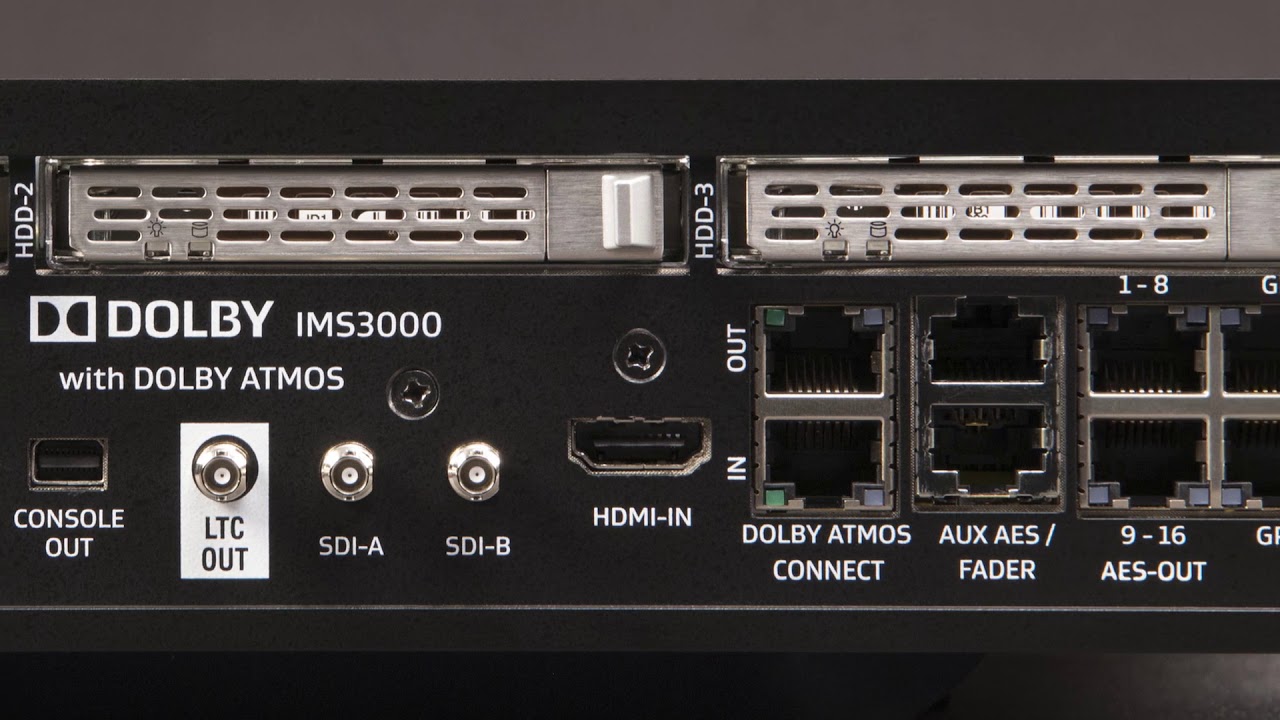
                Does anyone know what the 'console' port is or was going to be used for? I seem to recall hearing that there was going to be a touch screen sort of thing but that doesn't seem to have ever been developed. Its it just a port that was native to what ever they are using as the the control computer?

                Comment

                • Jim Cassedy
                  Film God
                  • Jan 2020
                  • 1450
                  • San Francisco

                  #9
                  When replaced all our projectors with BARCO laser machines (including one LS-4KHDR),
                  we 'lost' all of the touch screen controllers in each booth that used to control the old Sony
                  systems. I keep one hardwired connection direct to the big Barco, and everything else is
                  controlled via i-pads. My (busy) schedule includes multiple live events with intros and/or
                  Q&A's every week, so a lot of shows are run semi-manually rather than rely on automation.
                  We've only got two "real" i-pads. The other two are cheap, bare-bones Korean knock-offs,
                  which work just fine for running the projectors/servers. They're cheap enough so that if one
                  gets lost or stolen, it's no big deal. My only complaint about them is that if you totally shut off
                  one of these i-pads, or simply re-boot them, they take forever to reload and come back on.

                  Comment

                  • Ryan Gallagher
                    Film God
                    • Nov 2022
                    • 2855
                    • Austin, Texas, USA

                    #10
                    Originally posted by Tj Hopland
                    Does anyone know what the 'console' port is or was going to be used for? I seem to recall hearing that there was going to be a touch screen sort of thing but that doesn't seem to have ever been developed. Its it just a port that was native to what ever they are using as the the control computer?
                    This IMS3000 ports overview video mentions it as a bootup debug port. Looks to just be a mini-display port video out... ever tried plugging a display into it? I don't know what it displays once booted, but it should give you the linux boot sequence at least.

                    Comment

                    • Caleb Williams
                      Pro Film Handler
                      • Jun 2022
                      • 149
                      • Casper, Wyoming, USA

                      #11
                      I have rescued a few IMS' using that console port. I can confirm it is a mini DisplayPort. You should be able to buy an adapter from your local electronics store, like Best Buy or similar. There is no GUI presented on that port but it does let you view the boot process and drops into a login terminal once the server has booted. You would not be able to control playback using this method of access, but it does allow you to look at logs, adjust network settings, check battery voltages, etc.

                      Comment

                      • Graham Cooke
                        Newbie
                        • Aug 2023
                        • 16
                        • Malmesbury, Wiltshire, United Kingdom

                        #12
                        Huge thanks and shout outs to everyone who has got back to me with suggestions; they are so helpful. I will be sitting down with my IT guy soon and will post back when we get the system running. We'll probably use an Android tablet with the Cinema Server Control App and set up some incremental volume increases and decreases (+.2 and -.2) so we can make fine adjustments within the hall.

                        What a great forum this is, especially for someone like me with little or no experience but bags of enthusiasm. Wishing you all a great Christmas and a Happy New Year!

                        Graham

                        Comment

                        • Jesse Crooks
                          Pro Film Handler
                          • Feb 2020
                          • 149
                          • Doylestown, PA

                          #13
                          I strongly prefer an actual laptop over a touchscreen for remote projection control. If you're literally only using it to adjust volumes I guess it may be okay. But for our purposes (building and testing playlists based on the trailer assignments delivered via spreadsheet, updating said spreadsheets, alternating between the server / projector / sound processor UIs, etc.) not having a physical keyboard sucks. I have only used the IMS3000 web UI, not the app, so I can't speak to that.

                          A touchscreen would be more convenient if you're using it in the room... but then you're committing the cardinal sin of lighting up a touchscreen in view of the audience. Even if it's dimmed it still sucks. I was recently at a theater that was using tablet in the audience to ride volumes for a shorts program and it drove me crazy. Made me nostalgic for the remote control with a physical dial that we had at one of our theaters in the 35mm days.

                          I like to have one projection control workstation on the floor if possible so that it's always ready to go if you need to react quickly, in addition to a laptop.

                          Comment

                          • James Gardiner
                            Expert Film Handler
                            • Nov 2021
                            • 500
                            • Melbourne, Australia

                            #14
                            Here, the default is a, not too expensive, laptop mounted next to every projector.
                            Touch screens are more common in front of house, where is mostly a info display, and emergency do basic control of a player.
                            But if doing anything more detailed, they run to the manager's office with a full computer and access to whatever they may need. TMS, Screen Players, and projectors.

                            Comment

                            • Steve Guttag
                              Film God
                              • Jan 2020
                              • 3777
                              • Annapolis, MD

                              #15
                              I'd say, with most clients, things are done via their office computer and nearly nothing is done right at the equipment anymore. The exception is where there is a problem and you want to see the results of your actions.

                              At this point in time, I know of no clients, of ours, that are using the bluetooth dongle with an app on a tablet or phone. Have some servers on Q-SYS UCIs in both touchscreen and web-browsing form and they get some use...unless it comes to show builds. I'd say when the touchscreens get used (again, more for when something is up or a special show), it is for basic transport functions or switching to HDMI input...which is faster than fumbling around on the web browser.

                              Comment

                              Working...