Film-Tech Cinema Systems
Film-Tech Forum ARCHIVE


my profile | my password | search | faq & rules | forum home
  next oldest topic   next newest topic
» Film-Tech Forum ARCHIVE   » Operations   » Film Handlers' Forum   » SIMPLEX X-L: Perfuct Focus? (Page 3)

 
This topic comprises 9 pages: 1  2  3  4  5  6  7  8  9 
 
Author Topic: SIMPLEX X-L: Perfuct Focus?
Jarret Chessell
Master Film Handler

Posts: 288
From: London, Ontario, Canada
Registered: Jan 2009


 - posted 05-04-2009 12:07 AM      Profile for Jarret Chessell   Email Jarret Chessell   Send New Private Message       Edit/Delete Post 
I'll try to get a picture of the blur up on here, i'm not sure how well it will photograph. I'll try to do it next time I'm working there.

I'm fairly certain the heads have all the parts they're suppose to have in them, but I'll double check just to be sure. (these X-L's actually had more bits in them than other X-L's i've worked with [Smile] They were still carbon-arc right before the theater re-opened)

 |  IP: Logged

Ian Parfrey
Phenomenal Film Handler

Posts: 1049
From: Imbil Australia 26 deg 27' 42.66" S 152 deg 42' 23.40" E
Registered: Feb 2009


 - posted 05-04-2009 03:33 AM      Profile for Ian Parfrey   Email Ian Parfrey   Send New Private Message       Edit/Delete Post 
I've seen a similar thing due to
a) Lightly scratched port glass caused by a concentrated horizontal cleaning motion and..
b) Internal reflections inside the shutter housing. The black paint had been burnt off the shutter blade and was reflecting light around the housing and out through the aperture.

Best 'o luck with it all.

Cheers
Ian

 |  IP: Logged

Gordon McLeod
Film God

Posts: 9532
From: Toronto Ontario Canada
Registered: Jun 99


 - posted 05-04-2009 08:52 AM      Profile for Gordon McLeod   Email Gordon McLeod   Send New Private Message       Edit/Delete Post 
Take the port glass right out

 |  IP: Logged

Richard Hamilton
Phenomenal Film Handler

Posts: 1341
From: Evansville, Indiana
Registered: Jan 2000


 - posted 05-04-2009 12:10 PM      Profile for Richard Hamilton   Email Richard Hamilton   Send New Private Message       Edit/Delete Post 
Jarret, A few things

You said the light blur is the same on both sides. Do you have side masking and could it be ambient light? (exit lights somewhere near the screen, or wall light reflections?)

Have you physically held up and looked through the scope lenses for damage?

How about the film? The flat is perfect, but the scope is bad, is it always the same scope film? Is the film damaged? Have you run RP-40 to look at it?

Misalignment of the lamp can damage both the film and optics, and not sure what you've tried.

Rick

 |  IP: Logged

Ian Parfrey
Phenomenal Film Handler

Posts: 1049
From: Imbil Australia 26 deg 27' 42.66" S 152 deg 42' 23.40" E
Registered: Feb 2009


 - posted 05-04-2009 04:26 PM      Profile for Ian Parfrey   Email Ian Parfrey   Send New Private Message       Edit/Delete Post 
Gordon's got it in one!

 |  IP: Logged

Jarret Chessell
Master Film Handler

Posts: 288
From: London, Ontario, Canada
Registered: Jan 2009


 - posted 05-06-2009 11:36 PM      Profile for Jarret Chessell   Email Jarret Chessell   Send New Private Message       Edit/Delete Post 
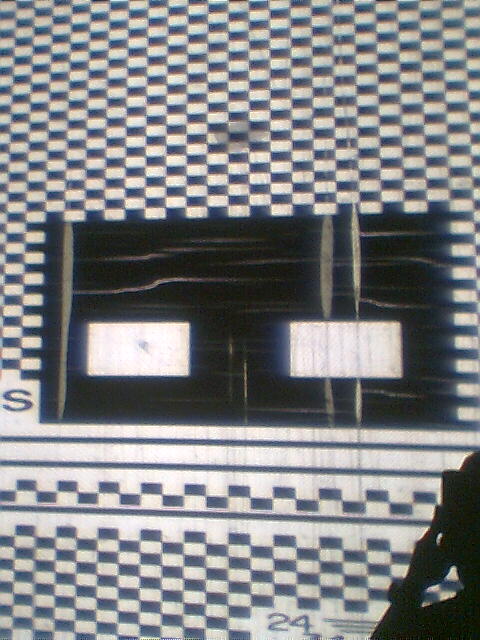
Okay, I had a chance to get some pictures after we closed tonight. The bad news is that I ended up using my nokia cell phone camera, but you can kind of see what I'm talking about.

Also, I took the glass out of the port window when I took these.

This first one is looking at the right side of the test film:

 -
Notice how the black is smearing over as a blue-purple kinda thing.

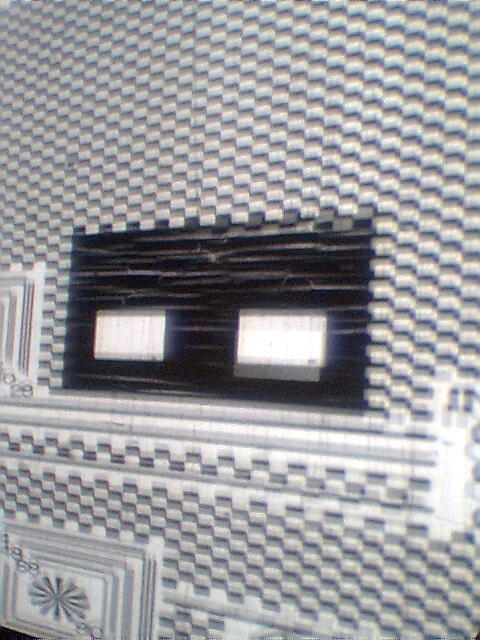
Here is looking at the same pattern on the left side:

 -
Same thing going on, but opposite.

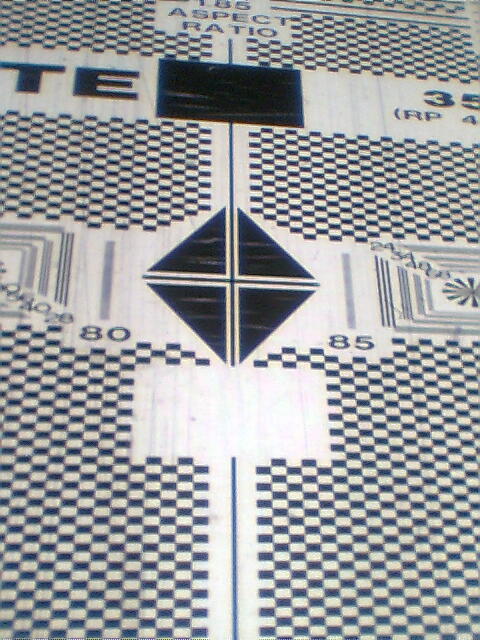
And finally... here is dead in the middle...

 -

On the rectangles and the triangles you can see it smearing in. The center black line isn't solid black either.

Hopefully this shows enough that you can get an idea of what's going on.

Thanks for your help everyone.

 |  IP: Logged

Martin McCaffery
Film God

Posts: 2481
From: Montgomery, AL
Registered: Jun 99


 - posted 05-07-2009 08:49 AM      Profile for Martin McCaffery   Author's Homepage   Email Martin McCaffery   Send New Private Message       Edit/Delete Post 
looking at the pix two obvious things you may have missed:
Have you checked the projector timing?
Is the projector at an extreme angle to the screen (ie a single screen theatre badly twinned?)
May also want to make sure the lens is sitting squarely in the collar and in the projector.

 |  IP: Logged

Vern Dias
Film Handler

Posts: 28
From: AllenTX USA
Registered: Apr 2009


 - posted 05-07-2009 03:10 PM      Profile for Vern Dias   Author's Homepage   Email Vern Dias   Send New Private Message       Edit/Delete Post 
You said you had tried a different prime lens at one time. Did this problem occur with both primes?

You said you see no issues with just the flat prime? Have you looked closely at the RP test film projected with the flat lens?
Is there any sign of this effect then?

Did somebody disassemble the prime lens for scope and put it back together incorrectly?

It sure looks like something is loose / crooked / broken in the optics. I don't think I have ever seen an image thats looks as bad as your photos, unless there was a major problem with the optics. I suppose lamphouse alignment could do this, but I would expect to see the same issue (possibly less severe) with flat.

Good Luck!!!

Vern

 |  IP: Logged

Ian Parfrey
Phenomenal Film Handler

Posts: 1049
From: Imbil Australia 26 deg 27' 42.66" S 152 deg 42' 23.40" E
Registered: Feb 2009


 - posted 05-07-2009 03:39 PM      Profile for Ian Parfrey   Email Ian Parfrey   Send New Private Message       Edit/Delete Post 
Jarrett.

Having that image without the port glass clears that item.

Has your reflector in the lamphouse ever suffered any dings or distortions, possibly from a bulb explosion? A distorted mirror may produce images such as yours.

Do you know if the machine has been run for any length of time with lamp running and no film in the gate? It doesn't take long to cook a lens.

Best of luck with this. I'd love to see what is causing this.

Cheers
Ian

 |  IP: Logged

Richard Hamilton
Phenomenal Film Handler

Posts: 1341
From: Evansville, Indiana
Registered: Jan 2000


 - posted 05-07-2009 07:15 PM      Profile for Richard Hamilton   Email Richard Hamilton   Send New Private Message       Edit/Delete Post 
Have you tried the "questionable" lens in a different theater to see if the problem follows the lens?

 |  IP: Logged

Jarret Chessell
Master Film Handler

Posts: 288
From: London, Ontario, Canada
Registered: Jan 2009


 - posted 05-07-2009 09:55 PM      Profile for Jarret Chessell   Email Jarret Chessell   Send New Private Message       Edit/Delete Post 
Projector angle is very reasonable. We've interchanged prime and anamorphic lenses with the same results appearing on the screen. The optics look great, not a hint of being burnt at all.

The flat picture does look much better, on test film the flat doesn't seem to have the problem to the near extreme as the scope, however, I think you can see the same thinking happening, a little... (i'll re-run the test film on flat to double check).

The reflector is in good shape, it has obviously never experienced a bulb exploding. It is possible the reflector has been damaged by an exhaust fan not being turned on while it's running for a while.

I appreciate more input and I'll try to look into a few other ideas that have been tossed up.

 |  IP: Logged

Louis Bornwasser
Film God

Posts: 4441
From: prospect ky usa
Registered: Mar 2005


 - posted 05-07-2009 10:08 PM      Profile for Louis Bornwasser   Author's Homepage   Email Louis Bornwasser   Send New Private Message       Edit/Delete Post 
Remember this kind of problem will be twice (or more) times as bad on scope as flat due to the "stretch." It will appear still worse if there is an issue with the scope lens.

Uncouple the scope lens from its backup and look only at the backup with the rp40. Should be the same up and down, but 1/2 as bad on the width. Louis

 |  IP: Logged

Tony Bandiera Jr
Film God

Posts: 3067
From: Moreland Idaho
Registered: Apr 2004


 - posted 05-08-2009 01:05 AM      Profile for Tony Bandiera Jr   Email Tony Bandiera Jr   Send New Private Message       Edit/Delete Post 
Okay, from the pics I see a few things that give me pause:

First pic: The purplish shadow ("Chromatic abberration") is from damage to the lens elements OR misalignment of the lens plane to that of the film (Lens collar or lens holder issue.) It won't always show up when a lens has been burnt from exposure to white light or a stopped machine.

Second pic:

The blurring ABOVE and BELOW the squares can be caused by either a warped shutter blade (check it by turning the machine over slowly and make sure none of the blades has any wobble or warpage to them) OR a bad shutter drive assembly. (Look at the metal drive gear on the horizontal shaft of the shutter drive in the gear side while the machine is running..if that gear is moving in and out, even slightly, the shutter drive needs to be rebuilt.) I have drives rebuilt available on a repair-exchange basis. Since that blurring is not happening all over the screen as it would when the drive is bad, I'd say the shutter blades are warped.

Finally you need some new RP40. [Smile] I'll try to get some out to you gratis within the week.

Richard made a great suggestion: Try the same lenses in another projector to see if the problem follows..if it does, the problem is in the lenses. If it does not, then there are still issues with either the projector or lamphouse.

Oh, BTW: following info would help:

Lamp Make Model and Bulb wattage;
Shutter type: Two or three blade;
Lens makes and focal lengths;
Screen size;
projection throw.

With all the brainpower on this site we'll get it solved!!

 |  IP: Logged

Gordon McLeod
Film God

Posts: 9532
From: Toronto Ontario Canada
Registered: Jun 99


 - posted 05-08-2009 10:40 AM      Profile for Gordon McLeod   Email Gordon McLeod   Send New Private Message       Edit/Delete Post 
If one looks at the middle picture one sees on the left block a smeared image top and bottom of the same block on the right image it is a smeared image going downward and to the left and a flare to the right
My suspicion is that you have a bad anamorphic lens coupled with a less than prime prime
Also I beleive the focallength is relativelylong so one must ensure that there is the correct amount of extension tubes to open the cone of light to use most of the glass in the anamorph and also the interior of the extension rings must be black

 |  IP: Logged

Jarret Chessell
Master Film Handler

Posts: 288
From: London, Ontario, Canada
Registered: Jan 2009


 - posted 05-08-2009 08:04 PM      Profile for Jarret Chessell   Email Jarret Chessell   Send New Private Message       Edit/Delete Post 
this is what we have:

Superlumex 2500W lamp house, the lamps we're using right now are OSRAM.
Schneider 105mm prime lens with ISCO ultrastar HD anamorphic attachment.

I also want to add, those pictures were with my craptastic nokia cell phone. I wanted everyone to see the blueish blur, anything that looks like a travel ghost in those pictures isn't really there. It's very crisp and clean with the exception of the blue blur. Vertical ghosting isn't present to the eye, i think the camera on my phone was picking up some of the intermittent movement.

We've tried adding extension rings between the prime and the anamorphic (they are not black inside). Also, using the same prime and anamorphic on the projector next to it (2 projectors one screen here), doesn't look nearly as bad, you can kind of see the blur a little, but unless you were looking for it would likely never notice it.

I haven't had too much time to play with it....

Mentioning the lens collar thing... I just had a flash back. We had one chap working there for a while who insisted on "locking the lens", then adjusting the focus, could that have warped something?

Would it be worth trying to swap shutters between our two X-L's?

And... I also want to mention something obvious before someone else does. We don't want to use the second projector as our feature projector, as it is on a more drastic angle to the screen.

and... if I keep posting pictures of our poor quality test films and equipment will more people offer to send me new freebies???

Thanks Tony again for all your hard work and trouble.

Now if only I could find a curved gate for my 16mm B&H [Big Grin]

 |  IP: Logged


All times are Central (GMT -6:00)
This topic comprises 9 pages: 1  2  3  4  5  6  7  8  9 
 
   Close Topic    Move Topic    Delete Topic    next oldest topic   next newest topic
 - Printer-friendly view of this topic
Hop To:


Powered by Infopop Corporation
UBB.classicTM 6.3.1.2

The Film-Tech Forums are designed for various members related to the cinema industry to express their opinions, viewpoints and testimonials on various products, services and events based upon speculation, personal knowledge and factual information through use, therefore all views represented here allow no liability upon the publishers of this web site and the owners of said views assume no liability for any ill will resulting from these postings. The posts made here are for educational as well as entertainment purposes and as such anyone viewing this portion of the website must accept these views as statements of the author of that opinion and agrees to release the authors from any and all liability.

© 1999-2020 Film-Tech Cinema Systems, LLC. All rights reserved.