Film-Tech Cinema Systems
Film-Tech Forum ARCHIVE


my profile | my password | search | faq & rules | forum home
  next oldest topic   next newest topic
» Film-Tech Forum ARCHIVE   » Operations   » Digital Cinema Forum   » Real D and "Meet The Robinsons" (Page 9)

 
This topic comprises 10 pages: 1  2  3  ...  6  7  8  9  10 
 
Author Topic: Real D and "Meet The Robinsons"
Mark J. Marshall
Film God

Posts: 3188
From: New Castle, DE, USA
Registered: Aug 2002


 - posted 04-19-2007 01:53 PM      Profile for Mark J. Marshall     Send New Private Message       Edit/Delete Post 
Specifically it will look far superior because one eye won't be retaining one frame with persistence of vision while the other eye is seeing the next frame. In other words, your brain won't be "seeing" two different frames at the same time. Indeed your eyes can not perceive a flicker at 144 fps, but that's not the problem. Your brain can certainly perceive when one eye is 1/144th of a second behind the other (at least mine can, apparently)... which it is for the duration of the entire show. It's not a problem if there's no (or very little) motion on the screen, but most animation since Roger Rabbit has included a lot of quick whip pans and other flying camera tricks which causes quite a bit of motion on the screen, and that leads to the eye images separating, and the 3D effect turning into the eyes seeing two completely different things.

Imagine watching a double interlocked presentation with two 35mm projectors equipped with three blade shutters. Each projector will be presenting at 24 fps times three blades, which equals 72 fps. Times two projectors is 144 fps, which by the way is EXACTLY the frame rate everyone has an orgasm over when they talk about the RealD setup. But setting that aside, imagine that one of the 35mm projector's shutters is out of sync with the other by one full shutter blade. Anyone who has run interlocked 35mm will tell you that in that situation, the 3D will look noticeably "off", yet ironically, that is EXACTLY what you get in a RealD presentation, and everyone thinks it looks great... probably because they haven't seen what 3D can look like with two projectors.

Trust me, it can look much better if the frames are completely in sync on the screen. The average viewer probably isn't missing anything right now because they haven't seen a two projector setup before except in special venue locations. I guess that's fortunate for the industry. Wait until more high end theaters start installing a second projector, then we'll see if more people notice the difference. Or... maybe they won't. People still don't think our warbling 650 is a problem, and it's been something like three years.

Of all people, Bobby, I would think you would certainly understand the problem with this setup. Maybe I'm not explaining it well, or maybe you think it's not as big of a deal as I do? Maybe I'm too picky for this industry. [Frown]

 |  IP: Logged

Jarryd Beard
Expert Film Handler

Posts: 229
From: Hellertown, PA
Registered: Jul 2004


 - posted 04-19-2007 02:09 PM      Profile for Jarryd Beard   Email Jarryd Beard   Send New Private Message       Edit/Delete Post 
quote: Bobby Henderson
If you watch that stuff wearing the 3D glasses you see a lot of flicker alternating between the video image and black.

If the theater was following protocol, this would not be the case. The Z-screen is not to be swung into place until the 3-D content is on the screen. Having the Z-screen in place would also reduce the light output to the screen. Though we don't have the 3-D system at our theatre, I was present during the initial setup at a nearby theatre. The Christie technician made these instructions quite clear to the manager there. Also, the manager and I both agree that this could be a safety hazard. The flicker is quite obnoxious and sickening. We weren't sure what risk someone with epilepsy might be at if they encountered this phenomenon.

 |  IP: Logged

Mike Schindler
Phenomenal Film Handler

Posts: 1039
From: Oak Park, IL, USA
Registered: Jun 2002


 - posted 04-19-2007 02:37 PM      Profile for Mike Schindler   Email Mike Schindler   Send New Private Message       Edit/Delete Post 
Waiting until the 2D content is over to swing the z-screen into place seems problematic. Whatever little adjustments that need to be made in order to ensure that it's aligned properly would be hard to do under those time constraints. I'd feel better knowing that it was properly aligned from the start. Why not just run the 2D content as 3D content like Darryl explained? That's what we do.

Also, what is the purpose of the "floating curtain?"

 |  IP: Logged

Darryl Spicer
Film God

Posts: 3250
From: Lexington, KY, USA
Registered: Dec 2000


 - posted 04-19-2007 02:54 PM      Profile for Darryl Spicer     Send New Private Message       Edit/Delete Post 
quote:
quote: Bobby Henderson
--------------------------------------------------------------------------------
If you watch that stuff wearing the 3D glasses you see a lot of flicker alternating between the video image and black.

--------------------------------------------------------------------------------

If the theater was following protocol, this would not be the case. The Z-screen is not to be swung into place until the 3-D content is on the screen. Having the Z-screen in place would also reduce the light output to the screen. Though we don't have the 3-D system at our theatre, I was present during the initial setup at a nearby theatre. The Christie technician made these instructions quite clear to the manager there. Also, the manager and I both agree that this could be a safety hazard. The flicker is quite obnoxious and sickening. We weren't sure what risk someone with epilepsy might be at if they encountered this phenomenon.

All of this problem will be eliminated if you do one thing. Tell the projector to run in the 3D format at 48fps at the start of the program. The trailers that are 2D will play and you will not experience the black effect during 2D trailers with the glasses on. Trust me I have watched the trailers with the Z screen in the run position and everything is fine no problems. The set up that the techs did at the carmikes is based on old information. for the way that they used to set them up when Monster house came out.

 -

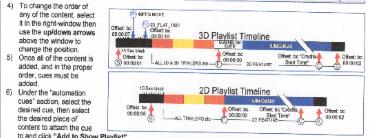
This image comes from the christie cheat sheet provided by the installer. This is how your timeline of the program should be set up.

If you are using a DCA21 this is how I set it up for 3D playback.

Play list set up:
use 15 seconds of black
place start flat cue 1 sec from beginning of black
48 fps 7 seconds from beginning of black
3-D Flat 1998 10 seconds from beginning of black

DCA21 set up:
step 1:
CP2000 standby
Set delay 10 seconds

Step 2:
Alt1
Delay 2 Seconds

Step 3:
Pre-show off
Analog 6ch
House up
house down

Step 4:
House Down

Step 5:
House up
House down

Step 6:
CP2000 off
Pre-show enable
Non-sync
House up
Delay set to repeat

the reason for 10 sec delay is so that everything is processed that is listed on 15seconds of black on the play list and it takes a few seconds for the alt1 to process and it allows step 2 to process automatically so you don't have to ad a cue to go to step two. I also put a two second delay on step two and put the pre-show, audio and lights to half on step 3. This is the smoothest I could get the transition from the pre-show to the dowser open. Follow the above and everything should run fine. It did for me.

 |  IP: Logged

Bobby Henderson
"Ask me about Trajan."

Posts: 10973
From: Lawton, OK, USA
Registered: Apr 2001


 - posted 04-19-2007 05:34 PM      Profile for Bobby Henderson   Email Bobby Henderson   Send New Private Message       Edit/Delete Post 
quote: Jarryd Beard
If the theater was following protocol, this would not be the case. The Z-screen is not to be swung into place until the 3-D content is on the screen.
In most multiplex environments, no one is going to be there to babysit the projector and swing the Z-screen into place (and make sure the bubble is level and all that) 15 minutes into the previews. I'll bet most theaters swing the Z-screen into place and leave it there until they stop playing Meet The Robinsons.

quote: Darryl Spicer
All of this problem will be eliminated if you do one thing. Tell the projector to run in the 3D format at 48fps at the start of the program. The trailers that are 2D will play and you will not experience the black effect during 2D trailers with the glasses on.
Sounds like a good tip.

Nevertheless, I usually don't put on a pair of typically uncomfortable 3D glasses until the 3D content begins to play.

 |  IP: Logged

Darryl Spicer
Film God

Posts: 3250
From: Lexington, KY, USA
Registered: Dec 2000


 - posted 04-20-2007 03:28 AM      Profile for Darryl Spicer     Send New Private Message       Edit/Delete Post 
Agreed, but there are people out there that don't understand that everything is not 3D so they put the glasses on. If you run it the way I described you will not have any complaints because you See flashes of black if you put the glasses on. It will play fine with the Z screen in place so you do not have to be at the machine to move the screen into place. The Christie people who set ours up never said that we could not run the z screen in front of the lens for the entire program.

 |  IP: Logged

Mark J. Marshall
Film God

Posts: 3188
From: New Castle, DE, USA
Registered: Aug 2002


 - posted 04-20-2007 07:54 AM      Profile for Mark J. Marshall     Send New Private Message       Edit/Delete Post 
Just install a second projector and get rid of the stupid Z thingy. All your problems will go away.

[Razz]

 |  IP: Logged

Bobby Henderson
"Ask me about Trajan."

Posts: 10973
From: Lawton, OK, USA
Registered: Apr 2001


 - posted 04-20-2007 08:51 AM      Profile for Bobby Henderson   Email Bobby Henderson   Send New Private Message       Edit/Delete Post 
Got a spare $200,000 you can loan to some people?

 |  IP: Logged

Mike Schindler
Phenomenal Film Handler

Posts: 1039
From: Oak Park, IL, USA
Registered: Jun 2002


 - posted 04-20-2007 10:13 AM      Profile for Mike Schindler   Email Mike Schindler   Send New Private Message       Edit/Delete Post 
Also, if you weren't to set it up the way Darryl described, you could always just unplug the z-screen instead of swinging it in and out of place.

 |  IP: Logged

Paul Konen
Jedi Master Film Handler

Posts: 981
From: Frisco, TX. (North of Dallas)
Registered: Jun 99


 - posted 04-20-2007 10:29 AM      Profile for Paul Konen   Email Paul Konen   Send New Private Message       Edit/Delete Post 
With this being my third 3D show, the Z-Screen was/is always in place. I can't speak about the other servers, but the DOREMI server will play 2D trailers. There is a macro that you have to enable before playing 2D trailers. This macro will ensure that the same frame information goes out on both cables going to the projector head.

It used to be that you would receive 2D trailers recoded for 48fps, but they weren't going to do that now. Hence, the early warning on this site to be running a specific version of the software to encode these correctly.

 |  IP: Logged

Bobby Henderson
"Ask me about Trajan."

Posts: 10973
From: Lawton, OK, USA
Registered: Apr 2001


 - posted 04-20-2007 11:14 AM      Profile for Bobby Henderson   Email Bobby Henderson   Send New Private Message       Edit/Delete Post 
quote: Mike Schindler
you could always just unplug the z-screen instead of swinging it in and out of place
The Z-screen cuts light output slightly. If you're showing a standard 2D movie it's always better to swing the Z-screen out of the way of the projector lens rather than just unplugging it.

If you're talking about unplugging the Z-screen while 2D trailers play during a 3D movie, that would be a no-go. Since the Z-screen has to be carefully balanced I would prefer to fiddle around with the thing as little as possible. Frequent swinging back and forth and/or unplugging cables is sure to eventually mess up some adjustments.

 |  IP: Logged

Mark J. Marshall
Film God

Posts: 3188
From: New Castle, DE, USA
Registered: Aug 2002


 - posted 04-20-2007 01:10 PM      Profile for Mark J. Marshall     Send New Private Message       Edit/Delete Post 
quote: Bobby Henderson
Got a spare $200,000 you can loan to some people?
Nope, I sure don't. Hence my [Razz] .

Although I guess I'm not surprised that so many in this industry are quick to dump $200,000 into doing something half right.

For clarity, let me add a few more: [Razz] [Razz] [Razz]

[Big Grin]

 |  IP: Logged

Mike Schindler
Phenomenal Film Handler

Posts: 1039
From: Oak Park, IL, USA
Registered: Jun 2002


 - posted 04-20-2007 01:42 PM      Profile for Mike Schindler   Email Mike Schindler   Send New Private Message       Edit/Delete Post 
quote: Bobby Henderson
The Z-screen cuts light output slightly. If you're showing a standard 2D movie it's always better to swing the Z-screen out of the way of the projector lens rather than just unplugging it.

If you're talking about unplugging the Z-screen while 2D trailers play during a 3D movie, that would be a no-go. Since the Z-screen has to be carefully balanced I would prefer to fiddle around with the thing as little as possible. Frequent swinging back and forth and/or unplugging cables is sure to eventually mess up some adjustments.

You're right, the Z-screen should absolutely be removed for 2D movies. I was referring to switching from 2D to 3D trailers. I don't really know much about it, but the cable is a single standard phone jack-looking thing (which, in a completely unrelated note, was co-invented by my grandpa). I can't imagine much going wrong by plugging and unplugging it. Certainly, there's less room for error in doing that than in repositioning the entire screen every show. But like Darryl said, it's a moot point with the proper setup. This is just a suggestion for theaters who don't have that setup in the mean time.

EDIT: Is it possible that by plugging in the z-screen while the movie's running, the eyes could be out of phase?

 |  IP: Logged

Bobby Henderson
"Ask me about Trajan."

Posts: 10973
From: Lawton, OK, USA
Registered: Apr 2001


 - posted 04-20-2007 04:14 PM      Profile for Bobby Henderson   Email Bobby Henderson   Send New Private Message       Edit/Delete Post 
I'm not sure how the RealD processor (installed the projector's accessory rack) works in conjunction with the Z-screen and with the media server playing back the movie. Pulling the plug on the Z-screen while everything else is running could cause some problems.

I would much rather accomplish everything within the media player's time line than mess around with any cables.

 |  IP: Logged

Tristan Lane
Master Film Handler

Posts: 444
From: Nampa, Idaho
Registered: Feb 2002


 - posted 04-21-2007 04:35 AM      Profile for Tristan Lane   Email Tristan Lane   Send New Private Message       Edit/Delete Post 
As Darryl stated in an earlier post, all theaters should be instructing the player/projector to play all 2D content at 48 FPS. If the system is setup up correctly, the 2D content will look exactly the same as the 3D content (minus the depth). Unplugging the zscreen rather than swinging it out of the way during the 2D trailers may have adverse affects on the viewers who insist on wearing their glasses. The zscreen mount is intended allow the screen to be moved out of the way and back again without any alignment. Circular polarization is pretty forgiving this way.

Moving it out of the way for trailers and back for 3D is asking too much of the projection staff at the common multiplex, and more important: Isn't needed if the showlist and automation are set up correctly.


quote: Mark J. Marshall
Trust me, it can look much better if the frames are completely in sync on the screen. The average viewer probably isn't missing anything right now because they haven't seen a two projector setup before
The more I think about this, the less I believe that this could be detrimental to the picture in a way that you have described. You describe jerky motion artifacts and such, and chalk it up to a 144/second delay between what the left eye sees as opposed to what the right eye sees. I would think that this add a smoother motion effect since one eye is still retaining an image from the last frame of motion - and would provide a smoother transition between the previous frame motion and the present frame. I also wonder if image retention over 144th of one second might be splitting hairs a little, as the majority of viewers have no complaints about the presentation. (many of which HAVE seen 2 projector 3D in IMAX)

quote: Mark J. Marshall
Just install a second projector and get rid of the stupid Z thingy. All your problems will go away.
A two projector RealD presentation, or any two projector digital 3D presentation is presently not economically practical, nor is it needed. This would present a problem with the two projectors both trying to decrypt content coming from one source. Present players are only allowed to playout content to ONE projector at a time. The use of two players may fix this, and require the players and projectors to remain in sync but this adds more cost on top of an additional DLP.

The "Stupid z thingy" does it's job adequately. I don't see anything distracting or irritating with RealD or In3's 3D effectn in comparison to what I saw on a daily basis as an IMAX operator. I'm not comparing picture quality or inherent motion artifacts that have been present in past 2K releases, just the 3D effect .

Mark, I'm not saying that you are wrong. But I get the feeling that you are strongly set in your opinion, and perhaps a little bit jaded by fact that it is only single projector 3D, and that the projector is digital [Razz]

 |  IP: Logged


All times are Central (GMT -6:00)
This topic comprises 10 pages: 1  2  3  ...  6  7  8  9  10 
 
   Close Topic    Move Topic    Delete Topic    next oldest topic   next newest topic
 - Printer-friendly view of this topic
Hop To:


Powered by Infopop Corporation
UBB.classicTM 6.3.1.2

The Film-Tech Forums are designed for various members related to the cinema industry to express their opinions, viewpoints and testimonials on various products, services and events based upon speculation, personal knowledge and factual information through use, therefore all views represented here allow no liability upon the publishers of this web site and the owners of said views assume no liability for any ill will resulting from these postings. The posts made here are for educational as well as entertainment purposes and as such anyone viewing this portion of the website must accept these views as statements of the author of that opinion and agrees to release the authors from any and all liability.

© 1999-2020 Film-Tech Cinema Systems, LLC. All rights reserved.