|
|
This topic comprises 9 pages: 1 2 3 4 5 6 7 8 9
|
|
Author
|
Topic: I have crossed over to the Dark Side...My first D-Cinema install
|
|
|
|
|
|
|
|
|
|
|
|
|
|
|
|
|
|
|
Joe Elliott
Master Film Handler
Posts: 497
From: Port Orange, Fl USA
Registered: Oct 2006
|
 posted 01-12-2012 06:44 AM


quote: Brad Miller
How old are your GDCs and what were the issues you had with the older Dolby DSS100s?
All of the GDC's are sa2100's, I service about 140 or so, most are a year and a half old but about 20 are older, maybe 3 to 5 years. The DSS100's I have had problems with have had either connection issues with the dsp100's, or have had problems freezing up. I service about 20 in my area. I have had 2 with the freezing problem, and after cleaning, reseating, replacing all of the hard drives, updating, reinstalling, reinstalling, reinstalling . . . etc, the problem was not fixed, and so Dolby eventually did repair exchanges on them because they were unsure what the problem was. I have about 6 that upon occasion, will not communicate with their Dsp100's. They eventually connect, but they take sometimes 5 to 10 min. I have 2 that read a degraded raid array. At various times one, or all of the drives have been replaced, software has been upgraded and then later reinstalled, but they still read degraded array, and Dolby is uncertain why, as they cannot find anything in the logs. They are working just fine, however. So the decision has come down, that if it works, don't fix it. Have had specific problems with the LMS and communication, especially of late, but I do not believe I am allowed to speak about that, so I will not. I have not signed a NDA, but I would be quoting others who have.
quote: Steve Guttag
About all I've had has been the Seagate drives...and unfortunate choice by Dolby (and even GDC).
Yes, all of the drives I have had to replace are the Seagate drives in both Dolby and GDC, I believe all barracuda drives.
| IP: Logged
|
|
|
|
Brad Miller
Administrator

Posts: 17775
From: Plano, TX (36.2 miles NW of Rockwall)
Registered: May 99
|
posted 01-12-2012 09:55 PM

Interesting, the only connection issues I'm aware of that Dolby had was on the original firmware for series 2 projectors. Then again we did the first install of Dolby servers with Christie series 2 projectors, so we got into that early on. Were yours with series 1 or series 2? I would be curious to know what version you were running if you happen to remember.
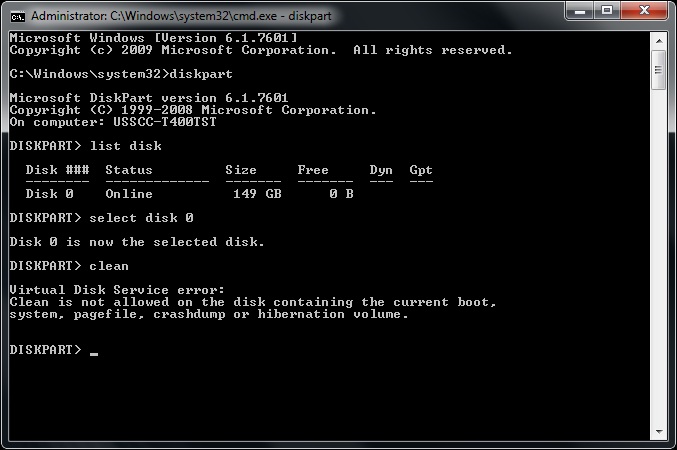
On your degraded raid problem, I've seen it happen and it was a result of the drives not being fully seated in the cage when the install disc was ran. This is the solution that always works for me:
Physically remove the hard drives and put them into a drive dock connected to your laptop. This one works well, or for only $4 more you can get this one and do 2 at a time. This is your best bargain.
Let Windows connect to the drive dock so it can see the drives.
Open a command prompt and type "diskpart" <enter>
Type "listdisk" <enter>
Type "select disk _" (whatever the disc number you want to wipe is) <enter>
***Do not select your laptop hard drive***
Type "listdisk" <enter>
Verify the drive you really want to wipe has an * beside it.
Type "clean" <enter>
About 2 seconds later the drive will be completely wiped. Do this for all 4 drives, then reinstall into the server and run the Dolby install disc.
Once you have ran the install disc and are rebooting the server, watch to see that all 4 drives are shown in the boot sequence.
I cannot stress this enough, always, always, always type "listdisk" that second time and make damn sure your laptop hard drive doesn't have the * beside it before you type "clean"!
| IP: Logged
|
|
|
|
|
|
|
|
|
|
All times are Central (GMT -6:00)
|
This topic comprises 9 pages: 1 2 3 4 5 6 7 8 9
|
Powered by Infopop Corporation
UBB.classicTM
6.3.1.2
The Film-Tech Forums are designed for various members related to the cinema industry to express their opinions, viewpoints and testimonials on various products, services and events based upon speculation, personal knowledge and factual information through use, therefore all views represented here allow no liability upon the publishers of this web site and the owners of said views assume no liability for any ill will resulting from these postings. The posts made here are for educational as well as entertainment purposes and as such anyone viewing this portion of the website must accept these views as statements of the author of that opinion
and agrees to release the authors from any and all liability.
|

 Home
Home





![[Smile]](smile.gif)



 Printer-friendly view of this topic