Film-Tech Cinema Systems
Film-Tech Forum ARCHIVE


my profile | my password | search | faq & rules | forum home
  next oldest topic   next newest topic
» Film-Tech Forum ARCHIVE   » Operations   » Digital Cinema Forum   » DOLBY SERVER = QUESTIONS (Page 3)

 
This topic comprises 5 pages: 1  2  3  4  5 
 
Author Topic: DOLBY SERVER = QUESTIONS
Steve Guttag
We forgot the crackers Gromit!!!

Posts: 12814
From: Annapolis, MD
Registered: Dec 1999


 - posted 05-17-2014 07:54 AM      Profile for Steve Guttag   Email Steve Guttag   Send New Private Message       Edit/Delete Post 
Brad...but wouldn't that mean it would take longer to initialize? [Razz]

A manufacturer's rep (any) can only recommend or authorized what the company has authorized. At the moment, Dolby is only issuing their servers with 2TB drives. When they test software, they only test it with 500GB, 1TB and 2TB drives because that is all they have issued with their servers. One reason, I'm sure, they are cutting off support on the DSS100/DSP100 is to remove the burden of testing all software on all of its permutations. As a company, they have to support their software on the hardware they supplied (approved). If you do something on your own, that is your business but you can't expect them to support your experimentations. And, you can bet if you have ANY problems, they will tie it all to the modifications you did.

 |  IP: Logged

Mattias Mattsson
Film Handler

Posts: 90
From: Göteborg, Sweden
Registered: May 2007


 - posted 06-24-2014 06:55 PM      Profile for Mattias Mattsson   Email Mattias Mattsson   Send New Private Message       Edit/Delete Post 
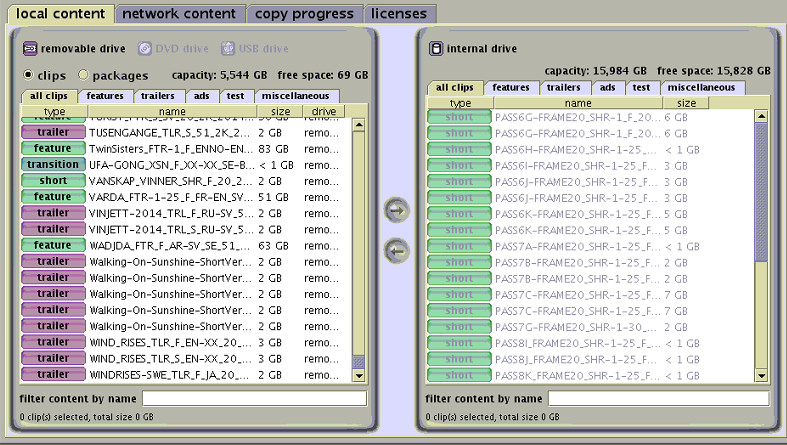
As a follow up: I have now successfully installed four 6 TB disks in a DSS200. Please see the attached picture.

To make it work you have to tweak the settings in the RAID controller BIOS and set "Boot Volume" to 16000 GiB (i.e. you waste approx 750 GiB). This is because Dolby is currently using a 32bit kernel and therefore the upper limit is 16 TiB. If you don't do this you get the "mount: file too large" error when the system tries to mount the partition.

XFS running with a 64 bit kernel can manage file systems as large as 18 Million TB (see: http://xfs.org/docs/xfsdocs-xml-dev/XFS_User_Guide/tmp/en-US/html/ch02s04.html ).

 -

This server is running Dolby version 4.8.0(33) and using the 9750-4i RAID-controller. For reference, here is the output from tw_cli:

# tw_cli /c0 show all
/c0 Driver Version = 3.26.02.000
/c0 Model = 9750-4i
/c0 Available Memory = 488MB
/c0 Firmware Version = FH9X 5.12.00.013
/c0 Bios Version = BE9X 5.11.00.007
/c0 Boot Loader Version = BT9X 6.00.00.004
/c0 Serial Number = SV32213788
/c0 PCB Version = Rev 001
/c0 PCHIP Version = B4
/c0 ACHIP Version = 05000e00
/c0 Controller Phys = 8
/c0 Connections = 4 of 128
/c0 Drives = 4 of 127
/c0 Units = 1 of 127
/c0 Active Drives = 4 of 127
/c0 Active Units = 1 of 32
/c0 Max Drives Per Unit = 32
/c0 Total Optimal Units = 1
/c0 Not Optimal Units = 0
/c0 Disk Spinup Policy = 1
/c0 Spinup Stagger Time Policy (sec) = 1
/c0 Auto-Carving Policy = off
/c0 Auto-Carving Size = 2048 GB
/c0 Auto-Rebuild Policy = on
/c0 Rebuild Mode = Low Latency
/c0 Rebuild Rate = 1
/c0 Verify Mode = Low Latency
/c0 Verify Rate = 1
/c0 Controller Bus Type = PCIe
/c0 Controller Bus Width = 4 lanes
/c0 Controller Bus Speed = 2.5 Gbps/lane

Unit UnitType Status %RCmpl %V/I/M Stripe Size(GB) Cache AVrfy
------------------------------------------------------------------------------
u0 RAID-5 OK - - 256K 16763.8 RiW ON

VPort Status Unit Size Type Phy Encl-Slot Model
------------------------------------------------------------------------------
p0 OK u0 5.45 TB SATA 0 - HGST HUS726060ALA640
p1 OK u0 5.45 TB SATA 1 - HGST HUS726060ALA640
p2 OK u0 5.45 TB SATA 2 - HGST HUS726060ALA640
p3 OK u0 5.45 TB SATA 3 - HGST HUS726060ALA640

 |  IP: Logged

Leo Enticknap
Film God

Posts: 7474
From: Loma Linda, CA
Registered: Jul 2000


 - posted 07-20-2014 12:19 PM      Profile for Leo Enticknap   Author's Homepage   Email Leo Enticknap   Send New Private Message       Edit/Delete Post 
In relation to Brad's comment, one of our theaters has a DSS200 (plus DMA8) that is currently on version 4.3.5.13. Our understanding is that we cannot update this to anything more recent, because the server is connected to a series 1 projector (NEC NC2500S), and this is the last version of the Dolby software that is compatible with it.

We have two festivals coming up within a week of each other in September, both of which will involve an assload of DCPs doing one-time shows. Preliminary estimates are that we'll be dealing with between 60 and 80 features, not to mention loads of shorts. Our current RAID capacity is 1.3TB. The last time we had a "DCP heavy" festival it was a nightmare, because the shortage of server space meant we were ingesting just in time, filmmakers wanting to preview a few minutes of their show a couple of days early couldn't, etc. etc.

Therefore, I want to put bigger hard drives in our server, and my boss has approved the expenditure (thank you Barbara! [Smile] ). Brad mentions that 4TB ones are only supported by version 4.5 or later of the software. I therefore have two questions: is it indeed correct that we cannot upgrade our software to anything newer, as this will break the compatibility between our server and projector? If not, any suggestions as to which version we should update to would be appreciated. If it's true that we can't risk updating, what is the largest hard drive capacity that I can put in our servers?

Many thanks in advance.

 |  IP: Logged

Marco Giustini
Film God

Posts: 2713
From: Reading, UK
Registered: Nov 2007


 - posted 07-20-2014 12:56 PM      Profile for Marco Giustini   Email Marco Giustini   Send New Private Message       Edit/Delete Post 
Go to System-Theatre Devices and check your 862 cinelink mode. If it says TLS mode, you are safe and you can upgrade to whatever you want. If it says anything different, you can try forcing TLS mode by command prompt. If that works, you're safe. If it does not you're limited to the version you already have.

 |  IP: Logged

Steve Guttag
We forgot the crackers Gromit!!!

Posts: 12814
From: Annapolis, MD
Registered: Dec 1999


 - posted 07-20-2014 01:27 PM      Profile for Steve Guttag   Email Steve Guttag   Send New Private Message       Edit/Delete Post 
As Marco says...the key is TLS mode. Put your DSS200 in TLS mode via CLI :

Log in as administrator, change to the scripts directory and use the linkencyrpt.sh script.

You may need to reboot both the server and the projector afterwards (it will prompt you to do this regardless). IF for some reason it does not work, don't give up hope yet.

Check some things...see if your TI board has its certificate...if you are on TI version 14.0, it should be there...if you've updated to one of the DCI compliant versions (15.1 is the latest) and you DON'T have the certificate, then you may need to recover it. But presuming that you do have the certificate...

Reinstall the CAT862 software using the Dolby Software Update utility and tick the "reinstall all components" That may restore a TLS session (I had a CAT862 give me grief until I did that...everything checked out but it would not work in TLS mode).

Once you establish you can work in TLS mode...then you may move your software version up (PERMANENTLY) to 4.8.1 and beyond.

 |  IP: Logged

Brad Miller
Administrator

Posts: 17775
From: Plano, TX (36.2 miles NW of Rockwall)
Registered: May 99


 - posted 07-20-2014 01:50 PM      Profile for Brad Miller   Author's Homepage   Email Brad Miller       Edit/Delete Post 
Leo, don't upgrade to 4.4.x (or higher). You're better off without the additional DCI security bs.

Instead buy 8 2TB drives and a 3Ware 9650SE-8LPML card such as this one. Then run a clean install disc of 4.3.5.13 and you're all set. You will have a usable capacity of 13,023GB and you won't have to bring about the unnecessary potential for quirkiness that comes with the additional DCI security of 4.4.x or higher. Trust me on this.

 -

 |  IP: Logged

Marco Giustini
Film God

Posts: 2713
From: Reading, UK
Registered: Nov 2007


 - posted 07-20-2014 03:29 PM      Profile for Marco Giustini   Email Marco Giustini   Send New Private Message       Edit/Delete Post 
Personally I would not modify the HW of a server. Any issue which turns up and Dolby will say "your controller is not supported".

4.8 will be slower than 4.3, but I can't really see the evil in it.

Thanks Steve about the TLS not working on the 862. Never happened to me, but if it did I'll keep your suggestion in mind.

 |  IP: Logged

Mattias Mattsson
Film Handler

Posts: 90
From: Göteborg, Sweden
Registered: May 2007


 - posted 07-20-2014 03:35 PM      Profile for Mattias Mattsson   Email Mattias Mattsson   Send New Private Message       Edit/Delete Post 
I agree that 4.3.5.13 is a stable version but there are real bugs fixed in later versions that are important if you are running a festival. Especially if you have DCP:s coming in from sources from beyond the large US studios.

These fixes are (among other things) related to subtitles and non-24 fps material.

Also, in my experience if you are running "strange" material (SMPTE subtitles, 25 fps, etc) it is always safer to run the bare clip rather than make it part of a playlist.

 |  IP: Logged

Steve Guttag
We forgot the crackers Gromit!!!

Posts: 12814
From: Annapolis, MD
Registered: Dec 1999


 - posted 07-20-2014 03:59 PM      Profile for Steve Guttag   Email Steve Guttag   Send New Private Message       Edit/Delete Post 
My usual comment on 4.3.5.x...build 9 was the best.

I definitely respect Brad's position on this one. However, for most of my customers, the benefits of 4.7 and beyond are too compelling to pass up on. We still have some that remain on 4.3.5.9 because the things that 4.7+ fix do not apply at those sites (yet). Note, in Leo's case, since it is a Series 1, there isn't an Enigma to fill up so one of the key things that 4.7 brought doesn't apply here.

There are valid points though on the frame rates and subtitle handling...particularly going forward as things move from interop to SMPTE. It isn't a matter of "if" but a matter of "when."

 |  IP: Logged

Mark Gulbrandsen
Resident Trollmaster

Posts: 16657
From: Music City
Registered: Jun 99


 - posted 07-20-2014 04:07 PM      Profile for Mark Gulbrandsen   Email Mark Gulbrandsen   Send New Private Message       Edit/Delete Post 
I have 4.7 running on two DSS-100's. No update key needed since it isn't updating the media block.

Mark

 |  IP: Logged

Marco Giustini
Film God

Posts: 2713
From: Reading, UK
Registered: Nov 2007


 - posted 07-20-2014 04:19 PM      Profile for Marco Giustini   Email Marco Giustini   Send New Private Message       Edit/Delete Post 
Mark,

The DSP100 has been upgraded on 4.7.1 and 4.5. If you come from 4.3 you will definitely need a KDM for your DSP100.

 |  IP: Logged

Mattias Mattsson
Film Handler

Posts: 90
From: Göteborg, Sweden
Registered: May 2007


 - posted 07-20-2014 04:23 PM      Profile for Mattias Mattsson   Email Mattias Mattsson   Send New Private Message       Edit/Delete Post 
Dolby version 4.7.3.3 comes with DSP100 version 4.0.10.37 issued 2014-02-25.

 |  IP: Logged

Leo Enticknap
Film God

Posts: 7474
From: Loma Linda, CA
Registered: Jul 2000


 - posted 07-20-2014 09:33 PM      Profile for Leo Enticknap   Author's Homepage   Email Leo Enticknap   Send New Private Message       Edit/Delete Post 
Many thanks everyone.

I'm next in that booth on Tuesday, and will check to see if the server is running in TLS mode. We have had problems with SMPTE subtitles in the past, and so updating our software is something we'll probably have to do in the end.

In the meantime, if I get and install 8 2TB drives but don't replace the RAID card, would I be right in thinking that this will give me around 14TB (RAID5)?

 |  IP: Logged

Brad Miller
Administrator

Posts: 17775
From: Plano, TX (36.2 miles NW of Rockwall)
Registered: May 99


 - posted 07-20-2014 09:44 PM      Profile for Brad Miller   Author's Homepage   Email Brad Miller       Edit/Delete Post 
Leo, if you don't replace the raid card, you will have 5.3TB of usable space. See my post above.

quote: Marco Giustini
Personally I would not modify the HW of a server. Any issue which turns up and Dolby will say "your controller is not supported".
Putting larger hard drives in is exactly the same thing Marco. "Those drives are not supported." For the record, it is the same model raid card, just capable of driving 8 drives instead of 4.

 |  IP: Logged

Leo Enticknap
Film God

Posts: 7474
From: Loma Linda, CA
Registered: Jul 2000


 - posted 07-20-2014 09:56 PM      Profile for Leo Enticknap   Author's Homepage   Email Leo Enticknap   Send New Private Message       Edit/Delete Post 
Many thanks Brad. I am a bit cagey about making an unauthorized (as in, not OEM-supported) modification to such a mission critical machine, especially if this means that if it breaks down beyond our competence to fix, having an aftermarket RAID card in there would result in a Dolby tech refusing to touch it.

When you say that the OEM card can only support four drives, does this mean that although there are eight physical slots for hard drives in the machine, only the four on the left can actually be used unless I replace the RAID card? If so and if I put 2TB drives in those four slots, will I also get 5.3TB of usable storage? If so I think that's what I'm going to do. 5.3TB is 30 to 40 typical 2K features, which should let us get one festival load ingested before it starts. That in itself would be a huge step forward from the last one. Furthermore, if we ever did get into trouble, we could always put the original drives back quickly and easily (i.e. we wouldn't have to take the server out of the rack and perform internal surgery to replace the RAID card) before calling in "official" support.

Thanks again for everyone's help.

 |  IP: Logged


All times are Central (GMT -6:00)
This topic comprises 5 pages: 1  2  3  4  5 
 
   Close Topic    Move Topic    Delete Topic    next oldest topic   next newest topic
 - Printer-friendly view of this topic
Hop To:


Powered by Infopop Corporation
UBB.classicTM 6.3.1.2

The Film-Tech Forums are designed for various members related to the cinema industry to express their opinions, viewpoints and testimonials on various products, services and events based upon speculation, personal knowledge and factual information through use, therefore all views represented here allow no liability upon the publishers of this web site and the owners of said views assume no liability for any ill will resulting from these postings. The posts made here are for educational as well as entertainment purposes and as such anyone viewing this portion of the website must accept these views as statements of the author of that opinion and agrees to release the authors from any and all liability.

© 1999-2020 Film-Tech Cinema Systems, LLC. All rights reserved.