Film-Tech Cinema Systems
Film-Tech Forum ARCHIVE


my profile | my password | search | faq & rules | forum home
  next oldest topic   next newest topic
» Film-Tech Forum ARCHIVE   » Operations   » Digital Cinema Forum   » DOLBY SERVER = QUESTIONS (Page 4)

 
This topic comprises 5 pages: 1  2  3  4  5 
 
Author Topic: DOLBY SERVER = QUESTIONS
Brad Miller
Administrator

Posts: 17775
From: Plano, TX (36.2 miles NW of Rockwall)
Registered: May 99


 - posted 07-20-2014 10:59 PM      Profile for Brad Miller   Author's Homepage   Email Brad Miller       Edit/Delete Post 
quote: Leo Enticknap
When you say that the OEM card can only support four drives, does this mean that although there are eight physical slots for hard drives in the machine, only the four on the left can actually be used unless I replace the RAID card? If so and if I put 2TB drives in those four slots, will I also get 5.3TB of usable storage?
Yes to all the above, except I think you will find Dolby isn't a snooty company like some manufacturers. It isn't like you are changing to a different after market raid card. Again, you would still be using the same raid card. If Dolby stuck their nose up at that, they would also stick their nose up at the idea of using (as an example) Seagate 2TB drives instead of the OEM Hitachi 1TB drives. But if 5.3TB is enough for you, then that's the easiest way out. If you want to update and put 4TB drives in, you can do that too, but you must be on 4.5 or higher for that to work on a 4-drive raid.

Also before you go getting all clever and decide to put the original 4 drives into the 4 slots on the right, you should note that those 4 slots DO have power going to them, so you won't be "storing" that set of drives, you will actually be "burning life off of" that set of drives. It's best to keep them on the shelf labeled 1, 2, 3, 4.

 |  IP: Logged

Marco Giustini
Film God

Posts: 2713
From: Reading, UK
Registered: Nov 2007


 - posted 07-21-2014 03:46 AM      Profile for Marco Giustini   Email Marco Giustini   Send New Private Message       Edit/Delete Post 
quote: Brad Miller
Putting larger hard drives in is exactly the same thing Marco. "Those drives are not supported."
Sure, that's why I would stick with 4x2TB from the approved list. I appreciate what you are suggesting will work but it's not something I would do.

 |  IP: Logged

Leo Enticknap
Film God

Posts: 7474
From: Loma Linda, CA
Registered: Jul 2000


 - posted 07-21-2014 12:20 PM      Profile for Leo Enticknap   Author's Homepage   Email Leo Enticknap   Send New Private Message       Edit/Delete Post 
If this was a home theater setup or we had a spare DSS200 that we could simply swap into place in the event of any serious gremlins, I'd be all for upgrading the RAID card and going to an eight-drive RAID. However, it's running shows in a 600-seat downtown theater and it's mission critical, so I'm going to be ultra cautious and go the 4x2TB route, leaving the software as it is, for now. Quite apart from anything else, taking the machine out of the rack wouldn't be a quick or easy job, thanks to all the stuff around it. As one of my co-workers is going to be away for the whole of August and the show schedule is pretty demanding anyway, I'm not keen to bite off more than we can chew. During one of those weeks the schedule appears to be almost entirely 35mm, and that's when I've got in mind for installing the new hard drives.

I will check out whether it's running in TLS mode tomorrow. This will be useful to know, because if we run into SMPTE subtitle issues while testing any of these DCPs (and given that one of these festivals in September is Japanese and the other the Guadalajara festival, I suspect that this could well happen - we certainly had one subtitle-problematic DCP with the Greek festival a couple of months ago), then if we already have TLS mode, at least we have the option of a software update to solve that problem at that point. That would then give us the option of going to a 4x4TB RAID if we're still short of space. My gut feeling is that having 5TB to play with will take a lot of the pressure off, and should enable us to have all the DCPs ingested and playable (keys permitting, though thankfully, indie and festival DCPs tend to be unencrypted) at least a week ahead of time.

Thanks again for all the suggestions, especially the heads-up that slots 5-8 are powered and should be left empty.

 |  IP: Logged

Mattias Mattsson
Film Handler

Posts: 90
From: Göteborg, Sweden
Registered: May 2007


 - posted 07-21-2014 01:37 PM      Profile for Mattias Mattsson   Email Mattias Mattsson   Send New Private Message       Edit/Delete Post 
Note that as Brad wrote earlier you will need to use an install CD (you can burn one yourself from Dolbys ISO-file) when you replace drives as the OS is stored on the RAID-disks. (On the older DSS200 units, the kernel and initrd are stored on an IDE flash, but not the root fs).

Also note that along with DCPs, configuration settings like GPIO, serial commands, show playlists, network configuration etc. will have to be redone.

You can back up serial commands to an external USB stick but I know of no (easy) way to backup SPLs, GPIO-definitions or the other settings.

 |  IP: Logged

Leo Enticknap
Film God

Posts: 7474
From: Loma Linda, CA
Registered: Jul 2000


 - posted 07-23-2014 12:36 AM      Profile for Leo Enticknap   Author's Homepage   Email Leo Enticknap   Send New Private Message       Edit/Delete Post 
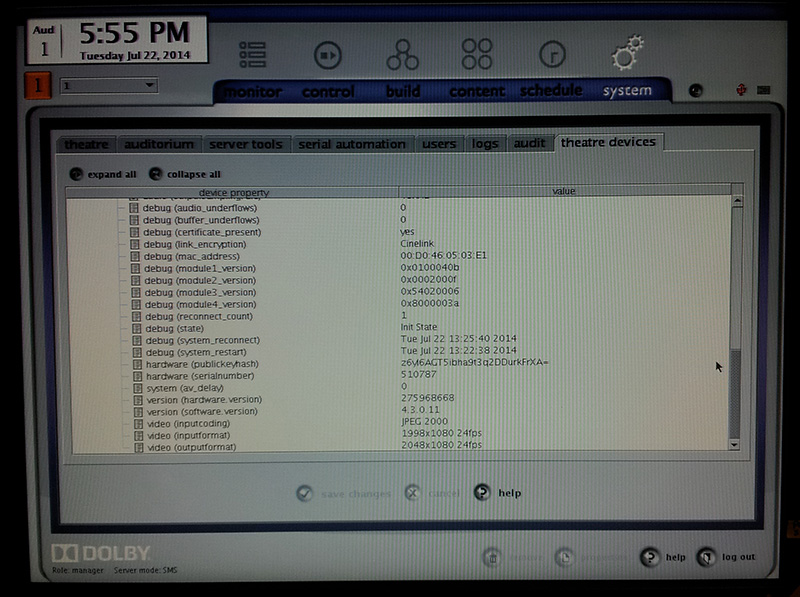
No TLS, by the look of things.

 -

Anyway, I now have an ISO of the software version that is currently in use, and therefore am all set to install the new set of 2TB drives when they arrive. Thanks again for everyone's suggestions.

 |  IP: Logged

Marco Giustini
Film God

Posts: 2713
From: Reading, UK
Registered: Nov 2007


 - posted 07-23-2014 03:09 AM      Profile for Marco Giustini   Email Marco Giustini   Send New Private Message       Edit/Delete Post 
No, it's Cinelink. You can change it temporarily by following Steve's advice.

The command is

./linkencrypt.sh TLS
reboot everything, if when it's back up it wouldn't connect to the projector, you can put it back to what it was with
./linkencrypt.sh DH

(if you just type ./linkencrypt.sh you'll have the available encryption types listed)

 |  IP: Logged

Steve Guttag
We forgot the crackers Gromit!!!

Posts: 12814
From: Annapolis, MD
Registered: Dec 1999


 - posted 07-23-2014 06:43 AM      Profile for Steve Guttag   Email Steve Guttag   Send New Private Message       Edit/Delete Post 
Note...he is on Cinelink 1 so to go back to that level it would ./linkencrypt.sh CINELINK.

The point is though...before you update, you have the ability to get back to safety of a working form of link encryption. With DCI, Cinelink II DH is no longer an option but I believe CINELINK is.

 |  IP: Logged

Marco Giustini
Film God

Posts: 2713
From: Reading, UK
Registered: Nov 2007


 - posted 07-23-2014 04:00 PM      Profile for Marco Giustini   Email Marco Giustini   Send New Private Message       Edit/Delete Post 
Ops, sorry!

 |  IP: Logged

Leo Enticknap
Film God

Posts: 7474
From: Loma Linda, CA
Registered: Jul 2000


 - posted 07-23-2014 06:29 PM      Profile for Leo Enticknap   Author's Homepage   Email Leo Enticknap   Send New Private Message       Edit/Delete Post 
Many thanks. I'll try this tomorrow. Just to be clear, if TLS mode does work, this means that I can update the software to whatever version I like and the projector will still be able to show what the server sends it through the dual-link SDI?

I have no immediate plans to update the software, but knowing that we can if we have a serious subtitle problem would be a weight off my mind. Thanks again.

 |  IP: Logged

Steve Guttag
We forgot the crackers Gromit!!!

Posts: 12814
From: Annapolis, MD
Registered: Dec 1999


 - posted 07-24-2014 06:44 AM      Profile for Steve Guttag   Email Steve Guttag   Send New Private Message       Edit/Delete Post 
Yes, if Cinelink II TLS works now...it will work in later forms of the software.

 |  IP: Logged

Antti Nayha
Master Film Handler

Posts: 268
From: Helsinki, Finland
Registered: Oct 2008


 - posted 07-24-2014 10:59 AM      Profile for Antti Nayha   Email Antti Nayha   Send New Private Message       Edit/Delete Post 
Note that it's not only SMPTE subtitles. I recently ran into an Interop DCP where the subtitles refused to play in 4.3 because the subtitle file name had a space in it. That one wasn't fixed until 4.6.

Quoting myself from an earlier thread, with a list of relevant issues that I've encountered at festivals:

quote:
Fixed in 4.6.0 (32): "a condition where subtitle files with one or more spaces in the file/folder name could not be read and transferred to the projector."

Fixed in 4.7.0: "a subtitle font problem that occasionally occurred when ingesting content via FTP."

Fixed in 4.8.0 (33): "a subtitles problem for shows with both Interop and SMPTE content."

Not bugs per se, but improvements that have helped me:
- 4.4.2(?): mediablock forces a restart of the CineCanvas subtitle engine automatically, in case subtitles are dropped during playback.
- 4.7.0: content can now be ingested from an exFAT drive.


 |  IP: Logged

Mattias Mattsson
Film Handler

Posts: 90
From: Göteborg, Sweden
Registered: May 2007


 - posted 07-24-2014 04:02 PM      Profile for Mattias Mattsson   Email Mattias Mattsson   Send New Private Message       Edit/Delete Post 
There is also the problem of Interop (CineCanvas) subtitle font files larger than 640 KB.

Unfortunately there is no cure for this issue other then re-author the DCP or use a Series 2 projector.

EDIT: Or you could use the Subtitle Engine of a Doremi server if you have one. It's MUCH more robust then the TI subtitle software in the projector.

 |  IP: Logged

Marco Giustini
Film God

Posts: 2713
From: Reading, UK
Registered: Nov 2007


 - posted 07-24-2014 05:37 PM      Profile for Marco Giustini   Email Marco Giustini   Send New Private Message       Edit/Delete Post 
I thought everybody was using Arial as a font for subtitles?

 |  IP: Logged

Mattias Mattsson
Film Handler

Posts: 90
From: Göteborg, Sweden
Registered: May 2007


 - posted 07-24-2014 06:15 PM      Profile for Mattias Mattsson   Email Mattias Mattsson   Send New Private Message       Edit/Delete Post 
quote: Marco Giustini
I thought everybody was using Arial as a font for subtitles?
Most are (but not all). The thing is, even if they are using Arial, instead of relying on the default font file stored in the projector almost all DCP:s come with their own font files (duplicates even, one font file for each reel!). Sometimes these files are over 640 KB in size and then they don't get rendered by a Series 1 projector!

The best thing you can do if you are running a festival is to check your DCP:s beforehand with Wolfgang Woehls excellent dcp_inspect ( https://github.com/wolfgangw/backports ). It warns you of this issue among many others.

 |  IP: Logged

Marco Giustini
Film God

Posts: 2713
From: Reading, UK
Registered: Nov 2007


 - posted 07-25-2014 01:22 PM      Profile for Marco Giustini   Email Marco Giustini   Send New Private Message       Edit/Delete Post 
As far as I know the font file is required, not sure there are default files in the server.
Once I had someone complaining that a DCP was sometimes missing the subs. Found that the ttf file was not included (arial) and if the server had just been rebooted - and hence the cache cleared - the engine wouldn't find the file. If run after another subbed CPL, the server would find the previous, cached, ttf file.
I believe the font file is supposed to be there all the time. Not sure whether some foreign languages may need special subs, but I would use PNGs in such cases, to avoid trouble.

 |  IP: Logged


All times are Central (GMT -6:00)
This topic comprises 5 pages: 1  2  3  4  5 
 
   Close Topic    Move Topic    Delete Topic    next oldest topic   next newest topic
 - Printer-friendly view of this topic
Hop To:


Powered by Infopop Corporation
UBB.classicTM 6.3.1.2

The Film-Tech Forums are designed for various members related to the cinema industry to express their opinions, viewpoints and testimonials on various products, services and events based upon speculation, personal knowledge and factual information through use, therefore all views represented here allow no liability upon the publishers of this web site and the owners of said views assume no liability for any ill will resulting from these postings. The posts made here are for educational as well as entertainment purposes and as such anyone viewing this portion of the website must accept these views as statements of the author of that opinion and agrees to release the authors from any and all liability.

© 1999-2020 Film-Tech Cinema Systems, LLC. All rights reserved.