Film-Tech Cinema Systems
Film-Tech Forum ARCHIVE


my profile | my password | search | faq & rules | forum home
  next oldest topic   next newest topic
» Film-Tech Forum ARCHIVE   » Operations   » Digital Cinema Forum   » Barco DP2K Lamp not striking (Page 4)

 
This topic comprises 4 pages: 1  2  3  4 
 
Author Topic: Barco DP2K Lamp not striking
Chris Markiewicz
Expert Film Handler

Posts: 209
From: Glenaviegh, County Tipperary, Ireland
Registered: Aug 2002


 - posted 06-25-2014 06:37 PM      Profile for Chris Markiewicz   Email Chris Markiewicz   Send New Private Message       Edit/Delete Post 
I ordered 2 small bar magnets from Edmund Scientifics, since Barco had no magnets available. We converted 33 screens last year with 32Bs; all magnets were reversed.

 |  IP: Logged

Monte L Fullmer
Film God

Posts: 8367
From: Nampa, Idaho, USA
Registered: Nov 2004


 - posted 06-25-2014 09:17 PM      Profile for Monte L Fullmer   Email Monte L Fullmer   Send New Private Message       Edit/Delete Post 
Going to head to Wally World and get a compass from their Sports Dept. I bet mine are reversed also.

 |  IP: Logged

Monte L Fullmer
Film God

Posts: 8367
From: Nampa, Idaho, USA
Registered: Nov 2004


 - posted 06-26-2014 02:39 AM      Profile for Monte L Fullmer   Email Monte L Fullmer   Send New Private Message       Edit/Delete Post 
Yep ..they were... !

 |  IP: Logged

Monte L Fullmer
Film God

Posts: 8367
From: Nampa, Idaho, USA
Registered: Nov 2004


 - posted 06-27-2014 01:47 AM      Profile for Monte L Fullmer   Email Monte L Fullmer   Send New Private Message       Edit/Delete Post 
Okey, got my magnet issues solved and glad to see that I'm not the only one with reversed magnets. Thus this is the end of this magnet topic.

But a question arises: Why doesn't the other modules require the magnet since it's basically no different than the 32B's module outside of running a much larger bulb?

thx - Monte

 |  IP: Logged

Steve Guttag
We forgot the crackers Gromit!!!

Posts: 12814
From: Annapolis, MD
Registered: Dec 1999


 - posted 06-27-2014 06:33 AM      Profile for Steve Guttag   Email Steve Guttag   Send New Private Message       Edit/Delete Post 
You'll find that is the rational...the larger lamps need more arc control than the smaller lamps with their much shorter arcs.

Personally, I've always questioned why there were not magnets and a means to see how the arc is performing like we had in the film lamphouses.

 |  IP: Logged

Antti Nayha
Master Film Handler

Posts: 268
From: Helsinki, Finland
Registered: Oct 2008


 - posted 07-08-2014 10:13 AM      Profile for Antti Nayha   Email Antti Nayha   Send New Private Message       Edit/Delete Post 
quote: Antti Nayha
Since I've found no way to restrict the CLO minimum and maximum power to something more conservative than Barco's presets, I've started to rely less on CLO and more on manual power settings.

For example, the aforementioned house uses an Ushio DXL-30BAF/L, which Barco's CLO happily runs at 1800-3000 W. I've now disabled CLO and set it up manually to always run 2D flat at 2000 W and 2D scope at 2800 W. Both 3D formats are also now being run at 2800 W.

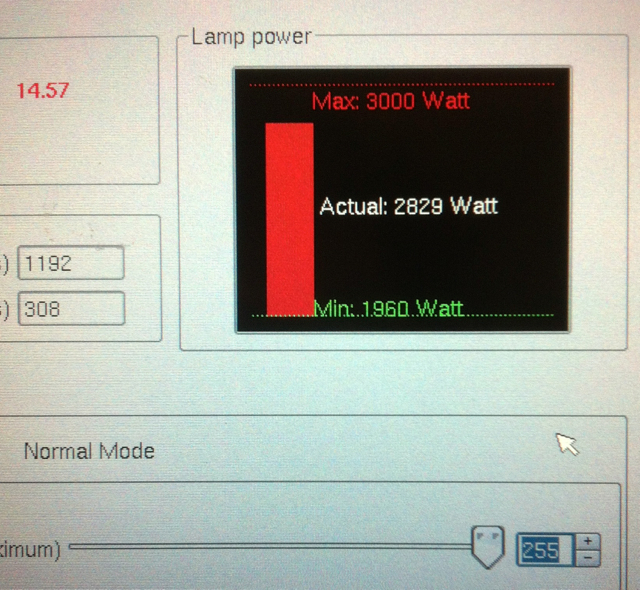
Well, what do you know: Barco's new software (1.12.160) has changed the minimum/maximum wattages to more conservative values. At least the DXL-30BAF is now shown to have a range of 1960-3000 W in Communicator, instead of 1800-3000 W. On top of that, even when you try to set the lamp power to maximum manually, it already maxes out at around 2830 W!
 -

I had to tweak my manual (non-CLO) settings, since the 0-255 scale doesn't mean the same thing anymore. For example, 205 used to correspond to 2800 W; now I have to go up to 245 to get 2800 W.

Lamp power changes are now also ramped more slowly, compared to the instant current change that has been the Barco tradition. Presumably both changes will help somewhat with premature strike/aging issues.

Edit: in my earlier post, I misidentified the lamp as DXL-30BAF/L... it's actually DXL-30BAF - for a little while longer, until we run out of those soon and move permanently to BAF/L's.

Edit 2: anyone care to check whether the maximum power is also reduced with larger lamps?

 |  IP: Logged

Steve Guttag
We forgot the crackers Gromit!!!

Posts: 12814
From: Annapolis, MD
Registered: Dec 1999


 - posted 07-08-2014 12:36 PM      Profile for Steve Guttag   Email Steve Guttag   Send New Private Message       Edit/Delete Post 
If you have a user level sufficient, you can go to the Installation>Lamp>Light Output and see both power and current for the lamp. Barco is set up such that any parameter can restrict the range (wattage, voltage or current).

If you go to the Installation>Advanced>FileManager screen...on the projector files...select the "Lamp files" There you will see all of the lamp files that have been installed. You can then select the one of interest, move it over to your computer and use your favorite text editor to see what the parameters are.

So you can satisfy your own curiosity as to what each file has in it.

This begs the question...can you modify one of those files to your liking and send it back over...the answer is mostly no! You can't send one of their files back, they are protected. But there IS a means to create your own (at your own risk, of course). For that information though, you will need to speak to Barco.

 |  IP: Logged

Antti Nayha
Master Film Handler

Posts: 268
From: Helsinki, Finland
Registered: Oct 2008


 - posted 07-15-2014 08:11 AM      Profile for Antti Nayha   Email Antti Nayha   Send New Private Message       Edit/Delete Post 
quote: Steve Guttag
If you have a user level sufficient, you can go to the Installation>Lamp>Light Output and see both power and current for the lamp.
Yeah, sure. At 255 manual power, the current reaches 2830 W and 104 A.

After some further playing around with the new software, I noticed that the new limitation is only in effect in the "normal mode". In CLO mode, the DXL-30BAF will happily run at 3000 W (and a bit more).

quote: Steve Guttag
If you go to the Installation>Advanced>FileManager screen...on the projector files...select the "Lamp files" There you will see all of the lamp files that have been installed.
Why am I not seeing a "Lamp files" directory in the File Manager? [Confused] That was the first place I looked, but since they weren't there, I figured that the lamp files are hidden somewhere in the Barco sw package with no way to look at them...

 |  IP: Logged

Justin Hamaker
Film God

Posts: 2253
From: Lakeport, CA USA
Registered: Jan 2004


 - posted 03-23-2015 03:28 PM      Profile for Justin Hamaker   Author's Homepage   Email Justin Hamaker   Send New Private Message       Edit/Delete Post 
I was just curious to know what the results were from flipping the magnet? Are you seeing longer lamp life?

 |  IP: Logged

Chris Markiewicz
Expert Film Handler

Posts: 209
From: Glenaviegh, County Tipperary, Ireland
Registered: Aug 2002


 - posted 03-23-2015 11:20 PM      Profile for Chris Markiewicz   Email Chris Markiewicz   Send New Private Message       Edit/Delete Post 
Yes, all bulbs are now reaching warranted hours. No more hard striking, and little if any wear on the electrodes. Very little darkening of envelope.

 |  IP: Logged

Sam D. Chavez
Film God

Posts: 2153
From: Martinez, CA USA
Registered: Aug 2003


 - posted 03-24-2015 12:06 PM      Profile for Sam D. Chavez   Author's Homepage     Send New Private Message       Edit/Delete Post 
Does anyone have the field bulletin detailing the test to determine whether the magnet is reversed? I've lot track of my copy and having trouble finding it on Barco's site?

 |  IP: Logged

Steve Guttag
We forgot the crackers Gromit!!!

Posts: 12814
From: Annapolis, MD
Registered: Dec 1999


 - posted 03-24-2015 12:42 PM      Profile for Steve Guttag   Email Steve Guttag   Send New Private Message       Edit/Delete Post 
It is InfoT-1160.

 |  IP: Logged

Mark Wylie
Film Handler

Posts: 2
From: Almancil, Algarve, Portugal
Registered: Mar 2015


 - posted 03-27-2015 02:30 AM      Profile for Mark Wylie   Author's Homepage   Email Mark Wylie   Send New Private Message       Edit/Delete Post 
Hi I'm a newbie to DCI, so apologies if I am speaking out of turn. Although I have not had a lamp strike issues with Barco, I have had IP strings between an automation controller and projector fail - the projector accepted some commands but not others, it was random. So we changed to RS232 and now every command string is acknowledged and carried out. With IP commands if the PJ misses part of the string its lost.
Probably nothing to do with your problem and we don't have Doremi but the ICMP.

 |  IP: Logged

Pete Naples
Phenomenal Film Handler

Posts: 1565
From: Dunfermline, Scotland
Registered: Feb 2001


 - posted 03-27-2015 03:15 AM      Profile for Pete Naples   Email Pete Naples   Send New Private Message       Edit/Delete Post 
It's possibly opening the port, sending the string and closing the port again too fast for your automation.

Have a seek around these forums, there's a solution that works with Doremi and should work with strings in general.

 |  IP: Logged


All times are Central (GMT -6:00)
This topic comprises 4 pages: 1  2  3  4 
 
   Close Topic    Move Topic    Delete Topic    next oldest topic   next newest topic
 - Printer-friendly view of this topic
Hop To:


Powered by Infopop Corporation
UBB.classicTM 6.3.1.2

The Film-Tech Forums are designed for various members related to the cinema industry to express their opinions, viewpoints and testimonials on various products, services and events based upon speculation, personal knowledge and factual information through use, therefore all views represented here allow no liability upon the publishers of this web site and the owners of said views assume no liability for any ill will resulting from these postings. The posts made here are for educational as well as entertainment purposes and as such anyone viewing this portion of the website must accept these views as statements of the author of that opinion and agrees to release the authors from any and all liability.

© 1999-2020 Film-Tech Cinema Systems, LLC. All rights reserved.