Film-Tech Cinema Systems
Film-Tech Forum ARCHIVE


my profile | my password | search | faq & rules | forum home
  next oldest topic   next newest topic
» Film-Tech Forum ARCHIVE   » Operations   » Digital Cinema Forum   » T.M.S. software programs (stand alone) (Page 3)

 
This topic comprises 4 pages: 1  2  3  4 
 
Author Topic: T.M.S. software programs (stand alone)
Mark Gulbrandsen
Resident Trollmaster

Posts: 16657
From: Music City
Registered: Jun 99


 - posted 06-26-2014 10:59 AM      Profile for Mark Gulbrandsen   Email Mark Gulbrandsen   Send New Private Message       Edit/Delete Post 
Ahhh, but you can't use ANY punch blocks with stranded... They won't make good connection.

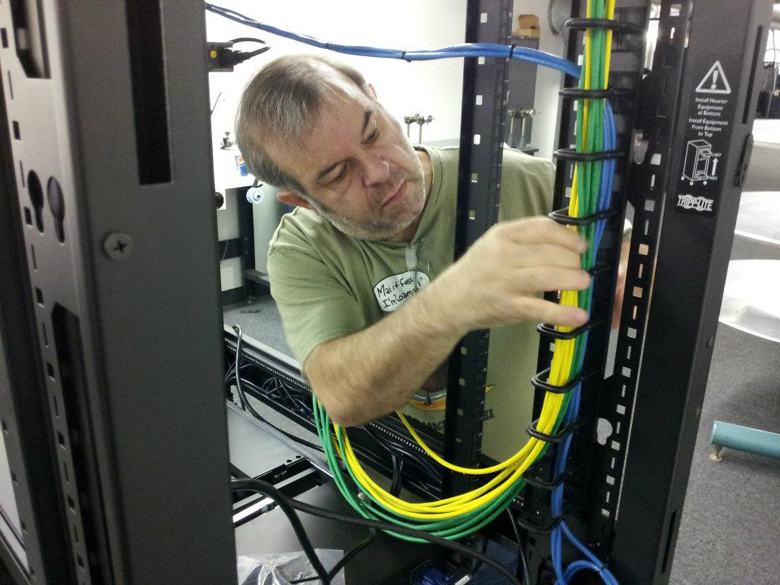
The reason you use a patch bay... so the cabling can be tied in place and out of harms way. The only other option is to mount it on the wall... not a good option really. Standard IT practice pretty much dictates at least doing what I am doing here in the picture... No one can f*ck with your cabling either because the rack is locked up. There really IS no argument for doing this the wrong way!

 -

 |  IP: Logged

Andrew Thomas
Master Film Handler

Posts: 273
From: Pearland, TX, USA
Registered: Jun 2012


 - posted 06-26-2014 11:34 PM      Profile for Andrew Thomas   Email Andrew Thomas   Send New Private Message       Edit/Delete Post 
Does anybody have a copy of the GDC TMS software they could send me? They sent me a temporary license but have so far not replied to my request for a download link to the software itself!

 |  IP: Logged

Greg Routenburg
Expert Film Handler

Posts: 178
From: Toronto, ON, Canada
Registered: May 2003


 - posted 06-27-2014 10:14 AM      Profile for Greg Routenburg   Email Greg Routenburg   Send New Private Message       Edit/Delete Post 
You really don't gain or lose anything with signal quality using patch bays if they are done properly. The principal advantage is being able to very quickly and easily identify cables coming into a large network rack. As Steve mentions, properly labeled cables are quite effective and I like to label all of my cables anyways but when you're dealing with many tens or hundreds of cables terminating within the same rack, locating the cable you want can be a time consuming process when you're relying solely on small, often hard to read, cable markers. A network done right will have a complete network map identifying what is terminated in which rack and what port numbers are used for each cable. When pulling extra cables to allow for future expansion, it makes it very easy to know what to connect where. It also helps with administration of the network from afar when you can instruct a third party network technician to jumper specific ports on managed switches or routers to specific ports on a patch panel to change a networking configuration.

 |  IP: Logged

Steve Guttag
We forgot the crackers Gromit!!!

Posts: 12814
From: Annapolis, MD
Registered: Dec 1999


 - posted 06-28-2014 07:34 AM      Profile for Steve Guttag   Email Steve Guttag   Send New Private Message       Edit/Delete Post 
Greg,

I'm agreeing with you (well just about 99%). ANY connection creates a signal loss or degradation. With a patch panel, you add the IDC of the punch down and then an extra RJ45 connection so there are a couple of extra connections to each core. Then there is the method of landing the cable on the back side of the patch bay such that the cable is properly strain relieved, doesn't violate any of the Ethernet cabling rules in terms of grouping and bend radius and the fact you have the cores no longer in their twist/spacing. Some patch bays have one terminate all conductors in a line (typical of dual row)...others have one terminate half on the top and half on the bottom (typical of single row) and one should keep the conductors of different cables separated to avoid EMI.

But okay...lets say you are good at all of that. Cinemas are not typical IT rooms where I see very valid reasons for traditional patch bays.

Typical cinemas are 15 screens or less. In most of the layouts I've seen (and installed), it is customary to have a switch in the pedestal or sound rack of each auditorium such that all of the auditorium specific devices (projector, sound...etc.) plug into that and from that switch, a single CAT cable is pulled to the TMS. In addition to that cable, there is a dedicated cable just for transport of the media (every server I've dealt with has at least two NICs so one can move the "media" while the other is typically used for "management." So there are two cables coming from each screen...so we are talking about 30 or fewer cables. However, those two cables are almost always landing on separate patch bays (and switches) so we are talking about 15 or less cables to keep track of. They are extremely unlikely to expand and it is also unlikely the patch system has been designed for any expansion either. Then, for logical layout, most have the patch ports as well as the ports on the switches in the TMS racks line up theatre-for-theatre. And by that, I mean that all ports in the same horizontal row line up with the theatres so if you are starting your theatres at say port "8" (but it could be any number)...they would be at 8, 10, 12, ...etc) so no cables are crossing over between patch panel and switch. So you got these 15 diagonally oriented patch cables (because there is a law that patch panels and switches can never align their ports). You patch them all up and you are done. This is a system that is VERY unlikely to change. Furthermore, unlike in a typical IT room, the cables coming in from the outside are pretty well defined and not likely to change...perhaps a few new sources (e.g. satellite feed of something). It isn't too hard to figure out what each cable is doing/coming from...proper cable labeling...something that should be done anyway. The advantage of a patch bay system just vanishes.

Yeah, the switch may change to different brand/model as things break or technology changes (but it isn't going to change too much since that would likely require a cable change too). So unless you violate cabling rules and pull your cables piano-string tight you can accommodate different port placement on the replacement switch.

All of the dressing that Mark shows (though zip ties are frowned upon in IT since any crushing of the cable disturbs its performance) would still apply...I merely claim that you will get an equally or superior performing system by merely continuing the cable to the front via a panel like Mid Atlantic's BR1 or a cable management trough (has holes on the back, wiring trough on the front with slots to allow cables to come up to the switch). It is equally as neat and serviceable but results in a faster and superior installation with higher reliability. I think DCinema tried to mimic IT's practices with patch bays without really thinking about WHY they do things that they do and if they apply to cinema. You know, in professional audio or video, most everything is landed on a patch bay too. We never did that in cinema because not only is it not necessary, it is a point of failure with virtually no benefit for us.

 |  IP: Logged

Andrew Thomas
Master Film Handler

Posts: 273
From: Pearland, TX, USA
Registered: Jun 2012


 - posted 06-28-2014 08:24 PM      Profile for Andrew Thomas   Email Andrew Thomas   Send New Private Message       Edit/Delete Post 
Do any of you guys have experience setting up the GDC TMS software?

I've got mostly the same set up in all four of my auditoriums.

Projector (1 CP4220, 3 Solaria Ones)
Audio Processor (USL JSD-60)
NAS (Iomega PX4-300R)
Automation (Jnior 310)
Managed Switch (Some Cisco something or other)

All of the switches at the projectors are connected to another managed switch.

I'm having a few issues on the networking side of things to start. If I run a ethernet wire into the main switch, I get no connectivity with any of the devices. If I run the wire into one of the switches at the projector itself, I can connect to any device on the network.

I'm also just not quite sure what I should be entering in the various fields when I try to add projectors and servers within the software.

Any thoughts?

 |  IP: Logged

Dennis Benjamin
Phenomenal Film Handler

Posts: 1445
From: Denton, MD
Registered: Feb 2002


 - posted 06-28-2014 08:49 PM      Profile for Dennis Benjamin   Author's Homepage   Email Dennis Benjamin   Send New Private Message       Edit/Delete Post 
Are all the ports active on the switch that gets no connectivity? If you have a managed switch from Christie, they only have certain ports active. I can't remember which ones, but there are only certain ones.

 |  IP: Logged

Andrew Thomas
Master Film Handler

Posts: 273
From: Pearland, TX, USA
Registered: Jun 2012


 - posted 06-28-2014 09:26 PM      Profile for Andrew Thomas   Email Andrew Thomas   Send New Private Message       Edit/Delete Post 
Well, as usually happens, after hours and hours of modifying settings I come here to ask questions and end up fixing it myself. I can know get connected to all four projectors and see their live states through the GDC TMS interface.

If I have any other issues, I'll be sure to post again. Thanks for the quick reply!

 |  IP: Logged

Steve Guttag
We forgot the crackers Gromit!!!

Posts: 12814
From: Annapolis, MD
Registered: Dec 1999


 - posted 06-29-2014 12:58 AM      Profile for Steve Guttag   Email Steve Guttag   Send New Private Message       Edit/Delete Post 
And yet you don't describe what you did so other may benefit from your experience.

 |  IP: Logged

Kerry Fleming
Film Handler

Posts: 46
From: Boynton Beach, FL, USA
Registered: Mar 2003


 - posted 06-29-2014 08:19 AM      Profile for Kerry Fleming   Author's Homepage   Email Kerry Fleming   Send New Private Message       Edit/Delete Post 
Did you check out Sensible Cinema?
sensiblecinema.com

 |  IP: Logged

Mark Gulbrandsen
Resident Trollmaster

Posts: 16657
From: Music City
Registered: Jun 99


 - posted 06-29-2014 01:06 PM      Profile for Mark Gulbrandsen   Email Mark Gulbrandsen   Send New Private Message       Edit/Delete Post 
quote: Steve Guttag
All of the dressing that Mark shows (though zip ties are frowned upon in IT since any crushing of the cable disturbs its performance) would still apply
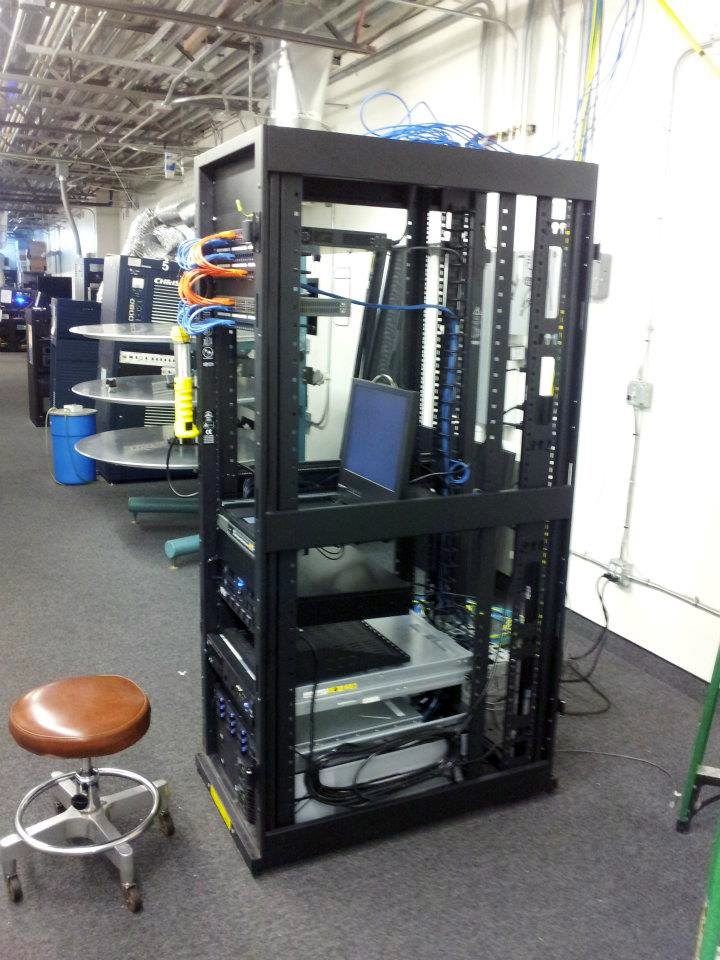
It all depends on how you use the zip ties Steve. With any networking cabling you never pull the zip ties tight. In that picture it is a Cinedigm rack... in St. George probably. I can tell by looking closely because it's taller than a half height rack which is all I ever use. So those cables were tied by who ever built that rack at Insight, but they do not appear to be tight. I use ties, especially on long runs with multiple cables to hold them in place. I have yet to have a single theater owner want to pay for cable tray to lay them in. So I run them along the flat edges of the roofing joists so that in effect becomes a cable tray. And because the cable tie creates a sort of triangular area for the cabling it actually can't be squeezed at all. If there is no joist where the cables need to go I use plastic loops and screw them to the all to hang the cables... about every foot or so. The plastic loops are much wider then cable ties.

Here is that rack... I am pretty sure...

 -

Mark

 |  IP: Logged

Steve Guttag
We forgot the crackers Gromit!!!

Posts: 12814
From: Annapolis, MD
Registered: Dec 1999


 - posted 06-29-2014 07:21 PM      Profile for Steve Guttag   Email Steve Guttag   Send New Private Message       Edit/Delete Post 
The "approved" strapping is generally Velcro. Note, we generally use wire ties as well and ensure that they are relatively loose because Velco tends to cost about 100 times more. However, when adding or changing the cabling...Velco is certainly convenient.

 |  IP: Logged

Andrew Thomas
Master Film Handler

Posts: 273
From: Pearland, TX, USA
Registered: Jun 2012


 - posted 06-30-2014 12:11 AM      Profile for Andrew Thomas   Email Andrew Thomas   Send New Private Message       Edit/Delete Post 
quote: Steve Guttag
And yet you don't describe what you did so other may benefit from your experience.
I think the main thing on the connectivity side is that I installed DD-WRT on the wifi router and disabled EVERYTHING that didn't need to be on to do what I needed done. Not sure what specifically was gumming up the works, but that allowed me direct access to everything on the network from the main switch.

I'm now needing to get a gigabit switch to get all the media network stuff setup for transfers.

 |  IP: Logged

Kevin Tan
Film Handler

Posts: 8
From: Singapore
Registered: Feb 2014


 - posted 06-30-2014 04:48 AM      Profile for Kevin Tan   Email Kevin Tan   Send New Private Message       Edit/Delete Post 
quote: Kerry Fleming
Did you check out Sensible Cinema?
sensiblecinema.com

Kerry,
I thought they are selling POS ?

 |  IP: Logged

Carsten Kurz
Film God

Posts: 4340
From: Cologne, NRW, Germany
Registered: Aug 2009


 - posted 06-30-2014 07:53 AM      Profile for Carsten Kurz   Email Carsten Kurz   Send New Private Message       Edit/Delete Post 
There is obviously to different types of software available under the term 'TMS'. The traditional one, already available in times of 35mm, is dealing with general theater operations, POS, bookings, restock, etc the other is dealing with digital playout/projection systems. They may interface at some point or the other, e.g. exchange of schedule data from POS to screen TMS. I have not seen a single TMS that covers both aspects. Anyone?

- Carsten

 |  IP: Logged

Dennis Benjamin
Phenomenal Film Handler

Posts: 1445
From: Denton, MD
Registered: Feb 2002


 - posted 06-30-2014 09:58 AM      Profile for Dennis Benjamin   Author's Homepage   Email Dennis Benjamin   Send New Private Message       Edit/Delete Post 
My search and research has come to an end. I was able to convince the powers that be to let us continue using GDC's TMS software at the two new locations to manage the projection booth networks. All of our other locations successfully use this software to manage their systems and we will have continuity throughout the company. While they are not using it to it's fullest potential, they do use it and my next project is to fully train the managers on the software's full range of capabilities.

Thanks to all that replied.

This in no way takes away from the amazing software that other companies have to offer.

 |  IP: Logged


All times are Central (GMT -6:00)
This topic comprises 4 pages: 1  2  3  4 
 
   Close Topic    Move Topic    Delete Topic    next oldest topic   next newest topic
 - Printer-friendly view of this topic
Hop To:


Powered by Infopop Corporation
UBB.classicTM 6.3.1.2

The Film-Tech Forums are designed for various members related to the cinema industry to express their opinions, viewpoints and testimonials on various products, services and events based upon speculation, personal knowledge and factual information through use, therefore all views represented here allow no liability upon the publishers of this web site and the owners of said views assume no liability for any ill will resulting from these postings. The posts made here are for educational as well as entertainment purposes and as such anyone viewing this portion of the website must accept these views as statements of the author of that opinion and agrees to release the authors from any and all liability.

© 1999-2020 Film-Tech Cinema Systems, LLC. All rights reserved.