Film-Tech Cinema Systems
Film-Tech Forum ARCHIVE


my profile | my password | search | faq & rules | forum home
  next oldest topic   next newest topic
» Film-Tech Forum ARCHIVE   » Operations   » Digital Cinema Forum   » Red Frame Symbol on Dolby Server (Page 2)

 
This topic comprises 5 pages: 1  2  3  4  5 
 
Author Topic: Red Frame Symbol on Dolby Server
Dave Macaulay
Film God

Posts: 2321
From: Toronto, Canada
Registered: Apr 2001


 - posted 06-16-2014 09:45 PM      Profile for Dave Macaulay   Email Dave Macaulay   Send New Private Message       Edit/Delete Post 
Nothing in the menus, but you can do a reboot from a terminal after logging in as installer.

 |  IP: Logged

Frank Cox
Film God

Posts: 2234
From: Melville Saskatchewan Canada
Registered: Apr 2011


 - posted 06-16-2014 09:52 PM      Profile for Frank Cox   Author's Homepage   Email Frank Cox   Send New Private Message       Edit/Delete Post 
quote: Leo Enticknap
What I meant by it was to reboot the server simply by disconnecting and reconnecting the mains power, without bothering to perform any of the recommended shutdown and/or restart procedures.
There are three ways to reboot a computer:

1. Warm Boot
2. Cold Boot
3. Steel-toed boot

 |  IP: Logged

Pete Naples
Phenomenal Film Handler

Posts: 1565
From: Dunfermline, Scotland
Registered: Feb 2001


 - posted 06-17-2014 04:33 AM      Profile for Pete Naples   Email Pete Naples   Send New Private Message       Edit/Delete Post 
CTRL+ALT+F1 will take you out of the GUI to a terminal prompt.

then

CTRL+ALT+DEL will reboot.

 |  IP: Logged

Steve Kraus
Film God

Posts: 4094
From: Chicago, IL, USA
Registered: May 2000


 - posted 06-17-2014 07:17 PM      Profile for Steve Kraus     Send New Private Message       Edit/Delete Post 
BUT...will that reboot the media block? If not I think that would probably cause trouble.

As to my saga, yeah the Cat.862 crapped out. Many thanks to Brad and Jeremy of Film-Tech for getting one overnighted from Dolby. The media block software was newer than my system software so that need updating one tick higher as well.

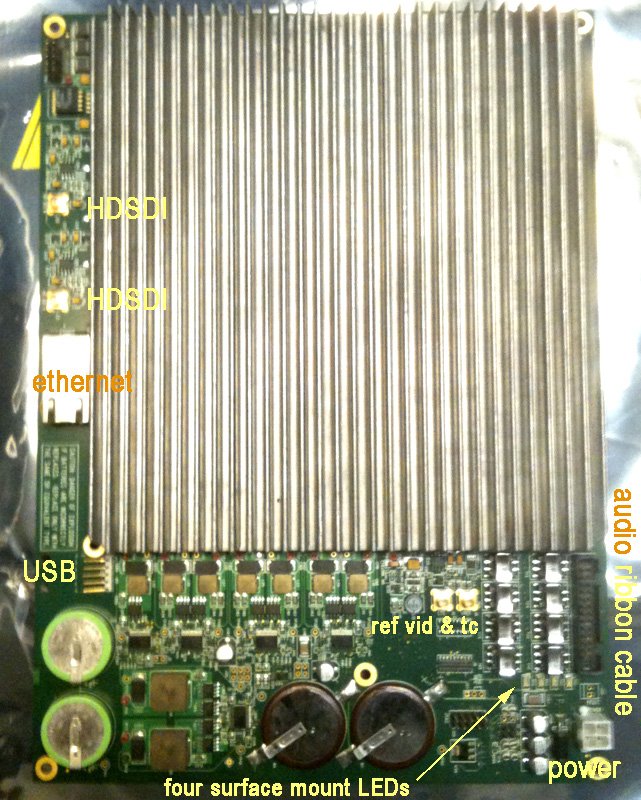
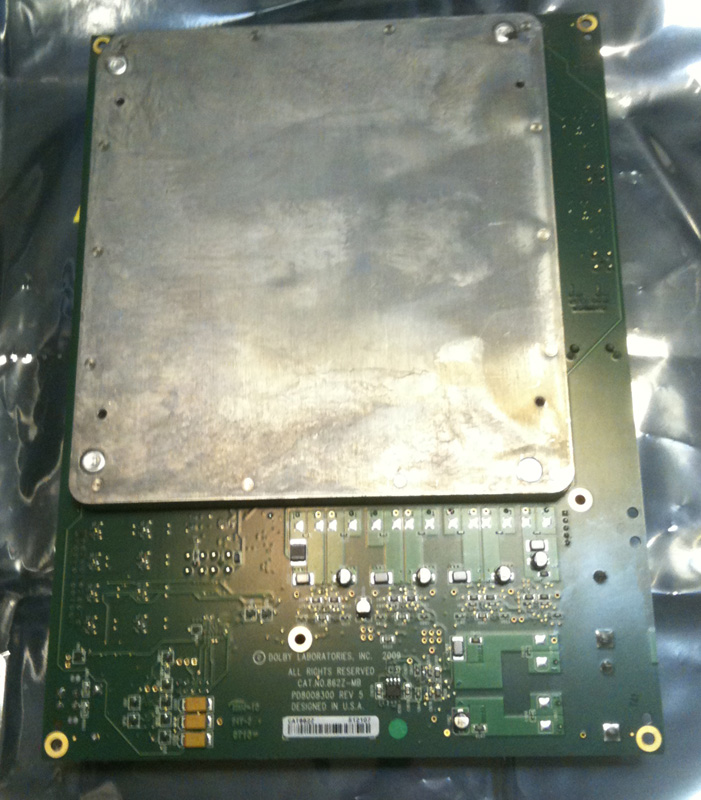
I was teasing Facebook friends with "I had no idea those things were so big" so for those who've never seen one, here it is, the legendary media block. About the size of a sheet of letter paper, it sits atop the rest of the Dolby server, fin side down. It is only directly connected to the server for power. Everything else is via the connections on the rear panel.

 -

 -

I point out the LEDs because none were lit on the bad one; at least two on the replacement.

 |  IP: Logged

Steve Kraus
Film God

Posts: 4094
From: Chicago, IL, USA
Registered: May 2000


 - posted 06-18-2014 12:34 PM      Profile for Steve Kraus     Send New Private Message       Edit/Delete Post 
In switching from 4.3.5(9) to 4.3.5(13), my CRU bay indicator LED flashes red/blue whenever there is a drive inserted and apparently regardless of usage. Is this a peculiarity of this software?

 |  IP: Logged

Marco Giustini
Film God

Posts: 2713
From: Reading, UK
Registered: Nov 2007


 - posted 06-18-2014 12:48 PM      Profile for Marco Giustini   Email Marco Giustini   Send New Private Message       Edit/Delete Post 
it's common with the CRU drives when they get nuts. Power cycle the system.

Did you get an 862 with version 4.3.9-13 on it? I was told that was not possible, had to upgrade a whole multiplex on a rush when one of their 862 crashed and the new one was on 4.4!!!

 |  IP: Logged

Steve Kraus
Film God

Posts: 4094
From: Chicago, IL, USA
Registered: May 2000


 - posted 06-18-2014 01:07 PM      Profile for Steve Kraus     Send New Private Message       Edit/Delete Post 
I can't remember the number but it was the 862 software that goes with 13.

Right now I'm trying to work past the lengthy downloading security logs thing. The odd thing is that instead of a moving time bar it immediately says COMPLETED (519/519) with the actual number varying. It takes just over 3 minutes to go back to normal. There have only been a few hundred screenings done on this projector. Maybe a reboot of the projector will help.

Did 9 require manually setting Cinelink to TLS? I don't recall that. Nice to know they are on the ball against those who would tap into the cables between server and projector!

Edit to add:

Rebooting the projector and it came up with a Downloading Projector Security Logs and a normal moving % bar (to 512). I ran a 5 second test show and once again it goes back to the non moving bar (COMPLETED 512/512) and 3 minutes of waiting. Something is not right.

 |  IP: Logged

Brad Miller
Administrator

Posts: 17775
From: Plano, TX (36.2 miles NW of Rockwall)
Registered: May 99


 - posted 06-18-2014 03:41 PM      Profile for Brad Miller   Author's Homepage   Email Brad Miller       Edit/Delete Post 
Marco - Steve's cat862 came with 4.3.0.11 which translates to 4.3.5.13
He was previously running 4.3.0.9 with 4.3.5.9 which I prefer, but 4.3.5.13 isn't bad.

If you are on a VPF program, you HAVE to be "DCI compliant", which in Dolby-land translates to 4.4.x so that is probably why you were forced to upgrade. Alternatively the new cat862 came to you on 4.4.0.48 and for your complex to communicate with each other you had to upgrade the rest. (I think this latter is what actually happened to you. The reason is because once you to go 4.4.x you are stuck there. You can't go back to non-DCI-compliant software at 4.3.x).

All Dolby software through the last version of 4.3.x by default setup for DH in cinelink. This was on the assumption everyone was running series 1 projectors. You must use TLS for series 2.

Give projector and server a hard reboot at the same time. See if the logs don't go back to acting normally after a few plays of a short black clip.

 |  IP: Logged

Steve Guttag
We forgot the crackers Gromit!!!

Posts: 12814
From: Annapolis, MD
Registered: Dec 1999


 - posted 06-18-2014 05:34 PM      Profile for Steve Guttag   Email Steve Guttag   Send New Private Message       Edit/Delete Post 
Steve, you can "downgrade" to 4.3.5.9...just need the KDM...which Dolby will issue since that was available for your server when new. I've done numerous 4.3.5.13 back to 4.3.5.9...it is better, more stable in my experience.

 |  IP: Logged

Steve Kraus
Film God

Posts: 4094
From: Chicago, IL, USA
Registered: May 2000


 - posted 06-18-2014 05:35 PM      Profile for Steve Kraus     Send New Private Message       Edit/Delete Post 
@Brad: Thanks; will try. I did several soft restarts in the process of running the config script to manually set the auditorium address so VNC would respond, then again back to default on the off chance that played a role in the log business, then back to manual setting. And one projector restart amidst this. Very odd.

But it runs, it plays encrypted content, VNC is answering, and no unsupported flag on that DCP. Woot!

@Steve: That's an interesting possibility. I do have the stuff Norm sent. But maybe best not to mess with it?

 |  IP: Logged

Marco Giustini
Film God

Posts: 2713
From: Reading, UK
Registered: Nov 2007


 - posted 06-18-2014 06:37 PM      Profile for Marco Giustini   Email Marco Giustini   Send New Private Message       Edit/Delete Post 
I've seen the "completed" issue with 4.3.5-13, I believe it's a bug.

Brad, no VPF. An 862 broke down and a new one was ordered from Dolby. Asked for one with 4.3.x software and was told that all 862's were coming with 4.4 software - hence I had to upgrade the rest of the servers as well.

 |  IP: Logged

Steve Guttag
We forgot the crackers Gromit!!!

Posts: 12814
From: Annapolis, MD
Registered: Dec 1999


 - posted 06-18-2014 07:11 PM      Profile for Steve Guttag   Email Steve Guttag   Send New Private Message       Edit/Delete Post 
I'd mess with it...I've had too many problems with 4.3.5.13. 4.3.5.9 was really the best, most stable of them all.

 |  IP: Logged

Steve Kraus
Film God

Posts: 4094
From: Chicago, IL, USA
Registered: May 2000


 - posted 06-18-2014 09:52 PM      Profile for Steve Kraus     Send New Private Message       Edit/Delete Post 
Marco, is that bug simply with the display, that it says completed when it's actually doing something and will eventually go away once everything is transferred? Or am I stuck with a 3 minute delay before I get control back forever? I've been trying Brad's suggestion of running 5 second shows to clear things out but the numbers do not seem to be getting smaller.

 |  IP: Logged

Steve Guttag
We forgot the crackers Gromit!!!

Posts: 12814
From: Annapolis, MD
Registered: Dec 1999


 - posted 06-19-2014 05:44 AM      Profile for Steve Guttag   Email Steve Guttag   Send New Private Message       Edit/Delete Post 
Steve,

You need to run 16 shows to clear all of the logs out. Just set up 16 5-second shows spaced 5 minutes apart on a schedule...go away for an hour and half and you should be all done.

 |  IP: Logged

Steve Kraus
Film God

Posts: 4094
From: Chicago, IL, USA
Registered: May 2000


 - posted 06-19-2014 01:40 PM      Profile for Steve Kraus     Send New Private Message       Edit/Delete Post 
Done! I set up 10 4 second shows at 5 minute intervals but it only took a few to finish them off. Will ponder going back to 9 though. As I still have 9 on the old RAID drives, if I reset the 862 with the software Dolby gave me, I'd pop them in and know right away if it worked. But no going back without help from Dolby including KDMs.

Is it safe to presume that a Cat.862 is a Cat.862, not that the replacement demands newer software?

 |  IP: Logged


All times are Central (GMT -6:00)
This topic comprises 5 pages: 1  2  3  4  5 
 
   Close Topic    Move Topic    Delete Topic    next oldest topic   next newest topic
 - Printer-friendly view of this topic
Hop To:


Powered by Infopop Corporation
UBB.classicTM 6.3.1.2

The Film-Tech Forums are designed for various members related to the cinema industry to express their opinions, viewpoints and testimonials on various products, services and events based upon speculation, personal knowledge and factual information through use, therefore all views represented here allow no liability upon the publishers of this web site and the owners of said views assume no liability for any ill will resulting from these postings. The posts made here are for educational as well as entertainment purposes and as such anyone viewing this portion of the website must accept these views as statements of the author of that opinion and agrees to release the authors from any and all liability.

© 1999-2020 Film-Tech Cinema Systems, LLC. All rights reserved.