Film-Tech Cinema Systems
Film-Tech Forum ARCHIVE


my profile | my password | search | faq & rules | forum home
  next oldest topic   next newest topic
» Film-Tech Forum ARCHIVE   » Operations   » Digital Cinema Forum   » Dead DSS100 (Page 4)

 
This topic comprises 6 pages: 1  2  3  4  5  6 
 
Author Topic: Dead DSS100
Mark Gulbrandsen
Resident Trollmaster

Posts: 16657
From: Music City
Registered: Jun 99


 - posted 11-02-2017 12:20 PM      Profile for Mark Gulbrandsen   Email Mark Gulbrandsen   Send New Private Message       Edit/Delete Post 
Stephen,

That was my intention except 3-Ware had been sold at the time I believe to LSI. And that card was out of production and the short time I spent searching for a used one turned up nothing. I had to get that screen back in operation again as it had already been down for two days. It was also not a very popular card even at the time according to the people I spoke to at LSI. Now it appears that Broadcom owns LSI/3-Ware... Sheesh, these are all some really unstable companies. I wonder who is in line to purchase Broadcom now? I have LSI 8888ELP raid cards in all my computers here at home [Eek!]

Mark

 |  IP: Logged

Steve Guttag
We forgot the crackers Gromit!!!

Posts: 12814
From: Annapolis, MD
Registered: Dec 1999


 - posted 11-02-2017 03:13 PM      Profile for Steve Guttag   Email Steve Guttag   Send New Private Message       Edit/Delete Post 
So let me get this straight. A "...not a very popular card even at the time according to the people I spoke to at LSI" that I can get now, years later (from multiple sources), YOU couldn't find anywhere?

Face it, you didn't/don't like Dolby (or however you spell it in a post) and were predisposed to sell your customer on a GDC and it didn't take much for you to forgo a couple hundred dollar solution in the name of a several thousand dollar solution. Not because it isn't or wasn't supportable but because YOU didn't want to support it.

And honestly, that is fine too. You can (as anyone else) can like or dislike whatever or whomever you want. There is just no need to lie about it. I've told customers that I prefer certain products over others and why and have taken the opportunity of a failure to have them switch but I've never resorted to fabricating a story to accomplish it.

I can, quite truthfully, tell you a story of two IMB failures where, heading into a holiday weekend, the IMB manufacturer could not supply replacements (FIPS error) such that this twin theatre would have been 100% down, if I didn't do anything about it and was able to have DSS200 servers sent in to get them going (and they've been going ever since). The replacement IMBs (they were still in warranty) didn't show for another 3 weeks or so! It happens.

I'm up to two DSP100 failures (both repaired) and one CAT862 failure (repaired). The DSS line remains the most reliable I deal with. It is a shame they discontinued it.

 |  IP: Logged

Mark Gulbrandsen
Resident Trollmaster

Posts: 16657
From: Music City
Registered: Jun 99


 - posted 11-02-2017 06:29 PM      Profile for Mark Gulbrandsen   Email Mark Gulbrandsen   Send New Private Message       Edit/Delete Post 
quote: Steve Guttag
So let me get this straight. A "...not a very popular card even at the time according to the people I spoke to at LSI" that I can get now, years later (from multiple sources), YOU couldn't find anywhere?
I have no idea if THAT card is easy to get now or not through normal channels, nor do I really care because it's a dinosaur now. There was but one possibility on Epay at the moment I found, and I can't remember if it's the exact card or not, but minus the battery it is similar. Today it is a very uncommon card because it set for an old style buss that no one uses. Most of them have since been junked. It is not the LSI card that I use in my home computers which are. The cards I use are 6gbps and are PCIe form.
The rest of this is irrelevant, The server failed, Dolbly couldn't supply parts to get it back up, it was replaced with another server and it became a door stop, plus I still had Norms original email to support what I said.

Case closed!

Mark

 |  IP: Logged

Scott Norwood
Film God

Posts: 8146
From: Boston, MA. USA (1774.21 miles northeast of Dallas)
Registered: Jun 99


 - posted 11-02-2017 06:54 PM      Profile for Scott Norwood   Author's Homepage   Email Scott Norwood   Send New Private Message       Edit/Delete Post 
It seems to me that part of the lesson here is that specialized hardware is difficult to support in a small industry. Since I work in IT, I will point out that all of the major vendors can supply parts (and an installation technician) in twenty-four hours on pretty much anything, and they offer (at much higher prices) service contracts with four-hour response times.

Maybe the solution is just to move to servers based on standard Dell/HP/IBM hardware and let those vendors support the "computer" part. No customer of those companies would need to be down for more than a day at most, even with the standard service contracts (although weekends usually aren't covered, which might be a problem). That would just leave the projector interface hardware and the projector itself in need of specialized support.

Why should Dolby/GDC/etc. need to be in the business of stocking standard computer hardware when Dell/IBM/HP and their associated companies are able to do a better job of it on a much larger (and cheaper) scale?

 |  IP: Logged

Steve Guttag
We forgot the crackers Gromit!!!

Posts: 12814
From: Annapolis, MD
Registered: Dec 1999


 - posted 11-03-2017 01:37 AM      Profile for Steve Guttag   Email Steve Guttag   Send New Private Message       Edit/Delete Post 
quote: Mark Gulbrandsen
I still had Norms original email to support what I said.
Well actually it doesn't and you changed your story yet again. It is no longer that Dolby didn't have any cards to they wouldn't sell you any from their service center because they had to have stock to repair any units sent in. You claim the card was only possibly available on eBay (that wasn't and isn't the case, it is available through some the usual computer supply sources that carry 3WARE stuff). Availability should go down with time, not up and yet here they are to this day. You got caught in another lie; stop squirming. Case closed.

Scott,

About all that was specialized hardware is the mediablocks. The early servers "suffered" from an ill defined set of security requirements. So some of this specialized hardware, at first, was to maintain some form of physical control. Another reason to build things in-house is to control your product obsolescence, to a degree (semiconductors can still bite you). That said, you can see that most of them moved, indeed, to relatively common server frames and just added their mediablock to make it DCinema. In the case of Dolby, the DSS200 and DSS220 are Supermicro servers (peel back the Dolby sticker and you'll see it). Dolby's big modification was the front status/USB module, that it was equipped with a CRU drive and DVD drive and the plastic face plate.

As most servers have moved to the IMB (IMS) style, the traditional server chassis is just about gone. It is now a mediablock with some means of storage (internal drives or drives attached via eSATA, or NAS).

The TMS/LMS servers, by and large are indeed standard name brand servers (IBM, DELL, HP) running the TMS software. That said, there is no guarantee that you are protected there. We have a couple sites that still use the IBM servers configured by InSight for the Cinedigm system and the support for them now that they are beyond 5-years is relatively poor unless you want to spend silly money. To a degree, it is like my experience above in that we had a server that was becoming flaky. The LMS drive was not always attaching. All evidence pointed to the RAID controller. The IBM people wanted multiple thousands to just go out to the site, diagnose and potentially fix (no guarantees). We were able to source the RAID controller conventionally, and it is back up to reliable. My experiences with the Dell based servers have been better (both in performance and interacting with their support people though they have some definite losers in their field techs too).

 |  IP: Logged

Steve Kraus
Film God

Posts: 4094
From: Chicago, IL, USA
Registered: May 2000


 - posted 11-08-2017 01:08 AM      Profile for Steve Kraus     Send New Private Message       Edit/Delete Post 
I continue to play with the 100 from time to time. I've taken a two-pronged approach on this.

One approach is to reload the software from the CD-R. Alas, nothing happens. I have verified that it is in fact reading the disk by doing a one time boot with all RAID drives pulled and disconnecting the cable from the SSD. The point of doing that is that I still saw something about Debian Linux which must come from the CD, the same message I ultimately see booting from the CD with drives connected normally. It gets that far then just sits.

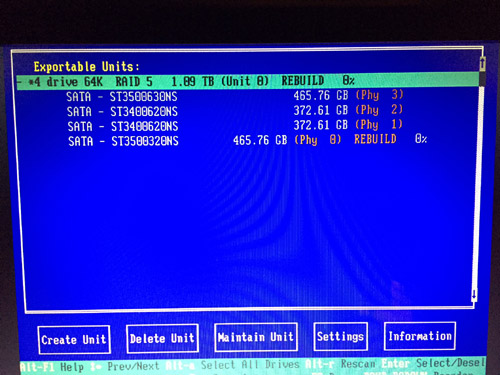
The other approach is to see if it will rebuild the array. If it was working normally it should still start on the degraded array but anyway, although I have my doubts that Drive 0 is bad (have not yet tested it elsewhere) I did swap in a replacement and got into the 3WARE setup to tell it to rebuild the array but have been unsuccessful. Actually I'm not sure where to go from this point.

 -

I exit but then nothing seems to happen other than the start up going nowhere as before. Or should one wait at that screen? I've tried both. Does getting into this setup imply that the RAID controller is in fact working?

 |  IP: Logged

Adam Martin
I'm not even gonna point out the irony.

Posts: 3686
From: Dallas, TX
Registered: Nov 2000


 - posted 11-08-2017 10:06 AM      Profile for Adam Martin   Author's Homepage   Email Adam Martin       Edit/Delete Post 
You have a mix of different drives in your RAID: 2x 400GB and 2x 500GB.

While this *should* not really matter to a hardware array (it *should* create an array defined by the smallest drive and ignore the extra space on the larger drives), this could be pissing something off in the Dolby software.

However, if the array was built when there were 4x 500GB drives, the 400GB drives will break it. Have you tried deleting the entire array from the RAID BIOS and recreating it (rather than just trying to rebuild) to ensure it builds the array using only 400GB of space on each drive? Note: Deleting the array will delete everything you have stored on it.

 |  IP: Logged

Steve Kraus
Film God

Posts: 4094
From: Chicago, IL, USA
Registered: May 2000


 - posted 11-08-2017 02:28 PM      Profile for Steve Kraus     Send New Private Message       Edit/Delete Post 
Of course I only replaced one drive so it was running with dissimilar drives all along. So I tried what you suggested, deleted and created. I saw the warning about data destruction and proceeded. But I didn't see it actually do anything and I am unclear when this action should occur...when I tell it to do this or after I exit with F8? Doesn't RAID creation take some time? Should something be displayed to indicate something happening. After exiting again, it goes to a blank screen. And rebooting with the CD in the drive (eventually) gives me a message about Linux and then it goes to a blank screen.

 |  IP: Logged

Dave Macaulay
Film God

Posts: 2321
From: Toronto, Canada
Registered: Apr 2001


 - posted 11-08-2017 04:18 PM      Profile for Dave Macaulay   Email Dave Macaulay   Send New Private Message       Edit/Delete Post 
Booting from the install cd - either upgrade or full install - should show console text saying what is happening. One of the first things is checking the RAID card firmware version and updating that if necessary (I have never had one do an upgrade, version has always been OK).
Are you sure the cd drive is before the boot ssd in bios setup? It may be trying to boot from a bad or corrupt ssd? First text is "uncompressing linux" I think, on all Linux servers. After that the boot crawl races by on a DSS, Doremi scrolls it slow enough to read some.
I am not sure about on a DSS but initializing a raid array usually takes some time with all physical drives churning. A Doremi with four 2TB drives takes several hours, my home NAS with two 2TB drives takes about 30 minutes but it is just raid 0 (I think, just mirroring anyway).

 |  IP: Logged

Adam Martin
I'm not even gonna point out the irony.

Posts: 3686
From: Dallas, TX
Registered: Nov 2000


 - posted 11-08-2017 04:19 PM      Profile for Adam Martin   Author's Homepage   Email Adam Martin       Edit/Delete Post 
The unit deletion and creation are immediate (following any warnings). Once the new unit is created, you should be able to Alt-R to rescan and it will show the RAID unit (now with a label of "Unit 0") and it may show "Verifying" or not. The RAID firmware version should not matter, as the install disk will set it to what Dolby wants, along with various settings such as weekly verification of the array.

It sounds like the RAID is okay, so working backward I would look at the flash memory that holds the OS on the DSS100. I'm not sure what it is since I don't have a 100 handy. Can you post a model number and/or photo of what's in there?

After the CD starts and shows ISOLINUX (later versions show a Dolby logo on the screen here), the screen should briefly go blank followed by

quote:
INIT: version 2.86 booting
(booting gobbledygook)
INIT: Entering runlevel: 2

Then it should show a hardware detection such as

quote:
no flash detected.
Running on a DSS200
Running Install CD

Dolby D-Cinema System Software Version 4.3.5 (13)

Checking the RAID controller firmware revision.
3Ware 9650 controller detected.
Erasing RAID partition data...done.
Searching for healthy RAID...found - will reuse.
Partitioning RAID...

If you see the ISOLINUX info and then nothing, I'm not sure what's causing it to hang. How long have you given it after it hangs there? Two minutes or two hours?

Spitballing ... What happens if you remove the flash memory and try to run the install disk? Removing the flash memory *might* make it think it's running on a DSS200 and it may try to install the OS on the RAID. I know that I can make a DSS220 think it's a DSS200 by adding a RAID card.

 |  IP: Logged

Steve Kraus
Film God

Posts: 4094
From: Chicago, IL, USA
Registered: May 2000


 - posted 11-10-2017 07:45 AM      Profile for Steve Kraus     Send New Private Message       Edit/Delete Post 
As I recall, on attempting to start from the CD, it says something about Debian Linux. When you say flash memory, do you mean the IDE SSD or is there something else?

Dave: I did do an experiment with all RAID drives pulled and the SSD cable unplugged and got the same line about Debian Linux which I accepted as proof it was in fact running from the CD since that would have to come from somewhere.

I'm thinking of taking all five drives to a PC and erasing them.

 |  IP: Logged

Marco Giustini
Film God

Posts: 2713
From: Reading, UK
Registered: Nov 2007


 - posted 11-11-2017 05:38 AM      Profile for Marco Giustini   Email Marco Giustini   Send New Private Message       Edit/Delete Post 
The install disk will re-use the existing RAID parition if it finds it healthy. It may be worth removing the partitions and let the software re-create everything in case something went wrong (I believe you can wipe those partitions from the screen you posted above). Being a HW controller, it will take a few moments, then the RAID will be in a "initialising" state for a while but - if memory serves - you can use the RAID straight away.

Mixed drives won't affect your RAID. I personally don't like the idea but I've seen that all the time and it works.

Finally, you may have a slightly bad drive/s. I've seen many times RAID controllers getting confused by those almost-dead drives which will prevent rebuilding etc. If you have logs, check the SMART data and see if all drives are actually healthy. Failing that you can check the status via command prompt accessing the RAID console - but you'll need the SW running first.

If you are happy to delete your content your first step is definitely to reinstall.

 |  IP: Logged

Leo Enticknap
Film God

Posts: 7474
From: Loma Linda, CA
Registered: Jul 2000


 - posted 11-12-2017 09:48 PM      Profile for Leo Enticknap   Author's Homepage   Email Leo Enticknap   Send New Private Message       Edit/Delete Post 
Agreed with Steve. If you don't need any of the content on the RAID, hook the drives to an Ubuntu PC and rewrite their partition tables using PartEd or GPartEd. The clean install ISO will then start afresh, and not be confused by anything that may have been on the RAID previously.

I once had to do this after replacing one bad drive in a 220. Even though I shut down the machine properly (ctrl/alt/F1, then ctrl/alt/del and wait for the fan surge - not just pulling the power cords), the boot process stalled before Show Manager came up after I'd replaced the center drive. Given that this machine was on a network with a TMS (and thus would be force fed through the network with all its DCPs, automation cues, etc. after a clean install and reconfig), I decided not to mess around, and nuked all three drives and then clean installed the software image. It's worked without any troubles ever since.

 |  IP: Logged

Steve Guttag
We forgot the crackers Gromit!!!

Posts: 12814
From: Annapolis, MD
Registered: Dec 1999


 - posted 11-13-2017 06:17 AM      Profile for Steve Guttag   Email Steve Guttag   Send New Private Message       Edit/Delete Post 
You can also wipe the drives using the "diskpart" utility in windows.

 |  IP: Logged

Steve Kraus
Film God

Posts: 4094
From: Chicago, IL, USA
Registered: May 2000


 - posted 11-14-2017 08:11 PM      Profile for Steve Kraus     Send New Private Message       Edit/Delete Post 
Are we having fun yet?

I took the RAID drives to another computer and ran DISKPART "clean all" on all four. I also did DISKPART "clean" on the SSD. Still not reloading the system. I can see it read the CD for a bit but all I get is a line about Debian Linux, then a black screen.

 |  IP: Logged


All times are Central (GMT -6:00)
This topic comprises 6 pages: 1  2  3  4  5  6 
 
   Close Topic    Move Topic    Delete Topic    next oldest topic   next newest topic
 - Printer-friendly view of this topic
Hop To:


Powered by Infopop Corporation
UBB.classicTM 6.3.1.2

The Film-Tech Forums are designed for various members related to the cinema industry to express their opinions, viewpoints and testimonials on various products, services and events based upon speculation, personal knowledge and factual information through use, therefore all views represented here allow no liability upon the publishers of this web site and the owners of said views assume no liability for any ill will resulting from these postings. The posts made here are for educational as well as entertainment purposes and as such anyone viewing this portion of the website must accept these views as statements of the author of that opinion and agrees to release the authors from any and all liability.

© 1999-2020 Film-Tech Cinema Systems, LLC. All rights reserved.