Film-Tech Cinema Systems
Film-Tech Forum ARCHIVE


my profile | my password | search | faq & rules | forum home
  next oldest topic   next newest topic
» Film-Tech Forum ARCHIVE   » Operations   » Digital Cinema Forum   » Dead DSS100 (Page 5)

 
This topic comprises 6 pages: 1  2  3  4  5  6 
 
Author Topic: Dead DSS100
Carsten Kurz
Film God

Posts: 4340
From: Cologne, NRW, Germany
Registered: Aug 2009


 - posted 11-15-2017 05:46 AM      Profile for Carsten Kurz   Email Carsten Kurz   Send New Private Message       Edit/Delete Post 
Change the cd drive, burn another CD, or source a dependable one from elsewhere. Could be an older version as well, just to check the boot/installer.

- Carsten

 |  IP: Logged

Steve Kraus
Film God

Posts: 4094
From: Chicago, IL, USA
Registered: May 2000


 - posted 11-15-2017 10:54 AM      Profile for Steve Kraus     Send New Private Message       Edit/Delete Post 
Maybe I will try a different drive or pull it and test it on another computer. But I had been working on the assumption that the optical drive is good because when I pulled all RAID drives AND disconnected the SSD, booting with the setup CD got me to that same line about Debian Linux and I don't know where it would be coming from if not the CD.

But I must fully eliminate each possibility one at a time. I have two different setup disks, both of which have been used on successfully at different times on my DSS200.

 |  IP: Logged

Stephan Shelley
Jedi Master Film Handler

Posts: 854
From: castro valley, CA, usa
Registered: Nov 2014


 - posted 11-15-2017 08:56 PM      Profile for Stephan Shelley   Email Stephan Shelley   Send New Private Message       Edit/Delete Post 
Have to ask, the upgrade/install disks your using are not ver 4.8.x is it. It will not work on a DSS 100

 |  IP: Logged

Steve Kraus
Film God

Posts: 4094
From: Chicago, IL, USA
Registered: May 2000


 - posted 11-17-2017 01:36 PM      Profile for Steve Kraus     Send New Private Message       Edit/Delete Post 
I have disks for 4.3.5(9) and 4.3.5(13).

After all the booting blather I see it read the optical drive and it ends up with this line. Then it goes black. No scroll of endless Linux and Dolby stuff.

 -

My recent experiments as follows:

Connected the optical drive to a PC (with a USB adapter since the host did not support IDE) and it seemed to be fine.

Just for fun, put in a Windows XP Pro setup disk (full version not tied to any mfg). It only got as far as the Windows Setup starting line. I was actually hoping it would run and I'd be posting this from the DSS. More realistically, I was expecting it would try to set up and stop for lack of proper drivers. Tried it also with an actual HD in place of the SSD but I had issues getting that to work. (Also tried the DSS setup that way.) Not sure why it went no further but maybe something in the BIOS is custom to Dolby. I've seen postings on FT on both sides of the question about whether the BIOS is custom.

I put the SSD on a PC in place of that machine's HD...no other HD's connected for this experiment. I put in the DSS setup disk and it did actually try to load...with lots of errors but still. Finally got to the point where it was trying something that wasn't happening and it just started putting dots . . . . on the screen.

Next experiment will be to take the SSD to a PC, format it and make sure it can be written to. I think the experiment above says it's okay but who knows? Then clean it again.

I will also try a different HD cable on the DSS. Who knows. This whole thing could come down to that.

But that's where things are at.

 |  IP: Logged

Stephan Shelley
Jedi Master Film Handler

Posts: 854
From: castro valley, CA, usa
Registered: Nov 2014


 - posted 11-17-2017 01:41 PM      Profile for Stephan Shelley   Email Stephan Shelley   Send New Private Message       Edit/Delete Post 
Can you post a boot order screen like I did?

Prior to 4.3.5.x the operating system was on the flash IDE drive. Starting with 4.3.5.x it is on the raid with a pointer installed on the flash IDE drive. the flash drive remains as the boot device. It is possible you are seeing the remains of the operating system there on the flash drive.

 |  IP: Logged

Steve Kraus
Film God

Posts: 4094
From: Chicago, IL, USA
Registered: May 2000


 - posted 11-18-2017 02:36 AM      Profile for Steve Kraus     Send New Private Message       Edit/Delete Post 
Yes, I'll get a screen grab next time I'm there. It's definitely set for optical drive first. I did run Windows DISKPART "clean" on the SSD. Now doing a "clean all" for good measure.

 |  IP: Logged

Marco Giustini
Film God

Posts: 2713
From: Reading, UK
Registered: Nov 2007


 - posted 11-18-2017 04:17 AM      Profile for Marco Giustini   Email Marco Giustini   Send New Private Message       Edit/Delete Post 
Diskpart should indeed clean everything but I agree with Stephan. If you see "ISOLINUX" it means it's booting from somewhere.
Did you try burning a new CDROM?

 |  IP: Logged

Steve Kraus
Film God

Posts: 4094
From: Chicago, IL, USA
Registered: May 2000


 - posted 11-18-2017 09:23 AM      Profile for Steve Kraus     Send New Private Message       Edit/Delete Post 
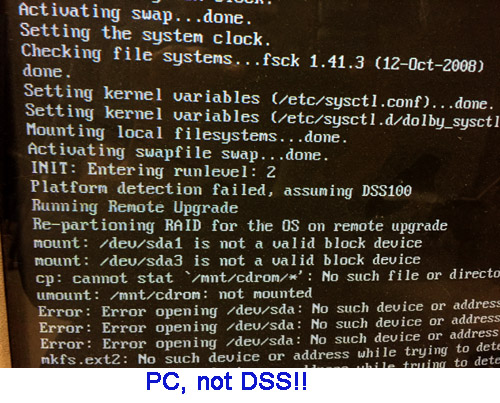
There are two CD/R's with two different versions. No reason to suspect both have gone bad. (Both have been used to successfully install the system on my regular server, the DSS200.) I did recently put one of them onto a PC where I substituted the DSS100's SSD for the normal HD and it did proceed to try to install. Unsuccessfully of course but I did see the reams of Linux and Dolby text scroll by before it ended in an endless series of dots. On the DSS100, it never gets past the line of text about Debian Linux. It just goes black.

This is what it looks like "installing" on a PC with the DSS SSD in place of the HD.

 -

I especially like the "assuming DSS100" line. Does this tell us anything? No. Well, actually yes, in fact it does.

Besides that the CD is readable, it tells me that to get this far one only needs a motherboard, an optical drive and an SSD drive. The lack of the other components that make a DSS a DSS doesn't stop this stuff from scrolling up the screen. As I apparently have a functional motherboard and the SSD and optical drives check out okay on a PC (and the SSD has been cleaned) then there must be some issue with how the SSD connects. I will start looking in that direction. I note that this could also explain why the attempt to load WinXP failed without even getting started.

 |  IP: Logged

Adam Martin
I'm not even gonna point out the irony.

Posts: 3686
From: Dallas, TX
Registered: Nov 2000


 - posted 11-18-2017 10:37 AM      Profile for Adam Martin   Author's Homepage   Email Adam Martin       Edit/Delete Post 
Also in the BIOS, check that the appropriate drive ports are all enabled and try toggling any BIOS/UEFI boot mode setting.

Last night I replaced the CMOS battery on a Dell server and found that it strangely remembered some settings and forgot others, including the SATA port settings.

It would be useful (now, and for future reference) if someone with a working DSS100 handy could post a complete list of working BIOS settings.

 |  IP: Logged

Dave Macaulay
Film God

Posts: 2321
From: Toronto, Canada
Registered: Apr 2001


 - posted 11-18-2017 02:01 PM      Profile for Dave Macaulay   Email Dave Macaulay   Send New Private Message       Edit/Delete Post 
I don't think the disk is bad, but whaat about the DSS CD/DVD drive? They don't generally get used much and get stiff and dirty just sitting there.
And... don't boot from the install disk in a PC unless you disconnect the system drive - or connect a DSS SSD. It goes through the first bit of installing itself on your PC before it realizes "hey that's not a DSS!" and stops... but by then the system drive has been reformatted with assorted partitions formatted for Linux. And if it was your PC system drive... "was" is the operative term.

 |  IP: Logged

Steve Kraus
Film God

Posts: 4094
From: Chicago, IL, USA
Registered: May 2000


 - posted 11-18-2017 08:18 PM      Profile for Steve Kraus     Send New Private Message       Edit/Delete Post 
Thanks Dave but I did address all of those issues. The optical drive was attached to a PC and worked fine. The test of trying to "install" on a PC was done with the DSS100's SSD only in place of the normal HD.

 |  IP: Logged

Marco Giustini
Film God

Posts: 2713
From: Reading, UK
Registered: Nov 2007


 - posted 11-19-2017 02:55 PM      Profile for Marco Giustini   Email Marco Giustini   Send New Private Message       Edit/Delete Post 
interesting.

What I would try
- Try burning another disc anyway
- Try removing the RAID cards and boot without them. It won't install but your disc is not even trying to load Linux.
- Re-seat DIMM modules
- Re-Seat all cables in the unit
- Does that motherboard have a "boot menu" option? You want to make sure it is indeed booting up from your DVD drive.

BTW, what happens if you boot it up without the disc in? Do you see anything on screen?

 |  IP: Logged

Marcel Birgelen
Film God

Posts: 3357
From: Maastricht, Limburg, Netherlands
Registered: Feb 2012


 - posted 11-19-2017 11:59 PM      Profile for Marcel Birgelen   Email Marcel Birgelen   Send New Private Message       Edit/Delete Post 
The ISOLINUX line you see is from the bootloader on the CD-ROM. The fact it stops right there is an indication it cannot load and execute the kernel from the CD. If the CD is the right CD, your problem is most likely an incompatible or defective optical drive.

The scrolling text that follows roughly consists of two parts.

The first one is the Linux kernel itself, as it is initializing itself and it is probing for devices in the machine and loading the accompanying device drivers.

Once that's done, stuff gets handed over to "init", which will execute the necessary boot scripts to get your system up and running. It's also here where filesystems get mounted, IP addresses get set, daemons get loaded, etc.

During your experiment to install the DSS software on the PC, you get stuck in this part. The problem here is that Dolby's installer expects a very specific hardware layout. You'll be having a hard time matching those with what the installer expects.

In this case, it seemingly expects your CD-ROM to be on /dev/sda, but presumably, your SSD is there.

 |  IP: Logged

Steve Kraus
Film God

Posts: 4094
From: Chicago, IL, USA
Registered: May 2000


 - posted 11-20-2017 08:35 AM      Profile for Steve Kraus     Send New Private Message       Edit/Delete Post 
Not sure how the optical drive can be incompatible as it is the drive that was there. It's an old DSS that I acquired and I suppose someone could have replaced it with a non compatible device. I've never loaded the system on this DSS before so hypothetically that could be true but seems very unlikely. And it is reading the disk sufficiently to get that line about Linux.

As for the optical drive being defective, I did test it on a PC and it was fine. And, again, it does read enough to get that one line.

Marco: Booting with no disk shows the usual BIOS stuff (I have it currently set to show everything), then the 3WARE RAID installation, and then there is another press this to enter setup where, if you do, you get a choice whether to follow the BIOS boot selection or not among a few other things.

 |  IP: Logged

Dave Macaulay
Film God

Posts: 2321
From: Toronto, Canada
Registered: Apr 2001


 - posted 11-20-2017 01:42 PM      Profile for Dave Macaulay   Email Dave Macaulay   Send New Private Message       Edit/Delete Post 
I'm not sure if it's available for a DSS100, but can you try the FTP installation procedure?

 |  IP: Logged


All times are Central (GMT -6:00)
This topic comprises 6 pages: 1  2  3  4  5  6 
 
   Close Topic    Move Topic    Delete Topic    next oldest topic   next newest topic
 - Printer-friendly view of this topic
Hop To:


Powered by Infopop Corporation
UBB.classicTM 6.3.1.2

The Film-Tech Forums are designed for various members related to the cinema industry to express their opinions, viewpoints and testimonials on various products, services and events based upon speculation, personal knowledge and factual information through use, therefore all views represented here allow no liability upon the publishers of this web site and the owners of said views assume no liability for any ill will resulting from these postings. The posts made here are for educational as well as entertainment purposes and as such anyone viewing this portion of the website must accept these views as statements of the author of that opinion and agrees to release the authors from any and all liability.

© 1999-2020 Film-Tech Cinema Systems, LLC. All rights reserved.