|
|
This topic comprises 5 pages: 1 2 3 4 5
|
|
Author
|
Topic: QSYS Corner
|
|
|
|
|
Steve Guttag
We forgot the crackers Gromit!!!

Posts: 12814
From: Annapolis, MD
Registered: Dec 1999
|
 posted 02-23-2019 09:10 PM


Q-TIP:
The CORE 110c (and 110f) may be the most economical core, has 8 mic/line inputs, 8 flex channels (can be any combination of inputs and outputs) and 8 outputs, handles 64-streaming channels and up to 128 inputs and outputs but a potential "gotcha" is the inputs (both flex and regular) used exclusively on the CORE 110.
If you are feeding it (and again it is only from its own inputs, not any other peripheral) an unbalanced signal, it has a hard ceiling of +8dBu. (This does not affect balanced signals, which can go up to +21dBu).
Why can this be a gotcha when most unbalanced sources are -10dBV? Well, for one -10dBV = .316V = -7.79dBu (consumer is based on a 1V reference, professional is based on .775V reference so pay attention to the little letter after the "dB").
If your source can play +20dB from its reference (say a CD or Blu-ray player), then you have the potential to hit 12.21dBu unbalanced! That will clip the inputs. So you may need to lower the output of your unbalanced device by 5-6dB. You can get that gain back within the core by raising preamp gain (sensitivity), if needed. Sure it isn't the most ideal situations but the noise specs are so good on the core 110, you aren't going to take a big hit. Remember that is a mic/line preamp, it is fully capable of amplifying a microphone 10s of dB lower in level.
The other potential source for cinemas is a film sound processor. That overwhelming majority of (film) cinema processors are unbalanced (all Dolby processors except the CP650), All USL processors before the JSD series, all SMART processors...etc. So, if you have one of the various digital sound formats, you have to pay attention to levels too. Note, cinema marched to its own tune and typically used a reference level of 300mV (-8.2dBu). So again, lowering your level by 5dB or so should scoot the signal in without clipping. Note too, Dolby digital only went to +18dB so you could merely lower things by 2-3dB and be safe. I don't know if DTS went the full +20dB over reference. Better to play it safe and drop the level and make it up on the preamp.
USL processors like the JS-280 used a .775V reference (0dBu) and unbalanced so you have to go lower for them, if using them.
Again, the balanced processors, like the CP650, Panastereo and JSD80 can use the full 21dBu capability of the input...which will be right there with 0dBu reference level, they will get to +20dBu
Note, if you are using a DCIO (-H) with the core 110, its stereo unbalanced (TRS) connector is good up to +15dBu so it isn't an issue. And, if you are using one of the mic/line inputs on one of the DPA-Q amplifiers, again, the input stage is different and can handle unbalanced signals just fine in the levels we would typically use.
| IP: Logged
|
|
|
|
|
|
|
|
|
|
|
|
Harold Hallikainen
Jedi Master Film Handler
Posts: 906
From: Denver, CO, USA
Registered: Aug 2009
|
posted 04-29-2019 11:58 AM

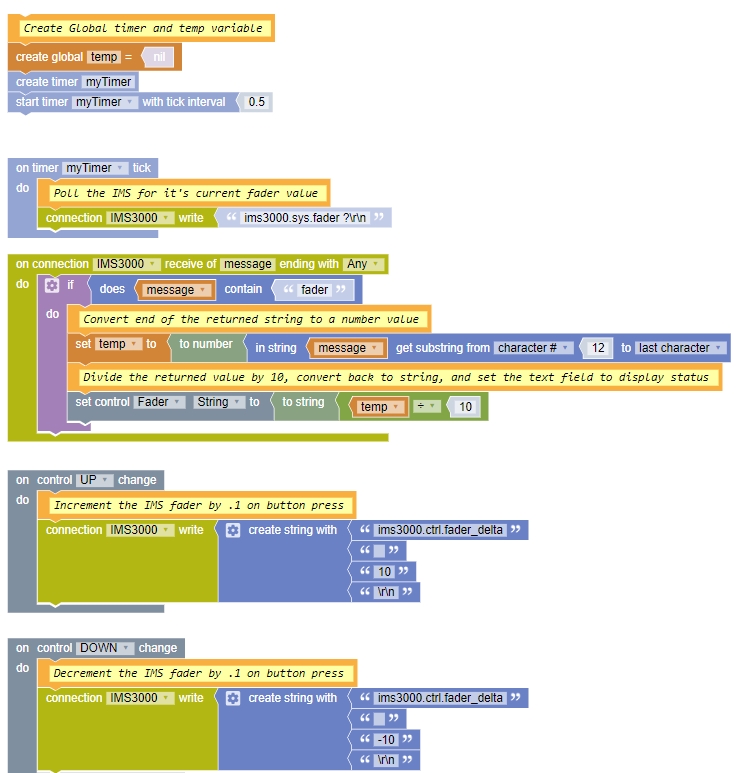
The actual level control is happening in the external sound processor, right? The IMS is only sending commands to that external processor and polling it to see what the current level is in case someone changed it there. On "moving pots," most, if not all, sound processors use a quadrature encoder for the fader knob, so there is no need to move it if a level is changed somewhere else. Instead, a display next to the knob is updated to show the current level.
By the way, the JSD-100 and JSD-60 have commands that return a bit mapped value of changes so you don't have to poll a bunch of stuff. Instead, you just poll Delta Bits. For example,
jsd100.sys.delta
Returns an unsigned decimal representation of a 32 bit bitmap of what has changed since the last read of delta, then clears delta. A separate delta is maintained for each connection to the JSD-100. The bit indicated in the list below is set if that parameter has changed.
0 - Bass
1 - Back Surround Source
2 - Equalization
3 - Channel Configuration (LC/RC versus BSL/BSR)
4 - EQ Set
5 - Fader Level
6 - Fader Preset (one of the fader presets was changed
7 - Generator (on/off, frequency, etc.)
8 - Headroom Setting
9 - Input Mode (format select)
10 - Input Mode Name (displayed string for a format)
11 - Input Trim
12 - Mute
13 - Output Trim
14 - Parametric EQ (something was changed)
15 - Surround Delay
16 - Sync Delay
17 - Treble
18 - AES error code
19 - A new message has been saved using jsd100.sys.message
20 - The sleep state changed. Either the system went to sleep or it woke up.
jsd60.sys.delta
Returns an unsigned decimal representation of a 32 bit bitmap of what has changed since the last read of delta, then clears delta. A separate delta is maintained for each connection to the JSD-60. The bit indicated in the list below is set if that parameter has changed.
Bit Meaning
0 Equalization
1 Fader Level
2 Fader Preset (one of the fader presets was changed
3 Generator (on/off, frequency, etc.)
4 Headroom Setting
5 Input Mode (format select)
6 Input Mode Mix (input source mix for a format)
7 Input Mode Name (displayed string for a format)
8 Input Trim
9 Mute
10 Output Trim
11 Channel Delay (normally used as surround delay)
12 Sync Delay
13 XO - A change was made in the crossover, including enabling or disabling (jsd60.sys.biamp)
14 AES error state changed. This is set if digital data appeared or disappeared on the current format. AES/EBU checks L/R (SRC 1). Everything else checks SRC 4.
15 Channel phase or band phase changed.
16 Channel mute or band mute changed.
17 Channel name changed.
18 Input source changed (jsd60.sys.input_source FormatIndex source)
19 Active Matrix changed (jsd60.sys.active_matrix FormatIndex 0|1 )
20 Channel Filter changed.
21 Fade Up or Fade Down rate changed.
22 A BLU link setting has changed.
Harold
| IP: Logged
|
|
Steve Guttag
We forgot the crackers Gromit!!!
Posts: 12814
From: Annapolis, MD
Registered: Dec 1999
|
posted 04-29-2019 12:23 PM
Harold,
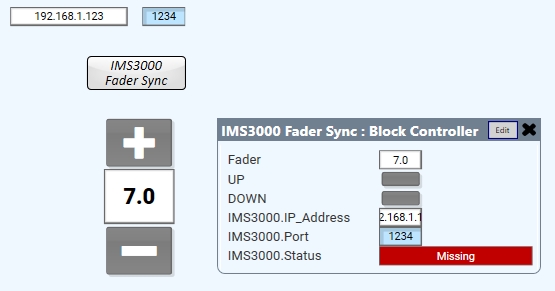
The IMS3000 is a combination server and sound processor all rolled into one.
In a more complex system, like the one I'm currently working on, more than DCP audio has to be considered (e.g. Dante). I don't want multiple volume controls, necessarily, based on the input path of the audio so I'd rather have the volumes track so there is the one master volume (one can always put in trims to balance things out the way they want them).
Dolby has done "delta" commands too so one can increment "0.1" if desired.
The goal, for me, on this project, is that there be ONE volume control even though there really are going to be, at least, 2, but to the user it should "feel" like there is just the one.
| IP: Logged
|
|
|
|
|
|
|
|
Leo Enticknap
Film God

Posts: 7474
From: Loma Linda, CA
Registered: Jul 2000
|
posted 04-30-2019 02:38 PM
Which is great, because I have a customer who wants a CP8850 fader on his Q-Sys UCI.
Incidentally, I just hit an interesting bug with version 8.0. After installing it, if I edit the shortcut that the installer puts on the desktop to add the /cinema suffix, that shortcut won't start Designer in cinema mode (the cinema-specific peripherals don't appear in the list of inventory items, and 110c and 510c don't appear in the core model pulldown).
However, if I create a new shortcut from scratch with the suffix in the command line, it will - all is good. Both shortcuts are identical (apart from their names), down to their size in bytes, but one will not start Designer in cinema mode, while the other will.
I have now replicated the same behavior on two Windows 10 PCs, so it isn't just a fluke with one computer.
| IP: Logged
|
|
|
|
|
|
All times are Central (GMT -6:00)
|
This topic comprises 5 pages: 1 2 3 4 5
|
Powered by Infopop Corporation
UBB.classicTM
6.3.1.2
The Film-Tech Forums are designed for various members related to the cinema industry to express their opinions, viewpoints and testimonials on various products, services and events based upon speculation, personal knowledge and factual information through use, therefore all views represented here allow no liability upon the publishers of this web site and the owners of said views assume no liability for any ill will resulting from these postings. The posts made here are for educational as well as entertainment purposes and as such anyone viewing this portion of the website must accept these views as statements of the author of that opinion
and agrees to release the authors from any and all liability.
|

 Home
Home






 Printer-friendly view of this topic