|
|
This topic comprises 5 pages: 1 2 3 4 5
|
|
Author
|
Topic: QSYS Corner
|
|
|
|
|
|
|
|
|
Steve Guttag
We forgot the crackers Gromit!!!

Posts: 12814
From: Annapolis, MD
Registered: Dec 1999
|
 posted 06-23-2019 12:55 PM


The silly questions are the ones not asked.
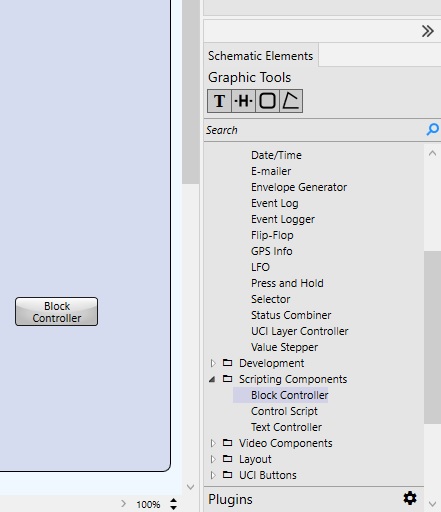
Starting with Designer 7.0.0, QSC has added their Block Controller to the "Scripting" components:
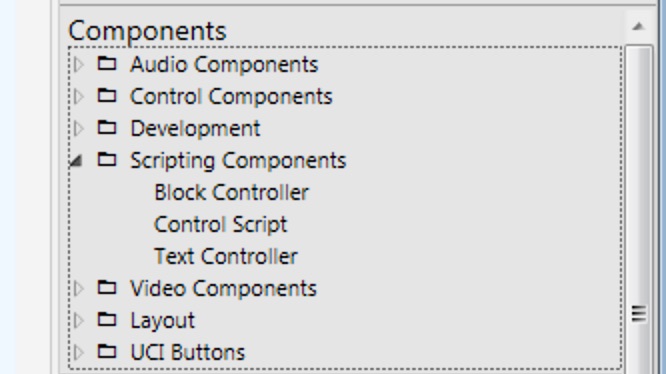
Note, for any system shipped before April of 2018 (pre "c" series of cores like the 110c and the 510c), that shipped with version 6.x or lower, this is a completely free upgrade (like all other scripting and UCI tools). However, any system shipped after 4/2018 (includes all "c" series cores and any core that came with version 7.0 or later) then the Block Editor and all other scripting tools need a scripting license (per core but it is a lifetime of the core type license).
The Block Controller is a handy tool for making scripts because you never make a typo and if you, like me, are not nearly fluent in LUA scripting, getting syntax right can be half the battle. The down side is that if they haven't put the block you need for a particular function/command into the Block Editor, you will be back to using LUA scripts (including from within the Block Editor).
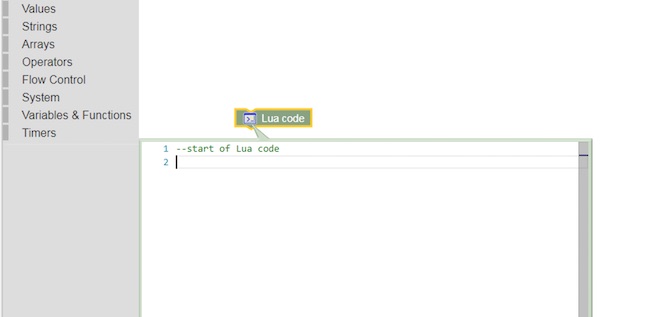
So using the Block Controller doesn't constrain you from using LUA or some command not created as a Block by QSC. Furthermore, the Block Controller creates a Lua script with perfect syntax that can be cut/pasted or edited though once converted to Lua and edited, there is no going back to the Block Controller with that edited Lua script.
I supsect that if you are talented with Lua scripting, the Block Controller is like being forced to always use a mouse/menu system when a command line interface would be faster. But, if you want to "bang out" an interface, it is going to be the faser/easier means to do so. They have some nifty tools to parse out reply strings to get at the information that is important in the response.
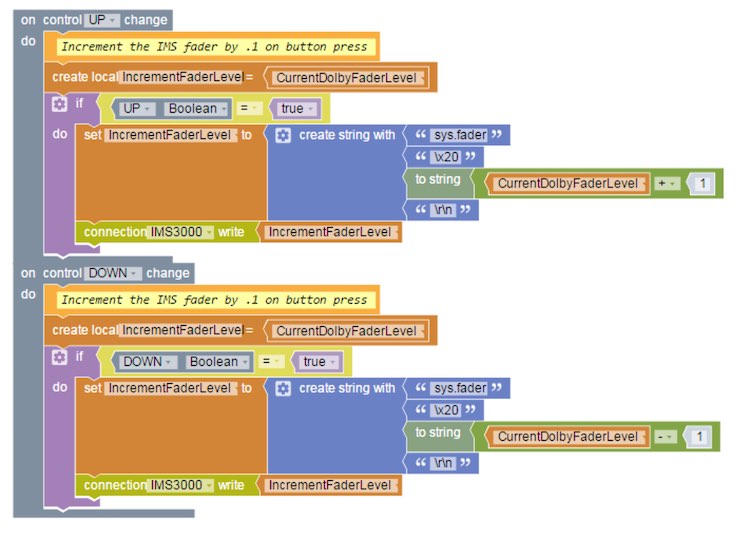
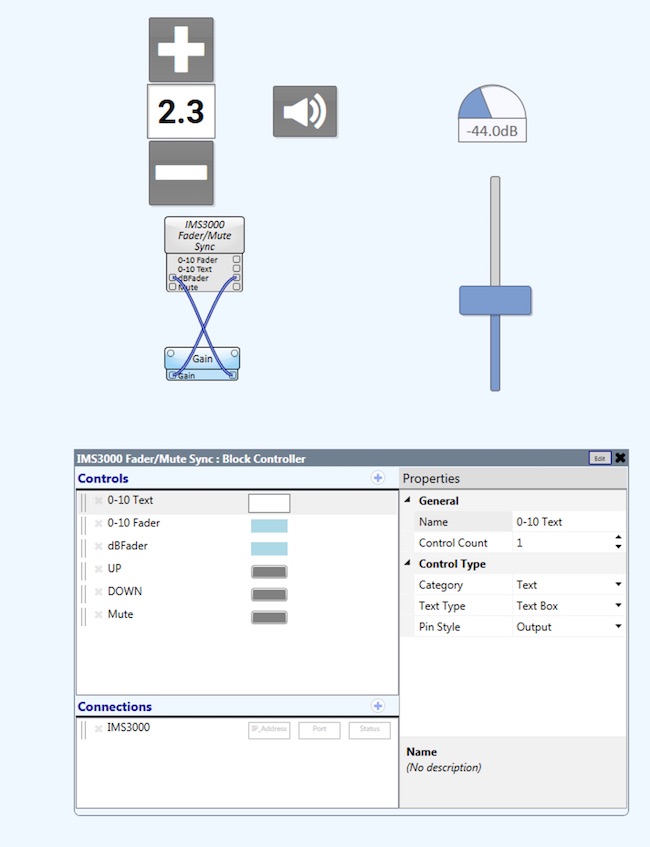
So, in Lua Scripting, my "UP" function block above would look like this:
Controls['UP'].EventHandler = function()
-- Increment the IMS fader by .1 on button press
--[[
Increment the IMS fader by .1 on button press
--]]
--
local IncrementFaderLevel = CurrentDolbyFaderLevel
if Controls['UP'].Boolean == true then
IncrementFaderLevel = table.concat({tostring('sys.fader'),
tostring('\x20'),
tostring(tostring((CurrentDolbyFaderLevel + 1))), tostring('\r\n')})
IMS3000:Write(IncrementFaderLevel)
end
end
And that Lua script was created by the Block Controller, I didn't have to type it.
For more information on the Block Editor, I suggest checking out QSC's "quick start" videos:
https://training.qsc.com/mod/book/view.php?id=1055
Also, they have a Control 101 training online (Q-SYS Level 1 training, also on line, should be the FIRST level of Q-SYS training. After Control 101, there is a Control 201 held in Boulder, CO (and likely other places around the world) geared towards people making scripts.
https://training.qsc.com/course/view.php?id=58
Mattis, I can't say for sure on the CP850, but that command does not work on the IMS3000. The CP850 documentation also does not list that command. It isn't really a big deal since it is easy enough to read the current level and then increment/decrement from there.
| IP: Logged
|
|
|
|
|
|
Steve Guttag
We forgot the crackers Gromit!!!
Posts: 12814
From: Annapolis, MD
Registered: Dec 1999
|
posted 08-26-2019 07:46 AM
Note, Jay's post above represents a solution that does not require a "UCI." One can provide the bypass switch without a touchpanel or other form of UCI (UCI viewer, Web-UCI, now available in 8.1).
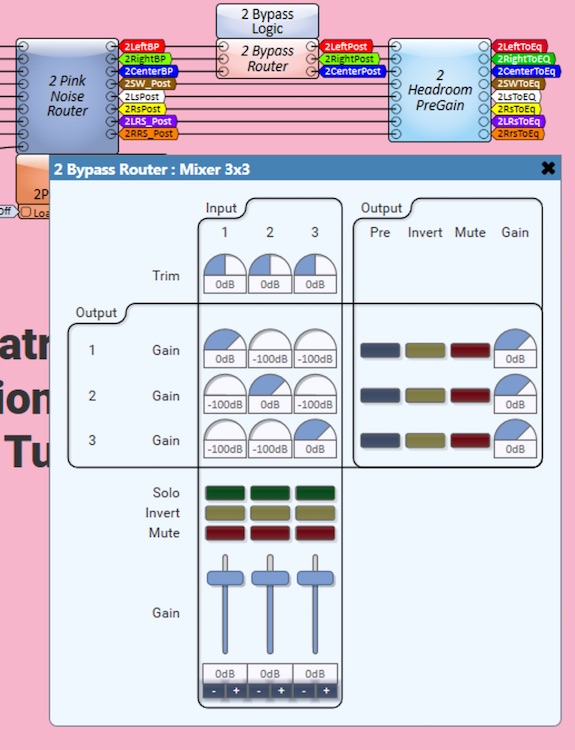
If you have a UCI, a bypass is easy to implement. :
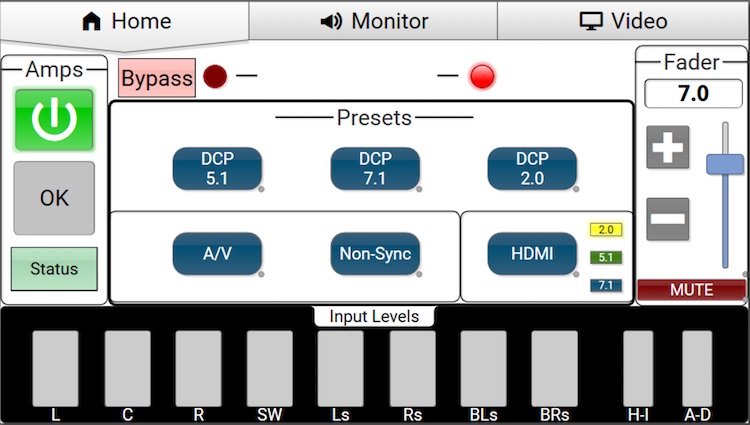
Pressing the Bypass "button" opens up a window:
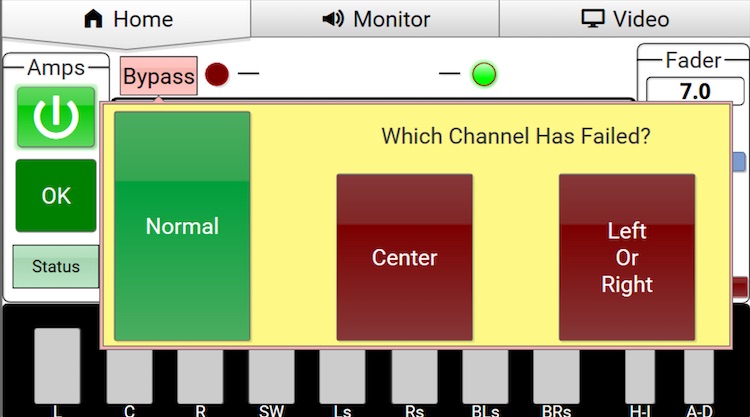
This is controlling a matrix mixer at the appropriate point in the signal path:
As some my know, one of my "things" is that the dB fader, while handy/appropriate within the signal path, has no place in a user interface where it merely represents "Volume." People do not think in a logarithmic fashion. They think linearly. Ask even a technician what a "little quieter" is when the fader is at 0dB and the answer you get will vary greatly from tech to tech. Regardless of which answer they give, give them the same question from say -6dB. If they give you the same amount, they don't understand how audio works. The log scale doesn't have a fixed slope, by definition.
Conversely, most anyone can relate to a 0-10 scale (or 0-100, if you prefer). If 7.0 is too loud, then 6.5 is going to be a good try. A linear control has the logarithmic part "cooked" in already.
With Q-SYS, you can have it your way. If you really like the dB scale, that is native to the product. However, if you want a linear scale, you can create that fader as well.
A more sophisticated and capable version (be able to interact with several components at once, have bi-directional communication...etc.) is going to be of the form of a script or "block controller" This is one I created that can work with a linear in/out, dB in/out and has a dedicated set of control pins to work with QSC's DCIO front panel fader (so you can have multiple faders active, like the front panel AND a fader on the UCI) as well as text control (one could key in the desired level if on a suitable UCI). I ran into a complication because I have each format in my system have its own fader that is recalled via format selection. Stringing multiple faders could get jitter in the line. Giving the DCIO its own "fader" to talk to cured the jitter problem.
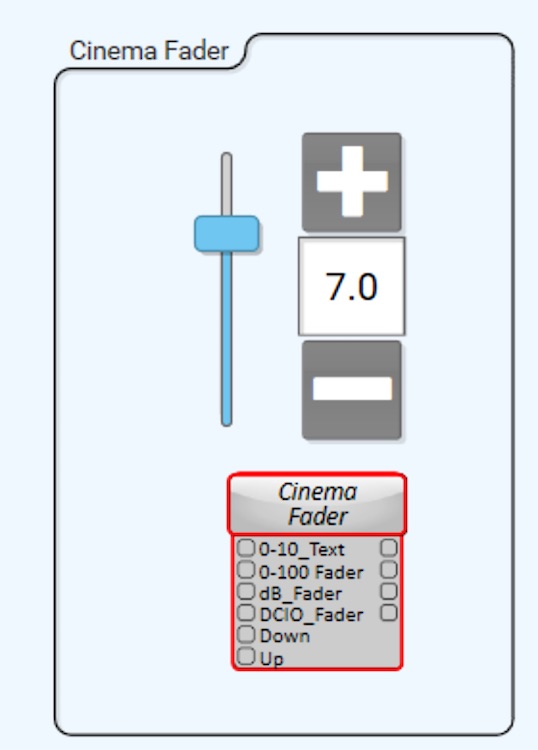
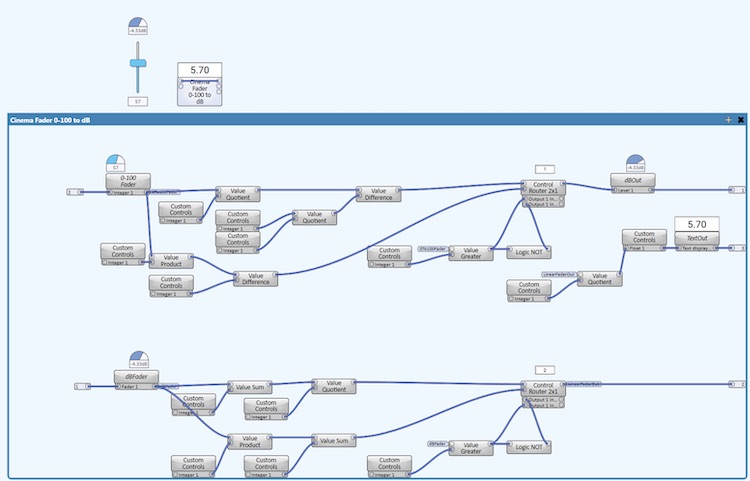
However, if you just want a simple linear fader that follows the "Dolby" fader characteristic, you can do it in Q-SYS without scripting (which requires licensing). Just use the appropriate control components.
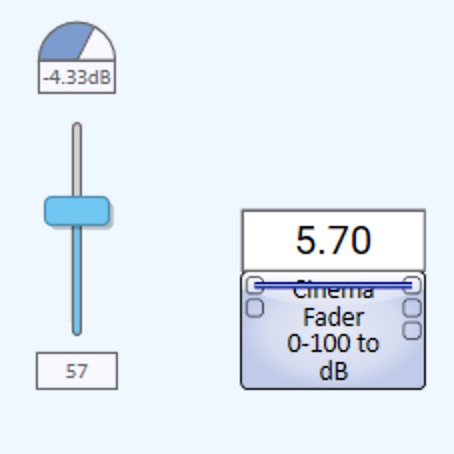
There is a link "wire" in the one above to tie the dB out to the dB in so that it does the full translation linear to dB and dB to linear to generate the display. Depending on the need, the link can be omitted and the fader inserted at the appropriate point in the design or it can merely be "The" fader and the output connected as needed. dB, 0-100 and text input/output are available.
Doing it without scripting is a bit ugly but hiding it in a container cleans it up :
| IP: Logged
|
|
|
|
|
|
|
|
|
|
|
|
Steve Guttag
We forgot the crackers Gromit!!!
Posts: 12814
From: Annapolis, MD
Registered: Dec 1999
|
posted 09-18-2019 06:15 AM
There; all fixed:
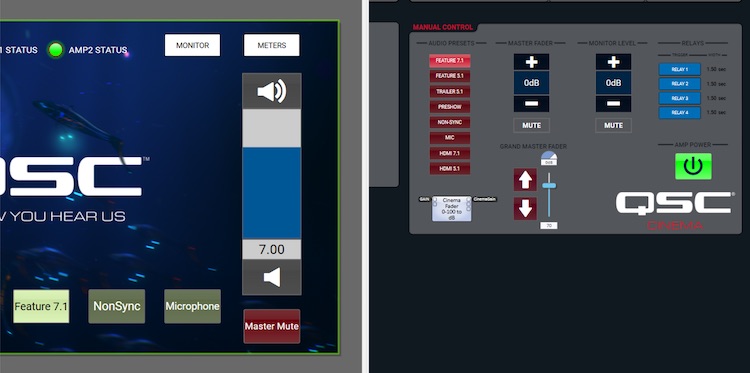
This is using my "logic" version of the Cinema Fader that does NOT require any scripting.
In all seriousness. This example is part of the point of the template. So you don't like some aspect of it...CHANGE IT...make it your own and let that be the template for your next project but you didn't have to start from scratch. Sometimes, it is a lot easier to stand on someone's shoulders to get a start.
As for dB versus linear, it all depends on where you are in the audio chain and who is operating it as to what makes the most sense. There is no 100% correct answer there. I maintain that for interaction with the END-USER, linear is almost always the better choice. For internal controls, precise level adjustments, dB is almost always the better choice. Using a dB type fader externally tends to force one into the small area at the top end of the scale because audio works logarithmically. The linear fader has the log part cooked into it.
Graphically, let's use this interface as an example.
At reference:
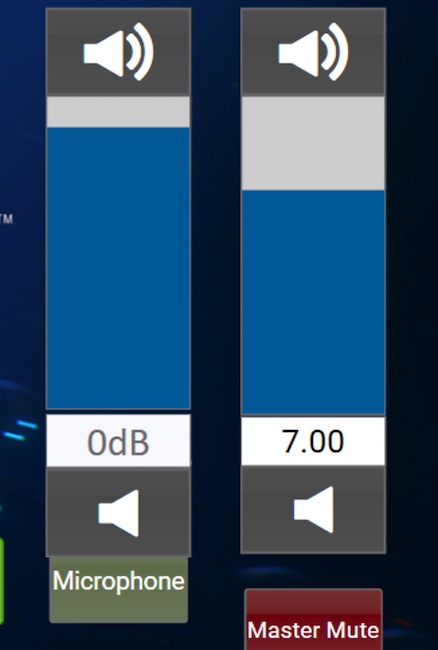
And at 4.0 (a rather low volume level but one, unfortunately, one I see a bit too often):
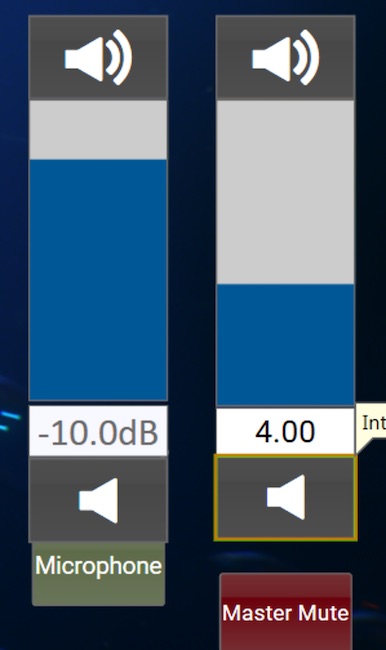
On the dB scale, you've compressed the area of interest into that tiny sliver at the top end of the scale. You might as well never show the bottom 2/3rds of the range. There is a reason why in the analog days they made "audio taper" pots and one didn't use linear...because you compress your useful adjustment range into a small portion of the range.
Both of these faders go from -90dB to +10dB but the linear one puts the area of interest over most of the range. From a user standpoint, it is MUCH easier to figure out. Moving from say 7.0 to 6.5 is simple. How many managers would intuitively do the mental conversion (because that is what it is) to adjust the dB fader to -1.67 dB? Still too loud? Move to 6.0 or -3.33dB (which is an approximation using a straight line approximation of the logarithmic slope; it should be increasing it's rate of decline as you go). You are wanting non-technical people (and even technical ones) to work constantly in negative numbers and throwing in fractions on top of that. That isn't part of their normal world. In this country, we tip at most sit-down restaurants. Ever see the scramble of how much to tip because they are figuring out the 10-30% range (people have their own philosophies about tipping, in general and what is a fair amount is a subset of that). Fractions are not easy for people that don't work with them or think "that way." I see people using cards, calculators (in their phone now).
In any event, with Q-SYS, you can have it YOUR way...whatever way that might be!
| IP: Logged
|
|
|
|
|
|
All times are Central (GMT -6:00)
|
This topic comprises 5 pages: 1 2 3 4 5
|
Powered by Infopop Corporation
UBB.classicTM
6.3.1.2
The Film-Tech Forums are designed for various members related to the cinema industry to express their opinions, viewpoints and testimonials on various products, services and events based upon speculation, personal knowledge and factual information through use, therefore all views represented here allow no liability upon the publishers of this web site and the owners of said views assume no liability for any ill will resulting from these postings. The posts made here are for educational as well as entertainment purposes and as such anyone viewing this portion of the website must accept these views as statements of the author of that opinion
and agrees to release the authors from any and all liability.
|

 Home
Home







![[evil]](graemlins/evil.gif)
![[Razz]](tongue.gif)


 Printer-friendly view of this topic